
浙政钉登录 :专有钉钉开放平台
官网登录流程图
开发指南 => 身份验证 => ( 扫码登录, 获取免登授权码 )
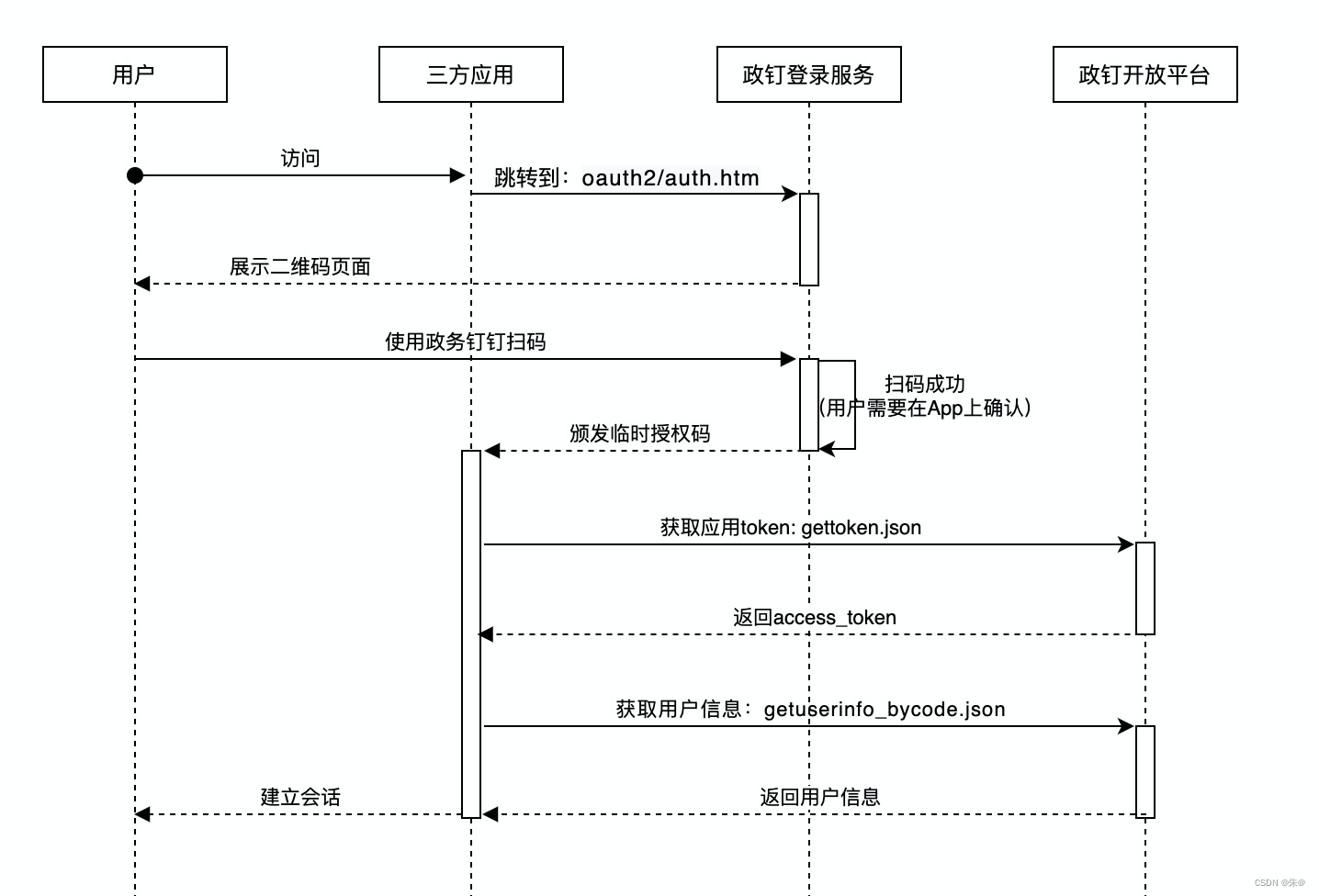
讯享网
申请专有钉钉账号:创建应用,获取appKey和appSecrect

配置回调地址
](https://img-blog.csdnimg.cn/1de815c827734386b18317054af9dfa6.png)
专有钉钉, 浙政钉
专有钉钉(测试版):
登录域名:login.dg-work.cnn
浙政钉(正式版):
登录域名: login-pro.ding.zj.gov.cn(域名对应政务外网IP:59.202.52.68)
开发环境用专有钉钉域名, 正式环境用浙政钉域名, 注意切换
浙政钉网站扫码登录
redirect_uri: 回调地址(后台管理配置)
client_id: 应用标识(后台管理配置)
在方式一中, 回调地址用作登录成功 钉钉 302 的地址, 会在回调地址拼接code和state参数
拿到 钉钉返回的code码, 通过code码 调后端获取用户信息接口

1.方式一 使用政务钉钉提供的扫码登录页面
/* 直接调转到 当前地址即可 https://login.dg-work.cn/oauth2/auth.htm?response_type=code&client_id=应用标识&redirect_uri=回调地址&scope=get_user_info&authType=QRCODE */ 讯享网
2.方式二 支持网站将政务钉钉登录二维码内嵌到自己页面中
讯享网/* 步骤一 在页面中通过iframe嵌入页面 width="360px" height="360px" 地址比方式一 多一个 embedMode=true 的参数 https://login.dg-work.cn/oauth2/auth.htm?response_type=code&client_id=应用标识&redirect_uri=回调地址&scope=get_user_info&authType=QRCODE&embedMode=true */ /* 步骤二 监听 message 事件 */ <script type="application/javascript"> window.addEventListener('message', function(event) {
    // 这里的event.data 就是登录成功的信息 // 数据格式:{ "code": "aaaa", "state": "bbbb" } alert(JSON.stringify(event.data)); }); </script>
浙政钉h5扫码登录
npm install gdt-jsapi
 import dd from 'gdt-jsapi'; dd.ready(() => {
    dd.getAuthCode({
   }).then(res =>{
    // 通过 res 返回的code 或 authCode 调用后端的获取用户信息的接口 console.log(res) }). catch(err =>{
}) }) 讯享网// 本人在项目中用的是第二种方式 <div class="login_content"> <h3>指标填报系统</h3> <p>请扫下方二维码登录,扫码后在手机上点击“确认授权”即可</p> <!-- 登录二维码的区域 iframe --> <iframe :src="scanUrl" frameborder="0" height="360px" width="360px" /> </div> data () {
// 通过后台配置 redirect_uri, client_id const redirect_uri = 'http://127.0.0.1' const client_id = 'xxxx' return {
scanUrl: `https://login-pro.ding.zj.gov.cn/oauth2/auth.htm?response_type=code&client_id=${
client_id}&redirect_uri=${
redirect_uri}&scope=get_user_info&authType=QRCODE&embedMode=true` } }, // 浙政钉登录 loginListener(event) {
// console.log('进入message', event) const code = event.data && event.data.code if ( code ) {
// 根据 code 去获取用户信息 console.log(code) } }, mounted() {
// 浙政钉 扫码登录第三方网站 window.addEventListener('message', this.loginListener); }, // css .login_content {
background-color: #fff; padding: 30px 40px; border-radius: 5px; margin-right: 14%; h3 {
font-size: 28px; color: #000000; font-weight: 400; border-bottom: 1px solid #efefef; padding: 14px 0; margin: 0 -40px; text-align: center; } p {
margin: 24px 0 14px; font-size: 14px; color: #; } #login_container {
background-color: #fff; border-radius: 5px; text-align: center; } }
对接中遇到的问题
注意:配置回调地址时千万带#,转码后redirect_uri回调地址生成的二维码会有问题,下面的二维码就是我当时配置回调地址时带了#,转码时#不会处理,导致生成的二维码有问题,扫码过后一直重定向到专有钉钉手机号登录页

正确生成的二维码是这个样的
版权声明:本文内容由互联网用户自发贡献,该文观点仅代表作者本人。本站仅提供信息存储空间服务,不拥有所有权,不承担相关法律责任。如发现本站有涉嫌侵权/违法违规的内容,请联系我们,一经查实,本站将立刻删除。
如需转载请保留出处:https://51itzy.com/kjqy/79646.html