
字符流
既然字节流可以操作所有的文件,为什么还有字符流呢
如果利用字节流,把文本中的中文,读取到内存中,有可能出现乱码
如果利用字节流,把中文写到文本文件中,也有可能出现乱码
如果是英文 可以打印出来,中文就会出现乱码
如果字节流写入到文本中也会出现乱码
基础知识:
计算机存储方式的信息是用二进制数表示的
按照某种规则,将字符变成二进制,再存储到计算机中,称为编码
按照同样的规则,将存储在计算机中的二进制数解析显示出来,称为解码
编码和节码的方式必须一致,否之会导致乱码
简单理解:
存储一个字符a,首先再码表中查到对应的数字是97,然后转成二进制进行存储
读取的时候,先把二进制解析出来,再转成97,通过97查找到对应的字符应该是a
编码表简单理解:
ASCII字符集:
ASCII(American Standard Code for Information Interchanae,美国信息交换标准代码):包括了数字,大小写字符和一些常见的标点符号
注意:ASCII码表是没有中文的
GBK:
window系统默认的码表。兼容了ASCII码表,也包含了21003个汉字,并支持繁体汉字以及部分日韩文字
注意:GBK是中国的码表,一个中文以两个字节的形式存储,但不包含世界上所有国家的文字
Unicode码表:
由国际组织ISO定制,是统一的万国码,计算机科学领域里的一项业界标准,容纳世界上大多数国家所有常见的文字和符号
但是因为表示的字符太多,所以Unicode码表中的数字不是直接以二进制的形式存储到计算机的
会先通过UTF-7,UTF-7.5,UTF-8,UTF-16,以及UTF-32进行编码,再存储到计算机,其中最为常见的UTF-8
注意:Unicode是万国码,以UTF-8编码后一个中文以三个字节的形式存储
重点:windows默认使用的码表为:GBK,一个字符两个字节
idea和其他工具默认使用Unicode的UTF-8的编码格式,一个中文三个字节
字节串中的编码节码问题
编码:
byte[] getBytes():使用平台的默认字符集将该String编码为一系列字节,将结果存储到新的字节数组中
byte[] getBytes(String charsetName):使用用户指定的字符集将该String编码为一系列字节,将结果存储到新的字节数组中
解码:
String(byte[] bytes):通过使用平台默认的字符集解码指定的字节数组来构造新的String
String(byte[] bytes,String charseName):通过指定的字符集节码指定的字节数组来构造新的String
代码:
public class test15 { public static void main(String[] args) throws UnsupportedEncodingException { // 编码: // byte[] getBytes():使用平台的默认字符集将该String编码为一系列字节,将结果存储到新的字节数组中 // byte[] getBytes(String charsetName):使用用户指定的字符集将该String编码为一系列字节,将结果存储到新的字节数组中 // String s="我以后一定会称为高级开发"; //利用idea默认的UTF-8将中文编码为一系列的字节 byte[] bytes=s.getBytes(); System.out.println(Arrays.toString(bytes)); //[-26, -120, -111, -28, -69, -91, -27, -112, -114, -28, -72, -128, -27, -82, -102, -28, -68, -102, -25, -89, -80, -28, -72, // -70, -23, -85, -104, -25, -70, -89, -27, -68, -128, -27, -113, -111] byte[] bytes1 = s.getBytes("GBK"); System.out.println(Arrays.toString(bytes1)); //[-50, -46, -46, -44, -70, -13, -46, -69, -74, -88, -69, -31, -77, -58, -50, -86, -72, -33, -68, -74, -65, -86, -73, -94] // 解码: String(byte[] bytes):通过使用平台默认的字符集解码指定的字节数组来构造新的String String(byte[] bytes,String charseName):通过指定的字符集节码指定的字节数组来构造新的String byte[] bytes2={-26, -120, -111, -28, -69, -91, -27, -112, -114, -28, -72, -128, -27, -82, -102, -28, -68, -102, -25, -89, -80, -28, -72, -70, -23, -85, -104, -25, -70, -89, -27, -68, -128, -27, -113, -111}; byte[] bytes3={-50, -46, -46, -44, -70, -13, -46, -69, -74, -88, -69, -31, -77, -58, -50, -86, -72, -33, -68, -74, -65, -86, -73, -94}; //默认使用UTF-8进行解析 String s1=new String(bytes2); System.out.println(s1);//我以后一定会称为高级开发 //利用只当GBK进行解码 String s2=new String(bytes3,"GBK"); System.out.println(s2);//我以后一定会称为高级开发 } }讯享网
字节流读取文本文件出现乱码的原因
因为字节流一次读一个字节,而不管是GBK还是UTF-8一个中文都是多个字符的,而字节流每次只能读取其中一部分,所以就会出现乱码问题
字符流读取中文的过程
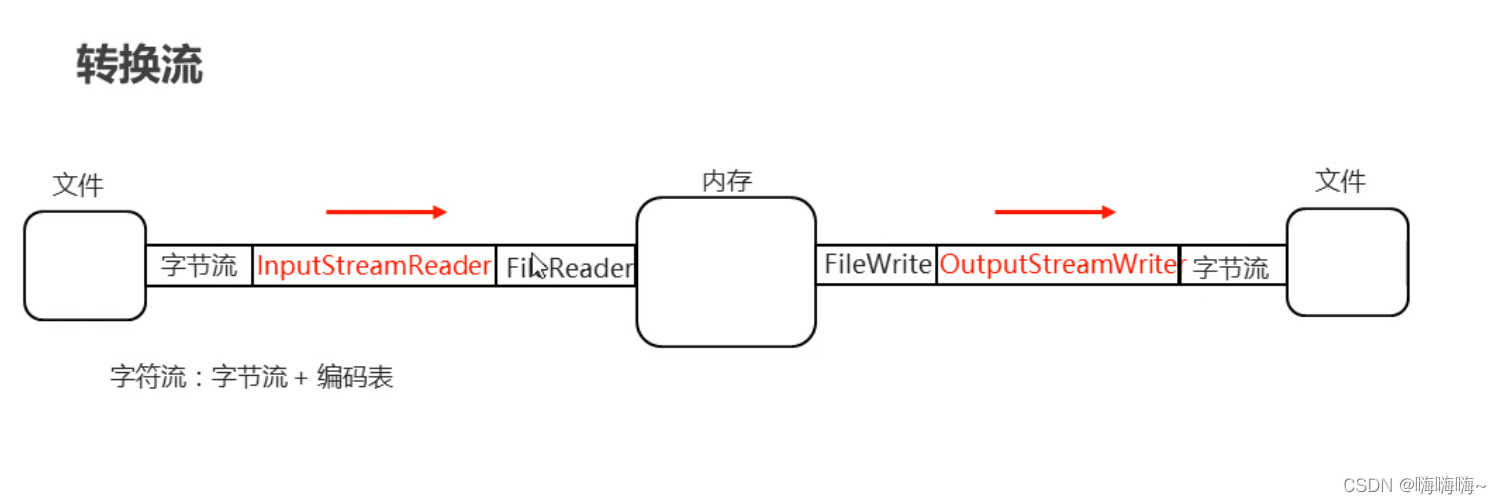
字符流=字节流+编码表
基础知识:
不管再那张码表中,中文的第一个字节一定是负数
小结:
1.想要进行拷贝,一律使用字节流或者字节缓冲流
2.想要把文本文件中的数据读取到内存中,请使用字符输入流
想要把内存中的数据写道文本文件中,请使用字符输出流
3.GBK码表一个中文两个字节,UTF-8编码格式一个中文三个字节
字符流写数据:
步骤:1.创建字符输出流对象
2.写数据
3.释放资源
字符流写数据的5中方式
void write(int c) 写一个字符
void write(char[] cbuf) 写一个字符数组
void write(char[] cbuf,int off,int len) 写出字符数组的一部分
void write(String str) 写一个字符串
void write(String str,int off,int len) 写一个字符串的一部分
代码:
讯享网 public class test16 { public static void main(String[] args) throws IOException { // 步骤:1.创建字符输出流对象 // 2.写数据 // 3.释放资源 // 字符流写数据的5中方式 // void write(int c) 写一个字符 //字符流的底层就是字节流 //下边两种创建方式都可以 //FileWriter fw = new FileWriter(new File("fileIo\\a.txt")); FileWriter fw= new FileWriter("fileIo\\a.txt"); //写出数据 fw.write(98); fw.write(97); fw.write(99); //释放资源 fw.close(); // void write(char[] cbuf) 写一个字符数组 char[] chars={97,98,99}; fw.write(chars); // void write(char[] cbuf,int off,int len) 写出字符数组的一部分 char[] chars1={97,98,99,100}; fw.write(chars1,0,2);//从0所以开始写入三个 // void write(String str) 写一个字符串 String s="我很厉害No1"; fw.write(s); // void write(String str,int off,int len) 写一个字符串的一部分 fw.write(s,0,2); //每次运行完 切记要关掉流 不然你内存多少G都不够 这坑踩过 } }
字符流写数据 注意事项
1.创建字符输出流对象
如果文件不存在,就创建,但是要保证父级路径存在
如果文件存在就清空
2.写数据
写出int类型的整数,实际写出的是整数再码表上对应的字母
写出字符串数据,是把字符串本身原样写出
3.释放资源
每次释放必须关闭,不然电脑内存会直接溢出,直至没有空间继续写
flush和close方法
flush() 刷新流,还可以继续写数据
close() 关闭流,释放资源,但是在关闭之前会先刷新流,一旦关闭,就不能再写数据
代码:
public class test17 { public static void main(String[] args) throws IOException { // flush() 刷新流,还可以继续写数据 // close() 关闭流,释放资源,但是在关闭之前会先刷新流,一旦关闭,就不能再写数据 FileWriter fw = new FileWriter("test//a.txt"); fw.write("阿星在努力");//这个时候运行并不会打印数据 // fw.flush(); // fw.write("666"); //fw.flush(); fw.close(); fw.write("aaa");//Stream close } }
字符流读的两种方式
单个字符读取:
讯享网public class test18 { public static void main(String[] args) throws IOException { //创建字符输入流的对象 //底层是字节流+编码表 // FileReader fr = new FileReader(new File("test\\a.txt")); FileReader fr = new FileReader("fileIo\\a.txt"); //读取数据 一次读取一个字符 int ch; while ((ch=fr.read())!=-1){ System.out.println((char) ch); } //释放资源 fr.close(); } }
多个字符读取:
public class test19 { public static void main(String[] args) throws IOException { //一次读取多个字符 //创建对象 FileReader fr = new FileReader("fileIo\\a.txt"); //创建一个数组 char[] chars = new char[1024]; int len; //read 读取 一次读取多个字符 //他把读到的字符都存入到了chars数组 //返回值:表示本次读到了多少个字符 while ((len=fr.read())!=-1){ System.out.println(new String(chars,0,len)); } fr.close(); } }
写一个练习
需求:用户输入的用户名和密码保存到本地实现永久化存储 用户名占一行,密码占一行
步骤:1.写一个键盘录入用户名和密码
2.将用户名和密码写到本地文件中
代码:
讯享网public class test20 { public static void main(String[] args) throws Exception { //1.键盘录入用户名和密码 Scanner sc=new Scanner(System.in); System.out.println("请录入用户名"); String username = sc.next(); System.out.println("请录入密码"); String password = sc.next(); //2.分别把用户名和密码写到本地文件 FileWriter fw = new FileWriter("filelo\\a.txt"); //将用户名和密码写到文件中 fw.write(username); //写出一个回车换行符 fw.write("\r\n"); fw.write(password); //刷新流 fw.flush(); //释放资源 fw.close(); } }
字符缓冲流
BufferedWriter:可以将数据高效的写出
BufferedReader:可以将数据高效的读取到内存
代码实例:
public class test21 { public static void main(String[] args) throws IOException { //字符缓冲输入流 BufferedReader br=new BufferedReader(new FileReader("filelo\\a.txt")); //读取数据 char[] chars=new char[1024]; int len; while ((len=br.read())!=-1){ System.out.println(new String(chars,0,len)); } br.close(); } }
字符缓冲输出流
BufferedWrited:可以将数据高效的写出
BufferedReader:可以将数据高效的读取到内存
构造方法:
BufferedWrited(Writer out);
BufferedReader(Reader in);
代码:
讯享网public class test22 { public static void main(String[] args) throws Exception { //字符缓冲输出流 BufferedWriter bw=new BufferedWriter(new FileWriter("filelo\\a.txt")); //写出数据 bw.write(98); char[] chars=new char[1024]; bw.write(chars); bw.write(chars,0,3); bw.write("有梦终会达"); String s="adsafsa"; bw.write(s,0,3); bw.flush(); bw.close(); } }
字符缓冲流特有功能
BufferedWrited:
void newLine(): 写一行行分隔符,行分隔符字符串由系统属性定义
BufferedReader:
public StringReadLine():读一行文字,结果包含行的内容的字符串,不包括任何行终止字符,如果流的结尾以及到达,则为null
代码实例:
public class test23 { public static void main(String[] args) throws Exception { //创建对象 BufferedWriter bw = new BufferedWriter(new FileWriter("filelo\\a.txt")); //写出数据 bw.write("在黑夜里发光"); //跨平台的回车换行 bw.newLine(); bw.write("asdasd"); bw.newLine(); bw.write(""); //刷新流 释放资源 bw.flush(); bw.close(); } }
代码实例:
public class test24 {
public static void main(String[] args) throws Exception {
//创建对象
BufferedReader br=new BufferedReader(new FileReader("filelo\\a.txt"));
//读取数据
//在之前,读不到数据返回就是-1,显示现在readLine方法读不到数据就返回null
String line = br.readLine();
String line1 = br.readLine();
String line2 = br.readLine();
System.out.println(line);
System.out.println(line1);
System.out.println(line2);//如果这一行没有数据 就在控制台输出null
//释放资源
br.close();
}
}
用循环做一个改进
讯享网public class test25 { public static void main(String[] args)throws Exception { //创建对象 BufferedReader br=new BufferedReader(new FileReader("filelo\\a.txt")); //读取数据 //在之前,读不到数据返回就是-1,显示现在readLine方法读不到数据就返回null String line; //可以读取一整行数据,一直都,读到回车换行为止 //但是他不会读取回车换行符 while ((line=br.readLine())!=null){ System.out.println(line); } //释放资源 br.close(); } }
案例:读取文件中的数据排序后再次写到本地 文件中的数据 9 8 2 4 3 1 5 3
1.读取数据
2.排序
3.写到本地
代码:
public class test26 { public static void main(String[] args) throws Exception { // 1.读取数据 BufferedReader br=new BufferedReader(new FileReader("filelo\\a.txt")); 这个不能提前创建 如果a.txt 有东西 会直接清空 不能写道BufferedReader定义的下一行 //BufferedWriter bw=new BufferedWriter(new FileWriter("filelo\\a.txt")); String line=br.readLine(); System.out.println("读取到的数据为"+line); br.close(); // 2.排序 //按照空格进行切割 String[] s = line.split(" "); //把字符串类型的数组变成int类型 int[] arr=new int[s.length]; //遍历s数组,可以进行类型转换 for (int i = 0; i < s.length; i++) { String smallStr= s[i]; int number = Integer.parseInt(smallStr); //把转换后的结果存到arr中 arr[i] =number; } Arrays.sort(arr); System.out.println(Arrays.toString(arr)); // 3.写到本地 BufferedWriter bw=new BufferedWriter(new FileWriter("filelo\\a.txt")); for (int i = 0; i < arr.length; i++) { bw.write(arr[i]+" "); bw.flush(); } bw.close(); } }
I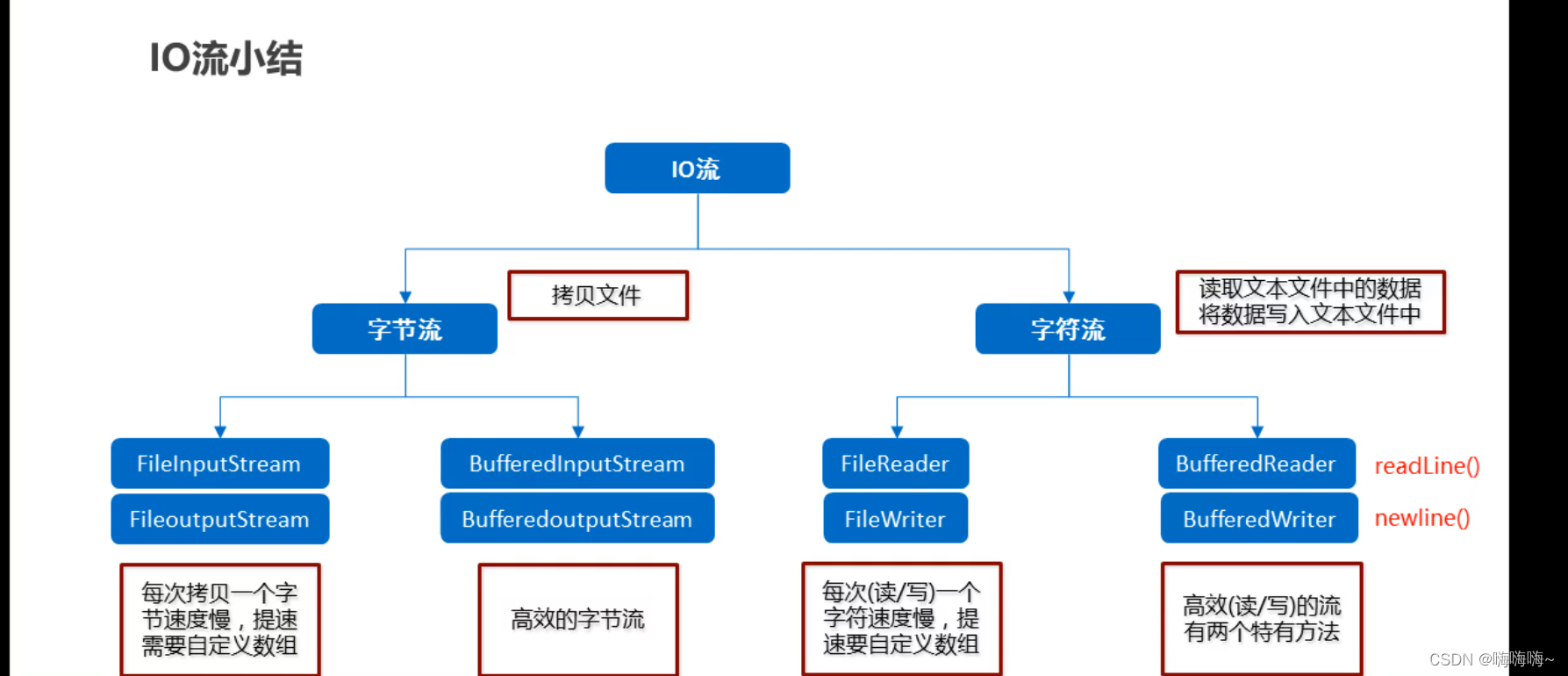
转换流:
转换输入流:InputStreamReader
转换输出流:OutputStreamWriter
转换流的使用场景
JDK11之前,指定编码读写
之前的方法会产生乱码
讯享网public class test27 { public static void main(String[] args) throws IOException { //这个方法直接读取会产生乱码 //因为文件时GBK码表 //而IDEA 默认时UTF-8 所以两者不一致 就会出现乱码 FileReader fr = new FileReader("D:\\a.txt"); int ch; while ((ch=fr.read())!=-1){ System.out.println((char) ch); } fr.close(); } }
public class test27 { public static void main(String[] args) throws IOException { //第二个参数 大小写都可以 指定编码读 InputStreamReader isr = new InputStreamReader(new FileInputStream("D\\a.txt"), "GBK"); int ch; while ((ch=isr.read())!=-1){ System.out.println((char) ch); } isr.close(); OutputStreamWriter osw=new OutputStreamWriter(new FileOutputStream("D\\a.txt"),"GBK"); osw.write("我爱学习"); osw.close(); //JDK11之后,字符流新推出了一个构造,也可以指定编码表 FileReader fr = new FileReader("D\\a.txt", Charset.forName("gbk")); int ch1; while ((ch1=isr.read())!=-1){ System.out.println((char) ch1); } } }
对象操作流
特点:可以把对象以字节的形式写道本地文件,直接打开文件,是读不懂的,需要再次用对象操作流读到内存中
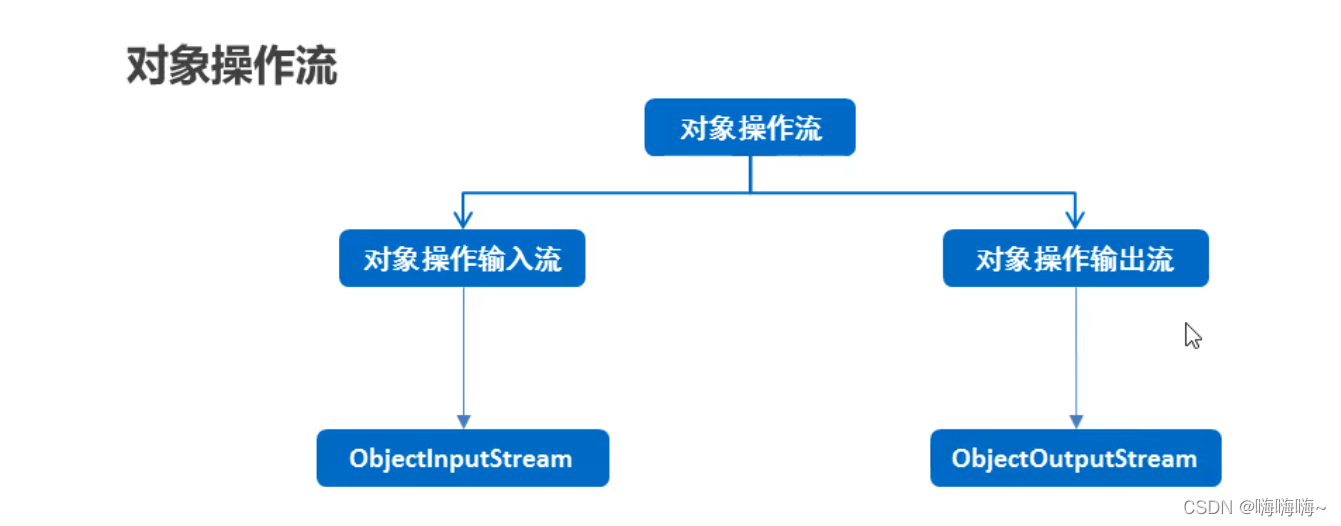
对象操作流分为两类:对象操作输入流和对象操作输出流
对象操作输出流(对象序列化流):就是将对象写到本地文件中,或者网络中传输对象
对象操作输入流(对象反序列化流):把写到本地文件中的对象读取到内存中,或者接收网络中传输的对象
序列化代码
User类: public class User implements Serializable {
//如果这个类的对象能被序列化,那么这个类必须要实现一个Serializable接口
//Serializable 称之为一个标记性接口,里面没有任何抽象方法 只要一个类实现了这个接口,那么就表示这个类的对象可以被序列化
讯享网 private String username; private String password; public User() { } public User(String username, String password) { this.username = username; this.password = password; } @Override public String toString() { return "User{" + "username='" + username + '\'' + ", password='" + password + '\'' + '}'; } public String getUsername() { return username; } public void setUsername(String username) { this.username = username; } public String getPassword() { return password; } public void setPassword(String password) { this.password = password; } }
public class test28 { public static void main(String[] args) throws Exception { User user=new User("zhangsan","abc"); ObjectOutputStream oos=new ObjectOutputStream(new FileOutputStream("a.txt")); oos.writeObject(user); oos.close(); } }讯享网public class test29 { public static void main(String[] args) throws Exception { ObjectInputStream ois=new ObjectInputStream(new FileInputStream("a.txt")); User o = (User) ois.readObject(); System.out.println(o); ois.close(); } }
注意点:用对象序列化一个对象后,假如我们修改了对象所属的Javabean类,读取会出现问题
SerialVersionUID 序列化
如果我们自己没有定义,那么虚拟机会根据类中的信息自动计算出一个序列号
如果我们修改了类中的信息,虚拟机就会再次计算出一个序列号
第一步 把User对象序列化到本地 虚拟机会创建一个序列号
第二步 修改了javabean类 导致虚拟机重新创建了一个序列号,两者不一致
第三步 把文件中的对象读到内存,本地中的序列号和类中的序列号就不一致了
解决
不让虚拟机帮我们计算,我们手动给出,而且这个值不变
在User类中加入 private static final long serialVerSionUID =1L;
public class User implements Serializable { //如果这个类的对象能被序列化,那么这个类必须要实现一个Serializable接口 //Serializable 称之为一个标记性接口,里面没有任何抽象方法 只要一个类实现了这个接口,那么就表示这个类的对象可以被序列化 // SerialVersionUID 序列化 // 如果我们自己没有定义,那么虚拟机会根据类中的信息自动计算出一个序列号 // 如果我们修改了类中的信息,虚拟机就会再次计算出一个序列号 // 第一步 把User对象序列化到本地 虚拟机会创建一个序列号 // 第二步 修改了javabean类 导致虚拟机重新创建了一个序列号,两者不一致 // 第三步 把文件中的对象读到内存,本地中的序列号和类中的序列号就不一致了 // 解决 // 不让虚拟机帮我们计算,我们手动给出,而且这个值不变 private static final long serialVerSionUID =1L; private String username; private String password; public User() { } public User(String username, String password) { this.username = username; this.password = password; } @Override public String toString() { return "User{" + "username='" + username + '\'' + ", password='" + password + '\'' + '}'; } public String getUsername() { return username; } public void setUsername(String username) { this.username = username; } public String getPassword() { return password; } public void setPassword(String password) { this.password = password; } }
版权声明:本文内容由互联网用户自发贡献,该文观点仅代表作者本人。本站仅提供信息存储空间服务,不拥有所有权,不承担相关法律责任。如发现本站有涉嫌侵权/违法违规的内容,请联系我们,一经查实,本站将立刻删除。
如需转载请保留出处:https://51itzy.com/kjqy/78252.html