
一、建立数据库
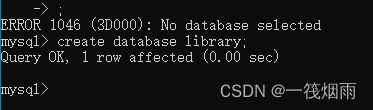
以“library”为数据库名建立数据库,并设置该数据库为当前数据库。(对以上操作截图,截图保存在该题下方。)
【截图:】create database library default character set gb2312 collate gb2312_chinese_ci;
use library;
二、建立数据表
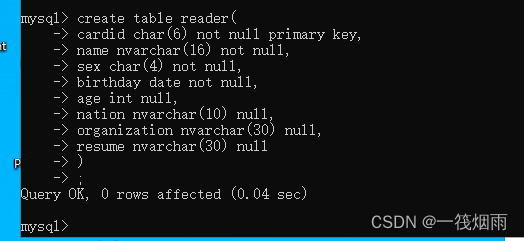
1、按如下表结构建立“reader”数据表(“读者表”)。(将上述操作截图,截图保存在该题下方。)
| 字段名 |
类型 |
宽度 |
主键、空值 |
说明 |
| cardid |
char |
6 |
非空,主键 |
借书证号 |
| name |
nvarchar |
16 |
非空 |
读者姓名 |
| sex |
char |
4 |
非空 |
性别 |
| birthday |
date |
非空 |
出生日期 |
|
| age |
int |
空 |
年龄 |
|
| nation |
nvarchar |
10 |
空 |
民族 |
| organization |
nvarchar |
30 |
空 |
工作单位 |
| resume |
nvarchar |
30 |
空 |
简历 |
【截图:】
create table reader (cardid char(6) not null primary key,name nvarchar(16) not null,sex char(4) not null,birthday date not null,age int,nation nvarchar(10),organization nvarchar(30),resume nvarchar(30));
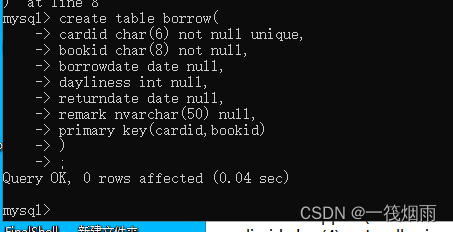
2、按如下表结构建立“borrow”数据表(“借阅表”)。(将上述操作截图,截图保存在该题下方。)
| 字段名 |
类型 |
宽度 |
主键、空值 |
说明 |
| cardid |
char |
6 |
非空,主键 |
借书证号 |
| bookid |
char |
8 |
非空,主键 |
图书编号 |
| borrowdate |
date |
空 |
借阅日期 |
|
| dayliness |
int |
空 |
借阅最长时限 |
|
| returndate |
date |
空 |
归还日期 |
|
| remark |
nvarchar |
50 |
空 |
备注 |
【截图:】
create table borrow (cardid char(6) not null,bookid char(8) not null,borrowdate date,dayliness int,returndate date,remark nvarchar(50),primary key(cardid,bookid));
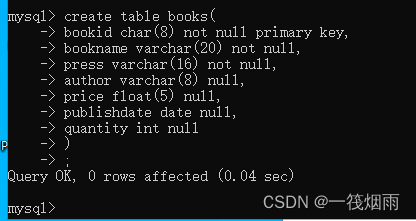
3、按如下表结构建立“books”数据表(“借阅表”)。(将上述操作截图,截图保存在该题下方。)
| 字段名 |
类型 |
宽度 |
主键、空值 |
说明 |
| bookid |
char |
8 |
非空,主键 |
图书编号 |
| bookname |
varchar |
20 |
非空 |
书名 |
| press |
varchar |
16 |
非空 |
出版社 |
| author |
varchar |
8 |
空 |
作者 |
| price |
float |
5 |
空 |
单价 |
| publishdate |
date |
空 |
出版日期 |
|
| quantity |
int |
空 |
数量 |
【截图:】
create table books (bookid char(8) not null primary key,bookname varchar(20) not null,press varchar(16) not null,author varchar(8),price float(5),publishdate date,quantity int);
三、插入数据记录
1、按下表中内容对“reader”数据表使用“insert”命令插入记录,并使用“select”命令浏览记录。(将上述两步操作截图,截图保存在该题下方。)(注:除“借书证号”字段外,第一条记录是自己的个人信息。)
| cardid |
name |
sex |
birthday |
age |
nation |
organization |
resume |
| 090101 |
|||||||
| 090102 |
张华 |
男 |
1992-12-12 |
汉 |
宁夏大学 |
学生 |
|
| 090103 |
刘晓红 |
女 |
1993-10-01 |
汉 |
宁夏大学 |
学生 |
|
| 刘海涛 |
男 |
1975-09-29 |
回 |
宁职院 |
教师 |
||
| 赵明明 |
女 |
1993-11-11 |
汉 |
宁职院 |
学生 |
||
| 马辉 |
男 |
1995-02-22 |
回 |
||||
| 洪波 |
男 |
1996-05-06 |
汉 |
||||
| 李波 |
男 |
1996-04-11 |
满 |
||||
| 祁红莉 |
女 |
1996-09-19 |
回 |
二民院 |
学生 |
||
| 郑丽丽 |
女 |
1997-03-31 |
回 |
||||
| 王爱民 |
男 |
1995-05-05 |
汉 |
【截图:】
注意下面的第二行!!!!!!!!!!!!!!!!!!!!!!!!
insert into reader
values ('090101','你的名字','你的性别','出生日期',null,'民族','宁职院','职业'),
('090102','张华','男','1992-12-12',null,'汉','宁夏大学','学生'),

('090103','刘晓红','女','1993-10-01',null,'汉','宁夏大学','学生'),
('','刘海涛','男','1975-09-29',null,'回','宁职院','教师'),
('','赵明明','女','1993-11-11',null,'汉','宁职院','学生'),
('','马辉','男','1995-02-22',null,'回',null,null),
('','洪波','男','1996-05-06',null,'汉',null,null),
('','李波','男','1996-04-11',null,'满',null,null),
('','祁红莉','女','1996-09-19',null,'回','二民院','学生'),
('','郑丽丽','女','1997-03-31',null,'回',null,null),
('','王爱民','男','1995-05-05',null,'汉',null,null);
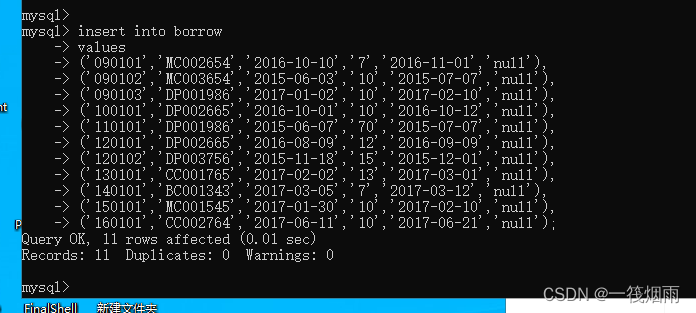
2、按下表中内容对“borrow”数据表使用“insert”命令插入记录,并使用“select”命令浏览记录。(将上述两步操作截图,截图保存在该题下方。)
| cardid |
bookid |
borrowdate |
dayliness |
returndate |
remark |
| 090101 |
MC002654 |
2016-10-10 |
7 |
2016-11-01 |
|
| 090102 |
MC003654 |
2015-06-03 |
10 |
2015-07-07 |
|
| 090103 |
DP001986 |
2017-01-02 |
10 |
2017-02-10 |
|
| DP002665 |
2016-10-01 |
10 |
2016-10-12 |
||
| DP001986 |
2015-06-07 |
70 |
2015-07-07 |
||
| DP002665 |
2016-08-09 |
12 |
2016-09-09 |
||
| DP003756 |
2015-11-18 |
15 |
2015-12-01 |
||
| CC001765 |
2017-02-02 |
13 |
2017-03-01 |
||
| BC001343 |
2017-03-05 |
7 |
2017-03-12 |
||
| MC001545 |
2017-01-30 |
10 |
2017-02-10 |
||
| CC002764 |
2017-06-11 |
10 |
2017-06-21 |
【截图:】
insert into borrow
values ('090101','MC002654','2016-10-10','7','2016-11-01',null),
('090102','MC003654','2015-06-03','10','2015-07-07',null),
('090103','DP001986','2017-01-02','10','2017-02-10',null),
('','DP002665','2016-10-01','10','2016-10-12',null),
('','DP001986','2015-06-07','70','2015-07-07',null),
('','DP002665','2016-08-09','12','2016-09-09',null),
('','DP003756','2015-11-18','15','2015-12-01',null),
('','CC001765','2017-02-02','13','2017-03-01',null),
('','BC001343','2017-03-05','7','2017-03-12',null),
('','MC001545','2017-01-30','10','2017-02-10',null),
('','CC002764','2017-06-11','10','2017-06-21',null);
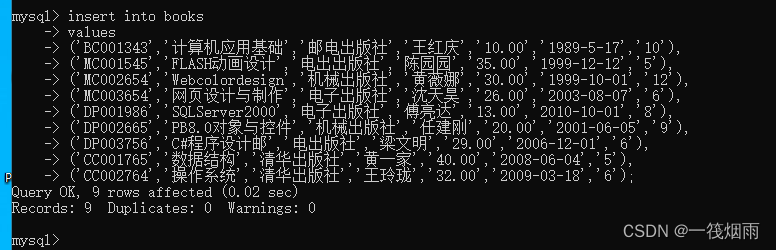
3、按下表中内容对“books”数据表使用“insert”命令插入记录,并使用“select”命令浏览记录。(将上述两步操作截图,截图保存在该题下方。)
| bookid |
bookname |
press |
author |
price |
publishdate |
quantity |
| BC001343 |
计算机应用基础 |
邮电出版社 |
王红庆 |
10.00 |
1989-5-17 |
10 |
| MC001545 |
FLASH动画设计 |
电出出版社 |
陈园园 |
35.00 |
1999-12-12 |
5 |
| MC002654 |
Web color design |
机械出版社 |
黄薇娜 |
30.00 |
1999-10-01 |
12 |
| MC003654 |
网页设计与制作 |
电子出版社 |
沈天昊 |
26.00 |
2003-08-07 |
6 |
| DP001986 |
SQL Server2000 |
电子出版社 |
傅亮达 |
13.00 |
2010-10-01 |
8 |
| DP002665 |
PB8.0对象与控件 |
机械出版社 |
任建刚 |
20.00 |
2001-06-05 |
9 |
| DP003756 |
C#程序设计 |
邮电出版社 |
梁文明 |
29.00 |
2006-12-01 |
6 |
| CC001765 |
数据结构 |
清华出版社 |
黄一家 |
40.00 |
2008-06-04 |
5 |
| CC002764 |
操作系统 |
清华出版社 |
王玲珑 |
32.00 |
2009-03-18 |
6 |
【截图:】
insert into books
values ('BC001343','计算机应用基础','邮电出版社','王红庆','10.00','1989-5-17','10'),
('MC001545','FLASH动画设计','电出出版社','陈园园','35.00','1999-12-12','5'),
('MC002654','Web color design','机械出版社','黄薇娜','30.00','1999-10-01','12'),
('MC003654','网页设计与制作','电子出版社','沈天昊','26.00','2003-08-07','6'),
('DP001986','SQL Server2000','电子出版社','傅亮达','13.00','2010-10-01','8'),
('DP002665','PB8.0对象与控件','机械出版社','任建刚','20.00','2001-06-05','9'),
('DP003756','C#程序设计','邮电出版社','梁文明','29.00','2006-12-01','6'),
('CC001765','数据结构','清华出版社','黄一家','40.00','2008-06-04','5'),
('CC002764','操作系统','清华出版社','王玲珑','32.00','2009-03-18','6');
四、使用SQL命令对数据记录维护
1、请使用“update”命令对“reader”数据表中“age”字段值进行更新,其值等于当前系统年份减去出生年月中的年份,并使用“select”命令浏览记录。(将上述两步操作截图,截图保存在该题下方。)
【截图:】
update reader set age=year(now())-year(birthday);
select * from reader;
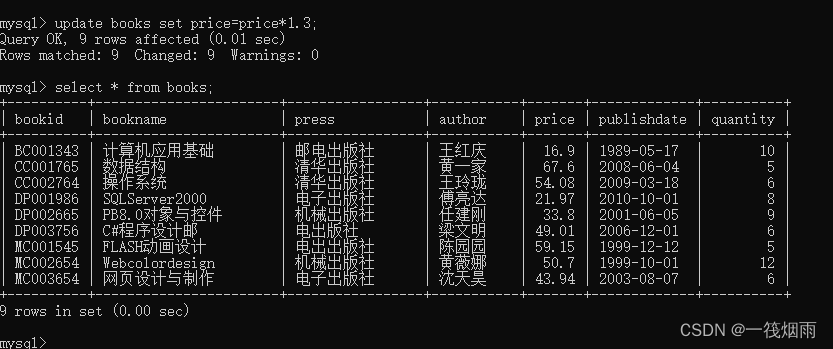
2、请使用“update”命令对“books”数据表中“电子出版社”的所有图书,其单价在原有基础上增加30%,并使用“select”命令浏览记录。(将上述两步操作截图,截图保存在该题下方。)
【截图:】
update books set price=price*1.3;
select * from books;
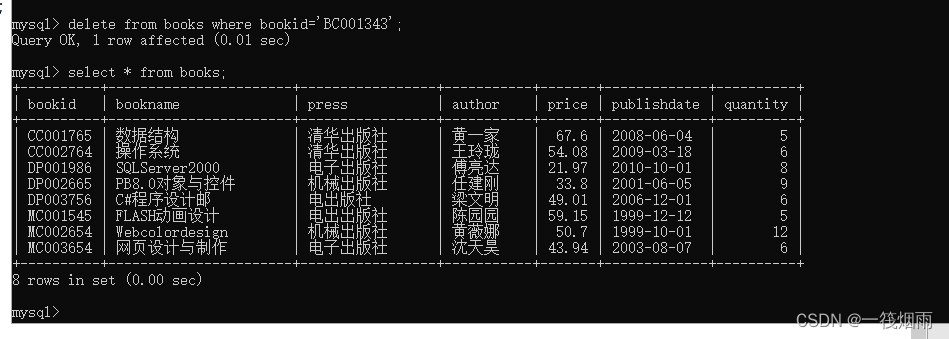
3、请使用“delete”命令删除“books”中图书编号为“BC001343”的记录,并使用“select”命令浏览记录。(将上述两步操作截图,截图保存在该题下方。)
【截图:】
delete from books where bookid='BC001343';
select * from books;
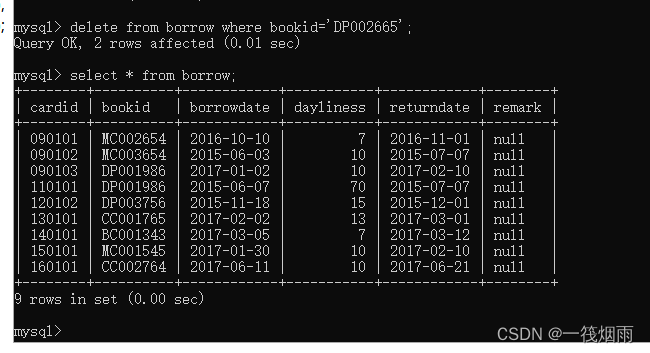
4、请使用“delete”命令对“borrow”数据表中“图书编号”为“DP002665”的记录进行删除操作,并使用“select”命令浏览记录。(将上述两步操作截图,截图保存在该题下方。)
【截图:】
delete from borrow where bookid='DP002665';
select * from borrow;
五、数据查询、视图
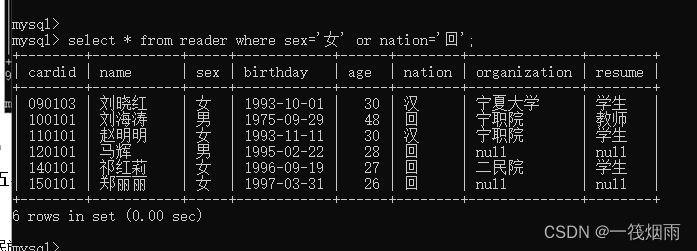
1、请使用“select”命令对“library”数据库进行数据查询操作。查询性别为“女”或民族为“回”的读者信息。(将上述查询操作及结果截图,截图保存在该题下方。)
【截图:】
select * from reader where sex='女' or nation='回';
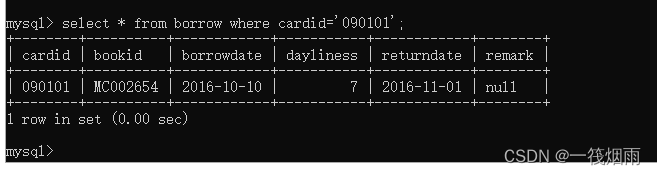
2、请使用“select”命令对“library”数据库进行数据查询操作。查询“本人”所借图书的信息。(将上述查询操作及结果截图,截图保存在该题下方。)
【截图:】
select * from borrow where cardid='090101';
3、请使用“select”命令对“library”数据库进行数据查询操作。查询“单价”在25.00元以上的图书信息。(将上述查询操作及结果截图,截图保存在该题下方。)
【截图:】
select * from books where price>25.00;
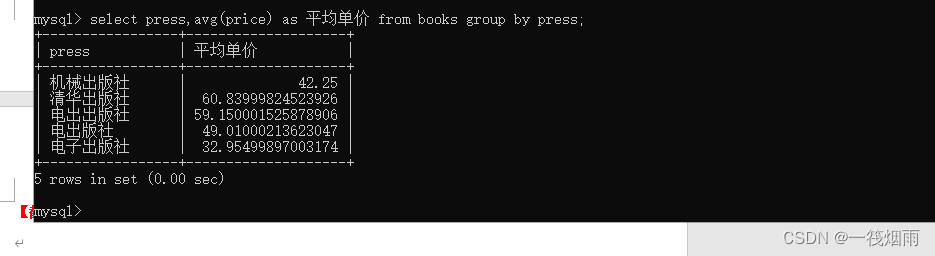
4、请使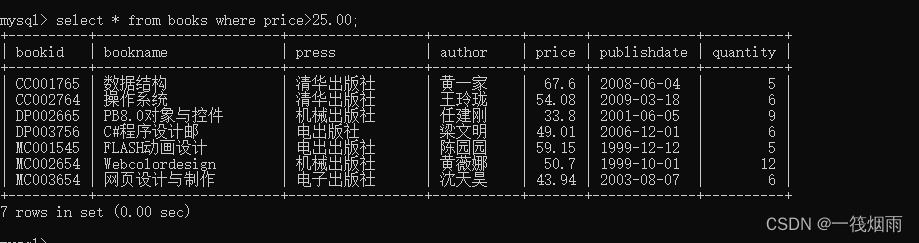 用“select”命令对“library”数据库进行数据查询操作。查询每个出版社所有图的平均单价单价。(将上述查询操作及结果截图,截图保存在该题下方。)
【截图:】
select press,avg(price) as 平均单价 from books group by press;
5、请使用“select”命令对“library”数据库进行数据查询操作。查询每本图书的总金额(单价*数量,用“总金额”表示),并按“出版社”降序输出查询结果。(将上述查询操作及结果截图,截图保存在该题下方。)
【截图:】
select bookname,price=price*quantity as 总金额 from books;!!!!!!!!!!!!不对,跳过
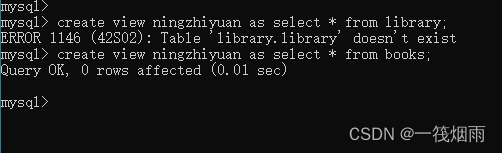
6、创建“宁职院”的读者视图。(将上述视图创建的SQL操作及结果截图,截图保存在该题下方。)
【截图:】
create view view1 as select * from reader where organization='宁职院';
六、用户及权限管理
1、使用CREATE USER语句添加两个用户,用户test1的密码是test1,用户test2的密码是test2。其主机名为localhost。(将上述添加用户的操作及结果截图,截图保存在该题下方。)
【截图:】
create user 'test1'@'localhost' identified by 'test1';
create user 'test2'@'localhost' identified by 'test2';
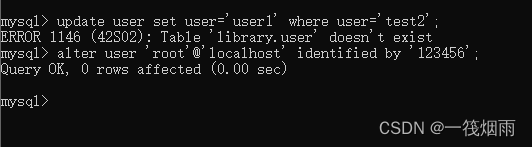
2、将用户test2的用户名重命名为user1,密码修改为“”。(将上述操作及结果截图,截图保存在该题下方。)
【截图:】
rename user 'test1@localhost' to 'user1@localhost' ;
3、对新创建的用户test1在reader表上的SELECT和DELETE权限。(将上述权限设置的操作及结果截图,截图保存在该题下方。)
【截图:】
grant select,delete on library.reader to 'user1@localhost';
4、回收用户test1在reader表上的SELECT权限。(将上述回收权限的操作及结果截图,截图保存在该题下方。)
【截图:】
revoke select on library.reader from 'user1@localhost';
版权声明:本文内容由互联网用户自发贡献,该文观点仅代表作者本人。本站仅提供信息存储空间服务,不拥有所有权,不承担相关法律责任。如发现本站有涉嫌侵权/违法违规的内容,请联系我们,一经查实,本站将立刻删除。
如需转载请保留出处:https://51itzy.com/kjqy/77945.html