
Spotfire主要是一个数据处理和分析工具,其本身不具备修改数据源的功能,可通过二次开发实现简单的数据修改功能,本文主要讲如何实现对数据库表的增删改查。
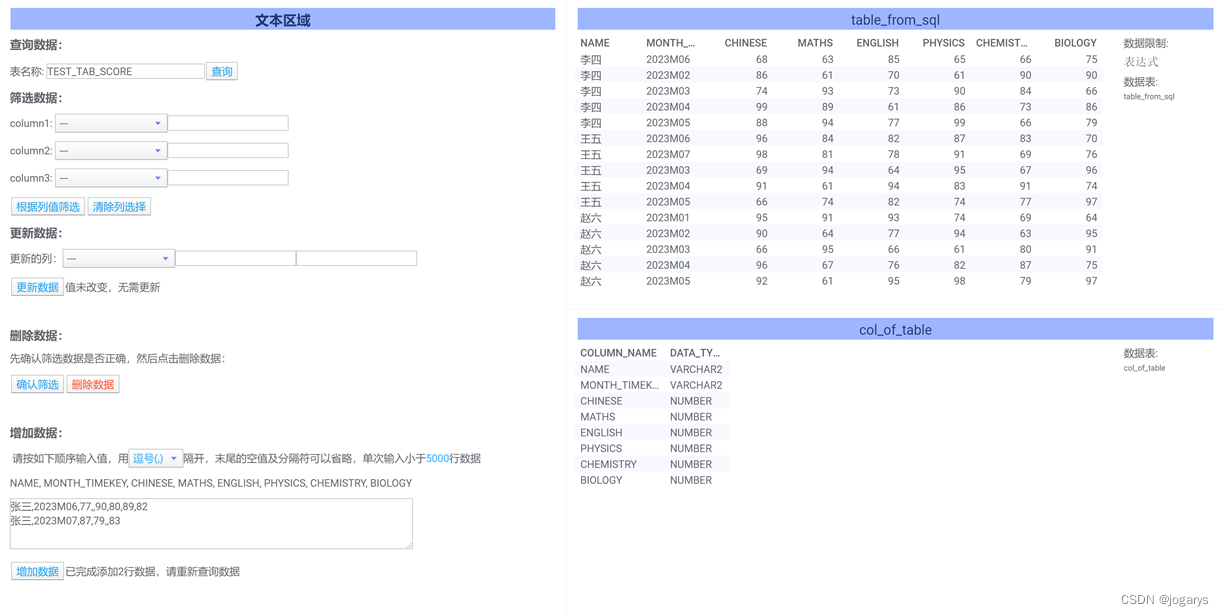
主要包含查询数据、筛选数据、更新数据、删除数据、增加数据五大模块,如下图所示
1.查询数据
1.1 新建一个输入框,绑定属性tablename;
1.2 新建查询按钮,绑定自定义函数get_from_sql,函数内容如下:
import pandas as pd import cx_Oracle #tablename为输入参数,传入tablename属性 tablename = tablename.strip() if tablename =='': table_from_sql = pd.DataFrame([['']]) col_of_table = pd.DataFrame([['']],columns=['COLUMN_NAME']) else: db = cx_Oracle.connect('username','password','10.10.10.11:1521/orcl') sqlcommand = "SELECT * FROM {}".format(tablename) table_from_sql = pd.read_sql(sqlcommand,db) colcommand = "SELECT COLUMN_NAME,DATA_TYPE FROM USER_TAB_COLS WHERE TABLE_NAME = '{}'".format(tablename) col_of_table = pd.read_sql(colcommand,db) #输出两个表:主表内容table_from_sql,以及表结构col_of_table讯享网
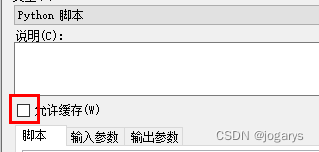
注意这里要取消函数的允许缓存,否则会导致数据修改后查不到最新数据
2.筛选数据
本例提供3个筛选列(可根据实际需求增加或减少),可根据选择的任意≤3列筛选数据,用于中图表展示,以及后续更新、删除数据的条件依据
2.1 新建3个下拉列表和文本输入框,分别绑定属性column1、value1,column2、value2,column3、value3
2.2 新建按钮根据列值筛选,绑定脚本text_filter_data,脚本内容如下:
讯享网#row_count为输入参数,传入表达式Count(case when ${textfilter} then 1 end ) #生成筛选数据文本,输出到属性textfilter Document.Properties['textfilter'] = "1=1 " if Document.Properties['column1'] <> '': Document.Properties['textfilter'] += """and ([${column1}]="${value1}" OR DocumentProperty("value1")="")""" if Document.Properties['column2'] <> '': Document.Properties['textfilter'] += """and ([${column2}]="${value2}" OR DocumentProperty("value2")="")""" if Document.Properties['column3'] <> '': Document.Properties['textfilter'] += """and ([${column3}]="${value3}" OR DocumentProperty("value3")="")""" print(Document.Properties['textfilter']) #生成删除数据状态提示 if row_count > 1: Document.Properties['deletestate']='将同时删除{}行数据,请谨慎操作'.format(row_count) elif row_count == 1: Document.Properties['deletestate']='将删除1行数据' else: Document.Properties['deletestate']='筛选数据为空,无需删除' #生成删除数据SQL语句 Document.Properties['textdelete'] = "delete from {} where 1=1 ".format(Document.Properties['tablename']) if Document.Properties['column1'] <> '': Document.Properties['textdelete'] += "and {} = '{}' ".format(Document.Properties['column1'],Document.Properties['value1']) if Document.Properties['column2'] <> '': Document.Properties['textdelete'] += "and {} = '{}' ".format(Document.Properties['column2'],Document.Properties['value2']) if Document.Properties['column3'] <> '': Document.Properties['textdelete'] += "and {} = '{}' ".format(Document.Properties['column3'],Document.Properties['value3']) print(Document.Properties['textdelete'])
2.3 新建按钮清楚列选择,绑定脚本clear_columns,脚本内容如下:
Document.Properties['column1'] = '' Document.Properties['column2'] = '' Document.Properties['column3'] = '' Document.Properties['textfilter'] = "1=1 " Document.Properties['columnupdate'] = '' Document.Properties['updatevalue'] = '' Document.Properties['deletestate'] = '' Document.Properties['textdelete'] = ''3.更新数据
3.1 新建下拉框,绑定属性columnupdate,脚本updatevalue_default,用于生成选中列的默认值,脚本内容如下:
讯享网#输入参数value_default,传入表达式If(Count(case when ${textfilter} then String([${columnupdate}]) end )=1,Max(case when ${textfilter} then String([${columnupdate}]) end ),'') #输入参数column_type,传入表达式UniqueConcatenate(case when [COLUMN_NAME]="${columnupdate}" then [DATA_TYPE] end ) Document.Properties['updatevalue']=value_default Document.Properties['columntype']=column_type
3.2 新建输入框,绑定属性updatevalue,脚本text_update,用于生成更新状态和SQL语句,内容如下:
#输入参数value_default,传入表达式Max(case when ${textfilter} then String([${columnupdate}]) end ) #输入参数row_count,传入表达式Count(case when ${textfilter} then String([${columnupdate}]) end ) if Document.Properties['updatevalue'] == value_default or Document.Properties['updatevalue'] == '': Document.Properties['updatestate']='值未改变,无需更新' Document.Properties['textupdate']='' else: if row_count > 1: Document.Properties['updatestate']='将同时更新{}行数据,请谨慎操作'.format(row_count) else: Document.Properties['updatestate']='将更新1行数据' #生成更新语句 if Document.Properties['columntype'] == 'NUMBER': Document.Properties['textupdate'] = "update {} set {} = {} where 1=1 ".format(Document.Properties['tablename'],Document.Properties['columnupdate'],Document.Properties['updatevalue']) else: Document.Properties['textupdate'] = "update {} set {} = '{}' where 1=1 ".format(Document.Properties['tablename'],Document.Properties['columnupdate'],Document.Properties['updatevalue']) if Document.Properties['column1'] <> '': Document.Properties['textupdate'] += "and {} = '{}' ".format(Document.Properties['column1'],Document.Properties['value1']) if Document.Properties['column2'] <> '': Document.Properties['textupdate'] += "and {} = '{}' ".format(Document.Properties['column2'],Document.Properties['value2']) if Document.Properties['column3'] <> '': Document.Properties['textupdate'] += "and {} = '{}' ".format(Document.Properties['column3'],Document.Properties['value3']) print(Document.Properties['textupdate']) 3.3 新建标签,绑定属性columntype,方便查看,非必需
3.4 新建按钮,绑定自定义函数update_value,函数内容如下:
讯享网#输入参数sql_update,传入属性textupdate #输出参数updatestate,输出到属性updatestate import cx_Oracle db = cx_Oracle.connect('username','password','10.10.10.11:1521/orcl') cr = db.cursor() cr.execute(sql_update) db.commit() cr.close() db.close() updatestate = '已更新完成,请重新查询数据'
3.5 新建两个标签,绑定属性updatestate和textupdate,在updatestate上绑定脚本rename_table,作用是updatestate的值变更时,在属性tablename后面增加空格,目的是再次点击1中查询是能重新查询数据(如果输入参数tablename的值未改变,自定义函数不会重新执行),rename_table内容如下:
if len(Document.Properties['tablename']) - len(Document.Properties['tablename'].strip()) < 5: Document.Properties['tablename'] += ' ' else: Document.Properties['tablename'] = Document.Properties['tablename'].strip() 4.删除数据
4.1 新建按钮确认筛选,绑定2.2中脚本
4.2 新建按钮删除数据,绑定自定义函数delete_value,函数内容如下
讯享网#输入参数sql_delete,传入属性textdelete #输出参数deletestate,输出到属性deletestate import cx_Oracle db = cx_Oracle.connect('username','password','10.10.10.11:1521/orcl') cr = db.cursor() cr.execute(sql_delete) db.commit() cr.close() db.close() deletestate = '已删除完成,请重新查询数据'
4.3 新建两个标签,绑定属性deletestate和textdelete,在updatestate上绑定脚本rename_table(同3.5)
5.增加数据
5.1 新建下拉框,绑定属性separator,属性值设置为固定值,可自行设置选项(逗号、分号、空格等),用于分割输入的值
5.2 新建计算的值,选择表col_of_table,表达式Concatenate([COLUMN_NAME])
5.3 新建输入框(多行),绑定属性insertvalue,脚本text_insert,内容如下:
#计算有效数据行数 insert_value_list = [value for value in Document.Properties['insertvalue'].split('\n') if value.strip()] Document.Properties['insertstate'] = '将添加{}行数据'.format(len(insert_value_list))5.4 新建按钮增加数据,绑定自定义函数,函数内容如下:
讯享网#输入参数table_name,传入属性tablename #输入参数insert_column,传入表达式Concatenate([col_of_table].[COLUMN_NAME]) #输入参数insert_value,传入属性insertvalue #输入参数col_type,传入表达式Concatenate([col_of_table].[DATA_TYPE]) #输入参数separator,传入属性separator #输出参数insert_state,输出到属性insertstate import cx_Oracle import pandas as pd col_type = [t.strip() for t in col_type.split(',')] #转换写入数据 insert_value_list = [(value+separator*len(col_type)).split(separator)[:len(col_type)] for value in insert_value.split('\n') if value.strip()] for i in range(len(insert_value_list)): for j in range(len(col_type)): if insert_value_list[i][j] == '': insert_value_list[i][j] = None elif col_type[j] == 'NUMBER': insert_value_list[i][j] = eval(insert_value_list[i][j]) #开始写入数据 db = cx_Oracle.connect('username','password','10.10.10.11:1521/orcl') cr = db.cursor() sql = ''' INSERT INTO {} ({}) VALUES({}) '''.format(table_name,insert_column,(':1,'*len(col_type)).strip(',')) cr.executemany(sql,insert_value_list) db.commit() cr.close() db.close() insert_state = '已完成添加{}行数据,请重新查询数据'.format(len(insert_value_list))
5.5 新建标签,绑定属性insertstate,在updatestate上绑定脚本rename_table(同3.5)
6.数据筛选展示
添加可视化图表,用表达式限制数据,表达式为:直接插入属性textfilter,即${textfilter},可以在结果表达式中看到实际生成的限制语句,即2.2中输出到属性textfilter的值


7.测试
7.1 查询数据
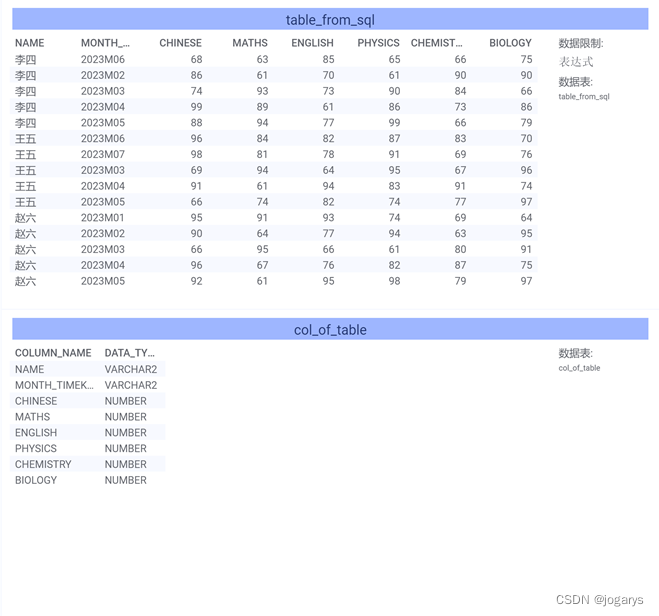
表名称填入TEST_TAB_SCORE,点击查询,在可视化图标中展示查询数据为
7.2 筛选数据
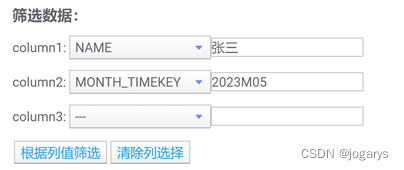
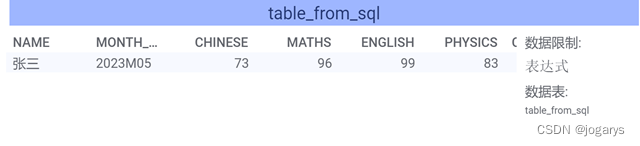
按如下筛选数据,点击根据列值筛选
筛选结果为
7.3 更新数据
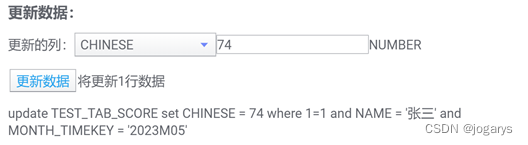
更新数据中选择CHINESE,默认得到73,将73改为74,会自动生成更新SQL,
点击更新数据,再点击1中查询
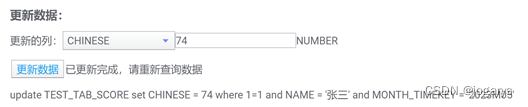
查询结果为

7.4 增加数据
分隔符选择逗号,在输入框中输入如下内容,会提示有效行数(自动去除空行)
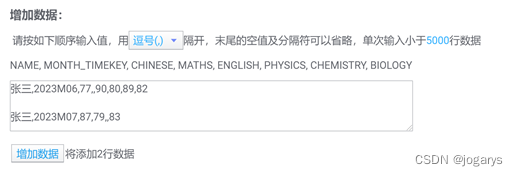
点击增加数据,再点击1中查询,结果如下:已增加了两行数据
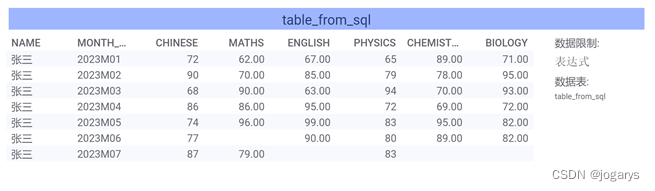
7.5 删除数据
在2中筛选数据为张三、2023M07,点击4.1中确认筛选,会提示删除1行数据,生成删除SQL
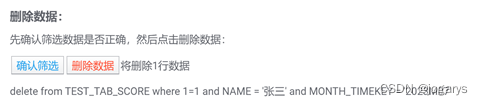
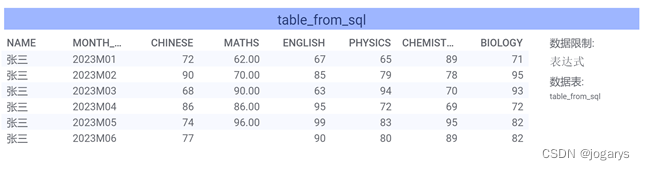
点击删除数据,再点击1中查询,结果如下:已删除了7月的1行数据
版权声明:本文内容由互联网用户自发贡献,该文观点仅代表作者本人。本站仅提供信息存储空间服务,不拥有所有权,不承担相关法律责任。如发现本站有涉嫌侵权/违法违规的内容,请联系我们,一经查实,本站将立刻删除。
如需转载请保留出处:https://51itzy.com/kjqy/76972.html