
日常开发中,难免遇到需要导入导出的业务场景,特别是一些一对多的场景,如一个用户对应多个职位。如果直接操作POI的接口实现,代码繁琐且容易出错。 今天在这里给大家推荐一款非常好用的 Excel 导入导出工具工具: zouzhiy-excel 。快速完成一对多导入导出功能,让加班离你远去! 讯享网
zouzhiy-excel 简介
zouzhiy-excel 是一款 Excel 导入导出的轻量级工具。对 POI 的接口做了一层封装,使导入导出更加简便快捷。
Spring 环境下集成
讯享网 <dependency> <groupId>io.github.zouzhiy</groupId> <artifactId>zouzhiy-excel-boot-starter</artifactId> <version>1.1.1</version> </dependency>
开始使用
今天来以用户对应多个职务为例,介绍一下一对多导入导出的实现。
- 首先创建一个数据对象
@Data @Builder @NoArgsConstructor @AllArgsConstructor @ExcelClass public class OneToManyVO {
@ExcelField(title = "姓名") private String username; @ExcelField(title = "手机号码") private String tel; @ExcelField(title = "年龄") private Integer age; @ExcelField(title = "出生日期") private LocalDate birthDay; @ExcelField(title = "分数") private BigDecimal score; @ExcelField(title = "职务", cellHandler = ListStringStringSplitHandler.class) private List<String> positionList; } - 接下来我们在 Controller 中添加一个接口,用于导出列表Excel,具体代码如下;
讯享网 @RestController @RequestMapping("one-to-many") public class OneToManyExportController {
    @Resource private ZouzhiyExcelFactory zouzhiyExcelFactory; @GetMapping("list/export") public void exportList(HttpServletResponse response) {
    List<OneToManyVO> voList = this.listVo(); response.addHeader("Content-Disposition" , "attachment; filename*=utf-8''" + URLEncoder.encode("列表信息(一对多).xlsx", StandardCharsets.UTF_8.name())); zouzhiyExcelFactory .write(response.getOutputStream()) .sheet() .title("列表信息(一对多)") .titleRowStartIndex(0) .dataRowStartIndex(2) .write(voList, OneToManyVO.class); } private final Random random = new Random(System.currentTimeMillis()); private List<OneToManyVO> listVo() {
    List<OneToManyVO> voList = new ArrayList<>(); for (int i = 0; i < 5; i++) {
    OneToManyVO vo = OneToManyVO.builder() .username("姓名-" + i) .tel(Math.abs(random.nextLong()) + "") .age(10 + i) .birthDay(LocalDate.of(2022, 7, random.nextInt(29) + 1)) .score(BigDecimal.valueOf(random.nextDouble())) .positionList(this.listPosition(i)) .build(); voList.add(vo); } return voList; } private List<String> listPosition(int sno) {
    int size = random.nextInt(5); List<String> positionList = new ArrayList<>(); for (int i = 0; i < size; i++) {
    positionList.add("position-" + sno + "-" + i); } return positionList; } }
- 通过浏览器访问: http://localhost:8080/one-to-many/list/export 。下载附件。导出结果如下:

讯享网
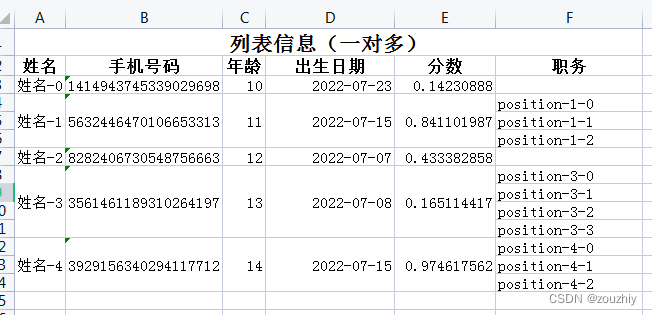
简单的自定义一对多导出就大功告成了!
简单导入
以上面的导出结果为导入数据。在 Controller 中添加一个接口,用于导入列表数据,具体代码如下;

 @RestController @RequestMapping("one-to-many") public class OneToManyImportController {
    @Resource private ZouzhiyExcelFactory zouzhiyExcelFactory; @PostMapping("list/import") public List<OneToManyVO> exportList(@RequestPart MultipartFile file) {
    return zouzhiyExcelFactory .read(file.getInputStream()) .sheet() .dataRowStartIndex(2) .read(OneToManyVO.class); } }
通过 Idea Client 测试
讯享网 POST http://localhost:8080/one-to-many/list/import Content-Type: multipart/form-data; boundary=WebAppBoundary --WebAppBoundary Content-Disposition: form-data; name="file"; filename="export.xls" Content-Type: multipart/form-data < ./excel/列表信息(一对多).xlsx --WebAppBoundary--
返回结果
[ {
    "username": "姓名-0", "tel": "", "age": 10, "birthDay": "2022-07-23", "score": 0.5304, "positionList": [] }, {
    "username": "姓名-1", "tel": "0", "age": 11, "birthDay": "2022-07-15", "score": 0.769, "positionList": [ "position-1-0", "position-1-1", "position-1-2" ] }, {
    "username": "姓名-2", "tel": "", "age": 12, "birthDay": "2022-07-07", "score": 0.665, "positionList": [] }, {
    "username": "姓名-3", "tel": "", "age": 13, "birthDay": "2022-07-08", "score": 0.2293, "positionList": [ "position-3-0", "position-3-1", "position-3-2", "position-3-3" ] }, {
    "username": "姓名-4", "tel": "", "age": 14, "birthDay": "2022-07-15", "score": 0.8761, "positionList": [ "position-4-0", "position-4-1", "position-4-2" ] } ]
简单的一对多导入功能也完成了,赶紧提交代码下班吧!
版权声明:本文内容由互联网用户自发贡献,该文观点仅代表作者本人。本站仅提供信息存储空间服务,不拥有所有权,不承担相关法律责任。如发现本站有涉嫌侵权/违法违规的内容,请联系我们,一经查实,本站将立刻删除。
如需转载请保留出处:https://51itzy.com/kjqy/76894.html