
vue.js2 路由项目
vue-2-小面包 (vue-2-crumbs)
Breadcrumbs plugin for Vue.js 2 framework that allows to select parent route in route meta object with no need of sub-routing.
Vue.js 2框架的Breadcrumbs插件,无需子路由就可以在路由元对象中选择父路由。
特征: (Features:)
Setting parent route without need to actually nest it in children array Sub-routing as default behavior Define breadcrumb info in page component Shorthand labeling (breadcrumb: 'Page Label') Dynamic breadcrumbs (with some caveats).
设置父路由而无需实际将其嵌套在子数组中子路由为默认行为在页面组件中定义面包屑信息速记标签(breadcrumb:“页面标签”)动态面包屑(带有一些警告)。
要求: (Requirements:)
- Vue: 2.x.x,
Vue:2.xx,
- vue-router: ^2.1.x
Vue路由器:^ 2.1.x

安装 (Installation)
$ npm install vue-2-crumbs --save讯享网
讯享网import Vue from 'vue' import Vue2Crumbs from 'vue-2-crumbs' Vue.use(Vue2Crumbs)
After that <app-breadcrumbs></app-breadcrumbs> component would be at your expose.
之后,您可以使用<app-breadcrumbs></app-breadcrumbs>组件。
用法 (Usage)
Use the breadcrumb property in route's meta to provide route label or/and parent route name as in example below:
使用路由的meta的breadcrumb属性来提供路由标签或/和父路由name ,如下例所示:
简单的例子 (Simple Example)
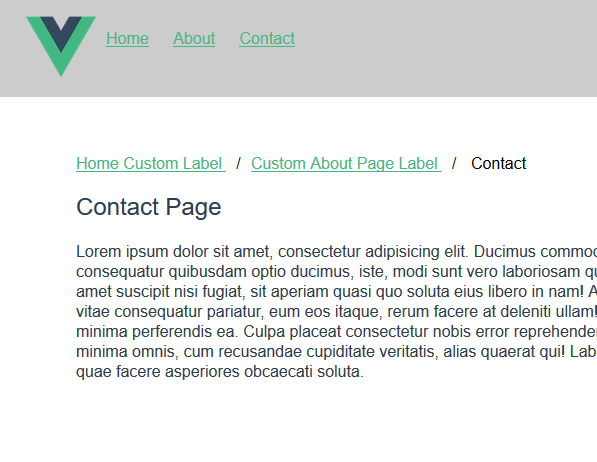
new VueRouter({ routes: [ { path: '/', name: 'home', // Be sure to set 'name' property for the route you want to be "parent" route component: Home, meta: { breadcrumb: 'Home Custom Label' // This is a shorthand for case you want to set just breadcrumb label } }, { path: '/about', name: 'about', component: About, meta: { breadcrumb: { label: 'Custom About page Label', parent: 'home' // Here you should use exact string as for name property in "parent" route } } }, { path: '/contact', name: 'contact', // name property would also used as default route label for breadcrumbs component: Contact, meta: { breadcrumb: { parent: 'about' } } } ] })结果: (Result:)
版权声明:本文内容由互联网用户自发贡献,该文观点仅代表作者本人。本站仅提供信息存储空间服务,不拥有所有权,不承担相关法律责任。如发现本站有涉嫌侵权/违法违规的内容,请联系我们,一经查实,本站将立刻删除。
如需转载请保留出处:https://51itzy.com/kjqy/76719.html