
本代码利用了jbarcode的jar包生成一维条码,代码如下,如有问题,还请见谅
package f; import java.awt.image.BufferedImage; import java.io.File; import java.io.FileOutputStream; import java.io.UnsupportedEncodingException; import java.net.URLDecoder; import java.text.SimpleDateFormat; import java.util.Date; import org.jbarcode.JBarcode; import org.jbarcode.encode.EAN13Encoder; import org.jbarcode.encode.InvalidAtributeException; import org.jbarcode.paint.EAN13TextPainter; import org.jbarcode.paint.WidthCodedPainter; import org.jbarcode.util.ImageUtil; public class KKK { / * 生成商品条形码 * * @param filePath * 商品条形码图片存放路径:C://barcode//images// * * @param barCode * 商品条形码:13位 * @param imgFormat * 图片格式 * * @return 图片存放路径+图片名称+图片文件类型 */ public static String createBarCode(String savePath, String jbarCode, String imgFormat) { // 校验全部省略…… // if(StringUtils.isNotEmpty(savePath)){ // // return null; // } // if(StringUtils.isNotEmpty(jbarCode)){ // return null; // } // if(StringUtils.isNotEmpty // (imgFormat)){ // return null; // } // if( jbarCode.length()!=13){ // return null; // } try { BufferedImage bi = null; int len = jbarCode.length(); // 实例化JBarcode // 这里三个参数,必要填写 JBarcode jbarcode13 = new JBarcode(EAN13Encoder.getInstance(), WidthCodedPainter.getInstance(), EAN13TextPainter.getInstance()); // 获取到前12位 String barCode = jbarCode.substring(0, len - 1); // 获取到校验位 String code = jbarCode.substring(len - 1, len); String checkCode = jbarcode13.calcCheckSum(barCode); if (!code.equals(checkCode)) { return "EN-13 条形码最后一位校验码 不对,应该是: " + checkCode; } /* * 最重要的是这里的设置,如果明白了这里的设置就没有问题 如果是默认设置, * 那么设置就是生成一般的条形码 如果不是默认 * 设置,那么就可以根据自己需要设置 */ // 尺寸,面积,大小 jbarcode13.setXDimension(Double.valueOf(0.8).doubleValue()); // 条形码高度 jbarcode13.setBarHeight(Double.valueOf(30).doubleValue()); // 宽度率 jbarcode13.setWideRatio(Double.valueOf(20).doubleValue()); // 是否校验最后一位,默认是false jbarcode13.setShowCheckDigit(true); // 生成二维码 bi = jbarcode13.createBarcode(barCode); // 定义图片名称 SimpleDateFormat sdf = new SimpleDateFormat("yyyyMMddhhmmss"); String imgName = sdf.format(new Date()) + "_" + jbarCode; // 保存二维码图片 FileOutputStream fileOutputStream = null; String imgPath = savePath + imgName + "." + imgFormat; try { try { savePath = URLDecoder.decode(savePath, "UTF-8"); } catch (UnsupportedEncodingException uee) { uee.printStackTrace(); savePath = "d://test//"; } File dirFile = new File(savePath); if (!dirFile.exists()) { dirFile.mkdirs(); } fileOutputStream = new FileOutputStream(imgPath); } catch (Exception e) { e.printStackTrace(); return null; } ImageUtil.encodeAndWrite(bi, imgFormat, fileOutputStream, 96, 96); fileOutputStream.close(); // 返回路径 return imgPath; } catch (Exception e) { e.printStackTrace(); return null; } } / * @param args * @throws InvalidAtributeException */ public static void main(String[] args) throws InvalidAtributeException { String path1 = KKK.createBarCode("D://test//", "40", ImageUtil.JPEG); String path2 = KKK.createBarCode("D://test//", "38", ImageUtil.JPEG); System.out.println(path1); System.out.println(path2); } }讯享网
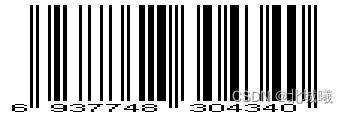
生成的截图如下:

jar包建议去maven仓库内寻找
版权声明:本文内容由互联网用户自发贡献,该文观点仅代表作者本人。本站仅提供信息存储空间服务,不拥有所有权,不承担相关法律责任。如发现本站有涉嫌侵权/违法违规的内容,请联系我们,一经查实,本站将立刻删除。
如需转载请保留出处:https://51itzy.com/kjqy/76062.html