
一、界面
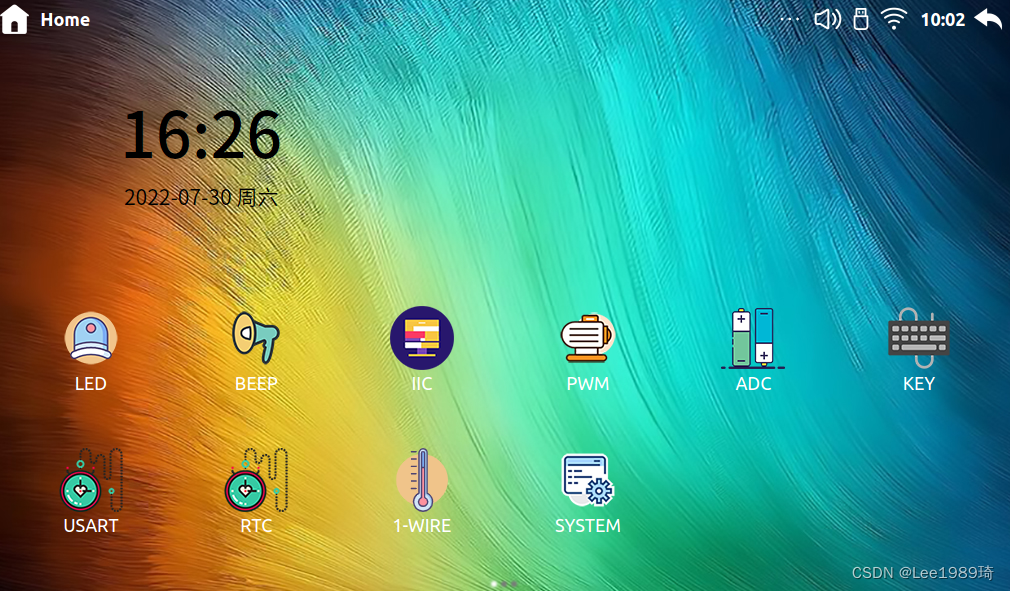
在某宝上面的看见别人车上面的车载中控屏,想到自己也会一些QT,刚好跟我的ARM板的驱动联系起来制作一个系统,就想着练习一下实现的界面如下:
讯享网

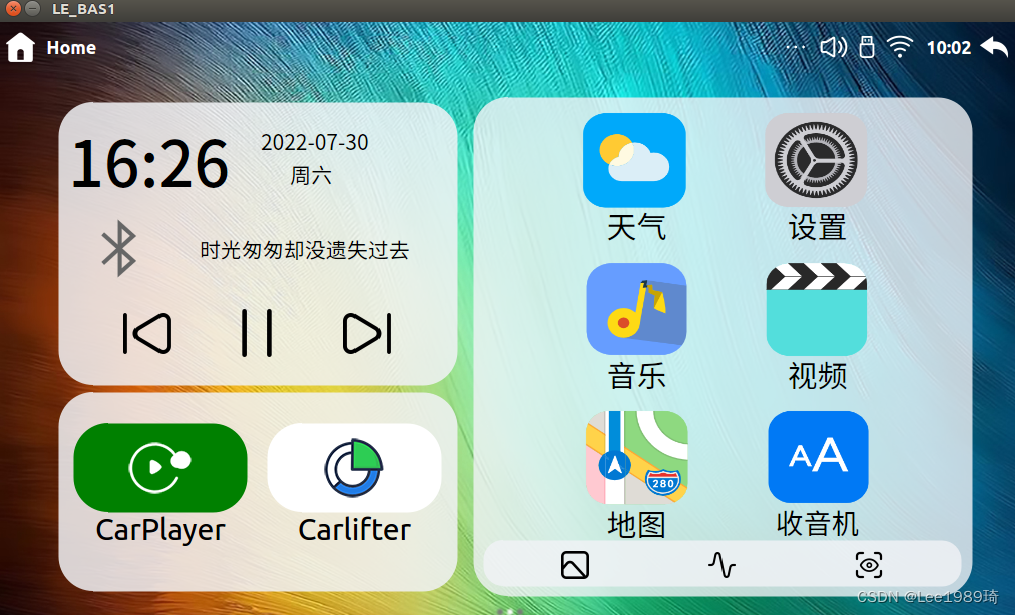
采用纯代码编写 QSS修改样式,构思了几天花了几个小时编写代码,具体应用功能还没有实现,跟ARM驱动相关的已经实现,对这方面感兴趣的小伙伴可以私信我一起学习
持续更新内容。。。
一、界面代码
QWidget * MainWindow::MainCarPlay(){
    this->setGeometry(0, 0, 1024,600); auto ret = new QWidget(this); // ret->resize(1024,600); QLabel * Map = new QLabel(); QLabel * Music = new QLabel(); QLabel * MainAPP = new QLabel(); Map->setFixedSize(500,500); Music->setMaximumWidth(400); Music->setMaximumHeight(300); MainAPP->setMaximumWidth(400); MainAPP->setMaximumHeight(200); Map->setObjectName("MainViewMap"); Music->setObjectName("MainViewMusic"); MainAPP->setObjectName("MainViewMainAPP"); Map->setStyleSheet( "background-color: rgb(241,242,246,80%);");//十六进制值:#F1F2F6; rgb 代码值:rgb(241,242,246) Music->setStyleSheet( "background-color: rgb(241,242,246,85%);");//十六进制值:#FFFFFF; rgb 代码值:rgb(255,255,255) MainAPP->setStyleSheet( "background-color: rgb(241,242,246,85%);"); QWidget *VWidget = new QWidget(this); auto VLayout = new QVBoxLayout(); VLayout->addWidget(Music); // VLayout->addWidget(MidBtn); VLayout->addWidget(MainAPP); VWidget->setLayout(VLayout); //Music auto Musicdata =new QLabel(); auto Musicdatatime = new QDateTime(QDateTime::currentDateTime()); QString str1 = Musicdatatime->toString("hh:mm"); //设置显示格式 QFont FONT("FangSong ",47,60); Musicdata->setFont(FONT); Musicdata->setText(str1); Musicdata->setFixedSize(300,60); Musicdata->setStyleSheet( "background-color: transparent;" // "color: white;" "border-style: none;" // "font: normal normal 18px;" ); auto Musicyear =new QLabel(); auto Musicyearweek = new QDateTime(QDateTime::currentDateTime()); QString str = Musicyearweek->toString("yyyy-MM-dd"); //设置显示格式 QFont FONT1("Microsoft YaHei",16,40);//设置为微软雅黑,字体12号,加粗 Musicyear->setFont(FONT1); Musicyear->setText(str); Musicyear->setObjectName("yeartime"); Musicyear->setFixedSize(300,20); Musicyear->setStyleSheet( "background-color: transparent;" "border-style: none;" ); auto MusicWek =new QLabel(); auto Musicweek = new QDateTime(QDateTime::currentDateTime()); QString str12 = Musicweek->toString("ddd"); //设置显示格式 QFont FONT12("Microsoft YaHei",16,40);//设置为微软雅黑,字体12号,加粗 MusicWek->setFont(FONT12); MusicWek->setText(str12); MusicWek->setObjectName("yeartime"); MusicWek->setAlignment(Qt::AlignHCenter); MusicWek->setFixedSize(100,30); MusicWek->setStyleSheet( "background-color: transparent;" "border-style: none;" ); auto YWLayout = new QVBoxLayout(); YWLayout->addWidget(Musicyear); YWLayout->addWidget(MusicWek); auto pV1Layout = new QHBoxLayout(); pV1Layout->addWidget(Musicdata); pV1Layout->addLayout(YWLayout); //labya auto Musiclanya = new QLabel(); Musiclanya->setAlignment(Qt::AlignRight); Musiclanya->setStyleSheet("image: url(:/misc/topwidget/image/bluetoothx.png);" "background-color: transparent;" ); Musiclanya->setFixedSize(100,70); auto Musictext = new QLabel(); Musictext->setText("时光匆匆却没遗失过去"); // Musictext->setAlignment(Qt::AlignHCenter); Musictext->setStyleSheet("font: normal normal 21px;" "background-color: transparent;" ); Musictext->setFixedSize(290,50); auto Musicbluthayout = new QHBoxLayout(); Musicbluthayout->addWidget(Musiclanya); Musicbluthayout->addSpacing(20); Musicbluthayout->addWidget(Musictext); QPushButton *MidBtn = new QPushButton(this); MidBtn->setStyleSheet("image: url(:/misc/CarPlay/image/as.png);" "border-radius:5px;" "background-color: transparent;" ); MidBtn->setFixedSize(50,50); QPushButton *RightBtn = new QPushButton(this); RightBtn->setStyleSheet("image: url(:/misc/CarPlay/image/sahng.png);" "border-radius:5px;" "background-color: transparent;" ); RightBtn->setFixedSize(50,50); QPushButton *LeftBtn = new QPushButton(this); LeftBtn->setStyleSheet("image: url(:/misc/CarPlay/image/xaio.png);" "border-radius:5px;" "background-color: transparent;" ); LeftBtn->setFixedSize(50,50); auto VH1ayout = new QHBoxLayout(); VH1ayout->addWidget(RightBtn); VH1ayout->addWidget(MidBtn); VH1ayout->addWidget(LeftBtn); auto MusicvLayout = new QVBoxLayout(); MusicvLayout->addLayout(pV1Layout); MusicvLayout->addLayout(Musicbluthayout); MusicvLayout->addLayout(VH1ayout); Music->setLayout(MusicvLayout); //Musicc父控件 //MainAPP auto ACarPlay = new QLabel(); ACarPlay->setText("CarPlayer"); ACarPlay->setAlignment(Qt::AlignHCenter); ACarPlay->setStyleSheet( "text-align:center;" "background-color: transparent;" "font: normal 30px;" ); ACarPlay->setFixedSize(175,50); auto ACarPlayview = new QPushButton(); ACarPlayview->setStyleSheet("image: url(:/misc/CarPlay/image/qwe.png);" "border-radius:35px;" "background-color:green" ); ACarPlayview->raise(); ACarPlayview->setFixedSize(175,90); auto ACarPlayPLayout = new QVBoxLayout(); ACarPlayPLayout->addWidget(ACarPlayview); ACarPlayPLayout->setSpacing(10); ACarPlayPLayout->addWidget(ACarPlay); auto ACarLift = new QLabel(); ACarLift->setText("Carlifter"); ACarLift->setAlignment(Qt::AlignHCenter); ACarLift->setStyleSheet( "text-align:center;" "background-color: transparent;" "font: normal 30px;" ); ACarLift->setFixedSize(175,50); auto ACarliftview = new QPushButton(); ACarliftview->setStyleSheet("image: url(:/misc/CarPlay/image/qw.png);" "border-radius:35px;" "background-color:white" ); ACarliftview->raise(); ACarliftview->setFixedSize(175,90); auto ACarLiftPLayout = new QVBoxLayout(); ACarLiftPLayout->addWidget(ACarliftview); ACarLiftPLayout->setSpacing(10); ACarLiftPLayout->addWidget(ACarLift); auto VH3ayout = new QHBoxLayout(); VH3ayout->addLayout(ACarPlayPLayout); VH3ayout->addLayout(ACarLiftPLayout); VH3ayout->setContentsMargins(1,30,1,30); MainAPP->setLayout(VH3ayout); //MainAPP //APP的布局 auto App1text = new QLabel(); App1text->setText("天气"); App1text->setAlignment(Qt::AlignHCenter); App1text->setStyleSheet( "text-align:center;" "background-color: transparent;" "font: normal 30px;" ); App1text->setFixedSize(115,50); auto APP1 = new QPushButton(); APP1->setStyleSheet("border-image: url(:/misc/CarPlay/image/Weather.png);" "background-color: transparent;" "color: white;" "border-style: none;" "font: normal normal 18px;" ); APP1->setFixedSize(115,106); auto veapp1 = new QVBoxLayout(); veapp1->addWidget(APP1); veapp1->setSpacing(60); veapp1->addWidget(App1text); auto App2text = new QLabel(); App2text->setText("设置"); App2text->setAlignment(Qt::AlignHCenter); App2text->setStyleSheet( "text-align:center;" "background-color: transparent;" "font: normal 30px;" ); App2text->setFixedSize(115,50); auto APP2 = new QPushButton(); APP2->setStyleSheet("border-image: url(:/misc/CarPlay/image/set.png);" "background-color: transparent;" "color: white;" "border-style: none;" "font: normal normal 18px;" ); APP2->setFixedSize(115,106); auto veapp2 = new QVBoxLayout(); veapp2->addWidget(APP2); veapp2->setSpacing(60); veapp2->addWidget(App2text); auto App3text = new QLabel(); App3text->setText("音乐"); App3text->setAlignment(Qt::AlignHCenter); App3text->setStyleSheet( "text-align:center;" "background-color: transparent;" "font: normal 30px;" ); App3text->setFixedSize(115,50); auto APP3 = new QPushButton(); APP3->setStyleSheet("border-image: url(:/misc/CarPlay/image/music.png);" "background-color: transparent;" "color: white;" "border-style: none;" "font: normal normal 18px;" ); APP3->setFixedSize(115,106); auto veapp3 = new QVBoxLayout(); veapp3->addWidget(APP3); veapp3->setSpacing(60); veapp3->addWidget(App3text); auto App4text = new QLabel(); App4text->setText("视频"); App4text->setAlignment(Qt::AlignHCenter); App4text->setStyleSheet( "text-align:center;" "background-color: transparent;" "font: normal 30px;" ); App4text->setFixedSize(115,50); auto APP4 = new QPushButton(); APP4->setStyleSheet("border-image: url(:/misc/CarPlay/image/Mplayer.png);" "background-color: transparent;" "color: white;" "border-style: none;" "font: normal normal 18px;" ); APP4->setFixedSize(115,106); auto veapp4 = new QVBoxLayout(); veapp4->addWidget(APP4); veapp4->setSpacing(60); veapp4->addWidget(App4text); auto App5text = new QLabel(); App5text->setText("地图"); App5text->setAlignment(Qt::AlignHCenter); App5text->setStyleSheet( "text-align:center;" "background-color: transparent;" "font: normal 30px;" ); App5text->setFixedSize(115,50); auto APP5 = new QPushButton(); APP5->setStyleSheet("border-image: url(:/misc/CarPlay/image/MAP.png);" "background-color: transparent;" "color: white;" "border-style: none;" "font: normal normal 18px;" ); APP5->setFixedSize(115,106); auto veapp5 = new QVBoxLayout(); veapp5->addWidget(APP5); veapp5->setSpacing(60); veapp5->addWidget(App5text); auto App6text = new QLabel(); App6text->setText("收音机"); App6text->setAlignment(Qt::AlignHCenter); App6text->setStyleSheet( "text-align:center;" "background-color: transparent;" "font: normal 28px;" ); App6text->setFixedSize(115,50); auto APP6 = new QPushButton(); APP6->setStyleSheet("border-image: url(:/misc/CarPlay/image/carr.png);" "background-color: transparent;" "color: white;" "border-style: none;" "font: normal normal 18px;" ); APP6->setFixedSize(115,106); auto veapp6 = new QVBoxLayout(); veapp6->addWidget(APP6); veapp6->setSpacing(60); veapp6->addWidget(App6text); auto APP7 = new QLabel(); APP7->setStyleSheet( "background-color: rgb(241,242,246,80%);" "border-radius:20;" ); APP7->setFixedSize(479,47); QPushButton *MAPappRightBtn = new QPushButton(this); MAPappRightBtn->setStyleSheet("image: url(:/misc/CarPlay/image/picture.png);" "border-radius:5px;" "background-color: transparent;" ); MAPappRightBtn->setFixedSize(30,30); QPushButton *MAPappMidBtn = new QPushButton(this); MAPappMidBtn->setStyleSheet("image: url(:/misc/CarPlay/image/als.png);" "border-radius:5px;" "background-color: transparent;" ); MAPappMidBtn->setFixedSize(30,30); QPushButton *MAPappLeftBtn = new QPushButton(this); MAPappLeftBtn->setStyleSheet("image: url(:/misc/CarPlay/image/eye.png);" "border-radius:5px;" "background-color: transparent;" ); MAPappLeftBtn->setFixedSize(30,30); auto MAPappLayout = new QHBoxLayout(); MAPappLayout->addWidget(MAPappRightBtn); MAPappLayout->setSpacing(50); MAPappLayout->addWidget(MAPappMidBtn); MAPappLayout->addWidget(MAPappLeftBtn); APP7->setLayout(MAPappLayout); auto APP23Layout = new QVBoxLayout(); APP23Layout->addLayout(veapp1); APP23Layout->addLayout(veapp3); APP23Layout->addLayout(veapp5); auto APP233Layout = new QVBoxLayout(); APP233Layout->addLayout(veapp2); APP233Layout->addLayout(veapp4); APP233Layout->addLayout(veapp6); auto APP2A33Layout = new QHBoxLayout(); APP2A33Layout->addLayout(APP23Layout); APP2A33Layout->setSpacing(20); APP2A33Layout->addLayout(APP233Layout); APP2A33Layout->setContentsMargins(50,0,40,0); auto APP1Layout = new QVBoxLayout(); APP1Layout->addLayout(APP2A33Layout); // APP1Layout->setContentsMargins(50,0,0,0); APP1Layout->addWidget(APP7); Map->setLayout(APP1Layout); auto pVLayout = new QHBoxLayout(this); pVLayout->setContentsMargins(50,20,50,20); pVLayout->addWidget(VWidget); pVLayout->addWidget(Map); ret->setFixedWidth(m_screenWidth); ret->setLayout(pVLayout); return ret; }
讯享网
版权声明:本文内容由互联网用户自发贡献,该文观点仅代表作者本人。本站仅提供信息存储空间服务,不拥有所有权,不承担相关法律责任。如发现本站有涉嫌侵权/违法违规的内容,请联系我们,一经查实,本站将立刻删除。
如需转载请保留出处:https://51itzy.com/kjqy/75876.html