
一、Hardhat框架介绍
Hardhat是一个基于javascript和solidity的开发框架。可实现编译、部署、测试、开源和调试以太坊应用的开发环境。Hardhat是一个围绕任务和插件的概念设计的;Hardhat 的大部分功能来自插件。Chain区块链开发群
二、Hardhat框架优点
1、Hardhat 拥有大量插件,并允许自定义、灵活性和可扩展性。
2、Hardhat运行同时使用ether.js和web3.js。
3、Hardhat有良好的 console.log() 调试能力;会在调试时提供代码中发生的堆栈跟踪。
4、Hardhat 提供原生Typescript支持,并且还有一个Vscode扩展,为 Vscode 编辑器添加了可靠的支持。
5、Hardhat 带有一个内置的本地以太坊网络,称为Hardhat Network,用于在本地机器上运行和部署智能合约,是一个专为开发而设计的本地以太坊网络节点。
三、哪些项目在使用Hardhat
Chainlink ;Uniswap;Aave ;SushiSwap ; ENS 等主流项目。
四、Hardhat环境搭建
1、请安装node.js 12.x及以上的版本
2、Hardhat先安装到本地。
npm install --save-dev hardhat讯享网
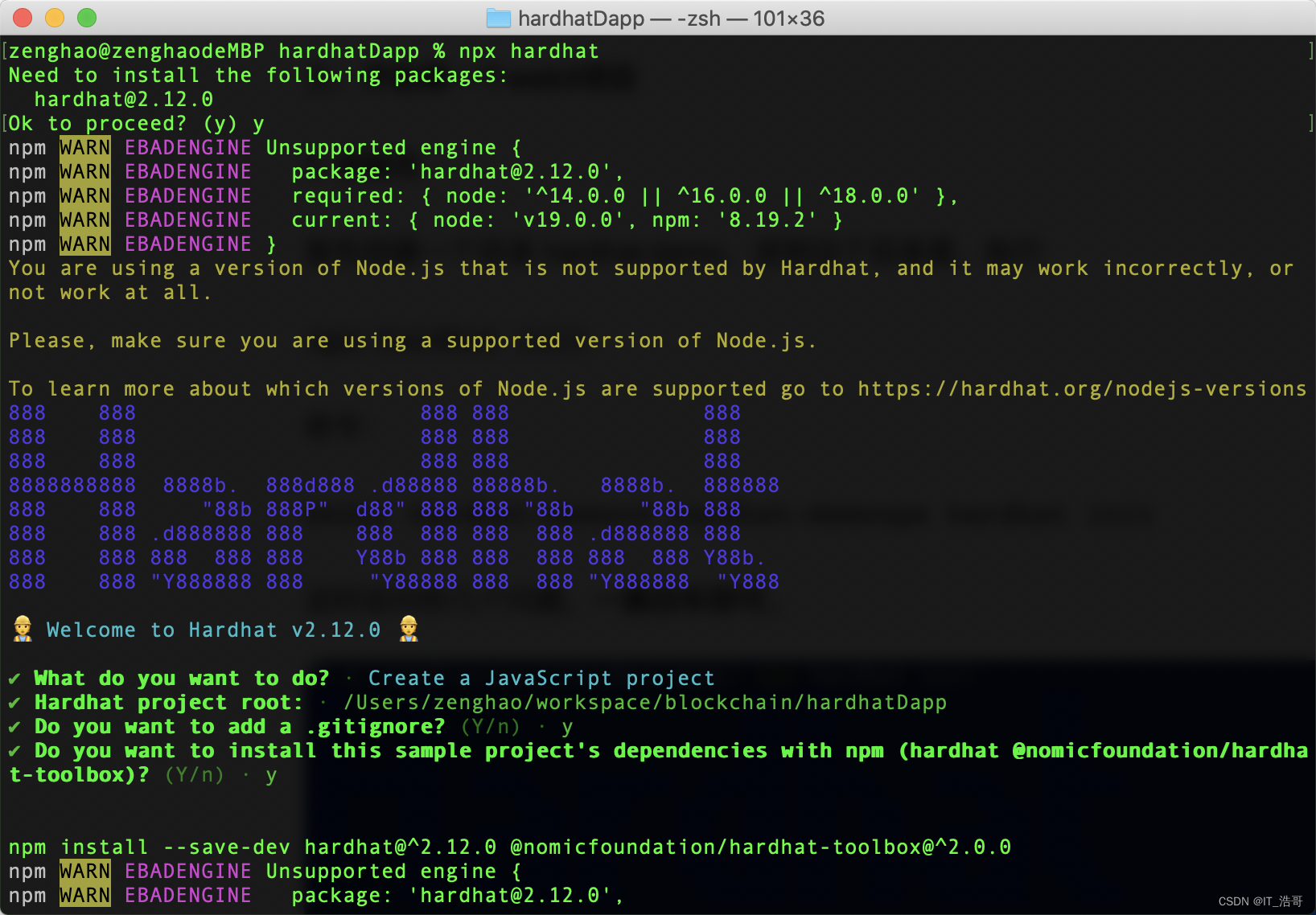
3、先创建一个空文件夹执行安装命令;通过执行 npx hardhat 创建项目。
讯享网npx hardhat
初始化后项目结构。
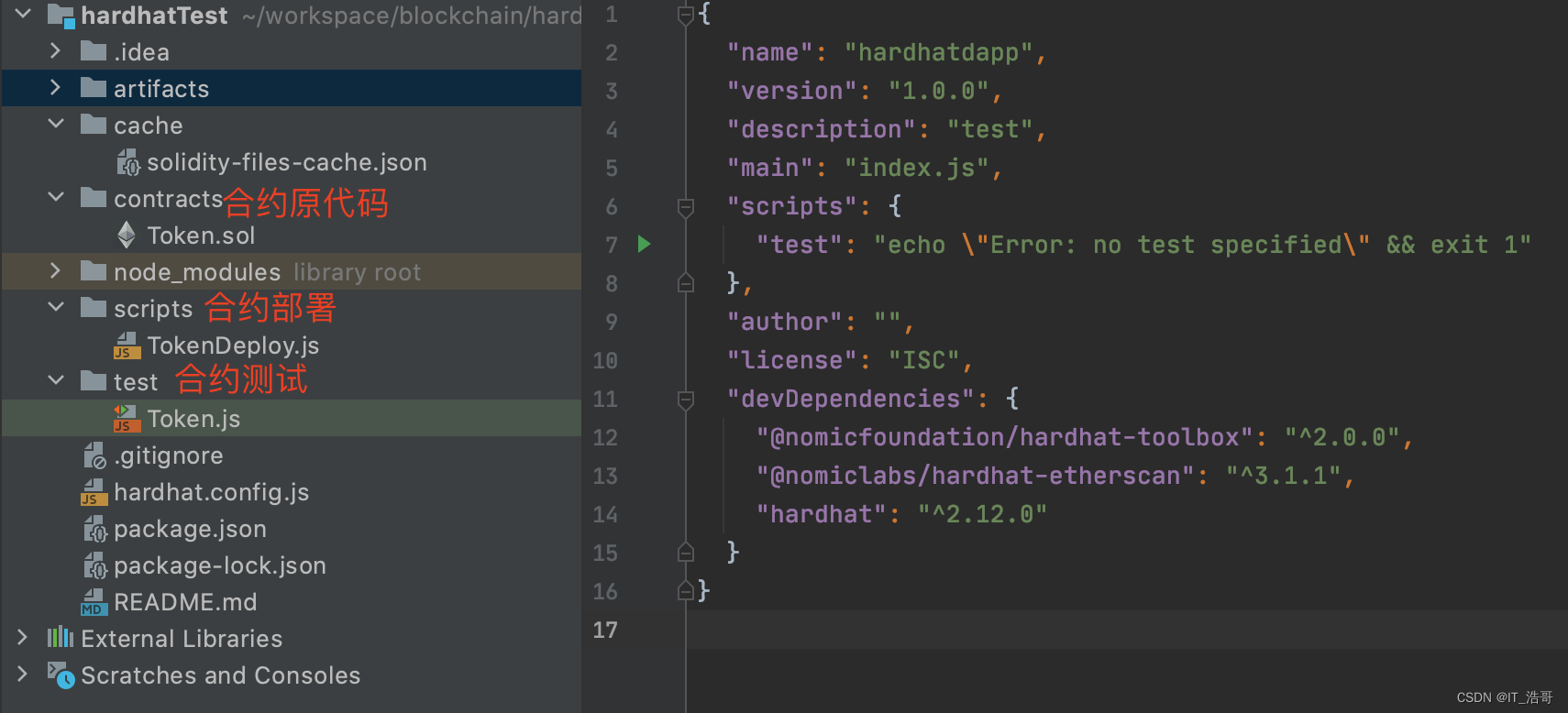
五、创建编译合约
1、在contracts目录下编写一个合约文件 Token.js
// SPDX-License-Identifier: MIT pragma solidity ^0.8.8; library SafeMath { function add(uint256 a, uint256 b) internal pure returns (uint256) { uint256 c = a + b; require(c >= a, "SafeMath: addition overflow"); return c; } function sub(uint256 a, uint256 b) internal pure returns (uint256) { require(b <= a, "SafeMath: subtraction overflow"); uint256 c = a - b; return c; } function mul(uint256 a, uint256 b) internal pure returns (uint256) { if (a == 0) { return 0; } uint256 c = a * b; require(c / a == b, "SafeMath: multiplication overflow"); return c; } function div(uint256 a, uint256 b) internal pure returns (uint256) { // Solidity only automatically asserts when dividing by 0 require(b > 0, "SafeMath: division by zero"); uint256 c = a / b; // assert(a == b * c + a % b); // There is no case in which this doesn't hold return c; } function mod(uint256 a, uint256 b) internal pure returns (uint256) { require(b != 0, "SafeMath: modulo by zero"); return a % b; } } interface IERC20 { function totalSupply() external view returns (uint256); function balanceOf(address account) external view returns (uint256); function transfer(address recipient, uint256 amount) external returns (bool); function allowance(address owner, address spender) external view returns (uint256); function approve(address spender, uint256 amount) external returns (bool); function transferFrom(address sender, address recipient, uint256 amount) external returns (bool); event Transfer(address indexed from, address indexed to, uint256 value); event Approval(address indexed owner, address indexed spender, uint256 value); } abstract contract ERC20Detailed is IERC20 { string private _name; string private _symbol; uint8 private _decimals; constructor (string memory tokenName, string memory tokenSymbol, uint8 tokenDecimals) { _name = tokenName; _symbol = tokenSymbol; _decimals = tokenDecimals; } function name() public view returns (string memory) { return _name; } function symbol() public view returns (string memory) { return _symbol; } function decimals() public view returns (uint8) { return _decimals; } } contract ERC20 is IERC20 { using SafeMath for uint256; mapping (address => uint256) private _balances; mapping (address => mapping (address => uint256)) private _allowances; uint256 private _totalSupply; function totalSupply() public view returns (uint256) { return _totalSupply; } function balanceOf(address account) public view returns (uint256) { return _balances[account]; } function transfer(address recipient, uint256 amount) public returns (bool) { _transfer(msg.sender, recipient, amount); return true; } function allowance(address owner, address spender) public view returns (uint256) { return _allowances[owner][spender]; } function approve(address spender, uint256 value) public returns (bool) { _approve(msg.sender, spender, value); return true; } function transferFrom(address sender, address recipient, uint256 amount) public returns (bool) { _transfer(sender, recipient, amount); _approve(sender, msg.sender, _allowances[sender][msg.sender].sub(amount)); return true; } function _transfer(address sender, address recipient, uint256 amount) internal { require(sender != address(0), "ERC20: transfer from the zero address"); require(recipient != address(0), "ERC20: transfer to the zero address"); _balances[sender] = _balances[sender].sub(amount); _balances[recipient] = _balances[recipient].add(amount); emit Transfer(sender, recipient, amount); } function _mint(address account, uint256 amount) internal { require(account != address(0), "ERC20: mint to the zero address"); _totalSupply = _totalSupply.add(amount); _balances[account] = _balances[account].add(amount); emit Transfer(address(0), account, amount); } function _burn(address account, uint256 value) internal { require(account != address(0), "ERC20: burn from the zero address"); _totalSupply = _totalSupply.sub(value); _balances[account] = _balances[account].sub(value); emit Transfer(account, address(0), value); } function _approve(address owner, address spender, uint256 value) internal { require(owner != address(0), "ERC20: approve from the zero address"); require(spender != address(0), "ERC20: approve to the zero address"); _allowances[owner][spender] = value; emit Approval(owner, spender, value); } function _burnFrom(address account, uint256 amount) internal { _burn(account, amount); _approve(account, msg.sender, _allowances[account][msg.sender].sub(amount)); } } contract ERC20Template is ERC20, ERC20Detailed { constructor() ERC20Detailed("USDT", "USDT", 18) { _mint(msg.sender, * (10 uint256(decimals()))); } } 2、编译合约执行 npx hardhat compile

讯享网 % npx hardhat compile Compiled 1 Solidity file successfully
3、在test目录下 编写测试案例 Token.js
//Chai,这是一个断言库 const { expect } = require("chai"); describe("创建合约测试案例", function() { it("CreateContract", async function() { //ethers.js中的Signer 代表以太坊账户对象。 它用于将交易发送到合约和其他帐户。 // 在这里,我们获得了所连接节点中的帐户列表,在本例中节点为Hardhat Network,并且仅保留第一个帐户 const [owner, addr1, addr2] = await ethers.getSigners(); //ethers.js中的ContractFactory是用于部署新智能合约的抽象,因此此处的Token是用来实例代币合约的工厂。 const Token = await ethers.getContractFactory("ERC20Template"); //在ContractFactory上调用deploy()将启动部署,并返回解析为Contract的Promise。 该对象包含了智能合约所有函数的方法。 const hardhatToken = await Token.deploy(); //当你调用deploy()时,将发送交易,但是直到该交易打包出块后,合约才真正部署。 调用deployed()将返回一个Promise,因此该代码将阻塞直到部署完成。 await hardhatToken.deployed(); //查询代币总量 const balance = await hardhatToken.balanceOf(await owner.getAddress()); console.log("代币总量="+balance) // 给钱包addr1转移100代币数量 await hardhatToken.transfer(await addr1.getAddress(), 100); //查询地址addr1余额 const balanceAddr1 = await hardhatToken.balanceOf(await addr1.getAddress()); console.log("地址addr1余额="+balanceAddr1) // 钱包addr1给钱包addr2转移100代币数量 await hardhatToken.connect(addr1).transfer(await addr2.getAddress(), 100); const balanceAddr11 = await hardhatToken.balanceOf(await addr1.getAddress()); console.log("余额转移给addr2后地址addr1余额="+balanceAddr11) //查询地址addr2余额 const balanceAddr2 = await hardhatToken.balanceOf(await addr2.getAddress()); console.log("地址addr2余额="+balanceAddr2) //断言判断 expect(await hardhatToken.balanceOf(await addr2.getAddress())).to.equal(100); }); }); 执行 npx hardhat test 查看运行结果:
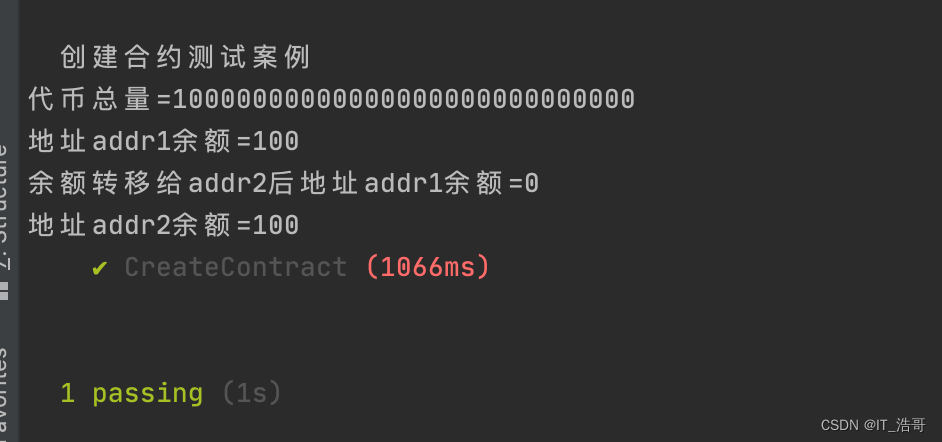
六、部署合约到正式网络网络
1、hardhat.config.js 在此文件里面配置 网络信息
讯享网require("@nomicfoundation/hardhat-toolbox"); require("@nomiclabs/hardhat-etherscan"); module.exports = { networks: { bsc: { url: `https://bsc-dataseed1.ninicoin.io/`, accounts: [`部署合约钱包私钥`], }, bscTest: { url: `https://data-seed-prebsc-2-s3.binance.org:8545/`, accounts: [`部署合约钱包私钥`] }, hecoTest: { url: 'https://http-testnet.hecochain.com', accounts: [`部署合约钱包私钥`] } }, etherscan: { apiKey: { bsc: '', hecoTestnet: '', } }, solidity: "0.8.9" };
2、在scripts目录下创建 TokenDeploy.js 文件
async function main() { const [deployer] = await ethers.getSigners(); console.log("获取部署钱包地址:",await deployer.getAddress()); console.log("获取部署钱包地址余额:", (await deployer.getBalance()).toString()); //指定合约工程要部署的名称 const Token = await ethers.getContractFactory("ERC20Template"); const token = await Token.deploy(); await token.deployed(); console.log("部署后合约地址:", token.address); } main() .then(() => process.exit(0)) .catch(error => { console.error(error); process.exit(1); }); 执行部署命令:npx hardhat run scripts/TokenDeploy.js --network hecoTest
讯享网 % npx hardhat run scripts/TokenDeploy.js --network hecoTest 获取部署钱包地址: 0xcb3daa1547B52783c50f0Bef3 获取部署钱包地址余额: 00000000 部署后合约地址: 0x9AdAaDb89C6968CF6C4Ef116C614EAedD314a6EE
HECO测试浏览器查看验证
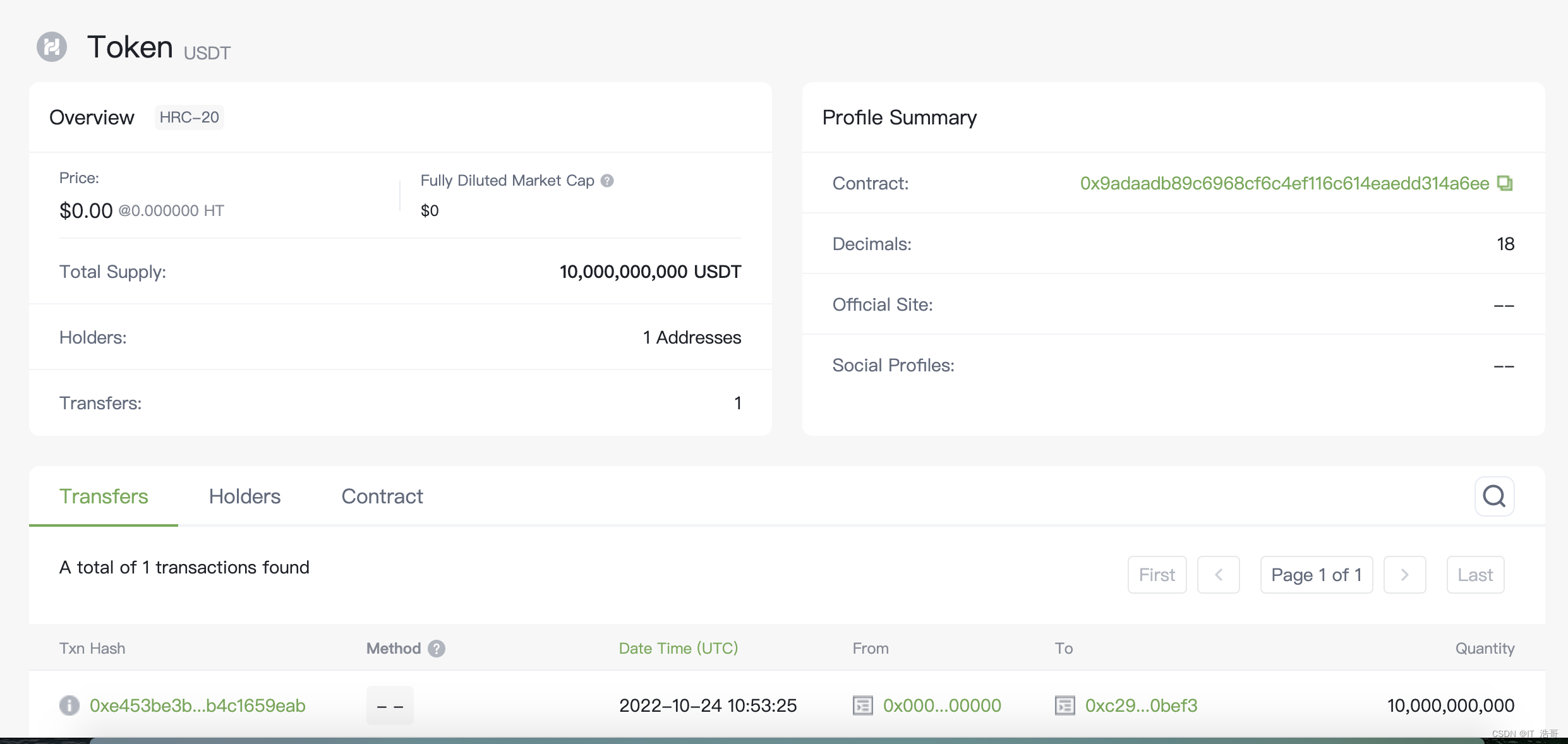
七、合约源代码开源
注:需要申请浏览器 apiKey配置在 hardhat.config.js文件此处。
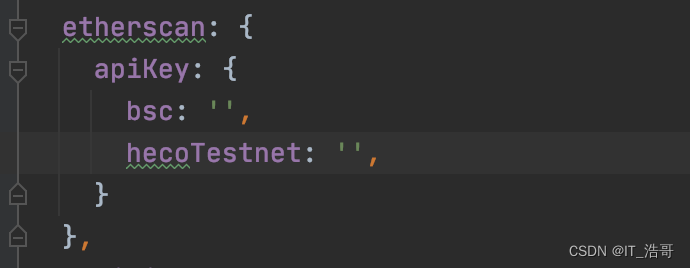
开源执行命令,成功后就可以在浏览器上查看了。
% npx hardhat verify 0x9adaadb89c6968cf6c4ef116c614eaedd314a6ee --network hecoTest 
版权声明:本文内容由互联网用户自发贡献,该文观点仅代表作者本人。本站仅提供信息存储空间服务,不拥有所有权,不承担相关法律责任。如发现本站有涉嫌侵权/违法违规的内容,请联系我们,一经查实,本站将立刻删除。
如需转载请保留出处:https://51itzy.com/kjqy/75820.html