
vue构建多入口 多出口项目 讯享网
(1)使用vue-clit搭建项目
讯享网cnpm install -g vue-cli
vue init webpack '项目名' (2) 调整一下项目目录
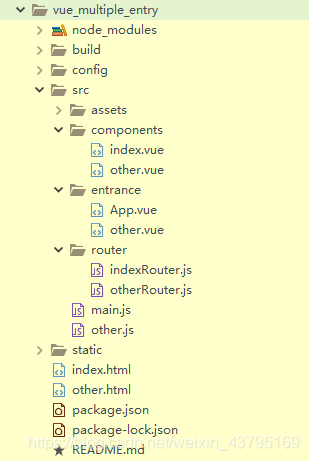
讯享网
(3)修改main.js和other.js文件
main.js
讯享网import Vue from 'vue' import App from './entrance/App' import router from './router/indexRouter.js' Vue.config.productionTip = false new Vue({ el: '#app', router, components: { App }, template: '<App/>' })
other.js
import Vue from 'vue' import App from './entrance/other' // 入口文件调用 other.vue import router from './router/otherRouter.js' // 路由调用 otherRouter.js Vue.config.productionTip = false new Vue({ el: '#app', router, components: { App }, template: '<App/>' }) (4)找到关于配置index.html入口的文件,加上other.html配置
build —> webpack.base.conf.js文件
讯享网entry: { app: './src/main.js', other:'./src/other.js' },
build —> webpack.dev.conf.js文件
  new HtmlWebpackPlugin({
      filename: 'index.html',
      template: 'index.html',
      inject: true,
			chunks: ['app']
    }),
	new HtmlWebpackPlugin({
		filename: 'other.html',
		template: 'other.html',
		inject: true,
		chunks: ['other']
	}),
build —> webpack.prod.conf.js文件
讯享网 new HtmlWebpackPlugin({
      filename: config.build.index,
      template: 'index.html',
      inject: true,
      minify: {
        removeComments: true,
        collapseWhitespace: true,
        removeAttributeQuotes: true
      },
      chunksSortMode: 'dependency',
	  chunks: ['manifest', 'vendor', 'app']

    }),
		new HtmlWebpackPlugin({
			filename: config.build.other,
			template: 'other.html',
			inject: true,
			minify: {
				removeComments: true,
				collapseWhitespace: true,
				removeAttributeQuotes: true
			},
			chunksSortMode: 'dependency',
			chunks: ['manifest', 'vendor', 'other']
		}),
config ----> index.js 讯享网 build: {
// Template for index.html
index: path.resolve(__dirname, '../dist/index.html'),
other: path.resolve(__dirname, '../dist/other.html'),
}
(5) 运行
http://localhost:8080/ 默认打开index.html
http://localhost:8080/other.html#/ 打开other.html页面
(6)打包
npm run build
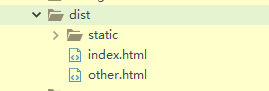
打包后的dist文件夹下,有index.html和other.html
github地址 https://github.com//vue_multiple_entry
版权声明:本文内容由互联网用户自发贡献,该文观点仅代表作者本人。本站仅提供信息存储空间服务,不拥有所有权,不承担相关法律责任。如发现本站有涉嫌侵权/违法违规的内容,请联系我们,一经查实,本站将立刻删除。
如需转载请保留出处:https://51itzy.com/kjqy/75212.html