
iPhone设备
物理分辨率是硬件所支持的,逻辑分辨率是软件可以达到的。
| 代数 | 设备 | 操作系统 | 逻辑分辨率(point) | 物理分辨率(pixel) | 屏幕尺寸(对角线长度) | 缩放因子 |
|---|---|---|---|---|---|---|
| iPhone | ||||||
| 第一代 | iPhone 2G | iOS 1 | 320 x 480 | 480 x 320 | 3.5寸 | 1x |
| 第二代 | iPhone 3 | iOS 2 | 320 x 480 | 480 x 320 | 3.5寸 | 1x |
| 第三代 | iPhone 3GS | iOS 3 | 320 x 480 | 480 x 320 | 3.5寸 | 1x |
| 第四代 | iPhone 4 | iOS 4 | 320 x 480 | 960 × 640 | 3.5寸 | 2x |
| 第五代 | iPhone 4S | iOS 5 | 320 x 480 | 960 × 640 | 3.5寸 | 2x |
| 第六代 | iPhone 5 | iOS 6 | 320 x 568 | 1136 x 640 | 4.0寸 | 2x |
| 第七代 | iPhone 5S/5C | iOS 7 | 320 x 568 | 1136 x 640 | 4.0寸 | 2x |
| 第八代 | iPhone 6 | iOS 8 | 375 x 667 | 1334 x 750 | 4.7寸 | 2x |
| 第八代 | iPhone 6 Plus | iOS 8 | 414 x 736 | 2208 x 1242 (1920x1080) | 5.5寸 | 3x |
| 第九代 | iPhone 6S | iOS 9 | 375 x 667 | 1334 x 750 | 4.7寸 | 2x |
| 第九代 | iPhone 6S Plus | iOS 9 | 414 x 736 | 2208 x 1242 (1920x1080) | 5.5寸 | 3x |
| iPhone SE | iOS 9 | 320 x 568 | 1136 x 640 | 4寸 | 2x | |
| 第十代 | iPhone 7 | iOS 10 | 375 x 667 | 1334 x 750 | 4.7寸 | 2x |
| 第十代 | iPhone 7 Plus | iOS 10 | 414 x 736 | 2208 x 1242 (1920x1080) | 5.5寸 | 3x |
| 第十一代 | iPhone 8 | iOS 11 | 375 x 667 | 1334 x 750 | 4.7寸 | 2x |
| 第十一代 | iPhone 8 Plus | iOS 11 | 414 x 736 | 2208 x 1242 (1920x1080) | 5.5寸 | 3x |
| 第十一代 | iPhone X | iOS 11 | 375 x 812 | 2436 × 1125 | 5.8寸 | 3x |
| 第十二代 | Phone Xʀ | iOS 12 | 414 x 896 | 1792 × 828 | 6.1寸 | 2x |
| 第十二代 | iPhone Xs | iOS 12 | 375 x 812 | 2436 × 1125 | 5.8寸 | 3x |
| 第十二代 | iPhone Xs Max | iOS 12 | 414 x 896 | 2688 × 1242 | 6.5寸 | 3x |
| 第十三代 | iPhone 11 | iOS 13 | 414 x 896 | 1792 × 828 | 6.1寸 | 2x |
| 第十三代 | iPhone 11 Pro | iOS 13 | 375 x 812 | 2436 × 1125 | 5.8寸 | 3x |
| 第十三代 | iPhone 11 Pro Max | iOS 13 | 414 x 896 | 2688 × 1242 | 6.5寸 | 3x |
| — | iPhone SE(二代) | iOS 13 | 375 x 667 | 1334 x 750 | 4.7寸 | 2x |
| 第十四代 | iPhone 12 mini | iOS 14 | 375 x 812 | 2340 × 1080 | 5.4寸 | 3x |
| 第十四代 | iPhone 12 | iOS 14 | 390 x 844 | 2532 × 1170 | 6.1寸 | 3x |
| 第十四代 | iPhone 12 Pro | iOS 14 | 390 x 844 | 2532 × 1170 | 6.1寸 | 3x |
| 第十四代 | iPhone 12 Pro Max | iOS 14 | 428 x 926 | 2778 × 1284 | 6.7寸 | 3x |
| 第十五代 | iPhone 13 Pro | iOS 15 | 390x844 | 1170x2532 | 6.1寸 | 3x |
| 第十五代 | iPhone 13 mini | iOS 15 | 360 x 780 | 1080x2340 | 5.4寸 | 3x |
| 第十五代 | iPhone 13 | iOS 15 | 390 x 844 | 1170x2532 | 6.1寸 | 3x |
| 第十五代 | iPhone 13 Pro Max | iOS 15 | 428 x 926 | 1284x2778 | 6.7寸 | 3x |

| 手机型号 | 尺寸(对角线) | 物理点 | 宽长比例 | 像素点 | 倍数 | 状态栏高度 | 底部安全距离 | 导航栏高度 | tabbar高度 |
|---|---|---|---|---|---|---|---|---|---|
| iPhone 4/4S | 3.5英寸 | 320x480 | 0.667 | 640x960 | @2x | 20 | - | 44 | 49 |
| iPhone 5/5S/5C | 4英寸 | 320x568 | 0.563 | 640x1136 | @2x | 20 | - | 44 | 49 |
| iPhone SE | 4英寸 | 320x568 | 0.563 | 640x1136 | @2x | 20 | - | 44 | 49 |
| iPhone 6 | 4.7英寸 | 375x667 | 0.562 | 750x1334 | @2x | 20 | - | 44 | 49 |
| iPhone 6 Plus | 5.5英寸 | 414x736 | 0.563 | 1242x2208 | @3x | 20 | - | 44 | 49 |
| iPhone 6S | 4.7英寸 | 375x667 | 0.562 | 750x1334 | @2x | 20 | - | 44 | 49 |
| iPhone 6S Plus | 5.5英寸 | 414x736 | 0.563 | 1242x2208 | @3x | 20 | - | 44 | 49 |
| iPhone 7 | 4.7英寸 | 375x667 | 0.562 | 750x1334 | @2x | 20 | - | 44 | 49 |
| iPhone 7 Plus | 5.5英寸 | 414x736 | 0.563 | 1242x2208 | @3x | 20 | - | 44 | 49 |
| iPhone 8 | 4.7英寸 | 375x667 | 0.562 | 750x1334 | @2x | 20 | - | 44 | 49 |
| iPhone 8 Plus | 5.5英寸 | 414x736 | 0.563 | 1242x2208 | @3x | 20 | - | 44 | 49 |
| iPhone X | 5.8英寸 | 375x812 | 0.462 | 1125x2436 | @3x | 44 | 34 | 44 | 83 |
| iPhone XS | 5.8英寸 | 375x812 | 0.462 | 1125x2436 | @3x | 44 | 34 | 44 | 83 |
| iPhone XS Max | 6.5英寸 | 414x896 | 0.462 | 1242x2688 | @3x | 44 | 34 | 44 | 83 |
| iPhone XR | 6.1英寸 | 414x896 | 0.462 | 828x1792 | @2x | 44 | 34 | 44 | 83 |
| iPhone 11 | 6.1英寸 | 414x896 | 0.462 | 828x1792 | @2x | 44 | 34 | 44 | 83 |
| iPhone 11 Pro | 5.8英寸 | 375x812 | 0.462 | 1125x2436 | @3x | 44 | 34 | 44 | 83 |
| iPhone 11 Pro Max | 6.5英寸 | 414x896 | 0.462 | 1242x2688 | @3x | 44 | 34 | 44 | 83 |
如图所示:
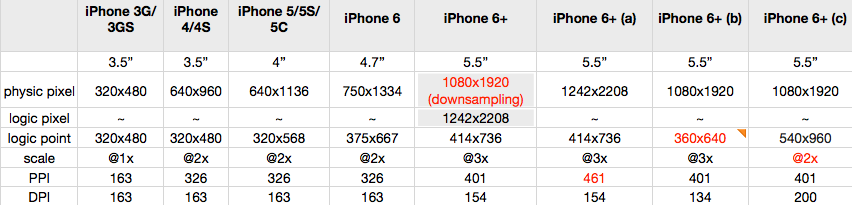
Tips:
| 机型 | 屏幕宽高比 |
|---|---|
| iPhone 5 | 320÷568=0.563 |
| iPhone 6 | 375÷667=0.562 |
| iPhone 6 Plus | 414÷736=0.5625 |
iPod设备
| 设备 | 操作系统 | 物理分辨率(pixel) | 屏幕尺寸(对角线长度) | 缩放因子 |
|---|---|---|---|---|
| iPod Touch 1 | iOS 1 | 480 x 320 | 3.5寸 | 1x |
| iPod Touch 2 | iOS 2 | 480 x 320 | 3.5寸 | 1x |
| iPod Touch 3 | iOS 3 | 480 x 320 | 3.5寸 | 1x |
| iPod Touch 4 | iOS 4 | 960 x 640 | 3.5寸 | 2x |
| iPod Touch 5 | iOS 6 | 1136 x 640 | 4.0寸 | 2x |
| iPod Touch 6 | iOS 8 | 1136 x 640 | 4.0寸 | 2x |
iPad设备
| 设备 | 操作系统 | 物理分辨率(pixel) | 屏幕尺寸(对角线长度) | 缩放因子 |
|---|---|---|---|---|
| iPad 1 | iOS 3 | 1024 x 768 | 9.7寸 | 1x |
| iPad 2 | iOS 4 | 1024 x 768 | 9.7寸 | 1x |
| iPad 3 (The New iPad) | iOS 5 | 2048 x 1536 | 9.7寸 | 2x |
| iPad 4 | iOS 6 | 2048 x 1536 | 9.7寸 | 2x |
| iPad Air | iOS 7 | 2048 x 1536 | 9.7寸 | 2x |
| iPad Air 2 | iOS 8 | 2048 x 1536 | 9.7寸 | 2x |
| iPad Pro | iOS 9 | 2048 x 1536 | 9.7寸 | 2x |
| iPad (第五代) | iOS 10 | 2048 x 1536 | 9.7寸 | 2x |
| iPad Pro | iOS 9 | 2732 x 2048 | 12.9寸 | 3x |
| iPad Pro (取代9.7寸) | iOS 10 | 2224 x 1668 | 10.5寸 | 3x |
| iPad mini | iOS 6 | 1024 x 768 | 7.9寸 | 1x |
| iPad mini 2 | iOS 7 | 2048 x 1536 | 7.9寸 | 2x |
| iPad mini 3 | iOS 8 | 2048 x 1536 | 7.9寸 | 2x |
| iPad mini 4 | iOS 9 | 2048 x 1536 | 7.9寸 | 2x |
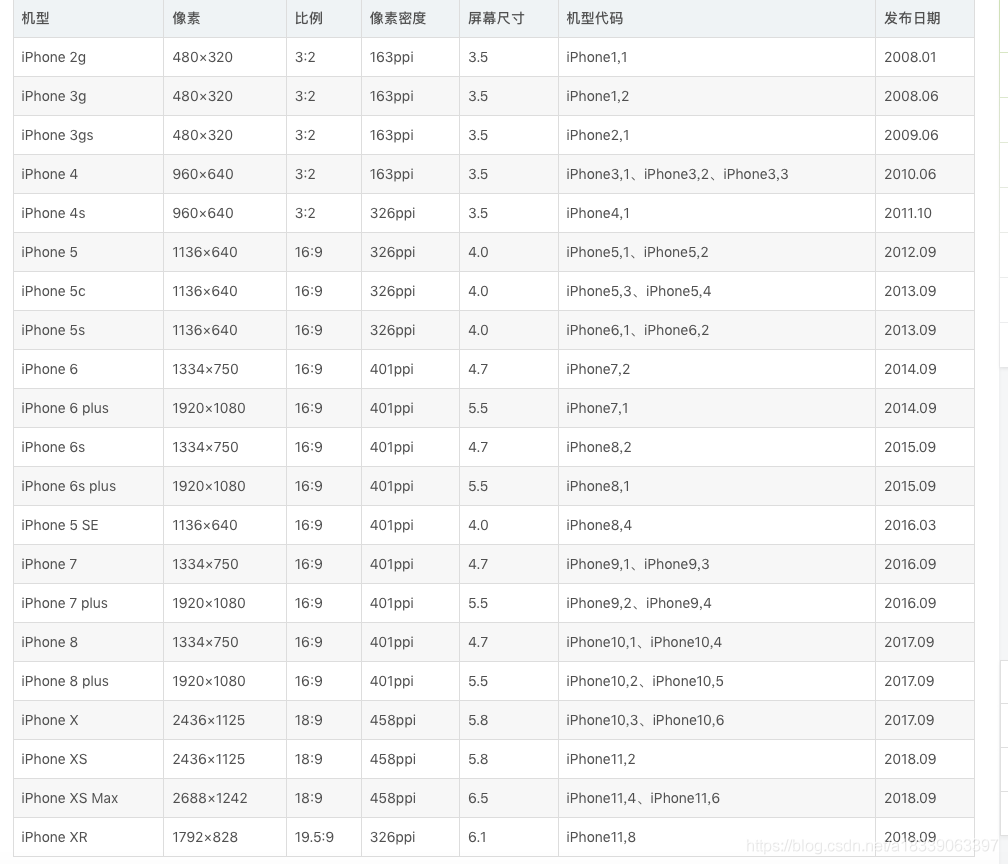
所有设备型号官网地址:Models - The iPhone Wiki
//获得屏幕的宽高
#define kScreenWidth ([UIScreen mainScreen].bounds.size.width)
#define kScreenHeight ([UIScreen mainScreen].bounds.size.height)
//iPhoneX / iPhoneXS
#define isIphoneX_XS (kScreenWidth == 375.f && kScreenHeight == 812.f ? YES : NO)
//iPhoneXR / iPhoneXSMax
#define isIphoneXR_XSMax (kScreenWidth == 414.f && kScreenHeight == 896.f ? YES : NO)
//异性全面屏
#define isFullScreen (isIphoneX_XS || isIphoneXR_XSMax)

iOS开发 关于ios14系统以上状态栏高度改变的问题
之前状态栏高度:有刘海屏iPhone为44,无刘海屏为20。
但是从ios14开始有刘海屏的iPhone状态栏高度不一定是44了。如:
iPhoneXR,iPhone11 状态栏高度为48,
iPhone X,iPhone 11 Pro,iPhone 11 Pro Max,iPhone 12 mini,状态栏高度44,
iPhone 12,iPhone 12 Pro,iPhone 12 Pro Max,状态栏高度为47.
iPhone 13 mini状态栏高度为50,
iPhone 13,iPhone 13 Pro,iPhone 13 Pro Max,状态栏高度为47.
所以之前项目中如果是写固定值的状态栏高度为44的宏就不适用了。
替换为以下宏:
#define phoneStatusHeight \ ({CGFloat statusBarHeight = 0.0;\ if (@available(iOS 13.0, *)) {\ statusBarHeight = [UIApplication sharedApplication].windows.firstObject.windowScene.statusBarManager.statusBarFrame.size.height;\ } else { \ statusBarHeight = [UIApplication sharedApplication].statusBarFrame.size.height;\ }\ (statusBarHeight);\ })讯享网
链接:https://www.jianshu.com/p/17a49d30e0e4
iOS(iPhone13)设备的机型/尺寸/型号/代码/像素 - 简书
转载:http://blog.csdn.net/Scorpio_27/article/details/
版权声明:本文内容由互联网用户自发贡献,该文观点仅代表作者本人。本站仅提供信息存储空间服务,不拥有所有权,不承担相关法律责任。如发现本站有涉嫌侵权/违法违规的内容,请联系我们,一经查实,本站将立刻删除。
如需转载请保留出处:https://51itzy.com/kjqy/74819.html