
1 实验拓扑
2 实验需求
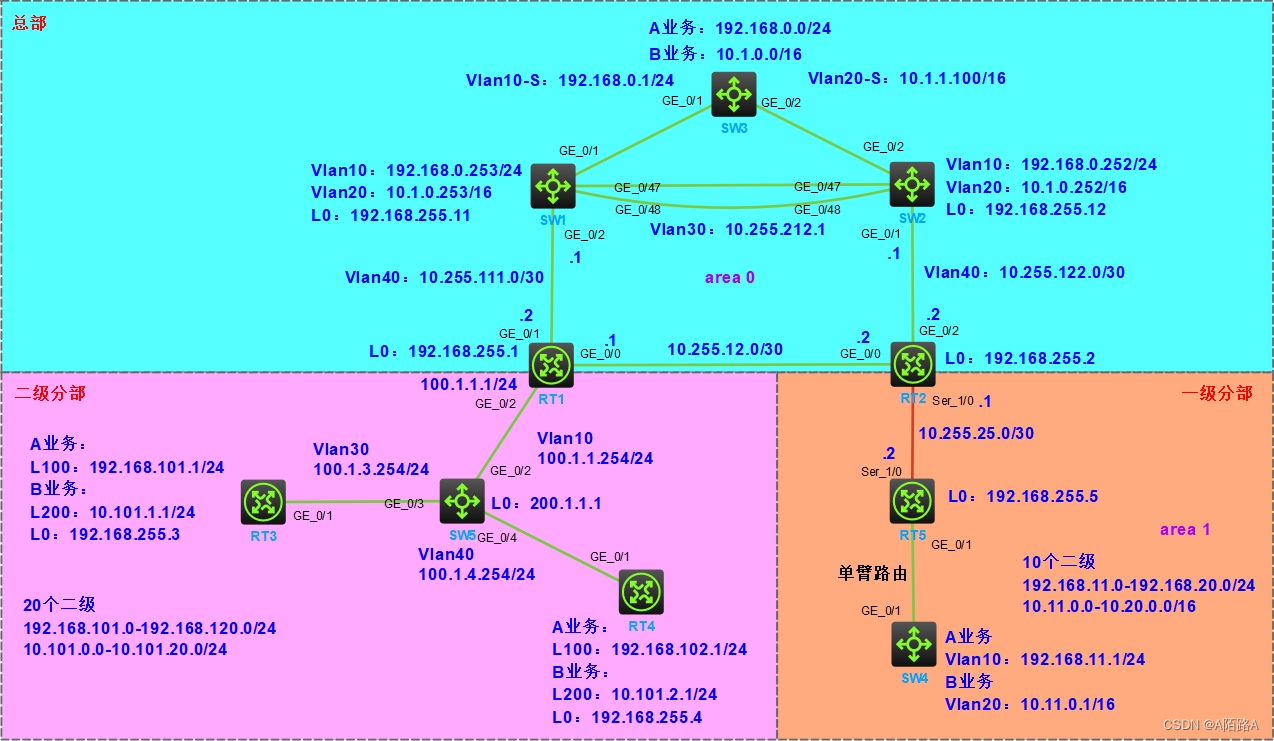
环境中共有三个部分:总部,分部一,分部二。
每个部分有两个业务网段:A业务、B业务。
VLAN
- 在SW1上有VLAN 10(A业务),VLAN20(B业务),VLAN30(S1-S2间三层链路),VLAN40(S1,S2上分别用于上连到RT1,RT2)MSTP
- SW1\SW2\SW3用MSTP防二层环路,三台交换机运行在同一个MSTP域中
- VLAN 10是A业务,VLAN 20是B业务网段;分别映射到MSTP实例1、实例2
- SW1作为实例1的根交换机,S2作为实例1的从根
- SW2作为实例2的根交换机,S1作为实例2的从根
链路聚合
SW1\SW2之间有二条物理链路,将这两条物理路由聚合成一条逻辑链路
TRUNK
SW1\SW2\SW3之间的链路都是TRUNK链路,允许VLAN10 VLAN 20 VLAN 30,不用允许VLAN 40
VRRP
- 总部的A业务、B业务使用虚拟网关提供可靠性
- SW1作为A业务的主网关,SW2作为A业务的备份网关
- SW2作为B业务的主网关,SW1作为B业务的备份网关
- 不用跟踪上行链路(端口)
- 不使用VRRP认证
PPP
RT2\RT5之间通过PPP互连,并使用CHAP保证链路安全
单臂路由
- 分部一有RT5下连到一台交换机SW4,在交换机上有两个VLAN
- VLAN 10为A业务,VLAN20为B业务
- SW4通过TRUNK链路与R5以太口相连,并允许VLAN10\VLAN20通过
- RT5的两个子接口作为两个业务网段的网关
DHCP
- SW5三层交换机,模拟Internet,并可用一个回环口模拟公网上的一台主机
- SW5作为DHCP服务器,为RT3\RT4与SW5互连的接口分配地址,不考虑为其它主机分配地址
- SW5与RT1、RT3、RT4互连所用的接口(可能是三层接口,也可能是VLAN接口)
GRE OVER IPSEC
- RT1到 RT3\RT4分别是通过GRE OVER IPSEC保护业务流
- RT1 IKE用野蛮模式,用名称识别对端
- RT1 IPSEC策略用模板来做,分别与RT3\RT4建立IPSEC SA
OSPF
- 总部和分部一路由用OSPF路由协议学习路由
- 总部在AREA 0;分部一用AREA 1与总部相连
- 所有设备不允许有等价路由
- 在业务网段中不能有协议报文
RIP
- 分部二与总部通过RIP路由协议学习路由
- RIP协议报文不能出现在OSPF域中
路由聚合
- 所有的B业务互通,A业务分部一和分部二的各个节点间不允许互通
- 总部和分部的各个节点不要出现各网段的明细。(直连路由除外)
QOS
总部和分部一的A流在RT2-RT5的链路上保证1.5M的带宽
NAT
- 全网的A业务都要能够通过NAT实现internet访问;分部一的有自己连接INTERNET的出口,不允许通过总部的出口访问INTERNET
- 在总部的B业务段中有一台服务器,需要提供给外部用户访问,要求提供所有服务
3 配置步骤
3-1 链路聚合
SW1
<H3C>sys System View: return to User View with Ctrl+Z. [H3C]sysname SW1 [SW1]interface Bridge-Aggregation 1 [SW1-Bridge-Aggregation1]qu [SW1]interface GigabitEthernet 1/0/47 [SW1-GigabitEthernet1/0/47]port link-aggregation group 1 [SW1-GigabitEthernet1/0/47]qu [SW1]interface GigabitEthernet 1/0/48 [SW1-GigabitEthernet1/0/48]port link-aggregation group 1 [SW1-GigabitEthernet1/0/48]qu 讯享网
SW2
讯享网<H3C>sys System View: return to User View with Ctrl+Z. [H3C]sysname SW2 [SW2]interface Bridge-Aggregation 1 [SW2-Bridge-Aggregation1]qu [SW2]interface GigabitEthernet 1/0/47 [SW2-GigabitEthernet1/0/47]port link-aggregation group 1 [SW2-GigabitEthernet1/0/47]qu [SW2]interface GigabitEthernet 1/0/48 [SW2-GigabitEthernet1/0/48]port link-aggregation group 1 [SW2-GigabitEthernet1/0/48]qu
检查
[SW1]dis link-aggregation verbose Loadsharing Type: Shar -- Loadsharing, NonS -- Non-Loadsharing Port Status: S -- Selected, U -- Unselected, I -- Individual Port: A -- Auto port, M -- Management port, R -- Reference port Flags: A -- LACP_Activity, B -- LACP_Timeout, C -- Aggregation, D -- Synchronization, E -- Collecting, F -- Distributing, G -- Defaulted, H -- Expired Aggregate Interface: Bridge-Aggregation1 Aggregation Mode: Static Loadsharing Type: Shar Management VLANs: None Port Status Priority Oper-Key GE1/0/47(R) S 32768 1 GE1/0/48 S 32768 1 3-2 配置Vlan
SW1
讯享网[SW1]vlan 10 [SW1-vlan10]vlan 20 [SW1-vlan20]vlan 30 [SW1-vlan30]vlan 40 [SW1-vlan40]qu [SW1]interface GigabitEthernet 1/0/1 [SW1-GigabitEthernet1/0/1]port link-type trunk [SW1-GigabitEthernet1/0/1]port trunk permit vlan 10 20 [SW1-GigabitEthernet1/0/1]undo port trunk permit vlan 1 [SW1-GigabitEthernet1/0/1]qu [SW1]interface Bridge-Aggregation 1 [SW1-Bridge-Aggregation1]port link-type trunk [SW1-Bridge-Aggregation1]port trunk permit vlan 10 20 30 [SW1-Bridge-Aggregation1]undo port trunk permit vlan 1 [SW1-Bridge-Aggregation1]qu [SW1]interface GigabitEthernet 1/0/2 [SW1-GigabitEthernet1/0/2]port access vlan 40
SW2
[SW2]vlan 10 [SW2-vlan10]vlan 20 [SW2-vlan20]vlan 30 [SW2-vlan30]vlan 40 [SW2-vlan40]qu [SW2]interface GigabitEthernet 1/0/2 [SW2-GigabitEthernet1/0/2]port link-type trunk [SW2-GigabitEthernet1/0/2]port trunk permit vlan 10 20 [SW2-GigabitEthernet1/0/2]undo port trunk permit vlan 1 [SW2-GigabitEthernet1/0/2]qu [SW2]interface Bridge-Aggregation 1 [SW2-Bridge-Aggregation1]port link-type trunk [SW2-Bridge-Aggregation1]port trunk permit vlan 10 20 30 [SW2-Bridge-Aggregation1]undo port trunk permit vlan 1 [SW2-Bridge-Aggregation1]qu [SW2]interface GigabitEthernet 1/0/1 [SW2-GigabitEthernet1/0/1]port access vlan 40 SW3
讯享网[SW3]vlan 10 [SW3-vlan10]vlan 20 [SW3-vlan20]qu [SW3]interface range GigabitEthernet 1/0/1 g [SW3]interface range GigabitEthernet 1/0/1 GigabitEthernet 1/0/2 [SW3-if-range]port link-type trunk [SW3-if-range]port trunk permit vlan 10 20 [SW3-if-range]undo port trunk permit vlan 1
检查
<SW1>display port trunk Interface PVID VLAN Passing BAGG1 1 10, 20, 30 GE1/0/1 1 10, 20 GE1/0/47 1 10, 20, 30 GE1/0/48 1 10, 20, 30 3-3 配置MSTP
SW1
讯享网[SW1]stp region-configuration [SW1-mst-region]region-name h3c [SW1-mst-region]revision-level 3 [SW1-mst-region]instance 1 vlan 10 [SW1-mst-region]instance 2 vlan 20 [SW1-mst-region]active region-configuration [SW1-mst-region]qu [SW1]stp instance 1 root primary [SW1]stp instance 2 root secondary
SW2
[SW2]stp region-configuration [SW2-mst-region]region-name h3c [SW2-mst-region]revision-level 3 [SW2-mst-region]instance 1 vlan 10 [SW2-mst-region]instance 2 vlan 20 [SW2-mst-region]active region-configuration [SW2-mst-region]qu [SW2]stp instance 1 root secondary [SW2]stp instance 2 root primary SW3
讯享网[SW3]stp region-configuration [SW3-mst-region]region-name h3c [SW3-mst-region]revision-level 3 [SW3-mst-region]instance 1 vlan 10 [SW3-mst-region]instance 2 vlan 20 [SW3-mst-region]active region-configuration [SW3-mst-region]qu
检查
<SW3>display stp instance 1 brief MST ID Port Role STP State Protection 1 GigabitEthernet1/0/1 ROOT FORWARDING NONE 1 GigabitEthernet1/0/2 ALTE DISCARDING NONE 讯享网<SW3>display stp instance 2 brief MST ID Port Role STP State Protection 2 GigabitEthernet1/0/1 ALTE DISCARDING NONE 2 GigabitEthernet1/0/2 ROOT FORWARDING NONE
3-4 配置VRRP
SW1
[SW1]interface Vlan-interface 10 [SW1-Vlan-interface10]ip address 192.168.0.253 24 [SW1-Vlan-interface10]vrrp vrid 10 virtual-ip 192.168.0.254 [SW1-Vlan-interface10]vrrp vrid 10 priority 120 [SW1-Vlan-interface10]qu [SW1]interface Vlan-interface 20 [SW1-Vlan-interface20]ip address 10.1.0.253 16 [SW1-Vlan-interface20]vrrp vrid 20 virtual-ip 10.1.0.254 [SW1-Vlan-interface20]qu SW2
讯享网[SW2]interface Vlan-interface 10 [SW2-Vlan-interface10]ip address 192.168.0.252 24 [SW2-Vlan-interface10]vrrp vrid 10 virtual-ip 192.168.0.254 [SW2-Vlan-interface10]qu [SW2]interface Vlan-interface 20 [SW2-Vlan-interface20]ip address 10.1.0.252 16 [SW2-Vlan-interface20]vrrp vrid 20 virtual-ip 10.1.0.254 [SW2-Vlan-interface20]vrrp vrid 20 priority 120 [SW2-Vlan-interface20]qu
SW3
[SW3]interface Vlan-interface 10 [SW3-Vlan-interface10]ip address 192.168.0.1 24 [SW3-Vlan-interface10]qu [SW3]interface Vlan-interface 20 [SW3-Vlan-interface20]ip address 10.1.1.100 16 [SW3-Vlan-interface20]qu 检查
讯享网<SW1>display vrrp IPv4 Virtual Router Information: Running mode : Standard Total number of virtual routers : 2 Interface VRID State Running Adver Auth Virtual Pri Timer Type IP Vlan10 10 Master 120 100 Not supported 192.168.0.254 Vlan20 20 Backup 100 100 Not supported 10.1.0.254
<SW2>display vrrp IPv4 Virtual Router Information: Running mode : Standard Total number of virtual routers : 2 Interface VRID State Running Adver Auth Virtual Pri Timer Type IP Vlan10 10 Backup 100 100 Not supported 192.168.0.254 Vlan20 20 Master 120 100 Not supported 10.1.0.254 3-5 配置 IP
SW1
讯享网[SW1]interface Vlan-interface 30 [SW1-Vlan-interface30]ip address 10.255.212.1 30 [SW1-Vlan-interface30]qu [SW1]interface Vlan-interface 40 [SW1-Vlan-interface40]ip address 10.255.111.1 30 [SW1-Vlan-interface40]qu [SW1]interface LoopBack 0 [SW1-LoopBack0]ip address 192.168.255.11 32 [SW1-LoopBack0]qu
SW2
[SW2]interface Vlan-interface 30 [SW2-Vlan-interface30]ip address 10.255.212.2 30 [SW2-Vlan-interface30]qu [SW2]interface Vlan-interface 40 [SW2-Vlan-interface40]ip address 10.255.122.1 30 [SW2-Vlan-interface40]qu [SW2]interface LoopBack 0 [SW2-LoopBack0]ip address 192.168.255.12 32 [SW2-LoopBack0]qu RT1
讯享网[H3C]sysname RT1 [RT1]interface GigabitEthernet 0/0 [RT1-GigabitEthernet0/0]ip address 10.255.12.1 30 [RT1-GigabitEthernet0/0]qu [RT1]interface GigabitEthernet 1/0/1 [RT1-GigabitEthernet0/1]ip address 10.255.111.2 30 [RT1-GigabitEthernet0/1]qu [RT1]interface GigabitEthernet 0/2 [RT1-GigabitEthernet0/2]ip address 100.1.1.1 24 [RT1-GigabitEthernet0/2]qu [RT1]interface LoopBack 0 [RT1-LoopBack0]ip address 192.168.255.1 32 [RT1-LoopBack0]qu
RT2
[H3C]sysname RT2 [RT2]interface GigabitEthernet 0/0 [RT2-GigabitEthernet0/0]ip address 10.255.12.2 30 [RT2-GigabitEthernet0/0]qu [RT2]interface GigabitEthernet 0/2 [RT2-GigabitEthernet0/2]ip address 10.255.122.2 30 [RT2-GigabitEthernet0/2]qu [RT2]interface Serial 1/0 [RT2-Serial1/0]ip address 10.255.25.1 30 [RT2-Serial1/0]qu [RT2]interface LoopBack 0 [RT2-LoopBack0]ip address 192.168.255.2 32 [RT2-LoopBack0]qu RT3
讯享网[H3C]sysname RT3 [RT3]interface LoopBack 0 [RT3-LoopBack0]ip address 192.168.255.3 32 [RT3-LoopBack0]qu [RT3]interface LoopBack 100 [RT3-LoopBack100]ip address 192.168.101.1 24 [RT3-LoopBack100]qu [RT3]interface LoopBack 200 [RT3-LoopBack200]ip address 10.101.1.1 24 [RT3-LoopBack200]qu
RT4
[H3C]sysname RT4 [RT4]interface LoopBack 0 [RT4-LoopBack0]ip address 192.168.255.4 32 [RT4-LoopBack0]qu [RT4]interface LoopBack 100 [RT4-LoopBack100]ip address 192.168.102.1 24 [RT4-LoopBack100]qu [RT4]interface LoopBack 200 [RT4-LoopBack200]ip address 10.101.2.1 24 [RT4-LoopBack200]qu RT5
讯享网[RT4]sysname RT5 [RT5]interface LoopBack 0 [RT5-LoopBack0]ip address 192.168.255.5 32 [RT5-LoopBack0]qu [RT5]interface Serial 1/0 [RT5-Serial1/0]ip address 10.255.25.2 30
3-6 单臂路由
RT5
[RT5]interface GigabitEthernet 0/1.10 [RT5-GigabitEthernet0/1.10]ip address 192.168.11.254 24 [RT5-GigabitEthernet0/1.10]vlan-type dot1q vid 10 [RT5-GigabitEthernet0/1.10]qu [RT5]interface GigabitEthernet 0/1.20 [RT5-GigabitEthernet0/1.20]ip address 10.11.0.254 16 [RT5-GigabitEthernet0/1.20]vlan-type dot1q vid 20 [RT5-GigabitEthernet0/1.20]qu SW4
讯享网[H3C]sysname SW4 [SW4]vlan 10 [SW4-vlan10]qu [SW4]interface Vlan-interface 10 [SW4-Vlan-interface10]ip address 192.168.11.1 24 [SW4-Vlan-interface10]qu [SW4]vlan 20 [SW4-vlan20]qu [SW4]interface Vlan-interface 20 [SW4-Vlan-interface20]ip address 10.11.0.1 16 [SW4-Vlan-interface20]qu [SW4]interface GigabitEthernet 1/0/1 [SW4-GigabitEthernet1/0/1]port link-type trunk [SW4-GigabitEthernet1/0/1]port trunk permit vlan 10 20
检查
[SW4]ping 192.168.11.254 Ping 192.168.11.254 (192.168.11.254): 56 data bytes, press CTRL+C to break 56 bytes from 192.168.11.254: icmp_seq=0 ttl=255 time=2.411 ms 56 bytes from 192.168.11.254: icmp_seq=1 ttl=255 time=1.117 ms 56 bytes from 192.168.11.254: icmp_seq=2 ttl=255 time=1.186 ms 56 bytes from 192.168.11.254: icmp_seq=3 ttl=255 time=1.547 ms 56 bytes from 192.168.11.254: icmp_seq=4 ttl=255 time=0.868 ms --- Ping statistics for 192.168.11.254 --- 5 packet(s) transmitted, 5 packet(s) received, 0.0% packet loss round-trip min/avg/max/std-dev = 0.868/1.426/2.411/0.538 ms 讯享网[SW4]ping 10.11.0.254 Ping 10.11.0.254 (10.11.0.254): 56 data bytes, press CTRL+C to break 56 bytes from 10.11.0.254: icmp_seq=0 ttl=255 time=1.126 ms 56 bytes from 10.11.0.254: icmp_seq=1 ttl=255 time=0.599 ms 56 bytes from 10.11.0.254: icmp_seq=2 ttl=255 time=1.021 ms 56 bytes from 10.11.0.254: icmp_seq=3 ttl=255 time=0.706 ms 56 bytes from 10.11.0.254: icmp_seq=4 ttl=255 time=1.009 ms --- Ping statistics for 10.11.0.254 --- 5 packet(s) transmitted, 5 packet(s) received, 0.0% packet loss round-trip min/avg/max/std-dev = 0.599/0.892/1.126/0.203 ms
3-7 配置DHCP
SW5
[H3C]sysname SW5 [SW5]vlan 40 [SW5-vlan40]qu [SW5]interface Vlan-interface 40 [SW5-Vlan-interface40]ip address 100.1.4.254 24 [SW5-Vlan-interface40]vlan 10 [SW5-vlan10]qu [SW5]interface vlan 10 [SW5-Vlan-interface10]ip address 100.1.1.254 24 [SW5-Vlan-interface10]vlan 30 [SW5-vlan30]qu [SW5]interface Vlan-interface 30 [SW5-Vlan-interface30]ip address 100.1.3.254 24 [SW5-Vlan-interface30]qu [SW5]interface LoopBack 0 [SW5-LoopBack0]ip address 200.1.1.1 32 [SW5-LoopBack0]qu [SW5]interface GigabitEthernet 1/0/2 [SW5-GigabitEthernet1/0/2]port access vlan 10 [SW5-GigabitEthernet1/0/2]qu [SW5]interface GigabitEthernet 1/0/3 [SW5-GigabitEthernet1/0/3]port access vlan 30 [SW5-GigabitEthernet1/0/3]qu [SW5]interface GigabitEthernet 1/0/4 [SW5-GigabitEthernet1/0/4]port access vlan 40 [SW5-GigabitEthernet1/0/4]qu [SW5]dhcp enable [SW5]dhcp server ip-pool 30 [SW5-dhcp-pool-30]network 100.1.3.0 mas [SW5-dhcp-pool-30]network 100.1.3.0 mask 255.255.255.0 [SW5-dhcp-pool-30]gateway-list 100.1.3.254 [SW5-dhcp-pool-30]dns-list 114.114.114.114 [SW5-dhcp-pool-30]qu [SW5]dhcp server ip-pool 40 [SW5-dhcp-pool-40]network 100.1.4.0 mask 255.255.255.0 [SW5-dhcp-pool-40]gateway-list 100.1.4.254 [SW5-dhcp-pool-40]dns-list 114.114.114.114 [SW5-dhcp-pool-40]qu RT3
讯享网[RT3]interface GigabitEthernet 0/1 [RT3-GigabitEthernet0/1]ip address dhcp-alloc
RT4
[RT4]interface GigabitEthernet 0/1 [RT4-GigabitEthernet0/1]ip address dhcp-alloc 检查
讯享网[RT3]display interface brief Brief information on interfaces in route mode: Link: ADM - administratively down; Stby - standby Protocol: (s) - spoofing Interface Link Protocol Primary IP Description GE0/0 DOWN DOWN -- -- GE0/1 UP UP 100.1.3.1 -- GE0/2 DOWN DOWN -- -- GE5/0 DOWN DOWN -- -- GE5/1 DOWN DOWN -- -- GE6/0 DOWN DOWN -- -- GE6/1 DOWN DOWN -- -- InLoop0 UP UP(s) -- -- Loop0 UP UP(s) 192.168.255.3 -- Loop100 UP UP(s) 192.168.101.1 -- Loop200 UP UP(s) 10.101.1.1 -- NULL0 UP UP(s) -- -- REG0 UP -- -- -- Ser1/0 DOWN DOWN -- -- Ser2/0 DOWN DOWN -- -- Ser3/0 DOWN DOWN -- -- Ser4/0 DOWN DOWN -- --
[RT4]display interface brief Brief information on interfaces in route mode: Link: ADM - administratively down; Stby - standby Protocol: (s) - spoofing Interface Link Protocol Primary IP Description GE0/0 DOWN DOWN -- -- GE0/1 UP UP 100.1.4.1 -- GE0/2 DOWN DOWN -- -- GE5/0 DOWN DOWN -- -- GE5/1 DOWN DOWN -- -- GE6/0 DOWN DOWN -- -- GE6/1 DOWN DOWN -- -- InLoop0 UP UP(s) -- -- Loop0 UP UP(s) 192.168.255.4 -- Loop100 UP UP(s) 192.168.102.1 -- Loop200 UP UP(s) 10.101.2.1 -- NULL0 UP UP(s) -- -- REG0 UP -- -- -- Ser1/0 DOWN DOWN -- -- Ser2/0 DOWN DOWN -- -- Ser3/0 DOWN DOWN -- -- Ser4/0 DOWN DOWN -- -- 讯享网[RT3]display ip routing-table Destinations : 18 Routes : 18 Destination/Mask Proto Pre Cost NextHop Interface 0.0.0.0/0 Static 70 0 100.1.3.254 GE0/1 0.0.0.0/32 Direct 0 0 127.0.0.1 InLoop0 10.101.1.0/24 Direct 0 0 10.101.1.1 Loop200 10.101.1.1/32 Direct 0 0 127.0.0.1 InLoop0 10.101.1.255/32 Direct 0 0 10.101.1.1 Loop200 100.1.3.0/24 Direct 0 0 100.1.3.1 GE0/1 100.1.3.1/32 Direct 0 0 127.0.0.1 InLoop0 100.1.3.255/32 Direct 0 0 100.1.3.1 GE0/1 127.0.0.0/8 Direct 0 0 127.0.0.1 InLoop0 127.0.0.1/32 Direct 0 0 127.0.0.1 InLoop0 127.255.255.255/32 Direct 0 0 127.0.0.1 InLoop0 192.168.101.0/24 Direct 0 0 192.168.101.1 Loop100 192.168.101.1/32 Direct 0 0 127.0.0.1 InLoop0 192.168.101.255/32 Direct 0 0 192.168.101.1 Loop100 192.168.255.3/32 Direct 0 0 127.0.0.1 InLoop0 224.0.0.0/4 Direct 0 0 0.0.0.0 NULL0 224.0.0.0/24 Direct 0 0 0.0.0.0 NULL0 255.255.255.255/32 Direct 0 0 127.0.0.1 InLoop0
3-8 配置PPP
R2

[RT2]local-user rt5 class network New local user added. [RT2-luser-network-rt5]password simple 123 [RT2-luser-network-rt5]service-type ppp [RT2-luser-network-rt5]qu [RT2]interface Serial 1/0 [RT2-Serial1/0]ppp authentication-mode chap [RT2-Serial1/0]ppp chap user rt2 [RT2-Serial1/0]ppp chap password simple 123 [RT2-Serial1/0]qu R5
讯享网[RT5]local-user rt2 class network New local user added. [RT5-luser-network-rt2]password simple 123 [RT5-luser-network-rt2]service-type ppp [RT5-luser-network-rt2]qu [RT5]interface Serial 1/0 [RT5-Serial1/0]ppp authentication-mode chap [RT5-Serial1/0]ppp chap user rt5 [RT5-Serial1/0]ppp chap password simple 123 [RT5-Serial1/0]qu
检查
[RT2-Serial1/0]shut %Mar 19 11:25:32:340 2024 RT2 IFNET/5/LINK_UPDOWN: Line protocol state on the interface Serial1/0 changed to down. %Mar 19 11:25:32:341 2024 RT2 IFNET/3/PHY_UPDOWN: Physical state on the interface Serial1/0 changed to down. 讯享网[RT2-Serial1/0]undo shut %Mar 19 11:25:35:321 2024 RT2 IFNET/3/PHY_UPDOWN: Physical state on the interface Serial1/0 changed to up. %Mar 19 11:25:38:424 2024 RT2 IFNET/5/LINK_UPDOWN: Line protocol state on the interface Serial1/0 changed to up.
[RT2-Serial1/0]display interface brief Brief information on interfaces in route mode: Link: ADM - administratively down; Stby - standby Protocol: (s) - spoofing Interface Link Protocol Primary IP Description GE0/0 DOWN DOWN 10.255.12.2 GE0/1 DOWN DOWN -- GE0/2 DOWN DOWN 10.255.122.2 GE5/0 DOWN DOWN -- GE5/1 DOWN DOWN -- GE6/0 DOWN DOWN -- GE6/1 DOWN DOWN -- InLoop0 UP UP(s) -- Loop0 UP UP(s) 192.168.255.2 NULL0 UP UP(s) -- REG0 UP -- -- Ser1/0 UP UP 10.255.25.1 Ser2/0 DOWN DOWN -- Ser3/0 DOWN DOWN -- Ser4/0 DOWN DOWN -- 3-9 配置OSPF
SW1
讯享网[SW1]ospf 1 router-id 192.168.255.11 [SW1-ospf-1]area 0 [SW1-ospf-1-area-0.0.0.0]network 192.168.255.11 0.0.0.0 [SW1-ospf-1-area-0.0.0.0]network 192.168.0.253 0.0.0.255 [SW1-ospf-1-area-0.0.0.0]network 10.1.0.253 0.0.0.255 [SW1-ospf-1-area-0.0.0.0]network 10.255.111.1 0.0.0.0 [SW1-ospf-1-area-0.0.0.0]network 10.255.212.1 0.0.0.0 [SW1-ospf-1-area-0.0.0.0]qu
SW2
[SW2]ospf 1 rout [SW2]ospf 1 router-id 192.168.255.12 [SW2-ospf-1]area 0 [SW2-ospf-1-area-0.0.0.0]network 192.168.255.12 0.0.0.0 [SW2-ospf-1-area-0.0.0.0]network 192.168.0.252 0.0.0.255 [SW2-ospf-1-area-0.0.0.0]network 10.1.0.252 0.0.0.255 [SW2-ospf-1-area-0.0.0.0]network 10.255.122.1 0.0.0.0 [SW2-ospf-1-area-0.0.0.0]network 10.255.212.2 0.0.0.0 [SW2-ospf-1-area-0.0.0.0]qu RT1
讯享网[RT1]ospf 1 router-id 192.168.255.1 [RT1-ospf-1]area 0 [RT1-ospf-1-area-0.0.0.0]network 192.168.255.1 0.0.0.0 [RT1-ospf-1-area-0.0.0.0]network 10.255.111.2 0.0.0.0 [RT1-ospf-1-area-0.0.0.0]network 10.255.12.1 0.0.0.0 [RT1-ospf-1-area-0.0.0.0]qu
RT2
[RT2]ospf 1 router-id 192.168.255.2 [RT2-ospf-1]area 0 [RT2-ospf-1-area-0.0.0.0]network 192.168.255.2 0.0.0.0 [RT2-ospf-1-area-0.0.0.0]network 10.255.122.2 0.0.0.0 [RT2-ospf-1-area-0.0.0.0]network 10.255.12.2 0.0.0.0 [RT2-ospf-1-area-0.0.0.0]area 1 [RT2-ospf-1-area-0.0.0.1]network 10.255.25.1 0.0.0.0 [RT2-ospf-1-area-0.0.0.1]dis th [RT2-ospf-1-area-0.0.0.1]qu RT5
讯享网[RT5]ospf 1 router-id 192.168.255.5 [RT5-ospf-1]area 1 [RT5-ospf-1-area-0.0.0.1]network 192.168.255.5 0.0.0.0 [RT5-ospf-1-area-0.0.0.1]network 10.255.25.2 0.0.0.0 [RT5-ospf-1-area-0.0.0.1]network 192.168.11.0 0.0.0.255 [RT5-ospf-1-area-0.0.0.1]network 10.11.0.0 0.0.255.255 [RT5-ospf-1-area-0.0.0.1]qu
检查
<RT5>display ip routing-table protocol ospf Summary count : 14 OSPF Routing table status : <Active> Summary count : 10 Destination/Mask Proto Pre Cost NextHop Interface 10.1.0.0/16 O_INTER 10 1564 10.255.25.1 Ser1/0 10.255.12.0/30 O_INTER 10 1563 10.255.25.1 Ser1/0 10.255.111.0/30 O_INTER 10 1564 10.255.25.1 Ser1/0 10.255.122.0/30 O_INTER 10 1563 10.255.25.1 Ser1/0 10.255.212.0/30 O_INTER 10 1564 10.255.25.1 Ser1/0 192.168.0.0/24 O_INTER 10 1564 10.255.25.1 Ser1/0 192.168.255.1/32 O_INTER 10 1563 10.255.25.1 Ser1/0 192.168.255.2/32 O_INTER 10 1562 10.255.25.1 Ser1/0 192.168.255.11/32 O_INTER 10 1564 10.255.25.1 Ser1/0 192.168.255.12/32 O_INTER 10 1563 10.255.25.1 Ser1/0 OSPF Routing table status : <Inactive> Summary count : 4 Destination/Mask Proto Pre Cost NextHop Interface 10.11.0.0/16 O_INTRA 10 1 0.0.0.0 GE0/1.20 10.255.25.0/30 O_INTRA 10 1562 0.0.0.0 Ser1/0 192.168.11.0/24 O_INTRA 10 1 0.0.0.0 GE0/1.10 192.168.255.5/32 O_INTRA 10 0 0.0.0.0 Loop0 讯享网[SW4]ip route-static 0.0.0.0 0 192.168.11.254 [SW4]ping -a 192.168.11.1 192.168.0.252 Ping 192.168.0.252 (192.168.0.252) from 192.168.11.1: 56 data bytes, press CTRL+C to break 56 bytes from 192.168.0.252: icmp_seq=0 ttl=253 time=2.670 ms 56 bytes from 192.168.0.252: icmp_seq=1 ttl=253 time=1.609 ms 56 bytes from 192.168.0.252: icmp_seq=2 ttl=253 time=1.556 ms 56 bytes from 192.168.0.252: icmp_seq=3 ttl=253 time=2.182 ms 56 bytes from 192.168.0.252: icmp_seq=4 ttl=253 time=1.200 ms --- Ping statistics for 192.168.0.252 --- 5 packet(s) transmitted, 5 packet(s) received, 0.0% packet loss round-trip min/avg/max/std-dev = 1.200/1.843/2.670/0.520 ms
3-10 配置VPN
IPsec VPN
RT1
[RT1]ip route-static 0.0.0.0 0 100.1.1.254 --->配置vpn前保证路由可通,配置默认路由 [RT1]ike proposal 1 --->创建ike提议 [RT1-ike-proposal-1]qu [RT1]ike keychain k1 --->创建ike域共享密匙,名称k1 [RT1-ike-keychain-k1]pre-shared-key hostname RT3 key simple 123 --->由于对端是自动获取ip所以使用设备名称,密码123 [RT1-ike-keychain-k1]qu [RT1]ike profile p1 --->创建ike profile p1 [RT1-ike-profile-p1]exchange-mode aggressive --->模式为野蛮模式 [RT1-ike-profile-p1]local-identity fqdn RT1 --->指定本地系统为RT1 [RT1-ike-profile-p1]match remote identity fqdn RT3 --->指定对端系统为RT3 [RT1-ike-profile-p1]proposal 1 --->绑定ike提议1 [RT1-ike-profile-p1]keychain k1 --->预共享密匙为k1 [RT1-ike-profile-p1]qu [RT1]ike keychain k2 [RT1-ike-keychain-k2]pre-shared-key hostname RT4 key simple 123 [RT1-ike-keychain-k2]qu [RT1]ike profile p2 [RT1-ike-profile-p2]exchange-mode aggressive [RT1-ike-profile-p2]local-identity fqdn RT1 [RT1-ike-profile-p2]match remote identity fqdn RT4 [RT1-ike-profile-p2]proposal 1 [RT1-ike-profile-p2]keychain k2 [RT1-ike-profile-p2]qu [RT1]ipsec transform-set tran1 --->创建ipsec转换集,名称tran1 [RT1-ipsec-transform-set-tran1]esp authentication-algorithm md5 --->验证方式md5 [RT1-ipsec-transform-set-tran1]esp encryption-algorithm 3des-cbc --->加密方式3des [RT1-ipsec-transform-set-tran1]qu [RT1]ipsec policy-template tem 1 --->创建策略模版tem 1 [RT1-ipsec-policy-template-tem-1]ike-profile p1 --->绑定ike-profile p1 [RT1-ipsec-policy-template-tem-1]transform-set tran1 --->绑定ipsec转换集tran1 [RT1-ipsec-policy-template-tem-1]qu [RT1]ipsec policy-template tem 2 [RT1-ipsec-policy-template-tem-2]ike-profile p2 [RT1-ipsec-policy-template-tem-2]transform-set tran1 [RT1-ipsec-policy-template-tem-2]qu [RT1]ipsec policy h3c 1 isakmp template tem --->创建ipsec 策略h3c,绑定tem模版 [RT1]interface GigabitEthernet 0/2 [RT1-GigabitEthernet0/2]ipsec apply policy h3c --->下发ipsec策略h3c RT3
讯享网[RT3]acl advanced 3000 [RT3-acl-ipv4-adv-3000]rule permit ip source 192.168.255.3 0 destination 192.168.255.1 0 [RT3-acl-ipv4-adv-3000]qu [RT3]ike proposal 1 [RT3-ike-proposal-1]qu [RT3]ike keychain k1 [RT3-ike-keychain-k1]pre-shared-key address 100.1.1.1 key simple 123 [RT3-ike-keychain-k1]qu [RT3]ike profile p1 [RT3-ike-profile-p1]exchange-mode aggressive [RT3-ike-profile-p1]local-identity fqdn RT3 [RT3-ike-profile-p1]match remote identity fqdn RT1 [RT3-ike-profile-p1]proposal 1 [RT3-ike-profile-p1]keychain k1 [RT3-ike-profile-p1]qu [RT3]ipsec transform-set tran1 [RT3-ipsec-transform-set-tran1]esp authentication-algorithm md5 [RT3-ipsec-transform-set-tran1]esp encryption-algorithm 3des-cbc [RT3-ipsec-transform-set-tran1]qu [RT3]ipsec policy h3c 1 isakmp [RT3-ipsec-policy-isakmp-h3c-1]security acl 3000 [RT3-ipsec-policy-isakmp-h3c-1]remote-address 100.1.1.1 [RT3-ipsec-policy-isakmp-h3c-1]ike-profile p1 [RT3-ipsec-policy-isakmp-h3c-1]transform-set tran1 [RT3-ipsec-policy-isakmp-h3c-1]qu [RT3]interface GigabitEthernet 0/1 [RT3-GigabitEthernet0/1]ipsec apply policy h3c [RT3-GigabitEthernet0/1]qu
RT4
[RT4]acl advanced 3000 [RT4-acl-ipv4-adv-3000]rule permit ip source 192.168.255.4 0 destination 192.168.255.1 0 [RT4-acl-ipv4-adv-3000]qu [RT4]ike proposal 1 [RT4-ike-proposal-1]qu [RT4]ike keychain k1 [RT4-ike-keychain-k1]pre-shared-key address 100.1.1.1 key simple 123 [RT4-ike-keychain-k1]qu [RT4]ike profile p1 [RT4-ike-profile-p1]exchange-mode aggressive [RT4-ike-profile-p1]local-identity fqdn RT4 [RT4-ike-profile-p1]match remote identity fqdn RT1 [RT4-ike-profile-p1]proposal 1 [RT4-ike-profile-p1]keychain k1 [RT4-ike-profile-p1]qu [RT4]ipsec transform-set tran1 [RT4-ipsec-transform-set-tran1]esp authentication-algorithm md5 [RT4-ipsec-transform-set-tran1]esp encryption-algorithm 3des-cbc [RT4-ipsec-transform-set-tran1]qu [RT4]ipsec policy h3c 1 isakmp [RT4-ipsec-policy-isakmp-h3c-1]security acl 3000 [RT4-ipsec-policy-isakmp-h3c-1]remote-address 100.1.1.1 [RT4-ipsec-policy-isakmp-h3c-1]ike-profile p1 [RT4-ipsec-policy-isakmp-h3c-1]transform-set tran1 [RT4-ipsec-policy-isakmp-h3c-1]qu [RT4]interface GigabitEthernet 0/1 [RT4-GigabitEthernet0/1]ipsec apply policy h3c [RT4-GigabitEthernet0/1]qu 检查
讯享网<RT3>ping -a 192.168.255.3 192.168.255.1 --->分部ping总部可通 Ping 192.168.255.1 (192.168.255.1) from 192.168.255.3: 56 data bytes, press CTRL+C to break Request time out 56 bytes from 192.168.255.1: icmp_seq=1 ttl=255 time=1.338 ms 56 bytes from 192.168.255.1: icmp_seq=2 ttl=255 time=1.413 ms 56 bytes from 192.168.255.1: icmp_seq=3 ttl=255 time=1.395 ms 56 bytes from 192.168.255.1: icmp_seq=4 ttl=255 time=2.152 ms --- Ping statistics for 192.168.255.1 --- 5 packet(s) transmitted, 4 packet(s) received, 20.0% packet loss round-trip min/avg/max/std-dev =1.338/1.575/2.152/0.335 ms
<RT4>ping -a 192.168.255.4 192.168.255.1 --->分部 标题ping总部可通 Ping 192.168.255.1 (192.168.255.1) from 192.168.255.4: 56 data bytes, press CTRL+C to break 56 bytes from 192.168.255.1: icmp_seq=0 ttl=255 time=1.765 ms 56 bytes from 192.168.255.1: icmp_seq=1 ttl=255 time=1.015 ms 56 bytes from 192.168.255.1: icmp_seq=2 ttl=255 time=1.505 ms 56 bytes from 192.168.255.1: icmp_seq=3 ttl=255 time=1.210 ms 56 bytes from 192.168.255.1: icmp_seq=4 ttl=255 time=1.003 ms --- Ping statistics for 192.168.255.1 --- 5 packet(s) transmitted, 5 packet(s) received, 0.0% packet loss round-trip min/avg/max/std-dev = 1.003/1.300/1.765/0.295 ms 讯享网<RT1>display ike sa --->第一阶段ike协商成功 Connection-ID Local Remote Flag DOI 1 100.1.1.1 100.1.3.1 RD IPsec 2 100.1.1.1 100.1.4.1 RD IPsec Flags: RD--READY RL--REPLACED FD-FADING RK-REKEY
<RT1>display ipsec sa brief --->第二阶段ipsec协商成功 Interface/Global Dst Address SPI Protocol Status GE0/2 100.1.3.1 ESP Active GE0/2 100.1.1.1 ESP Active GE0/2 100.1.4.1 ESP Active GE0/2 100.1.1.1 ESP Active GRE VPN
RT1
讯享网[RT1]interface Tunnel 0 mode gre --->进入Tun0,模式gre [RT1-Tunnel0]ip address 10.255.13.1 30 --->配置IP地址 [RT1-Tunnel0]source LoopBack 0 --->配置源端口 [RT1-Tunnel0]destination 192.168.255.3 --->配置目的端口 [RT1-Tunnel0]keepalive --->开启保活 [RT1-Tunnel0]qu [RT1]interface Tunnel 1 mode gre [RT1-Tunnel1]ip address 10.255.14.1 30 [RT1-Tunnel1]source LoopBack 0 [RT1-Tunnel1]destination 192.168.255.4 [RT1-Tunnel1]keepalive [RT1-Tunnel1]qu
RT3
[RT3]interface Tunnel 0 mode gre [RT3-Tunnel0]ip address 10.255.13.2 30 [RT3-Tunnel0]source LoopBack 0 [RT3-Tunnel0]destination 192.168.255.1 [RT3-Tunnel0]keepalive RT4
讯享网[RT4]interface Tunnel 1 mode gre [RT4-Tunnel1]ip address 10.255.14.2 30 [RT4-Tunnel1]source LoopBack 0 [RT4-Tunnel1]destination 192.168.255.1 [RT4-Tunnel1]keepalive [RT4-Tunnel1]qu
检查
<RT1>ping -a 192.168.255.1 192.168.255.4 --->总部ping分部可通 Ping 192.168.255.4 (192.168.255.4) from 192.168.255.1: 56 data bytes, press CTRL+C to break 56 bytes from 192.168.255.4: icmp_seq=0 ttl=255 time=1.701 ms 56 bytes from 192.168.255.4: icmp_seq=1 ttl=255 time=0.841 ms 56 bytes from 192.168.255.4: icmp_seq=2 ttl=255 time=1.311 ms 56 bytes from 192.168.255.4: icmp_seq=3 ttl=255 time=1.305 ms 56 bytes from 192.168.255.4: icmp_seq=4 ttl=255 time=0.950 ms --- Ping statistics for 192.168.255.4 --- 5 packet(s) transmitted, 5 packet(s) received, 0.0% packet loss round-trip min/avg/max/std-dev = 0.841/1.222/1.701/0.304 ms 讯享网<RT1>ping -a 192.168.255.1 192.168.255.3 Ping 192.168.255.3 (192.168.255.3) from 192.168.255.1: 56 data bytes, press CTRL+C to break 56 bytes from 192.168.255.3: icmp_seq=0 ttl=255 time=1.240 ms 56 bytes from 192.168.255.3: icmp_seq=1 ttl=255 time=1.147 ms 56 bytes from 192.168.255.3: icmp_seq=2 ttl=255 time=1.655 ms 56 bytes from 192.168.255.3: icmp_seq=3 ttl=255 time=1.504 ms 56 bytes from 192.168.255.3: icmp_seq=4 ttl=255 time=1.543 ms --- Ping statistics for 192.168.255.3 --- 5 packet(s) transmitted, 5 packet(s) received, 0.0% packet loss round-trip min/avg/max/std-dev = 1.147/1.418/1.655/0.192 ms
3-11 配置RIP
RT1
[RT1]rip [RT1-rip-1]version 2 [RT1-rip-1]undo summary [RT1-rip-1]network 10.0.0.0 [RT1-rip-1]qu RT3
讯享网[RT3]rip [RT3-rip-1]version 2 [RT3-rip-1]undo summary [RT3-rip-1]network 10.0.0.0 [RT3-rip-1]network 192.168.101.0 [RT3-rip-1]qu
RT4
[RT4]rip [RT4-rip-1]version 2 [RT4-rip-1]undo summary [RT4-rip-1]network 10.0.0.0 [RT4-rip-1]network 192.168.102.0 [RT4-rip-1]qu 检查
讯享网<RT1>display ip routing-table protocol rip Summary count : 8 RIP Routing table status : <Active> Summary count : 4 Destination/Mask Proto Pre Cost NextHop Interface 10.101.1.0/24 RIP 100 1 10.255.13.2 Tun0 10.101.2.0/24 RIP 100 1 10.255.14.2 Tun1 192.168.101.0/24 RIP 100 1 10.255.13.2 Tun0 192.168.102.0/24 RIP 100 1 10.255.14.2 Tun1 RIP Routing table status : <Inactive> Summary count : 4 Destination/Mask Proto Pre Cost NextHop Interface 10.255.12.0/30 RIP 100 0 0.0.0.0 GE0/0 10.255.13.0/30 RIP 100 0 0.0.0.0 Tun0 10.255.14.0/30 RIP 100 0 0.0.0.0 Tun1 10.255.111.0/30 RIP 100 0 0.0.0.0 GE0/1
3-12 路由引入
OSPF引入RIP
RT1
[RT1]ip prefix-list o2r permit 192.168.0.0 24 --->创建地址前缀列表 [RT1]ip prefix-list o2r permit 10.0.0.0 8 greater-equal 16 less-equal 24 [RT1]ip prefix-list o2r permit 10.0.0.0 8 greater-equal 32 [RT1]route-policy o2r permit node 10 --->创建路由策略,绑定地址前缀列表o2r Routing policy node created. [RT1-route-policy-o2r-10]if-match ip address prefix-list o2r [RT1-route-policy-o2r-10]qu [RT1]rip --->在RT1的rip中引入ospf [RT1-rip-1]import-route ospf route-policy o2r 检查
讯享网<RT3>display ip routing-table protocol rip Summary count : 11 RIP Routing table status : <Active> Summary count : 8 Destination/Mask Proto Pre Cost NextHop Interface 10.1.0.0/16 RIP 100 1 10.255.13.1 Tun0 --->SW3路由 10.11.0.0/16 RIP 100 1 10.255.13.1 Tun0 --->SW3路由 10.101.2.0/24 RIP 100 2 10.255.13.1 Tun0 10.255.12.0/30 RIP 100 1 10.255.13.1 Tun0 10.255.14.0/30 RIP 100 1 10.255.13.1 Tun0 10.255.111.0/30 RIP 100 1 10.255.13.1 Tun0 192.168.0.0/24 RIP 100 1 10.255.13.1 Tun0 192.168.102.0/24 RIP 100 2 10.255.13.1 Tun0 RIP Routing table status : <Inactive> Summary count : 3 Destination/Mask Proto Pre Cost NextHop Interface 10.101.1.0/24 RIP 100 0 0.0.0.0 Loop200 10.255.13.0/30 RIP 100 0 0.0.0.0 Tun0 192.168.101.0/24 RIP 100 0 0.0.0.0 Loop100 RIP引入OSPF `RT1` ```java [RT1]ip prefix-list r2o permit 192.168.64.0 18 less-equal 32 [RT1]ip prefix-list r2o permit 10.101.0.0 16 less-equal 32 [RT1]route-policy r2o permit node 10 Routing policy node created. [RT1-route-policy-r2o-10]if-match ip address prefix-list r2o [RT1-route-policy-r2o-10]qu [RT1]ospf [RT1-ospf-1]import-route rip route-policy r2o
检查
<SW1>display ip routing-table protocol ospf Summary count : 37 OSPF Routing table status : <Active> Summary count : 32 Destination/Mask Proto Pre Cost NextHop Interface 10.11.0.0/16 O_INTER 10 1565 10.1.0.252 Vlan20 10.255.111.2 Vlan40 10.255.212.2 Vlan30 192.168.0.252 Vlan10 10.101.1.0/24 O_ASE2 150 1 10.255.111.2 Vlan40 10.101.2.0/24 O_ASE2 150 1 10.255.111.2 Vlan40 10.255.12.0/30 O_INTRA 10 2 10.255.111.2 Vlan40 10.255.25.0/30 O_INTER 10 1564 10.1.0.252 Vlan20 10.255.111.2 Vlan40 10.255.212.2 Vlan30 192.168.0.252 Vlan10 10.255.122.0/30 O_INTRA 10 2 10.1.0.252 Vlan20 10.255.212.2 Vlan30 192.168.0.252 Vlan10 192.168.11.0/24 O_INTER 10 1565 10.1.0.252 Vlan20 10.255.111.2 Vlan40 10.255.212.2 Vlan30 192.168.0.252 Vlan10 192.168.101.0/24 O_ASE2 150 1 10.255.111.2 Vlan40 --->RT3路由 192.168.102.0/24 O_ASE2 150 1 10.255.111.2 Vlan40 --->RT4路由 192.168.255.1/32 O_INTRA 10 1 10.255.111.2 Vlan40 192.168.255.2/32 O_INTRA 10 2 10.1.0.252 Vlan20 10.255.111.2 Vlan40 10.255.212.2 Vlan30 192.168.0.252 Vlan10 192.168.255.5/32 O_INTER 10 1564 10.1.0.252 Vlan20 10.255.111.2 Vlan40 10.255.212.2 Vlan30 192.168.0.252 Vlan10 192.168.255.12/32 O_INTRA 10 1 10.1.0.252 Vlan20 10.255.212.2 Vlan30 192.168.0.252 Vlan10 OSPF Routing table status : <Inactive> Summary count : 5 Destination/Mask Proto Pre Cost NextHop Interface 10.1.0.0/16 O_INTRA 10 1 0.0.0.0 Vlan20 10.255.111.0/30 O_INTRA 10 1 0.0.0.0 Vlan40 10.255.212.0/30 O_INTRA 10 1 0.0.0.0 Vlan30 192.168.0.0/24 O_INTRA 10 1 0.0.0.0 Vlan10 192.168.255.11/32 O_INTRA 10 0 0.0.0.0 Loop0 3-13 路由过滤
分支一
RT5
讯享网[RT5]acl basic 2000 --->配置ACL 2000 [RT5-acl-ipv4-basic-2000]rule permit source 192.168.0.0 0.0.0.255 [RT5-acl-ipv4-basic-2000]rule permit source 10.1.0.0 0.0.255.255 [RT5-acl-ipv4-basic-2000]rule permit source 10.101.0.0 0.0.255.255 [RT5-acl-ipv4-basic-2000]qu [RT5]ospf --->在RT5的OSPF中设置ACL 2000为如方向 [RT5-ospf-1]filter-policy 2000 import [RT5-ospf-1]qu
检查
[RT5]display ip routing-table protocol ospf Summary count : 4 OSPF Routing table status : <Active> Summary count : 4 Destination/Mask Proto Pre Cost NextHop Interface 10.1.0.0/16 O_INTER 10 1564 10.255.25.1 Ser1/0 10.101.1.0/24 O_ASE2 150 1 10.255.25.1 Ser1/0 10.101.2.0/24 O_ASE2 150 1 10.255.25.1 Ser1/0 192.168.0.0/24 O_INTER 10 1564 10.255.25.1 Ser1/0 OSPF Routing table status : <Inactive> 分支二
RT3
讯享网[RT3]acl basic 2000 [RT3-acl-ipv4-basic-2000]rule deny source 192.168.102.0 0.0.0.255 [RT3-acl-ipv4-basic-2000]rule permit source any [RT3-acl-ipv4-basic-2000]qu [RT3]rip [RT3-rip-1]filter-policy 2000 import [RT3-rip-1]qu
RT4
[RT4]acl basic 2000 [RT4-acl-ipv4-basic-2000]rule deny source 192.168.101.0 0.0.0.255 [RT4-acl-ipv4-basic-2000]rule permit source any [RT4-acl-ipv4-basic-2000]qu [RT4]rip [RT4-rip-1]filter-policy 2000 import [RT4-rip-1]qu 检查
讯享网<RT3>dis ip routing-table protocol rip Summary count : 10 RIP Routing table status : <Active> Summary count : 7 Destination/Mask Proto Pre Cost NextHop Interface 10.1.0.0/16 RIP 100 1 10.255.13.1 Tun0 10.11.0.0/16 RIP 100 1 10.255.13.1 Tun0 10.101.2.0/24 RIP 100 2 10.255.13.1 Tun0 10.255.12.0/30 RIP 100 1 10.255.13.1 Tun0 10.255.14.0/30 RIP 100 1 10.255.13.1 Tun0 10.255.111.0/30 RIP 100 1 10.255.13.1 Tun0 192.168.0.0/24 RIP 100 1 10.255.13.1 Tun0 RIP Routing table status : <Inactive> Summary count : 3 Destination/Mask Proto Pre Cost NextHop Interface 10.101.1.0/24 RIP 100 0 0.0.0.0 Loop200 10.255.13.0/30 RIP 100 0 0.0.0.0 Tun0 192.168.101.0/24 RIP 100 0 0.0.0.0 Loop100
[RT4]display ip routing-table protocol rip Summary count : 10 RIP Routing table status : <Active> Summary count : 7 Destination/Mask Proto Pre Cost NextHop Interface 10.1.0.0/16 RIP 100 1 10.255.14.1 Tun1 10.11.0.0/16 RIP 100 1 10.255.14.1 Tun1 10.101.1.0/24 RIP 100 2 10.255.14.1 Tun1 10.255.12.0/30 RIP 100 1 10.255.14.1 Tun1 10.255.13.0/30 RIP 100 1 10.255.14.1 Tun1 10.255.111.0/30 RIP 100 1 10.255.14.1 Tun1 192.168.0.0/24 RIP 100 1 10.255.14.1 Tun1 RIP Routing table status : <Inactive> Summary count : 3 Destination/Mask Proto Pre Cost NextHop Interface 10.101.2.0/24 RIP 100 0 0.0.0.0 Loop200 10.255.14.0/30 RIP 100 0 0.0.0.0 Tun1 192.168.102.0/24 RIP 100 0 0.0.0.0 Loop100 3-14 静默接口
RT1
讯享网[RT1]rip [RT1-rip-1]silent-interface GigabitEthernet 0/0 [RT1-rip-1]silent-interface GigabitEthernet 0/1 [RT1-rip-1]qu
SW1
[SW1]ospf [SW1-ospf-1]silent-interface Vlan-interface 10 [SW1-ospf-1]silent-interface Vlan-interface 20 [SW1-ospf-1]qu SW2
讯享网[SW2]ospf [SW2-ospf-1]silent-interface Vlan-interface 10 [SW2-ospf-1]silent-interface Vlan-interface 20 [SW2-ospf-1]qu
RT3
[RT3]rip [RT3-rip-1]silent-interface LoopBack 100 [RT3-rip-1]silent-interface LoopBack 200 [RT3-rip-1]qu RT4
讯享网[RT4]rip [RT4-rip-1]silent-interface LoopBack 100 [RT4-rip-1]silent-interface LoopBack 200 [RT4-rip-1]qu
RT5
[RT5]ospf [RT5-ospf-1]silent-interface GigabitEthernet 0/1.10 [RT5-ospf-1]silent-interface GigabitEthernet 0/1.20 [RT5-ospf-1]qu 3-15 消除等价
SW1
讯享网[SW1]interface Vlan-interface 30 [SW1-Vlan-interface30]ospf cost 1000 [SW1-Vlan-interface30]qu
SW2
[SW2]interface Vlan-interface 30 [SW2-Vlan-interface30]ospf cost 1000 [SW2-Vlan-interface30]qu 检查
讯享网<SW1>display ip routing-table Destinations : 39 Routes : 44 Destination/Mask Proto Pre Cost NextHop Interface 10.11.0.0/16 O_INTER 10 1565 10.255.111.2 Vlan40 10.255.212.2 Vlan30 10.101.1.0/24 O_ASE2 150 1 10.255.111.2 Vlan40 10.101.2.0/24 O_ASE2 150 1 10.255.111.2 Vlan40
<SW1>display ip routing-table Destinations : 39 Routes : 39 Destination/Mask Proto Pre Cost NextHop Interface 10.11.0.0/16 O_INTER 10 1565 10.255.111.2 Vlan40 10.101.1.0/24 O_ASE2 150 1 10.255.111.2 Vlan40 10.101.2.0/24 O_ASE2 150 1 10.255.111.2 Vlan40 3-16 配置NAT
RT1
讯享网[RT1]ospf [RT1-ospf-1]default-route-advertise [RT1-ospf-1]qu [RT1]acl basic 2001 [RT1-acl-ipv4-basic-2001]rule permit source 10.1.0.0 0.0.255.255 [RT1-acl-ipv4-basic-2001]qu [RT1]interface GigabitEthernet 0/2 [RT1-GigabitEthernet0/2]nat outbound 2001 [RT1-GigabitEthernet0/2]qu [RT1]nat static outbound 10.1.1.100 100.1.1.100 --->静态NAT [RT1]interface GigabitEthernet 0/2 [RT1-GigabitEthernet0/2]nat static enable [RT1-GigabitEthernet0/2]qu
RT3
[RT3]acl basic 2001 [RT3-acl-ipv4-basic-2001]rule permit source 10.101.1.0 0.0.0.255 [RT3-acl-ipv4-basic-2001]qu [RT3]interface GigabitEthernet 0/1 [RT3-GigabitEthernet0/1]nat outbound 2001 [RT3-GigabitEthernet0/1]qu RT4
讯享网[RT4]acl basic 2001 [RT4-acl-ipv4-basic-2001]rule permit source 10.101.2.0 0.0.0.255 [RT4-acl-ipv4-basic-2001]qu [RT4]interface GigabitEthernet 0/1 [RT4-GigabitEthernet0/1]nat outbound 2001 [RT4-GigabitEthernet0/1]qu
SW3
[SW3]ip route-static 0.0.0.0 0 192.168.0.254 [SW3]ip route-static 0.0.0.0 0 10.1.0.254 3-17 配置QOS
RT2
讯享网[RT2]acl advanced 3001 [RT2-acl-ipv4-adv-3001]rule permit ip source 192.168.0.0 0.0.0.255 destination 192.168.11.0 0.0.0.255 [RT2-acl-ipv4-adv-3001]qu [RT2]traffic classifier a [RT2-classifier-a]if-match acl 3001 [RT2-classifier-a]qu [RT2]traffic behavior a --->创建行为 a,最小带宽1500 [RT2-behavior-a]queue af bandwidth 1500 [RT2-behavior-a]quit [RT2]qos policy a [RT2-qospolicy-a]classifier a behavior a [RT2-qospolicy-a]qu [RT2]interface Serial 1/0 --->在r2上进入S1/0,在出方向下发 QOS 策略 [RT2-Serial1/0]bandwidth 2048 [RT2-Serial1/0]qos apply policy a outbound [RT2-Serial1/0]qu
检查
[RT2]display qos policy interface Serial 1/0 Interface: Serial1/0 Direction: Outbound Policy: a Classifier: default-class Matched : 5 (Packets) 360 (Bytes) 5-minute statistics: Forwarded: 0/0 (pps/bps) Dropped : 0/0 (pps/bps) Operator: AND Rule(s) : If-match any Behavior: be Default Queue: Flow based Weighted Fair Queue: Max number of hashed queues: 256 Matched : 0 (Packets) 0 (Bytes) Enqueued : 0 (Packets) 0 (Bytes) Discarded: 0 (Packets) 0 (Bytes) Discard Method: Tail Classifier: a Matched : 0 (Packets) 0 (Bytes) 5-minute statistics: Forwarded: 0/0 (pps/bps) Dropped : 0/0 (pps/bps) Operator: AND Rule(s) : If-match acl 3001 Behavior: a Assured Forwarding: Bandwidth 1500 (kbps) Matched : 0 (Packets) 0 (Bytes) Enqueued : 0 (Packets) 0 (Bytes) Discarded: 0 (Packets) 0 (Bytes) Discard Method: Tail RT5
讯享网[RT5]acl advanced 3001 [RT5-acl-ipv4-adv-3001]rule permit ip source 192.168.11.0 0.0.0.255 destination 192.168.0.0 0.0.0.255 [RT5-acl-ipv4-adv-3001]qu [RT5]traff classifier a [RT5-classifier-a]if-match acl 3001 [RT5-classifier-a]qu [RT5]traffic behavior a [RT5-behavior-a]queue af bandwidth 1500 [RT5-behavior-a]quit [RT5]qos policy a [RT5-qospolicy-a]classifier a behavior a [RT5-qospolicy-a]qu [RT5]interface Serial 1/0 [RT5-Serial1/0]bandwidth 2048 [RT5-Serial1/0]qos apply policy a outbound [RT5-Serial1/0]qu
检查
[RT5]display qos policy interface Serial 1/0 Interface: Serial1/0 Direction: Outbound Policy: a Classifier: default-class Matched : 1 (Packets) 72 (Bytes) 5-minute statistics: Forwarded: 0/0 (pps/bps) Dropped : 0/0 (pps/bps) Operator: AND Rule(s) : If-match any Behavior: be Default Queue: Flow based Weighted Fair Queue: Max number of hashed queues: 256 Matched : 0 (Packets) 0 (Bytes) Enqueued : 0 (Packets) 0 (Bytes) Discarded: 0 (Packets) 0 (Bytes) Discard Method: Tail Classifier: a Matched : 0 (Packets) 0 (Bytes) 5-minute statistics: Forwarded: 0/0 (pps/bps) Dropped : 0/0 (pps/bps) Operator: AND Rule(s) : If-match acl 3001 Behavior: a Assured Forwarding: Bandwidth 1500 (kbps) Matched : 0 (Packets) 0 (Bytes) Enqueued : 0 (Packets) 0 (Bytes) Discarded: 0 (Packets) 0 (Bytes) Discard Method: Tail
版权声明:本文内容由互联网用户自发贡献,该文观点仅代表作者本人。本站仅提供信息存储空间服务,不拥有所有权,不承担相关法律责任。如发现本站有涉嫌侵权/违法违规的内容,请联系我们,一经查实,本站将立刻删除。
如需转载请保留出处:https://51itzy.com/kjqy/69876.html