
腾讯trpc-go教程——一文搞懂trpc框架
前言
最近腾讯开源了trpc框架,小编心血来潮就去研究了以下,现在将研究结果分享给大家。
安装trpc
首先将以下内容添加到你的 ~/.gitconfig 中:
[url "ssh:///"] insteadOf = https://github.com/ 讯享网
然后执行
讯享网go install trpc.group/trpc-go/trpc-cmdline/trpc@latest
如果报错了可以尝试一下的代理地址:
go env -w GOPROXY=https://goproxy.cn,direct go env -w GOPROXY=https://goproxy.io,direct go env -w GOPROXY=https://goproxy.baidu.com/ go env -w GOPROXY=https://mirrors.aliyun.com/goproxy/ 执行一下命令查看是否安装成功
讯享网trpc version #打印版本号就是成功了 trpc-group/trpc-cmdline version: v1.0.5
然后执行一下代码,安装下依赖
trpc setup 安装protoc
我们可以点击protoc工具下载链接,目前的最新版本是v25.0
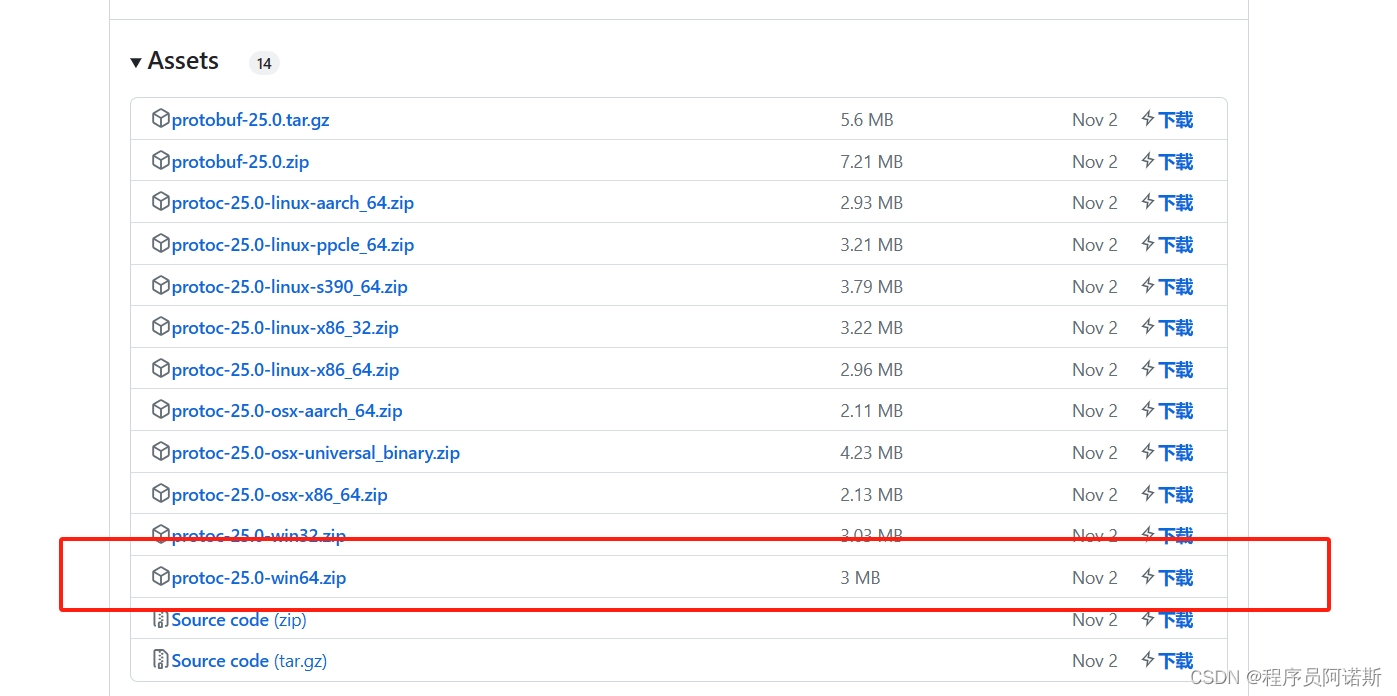
大家可以根据自己需求安装。安装之后配置下环境变量。
然后执行:
讯享网protoc --version
查看下版本号,如果没有输出版本号就是没安装成功或者环境变量没配好。
第一个trpc程序
创建项目目录
创建一下的目录结构,模拟项目操作
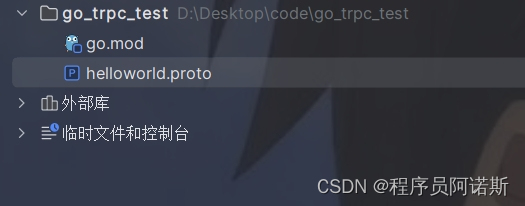
编写helloworld.proto文件
syntax = "proto3"; package helloworld; option go_package = "github.com/some-repo/examples/helloworld"; // HelloRequest is hello request. message HelloRequest { string msg = 1; } // HelloResponse is hello response. message HelloResponse { string msg = 1; } // HelloWorldService handles hello request and echo message. service HelloWorldService { // Hello says hello. rpc Hello(HelloRequest) returns(HelloResponse); } 执行命令
讯享网trpc create -p helloworld.proto -o out cd out go run .
执行命令后会生成以下文件目录
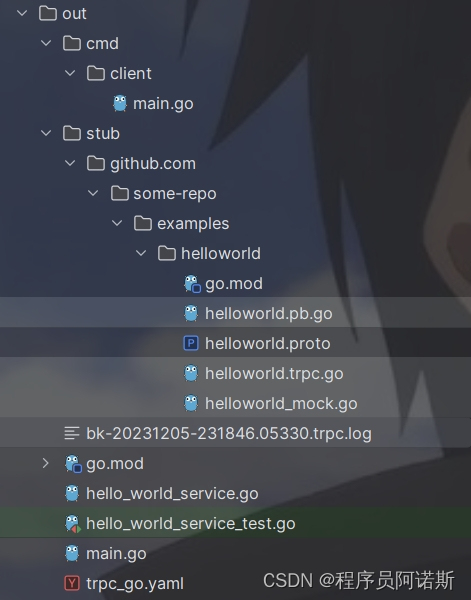
trpc_go.yaml是trpc的配置文件
global: # Global configuration. namespace: Development # Environment type, either Production or Development. env_name: test # Environment name for non-production environments. server: # Server configuration. app: yourAppName # Application name for the business. server: HelloWorldService # Process server name. bin_path: /usr/local/trpc/bin/ # Path to binary executable files and framework configuration files. conf_path: /usr/local/trpc/conf/ # Path to business configuration files. data_path: /usr/local/trpc/data/ # Path to business data files. filter: # List of interceptors for all service handler functions. - simpledebuglog - recovery # Intercept panics from business processing goroutines created by the framework. service: # Services provided by the business, can have multiple. - name: helloworld.HelloWorldService # Route name for the service. ip: 127.0.0.1 # Service listening IP address, can use placeholder ${ip}. Use either ip or nic, ip takes priority. # nic: eth0 port: 9000 # Service listening port, can use placeholder ${port}. network: tcp # Network listening type: tcp or udp. protocol: trpc # Application layer protocol: trpc or http. timeout: 1000 # Maximum processing time for requests in milliseconds. client: # Backend configuration for client calls. timeout: 1000 # Maximum processing time for all backends. namespace: Development # Environment for all backends. filter: # List of interceptors for all backend function calls. - simpledebuglog service: # Configuration for individual backends. - name: helloworld.HelloWorldService # Service name for the backend. namespace: Development # Environment for the backend. network: tcp # Network type for the backend: tcp or udp (configuration takes priority). protocol: trpc # Application layer protocol: trpc or http. target: ip://127.0.0.1:8000 # Service address for requests. timeout: 1000 # Maximum processing time for requests. plugins: # Plugin configuration. log: # Log configuration. default: # Default log configuration, supports multiple outputs. - writer: console # Console standard output (default). level: debug # Log level for standard output. - writer: file # Local file log. level: info # Log level for local file rolling logs. writer_config: filename: ./trpc.log # Path to store local file rolling logs. max_size: 10 # Maximum size of local file rolling logs in MB. max_backups: 10 # Maximum number of log files. max_age: 7 # Maximum number of days to keep logs. compress: false # Whether to compress log files. proto文件介绍
syntax
syntax用于制定protoc的版本,proto2或proto3,新版本proto3中必填。
message

message:protobuf中定义一个消息类型式是通过关键字 message字段指定的。消息就是需要传输的数据格式的定义message关键字 类似于C++中的class,JAVA中的class,go中的struct。
在消息中承载的数据分别对应于每一个字段,其中每个字段都有一个名字和一种类型个proto文件中可以定义多个消息类型。
字段规则
- required:消息体中必填字段,不设置会导致编码异常。在protobuf2中使用,在protobuf3中被删去
- optional:消息体中可选字段。protobuf3没有了required,optional等说明关键字,都默认为optional
- repeate:消息体中可重复字段,重复的值的顺序会被保留在go中重复的会被定义为切片。
消息号
在消息体的定义中,每个字段都必须要有一个唯一的标识号,标识号是[1,2^29-1]范国内的一个整数
嵌套消息
可以在其他消息类型中定义、使用消息类型,在下面的例子中,person消息就定义在Personlnfo消息内如
讯享网message PersonInfo{ message Person{ string name = 1; int32 height =2; repeated int32 weight = 3; } repeated Person info = 1; }
如果要在它的父消息类型的外部重用这个消息类型,需要Personlnfo.Person的形式使用它,如:
message PersonMessage{ PersonInfo.Person info = 1; } 服务定义
如果想要将消息类型用在RPC系统中,可以在.proto文件中定义一个RPC服务接口,protocol buffer编译器将会根据所选择的不同语言生成服务接口代码及存根。
讯享网service $earchService{ # rpc 服务函数名 (参》返回(返回参) rpc Search(SearchRequest) returns (SearchResponse) }
服务端编写
out/main.go
package main import ( "context" "fmt" pb "github.com/some-repo/examples/helloworld" _ "trpc.group/trpc-go/trpc-filter/debuglog" _ "trpc.group/trpc-go/trpc-filter/recovery" trpc "trpc.group/trpc-go/trpc-go" "trpc.group/trpc-go/trpc-go/log" ) type service struct {
    pb.UnimplementedHelloWorldService } func (s *service) Hello(ctx context.Context, req *pb.HelloRequest) (*pb.HelloResponse, error) {
    fmt.Println("hello " + req.Msg) return &pb.HelloResponse{
   Msg: "hello " + req.Msg}, nil } func main() {
    s := trpc.NewServer() pb.RegisterHelloWorldServiceService(s.Service("helloworld.HelloWorldService"), &service{
   }) if err := s.Serve(); err != nil {
    log.Fatal(err) } }
客户端编写
out/cmd/client/main.go
讯享网// Package main is originally generated by trpc-cmdline v1.0.5. // It is located at `project/cmd/client`. // Run this file by executing `go run cmd/client/main.go` in the project directory. package main import ( "fmt" pb "github.com/some-repo/examples/helloworld" _ "trpc.group/trpc-go/trpc-filter/debuglog" trpc "trpc.group/trpc-go/trpc-go" "trpc.group/trpc-go/trpc-go/client" "trpc.group/trpc-go/trpc-go/log" ) func callHelloWorldServiceHello() {
    proxy := pb.NewHelloWorldServiceClientProxy( client.WithTarget("ip://127.0.0.1:9000"), client.WithProtocol("trpc"), ) ctx := trpc.BackgroundContext() // Example usage of unary client. reply, err := proxy.Hello(ctx, &pb.HelloRequest{
   Msg: "itcyy"}) fmt.Println(reply) if err != nil {
    log.Fatalf("err: %v", err) } log.Debugf("simple rpc receive: %+v", reply) } func main() {
    // Load configuration following the logic in trpc.NewServer. cfg, err := trpc.LoadConfig(trpc.ServerConfigPath) if err != nil {
    panic("load config fail: " + err.Error()) } trpc.SetGlobalConfig(cfg) if err := trpc.Setup(cfg); err != nil {
    panic("setup plugin fail: " + err.Error()) } callHelloWorldServiceHello() }
运行结果
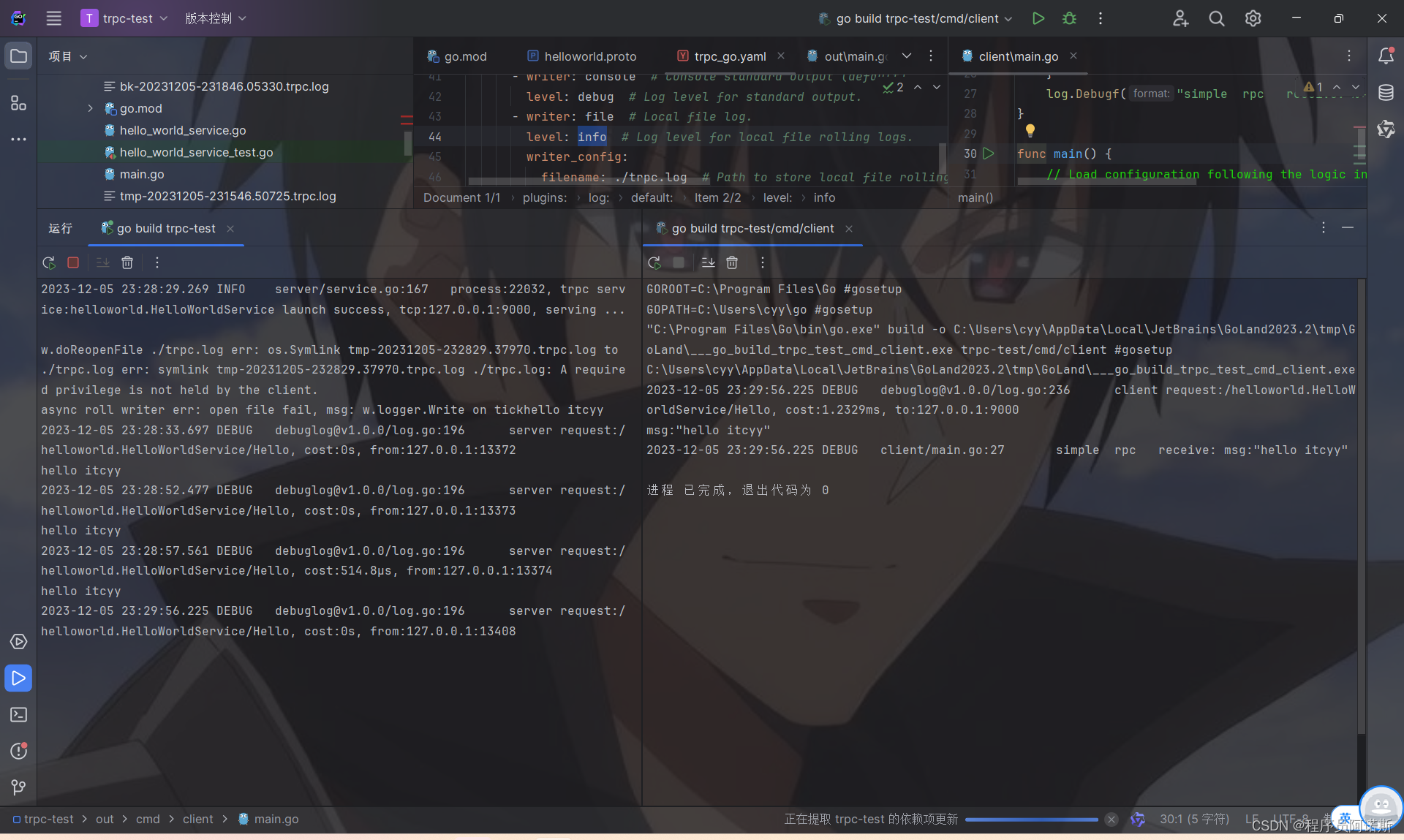
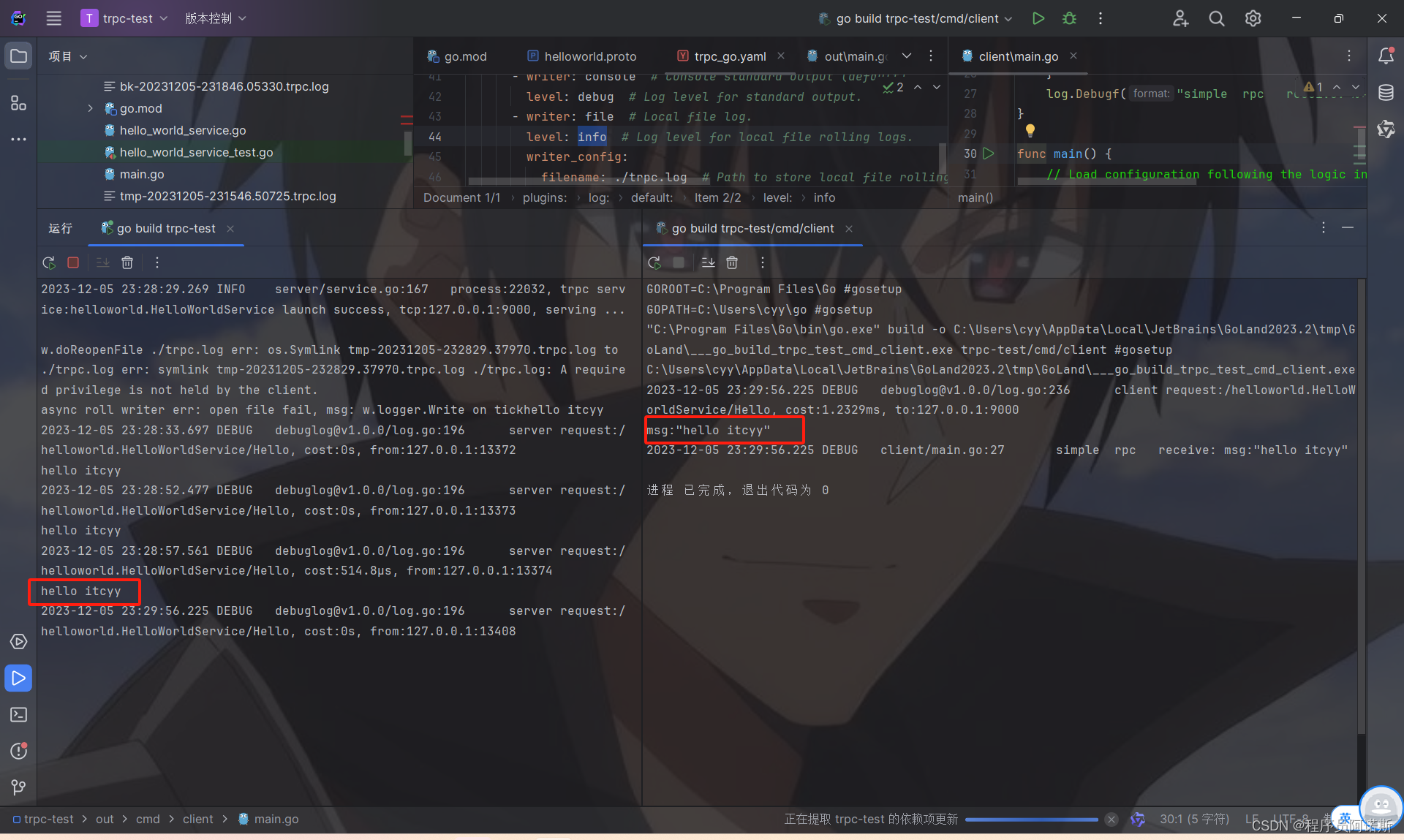
先运行out下的main.go,再运行out/cmd/client/main.go。
两边都打印出hello itcyy的结构即运行成功,如图所示
总结
关于trpc-go的快速入门就到此结束了,感兴趣的可以关注下博主,查看后续文章哦!
版权声明:本文内容由互联网用户自发贡献,该文观点仅代表作者本人。本站仅提供信息存储空间服务,不拥有所有权,不承担相关法律责任。如发现本站有涉嫌侵权/违法违规的内容,请联系我们,一经查实,本站将立刻删除。
如需转载请保留出处:https://51itzy.com/kjqy/67035.html