
Windows Cygwin 配置
一、什么是Cygwin?
Cygwin,原Cygnus出品(已被红帽收购),目前是RedHat名下的项目。项目的目的是提供运行于 Windows 平台的类 Unix 环境(以 GNU 工具为代表)。为了达到这个目的,Cygwin 提供了一套抽象层 dll,用于将部分 Posix 调用转换成 Windows 的 API 调用,实现相关功能。这里面最典型的,最基本的模拟层就是那个cygwin1.dll。除此之外,随着 Linux 系统的发展壮大,目前的 Cygwin 已经不仅仅提供 POSIX 兼容,因此也顺带多了更多模拟层的依赖关系。Cygwin的主要目的是通过重新编译,将POSIX系统(例如Linux、BSD,以及其他Unix系统)上的软件移植到Windows上。
二、为什么使用Cygwin?
安装一个工具或者软件是用来解决具体问题的,如上文所述,Cygwin提供兼容层,可以通过重新编译将Linux、BSD,以及其他Unix系统上的软件移植到Windows上使用,有时候我们会遇到这样的需求。
笔者安装的原因是由于使用Clion进行C语言开发的时候,经常碰到中文乱码的问题,官方给出的方案是将MinGW替换为Cygwin,故有了此教程。
三、Cygwin的安装
1、找到安装包
首先进入Cygwin Installation,下载我们所需的安装包:
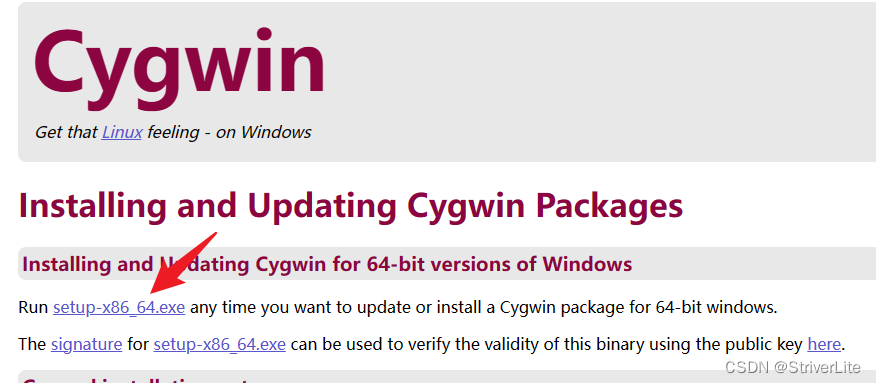
讯享网
2、安装流程
下载好安装包后双击运行:
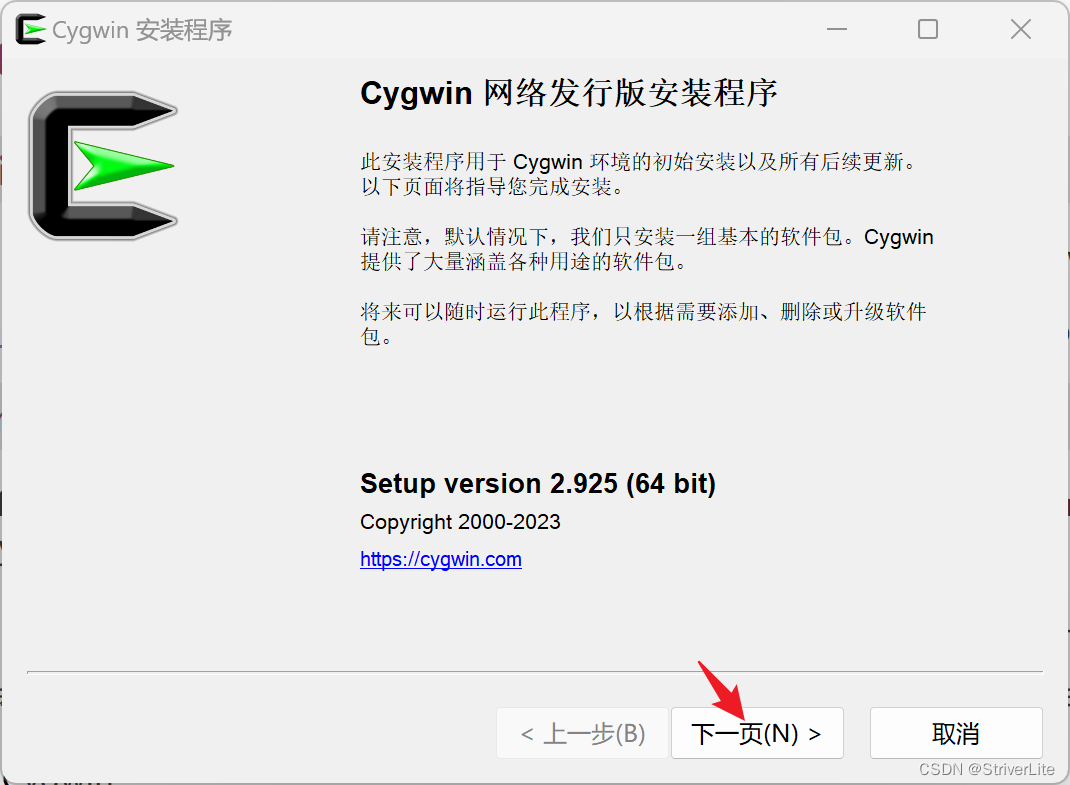
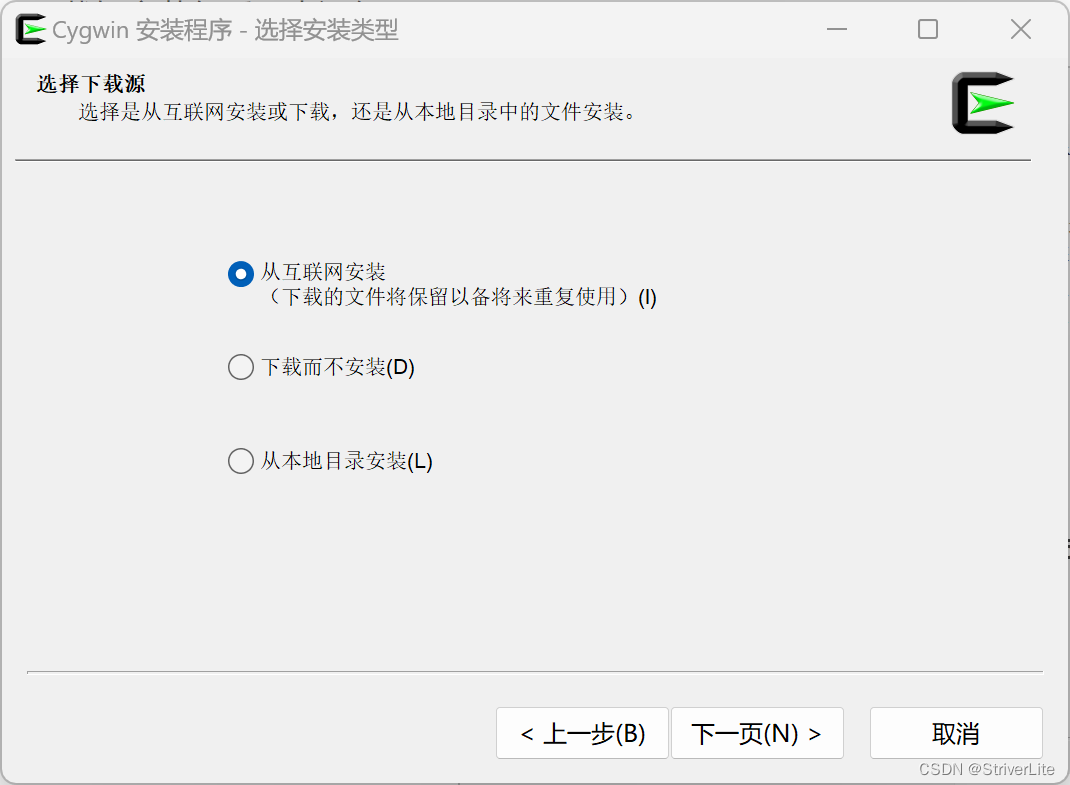
从互联网安装:
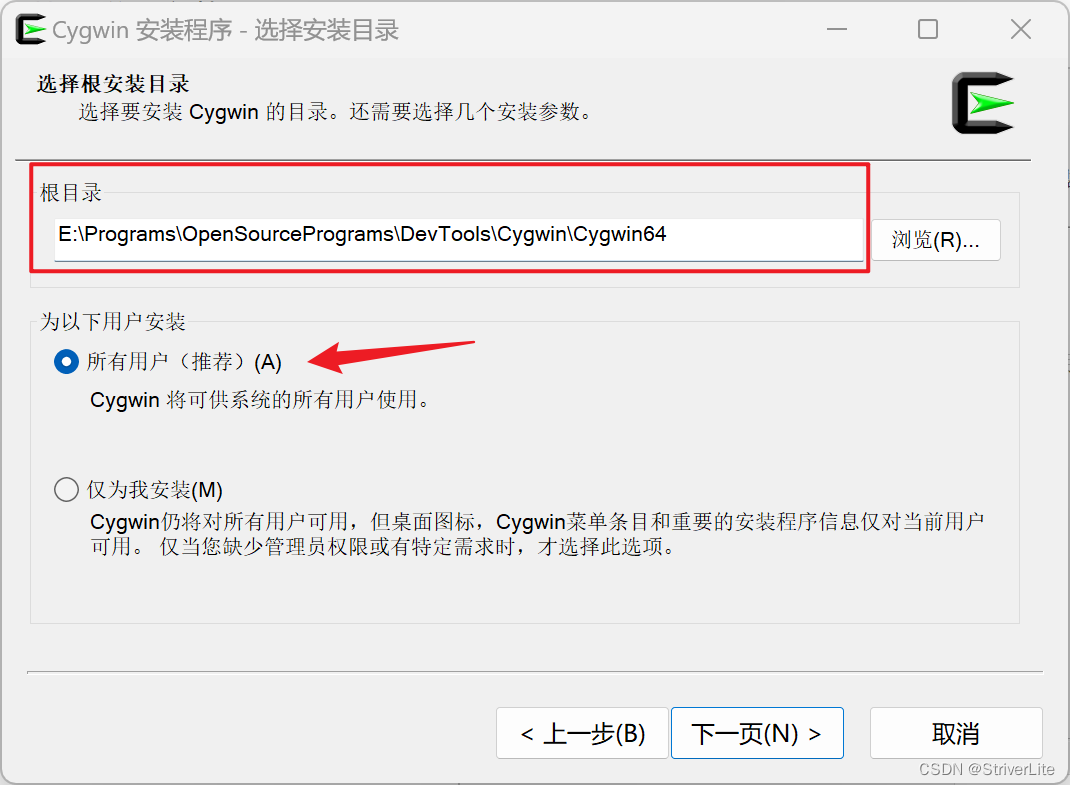
选择自己安装的根目录(不建议C盘,路径最好不要有空格和中文),其他默认:
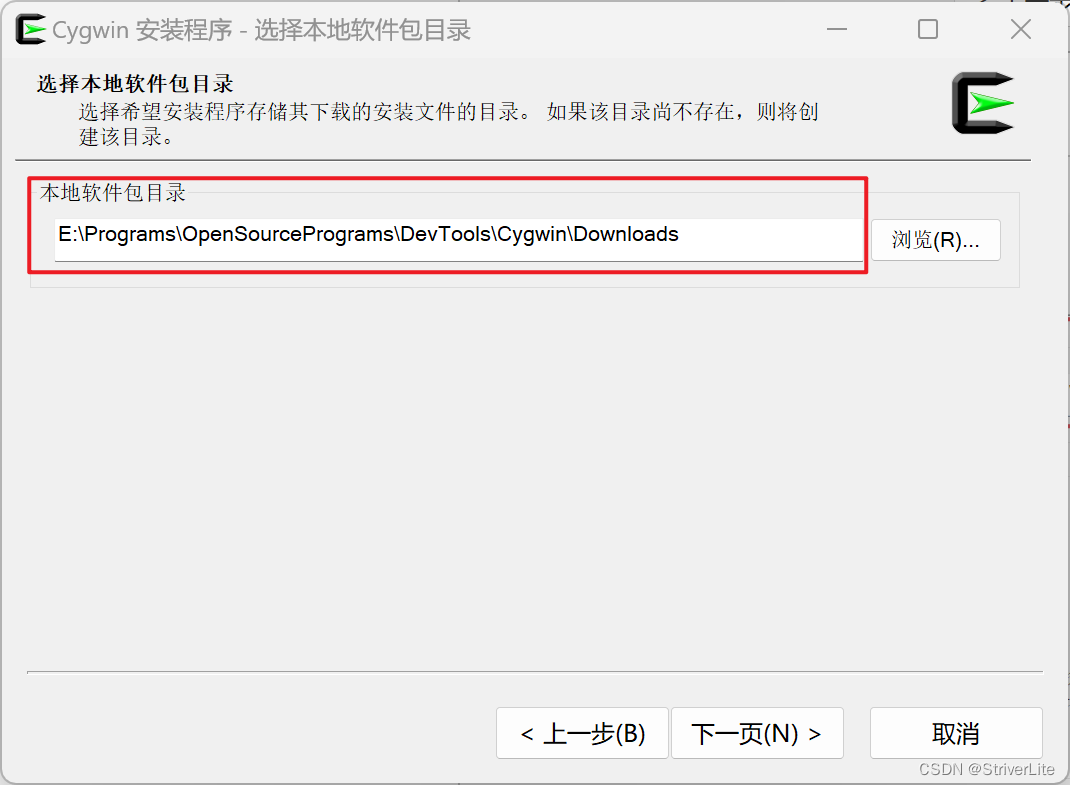
设置软件包目录,这里用于存储Cygwin内下载的软件安装包:
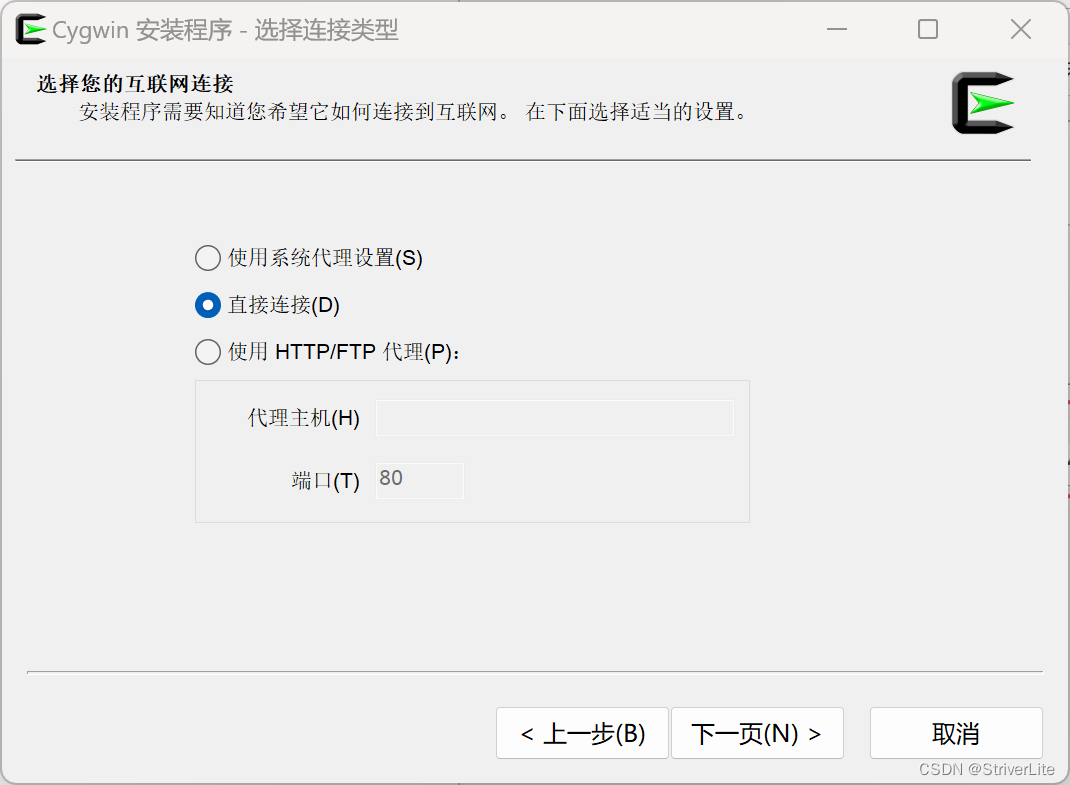
由于有镜像服务器,我们直连:
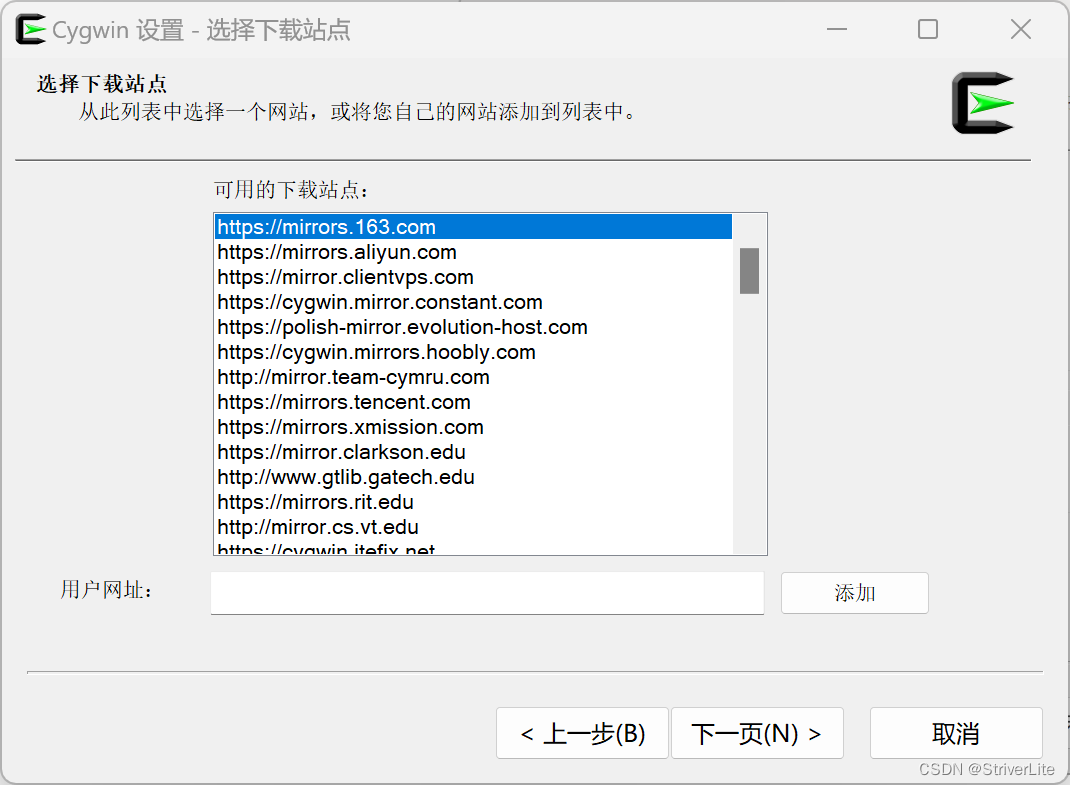
选择镜像站用于提高下载速度,建议163:
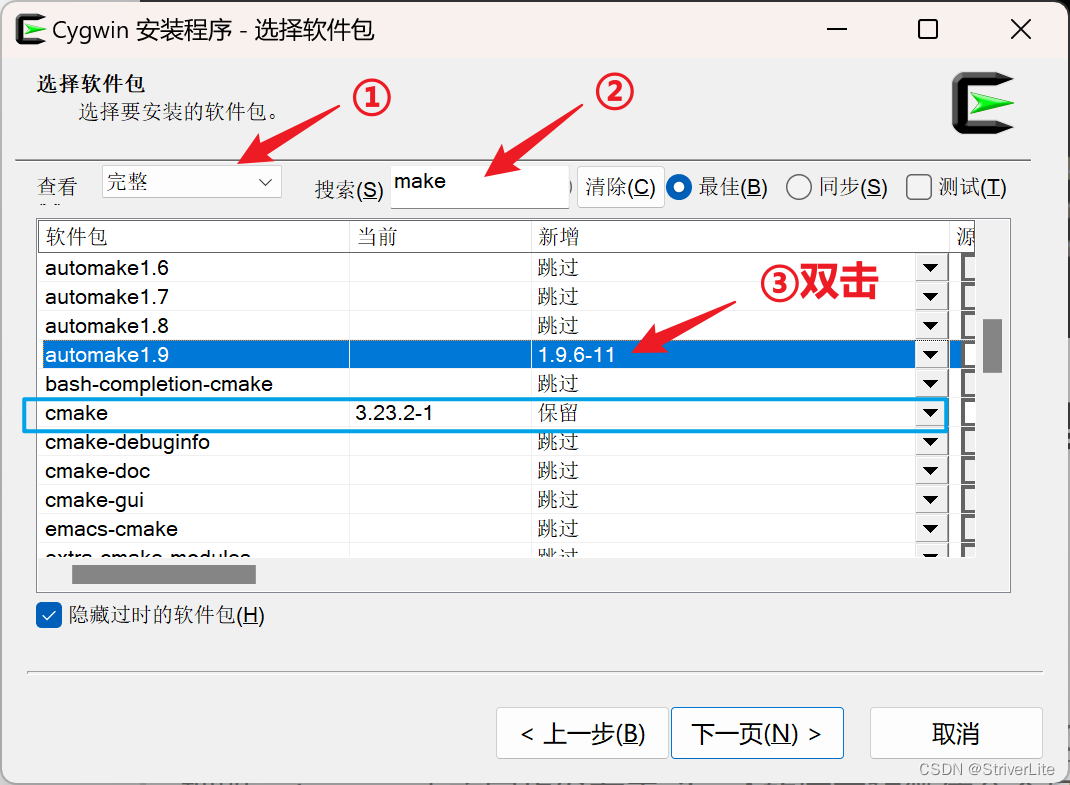
搜索并选择所需的软件包,随后双击“新增栏”,出现版本就表示安装这个版本(笔者已经安装过了,故使用automake演示),用于C语言编程,建议安装gcc-core、gcc-g++、make、gdb、binutils,cmake,若看不到版本这些栏目,建议把窗口最大化
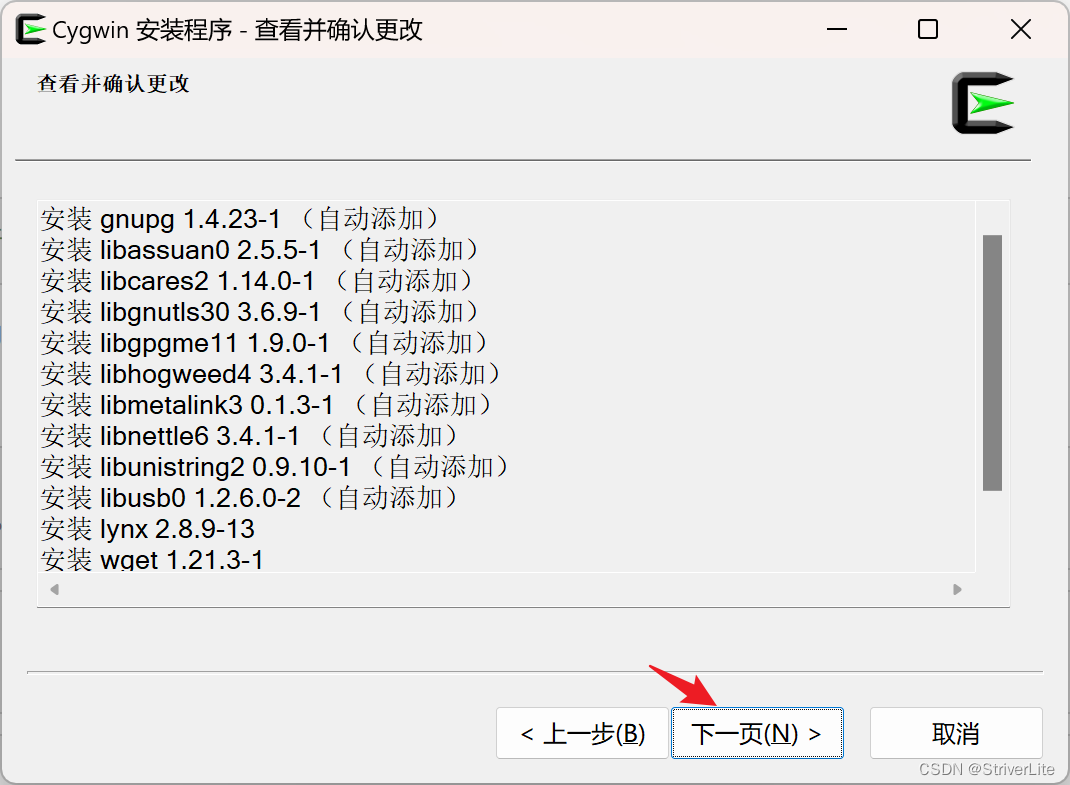
为了有更好的体验,建议安装wget、lynx,下一部分会用到

继续安装流程:
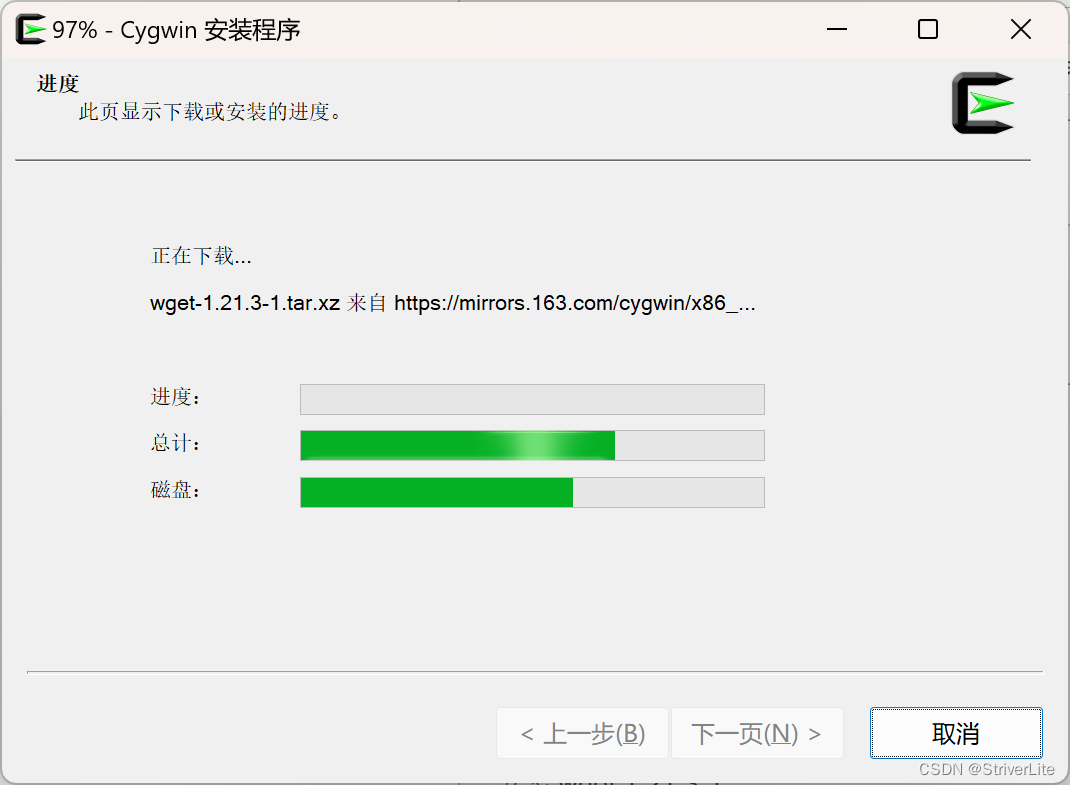
等待安装结束:
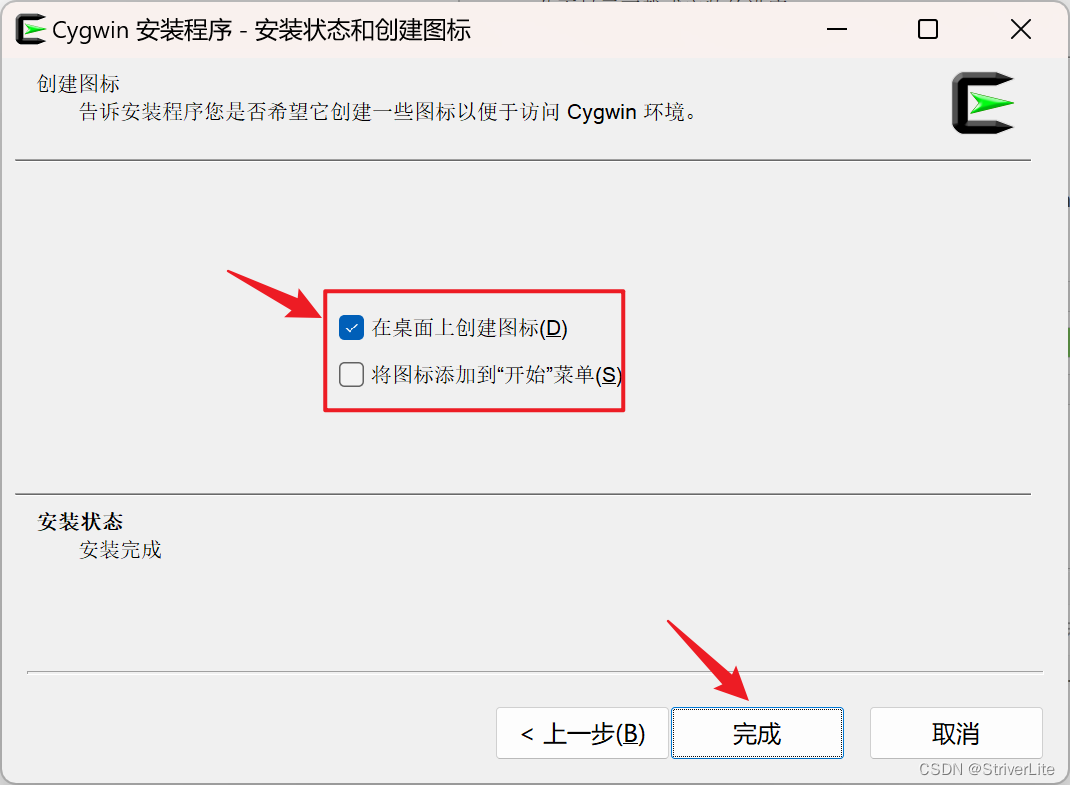
添加相关图标,根据自己的情况勾选即可,安装完成:
二、安装包管理器
这就是为什么我建议安装wget或者lynx的原因
1、获取并安装apt-cyg
进入Cygwin命令行,执行如下指令(二选一)
lynx -source rawgit.com/transcode-open/apt-cyg/master/apt-cyg > apt-cyg #下载apt-cyg install apt-cyg /bin #安装apt-cyg 讯享网
讯享网wget -c https://raw.githubusercontent.com/transcode-open/apt-cyg/master/apt-cyg install apt-cyg /bin # 安装apt-cyg
apt-cyg其实是一段脚本,如果下载不下来,可以拷贝以下脚本,另存为apt-cyg,然后拷贝{cygwin64_dir}\home\{user_dir}目录下,建议使用vim编辑保存:
#!/bin/bash # apt-cyg: install tool for Cygwin similar to debian apt-get # # The MIT License (MIT) # # Copyright (c) 2013 Trans-code Design # # Permission is hereby granted, free of charge, to any person obtaining a copy # of this software and associated documentation files (the "Software"), to deal # in the Software without restriction, including without limitation the rights # to use, copy, modify, merge, publish, distribute, sublicense, and/or sell # copies of the Software, and to permit persons to whom the Software is # furnished to do so, subject to the following conditions: # # The above copyright notice and this permission notice shall be included in # all copies or substantial portions of the Software. # # THE SOFTWARE IS PROVIDED "AS IS", WITHOUT WARRANTY OF ANY KIND, EXPRESS OR # IMPLIED, INCLUDING BUT NOT LIMITED TO THE WARRANTIES OF MERCHANTABILITY, # FITNESS FOR A PARTICULAR PURPOSE AND NONINFRINGEMENT. IN NO EVENT SHALL THE # AUTHORS OR COPYRIGHT HOLDERS BE LIABLE FOR ANY CLAIM, DAMAGES OR OTHER # LIABILITY, WHETHER IN AN ACTION OF CONTRACT, TORT OR OTHERWISE, ARISING FROM, # OUT OF OR IN CONNECTION WITH THE SOFTWARE OR THE USE OR OTHER DEALINGS IN # THE SOFTWARE. if [ ${
   BASH_VERSINFO}${
   BASH_VERSINFO[1]} -lt 42 ] then echo 'Bash version 4.2+ required' exit fi usage="\ NAME apt-cyg - package manager utility SYNOPSIS apt-cyg [operation] [options] [targets] DESCRIPTION apt-cyg is a package management utility that tracks installed packages on a Cygwin system. Invoking apt-cyg involves specifying an operation with any potential options and targets to operate on. A target is usually a package name, file name, URL, or a search string. Targets can be provided as command line arguments. OPERATIONS install Install package(s). remove Remove package(s) from the system. update Download a fresh copy of the master package list (setup.ini) from the server defined in setup.rc. download Retrieve package(s) from the server, but do not install/upgrade anything. show Display information on given package(s). depends Produce a dependency tree for a package. rdepends Produce a tree of packages that depend on the named package. list Search each locally-installed package for names that match regexp. If no package names are provided in the command line, all installed packages will be queried. listall This will search each package in the master package list (setup.ini) for names that match regexp. category Display all packages that are members of a named category. listfiles List all files owned by a given package. Multiple packages can be specified on the command line. search Search for downloaded packages that own the specified file(s). The path can be relative or absolute, and one or more files can be specified. searchall Search cygwin.com to retrieve file information about packages. The provided target is considered to be a filename and searchall will return the package(s) which contain this file. mirror Set the mirror; a full URL to a location where the database, packages, and signatures for this repository can be found. If no URL is provided, display current mirror. cache Set the package cache directory. If a file is not found in cache directory, it will be downloaded. Unix and Windows forms are accepted, as well as absolute or regular paths. If no directory is provided, display current cache. OPTIONS --nodeps Specify this option to skip all dependency checks. --version Display version and exit. " version="\ apt-cyg version 1 The MIT License (MIT) Copyright (c) 2005-9 Stephen Jungels " function wget {
    if command wget -h &>/dev/null then command wget "$@" else warn wget is not installed, using lynx as fallback set "${*: -1}" lynx -source "$1" > "${1*/}" fi } function find-workspace {
    # default working directory and mirror # work wherever setup worked last, if possible cache=$(awk ' BEGIN { RS = "\n\\<" FS = "\n\t" } $1 == "last-cache" { print $2 } ' /etc/setup/setup.rc) mirror=$(awk ' /last-mirror/ { getline print $1 } ' /etc/setup/setup.rc) mirrordir=$(sed ' s / %2f g s : %3a g ' <<< "$mirror") mkdir -p "$cache/$mirrordir/$arch" cd "$cache/$mirrordir/$arch" if [ -e setup.ini ] then return 0 else get-setup return 1 fi } function get-setup {
    touch setup.ini mv setup.ini setup.ini-save wget -N $mirror/$arch/setup.bz2 if [ -e setup.bz2 ] then bunzip2 setup.bz2 mv setup setup.ini echo Updated setup.ini else echo Error updating setup.ini, reverting mv setup.ini-save setup.ini fi } function check-packages {
    if [[ $pks ]] then return 0 else echo No packages found. return 1 fi } function warn {
    printf '\e[1;31m%s\e[m\n' "$*" >&2 } function apt-update {
    if find-workspace then get-setup fi } function apt-category {
    check-packages find-workspace for pkg in "${pks[@]}" do awk ' $1 == "@" { pck = $2 } $1 == "category:" && $0 ~ query { print pck } ' query="$pks" setup.ini done } function apt-list {
    local sbq for pkg in "${pks[@]}" do let sbq++ && echo awk 'NR>1 && $1~pkg && $0=$1' pkg="$pkg" /etc/setup/installed.db done let sbq && return awk 'NR>1 && $0=$1' /etc/setup/installed.db } function apt-listall {
    check-packages find-workspace local sbq for pkg in "${pks[@]}" do let sbq++ && echo awk '$1~pkg && $0=$1' RS='\n\n@ ' FS='\n' pkg="$pkg" setup.ini done } function apt-listfiles {
    check-packages find-workspace local pkg sbq for pkg in "${pks[@]}" do (( sbq++ )) && echo if [ ! -e /etc/setup/"$pkg".lst.gz ] then download "$pkg" fi gzip -cd /etc/setup/"$pkg".lst.gz done } function apt-show {
    find-workspace check-packages for pkg in "${pks[@]}" do (( notfirst++ )) && echo awk ' $1 == query { print fd++ } END { if (! fd) print "Unable to locate package " query } ' RS='\n\n@ ' FS='\n' query="$pkg" setup.ini done } function apt-depends {
    find-workspace check-packages for pkg in "${pks[@]}" do awk ' @include "join" $1 == "@" { apg = $2 } $1 == "requires:" { for (z=2; z<=NF; z++) reqs[apg][z-1] = $z } END { prpg(ENVIRON["pkg"]) } function smartmatch(small, large, values) { for (each in large) values[large[each]] return small in values } function prpg(fpg) { if (smartmatch(fpg, spath)) return spath[length(spath)+1] = fpg print join(spath, 1, length(spath), " > ") if (isarray(reqs[fpg])) for (each in reqs[fpg]) prpg(reqs[fpg][each]) delete spath[length(spath)] } ' setup.ini done } function apt-rdepends {
    find-workspace for pkg in "${pks[@]}" do awk ' @include "join" $1 == "@" { apg = $2 } $1 == "requires:" { for (z=2; z<=NF; z++) reqs[$z][length(reqs[$z])+1] = apg } END { prpg(ENVIRON["pkg"]) } function smartmatch(small, large, values) { for (each in large) values[large[each]] return small in values } function prpg(fpg) { if (smartmatch(fpg, spath)) return spath[length(spath)+1] = fpg print join(spath, 1, length(spath), " < ") if (isarray(reqs[fpg])) for (each in reqs[fpg]) prpg(reqs[fpg][each]) delete spath[length(spath)] } ' setup.ini done } function apt-download {
    check-packages find-workspace local pkg sbq for pkg in "${pks[@]}" do (( sbq++ )) && echo download "$pkg" done } function download {
    local pkg digest digactual pkg=$1 # look for package and save desc file awk '$1 == pc' RS='\n\n@ ' FS='\n' pc=$pkg setup.ini > desc if [ ! -s desc ] then echo Unable to locate package $pkg exit 1 fi # download and unpack the bz2 or xz file # pick the latest version, which comes first set -- $(awk '$1 == "install:"' desc) if (( ! $# )) then echo 'Could not find "install" in package description: obsolete package?' exit 1 fi dn=$(dirname $2) bn=$(basename $2) # check the md5 digest=$4 case ${
   #digest} in 32) hash=md5sum ;; 128) hash=sha512sum ;; esac mkdir -p "$cache/$mirrordir/$dn" cd "$cache/$mirrordir/$dn" if ! test -e $bn || ! $hash -c <<< "$digest $bn" then wget -O $bn $mirror/$dn/$bn $hash -c <<< "$digest $bn" || exit fi tar tf $bn | gzip > /etc/setup/"$pkg".lst.gz cd ~- mv desc "$cache/$mirrordir/$dn" echo $dn $bn > /tmp/dwn } function apt-search {
    check-packages echo Searching downloaded packages... for pkg in "${pks[@]}" do key=$(type -P "$pkg" | sed s./..) [[ $key ]] || key=$pkg for manifest in /etc/setup/*.lst.gz do if gzip -cd $manifest | grep -q "$key" then package=$(sed ' s,/etc/setup/,, s,.lst.gz,, ' <<< $manifest) echo $package fi done done } function apt-searchall {
    cd /tmp for pkg in "${pks[@]}" do printf -v qs 'text=1&arch=%s&grep=%s' $arch "$pkg" wget -O matches cygwin.com/cgi-bin2/package-grep.cgi?"$qs" awk ' NR == 1 {next} mc[$1]++ {next} /-debuginfo-/ {next} /^cygwin32-/ {next} {print $1} ' FS=-[[:digit:]] matches done } function apt-install {
    check-packages find-workspace local pkg dn bn requires wr package sbq script for pkg in "${pks[@]}" do if grep -q "^$pkg " /etc/setup/installed.db then echo Package $pkg is already installed, skipping continue fi (( sbq++ )) && echo echo Installing $pkg download $pkg read dn bn </tmp/dwn echo Unpacking... cd "$cache/$mirrordir/$dn" tar -x -C / -f $bn # update the package database awk ' ins != 1 && pkg < $1 { print pkg, bz, 0 ins = 1 } 1 END { if (ins != 1) print pkg, bz, 0 } ' pkg="$pkg" bz=$bn /etc/setup/installed.db > /tmp/awk.$$ mv /etc/setup/installed.db /etc/setup/installed.db-save mv /tmp/awk.$$ /etc/setup/installed.db [ -v nodeps ] && continue # recursively install required packages requires=$(awk '$1=="requires", $0=$2' FS=': ' desc) cd ~- wr=0 if [[ $requires ]] then echo Package $pkg requires the following packages, installing: echo $requires for package in $requires do if grep -q "^$package " /etc/setup/installed.db then echo Package $package is already installed, skipping continue fi apt-cyg install --noscripts $package || (( wr++ )) done fi if (( wr )) then echo some required packages did not install, continuing fi # run all postinstall scripts [ -v noscripts ] && continue find /etc/postinstall -name '*.sh' | while read script do echo Running $script $script mv $script $script.done done echo Package $pkg installed done } function apt-remove {
    check-packages cd /etc cygcheck awk bash bunzip2 grep gzip mv sed tar xz > setup/essential.lst for pkg in "${pks[@]}" do if ! grep -q "^$pkg " setup/installed.db then echo Package $pkg is not installed, skipping continue fi if [ ! -e setup/"$pkg".lst.gz ] then warn Package manifest missing, cannot remove $pkg. Exiting exit 1 fi gzip -dk setup/"$pkg".lst.gz awk ' NR == FNR { if ($NF) ess[$NF] next } $NF in ess { exit 1 } ' FS='[/\\\\]' setup/{
   essential,$pkg}.lst esn=$? if [ $esn = 0 ] then echo Removing $pkg if [ -e preremove/"$pkg".sh ] then preremove/"$pkg".sh rm preremove/"$pkg".sh fi mapfile dt < setup/"$pkg".lst for each in ${dt[*]} do [ -f /$each ] && rm /$each done for each in ${dt[*]} do [ -d /$each ] && rmdir --i /$each done rm -f setup/"$pkg".lst.gz postinstall/"$pkg".sh.done awk -i inplace '$1 != ENVIRON["pkg"]' setup/installed.db echo Package $pkg removed fi rm setup/"$pkg".lst if [ $esn = 1 ] then warn apt-cyg cannot remove package $pkg, exiting exit 1 fi done } function apt-mirror {
    if [ "$pks" ] then awk -i inplace ' 1 /last-mirror/ { getline print "\t" pks } ' pks="$pks" /etc/setup/setup.rc echo Mirror set to "$pks". else awk ' /last-mirror/ { getline print $1 } ' /etc/setup/setup.rc fi } function apt-cache {
    if [ "$pks" ] then vas=$(cygpath -aw "$pks") awk -i inplace ' 1 /last-cache/ { getline print "\t" vas } ' vas="${vas//\\/\\\\}" /etc/setup/setup.rc echo Cache set to "$vas". else awk ' /last-cache/ { getline print $1 } ' /etc/setup/setup.rc fi } if [ -p /dev/stdin ] then mapfile -t pks fi # process options until [ $# = 0 ] do case "$1" in --nodeps) nodeps=1 shift ;; --noscripts) noscripts=1 shift ;; --version) printf "$version" exit ;; update) command=$1 shift ;; list | cache | remove | depends | listall | download | listfiles |\ show | mirror | search | install | category | rdepends | searchall ) if [[ $command ]] then pks+=("$1") else command=$1 fi shift ;; *) pks+=("$1") shift ;; esac done set -a if type -t apt-$command | grep -q function then readonly arch=${
   HOSTTYPE/i6/x} apt-$command else printf "$usage" fi
2、更换软件源
一般情况下,在刚才的安装过程中,已经设置好国内镜像源,有时候可能因为错误操作,或者忘记安装的时候设置源,可以继续以下操作
为了是速度更快,我们首先更换软件源为国内镜像,这里以网易云镜像为例
讯享网apt-cyg mirror https://mirrors.163.com/cygwin/ apt-cyg update
附:国内镜像源:
https://mirrors.163.com/cygwin/ https://mirrors.aliyun.com/cygwin/ https://mirrors.neusoft.edu.cn/cygwin/ https://mirrors.sjtug.sjtu.edu.cn/cygwin/ https://mirrors.tuna.tsinghua.edu.cn/cygwin/ https://mirrors.ustc.edu.cn/cygwin/ https://mirrors.cloud.tencent.com/cygwin/ 3、安装软件
这里以vim为例
讯享网apt-cyg install vim
4、操作指令
通过apt-cyg help来获取,这里做简要翻译
NAME # 名称 apt-cyg - package manager utility # 程序包管理器实用程序 SYNOPSIS # 命令简介 apt-cyg [operation] [options] [targets] # apt-cyg [操作][选项][目标] DESCRIPTION # 描述 apt-cyg is a package management utility that tracks installed packages on a Cygwin system. Invoking apt-cyg involves specifying an operation with any potential options and targets to operate on. A target is usually a package name, file name, URL, or a search string. Targets can be provided as command line arguments. # apt-cyg是一个包管理实用程序,用于跟踪Cygwin系统上安装的包。 # 调用apt-cyg涉及到指定一个具有任何潜在选项和目标的操作。 # 目标通常是一个包名、文件名、URL或搜索字符串。 # 目标可以作为命令行参数提供。 OPERATIONS # 操作 install # 安装 Install package(s). # 安装软件包 remove # 移除 Remove package(s) from the system. # 移除软件包 update # 更新 Download a fresh copy of the master package list (setup.ini) from the server defined in setup.rc. # 从setup.rc中定义的服务器下载主程序包列表(setup.ini)的新副本。 download # 下载 Retrieve package(s) from the server, but do not install/upgrade anything. # 从服务器获取程序包,但不要安装/升级任何内容。 show # 显示 Display information on given package(s). # 显示指定程序包的信息。 depends # 依赖 Produce a dependency tree for a package. # 生成包的依赖关系树。 rdepends # 包依赖? Produce a tree of packages that depend on the named package. # 生成一个依赖于命名包的包树。 list # 列表 Search each locally-installed package for names that match regexp. If no package names are provided in the command line, all installed packages will be queried. # 在每个本地安装的软件包中搜索与regexp匹配的名称。如果命令行中没有提供包名称,则将查询所有已安装的包。 listall # 列出所有包 This will search each package in the master package list (setup.ini) for names that match regexp. # 这将在主程序包列表(setup.ini)中搜索每个程序包,以查找与regexp匹配的名称。 category # 分类 Display all packages that are members of a named category. # 显示属于命名类别的所有包。 listfiles # 列出文件 List all files owned by a given package. Multiple packages can be specified on the command line. # 列出给定程序包所拥有的所有文件。可以在命令行上指定多个程序包。 search # 搜索 Search for downloaded packages that own the specified file(s). The path can be relative or absolute, and one or more files can be specified. # 搜索拥有指定文件的下载包。路径可以是相对路径,也可以是绝对路径,并且可以指定一个或多个文件。 searchall # 搜索全部 Search cygwin.com to retrieve file information about packages. The provided target is considered to be a filename and searchall will return the package(s) which contain this file. # 搜索cygwin.com以检索有关包的文件信息。提供的目标被视为文件名,searchall将返回包含此文件的包。 mirror # 镜像 Set the mirror; a full URL to a location where the database, packages, and signatures for this repository can be found. If no URL is provided, display current mirror. # 设置镜像;指向可以在此存储库中找到数据库、包和签名的位置的完整URL。如果未提供URL,则显示当前镜像。 cache # 缓存 Set the package cache directory. If a file is not found in cache directory, it will be downloaded. Unix and Windows forms are accepted, as well as absolute or regular paths. If no directory is provided, display current cache. # 设置包缓存目录。如果在缓存目录中找不到文件,则会下载该文件。 # Unix和Windows形式以及绝对路径或常规路径都可以接受。如果未提供目录,则显示当前缓存。 OPTIONS # 操作 --nodeps Specify this option to skip all dependency checks. # 指定此选项可跳过所有依赖项检查。 --version Display version and exit. # Display version and exit. 本文参考的文章
- Cygwin/MinGW/MSys/WSL区别与联系 – 标点符 (biaodianfu.com)
- CLion 中的 Cygwin 配置(及中文坑解决) - 知乎 (zhihu.com)
- 【cygwin的包管理器】通过命令行为cygwin添加新package_cygwin lynx_elloop的博客-CSDN博客
- Cygwin下安装包管理器apt-cyg_cygwin 包管理器_小龙在山东的博客-CSDN博客
- Cygwin系列(八):命令行软件包管理器apt-cyg - 知乎 (zhihu.com)
- Windows下安装Cygwin及包管理器apt-cyg(转)-阿里云开发者社区 (aliyun.com)
版权声明:本文内容由互联网用户自发贡献,该文观点仅代表作者本人。本站仅提供信息存储空间服务,不拥有所有权,不承担相关法律责任。如发现本站有涉嫌侵权/违法违规的内容,请联系我们,一经查实,本站将立刻删除。
如需转载请保留出处:https://51itzy.com/kjqy/65250.html