
参考官方文档:https://docs.yoctoproject.org/kernel-dev/common.html#working-with-out-of-tree-modules
参考官方文档:https://docs.yoctoproject.org/dev-manual/common-tasks.html#creating-a-general-layer-using-the-bitbake-layers-script
参考官方文档:https://docs.yoctoproject.org/kernel-dev/common.html#using-devtool-to-patch-the-kernel
本文依次介绍两种内核模块编译方法,第一种是基于内核树在源码之外编译模块,第二种是内核源码内编译模块(直接修改内核源码)。
上一篇文章中我们编译运行了yocto默认平台,即qemux86-64,现在我们在此环境中增加我们自己的模块,在此之前我们应该增加自己的layer来存放模块配方。
创建自己的layer
我们先查看一下当前环境下哪些layer是生效的。
$ cd poky $ source oe-init-build-env #注意,执行完这个命令后将自动进入build目录 build$ cat conf/bblayers.conf # POKY_BBLAYERS_CONF_VERSION is increased each time build/conf/bblayers.conf # changes incompatibly POKY_BBLAYERS_CONF_VERSION = "2" BBPATH = "${TOPDIR}" BBFILES ?= "" BBLAYERS ?= " \ /home/virtio/yocto/poky/meta \ /home/virtio/yocto/poky/meta-poky \ /home/virtio/yocto/poky/meta-yocto-bsp \ " 讯享网
可以看到当前生效的layer有三个,分别为meta、meta-poky、meta-yocto-bsp,这些layer都是yocto自带的,新增软件包或模块之类的操作不应该去修改这些layer,因为这些layer会随着yocto更新而变化(git pull)。
我们创建自己的layer。
讯享网$ cd poky $ source oe-init-build-env #注意,执行完这个命令后将自动进入build目录 build$ bitbake-layers create-layer ../meta-mylayer
执行完毕后,可以看见yocto顶层目录下多了一个meta-mylayer目录,这个就是我们新建的layer,但是此时这个layer并未生效,可以通过cat conf/bblayers.conf命令查看。
执行以下命令让创建的layer生效。
build$ bitbake-layers add-layer ../meta-mylayer #注意是在build目录下执行 再次查看 build$ cat conf/bblayers.conf # POKY_BBLAYERS_CONF_VERSION is increased each time build/conf/bblayers.conf # changes incompatibly POKY_BBLAYERS_CONF_VERSION = "2" BBPATH = "${TOPDIR}" BBFILES ?= "" BBLAYERS ?= " \ /home/virtio/yocto/poky/meta \ /home/virtio/yocto/poky/meta-poky \ /home/virtio/yocto/poky/meta-yocto-bsp \ /home/virtio/yocto/poky/meta-mylayer \ " 可以看到多了一个我们自己的layer。
我们新增的layer生效了,那再来看看layer下哪些配方会生效。
讯享网$ cat meta-mylayer/conf/layer.conf # We have a conf and classes directory, add to BBPATH BBPATH .= ":${LAYERDIR}" # We have recipes-* directories, add to BBFILES BBFILES += "${LAYERDIR}/recipes-*/*/*.bb \ ${LAYERDIR}/recipes-*/*/*.bbappend" BBFILE_COLLECTIONS += "meta-mylayer" BBFILE_PATTERN_meta-mylayer = "^${LAYERDIR}/" BBFILE_PRIORITY_meta-mylayer = "6" LAYERDEPENDS_meta-mylayer = "core" LAYERSERIES_COMPAT_meta-mylayer = "kirkstone"
由BBFILES变量可知道该层目录下recipes-*/*/*.bb和recipes-*/*/*.bbappend都是生效的,接下来就是在这个layer下创建模块配方了(recipes)。
添加模块
内核源码外添加
先在meta-mylayer中创建模块的配方目录。
$ cd meta-mylayer meta-mylayer$ mkdir recipes-module 然后再模块配方目录下创建以下:
讯享网meta-mylayer/recipes-module$ tree . └── hello ├── files │ ├── hello.c │ └── Makefile └── hello.bb 2 directories, 3 files
hello.c文件内容为:
#include <linux/module.h> static int __init hello_init(void) {
    pr_info("Hello World!\n"); return 0; } static void __exit hello_exit(void) {
    pr_info("Goodbye Cruel World!\n"); } module_init(hello_init); module_exit(hello_exit); MODULE_LICENSE("GPL");
Makefile文件内容为:
讯享网obj-m := hello.o SRC := $(shell pwd) all: $(MAKE) -C $(KERNEL_SRC) M=$(SRC) modules_install: $(MAKE) -C $(KERNEL_SRC) M=$(SRC) modules_install clean: rm -f *.o *~ core .depend .*.cmd *.ko *.mod.c rm -f Module.markers Module.symvers modules.order rm -rf .tmp_versions Modules.symvers
hello.bb文件内容为:
SUMMARY = "Example of how to build an external Linux kernel module" DESCRIPTION = "${SUMMARY}" LICENSE = "GPL-2.0-only" #注意下面的license校验,如果报错的话,请去其他meta目录下搜素COMMON_LICENSE_DIR变量,并将后面的md5值填入下面即可 LIC_FILES_CHKSUM = "file://${COMMON_LICENSE_DIR}/MIT;md5=0835ade698e0bcf8506ecda2f7b4f302" inherit module SRC_URI = "file://Makefile \ file://hello.c \ " S = "${WORKDIR}" # The inherit of module.bbclass will automatically name module packages with # "kernel-module-" prefix as required by the oe-core build environment. # 注意下面的名字,后续要让模块加到整个系统构建就需要使用 RPROVIDES:${PN} += "kernel-module-hello" 添加完成之后返回yocto顶层,执行:
讯享网$ bitbake core-image-sato
再去build/tmp/work/qemux86_64-poky-linux/core-image-sato/1.0-r0/rootfs/lib/modules/5.15.54-yocto-standard/extra目录下查看发现并没有hello.ko,这是因为我们并没有将hello模块加入到image镜像中。
yocto支持4中方式在image中添加模块:
- MACHINE_ESSENTIAL_EXTRA_RDEPENDS
- MACHINE_ESSENTIAL_EXTRA_RRECOMMENDS
- MACHINE_EXTRA_RDEPENDS
- MACHINE_EXTRA_RRECOMMENDS
按官方推荐的,我们使用MACHINE_EXTRA_RRECOMMENDS好了。怎么用呢?我们需要在平台设备(machine)的配置文件中添加,对于本文来说,默认平台为qemux86-64,所以找到对应的配置文件,即meta/conf/machine/qemux86-64.conf文件。
#@TYPE: Machine #@NAME: QEMU x86-64 machine #@DESCRIPTION: Machine configuration for running an x86-64 system on QEMU PREFERRED_PROVIDER_virtual/xserver ?= "xserver-xorg" PREFERRED_PROVIDER_virtual/libgl ?= "mesa" PREFERRED_PROVIDER_virtual/libgles1 ?= "mesa" PREFERRED_PROVIDER_virtual/libgles2 ?= "mesa" PREFERRED_PROVIDER_virtual/libgles3 ?= "mesa" require conf/machine/include/qemu.inc DEFAULTTUNE ?= "core2-64" require conf/machine/include/x86/tune-core2.inc require conf/machine/include/x86/qemuboot-x86.inc UBOOT_MACHINE ?= "qemu-x86_64_defconfig" KERNEL_IMAGETYPE = "bzImage" SERIAL_CONSOLES ?= ";ttyS0 ;ttyS1" # Install swrast and glx if opengl is in DISTRO_FEATURES and x32 is not in use. # This is because gallium swrast driver was found to crash X server on startup in qemu x32. XSERVER = "xserver-xorg \ ${@bb.utils.contains('DISTRO_FEATURES', 'opengl', \ bb.utils.contains('TUNE_FEATURES', 'mx32', '', 'mesa-driver-swrast xserver-xorg-extension-glx', d), '', d)} \ xf86-video-cirrus \ xf86-video-fbdev \ xf86-video-vmware \ xf86-video-modesetting \ xf86-video-vesa \ xserver-xorg-module-libint10 \ " MACHINE_FEATURES += "x86 pci" MACHINE_ESSENTIAL_EXTRA_RDEPENDS += "v86d" MACHINE_EXTRA_RRECOMMENDS = "kernel-module-snd-ens1370 kernel-module-snd-rawmidi" WKS_FILE ?= "qemux86-directdisk.wks" do_image_wic[depends] += "syslinux:do_populate_sysroot syslinux-native:do_populate_sysroot mtools-native:do_populate_sysroot dosfstools-native:do_populate_sysroot" #For runqemu QB_SYSTEM_NAME = "qemu-system-x86_64" 找到MACHINE_EXTRA_RRECOMMENDS字段,在其尾部追加kernel-module-hello,即
讯享网MACHINE_EXTRA_RRECOMMENDS = "kernel-module-snd-ens1370 kernel-module-snd-rawmidi kernel-module-hello"
然后再次编译查看
$ source oe-init-build-env #注意必须重新设置一下环境变量 $ bitbake core-image-sato build$ ls tmp/work/qemux86_64-poky-linux/hello/1.0-r0/image/lib/modules/5.15.54-yocto-standard/extra/ hello.ko 可以看到hello.ko已经加入到image最终的rootfs中了,我们启动看看。
讯享网$ runqemu qemux86-64
结果如下
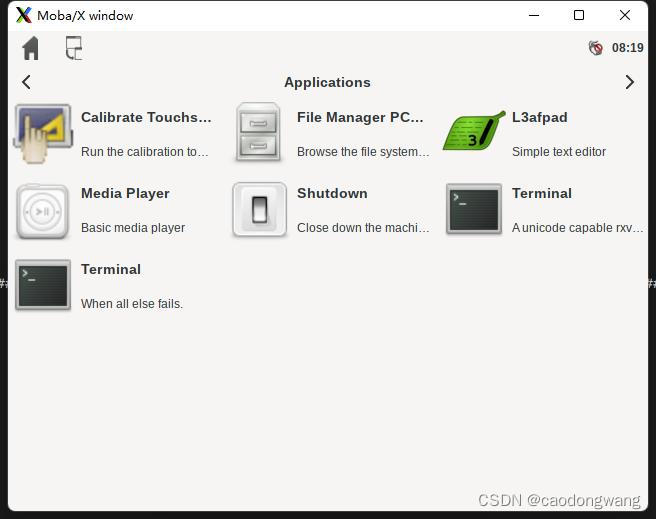
讯享网
我们打开一个中断(即点击上图Terminal),输入命令加载模块:
$ modprobe hello 在输入dmesg命令查看模块打印:
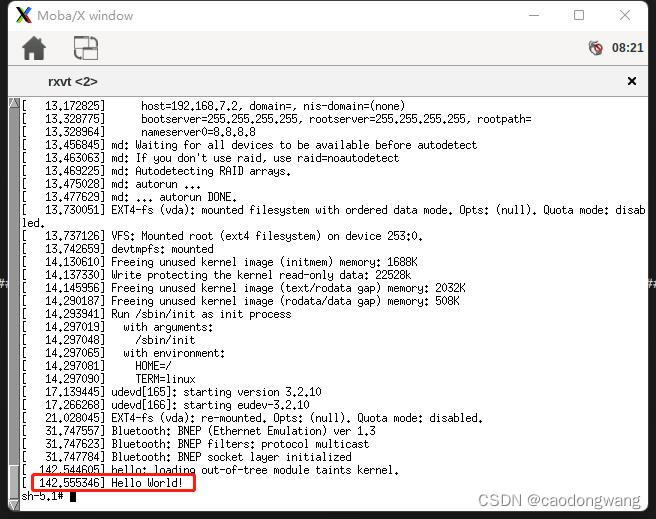
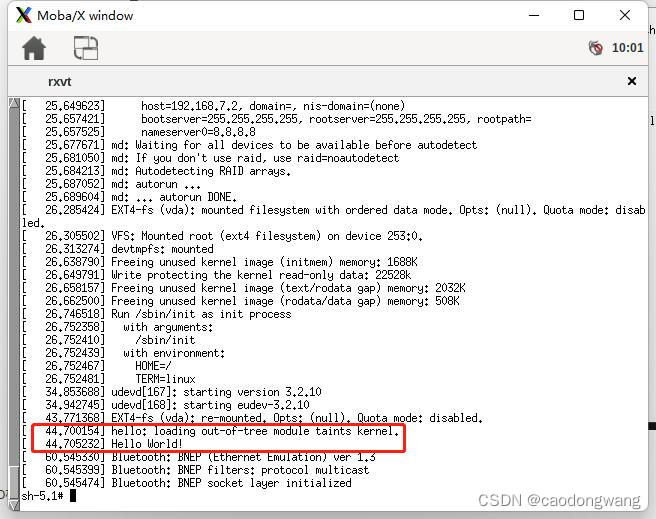
如果需要让hello模块自动加载,在hello.bb文件或meta/conf/machine/qemux86-64.conf中添加以下行:
讯享网KERNEL_MODULE_AUTOLOAD += "hello"
关于该变量的介绍可查阅网址。
这样系统起来之后将会自动加载指定的内核模块。
内核源码中添加
前期调试模块时候使用内核源码之外编译模块的方式比较方便,但是模块调试好了一般都是随内核源码一块编译并插入系统的,所以下面讲解第二种编译模块方法。
提取源码
既然是修改linux内核源码,那在此之前应该把源码提取出来。执行以下命令:
$ source oe-init-build-env $ bitbake -s | grep linux #查看linux源码包全称 binutils-crosssdk-x86_64-pokysdk-linux :2.38-r0 cryptodev-linux :1.12-r0 cryptodev-linux-native :1.12-r0 gcc-crosssdk-x86_64-pokysdk-linux :11.3.0-r0 go-crosssdk-x86_64-pokysdk-linux :1.17.10-r0 linux-firmware 1:-r0 linux-libc-headers :5.16-r0 linux-yocto :5.15.54+gitAUTOINC+0e3a81a5ae_a40d2daf27-r0 nativesdk-cryptodev-linux :1.12-r0 nativesdk-linux-libc-headers :5.16-r0 nativesdk-syslinux :6.04-pre2-r1 nativesdk-util-linux :2.37.4-r0 nativesdk-util-linux-libuuid :2.37.4-r0 syslinux :6.04-pre2-r1 syslinux-native :6.04-pre2-r1 util-linux :2.37.4-r0 util-linux-libuuid :2.37.4-r0 util-linux-libuuid-native :2.37.4-r0 util-linux-native :2.37.4-r0 #可以看到linux内核源码包全称为linux-yocto $ devtool modify linux-yocto #借助devtool工具提取内核源码 NOTE: Starting bitbake server... INFO: Creating workspace layer in /home/virtio/yocto/poky/build/workspace NOTE: Reconnecting to bitbake server... NOTE: Retrying server connection (#1)... Loading cache: 100% | | ETA: --:--:-- Loaded 0 entries from dependency cache. Parsing recipes: 100% || Time: 0:00:12 Parsing of 884 .bb files complete (0 cached, 884 parsed). 1643 targets, 44 skipped, 0 masked, 0 errors. NOTE: Resolving any missing task queue dependencies Build Configuration: BB_VERSION = "2.0.0" BUILD_SYS = "x86_64-linux" NATIVELSBSTRING = "universal" TARGET_SYS = "x86_64-poky-linux" MACHINE = "qemux86-64" DISTRO = "poky" DISTRO_VERSION = "4.0.2" TUNE_FEATURES = "m64 core2" TARGET_FPU = "" meta meta-poky meta-yocto-bsp meta-mylayer workspace = "my-kirkstone:e4b5c35fd430e1aec8218b4ae4ab51b2b919eec6" Initialising tasks: 100% || Time: 0:00:00 Sstate summary: Wanted 0 Local 0 Mirrors 0 Missed 0 Current 128 (0% match, 100% complete) NOTE: Executing Tasks NOTE: Tasks Summary: Attempted 581 tasks of which 581 didn't need to be rerun and all succeeded. INFO: Copying kernel config to workspace INFO: Recipe linux-yocto now set up to build from /home/virtio/yocto/poky/build/workspace/sources/linux-yocto 更多关于devtool工具的使用方法,可参阅网址。
看到上面最后一行就是linux内核源码提取后所在目录,即/home/virtio/yocto/poky/build/workspace/sources/linux-yocto,去这个目录下面修改内核源码即可。
我们来看看build/workspace目录下结构:
讯享网build/workspace$ tree -L 2 . ├── appends │ └── linux-yocto_5.15.bbappend ├── conf │ └── layer.conf ├── README └── sources └── linux-yocto 4 directories, 3 files
简要说一下devtool工具提取Linux内核源码过程中发生了一些什么。
1)创建了上面workspace目录及目录下文件,最主要的是layer.conf和linux-yocto_5.15.bbappend。
先看看layer.conf文件内容:
build/workspace$ cat conf/layer.conf # workspace layer auto-generated by devtool BBPATH =. "${LAYERDIR}:" BBFILES += "${LAYERDIR}/recipes/*/*.bb \ ${LAYERDIR}/appends/*.bbappend" BBFILE_COLLECTIONS += "workspacelayer" BBFILE_PATTERN_workspacelayer = "^${LAYERDIR}/" BBFILE_PATTERN_IGNORE_EMPTY_workspacelayer = "1" BBFILE_PRIORITY_workspacelayer = "99" LAYERSERIES_COMPAT_workspacelayer = "${LAYERSERIES_COMPAT_core}" 让该目录下recipes/*/*.bb和appends/*.bbappend配方文件都生效,设置layer优先级为99,即最高。优先级有什么用呢?假设我们自己的layer(如meta-mylayer默认优先级为6)中也有linux-yocto_5.15.bbappend文件,那么bitbake将优先使用workspace下面的linux-yocto_5.15.bbappend中的变量定义(如果冲突的话),注意,这一点非常重要,这样能确保workspace下面的linux-yocto_5.15.bbappend变量一定生效,作用后面讲。

再看看linux-yocto_5.15.bbappend文件:
讯享网FILESEXTRAPATHS:prepend := "${THISDIR}/${PN}:" FILESPATH:prepend := "/home/virtio/yocto/poky/build/workspace/sources/linux-yocto/oe-local-files:" # srctreebase: /home/virtio/yocto/poky/build/workspace/sources/linux-yocto inherit externalsrc # NOTE: We use pn- overrides here to avoid affecting multiple variants in the case where the recipe uses BBCLASSEXTEND EXTERNALSRC:pn-linux-yocto = "/home/virtio/yocto/poky/build/workspace/sources/linux-yocto" #linux源码将从这个目录获取 SRCTREECOVEREDTASKS = "do_validate_branches do_kernel_checkout do_fetch do_unpack do_kernel_configcheck" #表示源码已包含这些任务的结果 do_patch[noexec] = "1" #不再执行patch动作,因为提取源码时候已经打上了patch,后续执行编译时不需要再执行 do_configure:append() { cp ${B}/.config ${S}/.config.baseline ln -sfT ${B}/.config ${S}/.config.new } do_kernel_configme:prepend() { if [ -e ${S}/.config ]; then mv ${S}/.config ${S}/.config.old fi } do_configure:append() { if [ ! ${DEVTOOL_DISABLE_MENUCONFIG} ]; then cp ${B}/.config ${S}/.config.baseline ln -sfT ${B}/.config ${S}/.config.new fi } # initial_rev: a40d2daf2795d89e3ef8af0413bec
设置workspace优先级为99就是确保上面变量定义优先使用,简单来说就是确保后续编译linux内核的源码一定是上面变量指定的。
2)将linux内核源码提取出来并打上patch放入到linux-yocto目录下。
3)将workspace当中layer插入到build/conf/bblayers.conf当中,使workspace生效,如下。
build/workspace$ cat ../conf/bblayers.conf # POKY_BBLAYERS_CONF_VERSION is increased each time build/conf/bblayers.conf # changes incompatibly POKY_BBLAYERS_CONF_VERSION = "2" BBPATH = "${TOPDIR}" BBFILES ?= "" BBLAYERS ?= " \ /home/virtio/yocto/poky/meta \ /home/virtio/yocto/poky/meta-poky \ /home/virtio/yocto/poky/meta-yocto-bsp \ /home/virtio/yocto/poky/meta-mylayer \ /home/virtio/yocto/poky/build/workspace \ " 修改源码增加模块
进入linux源码目录下找个目录增加模块代码,这里找到的是build/workspace/sources/linux-yocto/drivers/char目录,在该目录下执行mkdir hello创建目录,然后在hello目录下创建以下文件。
讯享网build/workspace/sources/linux-yocto/drivers/char$ tree hello/ hello/ ├── hello.c ├── Kconfig └── Makefile 0 directories, 3 files
其中hello.c文件填入:
#include <linux/kernel.h> #include <linux/module.h> #include <linux/init.h> static int __init init_hello( void ) {
    printk("this is my first driver module: Hello world!\n"); return 0;//必须返回0 } static void __exit exit_hello( void ) {
    printk("this is my first driver module: Goodbey world!\n"); } module_init(init_hello); module_exit(exit_hello); MODULE_LICENSE("GPL"); MODULE_AUTHOR("caodongwang");
Kconfig文件填入以下:
讯享网config HELLO tristate 'Create a my hello module' default y help This is a module to print Hello World!
在Makefile文件中填入以下:
obj-$(CONFIG_HELLO) += hello.o 然后修改build/workspace/sources/linux-yocto/drivers/char目录下的Kconfig文件,在尾部的endmenu之前添加以下。
讯享网source "drivers/char/hello/Kconfig"
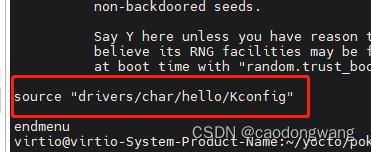
最后修改build/workspace/sources/linux-yocto/drivers/char目录下的Makefile文件,在尾部添加以下。
#注意后面有个 / 符号 obj-$(CONFIG_HELLO) += hello/ 这样就好了,返回到yocto顶层目录下执行以下。
讯享网$ source oe-init-build-env build$ bitbake virtual/kernel -c menuconfig
在Device Drivers->Character devices中找到Create a my hello module选项勾上,保存退出。
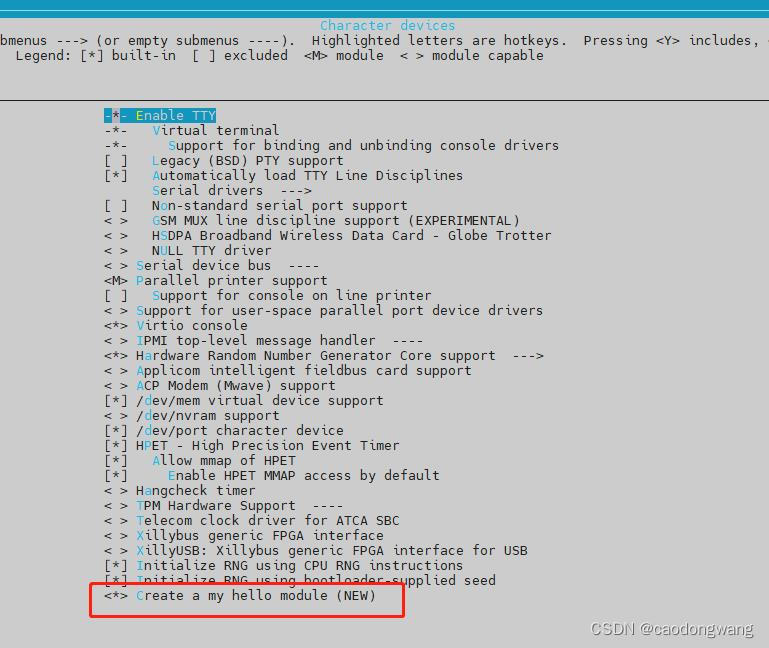
这样模块就添加好了,先单独编译一下linux内核,确保增加的模块没有问题。
build$ devtool build linux-yocto 没问题后,编译整个image。
讯享网build$ devtool build-image core-image-sato
正常情况下都不会有问题,现在让我们运行起来看看吧。
build$ runqemu qemux86-64 启动系统之后打开一个终端,输入:
讯享网dmesg | grep Hello #注意Hello首字母是大写
结果如下:
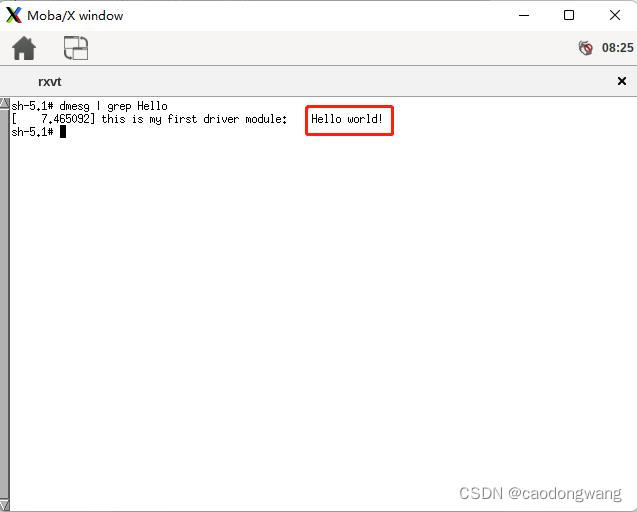
这样模块就增加好了。
制作补丁
模块是添加好了,但是我们平常维护代码时(如代码上传到git上),往往都是以补丁形式维护。所以我们需要将我们修改的代码以补丁形式弄出来。
$ cd build/workspace/sources/linux-yocto build/workspace/sources/linux-yocto$ git status Refresh index: 100% (73790/73790), done. On branch v5.15/standard/base Your branch is behind 'origin/v5.15/standard/base' by 3 commits, and can be fast-forwarded. (use "git pull" to update your local branch) Changes not staged for commit: (use "git add <file>..." to update what will be committed) (use "git restore <file>..." to discard changes in working directory) modified: drivers/char/Kconfig modified: drivers/char/Makefile Untracked files: (use "git add <file>..." to include in what will be committed) drivers/char/hello/ no changes added to commit (use "git add" and/or "git commit -a") 发现我们新增的hello目录及目录下的文件都没添加,所以执行以下添加并提交。
讯享网build/workspace/sources/linux-yocto$ git add ./* build/workspace/sources/linux-yocto$ git commit -m "add my hello module" [v5.15/standard/base a6e61b97482d] add my hello module 5 files changed, 28 insertions(+) create mode drivers/char/hello/Kconfig create mode drivers/char/hello/Makefile create mode drivers/char/hello/hello.c
再制作补丁就好了。制作补丁需要指定创建在哪个layer,我们使用上面创建的mylayer就好了。
$ cd build build$ devtool finish linux-yocto ../meta-mylayer NOTE: Starting bitbake server... Loading cache: 100% || Time: 0:00:00 Loaded 1642 entries from dependency cache. Parsing recipes: 100% || Time: 0:00:00 Parsing of 884 .bb files complete (883 cached, 1 parsed). 1643 targets, 44 skipped, 0 masked, 0 errors. INFO: Updating config fragment /tmp/devtoolhq703q2s/tmpguic8grd/devtool-fragment.cfg NOTE: Writing append file /home/virtio/yocto/poky/meta-mylayer/recipes-kernel/linux/linux-yocto_%.bbappend NOTE: Copying devtool-fragment.cfg to /home/virtio/yocto/poky/meta-mylayer/recipes-kernel/linux/linux-yocto/devtool-fragment.cfg NOTE: Copying 0001-add-my-hello-module.patch to /home/virtio/yocto/poky/meta-mylayer/recipes-kernel/linux/linux-yocto/0001-add-my-hello-module.patch INFO: Cleaning sysroot for recipe linux-yocto... INFO: Leaving source tree /home/virtio/yocto/poky/build/workspace/sources/linux-yocto as-is; if you no longer need it then please delete it manually 注意上面提示的信息,执行完 devtool finish 命令后,会将build/workspace/appends/linux-yocto_5.15.bbappend文件删除,这样build/workspace/sources/linux-yocto下的代码就无效了,也就是说下次编译linux内核或image,不会再使用build/workspace/sources/linux-yocto下的源码,如果后续不需要这个目录的话,可以手动删除linux内核源码。
我们回到之前创建的layer,看看devtool finish命令还创建了啥。
讯享网meta-mylayer$ tree . ├── conf │ └── layer.conf ├── COPYING.MIT ├── README ├── recipes-example │ └── example │ └── example_0.1.bb ├── recipes-kernel │ └── linux │ ├── linux-yocto │ │ ├── 0001-add-my-hello-module.patch │ │ └── devtool-fragment.cfg │ └── linux-yocto_%.bbappend └── recipes-module └── hello ├── files │ ├── hello.c │ └── Makefile └── hello.bb 9 directories, 10 files
发现没?多了recipes-kernel目录及下面的文件。我们来依次过一下文件内容。
0001-add-my-hello-module.patch文件:
meta-mylayer/recipes-kernel/linux$ cat linux-yocto/0001-add-my-hello-module.patch From a6e61b97482dcc250df313f351d9a07d36d59adc Mon Sep 17 00:00:00 2001 From: OpenEmbedded <oe.patch@oe> Date: Sat, 30 Jul 2022 16:36:52 +0800 Subject: [PATCH] add my hello module --- drivers/char/Kconfig | 2 ++ drivers/char/Makefile | 2 ++ drivers/char/hello/Kconfig | 5 +++++ drivers/char/hello/Makefile | 1 + drivers/char/hello/hello.c | 18 ++++++++++++++++++ 5 files changed, 28 insertions(+) create mode  drivers/char/hello/Kconfig create mode  drivers/char/hello/Makefile create mode  drivers/char/hello/hello.c diff --git a/drivers/char/Kconfig b/drivers/char/Kconfig index df4981..14de372b5151  --- a/drivers/char/Kconfig +++ b/drivers/char/Kconfig @@ -464,4 +464,6 @@ config RANDOM_TRUST_BOOTLOADER believe its RNG facilities may be faulty. This may also be configured at boot time with "random.trust_bootloader=on/off". +source "drivers/char/hello/Kconfig" + endmenu diff --git a/drivers/char/Makefile b/drivers/char/Makefile index 264eb398fdd4..2a7bbcc71ce9  --- a/drivers/char/Makefile +++ b/drivers/char/Makefile @@ -46,3 +46,5 @@ obj-$(CONFIG_PS3_FLASH) += ps3flash.o obj-$(CONFIG_XILLYBUS_CLASS) += xillybus/ obj-$(CONFIG_POWERNV_OP_PANEL) += powernv-op-panel.o obj-$(CONFIG_ADI) += adi.o + +obj-$(CONFIG_HELLO) += hello/ diff --git a/drivers/char/hello/Kconfig b/drivers/char/hello/Kconfig new file mode  index 000000000000..b086d4ab806c --- /dev/null +++ b/drivers/char/hello/Kconfig @@ -0,0 +1,5 @@ +config HELLO + tristate 'Create a my hello module' + default y + help + This is a module to print Hello World! diff --git a/drivers/char/hello/Makefile b/drivers/char/hello/Makefile new file mode  index 000000000000..b9fc9c399f7e --- /dev/null +++ b/drivers/char/hello/Makefile @@ -0,0 +1 @@ +obj-$(CONFIG_HELLO) += hello.o diff --git a/drivers/char/hello/hello.c b/drivers/char/hello/hello.c new file mode  index 000000000000..18826bb14ded --- /dev/null +++ b/drivers/char/hello/hello.c @@ -0,0 +1,18 @@ +#include <linux/module.h> + +static int __init hello_init(void) +{
    + pr_info("this is test driver module: Hello world!\n"); + return 0; +} + +static void __exit hello_exit(void) +{
    + pr_info("this is test driver module: Goodbey world!\n"); +} + +module_init(hello_init); +module_exit(hello_exit); + +MODULE_LICENSE("GPL"); +MODULE_AUTHOR("caodongwang");
0001-add-my-hello-module.patch文件就是我们修改linux内核源码的补丁文件。
devtool-fragment.cfg文件:
讯享网meta-mylayer/recipes-kernel/linux$ cat linux-yocto/devtool-fragment.cfg CONFIG_HELLO=y
devtool-fragment.cfg文件就是我们对linux menucinfig的修改,上面就是勾选了我们添加的hello模块。
linux-yocto_%.bbappend文件:
meta-mylayer/recipes-kernel/linux$ cat linux-yocto_%.bbappend FILESEXTRAPATHS:prepend := "${THISDIR}/${PN}:" #增加fetch文件目录,即该追加配方所在目录meta-mylayer/recipes-kernel/linux SRC_URI += "file://devtool-fragment.cfg file://0001-add-my-hello-module.patch" #下载这两个文件到linux内核编译时的工作目录下 linux-yocto_%.bbappend文件中增加了linux内核编译任务文件下载的搜索目录,然后指定下载两个文件(默认搜索file目录、包名目录,查看本系列文件第二篇)。对于devtool-fragment.cfg文件,bitbake会将所有linux内核编译工作目录下所有*.cfg后缀的文件当做linux menuconfig的配置文件整合到.config中。对于0001-add-my-hello-module.patch文件,将自动为linux内核源码打上patch,详情查看本系列文件第二篇。
总结
如果需要修改某个软件源码包,需要按以下步骤进行。
1)查找包名。提取源码时必须填写正确的软件包名,可以使用bitbake -s命令列出所有包名,然后找到你需要修改的,比如bitbake -s | grep uboot。
2)提取源码。执行devtool modify XXX,XXX是软件包全名。
3)修改源码。去build/workspace/sources/XXX目录下修改源码。
4)提交修改。在build/workspace/sources/XXX目录下依次执行git add ./* 、 git commit -m "YYY"命令提交修改。
5)制作补丁。在build目录下执行devtool finish XXX ../meta-mylayer命令完修改,并创建补丁文件到指定的layer下。
最后
觉得博主讲的好就点个赞呗~~~
版权声明:本文内容由互联网用户自发贡献,该文观点仅代表作者本人。本站仅提供信息存储空间服务,不拥有所有权,不承担相关法律责任。如发现本站有涉嫌侵权/违法违规的内容,请联系我们,一经查实,本站将立刻删除。
如需转载请保留出处:https://51itzy.com/kjqy/61162.html