
使用python自带的库完成小游戏:
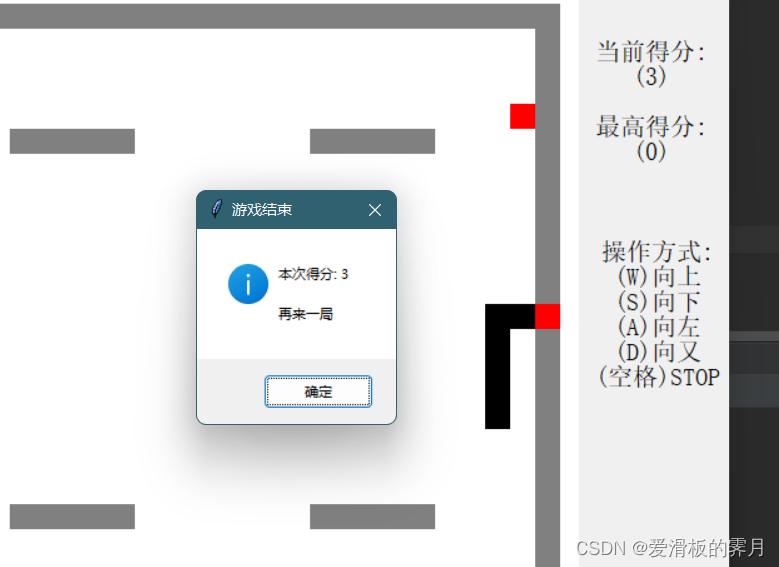
游戏拥有元素:贪吃蛇基础功能,得分统计,最高得分统计,障碍墙。
关键:使用二维表去保存地图数据,通过存储不同的数字去判断地图信息,随机生成的食物和吃掉食物后🐍的变化。
参考文章:(33条消息) 用python自带的tkinter做游戏(一)—— 贪吃蛇 篇_python tkinter游戏_Juni Zhu的博客-CSDN博客
图片
讯享网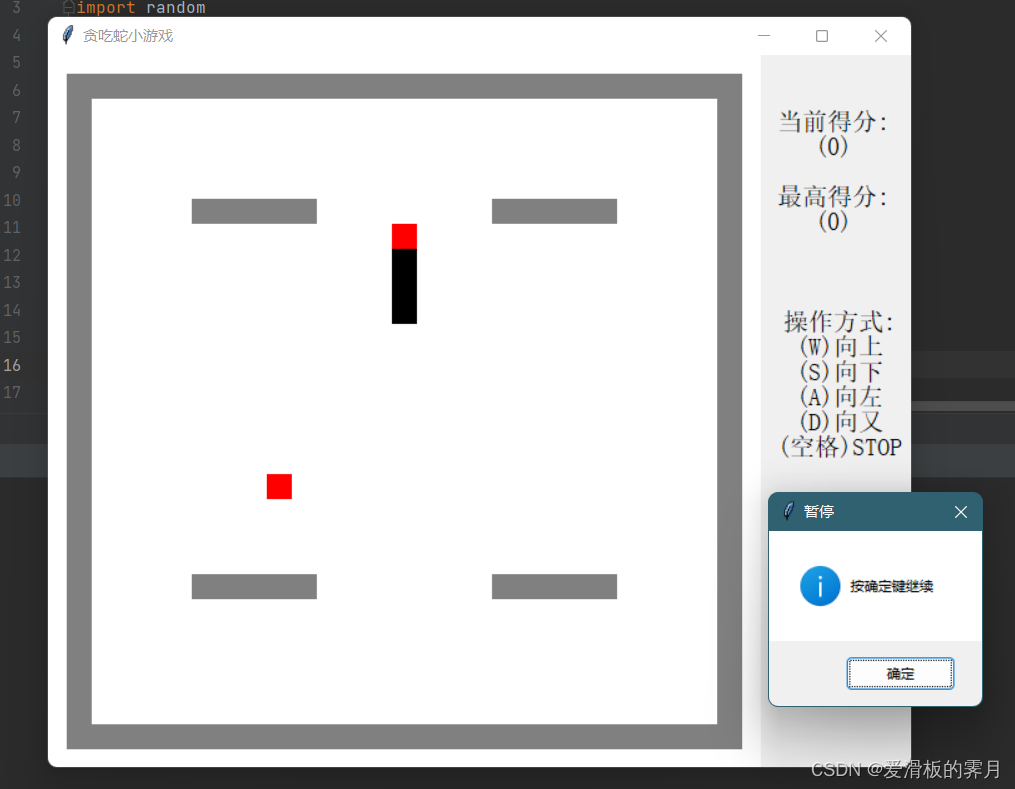
使用库:
import tkinter as tk from tkinter.messagebox import showinfo import random讯享网
1. 初始化数据:在这里初始化所有的游戏参数包括(窗口大小 颜色,分数,运动速度等...)【可自己修改】:
讯享网 def __init__(self): self.window = None # 实例化的窗体 self.canvas = None # 实例化的画布 self.loop = 0 # 暂停标记,1为开启,0为暂停 self.loop_id = None # 实例化loop,用来取消循环 self.game_map = [] # 整个游戏的地图 self.snake_body = [] # 蛇身的坐标集 self.food_xy = [] # 食物的坐标 self.head_x = 0 # 蛇头的X坐标 self.head_y = 0 # 蛇头的Y坐标 self.dd = [0] # 记录按键方向 self.score = 0 # 记录得分 self.score_max = 0 # 历史最高得分 self.len = 3 # 蛇身初始长度(最小设定值为1,不包括蛇头) self.body_len = self.len # 蛇身当前长度 self.FPS = 100 # 蛇的移动速度(单位毫秒) self.row_cells = 27 # 一行多少个单元格(含边框) self.col_cells = 27 # 一共多少行单元格(含边框) self.canvas_bg = 'white' # 游戏背景色 self.cell_size = 20 # 方格单元格大小 self.cell_gap = 0 # 方格间距 self.frame_x = 15 # 左右边距 self.frame_y = 15 # 上下边距 self.win_w_plus = 120 # 窗口右边额外多出的宽度 self.wall_list = list() # 墙体障碍 self.color_dict = { 0: 'white', # 0表示空白 1: 'red', # 1代表蛇头 2: 'black', # 2代表蛇身 3: 'red', # 3代表食物 4: 'gray' # 4代表墙 } self.run_game()
2. 窗口的初始化:创建窗口 和 画布 以及 窗口显示文字
def run_game(self): # 游戏窗口 self.window = tk.Tk() # 开一个窗口 self.window.focus_force() # 主窗口焦点 self.window.title('贪吃蛇小游戏') # 窗体大小 win_w_size = self.row_cells * self.cell_size + self.frame_x * 2 + self.win_w_plus win_h_size = self.col_cells * self.cell_size + self.frame_y * 2 screenWidth = self.window.winfo_screenwidth() # 获取显示区域的宽度 screenHeight = self.window.winfo_screenheight() # 获取显示区域的高度 left = (screenWidth - win_w_size) // 2 top = (screenHeight - win_h_size) // 2 self.window.geometry("{}x{}+{}+{}".format(win_w_size, win_h_size, left, top)) # 操作介绍 txt_lable = tk.Label(self.window, text="操作方式:\n(W)向上\n(S)向下\n(A)向左\n(D)向又\n(空格)STOP", font=('Ya_hei', 15)) txt_lable.place(x=self.cell_size * self.col_cells + self.cell_size * 2, y=self.cell_size * 10) # 创建画布 canvas_h = win_h_size canvas_w = win_w_size - self.win_w_plus self.canvas = tk.Canvas(self.window, bg=self.canvas_bg, height=canvas_h, width=canvas_w, highlightthickness=0) self.canvas.place(x=0, y=0) self.game_start()3. 创建地图数据,使用二维表的形式存储数据(0为空白, 4为墙壁)
讯享网 def create_map(self): # 创建地图列表 通过列表存放 self.game_map = [] for i in range(0, self.col_cells): self.game_map.append([]) for i in range(0, self.col_cells): for j in range(0, self.row_cells): self.game_map[i].append(j) self.game_map[i][j] = 0 print("-------------------- 地图数据 ---------------------") print(self.game_map) # 绘制障碍物 可以自己设置 for i in range(0, self.row_cells - 1): self.game_map[0][i] = 4 self.game_map[self.col_cells - 1][i] = 4 for i in range(0, self.col_cells - 1): self.game_map[i][0] = 4 self.game_map[i][self.row_cells - 1] = 4 self.game_map[-1][-1] = 4 u = 5 d = 20 for i in range(5, 10): self.wall_list.append([u, i]) self.game_map[u][i] = 4 self.wall_list.append([d, i]) self.game_map[d][i] = 4 for i in range(17, 22): self.wall_list.append([u, i]) self.game_map[u][i] = 4 self.wall_list.append([d, i]) self.game_map[d][i] = 4 print(self.wall_list)
4. 创建像素格:
def create_cells(self): # 创建单元格 像素点 for y in range(0, self.col_cells): for x in range(0, self.row_cells): a = self.frame_x + self.cell_size * x b = self.frame_y + self.cell_size * y c = self.frame_x + self.cell_size * (x + 1) d = self.frame_y + self.cell_size * (y + 1) e = self.canvas_bg f = self.cell_gap g = self.color_dict[self.game_map[y][x]] self.canvas.itemconfig(self.canvas.create_rectangle(a, b, c, d, outline=e, width=f, fill=g), fill=g)5. 初始化 🐍的信息和位置
讯享网 def create_snake(self): # 蛇头 在边框中间 self.snake_body = [[self.col_cells // 2, self.row_cells // 2]] # 蛇身 蛇头上色,颜色为定义的1 self.game_map[self.snake_body[0][0]][self.snake_body[0][1]] = 1
6. 食物的随机生成

def create_food(self): # 食物 通过 random 随机生成 self.food_xy = [0, 0] self.food_xy[1] = random.randint(1, self.row_cells - 2) self.food_xy[0] = random.randint(1, self.col_cells - 2) while self.game_map[self.food_xy[0]][self.food_xy[1]] != 0: self.food_xy[0] = random.randint(1, self.row_cells - 2) self.food_xy[1] = random.randint(1, self.col_cells - 2) self.game_map[self.food_xy[0]][self.food_xy[1]] = 37. 读取🐍在地图上的信息
讯享网 def snake_xy(self): # 读取蛇 xy = [] for i in range(0, self.col_cells): try: # 查找数值为1的坐标,没有就返回0。为防止在0列,先加上1,最后再减去。 x = self.game_map[i].index(1) + 1 except: x = 0 xy.append(x) self.head_x = max(xy) self.head_y = xy.index(self.head_x) self.head_x = self.head_x - 1
8. 控制🐍的移动
def move_snake(self, event): # 记录按键的方向,a上 b下 c左 d右 def move_key(a, b, c, d): direction = event.keysym if self.head_x != self.snake_body[-1][1]: if direction == a: self.dd[0] = 1 if direction == b: self.dd[0] = 2 else: if direction == c: self.dd[0] = 3 if direction == d: self.dd[0] = 4 if self.head_y != self.snake_body[-1][0]: if direction == c: self.dd[0] = 3 if direction == d: self.dd[0] = 4 else: if direction == a: self.dd[0] = 1 if direction == b: self.dd[0] = 2 讯享网 def pause_key(key): """ 暂停键 """ direction = event.keysym if direction == key: self.loop = 0 showinfo('暂停', '按确定键继续') self.loop = 1 self.window.after(self.FPS, self.game_loop) move_key('w', 's', 'a', 'd') move_key('W', 'S', 'A', 'D') move_key('Up', 'Down', 'Left', 'Right') pause_key('space')
9. 判断游戏是否结束
def game_over(self): def over(): showinfo('游戏结束', '本次得分: {}\n\n再来一局'.format(self.score)) # 判断分数 if self.score >= self.score_max: self.score_max = self.score self.score = 0 self.body_len = self.len self.game_start() if [self.head_y, self.head_x] in self.snake_body[0:-2]: over() if self.head_x == self.row_cells - 1 or self.head_x == 0: over() if self.head_y == self.col_cells - 1 or self.head_y == 0: over() if [self.head_y, self.head_x] in self.wall_list: over() 10. 记录蛇头运行轨迹,生成蛇身
讯享网 def snake_record(self): # 记录蛇头运行轨迹,生成蛇身 temp = [] temp.append(self.head_y) temp.append(self.head_x) print(self.head_y, self.head_x, self.game_map[self.head_y][self.head_x]) self.snake_body.append(temp) if self.snake_body[-1] == self.snake_body[-2]: del self.snake_body[-1] # 碰到食物身体加长,并再随机生成一个食物 if [self.head_y, self.head_x] == self.food_xy: self.score += 1 self.body_len += 1 self.create_food() # 限制蛇身长度,不超过设定值 elif len(self.snake_body) > self.body_len: self.game_map[self.snake_body[0][0]][self.snake_body[0][1]] = 0 del self.snake_body[0] # 在方向 自动前进 def move(d, x, y): if self.dd[0] == d: # 根据方向值来决定走向 self.game_map[self.head_y + x][self.head_x + y] = 1 self.game_map[self.head_y + 0][self.head_x + 0] = 2 move(1, -1, 0) move(2, 1, 0) move(3, 0, -1) move(4, 0, 1)
11. 每次吃到食物后🐍会变长,分数会增加 所以吃到一次,画面会刷新一次。
def game_loop(self): # 吃到food 循环 刷新 self.snake_record() self.snake_xy() self.canvas.delete('all') # 清除canvas self.create_cells() self.game_over() if self.loop == 1: txt_s = tk.Label(self.window, text="当前得分:\n({})\n\n最高得分:\n({})".format(self.score, self.score_max), font=('Ya_hei', 15)) txt_s.place(x=self.cell_size * self.col_cells + self.cell_size * 2, y=self.cell_size * 2) self.loop_id = self.window.after(self.FPS, self.game_loop)12. 游戏的开始 按顺序 初始化函数
讯享网 def game_start(self): # 游戏开始 self.loop = 1 # 暂停标记,1为开启,0为暂停 self.dd = [0] # 记录按键方向 self.create_map() self.create_snake() self.create_food() self.window.bind('<Key>', self.move_snake) self.snake_xy() self.game_loop()
13. 游戏结束关闭窗口
def close_w(): self.loop = 0 self.window.after_cancel(self.loop_id) self.window.destroy() self.window.protocol('WM_DELETE_WINDOW', close_w) self.window.mainloop() 14. 启动main
讯享网if __name__ == '__main__': Snake()
全部代码:
import tkinter as tk from tkinter.messagebox import showinfo import random class Snake: def __init__(self): self.window = None # 实例化的窗体 self.canvas = None # 实例化的画布 self.loop = 0 # 暂停标记,1为开启,0为暂停 self.loop_id = None # 实例化loop,用来取消循环 self.game_map = [] # 整个游戏的地图 self.snake_body = [] # 蛇身的坐标集 self.food_xy = [] # 食物的坐标 self.head_x = 0 # 蛇头的X坐标 self.head_y = 0 # 蛇头的Y坐标 self.dd = [0] # 记录按键方向 self.score = 0 # 记录得分 self.score_max = 0 # 历史最高得分 self.len = 3 # 蛇身初始长度(最小设定值为1,不包括蛇头) self.body_len = self.len # 蛇身当前长度 self.FPS = 100 # 蛇的移动速度(单位毫秒) self.row_cells = 27 # 一行多少个单元格(含边框) self.col_cells = 27 # 一共多少行单元格(含边框) self.canvas_bg = 'white' # 游戏背景色 self.cell_size = 20 # 方格单元格大小 self.cell_gap = 0 # 方格间距 self.frame_x = 15 # 左右边距 self.frame_y = 15 # 上下边距 self.win_w_plus = 120 # 窗口右边额外多出的宽度 self.wall_list = list() # 墙体障碍 self.color_dict = { 0: 'white', # 0表示空白 1: 'red', # 1代表蛇头 2: 'black', # 2代表蛇身 3: 'red', # 3代表食物 4: 'gray' # 4代表墙 } self.run_game() def run_game(self): # 游戏窗口 self.window = tk.Tk() # 开一个窗口 self.window.focus_force() # 主窗口焦点 self.window.title('贪吃蛇小游戏') # 窗体大小 win_w_size = self.row_cells * self.cell_size + self.frame_x * 2 + self.win_w_plus win_h_size = self.col_cells * self.cell_size + self.frame_y * 2 screenWidth = self.window.winfo_screenwidth() # 获取显示区域的宽度 screenHeight = self.window.winfo_screenheight() # 获取显示区域的高度 left = (screenWidth - win_w_size) // 2 top = (screenHeight - win_h_size) // 2 self.window.geometry("{}x{}+{}+{}".format(win_w_size, win_h_size, left, top)) # 操作介绍 txt_lable = tk.Label(self.window, text="操作方式:\n(W)向上\n(S)向下\n(A)向左\n(D)向又\n(空格)STOP", font=('Ya_hei', 15)) txt_lable.place(x=self.cell_size * self.col_cells + self.cell_size * 2, y=self.cell_size * 10) # 创建画布 canvas_h = win_h_size canvas_w = win_w_size - self.win_w_plus self.canvas = tk.Canvas(self.window, bg=self.canvas_bg, height=canvas_h, width=canvas_w, highlightthickness=0) self.canvas.place(x=0, y=0) self.game_start() def create_map(self): # 创建地图列表 通过列表存放 self.game_map = [] for i in range(0, self.col_cells): self.game_map.append([]) for i in range(0, self.col_cells): for j in range(0, self.row_cells): self.game_map[i].append(j) self.game_map[i][j] = 0 print("-------------------- 地图数据 ---------------------") print(self.game_map) # 绘制障碍物 可以自己设置 for i in range(0, self.row_cells - 1): self.game_map[0][i] = 4 self.game_map[self.col_cells - 1][i] = 4 for i in range(0, self.col_cells - 1): self.game_map[i][0] = 4 self.game_map[i][self.row_cells - 1] = 4 self.game_map[-1][-1] = 4 u = 5 d = 20 for i in range(5, 10): self.wall_list.append([u, i]) self.game_map[u][i] = 4 self.wall_list.append([d, i]) self.game_map[d][i] = 4 for i in range(17, 22): self.wall_list.append([u, i]) self.game_map[u][i] = 4 self.wall_list.append([d, i]) self.game_map[d][i] = 4 print(self.wall_list) def create_cells(self): # 创建单元格 像素点 for y in range(0, self.col_cells): for x in range(0, self.row_cells): a = self.frame_x + self.cell_size * x b = self.frame_y + self.cell_size * y c = self.frame_x + self.cell_size * (x + 1) d = self.frame_y + self.cell_size * (y + 1) e = self.canvas_bg f = self.cell_gap g = self.color_dict[self.game_map[y][x]] self.canvas.itemconfig(self.canvas.create_rectangle(a, b, c, d, outline=e, width=f, fill=g), fill=g) def create_snake(self): # 蛇头 在边框中间 self.snake_body = [[self.col_cells // 2, self.row_cells // 2]] # 蛇身 蛇头上色,颜色为定义的1 self.game_map[self.snake_body[0][0]][self.snake_body[0][1]] = 1 def create_food(self): # 食物 通过 random 随机生成 self.food_xy = [0, 0] self.food_xy[1] = random.randint(1, self.row_cells - 2) self.food_xy[0] = random.randint(1, self.col_cells - 2) while self.game_map[self.food_xy[0]][self.food_xy[1]] != 0: self.food_xy[0] = random.randint(1, self.row_cells - 2) self.food_xy[1] = random.randint(1, self.col_cells - 2) self.game_map[self.food_xy[0]][self.food_xy[1]] = 3 def snake_xy(self): # 读取蛇 xy = [] for i in range(0, self.col_cells): try: # 查找数值为1的坐标,没有就返回0。为防止在0列,先加上1,最后再减去。 x = self.game_map[i].index(1) + 1 except: x = 0 xy.append(x) self.head_x = max(xy) self.head_y = xy.index(self.head_x) self.head_x = self.head_x - 1 def move_snake(self, event): # 记录按键的方向,a上 b下 c左 d右 def move_key(a, b, c, d): direction = event.keysym if self.head_x != self.snake_body[-1][1]: if direction == a: self.dd[0] = 1 if direction == b: self.dd[0] = 2 else: if direction == c: self.dd[0] = 3 if direction == d: self.dd[0] = 4 if self.head_y != self.snake_body[-1][0]: if direction == c: self.dd[0] = 3 if direction == d: self.dd[0] = 4 else: if direction == a: self.dd[0] = 1 if direction == b: self.dd[0] = 2 def pause_key(key): """ 暂停键 """ direction = event.keysym if direction == key: self.loop = 0 showinfo('暂停', '按确定键继续') self.loop = 1 self.window.after(self.FPS, self.game_loop) move_key('w', 's', 'a', 'd') move_key('W', 'S', 'A', 'D') move_key('Up', 'Down', 'Left', 'Right') pause_key('space') def game_over(self): def over(): showinfo('游戏结束', '本次得分: {}\n\n再来一局'.format(self.score)) # 判断分数 if self.score >= self.score_max: self.score_max = self.score self.score = 0 self.body_len = self.len self.game_start() if [self.head_y, self.head_x] in self.snake_body[0:-2]: over() if self.head_x == self.row_cells - 1 or self.head_x == 0: over() if self.head_y == self.col_cells - 1 or self.head_y == 0: over() if [self.head_y, self.head_x] in self.wall_list: over() def snake_record(self): # 记录蛇头运行轨迹,生成蛇身 temp = [] temp.append(self.head_y) temp.append(self.head_x) print(self.head_y, self.head_x, self.game_map[self.head_y][self.head_x]) self.snake_body.append(temp) if self.snake_body[-1] == self.snake_body[-2]: del self.snake_body[-1] # 碰到食物身体加长,并再随机生成一个食物 if [self.head_y, self.head_x] == self.food_xy: self.score += 1 self.body_len += 1 self.create_food() # 限制蛇身长度,不超过设定值 elif len(self.snake_body) > self.body_len: self.game_map[self.snake_body[0][0]][self.snake_body[0][1]] = 0 del self.snake_body[0] # 在方向 自动前进 def move(d, x, y): if self.dd[0] == d: # 根据方向值来决定走向 self.game_map[self.head_y + x][self.head_x + y] = 1 self.game_map[self.head_y + 0][self.head_x + 0] = 2 move(1, -1, 0) move(2, 1, 0) move(3, 0, -1) move(4, 0, 1) def game_loop(self): # 吃到food 循环 刷新 self.snake_record() self.snake_xy() self.canvas.delete('all') # 清除canvas self.create_cells() self.game_over() if self.loop == 1: txt_s = tk.Label(self.window, text="当前得分:\n({})\n\n最高得分:\n({})".format(self.score, self.score_max), font=('Ya_hei', 15)) txt_s.place(x=self.cell_size * self.col_cells + self.cell_size * 2, y=self.cell_size * 2) self.loop_id = self.window.after(self.FPS, self.game_loop) def game_start(self): # 游戏开始 self.loop = 1 # 暂停标记,1为开启,0为暂停 self.dd = [0] # 记录按键方向 self.create_map() self.create_snake() self.create_food() self.window.bind('<Key>', self.move_snake) self.snake_xy() self.game_loop() def close_w(): self.loop = 0 self.window.after_cancel(self.loop_id) self.window.destroy() self.window.protocol('WM_DELETE_WINDOW', close_w) self.window.mainloop() if __name__ == '__main__': Snake()
版权声明:本文内容由互联网用户自发贡献,该文观点仅代表作者本人。本站仅提供信息存储空间服务,不拥有所有权,不承担相关法律责任。如发现本站有涉嫌侵权/违法违规的内容,请联系我们,一经查实,本站将立刻删除。
如需转载请保留出处:https://51itzy.com/kjqy/59928.html