
◆ 每分钟发送红包数量不得超过1800个; ◆ 同一个商户号,每分钟最多给同一个用户发送一个红包; 讯享网
2、红包规则
讯享网 ◆ 单个红包金额介于[1.00元,200.00元]之间; ◆ 同一个红包只能发送给一个用户;(如果以上规则不满足您的需求,请发邮件至获取升级指引)
以及商户侧调用红包接口流程
1.◆ 下载证书 商户调用微信红包接口时,服务器会进行证书验证,请在商户平台下载证书 2.◆ 充值 发放现金红包将扣除商户的可用余额,请注意,可用余额并不是微信支 付交易额,需要预先充值,确保可用余额充足。查看可用余额、充值、 提现请登录微信支付商户平台,进入“资金管理”菜单,进行操作 微信红包接口调用流程
◆ 后台API调用:待进入联调过程时与开发进行详细沟通;
◆ 告知服务器:告知服务器接收微信红包的用户openID,告知服务器该用户获得的金额;
◆ 从商务号扣款:服务器获取信息后从对应的商务号扣取对应的金额;
◆ 调用失败:因不符合发送规则,商务号余额不足等原因造成调用失败,反馈至调用方;
◆ 发送成功:以微信红包公众账号发送对应红包至对应用户;

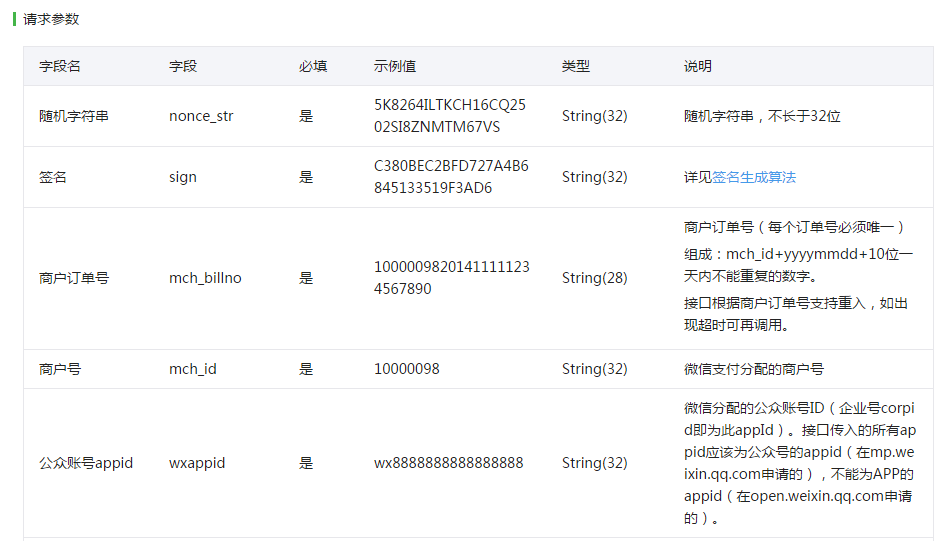
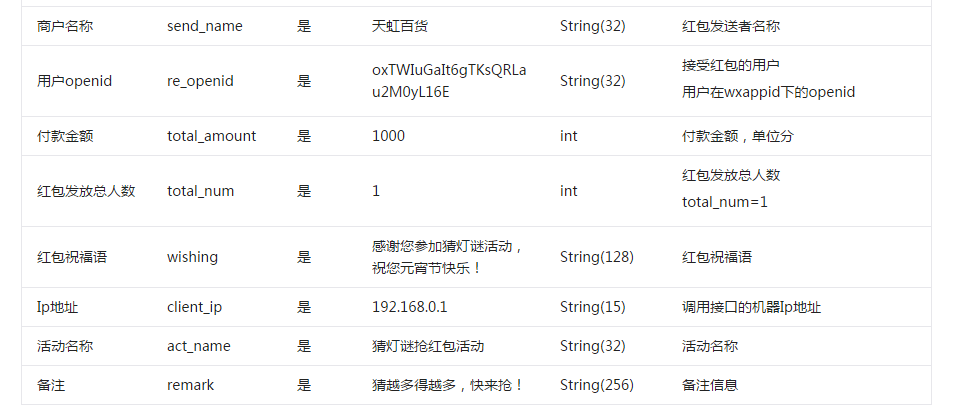

首先编写调用该接口所需要的工具类
讯享网package com.beitian.eshop.wx; import java.security.MessageDigest; import java.util.ArrayList; import java.util.Collection; import java.util.Collections; import java.util.Iterator; import java.util.List; import java.util.Map; import java.util.Random; import java.util.Set; import java.util.SortedMap; import java.util.Map.Entry; import org.apache.commons.lang.StringUtils; import org.dom4j.Document; import org.dom4j.DocumentHelper; import org.dom4j.Element; / * 微信开发工具类 * <p>作者:Afan</p> * <p>电子邮箱:</p> * <p>创建时间:2016-5-3 上午11:14:32</p> */ public class WxFanztUtils {
    / * sign签名 * <p>Afan</p> * <p>2016-4-29 下午4:28:29</p> * @param map * @param key * @return */ public static String getSign(Map<String, String> map, String key) { String sign = ""; Collection<String> keyset = map.keySet(); List<String> list = new ArrayList<String>(keyset); // 对key键值按字典升序排序 Collections.sort(list); String stringA = ""; for (int i = 0; i < list.size(); i++) { if (null == map.get(list.get(i)) || "".equals(map.get(list.get(i)))) { continue; } stringA += list.get(i) + "=" + map.get(list.get(i)) + "&"; } stringA += "key=" + key; sign = MD5(stringA).toUpperCase(); return sign; } / * MD5 * <p>Afan</p> * <p>2016-5-3 上午9:53:01</p> * @param s * @return */ public static String MD5(String s) { char hexDigits[]={


  '0','1','2','3','4','5','6','7','8','9','A','B','C','D','E','F'}; try { byte[] btInput = s.getBytes("UTF-8"); MessageDigest mdInst = MessageDigest.getInstance("MD5"); mdInst.update(btInput); byte[] md = mdInst.digest(); int j = md.length; char str[] = new char[j * 2]; int k = 0; for (int i = 0; i < j; i++) { byte byte0 = md[i]; str[k++] = hexDigits[byte0 >>> 4 & 0xf]; str[k++] = hexDigits[byte0 & 0xf]; } return new String(str); } catch (Exception e) { e.printStackTrace(); return null; } } / * 生成随机字符 * @param iLen :长度 * @param iType:0--表示仅获得数字随机数,1--表示仅获得字符随机数,2--表示获得数字字符混合随机数 * @return */ public static String BuildRadom(int iLen, int iType) { String strRandom = "";// 随机字符串 Random rnd = new Random(); if (iLen < 0) { iLen = 5; } if ((iType > 2) || (iType < 0)) { iType = 2; } switch (iType) { case 0: for (int iLoop = 0; iLoop < iLen; iLoop++) { strRandom += Integer.toString(rnd.nextInt(10)); } break; case 1: for (int iLoop = 0; iLoop < iLen; iLoop++) { // 将得到的10到35之间的数字转成36进制表示,即a到z的表示 strRandom += Integer.toString((10 + rnd.nextInt(26)), 36); } break; case 2: for (int iLoop = 0; iLoop < iLen; iLoop++) { strRandom += Integer.toString(rnd.nextInt(36), 36); } break; } return strRandom; } / * 参数map转xml格式 * * @param params * @return */ public static String paramsToXml(SortedMap<String, String> params) { Document doc = DocumentHelper.createDocument(); Element root = doc.addElement("xml"); Set<Entry<String, String>> es = params.entrySet(); Iterator<Entry<String, String>> it = es.iterator(); while (it.hasNext()) { Map.Entry<String, String> entry = (Map.Entry<String, String>) it .next(); String tmpKey = (String) entry.getKey(); String tmpValue = (String) entry.getValue(); if (!StringUtils.isEmpty(tmpValue)) { root.addElement(tmpKey).addText(tmpValue); } } return doc.asXML(); } }
实现发红红包的代码:
package com.beitian.eshop.wx; import java.io.BufferedReader; import java.io.File; import java.io.FileInputStream; import java.io.InputStreamReader; import java.security.KeyStore; import java.util.HashMap; import java.util.Map; import java.util.SortedMap; import java.util.TreeMap; import javax.net.ssl.SSLContext; import org.apache.http.HttpEntity; import org.apache.http.client.methods.CloseableHttpResponse; import org.apache.http.client.methods.HttpPost; import org.apache.http.conn.ssl.SSLConnectionSocketFactory; import org.apache.http.entity.StringEntity; import org.apache.http.impl.client.CloseableHttpClient; import org.apache.http.impl.client.HttpClients; import org.apache.http.ssl.SSLContexts; import org.apache.http.util.EntityUtils; / * 微信开发-->微信现金红包 * <p>作者:Afan</p> * <p>电子邮箱:</p> * <p>创建时间:2016-5-3 上午11:14:32</p> */ public class WxRedPackageHelper { private final static String url = "https://api.mch.weixin..com/mmpaymkttransfers/sendredpack"; @SuppressWarnings("deprecation") public static void main(String[] args) throws Exception { Map<String, String> map = new HashMap<String, String>(); map.put("nonce_str", WxFanztUtils.BuildRadom(32,2));//随机字符串 map.put("mch_billno", "7890"); map.put("mch_id", WxConfig.WX_MERCH_ID);//商户号 map.put("wxappid", WxConfig.WX_APPID);//公众账号appid map.put("send_name", "安鑫宝");//商户名 map.put("re_openid", "oA5zmtxy5NAuYF-Y_q9m5U--V4sE");//用户openid map.put("total_amount", "100");//金额,单位分 map.put("total_num", "1");//数量 map.put("wishing", "感谢您参加猜灯谜活动,祝您元宵节快乐!");//红包祝福语 map.put("client_ip", "192.168.0.1"); map.put("act_name", "猜灯谜抢红包活动");//活动名称 map.put("remark", "猜越多得越多,快来抢!");//备注 String sign = WxFanztUtils.getSign(map, WxConfig.WX_MERCH_API_KEY);//key map.put("sign", sign); SortedMap<String, String> map2 = new TreeMap<String, String>(map); String postXml = WxFanztUtils.paramsToXml(map2); KeyStore keyStore = KeyStore.getInstance("PKCS12"); FileInputStream instream = new FileInputStream(new File("E:/Afan/weixin/apiclient_cert.p12")); try { keyStore.load(instream, WxConfig.WX_MERCH_ID.toCharArray());//WxConfig.WX_MERCH_ID//商户号 } finally { instream.close(); } SSLContext sslcontext = SSLContexts.custom().loadKeyMaterial(keyStore, WxConfig.WX_MERCH_ID.toCharArray()).build(); SSLConnectionSocketFactory sslsf = new SSLConnectionSocketFactory(sslcontext,new String[] { "TLSv1" },null,SSLConnectionSocketFactory.BROWSER_COMPATIBLE_HOSTNAME_VERIFIER); CloseableHttpClient httpclient = HttpClients.custom().setSSLSocketFactory(sslsf).build(); try { HttpPost httpost=new HttpPost(url); httpost.addHeader("Connection", "keep-alive"); httpost.addHeader("Accept", "*/*"); httpost.addHeader("Content-Type", "application/x-www-form-urlencoded; charset=UTF-8"); httpost.addHeader("Host", "api.mch.weixin..com"); httpost.addHeader("X-Requested-With", "XMLHttpRequest"); httpost.addHeader("Cache-Control", "max-age=0"); httpost.addHeader("User-Agent", "Mozilla/4.0 (compatible; MSIE 8.0; Windows NT 6.0) "); httpost.setEntity(new StringEntity(postXml, "utf-8")); CloseableHttpResponse response = httpclient.execute(httpost); try { HttpEntity entity = response.getEntity(); System.out.println("----------------------------------------"); System.out.println(response.getStatusLine()); if (entity != null) { System.out.println("Response content length: " + entity.getContentLength()); BufferedReader bufferedReader = new BufferedReader(new InputStreamReader(entity.getContent())); String text; while ((text = bufferedReader.readLine()) != null) { System.out.println(text); } } EntityUtils.consume(entity); } finally { response.close(); } }finally { httpclient.close(); } } } 需要注意的是调用微信红包接口需要再本地导入证书,证书的下载微信商户平台(pay.weixin..com)–>账户设置–>API安全–>证书下载 。证书文件有四个:
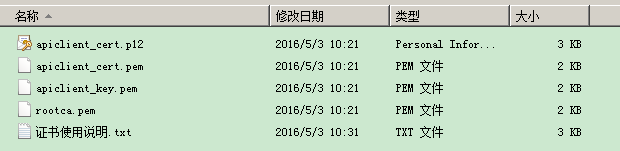
双击导入apiclient_cert.p12,密码为你的商户号
运行main方法,服务器返回:
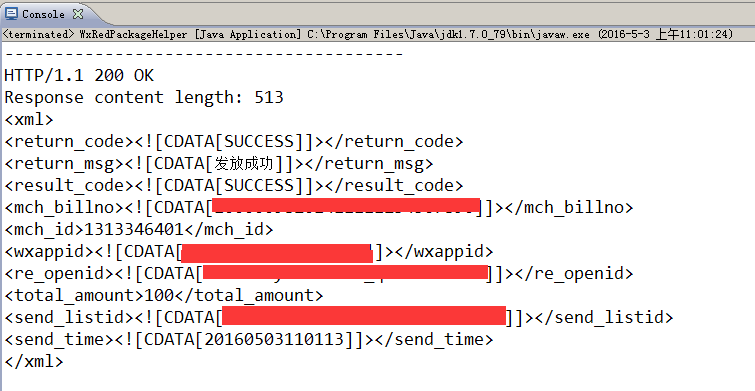
打开微信,收取红包。
版权声明:本文内容由互联网用户自发贡献,该文观点仅代表作者本人。本站仅提供信息存储空间服务,不拥有所有权,不承担相关法律责任。如发现本站有涉嫌侵权/违法违规的内容,请联系我们,一经查实,本站将立刻删除。
如需转载请保留出处:https://51itzy.com/kjqy/59170.html