
sinon
做测试的知道,在 Java 的单元测试中,不能获取实际对象时,我们可以使用 Mock/Stub 对我们的代码进行mock 等操作,更好的方便我们测试。
官网 : http://sinonjs.org/
Spy
翻译过来的意思是 “监视”,很贴切。
sinon.js 中 spy 主要用来监视函数的调用情况,sinon 对待监视的函数进行 wrap 包装,因此可以通过它清楚的知道,该函数被调用过几次,传入什么参数返回什么结果,甚至是抛出的异常情况。
看个例子:
var sinon = require('sinon'); var expect = require('chai').expect; var orginObj = { 'launch': function() { console.log('I am launch function'); } } var myspy = sinon.spy(orginObj, 'launch');// 监视 orginObj.launch. console.log(typeof myspy); console.log('-------------') // 调用 orginObj.launch orginObj.launch('sss'); // 函数调用次数 expect(orginObj.launch.callCount).to.be.equal(1) // 该函数以该参数调用过 expect(orginObj.launch.called).be.True; // 该函数以该参数调用过一次 expect(orginObj.launch.withArgs("sss").calledOnce).to.be.True;讯享网
从上面的例子可以看出,spy 确实给出了详细的函数被调用情况。那么 spy 到底是什么呢?首先发现它是个函数。
讯享网var myspy = sinon.spy(orginObj, 'launch');// 监视 orginObj.launch. console.log(typeof myspy);// function
把这个函数对象打印出来如下:
{ [Function: proxy] isSinonProxy: true, formatters: { c: [Function], n: [Function], D: [Function], C: [Function], t: [Function], '*': [Function] }, reset: [Function], invoke: [Function: invoke], named: [Function: named], getCall: [Function: getCall], getCalls: [Function], calledBefore: [Function: calledBefore], calledAfter: [Function: calledAfter], calledImmediatelyBefore: [Function: calledImmediatelyBefore], calledImmediatelyAfter: [Function: calledImmediatelyAfter], withArgs: [Function], matchingFakes: [Function], matches: [Function], printf: [Function], calledOn: [Function], alwaysCalledOn: [Function], calledWith: [Function], calledWithMatch: [Function], alwaysCalledWith: [Function], alwaysCalledWithMatch: [Function], calledWithExactly: [Function], alwaysCalledWithExactly: [Function], neverCalledWith: [Function], neverCalledWithMatch: [Function], threw: [Function], alwaysThrew: [Function], returned: [Function], alwaysReturned: [Function], calledWithNew: [Function], alwaysCalledWithNew: [Function], callArg: [Function], callArgWith: [Function], callArgOn: [Function], callArgOnWith: [Function], throwArg: [Function], yield: [Function], invokeCallback: [Function], yieldOn: [Function], yieldTo: [Function], yieldToOn: [Function], spyCall: { [Function: createSpyCall] toString: [Function] }, called: false, notCalled: true, calledOnce: false, calledTwice: false, calledThrice: false, callCount: 0, firstCall: null, secondCall: null, thirdCall: null, lastCall: null, args: [], returnValues: [], thisValues: [], exceptions: [], callIds: [], errorsWithCallStack: [], displayName: 'launch', toString: [Function: toString], instantiateFake: [Function: create], id: 'spy#0', stackTrace: 'Error: Stack Trace for original\n XXXXXXXXXXXXXX, restore: { [Function] sinon: true }, wrappedMethod: [Function] }里面包含一些基本的function 和 函数被调用情况 以及 stackTrace。
stub
在 Junit 中,我们有时候会使用stub 来嵌入或者直接替换掉一些代码,来达到隔离的目的。一个Stub可以使用最少的依赖方法来模拟该单元测试。比如一个方法可能依赖另一个方法的执行,而后者对我们来说是透明的。好的做法是使用stub 对它进行隔离替换。这样就实现了更准确的单元测试。
简单的说,stub是代码的一部分。在运行时用stub替换真正代码,忽略调用代码的原有实现。目的是用一个简单一点的行为替换一个复杂的行为,从而独立地测试代码的某一部分。
下面的例子能很好的看出这点:
讯享网// // 创建一个 stub var stub = sinon.stub(); var testObj = { 'fun' : function (arg) { // ... }, 'secondFun' : function(arg){ }, 'thirdFun': function (arg) { // body... } } // // 将 testObj.fun 替换成一个stub,使用完毕后需要调用stub.restore() 或 testObj.fun.restore 复原。 var stub = sinon.stub(testObj, 'fun'); // // 将testObj.fun 替换成指定的函数 // var stub = sinon.stub(testObj, "fun", function (argument) { // // body... // }) stub(); expect(stub.callCount).to.be.equal(1); // testObj.secondFun 替换成指定的函数,不建议使用,以后会废弃 var stub2 = sinon.stub(testObj, "secondFun", function (arg) { console.log('I am replaced function'); }); stub2('arg'); expect(stub2.withArgs("arg").calledOnce).to.be.True; var stub3 = sinon.stub(testObj, "thirdFun").callsFake(function (arg) { console.log('I am replaced function3'); }); stub3('arg'); expect(stub3.withArgs("arg").calledOnce).to.be.True;
这里要的注意两点:

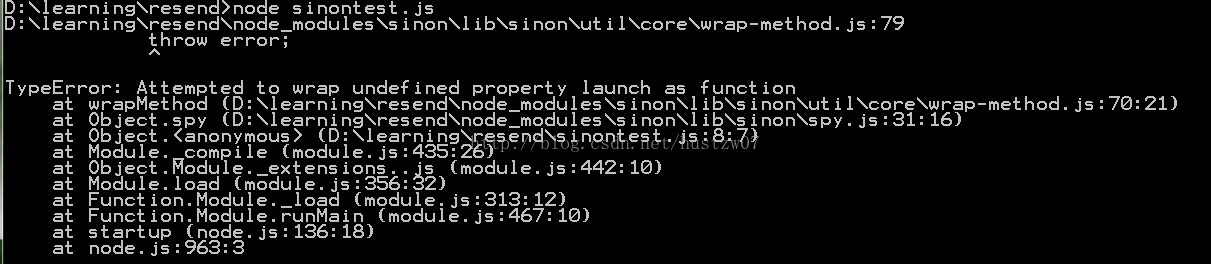
1.我们要对 函数进行替换,当对一个没定义的函数进行替换会报错。
2. 对象的某个函数属性只能被 stub 一次。当尝试第二次 stub时会报错。
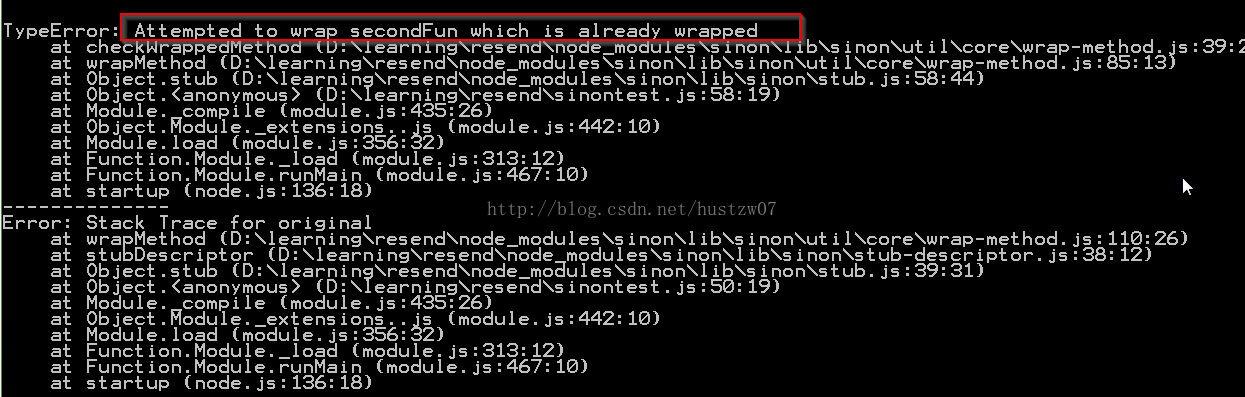
如果要在一个测试集里面多次stub 同一个函数,可以在钩子函数里面对其进行初始化。另外,由于 stub 是使用指定函数替换已有的函数,所以每次使用后最好复原它。做法很简单如下:
stub3.restore()
另外,stub 也可以用来改变函数的行为来完成我们特殊的测试用例。比如返回值、抛出异常等。有兴趣的同学可以自己尝试下。
讯享网// stub.returns(6666); // stub(); // stub() 总是返回 6666 // stub.throws('6666'); // stub(); // stub() 总是抛出 '6666' // stub.withArgs(1).returns(6666); // stub(1); // stub() 总是返回 6666
mock
var obj = { 'fun': function (argument) { // body... } }; var mock = sinon.mock(obj); // obj.fun(10) 至少被调用过 1 次 mock.expects('fun').atLeast(1).atMost(5).withArgs(10); // mock.expects("method").once().throws(); obj.fun(10); mock.verify();// 测试此时的 obj 是否满足上面的mock 设定条件。 mock.restore();比较
spy : 监视函数被调用情况。
stub : 替换对象的函数行为。
mock : 设定函数行为,并验证。
从这点来说,mock 更像是 spy 和 stub 的合体。看下面一个例子,这里我想测试 myPrinter,但是它的函数还没实现,先用 一个对象代替。
讯享网var orgin = { 'print': function (prt) { console.log('I am print of orgin') } } var myPrinter = { 'getPrinter': function () { // TODO } } var mocker = sinon.mock(orgin); // 由于我们的 printer 还没实现,先用 orgin 代替.这样我们就能测试 myPrinter 的方法了. var stub4Printer = sinon.stub(myPrinter, "getPrinter").callsFake(function () { return orgin; }); // 此时测试还没执行,但我们预期 orgin的print() 将会被传入 'Hustzw' 作为参数调用一次 mocker.expects('print').once().withArgs('Hustzw'); // 测试执行 stub4Printer().print('Hustzw'); mocker.verify();// 验证 mocker 是否满足上面的mock 预期。 // 在完成执行测试后,我们的 print() 在测试过程中应该会被调用一次 mocker.restore();
版权声明:本文内容由互联网用户自发贡献,该文观点仅代表作者本人。本站仅提供信息存储空间服务,不拥有所有权,不承担相关法律责任。如发现本站有涉嫌侵权/违法违规的内容,请联系我们,一经查实,本站将立刻删除。
如需转载请保留出处:https://51itzy.com/kjqy/58465.html