
需求:利用aop思想实现日志输出,加了注解的方法忽略打印日志,下面请看具体实现。
1.编写切面
注意:注意查看execution访问的方法修饰符,默认是方法public方法,如果是private需要手动修改。
package com.bandweaver.tunnel.common.platform.log; import java.io.IOException; import java.lang.reflect.Method; import java.util.Date; import java.util.Set; import java.util.UUID; import javax.management.RuntimeErrorException; import javax.servlet.http.HttpServletRequest; import javax.servlet.http.HttpServletResponse; import javax.servlet.http.HttpSession; import javax.xml.parsers.ParserConfigurationException; import org.apache.shiro.SecurityUtils; import org.aspectj.lang.JoinPoint; import org.aspectj.lang.Signature; import org.aspectj.lang.annotation.After; import org.aspectj.lang.annotation.AfterReturning; import org.aspectj.lang.annotation.AfterThrowing; import org.aspectj.lang.annotation.Aspect; import org.aspectj.lang.annotation.Pointcut; import org.aspectj.lang.reflect.MethodSignature; import org.springframework.beans.factory.annotation.Autowired; import org.springframework.stereotype.Component; import org.springframework.web.context.request.RequestContextHolder; import org.springframework.web.context.request.ServletRequestAttributes; import org.xml.sax.SAXException; import com.alibaba.fastjson.JSON; import com.alibaba.fastjson.JSONObject; import com.bandweaver.tunnel.common.biz.dto.UserDTO; import com.bandweaver.tunnel.common.biz.itf.OperationLogService; import com.bandweaver.tunnel.common.biz.itf.SecurityLogService; import com.bandweaver.tunnel.common.biz.itf.UserService; import com.bandweaver.tunnel.common.biz.pojo.OperationLog; import com.bandweaver.tunnel.common.biz.pojo.SecurityLog; import com.bandweaver.tunnel.common.biz.pojo.User; import com.bandweaver.tunnel.common.platform.constant.Constants; import com.bandweaver.tunnel.common.platform.constant.StatusCodeEnum; import com.bandweaver.tunnel.common.platform.util.ContextUtil; / * ClassName: LogAspect * * @Description: 日志切面 * @author shaosen * @date 2018年5月16日 */ @Aspect @Component public class LogAspect { private static final String OPTLOGID = "optLogId"; @Autowired private OperationLogService operationLogService; @Autowired private SecurityLogService securityLogService; @Autowired private UserService userService; / * @Description: 配置切入点 * @param * @return void * @throws * @author shaosen * @date 2018年5月16日 */ @Pointcut("execution (public * com.bandweaver.tunnel.controller..*.*(..))") public void controllerAspect() { } / * @Description: 后置通知 * @param @param joinPoint * @return void * @throws IOException * @throws SAXException * @throws ParserConfigurationException * @throws * @author shaosen * @date 2018年5月16日 */ @After("controllerAspect()") public void doAfter(JoinPoint joinPoint) throws ParserConfigurationException, SAXException, IOException { ServletRequestAttributes attributes = (ServletRequestAttributes) RequestContextHolder.getRequestAttributes(); HttpServletRequest request = attributes.getRequest(); WriteLog annotation = checkAnnotation(joinPoint); if (annotation == null) return; //模块 JSONObject jsonObject = LogHandler.parseXML(annotation.value().getId()); // operationID 模块id String cname = (String) jsonObject.get("cname"); //模块 // String oname = (String) jsonObject.get("oname"); String desc = (String) jsonObject.get("desc"); //带有{}的描述 // ip String reqIP = request.getRemoteAddr(); // 请求人 String reqUser = null; if (SecurityUtils.getSubject().getSession().getAttribute(Constants.SESSION_USER_INFO) != null) { User user = (User) SecurityUtils.getSubject().getSession().getAttribute(Constants.SESSION_USER_INFO); reqUser = user.getName(); } // 请求人id int reqID = 0; if (reqUser != null && reqUser.trim().length() > 0) { User user = userService.getByUserName(reqUser); reqID = user.getId(); } // 类方法 String method = joinPoint.getSignature().getDeclaringTypeName() + "." + joinPoint.getSignature().getName(); // 参数 Object[] arguments = joinPoint.getArgs(); String params = ""; for (int i = 0; i < arguments.length; i++) { params = params + arguments[i] + (i == arguments.length - 1 ? "" : " , "); } OperationLog optLog = new OperationLog(); optLog.setId(UUID.randomUUID().toString().replaceAll("-", "")); optLog.setModuleType(cname); optLog.setReqIp(reqIP); optLog.setReqId(reqID); optLog.setReqUser(reqUser); optLog.setMethod(method); optLog.setParams(params); optLog.setCrtTime(new Date()); optLog.setDesc(desc); SaveOptLog(annotation, optLog); } / * @Description: 保存操作日志 * @param @param annotation * @param @param optLog * @return void * @throws * @author shaosen * @date 2018年5月28日 */ private void SaveOptLog(WriteLog annotation, OperationLog optLog) { String desc; desc = LogHandler.getDesc(annotation.value().getId(),optLog);//对desc中的{0},{1}进行填充 optLog.setDesc(desc); LogUtil.info("------------------操作日志--------------------------"); LogUtil.info("描述 : " + optLog.getDesc()); LogUtil.info("------------------操作日志--------------------------"); operationLogService.save(optLog); //保存这条日志的id,记录日志操作结果 ContextUtil.getRequest().getSession().setAttribute(OPTLOGID, optLog.getId()); } / * @Description: 获取注解 * @param @param joinPoint * @param @return * @return IgnoreLog * @throws @author shaosen * @date 2018年5月17日 */ private WriteLog checkAnnotation(JoinPoint joinPoint) { Signature signature = joinPoint.getSignature(); MethodSignature methodSignature = (MethodSignature) signature; Method method = methodSignature.getMethod(); if (method != null) { return method.getAnnotation(WriteLog.class); } return null; } / * @Description: 使用这个注解可以得到执行方法之后的返回信息 * @param @param object * @return void * @throws @author shaosen * @date 2018年5月16日 */ @AfterReturning(returning = "object", pointcut = "controllerAspect()") public void doAfterReturning(Object object) { ContextUtil.getSession().removeAttribute(OPTLOGID); } /在目标方法出现异常时执行的代码,可以访问到异常对象,且可以指定在出现特定异常时在执行通知代码 * @param joinPoint * @param ex * @author shaosen * @Date 2018年9月25日 */ @AfterThrowing( value = "controllerAspect()" ,throwing = "ex") public void afterThrowing(JoinPoint joinPoint,Exception ex) { HttpSession session = ContextUtil.getSession(); try { // LogUtil.info("操作失败:" + ex ); String optLogId = (String) session.getAttribute(OPTLOGID); operationLogService.updateById("失败", optLogId); } catch (Exception e) { e.printStackTrace(); }finally { session.removeAttribute(OPTLOGID); } } } 讯享网
我的日志格式是在一个xml文件中定义好的,利用dom4j解析这个xml,再把对应的日志给输出
logFmt.xml
讯享网<LogConfig> <!-- * {0}:请求用户 * {1}:请求ip * {2}:请求参数 * {3}:请求方法 * {4}:操作时间 * {5}:模块类型 * {6}: --> <LogOperationCategory cid="001" cname="安全管理"> <Operation oid="00101" oname="登录账号" desc="来自IP:{1}的用户{0}登录了"/> <Operation oid="00102" oname="退出账号" desc="来自IP:{1}的用户{0}退出了"/> </LogOperationCategory> <LogOperationCategory cid="002" cname="用户管理"> <Operation oid="00201" oname="用户" desc="查询用户"></Operation> <Operation oid="00202" oname="用户" desc="用户{0}在{4}添加了新用户{2}"/> <Operation oid="00203" oname="用户" desc="用户{0}在{4}删除了id={2}的用户信息"/> <Operation oid="00204" oname="用户" desc="更新用户"></Operation> </LogOperationCategory> <LogOperationCategory cid="003" cname="运维管理"> <Operation oid="00301" oname="设备" desc="添加设备:{2},操作者:{0}"/> <Operation oid="00302" oname="设备" desc="更新设备:{2},操作者:{0}"/> <Operation oid="00303" oname="设备" desc="删除设备:id={2},操作者:{0}"/> </LogOperationCategory> <LogOperationCategory cid="004" cname="运营管理"> <Operation oid="00404" oname="客户" desc="添加客户:{2},操作者:{0}"/> <Operation oid="00405" oname="客户" desc="删除客户:id={2},操作者:{0}"/> <Operation oid="00406" oname="客户" desc="修改客户:{2},操作者:{0}"/> </LogOperationCategory> <LogOperationCategory cid="005" cname="文件管理"> <Operation oid="00501" oname="文件" desc="文件上传:操作者:{0}"/> <Operation oid="00502" oname="文件" desc="文件下载:操作者:{0}"/> <Operation oid="00503" oname="文件" desc="文件删除:操作者:{0}"/> </LogOperationCategory> </LogConfig>
/* {0}:请求用户 * {1}:请求ip * {2}:请求参数 * {3}:请求方法 * {4}:操作时间 * {5}:模块类型 * {6}: */ public static String getDesc(String id,OperationLog optLog) { return MessageFormat.format(optLog.getDesc(), optLog.getReqUser(), optLog.getReqIp(), optLog.getParams(), optLog.getMethod(), optLog.getCrtTime(), optLog.getModuleType()); }
2.编写自定义注解,通过在方法上加注解来实现日志输出。

讯享网package com.bandweaver.tunnel.common.platform.log; import java.lang.annotation.Documented; import java.lang.annotation.ElementType; import java.lang.annotation.Retention; import java.lang.annotation.RetentionPolicy; import java.lang.annotation.Target; / * ClassName: WriteLog * @Description:打印日志 * @author shaosen * @date 2018年5月17日 */ @Target({ElementType.PARAMETER, ElementType.METHOD}) @Retention(RetentionPolicy.RUNTIME) @Documented public @interface WriteLog { /LogConfig.xml中标签<Operation>的ID*/ DescEnum value(); }
3.控制层代码,在需要输出日志的方法上加上注解即可(我的自定义注解里面放的是枚举,这个根据自己需要来设计)
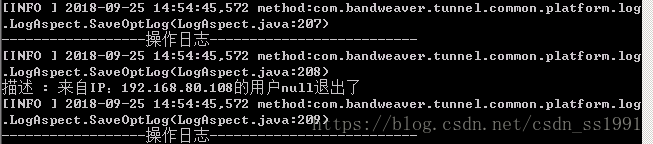
@WriteLog(DescEnum.LOGOUT) @RequestMapping(value = "/logout", method = RequestMethod.GET) public JSONObject Logout(){ Subject currentUser = SecurityUtils.getSubject(); currentUser.logout(); return CommonUtil.returnStatusJson(StatusCodeEnum.S_200); }4.控制台输出结果如下
版权声明:本文内容由互联网用户自发贡献,该文观点仅代表作者本人。本站仅提供信息存储空间服务,不拥有所有权,不承担相关法律责任。如发现本站有涉嫌侵权/违法违规的内容,请联系我们,一经查实,本站将立刻删除。
如需转载请保留出处:https://51itzy.com/kjqy/53269.html