
Go语言命令行工具cobra
1、Cobra 介绍
Cobra 是关于 golang 的一个命令行解析库,用它能够快速创建功能强大的 cli 应用程序和命令行工具。
cobra既是一个用于创建强大现代CLI应用程序的库,也是一个生成应用程序和命令文件的程序。cobra被用在很多
go语言的项目中,比如 Kubernetes、Docker、Istio、ETCD、Hugo、Github CLI等等。
我们平常用到命令:git commit -m “message”,docker containter start 等都可以用 cobra 来实现。
Cobra 官网:https://cobra.dev/
github地址:https://github.com/spf13/cobra
2、功能特性介绍
- 很多子命令的CLIS: 比如 app server、app fetch 等
- 支持嵌套子命令(sub-command)
- 轻松完成应用程序和命令的创建:cobra init appname 和 cobra add cmdname
- 为应用程序生成 man 手册
- 全局、本地和级联 flag
- 为 shell 程序完成自动提示(bash,zsh,fish, powershell etc.)
- 支持命令行别名,可以帮助你更容易更改内容而不破坏他们
- 灵活定义自己的help、usage信息
- 可选集成 viper 配置管理工具库
3、Cobra命令结构说明
Cobra 命令结构由3部分组成:
commands、arguments 和 flags
- commands:
命令行,代表行为动作,要执行的一个动作。每个命令还可以包含子命令,分为:rootCmd 和 subCmd。程
序中具体对象是 cobra.Command{},这个是根命令;子命令(subCmd)用 rootCmd.AddCommand() 添加,
子命令通常也会单独存一个文件,并通过一个全局变量让 rootCmd 可以 add 它。
- arguments:
命令行参数,通常是 []string 表示。
- flags:
命令行选项。对 command 进一步的控制。通常用一短横
-或者两短横--标识,程序中读取存储在变量中。
cobra 命令行格式:
APPNAME VERB NOUN --ADJECTIVE APPNEM COMMAND ARG --FLAG 讯享网
例子说明:
讯享网# server代表command,port代表flag hugo server --port=1313 # clone代表command,URL代表argument,bare代表flag git clone URL --bare
4、Cobra基本使用方法
安装 cobra:
$ go get -u github.com/spf13/cobra 安装 cobra-cli:
讯享网$ go get github.com/spf13/cobra-cli $ go install github.com/spf13/cobra-cli
可以用 cobra-cli -h 来查看 cobra 命令的一些用法。
$ cobra-cli -h Cobra is a CLI library for Go that empowers applications. This application is a tool to generate the needed files to quickly create a Cobra application. Usage: cobra-cli [command] Available Commands: add Add a command to a Cobra Application completion Generate the autocompletion script for the specified shell help Help about any command init Initialize a Cobra Application Flags: -a, --author string author name for copyright attribution (default "YOUR NAME") --config string config file (default is $HOME/.cobra.yaml) -h, --help help for cobra-cli -l, --license string name of license for the project --viper use Viper for configuration Use "cobra-cli [command] --help" for more information about a command. 4.1 init命令初始化应用程序
使用命令 cobra-cli init 来创建第一个应用程序,这个命令也是初始化一个应用程序的项目框架,具体的过程:
讯享网$ mkdir go-cobra $ go mod init proj $ cobra-cli init Your Cobra application is ready at ......\go-cobra
自动生成了如下目录的程序:
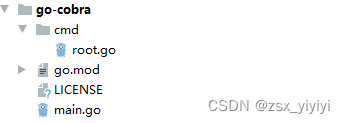
程序代码如下:
main.go
/* Copyright © 2023 NAME HERE <EMAIL ADDRESS> */ package main import "proj/cmd" func main() {
    cmd.Execute() }
cmd/root.go
讯享网/* Copyright © 2023 NAME HERE <EMAIL ADDRESS> */ package cmd import ( "os" "github.com/spf13/cobra" ) // rootCmd represents the base command when called without any subcommands var rootCmd = &cobra.Command{
    Use: "proj", Short: "A brief description of your application", Long: `A longer description that spans multiple lines and likely contains examples and usage of using your application. For example: Cobra is a CLI library for Go that empowers applications. This application is a tool to generate the needed files to quickly create a Cobra application.`, // Uncomment the following line if your bare application // has an action associated with it: // Run: func(cmd *cobra.Command, args []string) { }, } // Execute adds all child commands to the root command and sets flags appropriately. // This is called by main.main(). It only needs to happen once to the rootCmd. func Execute() {
    err := rootCmd.Execute() if err != nil {
    os.Exit(1) } } func init() {
    // Here you will define your flags and configuration settings. // Cobra supports persistent flags, which, if defined here, // will be global for your application. // rootCmd.PersistentFlags().StringVar(&cfgFile, "config", "", "config file (default is $HOME/.proj.yaml)") // Cobra also supports local flags, which will only run // when this action is called directly. rootCmd.Flags().BoolP("toggle", "t", false, "Help message for toggle") }
启动运行:
$ go run main.go A longer description that spans multiple lines and likely contains examples and usage of using your application. For example: Cobra is a CLI library for Go that empowers applications. This application is a tool to generate the needed files to quickly create a Cobra application. 可以看出,用 cobra-cli init 命令初始化的项目, 生成了一个初始化的应用框架,但是没有任何逻辑功能,仅仅输
出一些描述性信息。
这个程序里,最重要的是 cmd/root.go 里的 rootCmd = &cobra.Command{} 这行程序,这里定义命令动作。
程序里的 init() 函数是对命令行的配置。
4.2 add 生成子命令subCmd
上面我们用 cobra-cli init 创建了应用程序框架,在程序 cmd/root.go 里有一个根命令 rootCmd,也就是说 init 命
令创建了一个根命令。执行 command 命令是 &cobra.Command{} 里的 Run 方法。
用 cobra-cli add 来为 rootCmd 创建一个子命令。
下面添加两个命令 ping 和 cat,这个子命令通常在一个单独的文件里。
讯享网$ cobra-cli add ping ping created at ......\go-cobra $ cobra-cli add cat cat created at ......\go-cobra
自动生成了如下目录的程序:
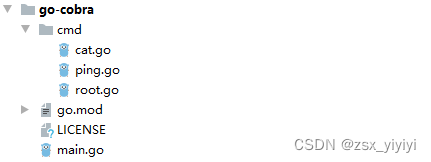
查看文件:
/* Copyright © 2023 NAME HERE <EMAIL ADDRESS> */ package cmd import ( "fmt" "github.com/spf13/cobra" ) // pingCmd represents the ping command var pingCmd = &cobra.Command{
    Use: "ping", Short: "A brief description of your command", Long: `A longer description that spans multiple lines and likely contains examples and usage of using your command. For example: Cobra is a CLI library for Go that empowers applications. This application is a tool to generate the needed files to quickly create a Cobra application.`, Run: func(cmd *cobra.Command, args []string) {
    fmt.Println("ping called") }, } func init() {
rootCmd.AddCommand(pingCmd) // Here you will define your flags and configuration settings. // Cobra supports Persistent Flags which will work for this command // and all subcommands, e.g.: // pingCmd.PersistentFlags().String("foo", "", "A help for foo") // Cobra supports local flags which will only run when this command // is called directly, e.g.: // pingCmd.Flags().BoolP("toggle", "t", false, "Help message for toggle") } 讯享网/* Copyright © 2023 NAME HERE <EMAIL ADDRESS> */ package cmd import ( "fmt" "github.com/spf13/cobra" ) // catCmd represents the cat command var catCmd = &cobra.Command{
Use: "cat", Short: "A brief description of your command", Long: `A longer description that spans multiple lines and likely contains examples and usage of using your command. For example: Cobra is a CLI library for Go that empowers applications. This application is a tool to generate the needed files to quickly create a Cobra application.`, Run: func(cmd *cobra.Command, args []string) {
fmt.Println("cat called") }, } func init() {
rootCmd.AddCommand(catCmd) // Here you will define your flags and configuration settings. // Cobra supports Persistent Flags which will work for this command // and all subcommands, e.g.: // catCmd.PersistentFlags().String("foo", "", "A help for foo") // Cobra supports local flags which will only run when this command // is called directly, e.g.: // catCmd.Flags().BoolP("toggle", "t", false, "Help message for toggle") }
运行:
$ go run main.go --help # 等价 $ go run main.go A longer description that spans multiple lines and likely contains examples and usage of using your application. For example: Cobra is a CLI library for Go that empowers applications. This application is a tool to generate the needed files to quickly create a Cobra application. Usage: proj [command] Available Commands: cat A brief description of your command completion Generate the autocompletion script for the specified shell help Help about any command ping A brief description of your command Flags: -h, --help help for proj -t, --toggle Help message for toggle Use "proj [command] --help" for more information about a command. ping 和 cat 已经被集成到 root.go 中。
讯享网$ go run main.go ping ping called $ go run main.go cat cat called
也可以自己编写文件然后进行手动添加。
子命令和根命令的关系一般通过程序 rootCmd.AddCommand() 方法确定。在程序里可以看到它在 init() 函数里。
Run 方法里可以添加自己需要实现的程序,一般这里的程序都是其他 package 里完成了具体逻辑,然后 Run 方法
里在调用这些程序。
4.3 给command添加flags
flag 命令行选项,也叫标识,对command命令行为的进一步指示操作。
用这个标识可以给 command 添加一些可选项。
根据 flag 选项作用范围不同,可以分为 2 类:
- Persistent Flags,持久化的flag,全局范围
如果设置全局范围的flag,可以用这个来设置。它既可以给根命令设置选项值,也可以给子命令设置选项值。
- Local Flags,局部flag
只对指定的command生效,比如某个子命令的 flag。


因为 flag 标识是在命令行后面不同位置使用,所以我们要在方法外定义一个变量,来分配存储使用这个标识符。
下面我们给 cat 命令添加命令行选项来实现全局 flag 和局部 flag。
4.3.1 全局flag
在 cmd/root.go 文件中添加一个变量 configFile
var configFile string 在 cmd/root.go 的 init() 函数中添加全局 flag,把 flag 值存储到变量 configFile 中。也就是读取命令行
–configfile 这个 flag 设置的值,然后赋值给程序里变量 configFile。
讯享网// 添加全局flag rootCmd.PersistentFlags().StringVar(&configFile, "configfile", "$HOME/app.conf", "config file (default is $HOME/app.conf)")
在文件 cmd/cat.go 中的 catCmd(子命令) 里 Run 方法输出 configFile 值:
Run: func(cmd *cobra.Command, args []string) {
    fmt.Println("cat called") // 打印输出 name fmt.Println("print persistent flag configFile: ", configFile) },
测试运行程序:
讯享网$ go run main.go cat -h A longer description that spans multiple lines and likely contains examples and usage of using your command. For example: Cobra is a CLI library for Go that empowers applications. This application is a tool to generate the needed files to quickly create a Cobra application. Usage: proj cat [flags] Flags: -h, --help help for cat Global Flags: --configfile string config file (default is $HOME/app.conf) (default "$HOME/app.conf")
$ go run main.go cat --configfile /opt/app.yaml cat called print persistent flag configFile: /opt/app.yaml 当然也可以先编译 go build -o main.exe,我用的win,然后在运行测试程序:
讯享网$ go build -o main.exe $ main.exe cat --configfile /opt/app.yaml cat called print persistent flag configFile: /opt/app.yaml
Persistent flag 的读取方法:
// arg1:存储变量 // arg2:设置长flag名,这里name显示--name // arg3:设置短flag名,这里n显示-n,一般与上面对应 // arg4:默认值,这里设置为"" // arg5:flag的一些说明信息 PersistentFlags().StringVarP(&name, "name", "n", "", "Set one name") // 与上面用法基本相同,只是没有短flag设置 PersistentFlags().StringVar(&name, "name", "", "Set one name") // 直接设置flag名,arg1:flag名,arg2:默认值,arg3:说明 PersistentFlags().String("foo", "", "A help for foo") 4.3.2 局部flag
一个 flag 赋值给本地变量,只能对指定的 command 生效。
我们在 cmd/ping.go 中测试局部 flag。
在 cmd/ping.go 文件中定义变量 ip,存储这个 flag 值。
讯享网// 定义局部flag var ip string
在 cmd/ping.go 中的 init() 中添加下面代码,把值存储到 ip 上。
pingCmd.Flags().StringVarP(&ip, "ip", "i", "127.0.0.1", "ip") 在 pingCmd.Command{} 获取该值:
讯享网Run: func(cmd *cobra.Command, args []string) {
    fmt.Println("ping called") // 打印输出 name fmt.Println("print persistent flag configFile: ", configFile) // 打印输出local flag: dsn fmt.Println("(local flag) print ip: ", ip) }
测试运行:
$ go run main.go ping -h A longer description that spans multiple lines and likely contains examples and usage of using your command. For example: Cobra is a CLI library for Go that empowers applications. This application is a tool to generate the needed files to quickly create a Cobra application. Usage: proj ping [flags] Flags: -h, --help help for ping -i, --ip string ip (default "127.0.0.1") Global Flags: --configfile string config file (default is $HOME/app.conf) (default "$HOME/app.conf") 讯享网$ go run main.go ping --ip "192.168.164.195" ping called print persistent flag configFile: $HOME/app.conf (local flag) print ip: 192.168.164.195
# 可以读取全局flag $ go run main.go ping --ip "192.168.164.195" --configfile /opt/app.yaml ping called print persistent flag configFile: /opt/app.yaml (local flag) print ip: 192.168.164.195 说明:local flag 局部选项,只能作用于指定的 command。
local flag 的读取方法:
讯享网// arg1:存储变量, // arg2:设置长flag名,这里name显示--name, // arg3:设置短flag名,这里n显示-n,一般与上面对应 // arg4:默认值,这里设置为"" // arg5:flag的一些说明信息 // 方法(1) Flags().StringVarP(&name, "name", "n", "", "Set one name") // 与上面方法(1)用法基本相同,只是没有短flag设置 Flags().StringVar(&name, "name", "", "Set one name") // 直接设置flag名,arg1:flag名,arg2:默认值,arg3:说明 Flags().String("foo", "", "A help for foo") // 与上面方法(1)用法基本相同,除了第一个没有变量读取参数 Flags().StringP("toggle", "t", false, "Help message for toggle")
4.3.3 设置flag必填项
比如给 cmd/ping.go 的 ip 这个 flag 设置必选项:
pingCmd.Flags().StringVarP(&ip, "ip", "i", "127.0.0.1", "ip") // 把ip设置为必选项 pingCmd.MarkFlagRequired("ip") flag 不设置 ip,运行程序:go run main.go ping,报错:
讯享网$ go run main.go ping Error: required flag(s) "ip" not set
加上 ip 运行,go run main.go ping --ip 192.168.164.195,正常输出:
$ go run main.go ping --ip 192.168.164.195 ping called print persistent flag configFile: $HOME/app.conf (local flag) print ip: 192.168.164.195 flag 还可以做依赖,比如下面 username 和 password 必须同时接收到参数。
讯享网rootCmd.Flags().StringVarP(&u, "username", "u", "", "Username (required if password is set)") rootCmd.Flags().StringVarP(&pw, "password", "p", "", "Password (required if username is set)") rootCmd.MarkFlagsRequiredTogether("username", "password")
4.3.4 绑定配置
还可以绑定配置到 flags 上,用 viper。
我们可以在 init() 方法中添加绑定 flag 程序。
在 cmd/root.go 里面,添加如下内容:
var author string func init() {
    rootCmd.Flags().BoolP("toggle", "t", false, "Help message for toggle") // 添加全局flag rootCmd.PersistentFlags().StringVar(&configFile, "configfile", "$HOME/app.conf", "config file (default is $HOME/app.conf)") rootCmd.PersistentFlags().StringVar(&author, "author", "zhangsan", "Author name for copyright attribution") viper.BindPFlag("author", rootCmd.PersistentFlags().Lookup("author")) }
在 cmd/ping.go 里面读取输出:
讯享网Run: func(cmd *cobra.Command, args []string) {
    fmt.Println("ping called") // 打印输出 name fmt.Println("print persistent flag configFile: ", configFile) // 打印输出local flag: dsn fmt.Println("(local flag) print ip: ", ip) fmt.Println("author is : ",author) fmt.Println("viper author: ",viper.Get("author")) },
启动运行:
$ go run main.go ping --ip 192.168.164.195 --author zsx ping called print persistent flag configFile: $HOME/app.conf (local flag) print ip: 192.168.164.195 author is : zsx viper author: zsx 讯享网# 如果不加--author go run main.go ping --ip 192.168.164.195 ping called print persistent flag configFile: $HOME/app.conf (local flag) print ip: 192.168.164.195 author is : zhangsan viper author: zhangsan
这样就将 viper 配置和 flag 绑定,如果用户不设置 --author,将从配置中查找。
4.4 arguments 命令行参数设置
cobra 内置的参数验证也是比较多,NoArgs、OnlyValidArgs、MinimumNArgs、MaximumNArgs等等,可以满
足基本使用,如果有自己的特殊要求可以通过解析 arg 来实现。
可以用Command 的 Args 字段指定参数效验规则。
Cobra 也内置了一些规则:
- NoArgs:如果有任何命令行args参数,将会报错
- ArbitraryArgs:该命令接受任何参数
- OnlyValidArgs:如果该命令参数不在 Command 的 ValidArgs 中,将会报错
- MinimumArgs(int): 如果命令参数数目少于N个,将会报错
- MaximumArgs(int): 如果命令参数数目多于N个,将会报错
- ExactArgs(int): 如果命令参数数目不是N个,将会报错
- RangeArgs(min, max):如果命令参数数目范围不在(min, max),将会报错
内置效验规则的例子:
$ cobra-cli add test test created at ......\go-cobra 讯享网// testCmd represents the test command var testCmd = &cobra.Command{
Use: "test", Short: "test short", Long: `test short`, Args: cobra.MinimumNArgs(5), Run: func(cmd *cobra.Command, args []string) {
fmt.Println("test called") }, }
运行:
$ go run main.go test Error: requires at least 5 arg(s), only received 0 讯享网$ go run main.go test aa bb cc dd ee test called
自定义验证规则的例子:
// testCmd represents the test command var testCmd = &cobra.Command{
    Use: "test", Short: "test short", Long: `test short`, Args: func(cmd *cobra.Command, args []string) error {
    if len(args) < 5 {
    return errors.New("requires at least 5 arg(s)") } if args[0] != "aa" {
    return errors.New("first must is aa") } return nil }, Run: func(cmd *cobra.Command, args []string) {
    fmt.Println("test called") }, }
运行:
讯享网$ go run main.go test aa bb cc dd Error: requires at least 5 arg(s)
$ go run main.go test ff bb cc dd ee Error: first must is aa 讯享网$ go run main.go test aa bb cc dd ee test called
4.5 钩子函数PreRun and PostRun Hooks
可以在执行命令之前或之后运行钩子函数。如果子命令未声明自己的 PersistentPreRun 和
PersistentPostRun函数,则子命令将继承父命令的钩子函数。
函数的执行顺序为:
- PersistentPreRun
- PreRun
- Run
- PostRun
- PersistentPostRun
cmd/root.go中添加如下内容:
// rootCmd represents the base command when called without any subcommands var rootCmd = &cobra.Command{
    Use: "proj", Short: "A brief description of your application", Long: `A longer description that spans multiple lines and likely contains examples and usage of using your application. For example: Cobra is a CLI library for Go that empowers applications. This application is a tool to generate the needed files to quickly create a Cobra application.`, // Uncomment the following line if your bare application // has an action associated with it: // Run: func(cmd *cobra.Command, args []string) { }, PersistentPreRun: func(cmd *cobra.Command, args []string) {
    fmt.Printf("Inside rootCmd PersistentPreRun with args: %v\n", args) }, PreRun: func(cmd *cobra.Command, args []string) {
    fmt.Printf("Inside rootCmd PreRun with args: %v\n", args) }, Run: func(cmd *cobra.Command, args []string) {
    fmt.Printf("Inside rootCmd Run with args: %v\n", args) }, PostRun: func(cmd *cobra.Command, args []string) {
    fmt.Printf("Inside rootCmd PostRun with args: %v\n", args) }, PersistentPostRun: func(cmd *cobra.Command, args []string) {
    fmt.Printf("Inside rootCmd PersistentPostRun with args: %v\n", args) }, }
启动:
讯享网$ go run main.go cat arg1 arg2 Inside rootCmd PersistentPreRun with args: [arg1 arg2] cat called print persistent flag configFile: $HOME/app.conf Inside rootCmd PersistentPostRun with args: [arg1 arg2]
cmd/cat.go中添加如下内容:
// catCmd represents the cat command var catCmd = &cobra.Command{
    Use: "cat", Short: "A brief description of your command", Long: `A longer description that spans multiple lines and likely contains examples and usage of using your command. For example: Cobra is a CLI library for Go that empowers applications. This application is a tool to generate the needed files to quickly create a Cobra application.`, Run: func(cmd *cobra.Command, args []string) {
    fmt.Println("cat called") // 打印输出 name fmt.Println("print persistent flag configFile: ", configFile) }, PreRun: func(cmd *cobra.Command, args []string) {
    fmt.Printf("Inside subCmd PreRun with args: %v\n", args) }, PostRun: func(cmd *cobra.Command, args []string) {
    fmt.Printf("Inside subCmd PostRun with args: %v\n", args) }, }
启动:
讯享网$ go run main.go cat arg1 arg2 Inside rootCmd PersistentPreRun with args: [arg1 arg2] Inside subCmd PreRun with args: [arg1 arg2] cat called print persistent flag configFile: $HOME/app.conf Inside subCmd PostRun with args: [arg1 arg2] Inside rootCmd PersistentPostRun with args: [arg1 arg2]
4.6 错误处理函数和钩子函数
与上面的钩子函数功能一样,只不过这里可以返回错误,处理RunE 功能的执行先后顺序如下:
- PersistentPreRunE
- PreRunE
- RunE
- PostRunE
- PersistentPostRunE
RunE: func(cmd *cobra.Command, args []string) error {
    fmt.Printf("Inside subCmd Run with args: %v\n", args) return nil },
4.7 为你的命令生成文档
Cobra 可以基于子命令、标志等生成文档。具体的使用方法和生产格式文档请点击下面链接:
https://pkg.go.dev/github.com/spf13/cobra/doc
- Man page docs
- Markdown docs
- Rest docs
- Yaml docs
这里我们生成 Markdown Docs:
讯享网package main import ( "github.com/spf13/cobra" "github.com/spf13/cobra/doc" "log" ) func main() {
    cmd := &cobra.Command{
    Use: "test", Short: "my test program", } err := doc.GenMarkdownTree(cmd, "./") if err != nil {
    log.Fatal(err) } }
生成的内容:
test my test program Options ``` -h, --help help for test ``` Auto generated by spf13/cobra on 31-May-2023 你可以设置 cmd.DisableAutoGenTag = true 从而把文档中 Auto generated by spf13/cobra... 等字样删
掉。
4.8 help命令
命令: cobra-cli help,可以清楚显示出对使用 cobra 有用的信息,比如命令提示:
讯享网$ cobra-cli help Cobra is a CLI library for Go that empowers applications. This application is a tool to generate the needed files to quickly create a Cobra application. Usage: cobra-cli [command] Available Commands: add Add a command to a Cobra Application completion Generate the autocompletion script for the specified shell help Help about any command init Initialize a Cobra Application Flags: -a, --author string author name for copyright attribution (default "YOUR NAME") --config string config file (default is $HOME/.cobra.yaml) -h, --help help for cobra-cli -l, --license string name of license for the project --viper use Viper for configuration Use "cobra-cli [command] --help" for more information about a command.
你还可以定义自己的 help 命令或模板:
cmd.SetHelpCommand(cmd *Command) cmd.setHelpCommand(f func(*Command, []string)) cmd.setHelpTemplate(s string) 正常情况下的输出:
讯享网go run main.go test -h test short Usage: proj test [flags] Flags: -h, --help help for test Global Flags: --author string Author name for copyright attribution (default "zhangsan") --configfile string config file (default is $HOME/app.conf) (default "$HOME/app.conf")
自己设置:
func init() {
rootCmd.AddCommand(testCmd) testCmd.SetHelpTemplate(`Usage: test [flags] Flags: -h, --help help for test`) } 讯享网$ go run main.go test -h Usage: test [flags] Flags: -h, --help help for test
版权声明:本文内容由互联网用户自发贡献,该文观点仅代表作者本人。本站仅提供信息存储空间服务,不拥有所有权,不承担相关法律责任。如发现本站有涉嫌侵权/违法违规的内容,请联系我们,一经查实,本站将立刻删除。
如需转载请保留出处:https://51itzy.com/kjqy/52525.html