
element UI上传图片Upload组件使用 & 图片转base64和fale文件处理 & formdata数据格式的应用
1、element UI上传图片Upload组件使用
效果图
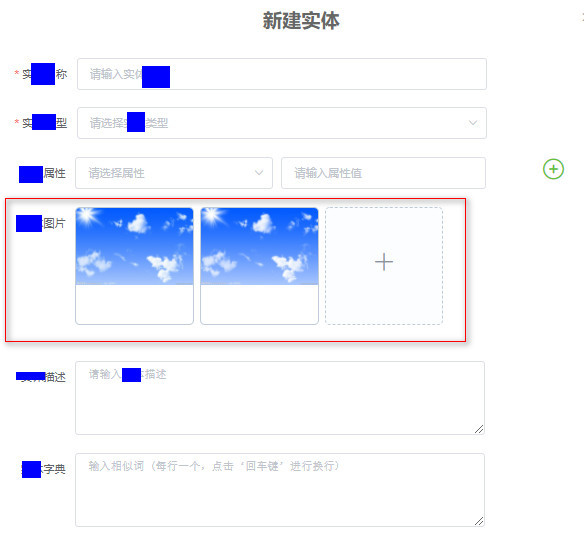
结构
<el-form-item label="实体图片"> <el-upload action="#" :on-change="getFile" :file-list="fileList" list-type="picture-card" :auto-upload="false" ref="pictureUpload" > <i slot="default" class="el-icon-plus"></i> <div slot="file" slot-scope="{ file }"> <img class="el-upload-list__item-thumbnail" :src="file.url" alt="" /> <span class="el-upload-list__item-actions"> <span class="el-upload-list__item-preview" @click="handlePictureCardPreview(file)" > <i class="el-icon-zoom-in"></i> </span> <span v-if="!disabled" class="el-upload-list__item-delete" @click="handleRemove(file)" > <i class="el-icon-delete"></i> </span> </span> </div> </el-upload> <el-dialog :visible.sync="dialogVisible"> <img width="100%" :src="dialogImageUrl" alt="" /> </el-dialog> </el-form-item> 讯享网
数据
讯享网data() {
    return {
    // 上传图片 dialogImageUrl: "", dialogVisible: false, disabled: false, ruleForms: {
    items: [{
   }] }, fileList: [ // {
    // name: "food.jpeg", // url: "https://fuss10.elemecdn.com/3/63/4e7f3a15429bfda99bce42a18cdd1jpeg.jpeg?imageMogr2/thumbnail/360x360/format/webp/quality/100", // }, // {
    // name: "food2.jpeg", // url: "https://fuss10.elemecdn.com/3/63/4e7f3a15429bfda99bce42a18cdd1jpeg.jpeg?imageMogr2/thumbnail/360x360/format/webp/quality/100", // }, ], imageInfo: {
   }, imageList: [], formInline: {
    image64: "", imageName: "", }, }; },
图片信息处理
2、图片转base64和fale文件处理
方法
methods: {
    // 图片增删 handleRemove(file) {
    // ⭐ 获取到该组件调用handleRemove方法删除file对象 this.$refs.pictureUpload.handleRemove(file); }, handlePictureCardPreview(file) {
    this.dialogImageUrl = file.url; this.dialogVisible = true; }, // 图片 转base64 getBase64(file) {
    return new Promise(function (resolve, reject) {
    let reader = new FileReader(); let imgResult = ""; reader.readAsDataURL(file); reader.onload = function () {
    imgResult = reader.result; }; reader.onerror = function (error) {
    reject(error); }; reader.onloadend = function () {
    resolve(imgResult); }; }); }, getFile(file, fileList) {
    console.log(file, "kkkkkkkkkkkkkkkkk"); console.log(file.name, "yyyyyyyyyy"); this.imageList = JSON.parse(JSON.stringify(fileList)); console.log(fileList, "前"); console.log(this.imageList, "后"); //fileList图片文件集合 let fileAllList = JSON.stringify(this.imageList); console.log(fileAllList, "定"); this.getBase64(file.raw).then((res) => {
    // console.log(res, "ffffffffffffff"); this.formInline.image64 = res; // this.imageInfo.base64 = this.formInline.image64; // this.imageInfo.name = file.name; file.base64 = res; console.log(file, "名字"); }); console.log(this.imageInfo, ""); // fileList.push({
    // name: $(this).attr('alt'), // base64: $(this).attr('src') // } }, }
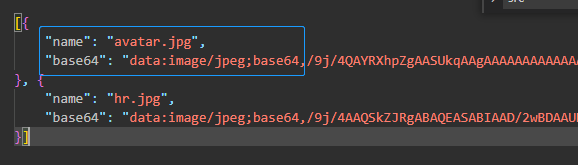
base64数据打印
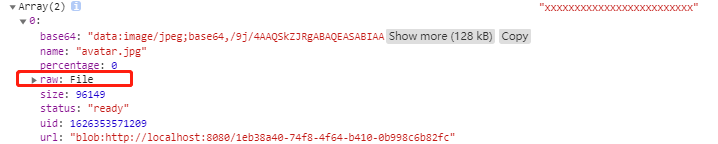
fale数据打印

图片上传功能
结构
讯享网<el-button type="primary" @click="addEntity()">确定上传图片</el-button>
功能
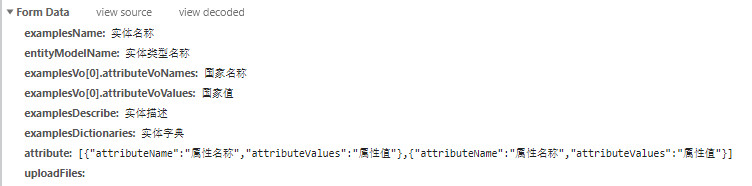
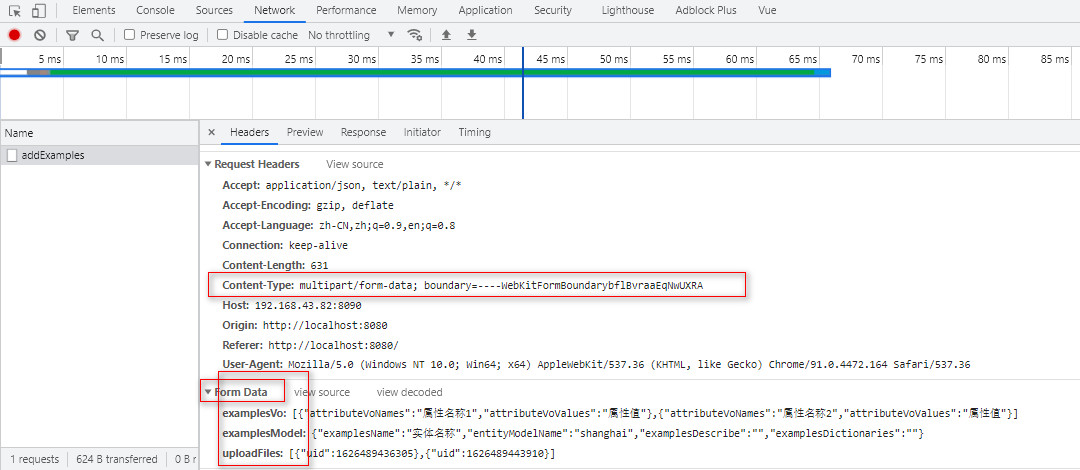
3、formdata数据参数格式的应用
格式效果-network请求
<script> import {
   add} from "@/api/knowledge/entityLibrary"; export default {
    methods:{
    addEntity() {
    //fale文件集合处理 var array = new Array(); for (var j in this.imageList) {
    array.push(this.imageList[j].raw); //将每一次循环创建的对象push到数组中去 } console.log(array, "wwwwwwwwwwwwwwwwwwww"); // console.log(this.ruleForms.items, ""); // const data = new FormData(); // data.append("name", "实体名称"); // data.get("name"); // // 新建 列表数据 let params = {
    examplesName: this.formInline.examplesName, entityModelName: this.formInline.entityModelName, examplesDescribe: this.formInline.examplesDescribe, examplesDictionaries: this.formInline.examplesDictionaries, // updateTimeMS: "2020-12-12 10:18:29", // reviser: "admin", // attributeNames: ["relationNames", "亲人"], // attributeValues: ["12", "13"], }; console.log(params, "yyyyyyyyyyyyy"); //formdata数据格式的应用 const data = new FormData(); console.log(this.imageList, "xxxxxxxxxxxxxxxxxxxxxxxxx"); // data.append("examplesName", "实体名称"); // data.append("entityModelName", "实体类型名称"); // data.append("examplesDescribe", "实体描述"); // data.append("examplesDictionaries", "实体字典"); // base64版 // data.append("examplesName", this.formInline.examplesName); // data.append("entityModelName", this.formInline.entityModelName); // data.append("examplesDescribe", this.formInline.examplesDescribe); // data.append("examplesDictionaries", this.formInline.examplesDictionaries); // data.append("examplesVo[0].attributeVoNames", "国家名称"); // data.append("examplesVo[0].attributeVoValues", "国家值"); data.append( "examplesVo", JSON.stringify([ {
    attributeVoNames: "属性名称1", attributeVoValues: "属性值", }, {
    attributeVoNames: "属性名称2", attributeVoValues: "属性值", }, ]) ); //拼接版 data.append("examplesModel", JSON.stringify(params)); data.append("uploadFiles", JSON.stringify(array)); // data.append("uploadFiles", array); add(data).then((res) => {
    // console.log(res, ); // this.dialogVisibleB = false; // window.parent.location.reload(); }); }, } }
4、数据展示
版权声明:本文内容由互联网用户自发贡献,该文观点仅代表作者本人。本站仅提供信息存储空间服务,不拥有所有权,不承担相关法律责任。如发现本站有涉嫌侵权/违法违规的内容,请联系我们,一经查实,本站将立刻删除。
如需转载请保留出处:https://51itzy.com/kjqy/52155.html