
剖面测量是较常见的工程测量项目,早期剖面测量采用的经纬仪导线放线,测量地形变换点的高程,现在使用 GPS放线测量地形变换点的高程,极大地提高了效率。 但把高程点展到CAD图上后,如何快速高效地把图上的高程数据转换成剖面数据,一直没有合式的方法,这里介绍一个自动输出剖面数据的程序。
- 已有数据
1.1中心线是一条完整的轻便多段线(LWPolyline),两端与首尾桩号的剖面定位线相交。如下图中的红色线。
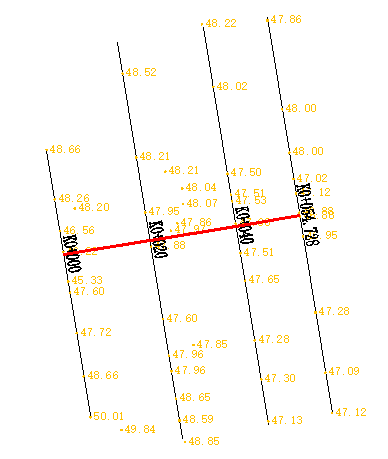
1.2 剖面定位线是直线(line)或二个点的轻便多段线(LWPolyline),你面向上游,定位线从左画到右,每条定位线应与中心线相交。如上图中的黑色线
1.3剖面名称(桩号)是文本注记(Text),插入点应在定位线与中心线交点的3m之内.
1.4高程点可以是属性块(INSERT),也可以是文本注记(Text),最好是属性块,插入点在定位线的2m范围内。
2、输出剖面数据的格式
2.1 本程序的格式
本程序输出的剖面数据格式为纵横剖面合一数轴格式,其中纵剖面只有与横剖面定位线相交处的高程。如:
K0+0,42.05,42.00
-7.66,43.75,-5.80,42.23,0.00,42.05,9.70,42.18,15.15,44.03
~
第一行:K0+0是剖面名称(桩号),42.05是纵剖面桩点高程,42.00是水面高
第二行:距离1,高程1,距离1,高程1,*距离n,高程n
*纵剖面桩点的距离包含在剖面名称中,如K1+140提取出来的距离为1140m。

*水面高分为:1不需要水面高;2固定水面高;3 动态水面高
*中心点左边桩点的距离是负值,右边是正值。
2.2转换为其他格式的数据
由于生成剖面图的软件不同,设计单位的要求不同,剖面数据的格式有很多,为了给甲方提交测量数据,本程序中包含了几种常用格式的转换。(其他格式的转换仅仅是文本文件的读取和输出问题,有开发能力的同行很容易做到)
3程序设计的流程
3.1创建定位线选择集:历遍定位线选择集
3.2利用定位线扩展外框(3米)创建剖面名称选择集,查找并确定定位线的剖面名称
3.3利用定位线扩展外框(2米)创建高程点选择集,把每一个高程点垂直移动到定位线上
3.4按高程点到定位线起点的距离进行排序
3.5利用定位线与中心线的交点到中心线起点的距离对所有剖面线进行排序
3.6按顺序输出剖面数据
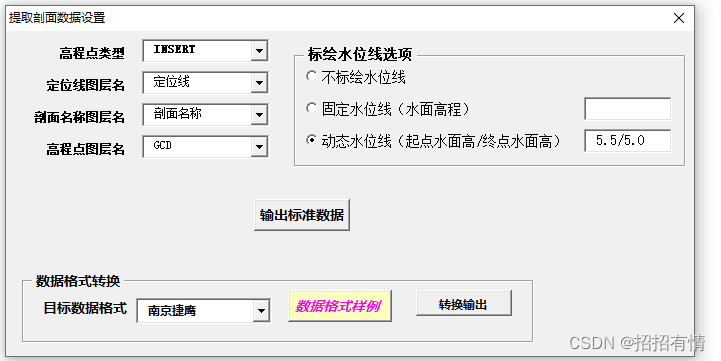
4程序界面
5核心源代码
Option Explicit Dim 剖面名称图层 As String, 定位线图层 As String Dim 高程点图层 As String, 高程点类型 As String Dim 水位线选项 As Integer Dim H0 As Double, Hn As Double, h1 As Double Private Sub CommandButton1_Click() Dim 文本块 As AcadSelectionSet, 定位线 As AcadSelectionSet Dim 中心线 As AcadEntity, gcdObj As AcadEntity Dim 中心线长 As Double Dim n As Integer, i As Integer Dim objBlock As Variant Dim FType(1) As Integer, FData(1) Dim pts As Collection, pt(0 To 1) As Double Dim pt1 As Variant, pt2 As Variant Dim xyS As Variant, xyE As Variant Dim 剖面名称 As String, m As String Dim 剖面线(), 线数 As Long Dim Filename As String, mm As String Dim 水面高程 As Double On Error Resume Next 定位线图层 = ComboBox2.Text 剖面名称图层 = ComboBox3.Text 高程点图层 = ComboBox4.Text 高程点类型 = ComboBox1.Text If OptionButton1.value = True Then 水位线选项 = 0 End If If OptionButton2.value = True Then 水位线选项 = 1 H0 = Val(TextBox1.Text) End If If OptionButton3.value = True Then 水位线选项 = 2 Dim cbFm() As String cbFm = Split(TextBox2.Text, "/", -1) H0 = Val(cbFm(0)) Hn = Val(cbFm(1)) End If 提取剖面数据设置.Hide ThisDrawing.Utility.GetEntity 中心线, xy, "选取中心线对象" Filename = ThisDrawing.path & "\数轴式剖面数据.txt" '桩号,桩点高程(纵剖面上的点),水面高程 '左侧(距离为负—右侧(距离为正)距离1,高程1,距离2,高程2,~,距离n,高程n ThisDrawing.Utility.GetEntity 中心线, xy, "选取中心线对象" 中心线长 = 中心线.Length ThisDrawing.SelectionSets.Item("通过点的选择集").Delete Err.Clear Set 文本块 = ThisDrawing.SelectionSets.Add("通过点的选择集") Dim sh As Double, SH1 As Double ThisDrawing.Application.ZoomExtents Set pts = 多段线坐标集合(中心线) ThisDrawing.SelectionSets.Item("定位线").Delete Err.Clear Set 定位线 = ThisDrawing.SelectionSets.Add("定位线") '定位线对象选择集 FType(0) = 8: FData(0) = 定位线图层 FType(1) = 0: FData(1) = "*LINE" filtertype = FType: filterdata = FData 定位线.Select acSelectionSetAll, , , filtertype, filterdata 线数 = -1 '组织剖面定位线,按定位线到中心线起点的距离进行排序。 For Each Entry In 定位线 If Entry.Handle = 中心线.Handle Then GoTo 50 pt1 = 中心线.IntersectWith(Entry, acExtendNone) If UBound(pt1) < 0 Then GoTo 50 Select Case Entry.ObjectName Case "AcDb2dPolyline", "AcDbPolyline" xyS = Entry.Coordinate(0) xyE = Entry.Coordinate(1) Case "AcDbLine" xyS = Entry.startPoint xyE = Entry.EndPoint End Select 线数 = 线数 + 1 ReDim Preserve 剖面线(3, 线数) 剖面线(0, 线数) = 距离_2P(pt1, xyS) '0 定位线起点到中点的距离 剖面线(1, 线数) = 点到点集合起点的距离(pts, pt1) '1 定位线到中心线起点的距离,用于剖面线排序 剖面线(2, 线数) = xyS '2 起点坐标 剖面线(3, 线数) = xyE '3 纵点坐标 50: Next Call ArrayPaXu(剖面线, 0, 线数, 1, True) Open Filename For Output As #1 For n = 0 To 线数 xyS = 剖面线(2, n) xyE = 剖面线(3, n) FType(0) = 8: FData(0) = 剖面名称图层 FType(1) = 0: FData(1) = "Text" Call 二点扩展框(xyS, xyE, 3) '按两边拓展 3 米为范围选择 剖面名称 注记文本 文本块.Clear filtertype = FType: filterdata = FData 文本块.SelectByPolygon acSelectionSetCrossingPolygon, pl, filtertype, filterdata 剖面名称 = Str(剖面线(1, n)) For Each gcdObj In 文本块 剖面名称 = gcdObj.TextString Next Do While pts.count > 0 pts.Remove index:=1 Loop FType(0) = 8: FData(0) = 高程点图层 FType(1) = 0: FData(1) = 高程点类型 Call 二点扩展框(xyS, xyE, 2) '按两边拓展 2 米为范围选择展点高程块 文本块.Clear filtertype = FType: filterdata = FData 文本块.SelectByPolygon acSelectionSetCrossingPolygon, pl, filtertype, filterdata Debug.Print 剖面名称, 文本块.count For Each gcdObj In 文本块 pt1 = gcdObj.insertionPoint pt2 = 点到直线的垂足(xyS, xyE, pt1) xy1(0) = pt2(0): xy1(1) = pt2(1) gcdObj.insertionPoint = xy1 '高程点垂直移到定位线上 Select Case gcdObj.ObjectName Case "AcDbText" m = gcdObj.TextString Case "AcDbBlockReference" objBlock = gcdObj.GetAttributes m = objBlock(0).TextString End Select pt(0) = 距离_2P(xyS, pt2) - 剖面线(0, n) pt(1) = Val(m) For i = 1 To pts.count pt1 = pts(i) If pt(0) < pt1(0) Then pts.Add Item:=pt, Before:=i GoTo 60 End If Next pts.Add Item:=pt 60: Next Dim 中桩点高程 As Double Dim s1 As Double, h1 As Double Dim s2 As Double, h2 As Double For i = 1 To pts.count pt1 = pts(i) If pt1(0) > 0 Then pt2 = pts(i - 1) s1 = Abs(pt2(0)): h1 = pt2(1) s2 = pt1(0): h2 = pt1(1) 中桩点高程 = h1 + s1 * (h2 - h1) / (s1 + s2) Exit For End If Next Select Case 水位线选项 Case 0 '无水面高程 水面高程 = "-1000" Case 1 '固定水面高程 水面高程 = H0 Case 2 '动态水面高程 水面高程 = H0 + 剖面线(1, n) * (Hn - H0) / 中心线长 End Select Print #1, 剖面名称 + "," + Format(中桩点高程, "0.00") + "," + Format(水面高程, "0.00") Print #1, 点集合转长字符串(pts) Next Close 文本块.Delete 定位线.Delete MsgBox "恭喜你,完成啦!" Unload Me End Sub Private Sub CommandButton2_Click() Dim WshShell As Object, Filename As String Set WshShell = CreateObject("WScript.Shell") Filename = VBApath + "\剖面数据格式.txt" WshShell.Run "Notepad " & Filename Set WshShell = Nothing End Sub Private Sub UserForm_Initialize() Dim i As Integer, l1 As Integer, l2 As Integer, l3 As Integer '高程点类型 ComboBox1.AddItem "INSERT" ComboBox1.AddItem "Text" ComboBox1.ListIndex = 0 Dim newlayer As AcadLayer i = 0 For Each newlayer In ThisDrawing.Layers l1 = IIf(newlayer.Name = "SZ-ZH-DIM" Or newlayer.Name = "Pile-下穿2" Or newlayer.Name = "定位线", i, l1) l2 = IIf(newlayer.Name = "SZ-ZH-DIM" Or newlayer.Name = "Pile-下穿2" Or newlayer.Name = "剖面名称", i, l2) l3 = IIf(newlayer.Name = "GCD", i, l3) ComboBox2.AddItem newlayer.Name '定位线图层名 ComboBox3.AddItem newlayer.Name '剖面名称图层名 ComboBox4.AddItem newlayer.Name '高程点图层名 i = i + 1 Next newlayer ComboBox2.ListIndex = l1 ComboBox3.ListIndex = l2 ComboBox4.ListIndex = l3 ComboBox6.AddItem "南京捷鹰" '双翅逗号纵横合一 ComboBox6.AddItem "双翅空格" ComboBox6.AddItem "Excel表" ComboBox6.AddItem "Cass格式" ComboBox6.ListIndex = 0 End Sub Private Sub CommandButton3_Click() Dim Filename As String, 横FileName As String, 纵FileName As String Dim strm() As String, pmxx() As String Dim path As String, mm As String Dim i As Integer On Error Resume Next Open VBApath & "path.txt" For Input As #1 Input #1, path Close Filename = GetOpenFile("查找数轴格式剖面数据文件", "文本文件 Files(*.txt), Profile.hdm", path) If Filename = "" Then Exit Sub strm = Split(Filename, "\", -1) ReDim Preserve strm(UBound(strm) - 1) path = Join(strm, "\") Select Case ComboBox6.Text Case "南京捷鹰" '桩号,距离1,高程1,.......距离n,高程n<> 横FileName = path & "\NJJYpm.txt" Open Filename For Input As #1 Open 横FileName For Output As #2 While Not (EOF(1)) Line Input #1, mm strm = Split(LTrim(mm), ",", -1) path = strm(0) Line Input #1, mm pl = 长字符串转数组(mm) Dim 左边距离 As Double 左边距离 = pl(0) For i = 0 To UBound(pl) Step 2 pl(i) = pl(i) - 左边距离 '距离改为左侧定位的距离 Next Print #2, path + "," + RealArrayJoin(pl, ",", True, False) + "<>" Wend Close Case "双翅空格" 横FileName = path & "\hdx.txt" 纵FileName = path & "\dmx.txt" Open Filename For Input As #1 Open 横FileName For Output As #2 Open 纵FileName For Output As #3 While Not (EOF(1)) Line Input #1, mm strm = Split(LTrim(mm), ",", -1) Print #3, Str(截取距离(strm(0))) + "," + strm(1) Line Input #1, mm Dim 左数组() As Double, 右数组() As Double pl = CStringToRealArray(mm, ",", 左数组, 右数组) Print #2, strm(0) + " " + RealArrayJoin(左数组, " ", False, True) '反向,取绝对值 Print #2, RealArrayJoin(右数组, " ", True, False) '顺向,不取绝对值 Wend Close Case "Excel表" '数轴式数据序列 横FileName = path & "\Profile.xlsx" Dim 行 As Integer, 列 As Integer, n As Integer Call 创建Excel文件 If xlBook.Worksheets.count < 2 Then xlBook.Worksheets.Add End If xlBook.Worksheets(1).Name = "横剖面" xlBook.Worksheets(2).Name = "纵剖面" Set xlSheet = xlBook.Worksheets(2) 列 = 1: n = 0 Open Filename For Input As #1 While Not (EOF(1)) With xlApp.Worksheets("横剖面") Line Input #1, mm strm = Split(LTrim(mm), ",", -1) '纵剖面数据 n = n + 1 xlSheet.Cells(n, 1) = 截取距离(strm(0)) '4 定位线到中心线起点的距离 xlSheet.Cells(n, 2) = strm(1) '3 纵剖面桩点(中心线与剖面定位线的交点)的高程 行 = 1 .Cells(行, 列) = strm(0) '剖面名称 .Cells(行, 列 + 1) = strm(2) '水面高程 '以下创建数据验证 With xlApp.Worksheets("横剖面").Range(.Cells(1, 列 + 2), .Cells(1, 列 + 2)).Validation .Delete .Add Type:=xlValidateList, AlertStyle:=xlValidAlertStop, Operator:=xlBetween, Formula1:="无,高程,高差" .i End With .Cells(1, 列 + 2) = "无" Line Input #1, mm strm = Split(LTrim(mm), ",", -1) For i = 0 To UBound(strm) Step 2 行 = 行 + 1 .Cells(行, 列) = strm(i) '桩点到定位线起点的距离 .Cells(行, 列 + 1) = strm(i + 1) '桩点高程 Next 列 = 列 + 3 End With Wend Close xlBook.SaveAs (横FileName) xlBook.Close xlApp.Quit Set xlApp = Nothing Set xlBook = Nothing Case "Cass格式" 横FileName = path & "\hdm.hdm" 纵FileName = path & "\zdm.zdm" Open Filename For Input As #1 Open 横FileName For Output As #2 Open 纵FileName For Output As #3 Print #3, "BEGIN,纵断面" While Not (EOF(1)) Line Input #1, mm '桩号,高程,水面高程 strm = Split(LTrim(mm), ",", -1) Print #3, Str(截取距离(strm(0))) + "," + strm(1) Print #2, "BEGIN," + strm(0) Line Input #1, mm strm = Split(LTrim(mm), ",", -1) For i = 0 To UBound(strm) Step 2 Print #2, strm(i) + "," + strm(i + 1) Next Wend Close End Select MsgBox "恭喜你,完成啦!" End Sub Public Function 点集合转长字符串(pts As Collection) As String Dim i As Integer Dim mm As String Dim pt As Variant On Error Resume Next pt = pts(1) mm = Format(pt(0), "0.00") + "," + Format(pt(1), "0.00") For i = 2 To pts.count pt = pts(i) mm = mm + "," + Format(pt(0), "0.00") + "," + Format(pt(1), "0.00") Next 点集合转长字符串 = mm End Function Public Function 长字符串转数组(mm As String) As Double() Dim strm() As String, data() As Double, i As Integer strm = Split(LTrim(mm), ",", -1) ReDim data(UBound(strm)) For i = 0 To UBound(strm) data(i) = Val(strm(i)) Next 长字符串转数组 = data End Function '长字符串转为实数数组:函数返回全部无素的数组,左数组返回左边负值的元素,右数组返回右边正值的元素。 Public Function CStringToRealArray(mm As String, 连接符 As String, 左数组() As Double, 右数组() As Double) As Double() Dim m() As String Dim RealArray() As Double Dim i As Integer, Left As Integer, Right As Integer m = Split(mm, 连接符, -1) ReDim RealArray(UBound(m)) For i = 0 To UBound(m) Step 2 RealArray(i) = Val(m(i)) RealArray(i + 1) = Val(m(i + 1)) If RealArray(i) < 0 Then ReDim Preserve 左数组(Left + 1) 左数组(Left) = RealArray(i) 左数组(Left + 1) = RealArray(i + 1) Left = Left + 2 Else ReDim Preserve 右数组(Right + 1) 右数组(Right) = RealArray(i) 右数组(Right + 1) = RealArray(i + 1) Right = Right + 2 End If Next CStringToRealArray = RealArray End Function '实数数组(每二个元素为一组,如:距离1,高程1,距离2,高程2......)转为长字符串 '方向=false时,点顺序反向 '绝对值=true时所有距离取绝对值, Public Function RealArrayJoin(RealArray() As Double, 连接符 As String, 方向 As Boolean, 绝对值 As Boolean) As String Dim strm() As String, i As Integer ReDim strm(UBound(RealArray)) If 方向 = True Then For i = 0 To UBound(RealArray) Step 2 strm(i) = IIf(绝对值 = True, Str(Abs(RealArray(i))), Str(RealArray(i))) strm(i + 1) = Str(RealArray(i + 1)) Next Else Dim r As Integer For i = UBound(RealArray) To 0 Step -2 strm(r) = IIf(绝对值 = True, Str(Abs(RealArray(i - 1))), Str(RealArray(i - 1))) strm(r + 1) = Str(RealArray(i)) r = r + 2 Next End If RealArrayJoin = Join(strm, 连接符) End Function '取出桩号中的数字部份,作为纵剖面的距离 Function 分析标题(mm As String, 水面高程 As Double, 距离 As Double, 桩点高程 As Double) As String Dim strm() As String On Error Resume Next strm = Split(LTrim(mm), ",", -1) 水面高程 = Val(strm(2)) 桩点高程 = Val(strm(1)) 距离 = 截取距离(strm(0)) 分析标题 = strm(0) End Function Function 截取距离(mm As String) As Double Dim m As String, i As Integer, j As Integer On Error Resume Next j = Len(mm) If IsNumeric(Right(mm, j - 1)) = True Then 截取距离 = Val(Right(mm, j - 1)) Exit Function End If i = InStr(mm, "+") If i > 0 Then m = Mid(mm, i + 1, j - i) i = InStr(mm, "-") If i > 0 Then m = Mid(mm, i + 1, j - i) 截取距离 = 1000 * Val(Mid(mm, 2, 1)) + Val(m) End Function Public Function 多段线坐标集合(Eobj As AcadEntity) As Collection Dim i As Integer, j As Integer Dim pts As New Collection Dim pt(0 To 2) As Double xy = Eobj.Coordinates r = IIf(Eobj.ObjectName = "AcDbPolyline", 2, 3) For i = 0 To UBound(xy) Step r pt(0) = xy(i): pt(1) = xy(i + 1): pt(2) = 0 pts.Add pt Next Set 多段线坐标集合 = pts End Function Public Function 点到点集合起点的距离(pts As Collection, Point As Variant) As Double Dim i As Integer, r As Integer Dim pt1 As Variant, pt2 As Variant Dim S As Double For i = 1 To pts.count r = IIf(i = pts.count, 1, i + 1) pt1 = pts.Item(i) pt2 = pts.Item(r) If 点在线段中间(pt1, pt2, Point) = True Then 点到点集合起点的距离 = S + 距离_2P(pt1, Point) Exit Function End If S = S + 距离_2P(pt1, pt2) Next 点到点集合起点的距离 = -1 End Function Function 距离_2P(ByVal Axy As Variant, ByVal Bxy As Variant) As Double Dim X As Double, Y As Double, Z As Double X = Bxy(0) - Axy(0): Y = Bxy(1) - Axy(1) If UBound(Axy) = 2 And UBound(Bxy) = 2 Then Z = Bxy(2) - Axy(2) Else Z = 0 End If 距离_2P = Sqr(X ^ 2 + Y ^ 2 + Z ^ 2) End Function Public Function 点到直线的垂足(xyA As Variant, xyB As Variant, xyc As Variant) As Double() 'xya 为直线的起点,xyb 为直线的终点,xyc 为第三点,XYd 为返回点坐标 Dim Qa As Double, qb As Double, xabc(0 To 1) As Double If Abs((xyB(0) - xyA(0))) < 0.000001 Then xabc(0) = xyA(0) xabc(1) = xyc(1) Else Qa = (xyB(1) - xyA(1)) / (xyB(0) - xyA(0)) qb = xyc(0) / Qa + Qa * xyA(0) - xyA(1) + xyc(1) xabc(0) = (xyc(0) / Qa + Qa * xyA(0) - xyA(1) + xyc(1)) / (Qa + 1 / Qa) xabc(1) = Qa * xabc(0) - Qa * xyA(0) + xyA(1) End If 点到直线的垂足 = xabc End Function Public Sub ArrayPaXu(ArrayB As Variant, starRow As Long, endRow As Long, KeyColumn As Integer, Order As Boolean) ' 数组排序 数组 起始行 终止行 关徤列 是否升序 Dim i As Long, j As Long, n As Integer, APM As Variant 'Currency Dim bm As Variant, Ffm As Boolean Ffm = IsNumeric(ArrayB(KeyColumn, starRow)) '是否数字 For i = starRow To endRow For j = starRow To endRow - 1 Select Case Ffm Case True '数字 If Val(ArrayB(KeyColumn, j)) = Val(ArrayB(KeyColumn, j + 1)) Then GoTo 100 APM = IIf(Val(ArrayB(KeyColumn, j)) < Val(ArrayB(KeyColumn, j + 1)), -1, 1) Case False '字符串 APM = StrComp(ArrayB(KeyColumn, j), ArrayB(KeyColumn, j + 1), 1) If APM = Null Or APM = 0 Then GoTo 100 End Select Select Case Order Case True '升序 If APM = -1 Then GoTo 100 Case False '降序 If APM = 1 Then GoTo 100 End Select For n = LBound(ArrayB) To UBound(ArrayB) bm = ArrayB(n, j) ArrayB(n, j) = ArrayB(n, j + 1) ArrayB(n, j + 1) = bm Next n 100: Next j Next i End Sub讯享网
版权声明:本文内容由互联网用户自发贡献,该文观点仅代表作者本人。本站仅提供信息存储空间服务,不拥有所有权,不承担相关法律责任。如发现本站有涉嫌侵权/违法违规的内容,请联系我们,一经查实,本站将立刻删除。
如需转载请保留出处:https://51itzy.com/kjqy/51464.html