
1.使用labelimg工具
打开
讯享网
进入自己使用的虚拟环境
activate name#自己的环境名字
然后直接pip,不用看网上其他的什么zip安装麻烦的不行还报错,参考:(1条消息) labelImg使用教程_G果的博客-CSDN博客_labelimg)
pip insatll labelimg
pip好后,直接命令行输入lanelimg打开工具
labelimg
open打开单个img图像文件,open Dir打开图像文件夹,

注意的是:ctrl+s保存后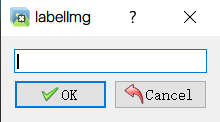 输入你的标签分类名字,后面转换为ecord文件会用到该名字标签映射!
不然会提示报错
2.xml转换为csv文件
xml_to_cvs.py
注意:文件路径!!
import os import glob import pandas as pd import xml.etree.ElementTree as ET os.chdir('D:\\AAAAA\\tf5_img\\TEST')#保存路径 path = 'D:\\AAAAA\\tf5_img\\TEST'#xnl文件路径 def xml_to_csv(path): xml_list = [] for xml_file in glob.glob(path + '/*.xml'): tree = ET.parse(xml_file) root = tree.getroot() for member in root.findall('object'): value = (root.find('filename').text, float(root.find('size')[0].text), float(root.find('size')[1].text), member[0].text, float(member[4][0].text), float(member[4][1].text), float(member[4][2].text), float(member[4][3].text) ) xml_list.append(value) column_name = ['filename', 'width', 'height', 'class', 'xmin', 'ymin', 'xmax', 'ymax'] xml_df = pd.DataFrame(xml_list, columns=column_name) return xml_df def main(): image_path = path xml_df = xml_to_csv(image_path) xml_df.to_csv('pedestrian_headshoulder.csv', index=None) print('Successfully converted xml to csv.') main()讯享网
3.cvs转换为recoed文件
由于github原作者(datitran/raccoon_dataset: The dataset is used to train my own raccoon detector and I blogged about it on Medium (github.com))为tensorflow1.X版本原因会报app、v1等bug,其他bug可自行搜索
很多博主解决方法是引入.compat.v1模块,但是现在版本已经移除了compat模块,无法解决该问题。
注意:路径问题!!!

注意:cvs文件改为utf-8编码!
generate_tfrecord.py修改源码为:(参考哪的找不到了)
讯享网from __future__ import division from __future__ import print_function from __future__ import absolute_import import os import io import pandas as pd from PIL import Image from collections import namedtuple import tensorflow as tf # CSV文件的位置 csv_input = 'D:\\AAAAA\\tf5_img/TEST\\pedestrian_headshoulder.csv' # TFRecords的输出位置及文件名 output_path = 'D:\\AAAAA\\tf5_img\\TEST\\img_train.record' # 图像数据的位置及文件名 image_dir = 'D:\\AAAAA\\tf5_img\\TEST' def class_text_to_int(row_label): if row_label == 'LiveLong': return 0 else: None def split(df, group): data = namedtuple('data', ['filename', 'object']) gb = df.groupby(group) return [data(filename, gb.get_group(x)) for filename, x in zip(gb.groups.keys(), gb.groups)] def create_tf_example(group, path): with tf.io.gfile.GFile(os.path.join(path, '{}'.format(group.filename)), 'rb') as fid: encoded_jpg = fid.read() encoded_jpg_io = io.BytesIO(encoded_jpg) image = Image.open(encoded_jpg_io) width, height = image.size filename = group.filename.encode('utf8') image_format = b'jpg' xmins = [] xmaxs = [] ymins = [] ymaxs = [] classes_text = [] classes = [] for index, row in group.object.iterrows(): xmins.append(row['xmin'] / width) xmaxs.append(row['xmax'] / width) ymins.append(row['ymin'] / height) ymaxs.append(row['ymax'] / height) classes_text.append(row['class'].encode('utf8')) classes.append(class_text_to_int(row['class'])) tf_example = tf.train.Example(features=tf.train.Features(feature={ 'image/height': tf.train.Feature(int64_list=tf.train.Int64List(value=[height])), 'image/width': tf.train.Feature(int64_list=tf.train.Int64List(value=[width])), 'image/filename': tf.train.Feature(bytes_list=tf.train.BytesList(value=[filename])), 'image/source_id': tf.train.Feature(bytes_list=tf.train.BytesList(value=[filename])), 'image/encoded': tf.train.Feature(bytes_list=tf.train.BytesList(value=[encoded_jpg])), 'image/format': tf.train.Feature(bytes_list=tf.train.BytesList(value=[image_format])), 'image/object/bbox/xmin': tf.train.Feature(float_list=tf.train.FloatList(value=xmins)), 'image/object/bbox/xmax': tf.train.Feature(float_list=tf.train.FloatList(value=xmaxs)), 'image/object/bbox/ymin': tf.train.Feature(float_list=tf.train.FloatList(value=ymins)), 'image/object/bbox/ymax': tf.train.Feature(float_list=tf.train.FloatList(value=ymaxs)), 'image/object/class/text': tf.train.Feature(bytes_list=tf.train.BytesList(value=classes_text)), 'image/object/class/label': tf.train.Feature(int64_list=tf.train.Int64List(value=classes)), })) return tf_example def main(): writer = tf.io.TFRecordWriter(output_path) path = os.path.join(os.getcwd(), image_dir) examples = pd.read_csv(csv_input,encoding='gbk') grouped = split(examples, 'filename') for group in grouped: tf_example = create_tf_example(group, path) writer.write(tf_example.SerializeToString()) writer.close() if __name__ == '__main__': main()
如果报bug:

是因为标签映射错误,注意自己保存标签的名字。
def class_text_to_int(row_label):
if row_label == 'LiveLong':#自己labelimg保存标签时的名字,有几类分几类
return 0
else:
None
可能还是报utf-8问题bug:

我是通过在读取cvs文件时加上encoding解决:
examples = pd.read_csv(csv_input,encoding='gbk')
关于其他utf-8的bug可参考((2条消息) 执行python generate_tfrecord.py 出现 utf-8‘ codec can‘t decode_Navy的博客-CSDN博客)
如果还是不能成功运行就新建环境安装tensorflow1.x版本运行原github作者code
最后终于成功运行生成record文件

版权声明:本文内容由互联网用户自发贡献,该文观点仅代表作者本人。本站仅提供信息存储空间服务,不拥有所有权,不承担相关法律责任。如发现本站有涉嫌侵权/违法违规的内容,请联系我们,一经查实,本站将立刻删除。
如需转载请保留出处:https://51itzy.com/kjqy/49931.html