
web 开发实践课的大作业。本次小程序设计主要围绕 map 组件展开。
我们组设计了一款能够记录地图上的标点信息,并将自己的标点信息发布到帖子上的旅游类app。
github 代码地址,希望对你有所帮助~
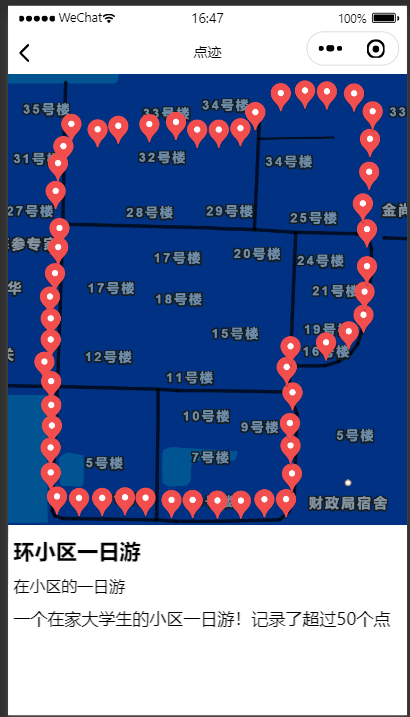
小程序的主要功能就是记录地图上的标点信息,并上传到云数据库中;
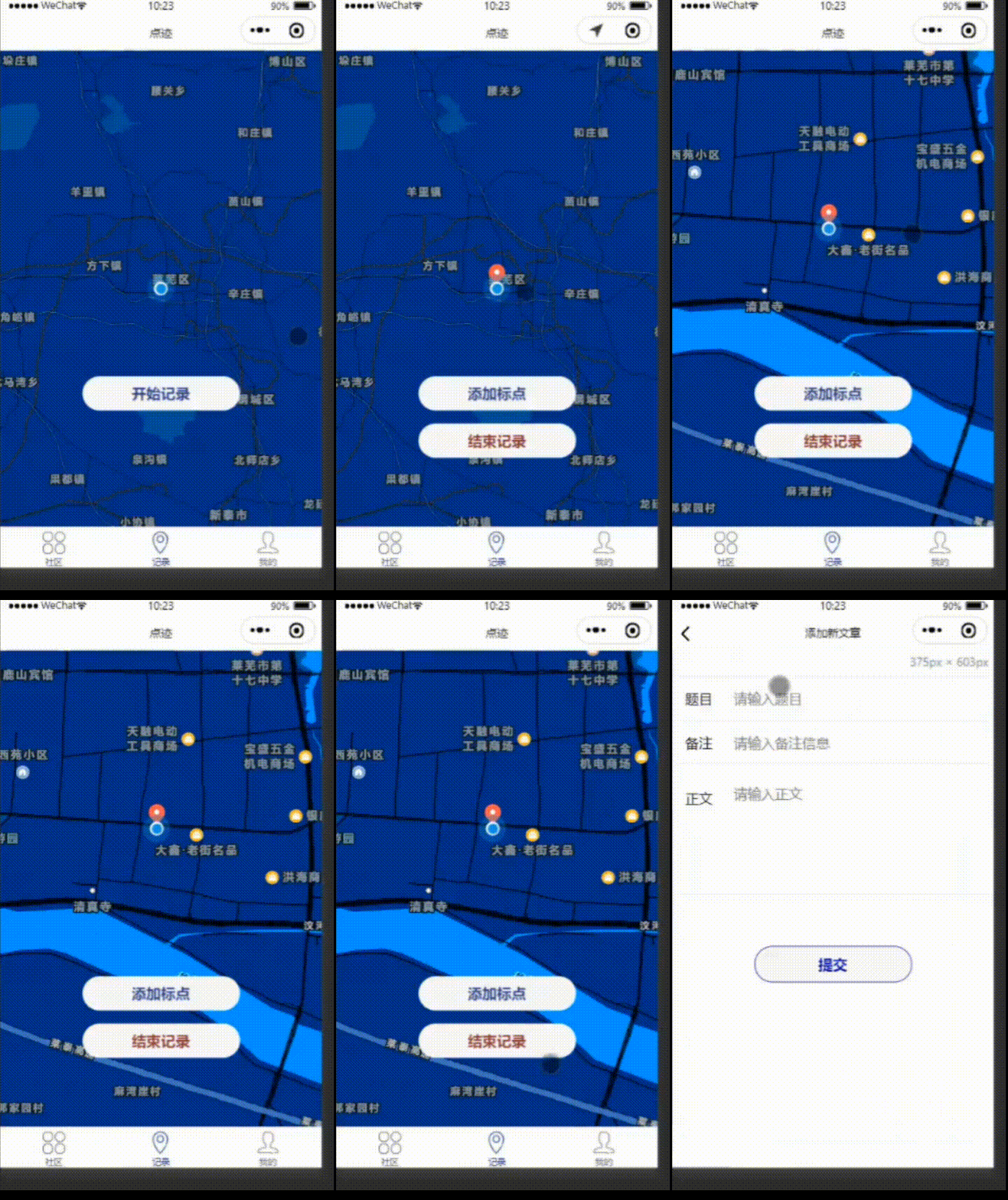
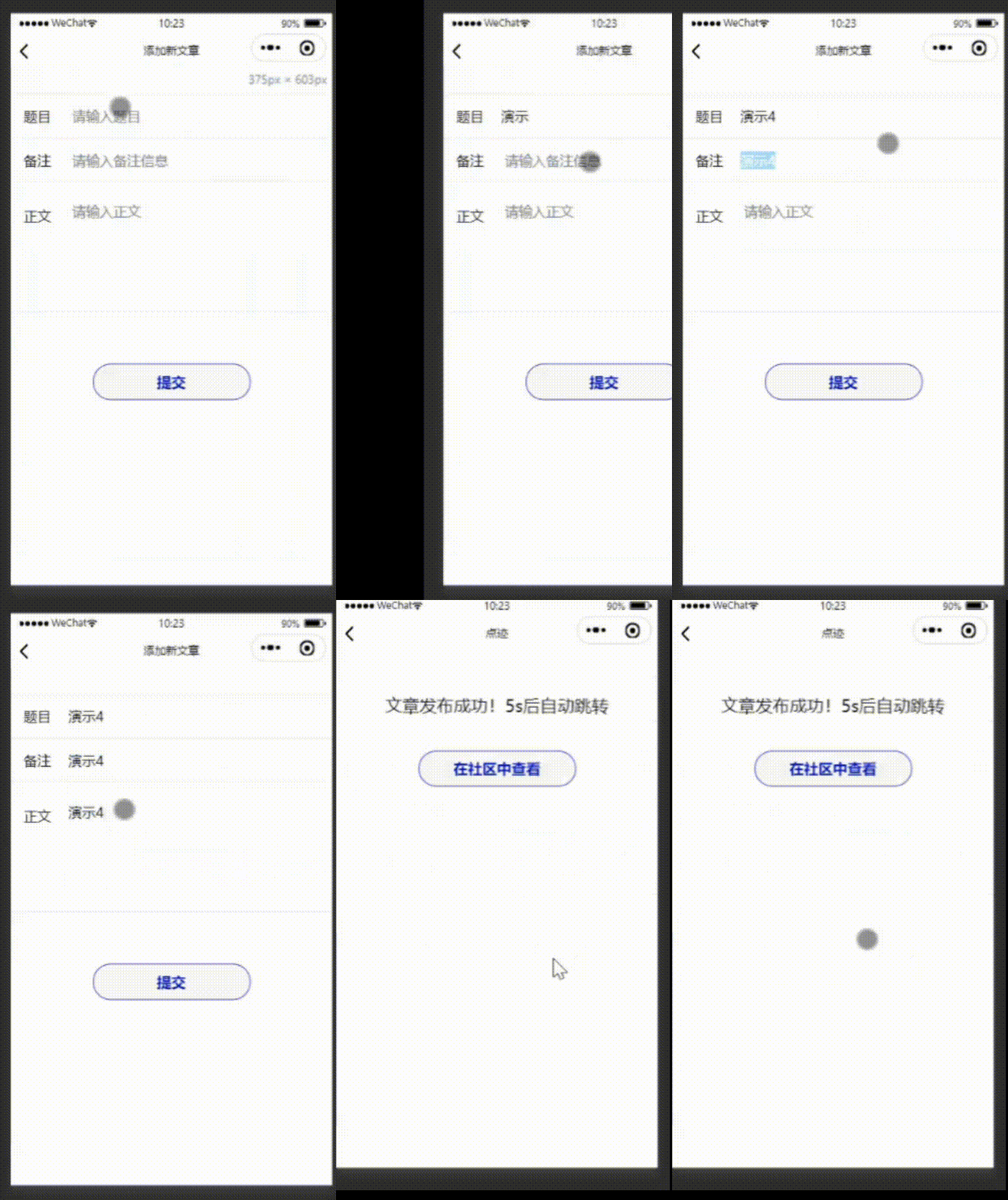
以及编辑文章,把文章信息上传到云数据库中;
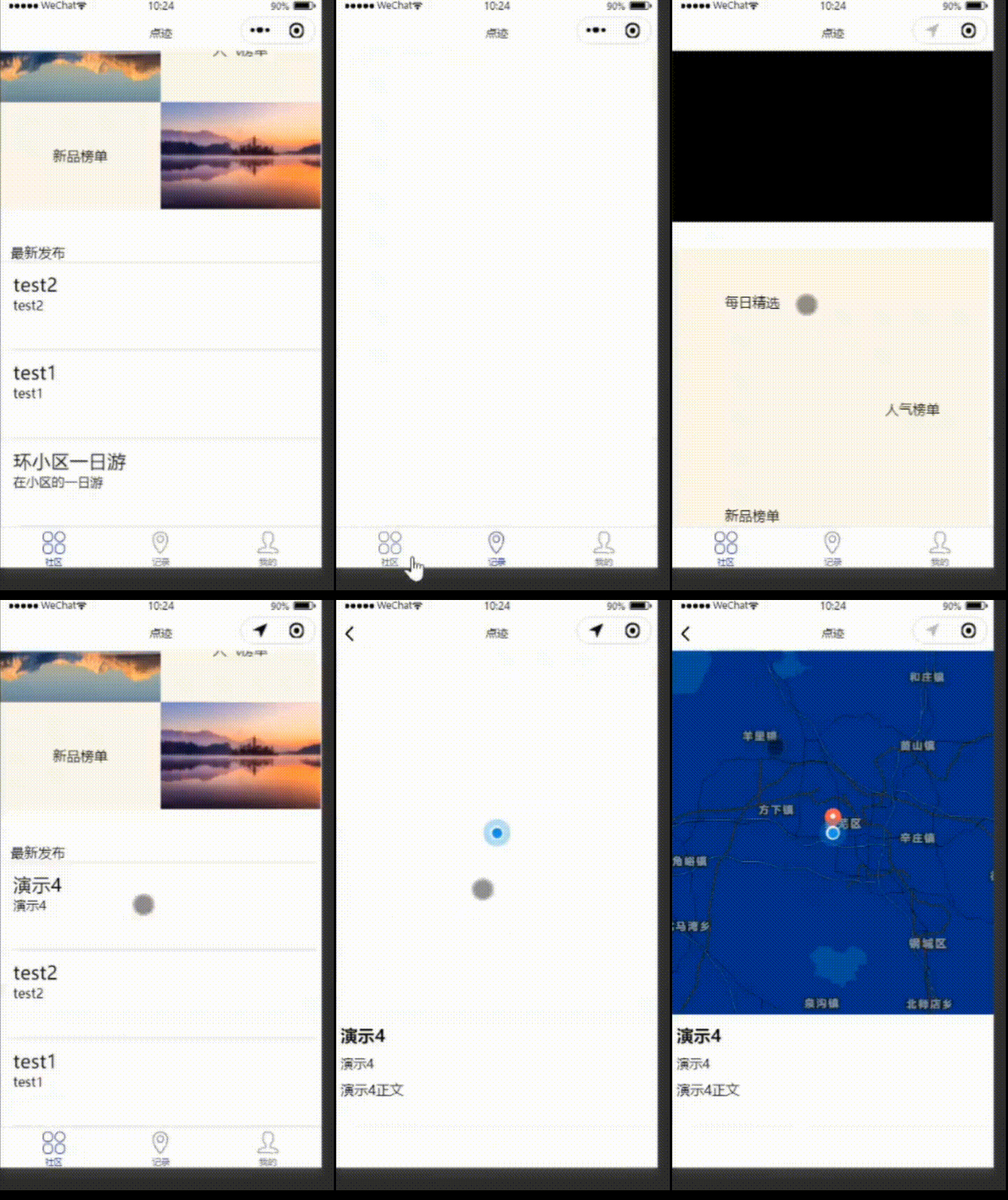
获取云数据库中的文章(最新发布的3篇)。
数据库设计
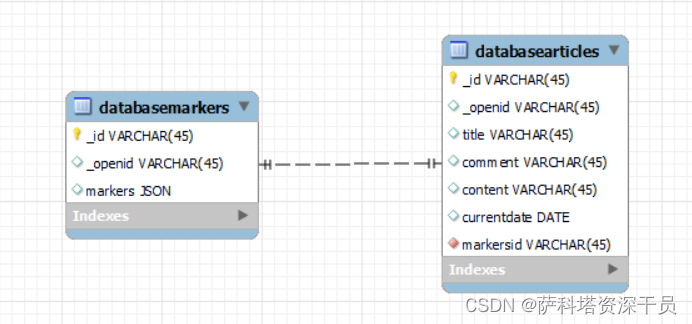
目前有两个数据库表。databasemarkers 存储本次记录中所有标点信息;databasearticles 存储该文章发布时间、文章标题、备注、内容以及对应的标点记录id(外键)。

1. 地图标点
小程序自带的 map 组件中有一个属性 markers,是一个对象数组。只要把相应格式的对象数组传给 map 组件,就会自动在地图上标记出点的信息。
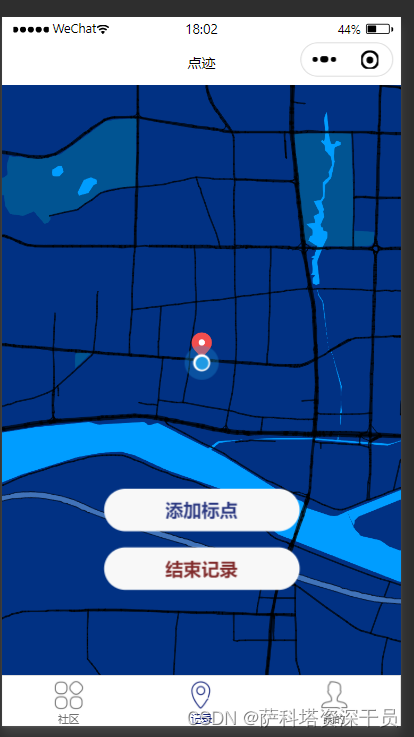
wxml 文件:
<!-- subkey 用于调整地图样式 经纬度 latitude longitude 信息是地图初始的中心点。 本例中,要传递给 map 组件的对象数组也命名为 markers,在 js 文件中获取数据后传递给 map--> <map id="map" subkey="DKEBZ-LKBW4-B3KUP-DYSCI-IG7OS-SQBJH" longitude='{
    {weidu}}' latitude='{
    {jingdu}}' scale="10" layer-style="1" show-location="true" markers="{
    {markers}}"></map> <!--每次点击添加标点按钮,就会获取当前位置信息,存入 markers 数组--> <button size="default" bindtap="recstart"> 添加标点 </button> <!--点击结束记录,将标点信息上传到数据库 databasemarkers 中,并跳转到文章编辑页面--> <button size="default" bindtap="recstop"> 添加标点 </button>
讯享网
js 文件:
讯享网let cnt=cnt+1 const db=wx.cloud.database Page({
    data: {
    jingdu: "", weidu: "", markers: [], }, recstart: function () {
    var that = this cnt = cnt + 1 wx.getLocation({
    altitude: 'altitude', highAccuracyExpireTime: 0, isHighAccuracy: true, type: 'gcj02', success: (result) => {
    console.log(result) let marker = this.data.markers marker.push({
    id: cnt-1, latitude: result.latitude, longitude: result.longitude, width: 20, height: 30 }) // let pointobj = this.data.polyline[0].points // console.log(pointobj) // pointobj.push( // {
    // latitude: result.latitude, // longitude: result.longitude, // } // ) console.log(that.data.markers) that.setData({
    jingdu: result.latitude, weidu: result.longitude, recmode: 1, markers: marker, // polyline:[{
    // points:pointobj // }] }) }, // fail: (res) => {}, // complete: (res) => {}, }) }, recstop:function() {
    var that = this db.collection("databasemarkers").add({
    data:{
    markers:this.data.markers } }).then(res=>{
    console.log("数据添加成功!") console.log(res) var docstring=res._id wx.navigateTo({
    url: '/pages/addarticle/addarticle?docstring='+docstring }) }) }, / * 生命周期函数--监听页面加载 */ onLoad(options) {
    var that = this wx.getLocation({
    altitude: 'altitude', highAccuracyExpireTime: 0, isHighAccuracy: true, type: 'type', success: (result) => {
    console.log(result) this.setData({
    jingdu: result.latitude, weidu: result.longitude }) } // fail: (res) => {}, // complete: (res) => {}, }) }, })
2. 发布文章
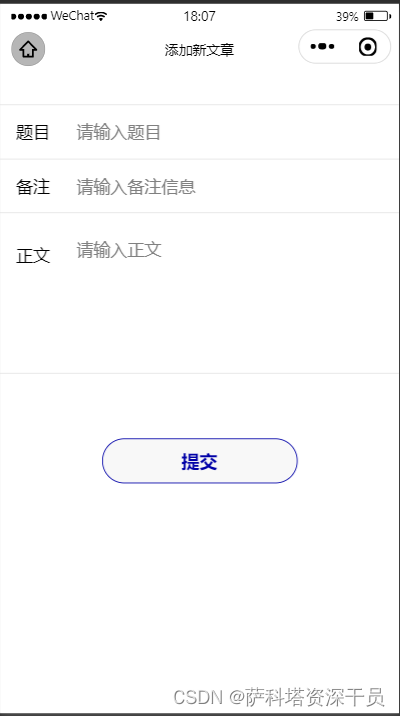
添加完标点信息后,提示输入文章标题、备注、正文信息,点击提交,文章就会发布到 databasearticles 数据库中。
wxml:
<view class="inputbox"> <view class="line" style="border-top: 1px solid #e4e4e4;"> <label>题目</label> <input placeholder=" 请输入题目" bindinput="inputtitle"/> </view> <view class="line"> <label>备注</label> <input placeholder=" 请输入备注信息" bindinput="inputcomment" /> </view> <view class="line-content"> <label>正文</label> <input placeholder=" 请输入正文" class="content" bindinput="inputcontent" /> </view> </view> <button bindtap="submit" class="submit">提交</button> js:
讯享网const db=wx.cloud.database() Page({
    / * 页面的初始数据 */ data: {
    dataobj:{
    comment:"", content:"", title:"", markersid:"" } }, inputtitle:function(options){
    var value=options.detail.value console.log(value) this.setData({
    title:value }) }, inputcomment:function(options){
    var value=options.detail.value console.log(value) this.setData({
    comment:value }) }, inputcontent:function(options){
    var value=options.detail.value console.log(value) this.setData({
    content:value }) }, submit(){
    var mydate=new Date() db.collection("databasearticles").add({
    data:{
    content:this.data.content, markersid:this.data.markersid, comment:this.data.comment, title:this.data.title, createdate:mydate } }).then(res=>{
    console.log("数据添加成功!") console.log(res) wx.navigateTo({
    url: '/pages/success/success', }) }) }, / * 生命周期函数--监听页面加载 */ onLoad(options) {
    var docstring=options.docstring console.log(docstring) this.setData({
    markersid:docstring }) }, })
wxss:
.inputbox {
    margin-top:60rpx; height: 450rpx; } .inputbox .line {
    display: block; min-height:100rpx; line-height:100rpx; padding: 0 30rpx; border-bottom:1px solid #e4e4e4; } .inputbox .line-content {
    display: block; min-height:300rpx; line-height:160rpx; padding: 0 30rpx; border-bottom:1px solid #e4e4e4; } .inputbox .line label {
    float: left; } .inputbox .line-content label {
    float:left; } .inputbox .line input {
    height:100rpx; line-height:100rpx; float: left; margin-left:40rpx; } .inputbox .line-content input {
    width:80%; height:140rpx; line-height: 140rpx; float: left; margin-left:40rpx; } .submit {
    position: absolute; width: 80%; left: 0; right: 0; margin: 180rpx auto 0; border-radius: 98rpx; border: 3rpx solid rgb(0, 0, 167); color:rgb(0, 0, 167); display: flex; flex-direction: row; align-items: center; justify-content: center; }
3. 获取最新发布的三篇文章
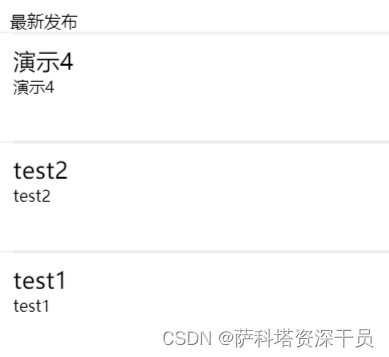
最新发布模块可以获取云数据库中最新发布的三篇文章,原理是根据时间戳倒叙排序后取前三条记录。
讯享网db.collection("databasearticles") .orderBy('createdate','desc') .limit(3) .get({
    success:res=>{
    console.log(res) this.setData({
    new3obj:res.data//new3obj 是在 data 中定义的,用来接收最新发布的三篇文章对象集合的变量 }) } })
以上就是本小程序核心功能啦!希望对你有帮助!
版权声明:本文内容由互联网用户自发贡献,该文观点仅代表作者本人。本站仅提供信息存储空间服务,不拥有所有权,不承担相关法律责任。如发现本站有涉嫌侵权/违法违规的内容,请联系我们,一经查实,本站将立刻删除。
如需转载请保留出处:https://51itzy.com/kjqy/48891.html