
1024G 嵌入式资源大放送!包括但不限于C/C++、单片机、Linux等。关注微信公众号【嵌入式大杂烩】,回复1024,即可免费获取!
1、前言
开发板上有AP3216三合一整合型光感测器,看了看出厂SDK包中并未添加相关驱动。本次我们就一起来学习一下。
2、AP3216简介
AP3216C 芯片集成了光强传感器( ALS: Ambient Light Sensor),接近传感器( PS: Proximity Sensor),还有一个红外 LED( IR LED)。
这个芯片设计的用途是给手机之类的使用,比如:返回当前环境光强以便调整屏幕亮度;用户接听电话时,将手机放置在耳边后,自动关闭屏幕避免用户误触碰 。
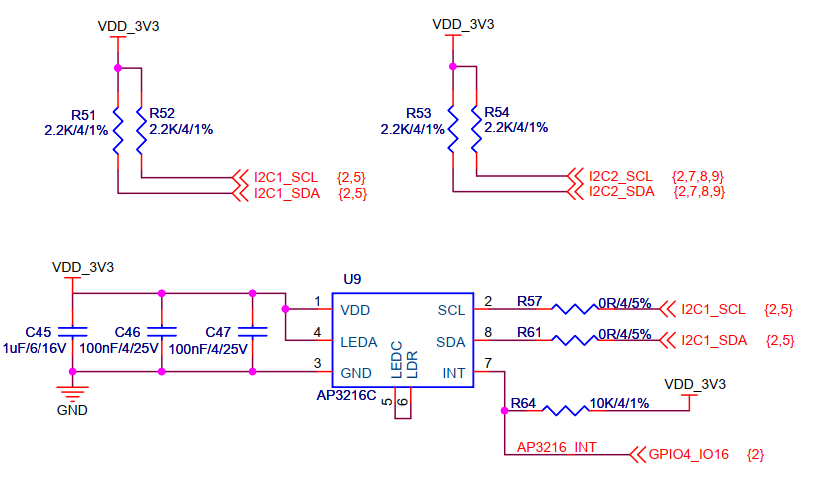
该芯片通过 I2C 接口与主控制器相连, 如:
3、IIC驱动简介
Linux下IIC有两种驱动方式:一种是按照字符设备驱动方式来驱动IIC;另一种是走Linux下IIC的框架。按照字符设备驱动的方式可以查阅这一篇文章:Linux IIC 字符设备 驱动例子。
这里我们浅浅地(真的很浅~~)了解学习一下第二种方式,因为找到的AP3216的驱动就是基于IIC驱动框架的,哈哈。
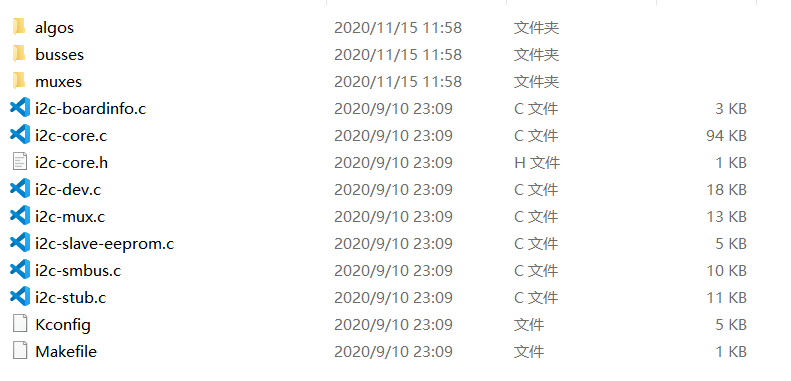
整个IIC的驱动框架相关代码在drivers\i2c中,包含的内容有:
IIC驱动框架图如(图片来源于网络,链接见文末参考资料):
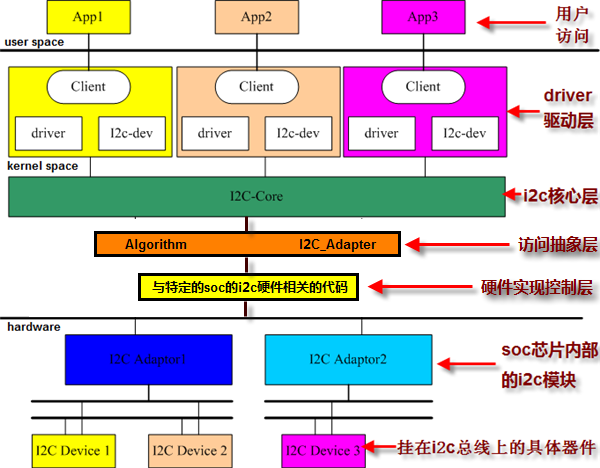
IIC驱动框架可大体分为两大部分:
① I2C 总线驱动:SOC 的 I2C 控制器驱动,也叫做 I2C 适配器驱动。
② I2C 设备驱动:针对具体的 I2C 设备而编写的驱动。
其中,访问抽象层与I2C核心层数据I2C 总线驱动部分;driver驱动层属于I2C设备驱动部分。
上面框图对应的代码调用层次图如:
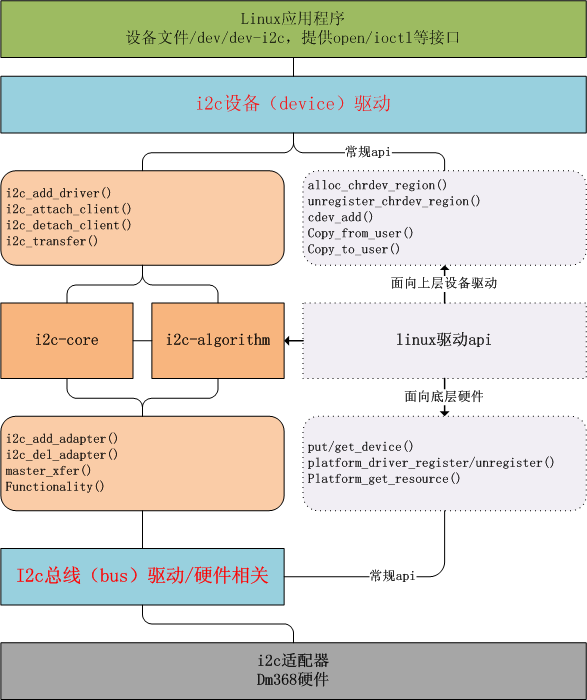
下面的AP3216驱动可以对照这张图来看看。
4、AP3216实验
我们使用设备树来描述AP3216设备信息,首先我们没有在设备树中添加AP3216相关节点时,我们系统的I2C设备如:
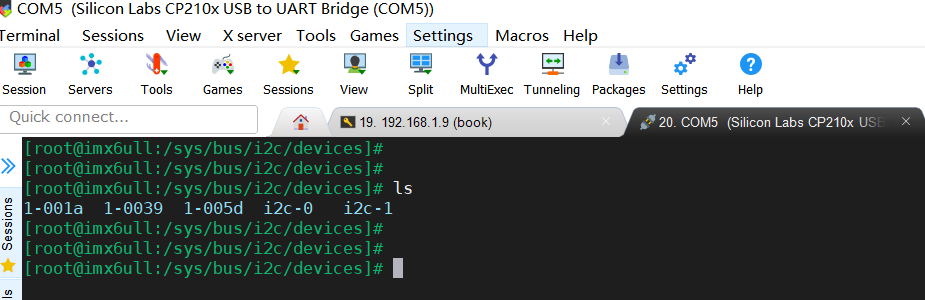
添加I2C pinctrl,板子上AP3216接的是I2C1:

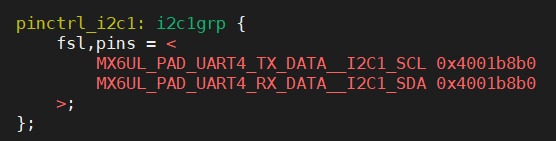
配置寄存器的值都设为0x4001b8b0,这一段是什么意思我们在什么是Pinctrl子系统及GPIO子系统?这篇笔记中也有写到,就是几个寄存器及其配置。
接下来在i2c1节点下添加ap3216节点:

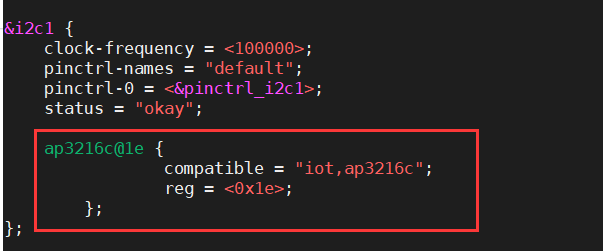
编译设备树,传到开发板上,重启。此时我们系统的I2C设备有:
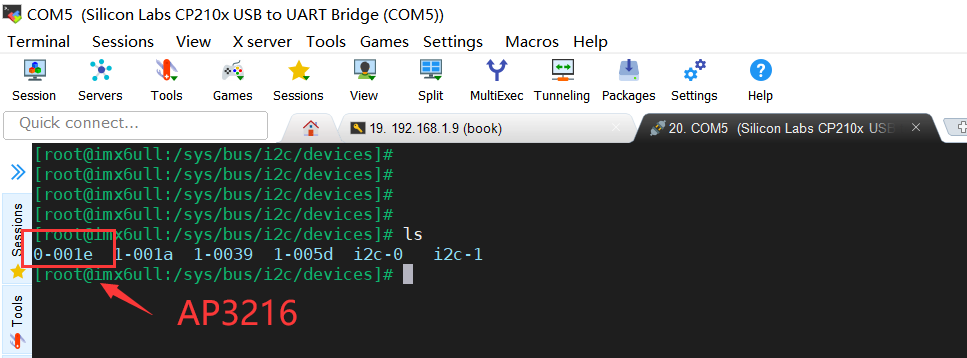
可见,新增的AP3216 I2C设备名就是我们设备树里设置的。
下面编写AP3216驱动(以下代码来源于网络,见文末链接):
ap3216.c:
#include <linux/types.h> #include <linux/kernel.h> #include <linux/delay.h> #include <linux/ide.h> #include <linux/init.h> #include <linux/module.h> #include <linux/errno.h> #include <linux/gpio.h> #include <linux/cdev.h> #include <linux/device.h> #include <linux/of_gpio.h> #include <linux/semaphore.h> #include <linux/timer.h> #include <linux/i2c.h> #include <asm/mach/map.h> #include <asm/uaccess.h> #include <asm/io.h> #include "ap3216creg.h" /* 文件名 : ap3216c.c 描述 : AP3216C驱动程序 */ #define AP3216C_CNT 1 #define AP3216C_NAME "ap3216c" struct ap3216c_dev { dev_t devid; /* 设备号 */ struct cdev cdev; /* cdev */ struct class *class; /* 类 */ struct device *device; /* 设备 */ struct device_node *nd; /* 设备节点 */ int major; /* 主设备号 */ void *private_data; /* 私有数据 */ unsigned short ir, als, ps; /* 三个光传感器数据 */ }; static struct ap3216c_dev ap3216cdev; /* * @description : 从ap3216c读取多个寄存器数据 * @param - dev: ap3216c设备 * @param - reg: 要读取的寄存器首地址 * @param - val: 读取到的数据 * @param - len: 要读取的数据长度 * @return : 操作结果 */ static int ap3216c_read_regs(struct ap3216c_dev *dev, u8 reg, void *val, int len) { int ret; struct i2c_msg msg[2]; struct i2c_client *client = (struct i2c_client *)dev->private_data; /* msg[0]为发送要读取的首地址 */ msg[0].addr = client->addr; /* ap3216c地址 */ msg[0].flags = 0; /* 标记为发送数据 */ msg[0].buf = ® /* 读取的首地址 */ msg[0].len = 1; /* reg长度*/ /* msg[1]读取数据 */ msg[1].addr = client->addr; /* ap3216c地址 */ msg[1].flags = I2C_M_RD; /* 标记为读取数据*/ msg[1].buf = val; /* 读取数据缓冲区 */ msg[1].len = len; /* 要读取的数据长度*/ ret = i2c_transfer(client->adapter, msg, 2); if(ret == 2) { ret = 0; } else { printk("i2c rd failed=%d reg=%06x len=%d\n",ret, reg, len); ret = -EREMOTEIO; } return ret; } /* * @description : 向ap3216c多个寄存器写入数据 * @param - dev: ap3216c设备 * @param - reg: 要写入的寄存器首地址 * @param - val: 要写入的数据缓冲区 * @param - len: 要写入的数据长度 * @return : 操作结果 */ static s32 ap3216c_write_regs(struct ap3216c_dev *dev, u8 reg, u8 *buf, u8 len) { u8 b[256]; struct i2c_msg msg; struct i2c_client *client = (struct i2c_client *)dev->private_data; b[0] = reg; /* 寄存器首地址 */ memcpy(&b[1],buf,len); /* 将要写入的数据拷贝到数组b里面 */ msg.addr = client->addr; /* ap3216c地址 */ msg.flags = 0; /* 标记为写数据 */ msg.buf = b; /* 要写入的数据缓冲区 */ msg.len = len + 1; /* 要写入的数据长度 */ return i2c_transfer(client->adapter, &msg, 1); } /* * @description : 读取ap3216c指定寄存器值,读取一个寄存器 * @param - dev: ap3216c设备 * @param - reg: 要读取的寄存器 * @return : 读取到的寄存器值 */ static unsigned char ap3216c_read_reg(struct ap3216c_dev *dev, u8 reg) { u8 data = 0; ap3216c_read_regs(dev, reg, &data, 1); return data; #if 0 struct i2c_client *client = (struct i2c_client *)dev->private_data; return i2c_smbus_read_byte_data(client, reg); #endif } /* * @description : 向ap3216c指定寄存器写入指定的值,写一个寄存器 * @param - dev: ap3216c设备 * @param - reg: 要写的寄存器 * @param - data: 要写入的值 * @return : 无 */ static void ap3216c_write_reg(struct ap3216c_dev *dev, u8 reg, u8 data) { u8 buf = 0; buf = data; ap3216c_write_regs(dev, reg, &buf, 1); } /* * @description : 读取AP3216C的数据,读取原始数据,包括ALS,PS和IR, 注意! * : 如果同时打开ALS,IR+PS的话两次数据读取的时间间隔要大于112.5ms * @param - ir : ir数据 * @param - ps : ps数据 * @param - ps : als数据 * @return : 无。 */ void ap3216c_readdata(struct ap3216c_dev *dev) { unsigned char i =0; unsigned char buf[6]; /* 循环读取所有传感器数据 */ for(i = 0; i < 6; i++) { buf[i] = ap3216c_read_reg(dev, AP3216C_IRDATALOW + i); } if(buf[0] & 0X80) /* IR_OF位为1,则数据无效 */ dev->ir = 0; else /* 读取IR传感器的数据 */ dev->ir = ((unsigned short)buf[1] << 2) | (buf[0] & 0X03); dev->als = ((unsigned short)buf[3] << 8) | buf[2]; /* 读取ALS传感器的数据 */ if(buf[4] & 0x40) /* IR_OF位为1,则数据无效 */ dev->ps = 0; else /* 读取PS传感器的数据 */ dev->ps = ((unsigned short)(buf[5] & 0X3F) << 4) | (buf[4] & 0X0F); } /* * @description : 打开设备 * @param - inode : 传递给驱动的inode * @param - filp : 设备文件,file结构体有个叫做private_data的成员变量 * 一般在open的时候将private_data指向设备结构体。 * @return : 0 成功;其他 失败 */ static int ap3216c_open(struct inode *inode, struct file *filp) { filp->private_data = &ap3216cdev; /* 初始化AP3216C */ ap3216c_write_reg(&ap3216cdev, AP3216C_SYSTEMCONG, 0x04); /* 复位AP3216C */ mdelay(50); /* AP3216C复位最少10ms */ ap3216c_write_reg(&ap3216cdev, AP3216C_SYSTEMCONG, 0X03); /* 开启ALS、PS+IR */ return 0; } /* * @description : 从设备读取数据 * @param - filp : 要打开的设备文件(文件描述符) * @param - buf : 返回给用户空间的数据缓冲区 * @param - cnt : 要读取的数据长度 * @param - offt : 相对于文件首地址的偏移 * @return : 读取的字节数,如果为负值,表示读取失败 */ static ssize_t ap3216c_read(struct file *filp, char __user *buf, size_t cnt, loff_t *off) { short data[3]; long err = 0; struct ap3216c_dev *dev = (struct ap3216c_dev *)filp->private_data; ap3216c_readdata(dev); data[0] = dev->ir; data[1] = dev->als; data[2] = dev->ps; err = copy_to_user(buf, data, sizeof(data)); return 0; } /* * @description : 关闭/释放设备 * @param - filp : 要关闭的设备文件(文件描述符) * @return : 0 成功;其他 失败 */ static int ap3216c_release(struct inode *inode, struct file *filp) { return 0; } /* AP3216C操作函数 */ static const struct file_operations ap3216c_ops = { .owner = THIS_MODULE, .open = ap3216c_open, .read = ap3216c_read, .release = ap3216c_release, }; /* * @description : i2c驱动的probe函数,当驱动与 * 设备匹配以后此函数就会执行 * @param - client : i2c设备 * @param - id : i2c设备ID * @return : 0,成功;其他负值,失败 */ static int ap3216c_probe(struct i2c_client *client, const struct i2c_device_id *id) { /* 1、构建设备号 */ if (ap3216cdev.major) { ap3216cdev.devid = MKDEV(ap3216cdev.major, 0); register_chrdev_region(ap3216cdev.devid, AP3216C_CNT, AP3216C_NAME); } else { alloc_chrdev_region(&ap3216cdev.devid, 0, AP3216C_CNT, AP3216C_NAME); ap3216cdev.major = MAJOR(ap3216cdev.devid); } /* 2、注册设备 */ cdev_init(&ap3216cdev.cdev, &ap3216c_ops); cdev_add(&ap3216cdev.cdev, ap3216cdev.devid, AP3216C_CNT); /* 3、创建类 */ ap3216cdev.class = class_create(THIS_MODULE, AP3216C_NAME); if (IS_ERR(ap3216cdev.class)) { return PTR_ERR(ap3216cdev.class); } /* 4、创建设备 */ ap3216cdev.device = device_create(ap3216cdev.class, NULL, ap3216cdev.devid, NULL, AP3216C_NAME); if (IS_ERR(ap3216cdev.device)) { return PTR_ERR(ap3216cdev.device); } ap3216cdev.private_data = client; return 0; } /* * @description : i2c驱动的remove函数,移除i2c驱动的时候此函数会执行 * @param - client : i2c设备 * @return : 0,成功;其他负值,失败 */ static int ap3216c_remove(struct i2c_client *client) { /* 删除设备 */ cdev_del(&ap3216cdev.cdev); unregister_chrdev_region(ap3216cdev.devid, AP3216C_CNT); /* 注销掉类和设备 */ device_destroy(ap3216cdev.class, ap3216cdev.devid); class_destroy(ap3216cdev.class); return 0; } /* 传统匹配方式ID列表 */ static const struct i2c_device_id ap3216c_id[] = { {"iot,ap3216c", 0}, {} }; /* 设备树匹配列表 */ static const struct of_device_id ap3216c_of_match[] = { { .compatible = "iot,ap3216c" }, { /* Sentinel */ } }; /* i2c驱动结构体 */ static struct i2c_driver ap3216c_driver = { .probe = ap3216c_probe, .remove = ap3216c_remove, .driver = { .owner = THIS_MODULE, .name = "ap3216c", .of_match_table = ap3216c_of_match, }, .id_table = ap3216c_id, }; /* * @description : 驱动入口函数 * @param : 无 * @return : 无 */ static int __init ap3216c_init(void) { int ret = 0; ret = i2c_add_driver(&ap3216c_driver); return ret; } /* * @description : 驱动出口函数 * @param : 无 * @return : 无 */ static void __exit ap3216c_exit(void) { i2c_del_driver(&ap3216c_driver); } /* module_i2c_driver(ap3216c_driver) */ module_init(ap3216c_init); module_exit(ap3216c_exit); MODULE_LICENSE("GPL"); MODULE_AUTHOR("pjw"); 讯享网
驱动详解可查阅注释及配合上诉的I2C驱动框架的框图及数据手册理解。
ap3216creg.h:
讯享网#ifndef AP3216C_H #define AP3216C_H /* 文件名 : ap3216creg.h 描述 : AP3216C寄存器地址描述头文件 */ #define AP3216C_ADDR 0X1E /* AP3216C器件地址 */ /* AP3316C寄存器 */ #define AP3216C_SYSTEMCONG 0x00 /* 配置寄存器 */ #define AP3216C_INTSTATUS 0X01 /* 中断状态寄存器 */ #define AP3216C_INTCLEAR 0X02 /* 中断清除寄存器 */ #define AP3216C_IRDATALOW 0x0A /* IR数据低字节 */ #define AP3216C_IRDATAHIGH 0x0B /* IR数据高字节 */ #define AP3216C_ALSDATALOW 0x0C /* ALS数据低字节 */ #define AP3216C_ALSDATAHIGH 0X0D /* ALS数据高字节 */ #define AP3216C_PSDATALOW 0X0E /* PS数据低字节 */ #define AP3216C_PSDATAHIGH 0X0F /* PS数据高字节 */ #endif
ap3216应用:
ap3216cApp.c:
#include "stdio.h" #include "unistd.h" #include "sys/types.h" #include "sys/stat.h" #include "sys/ioctl.h" #include "fcntl.h" #include "stdlib.h" #include "string.h" #include <poll.h> #include <sys/select.h> #include <sys/time.h> #include <signal.h> #include <fcntl.h> /* 文件名 : ap3216cApp.c 描述 : ap3216c设备测试APP。 使用方法 :./ap3216cApp /dev/ap3216c */ /* * @description : main主程序 * @param - argc : argv数组元素个数 * @param - argv : 具体参数 * @return : 0 成功;其他 失败 */ int main(int argc, char *argv[]) { int fd; char *filename; unsigned short databuf[3]; unsigned short ir, als, ps; int ret = 0; if (argc != 2) { printf("Error Usage!\r\n"); return -1; } filename = argv[1]; fd = open(filename, O_RDWR); if(fd < 0) { printf("can't open file %s\r\n", filename); return -1; } while (1) { ret = read(fd, databuf, sizeof(databuf)); if(ret == 0) { /* 数据读取成功 */ ir = databuf[0]; /* ir传感器数据 */ als = databuf[1]; /* als传感器数据 */ ps = databuf[2]; /* ps传感器数据 */ printf("ir = %d, als = %d, ps = %d\r\n", ir, als, ps); } usleep(); /*100ms */ } close(fd); /* 关闭文件 */ return 0; } 编写Makefile:
讯享网KERN_DIR = /home/book/100ask_imx6ull-sdk/Linux-4.9.88 all: make -C $(KERN_DIR) M=`pwd` modules $(CROSS_COMPILE)gcc -o ap3216cApp ap3216cApp.c clean: make -C $(KERN_DIR) M=`pwd` modules clean rm -rf modules.order rm -f ap3216cApp # 参考内核源码drivers/char/ipmi/Makefile # 要想把a.c, b.c编译成ab.ko, 可以这样指定: # ab-y := a.o b.o # obj-m += ab.o obj-m += ap3216.o
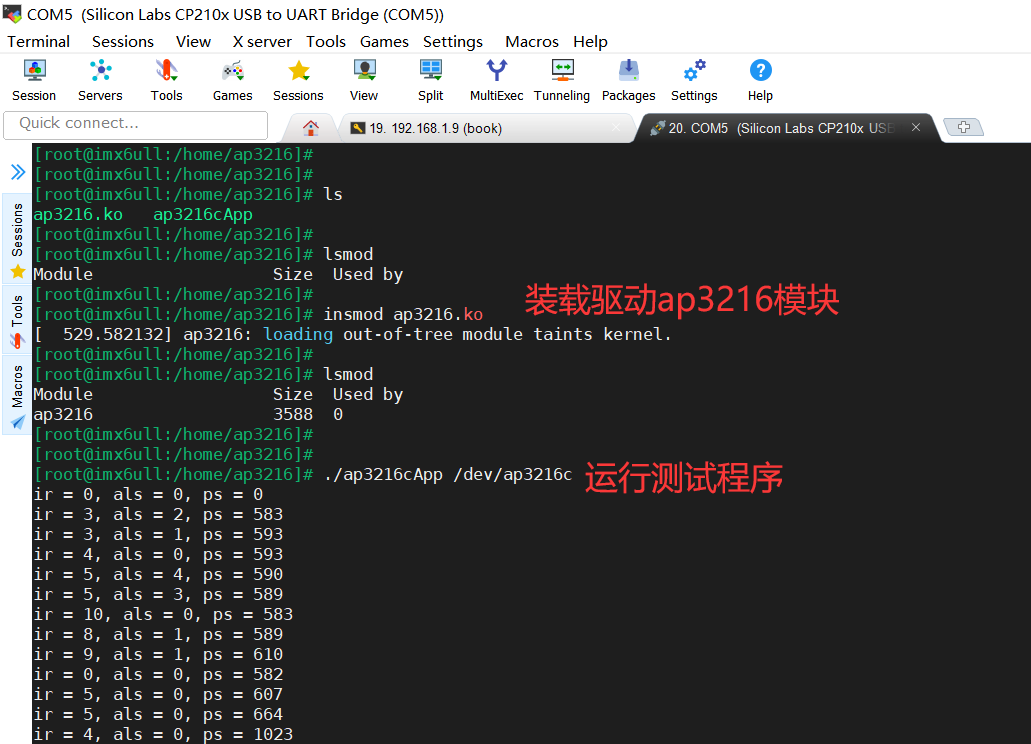
编译得到ap3216.ko及ap3216cApp,传到板子上运行:
以上就是本次的实验分享,如果文章对你有帮助,欢迎转发,谢谢!
参考资料:
1、https://blog.csdn.net/weixin_/article/details/?utm_medium=distribute.pc_relevant.none-task-blog-BlogCommendFromMachineLearnPai2-2.control&dist_request_id=.367.&depth_1-utm_source=distribute.pc_relevant.none-task-blog-BlogCommendFromMachineLearnPai2-2.control
2、https://blog.csdn.net/p/article/details/
3、《嵌入式Linux应用开发完全手册》
猜你喜欢:
实用 | 分享几个非常实用的开源项目
【嵌入式Linux笔记】设备树实例分析
【嵌入式Linux笔记】设备树基础知识
【嵌入式Linux笔记】总线设备驱动模型
2020年精选原创笔记汇总
1024G 嵌入式资源大放送!包括但不限于C/C++、单片机、Linux等。关注微信公众号【嵌入式大杂烩】,回复1024,即可免费获取!
版权声明:本文内容由互联网用户自发贡献,该文观点仅代表作者本人。本站仅提供信息存储空间服务,不拥有所有权,不承担相关法律责任。如发现本站有涉嫌侵权/违法违规的内容,请联系我们,一经查实,本站将立刻删除。
如需转载请保留出处:https://51itzy.com/kjqy/45978.html