
环境: Red Hat Enterprise Linux Server release 6.2 (Santiago)
内核: 2.6.32-220.el6.x86_64
PHP版本: php-5.3.10
Mysql版本:mysql-5.1.62
Apache版本:httpd-2.4.1
PHP的安装路径:/lamp/php
安装文件存放位置:/home/software/lamp
支持库的安装:
[root@A12 lamp]# ]# yum install –y libjpeg freetype libpng gd curl libiconv zlib-devel linxml2-devel libjpeg-devel freetype-devel libpng-devel gd-devel curl-devel libxslt-devel
libiconv的安装:
[root@A12 lamp]# tar zcxf libiconv-1.14.tar.gz
[root@A12 lamp]# cd libiconv-1.14
[root@A12 libiconv-1.14]# ./configure --prefix=/usr/local/libiconv
[root@A12 libiconv-1.14]# make && make install
PHP的安装
[root@A12 lamp]# tar zxf php-5.3.10.tar.gz
[root@A12 lamp]# cd php-5.3.10
[root@A12 php-5.3.10]#./configure --prefix=/lamp/php \
--with-apxs2=/lamp/apache/bin/apxs \
--with-mysql=/lamp/mysql \
--with-xmlrpc \
--with-openssl \
--with-zlib \
--with-freetype-dir \
--with-gd \
--with-jpeg-dir \
--with-png-dir \
--with-iconv=/usr/local/libiconv \
--enable-short-tags \
--enable-sockets \
--enable-zend-multibyte \
--enable-soap \
--enable-static \
--enable-mbstring \
--enable-gd-native-ttf \
--with-curl \
--with-xsl \
--enable-ftp \
--with-libxml-dir
+--------------------------------------------------------------------+
| License: |
| This software is subject to the PHP License, available in this |
| distribution in the file LICENSE. By continuing this installation |

| process, you are bound by the terms of this license agreement. |
| If you do not agree with the terms of this license, you must abort |
| the installation process at this point. |
+--------------------------------------------------------------------+
Thank you for using PHP.
[root@A12 php-5.3.10]# make && make install
复制PHP的配置文件
[root@A12 php-5.3.10]# bin/cp php.ini-production /lamp/php/lib/php.ini
查看apache主配置文件中是否存在php的加载模块:
[root@A12 php-5.3.10]# grep php /lamp/apache/conf/httpd.conf
LoadModule php5_module modules/libphp5.so
增加php的支持:
[root@A12 php-5.3.10]# vim /lamp/apache/conf/httpd.conf
增加以下内容(红色字体为增加的内容)
AddType application/x-httpd-php .php # .之前一点要有空格
DirectoryIndex index.php index.html
检查apache语法是否正确:
[root@A12 php-5.3.10]# /lamp/apache/bin/apachectl –t
Syntax OK
[root@A12 php-5.3.10]# /lamp/apache/bin/apachectl graceful
[root@A12 php-5.3.10]# netstart -lntup|grep 80
tcp 0 0 :::80 :::* LISTEN 18958/httpd
[root@A12 php-5.3.10]# netstat -lntup|grep
tcp 0 0 0.0.0.0:3306 0.0.0.0:* LISTEN 32363/mysqld
[root@A12 php-5.3.10]# cd /lamp/apache/htdocs/
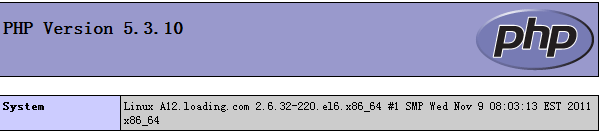
测试php是否安装成功:
[root@A12 htdocs]# vim indesx.php
phpinfo ();
?>
将上述文件保存后退出;
再使用浏览器测试:http://IP
测试与mysql的连接:
[root@A12 htdocs]# vim index.php
$link=mysql_connect('localhost','root','');
if(!$link) echo "失败!";
else echo "成功!";
mysql_close();
?>
再使用浏览器测试:http://IP
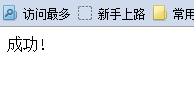
OK!!php连接mysql是正常的。
版权声明:本文内容由互联网用户自发贡献,该文观点仅代表作者本人。本站仅提供信息存储空间服务,不拥有所有权,不承担相关法律责任。如发现本站有涉嫌侵权/违法违规的内容,请联系我们,一经查实,本站将立刻删除。
如需转载请保留出处:https://51itzy.com/kjqy/43611.html