
Typescript+vite+sass手把手实现五子棋游戏(放置类)
下面有图片和gif可能没加载出来
讯享网
上面有图片和gif可能没加载出来
导言
最近练习Typescript,觉得差不多了,就用这个项目练练手,使用Typescript纯面向对象编程。
开源地址
试玩地址:试玩地址 (zou-hong-run.github.io)
代码地址:zou-hong-run/dobang: Typescript+vite+sass拖拽放置五子棋 (github.com)
视频演示地址:https://www.bilibili.com/video/BV1JX4y1L7XS/
功能介绍
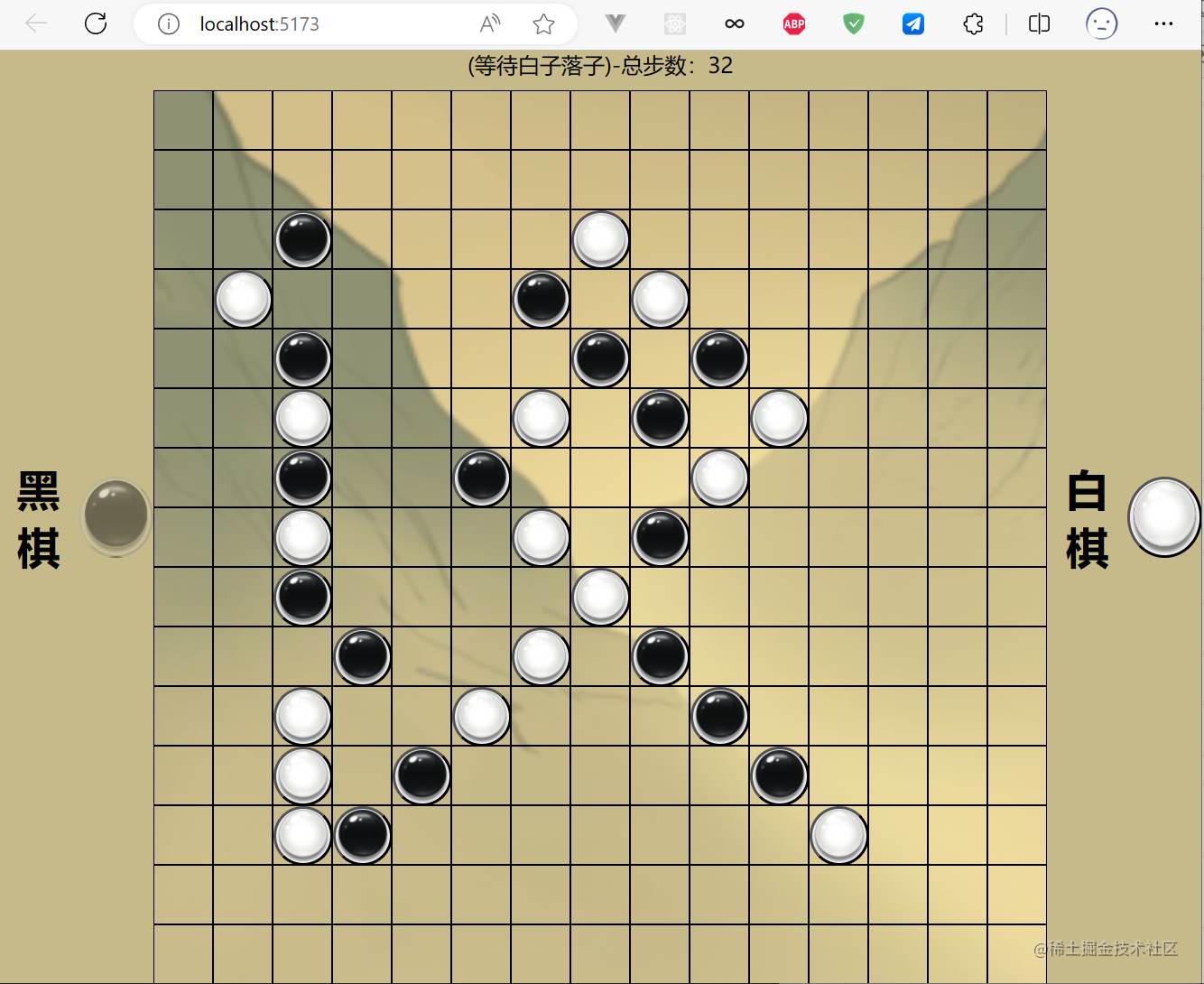
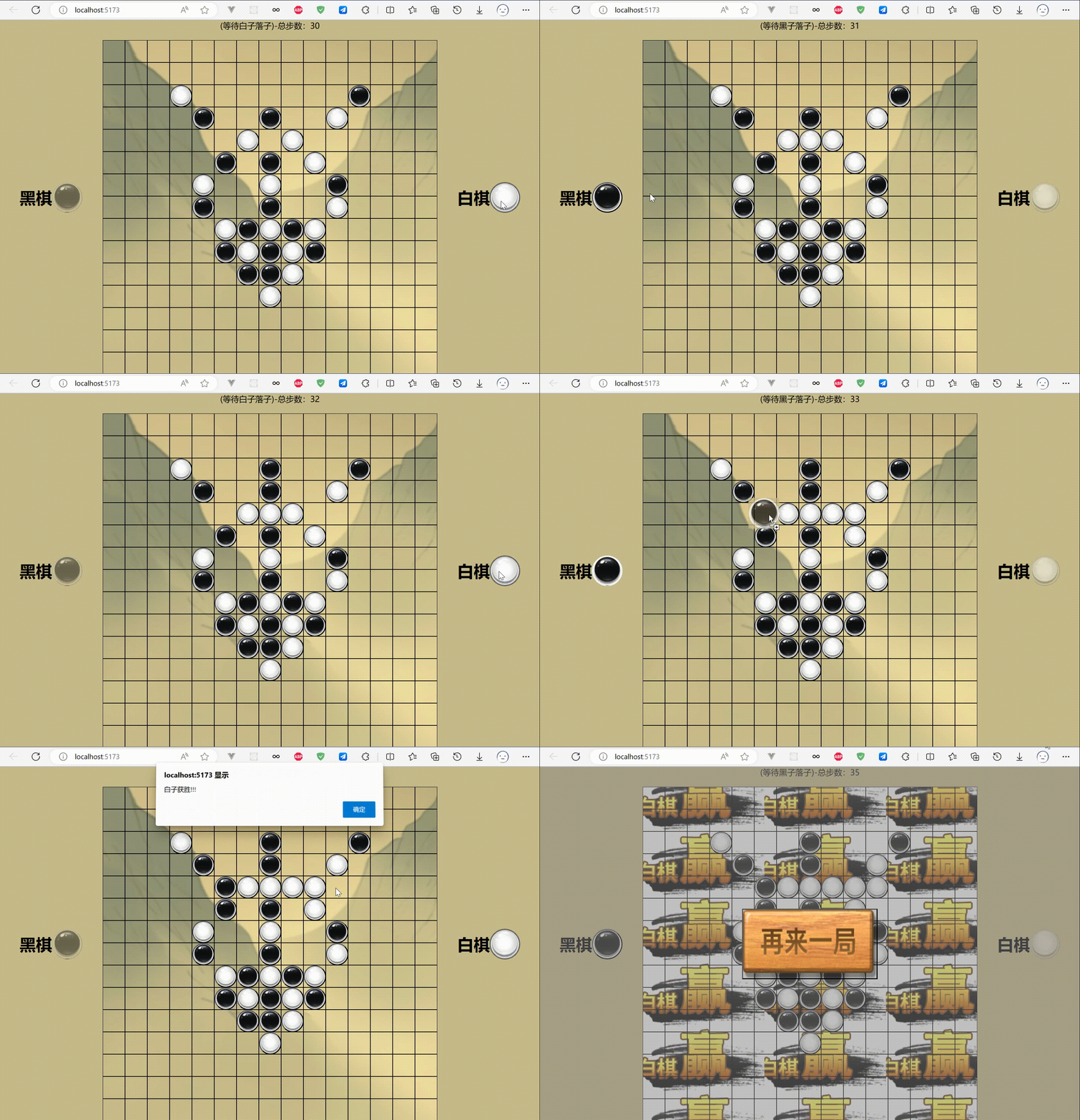
用户将棋子放置在棋盘上,首先将五颗棋子连成线的用户胜利
游戏功能
- 开始游戏
- 用户开始交替放置棋子
- 放置棋子后该棋子会被禁用,直到对方下子,方可解
- 五子连成线胜利
- 重新游戏
项目介绍
使用Typescript+vite+sass构建项目
typescript:类型提示不要太爽。
vite:轻松编译打包项目,减少配置时间
sass:简化css书写
项目搭建
使用vite初始化项目
这里使用vite作为脚手架搭建 因为可以很好的将Typescript和html等结合到一块 打包压缩更方便 支持热更新
你可以使用npm,yarn或pnpm
npm create vite@latest yarn create vite pnpm create vite 讯享网
这里我使用的pnpm
讯享网 pnpm create vite // 项目名 √ Project name: ... gobang // 原生代码,没有框架支持 √ Select a framework: » Vanilla // 使用ts √ Select a variant: » TypeScript cd gobang pnpm install pnpm run dev
安装sass
方便书写scss,-D装开发依赖
pnpm add sass -D 项目目录结构
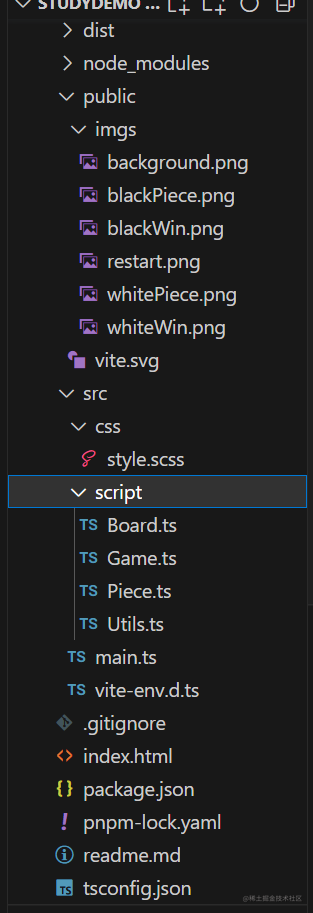
- dist
- 最终打包文件
- public
- 图片资源等
- src
- 源码入口
- css
- 样式
- script
- ts代码放置
- main.ts
- 代码主入口
- index.html
- 网页文件
- tsconfig.json
- ts配置文件
- package.json
- 包管理文件
前端页面布局
index.html布局
游戏首页index.html
- #black_piece左边黑子
- #white_piece右边白子
- #container_center棋盘
- #restart 重新游戏
讯享网 <!doctype html>
<html lang="zh">
<head>
<meta charset="UTF-8" />
<link rel="icon" type="image/svg+xml" href="/vite.svg" />
<meta name="viewport" content="width=device-width, initial-scale=1.0" />
<title>Typescript五子棋</title>
</head>
<body>
<div id="container">
<div id="container_left">
<h1>黑棋</h1>
<button id="black_piece"></button>
</div>
<div id="container_center">
<div id="title">五子棋对决(等待白棋落子)</div>
<div id="game"></div>
</div>
<div id="container_right">
<h1>白棋</h1>
<button id="white_piece"></button>
</div>
<div id="restart" class="none">
<button></button>
</div>
</div>
<script type="module" src="./src/main.ts"></script>
</body>
</html>
sass样式
src/css/style.scss
比原生css简直不要太舒服

@use "sass:math";
* {
padding: 0;
margin: 0;
box-sizing: border-box;
}
html,
body {
min-width: 660px;
min-height: 660px;
width: 100%;
height: 100%;
}
$centerWidthAndHeight: 660px;
$leftAndRightWidth: calc((100% - $centerWidthAndHeight)/2);
// $centerWidth: 100% - $leftAndRightWidth * 2;
// $pieceWidthAndHeight:math.div(100%,1);
$pieceWidthAndHeight: 60px;
.none{
display: none !important;
}
#container {
width: 100%;
height: 100%;
display: flex;
text-align: center;
user-select: none;
h1 {
user-select: none;
}
&_left,
&_right {
min-width: 100px;
width: $leftAndRightWidth;
height: 100%;
display: flex;
justify-content: center;
align-items: center;
background-color: #C6BA8A;
}
// 这里的样式共用
#black_piece {
width: $pieceWidthAndHeight;
height: $pieceWidthAndHeight;
background-image: url("../public/imgs/blackPiece.png");
background-size: 100% 100%;
border-radius: 50%;
user-select: all;
}
#black_piece:hover {
border: 2px double white;
}
#white_piece {
width: $pieceWidthAndHeight;
height: $pieceWidthAndHeight;
background-image: url("../public/imgs/whitePiece.png");
background-size: 100% 100%;
border-radius: 50%;
user-select: all;
}
#white_piece:hover {
border: 2px double black;
}
&_center {
width: $centerWidthAndHeight;
height: 100%;
background-image: url('../public/imgs/background.png');
background-repeat: no-repeat;
background-size: cover;
#title {
background-color: #C6BA8A;
// opacity: .9;
height: calc(100% - $centerWidthAndHeight);
}
#game {
// user-select: all;
width: $centerWidthAndHeight;
height: $centerWidthAndHeight;
position: relative;
display: flex;
flex-wrap: wrap;
}
}
#restart{
width: 100%;
height: 100%;
position: absolute;
display: flex;
justify-content: center;
align-items: center;
background-color: rgba(133, 132, 132,0.5);
button{
width: 25%;
height: 20%;
background: url("../../public/imgs/restart.png");
background-size: 100% 100%;
}
}
}
工具类封装
src/Utils.ts
此类封装了公用的静态方法
- clone
- 克隆元素设置属性
讯享网 export default class Utils { static clone( target: HTMLElement, options: Partial<{ width: string, height: string, draggable: boolean, userSelect: string, x:string, y:string }> ): HTMLElement { let { width, height, draggable, userSelect,x,y } = options; let cloneNode = target.cloneNode(true) as HTMLButtonElement; if (width) { cloneNode.style.cssText += ` width:${width}; ` } if (height) { cloneNode.style.cssText += ` height:${height}; `; } cloneNode.draggable = draggable as boolean; // 根据父元素的坐标记录该元素的坐标 cloneNode.dataset.x = x; cloneNode.dataset.y = y; if (userSelect) { cloneNode.style.cssText += ` user-select:${userSelect}; ` } return cloneNode; } }
游戏逻辑
项目入口
main.ts
- 导入scss样式
- 实例化Game类
import './css/style.scss' import Game from './script/Game' // 白子优先 new Game() Game类
src/Game.ts 游戏控制类,控制各个类的协调工作
- 初始参数
- 创建棋盘
- new Board
- 创建黑/白棋子
- new Piece
- 等待Board触发的回调函数
- countPieceCallBack
- 传入最新棋子数和当前的放在棋盘的棋子
- 判断胜负
- isWin
- 根据isPieceFullFive函数判断是否胜利
- isPieceFullFive
- 判断落子点的四周是否五子连续
- 重新游戏功能
- 改变标题
讯享网 import Board from './Board'; import Piece from './Piece'; export type countPieceCallBack = (count: number, currentPiece: HTMLElement) => void type plainArr = ({ posX: number; posY: number; name: string; } | { posX: number; posY: number; name: null; })[] export default class Game { // 标题元素 public titleEle:HTMLElement; // 白字优先 public firstWhite: boolean; // 棋盘对象 public board: Board; // 黑子对象 public blackPiece: Piece; // 白子对象 public whitePiece: Piece; // 当前棋盘棋子数量 public pieceCount: number; // 当前落子 public currentPiece: HTMLElement | undefined constructor() { this.titleEle = document.querySelector("#title")!; this.firstWhite = true;// 白子优先 this.board = new Board(this.countPieceCallBack.bind(this)); // 初始化棋盘 // 初始化白棋子 this.blackPiece = new Piece("black_piece", this.firstWhite); // 初始化黑棋子 this.whitePiece = new Piece("white_piece", this.firstWhite); // 刚开始为零 this.pieceCount = 0; } // 传给Board触发的回调函数 countPieceCallBack(count: number, currentPiece: HTMLElement) { // board告诉game棋子数量变化了 console.log("board计数", count); // 实时记录最新棋子数量 this.pieceCount = count // 交换顺序 this.firstWhite = !this.firstWhite; // 通知棋子修改显示状态 this.blackPiece.setFirstWhite(this.firstWhite) this.whitePiece.setFirstWhite(this.firstWhite); // 记录当前棋子 this.currentPiece = currentPiece // 当前棋子是什么名字 let currentPieceName = this.currentPiece?.id; // 改变标题 this.changeTitle(currentPieceName);// 判断胜负 if(this.isWin()){ if(currentPieceName==='black_piece'){ alert("黑子获胜!!!"); this.changeBackGround(currentPieceName) }else{ alert("白子获胜!!!") this.changeBackGround(currentPieceName) } this.addRestartPage() } } addRestartPage(){ (document.querySelector("#restart")as HTMLDivElement).classList.remove("none"); (document.querySelector("#restart button")as HTMLButtonElement).addEventListener("click",()=>{ window.location.reload() }) } changeBackGround(currentPieceName:string){ let bodycontainer_center = document.querySelector("#container_center") as HTMLDivElement if(currentPieceName==='black_piece'){ bodycontainer_center.style.background = `url("../imgs/blackWin.png")` }else{ bodycontainer_center.style.background = `url("../imgs/whiteWin.png")` } } changeTitle(currentPieceName:string){ this.titleEle.innerText = (currentPieceName==='white_piece'?"(等待黑子落子)-":"(等待白子落子)-")+"总步数:"+this.pieceCount; } // 判断胜负 isWin():boolean{ // 两种判断,一种全盘判断,一种判断当前落子及其周围是否连成五子 // 这里判断当前落子地方及其周围是否连成五子即可 if (this.pieceCount >= 8) { let allPiece = this.board.getAllPiece(); let dataset = this.currentPiece?.dataset; let { x, y } = dataset!; let currentPieceName = this.currentPiece?.id; let currentPieceposX = parseInt(x!); let currentPieceposY = parseInt(y!); // 提纯allPiece let plainArr = Array.from(allPiece).map(item => { let children = item.children[0] as HTMLButtonElement if (children) { let name = children.id; let { x, y } = children.dataset; return { posX: parseInt(x!), posY: parseInt(y!), name } } return { posX: parseInt(x!), posY: parseInt(y!), name: null } }) // 当前落子的位置 let currentPiecePos = { X: currentPieceposX, Y: currentPieceposY, name: currentPieceName! } // 判断是否五子 // 竖直方向 if(this.isPieceFullFive(currentPiecePos, plainArr,0,1)){ return true; } // 横向 if(this.isPieceFullFive(currentPiecePos, plainArr,1,0)){ return true } // 45度向 if(this.isPieceFullFive(currentPiecePos, plainArr,1,1)){ return true } // 135度向 if(this.isPieceFullFive(currentPiecePos, plainArr,-1,1)){ return true } } if (this.pieceCount == 255) { alert("平局"); return true; } return false } // 检查从当前位置的竖向,横向,45度向,135度向,的棋子数量是否大于五 isPieceFullFive(currentPiecePos: { X: number, Y: number, name: string }, plainArr:plainArr,directX:number,directY:number):boolean { let { X, Y, name } = currentPiecePos; let tempPos = { x:0, y:0 }; let count = 0; // 从落点位置分为 正方向和反方向 // 反方向 for(let i=1;i<5;i++){ tempPos.x = X - directX*i; tempPos.y = Y - directY*i; if(!plainArr.find(item=>item.name === name&&item.posX === tempPos.x&&item.posY===tempPos.y)){ break; } count++; } // 正方向 for(let i=1;i<5;i++){ tempPos.x = X + directX*i; tempPos.y = Y + directY*i; if(!plainArr.find(item=>item.name === name&&item.posX === tempPos.x&&item.posY===tempPos.y)){ break; } count++; } // if(count>=4){ // 当前棋子+count=5 游戏胜利 return true; } return false } }
Board类
src/Board.ts 棋盘类,控制棋盘格子生成
- 初始化棋盘参数
- 初始化棋盘
- emitGameCountPiece
- Game传来的回调函数
- initBoard
- 创建15*15的棋盘
- addEventListenerSetGrid
- 给每个棋盘格子都监听放置事件,棋子放置到网格才触发
- addEventListenerSetPiece
- 只要有落子,就会触发该函数
- 触发Game传来的回调函数emitGameCountPiece
- getAllPiece
- 得到棋盘并且包括棋盘中的所有棋子
import Utils from './Utils' import {type countPieceCallBack} from './Game' export default class Board { // 棋盘行和列 private row: number; private col: number; // 网页游戏区域宽高 // 游戏区域 private game: Element; private gameWidth: number; private gameHeight: number; // 棋盘网格中的单个元素宽高 private oneGridWidth: number private oneGridHeight: number // 记录棋盘中的棋子数量 public pieceCount: number; // Game传过来的函数,告诉game当前棋盘上的棋子数 public emitGameCountPiece: countPieceCallBack; // 记录当前放置的棋子 public crrentPiece:HTMLElement|undefined; constructor(emitGameCountPiece:countPieceCallBack) { this.row = 15; this.col = 15; this.game = document.querySelector("#game")!; this.gameWidth = this.game?.clientWidth! this.gameHeight = this.game?.clientHeight! this.oneGridWidth = this.gameWidth / this.row this.oneGridHeight = this.gameHeight / this.col this.pieceCount = 0; this.emitGameCountPiece = emitGameCountPiece; this.initBoard() } initBoard() { this.initGrid() this.addEventListenerSetPiece() } // 初始化棋盘网格 initGrid() { let fragment = document.createDocumentFragment(); for (let i = 0; i < this.col; i++) { for (let j = 0; j < this.row; j++) { // 添加网格 let grid = document.createElement('div'); grid.style.cssText = ` border:1px solid black; width:${this.oneGridWidth}px; height:${this.oneGridHeight}px; user-select:none; position:relative; ` grid.draggable = false; grid.dataset.x = j + ""; grid.dataset.y = i + ""; // 给每个网格监听放置棋子事件 this.addEventListenerSetGrid(grid) // 给文档片段添加元素 fragment.appendChild(grid); } } this.game.appendChild(fragment) } // 每一个网格都设置一个放置事件 addEventListenerSetGrid(ele: Element) { let that = this; // 我们可以看到对于被拖拽元素,事件触发顺序是 dragstart->drag->dragend; // 对于目标元素,事件触发的顺序是 dragenter->dragover->drop/dropleave。 ele.addEventListener("dragover", (e) => { // e.stopPropagation() e.preventDefault() }); // 防止一个网格放置多个棋子 const disableSecondDrop = function () { // 棋盘监听放子会加一,所以这里我们减一 that.pieceCount--; // 告诉Game类型 that.emitGameCountPiece(that.pieceCount,that.crrentPiece!) alert("此处已经放置元素"); return false; } // 一个网格放置一个棋子 const drop = function (e: Event) { let parent = ele as HTMLElement; let parentWidth = parent.style.width; let parentHeight = parent.style.height; let x = parent.dataset.x; let y = parent.dataset.y; if (e instanceof DragEvent) { console.log("棋子放置在棋盘上,得到ID"); let pieceId = e.dataTransfer?.getData("ID"); let pieceEle = document.getElementById(`${pieceId}`)!; // 克隆一个新的棋子 let clonePiece = Utils.clone( pieceEle, { width: parentWidth, height: parentHeight, draggable: false, userSelect: "none", x:x, y:y }); // 添加到网格中 parent.appendChild(clonePiece!) // 记录该棋子的坐标 that.crrentPiece = clonePiece; // 禁止该网格放置多个元素 parent.addEventListener("drop", disableSecondDrop) // 清除放置事件 parent.removeEventListener("drop", drop) } } ele.addEventListener("drop", drop) } // 监听棋子放置事件 addEventListenerSetPiece() { this.game.addEventListener("dragover", (e) => { e.preventDefault() }) this.game.addEventListener("drop", () => { console.log("棋盘监听到棋子放下"); this.pieceCount++; console.log("棋盘上的棋子数加一", this.pieceCount); // 告诉Game类 数量改变 this.emitGameCountPiece(this.pieceCount,this.crrentPiece!) }) } // 得到棋盘并且包括棋盘中的所有棋子 getAllPiece(){ let gameChild = this.game.children; return gameChild; } } Piece类
src/Piece.ts 棋子类,控制棋子的各种属性
- 初始化棋子信息
- addEventListenerDrag
- 给黑白棋子添加拖拽事件监听
- togglePiece
- 切换黑白棋子放子顺序
- setFirstWhite
- 修改当前黑白棋子放子顺序
讯享网 export default class Piece { private piece: HTMLButtonElement; private firstWhite: boolean; public name: string; constructor(name: string, firstWhite: boolean) { this.name = name; this.firstWhite = firstWhite; this.piece = document.getElementById(`${name}`) as HTMLButtonElement; this.addEventListenerDrag() this.togglePiece() } // 修改当前棋子状态 setFirstWhite(value: boolean) { this.firstWhite = value; this.togglePiece() } // 根据isBlack的值禁用左边或者右边棋盘 togglePiece() { // 判断当前是黑棋还是白棋 let isBlack = this.name === 'black_piece' if (isBlack) { // 黑棋,白棋先手禁用黑棋 this.firstWhite ? (this.piece.draggable = false) : (this.piece.draggable = true); this.firstWhite ? (this.piece.disabled = true) : (this.piece.disabled = false); this.firstWhite ? (this.piece.style.opacity = "0.5") : (this.piece.style.opacity = "1"); console.log("黑棋先手","draggable:",this.piece.draggable,"disabled:",this.piece.disabled,this.piece.style.opacity); }else{// 白棋 白棋先手 显示白棋 this.firstWhite ? (this.piece.draggable = true) : (this.piece.draggable = false) this.firstWhite ? (this.piece.disabled = false) : (this.piece.disabled = true); this.firstWhite ? (this.piece.style.opacity = "1") : (this.piece.style.opacity = "0.5"); console.log("白棋先手","draggable:",this.piece.draggable,"disabled:",this.piece.disabled,this.piece.style.opacity); } } // 监听器棋子被拖拽 addEventListenerDrag() { // 我们可以看到对于被拖拽元素,事件触发顺序是 dragstart->drag->dragend; // 对于目标元素,事件触发的顺序是 dragenter->dragover->drop/dropleave。 this.piece.addEventListener("dragstart", (e) => { console.log("棋子开始被拖拽,设置ID"); if (e instanceof DragEvent) { e.dataTransfer?.setData("ID", (e.target as Element).id) } }); this.piece.addEventListener("drag", (e) => { // e.stopPropagation() e.preventDefault() }); this.piece.addEventListener("dragend", (e) => { if (e instanceof DragEvent) { // console.log("棋子被放置"); } }) } }
总结
- 练习本项目,可以提高Typescript使用技巧,理解面向对象知识,提示编码能力
- 项目还很有多不足,请大家多多指教
- 大佬们觉得不错的话,请三连支持一下!!!!
版权声明:本文内容由互联网用户自发贡献,该文观点仅代表作者本人。本站仅提供信息存储空间服务,不拥有所有权,不承担相关法律责任。如发现本站有涉嫌侵权/违法违规的内容,请联系我们,一经查实,本站将立刻删除。
如需转载请保留出处:https://51itzy.com/kjqy/43439.html