
“即便职场如战场,仍需铭记善待他人等于善待自己,勿忘初心。”
今天临时接了一个http协议的接口压测任务,就一个接口,想着也能熟悉下locust,顺便对比jmeter无GUI的区别,就用locust进行了压测,操作步骤和命令如下:
第一种写法:
1,监听端口命令 ps -ef |grep viewers.py 2,然后杀掉之前执行的占用(这是进行中,一开始不需要) kill -f 28420 3,执行命令跑脚本 locust -f /home/guozhen.deng/locustfile/viewers.py --host=http://192.168.16.11:8484 4,脚本实现 # -*- coding: utf-8 -*- # @File : viewers.py # @API_name: # @Time : 2019/4/10 17:07 # @Author : guozhen.deng from locust import HttpLocust, TaskSet, task import random # 定义用户行为,继承TaskSet类,用于描述用户行为 # (这个类下面放各种请求,请求是基于requests的) # client.get=requests.get # client.post=requests.post class test_viewers(TaskSet): # task装饰该方法为一个事务方法的参数用于指定该行为的执行权重。参数越大,每次被虚拟用户执行概率越高,不设置默认是1 @task() def test_viewersuv(self): #用法和requests相同 header = {} params = {"aid": random.randint(1, 1000)} r = self.client.get("/vod/viewers/uv", headers=header, params=params) # 使用assert断言请求是否正确 # assert r.status_code == 200 # 这个类类似设置性能测试,继承HttpLocust class websitUser(HttpLocust): # 指向一个上面定义的用户行为类 host = "http://192.168.16.11:8484" task_set = test_viewers # 执行事物之间用户等待时间的下界,单位毫秒,相当于lr中的think time min_wait = 1000 max_wait = 6000讯享网
讯享网第二种写法 # -*- coding: utf-8 -*- # @File : viewers.py # @API_name: # @Time : 2019/5/17 17:07 # @Author : guozhen.deng from locust import HttpLocust, TaskSet, task import random # 定义用户行为,继承TaskSet类,用于描述用户行为 # (这个类下面放各种请求,请求是基于requests的) # client.get=requests.get # client.post=requests.post class test_viewers(TaskSet): # task装饰该方法为一个事务方法的参数用于指定该行为的执行权重。参数越大,每次被虚拟用户执行概率越高,不设置默认是1 @task() def test_viewersuv(self): u'这是一个压测事务' #用法和requests相同 header = {} params = {"aid": random.randint(1, 1000)} with self.client.post("/vod/viewers/uv", headers=header, data=params,catch_responese=True) as response: #请求参数中通过catch_response=True来捕获响应数据,然后对响应数据进行校验 #使用success()/failure()两个方法来标识请求结果的状态 if response.status_code == 200: response.success() else: response.failure() # 这个类类似设置性能测试,继承HttpLocust class websitUser(HttpLocust): # 指向一个上面定义的用户行为类 host = "http://192.168.16.11:8484" #这里host如果配置,则命令行可直接执行locust -f viewers.py 不需要后缀加上 --host; task_set = test_viewers # 执行事物之间用户等待时间的下界,单位毫秒,相当于lr中的think time min_wait = 1000 max_wait = 6000 if __name__=='__main__': #导入os模块,os.system方法可以直接在pycharm中该文件中直接运行该py文件,端口若被占用,需查找端口并kill import os os.system('locust -f locustfile4.py ')
因为需要在web可视化页面看到页面的情况,故编写第三种写法
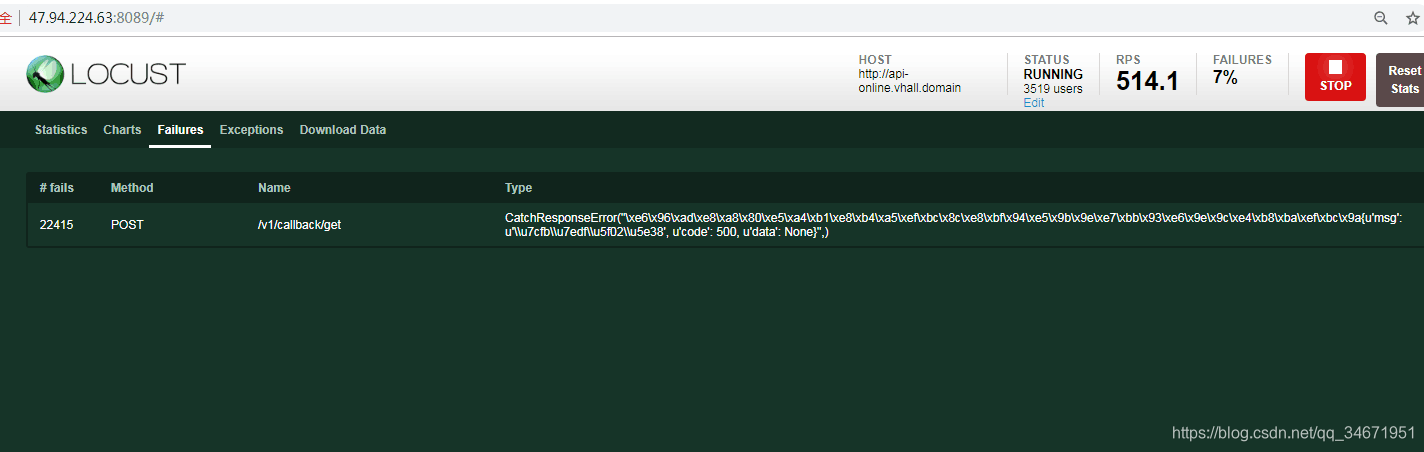
# -*- coding: utf-8 -*- # @File : onlineTest.py # @API_name:在线服务api # @Time : 2019/5/17 15:37 # @Author : guozhen.deng from base64 import decode from locust import HttpLocust, TaskSet, task # 定义用户行为,继承TaskSet类,用于描述用户行为 # (这个类下面放各种请求,请求是基于requests的) # client.get=requests.get # client.post=requests.post app_id = "15df4d3f" channel = "test_online_channel" sender_id = "third_party_user_id" class test_online(TaskSet): # task装饰该方法为一个事务方法的参数用于指定该行为的执行权重。参数越大,每次被虚拟用户执行概率越高,不设置默认是1 # @task(1) # # 1批量检查用户是否在线 # def test_checkonline(self): # # u'1批量检查用户是否在线' # #用法和requests相同 # # header = {} # params = {"channel": channel,"send_user_ids":sender_id,"app_id":app_id} # # r = self.client.get("/v1/channel/check-online", params=params) # with self.client.post("/v1/channel/check-online", data=params,catch_response=True) as response: # print response.text # if response.status_code == 200: # if response.json()["code"] == 200: # response.success() # else: # response.failure("断言失败,返回结果为:{}".format(response.json())) # else: # response.failure("断言失败,接口状态码为:{}".format(response.status_code,response.text)) # @task(1) # # 2查询回调信息 # def test_checkonget(self): # params = {"app_id":app_id} # with self.client.post("/v1/callback/get", json=params,catch_response=True) as response: # if response.status_code == 200: # if response.json()["code"] == 200: # response.success() # else: # response.failure("断言失败,返回结果为:{}".format(response.json())) # else: # response.failure("断言失败,接口状态码为:{}".format(response.status_code,response.text)) # # # # # @task(1) # # 3查询用户在线连接数 # def test_userconnectioncount(self): # params = {"channel": channel, "send_user_id": sender_id,"app_id":app_id} # with self.client.post("/v1/channel/user-connection-count", data=params,catch_response=True) as response: # if response.status_code == 200: # if response.json()["code"] == 200: # response.success() # else: # response.failure("断言失败,返回结果为:{}".format(response.json())) # else: # response.failure("断言失败,接口状态码为:{}".format(response.status_code,response.text)) # # @task(1) # # 4查询频道在线成员列表 # def test_users(self): # params = {"channel": channel, "offset": "1","limit":"100","app_id":app_id} # with self.client.post("/v1/channel/users", data=params,catch_response=True) as response: # if response.status_code == 200: # if response.json()["code"] == 200: # response.success() # else: # response.failure("断言失败,返回结果为:{}".format(response.json())) # else: # response.failure("断言失败,接口状态码为:{}".format(response.status_code,response.text)) # # # # @task(1) # # 5查询频道在线连接数 # def test_connectioncount(self): # params = {"channels": channel,"app_id":app_id} # with self.client.post("/v1/channel/connection-count", data=params,catch_response=True) as response: # if response.status_code == 200: # response.success() # if response.status_code == 200: # if response.json()["code"] == 200: # response.success() # else: # response.failure("断言失败,返回结果为:{}".format(response.json())) # else: # response.failure("断言失败,接口状态码为:{}".format(response.status_code,response.text)) # # @task(1) # # 6获取频道在线人数 # def test_usercount(self): # params = {"channels": channel,"app_id":app_id} # # with self.client.post("/v1/channel/user-count", data=params,catch_response=True) as response: # if response.status_code == 200: # if response.json()["code"] == 200: # response.success() # else: # response.failure("断言失败,返回结果为:{}".format(response.json())) # else: # response.failure("断言失败,接口状态码为:{}".format(response.status_code,response.text)) # # # @task(1) # 7设置回调信息 def test_set(self): params = {"callback_url": "https://blog.csdn.net/_", "private_key": "test-private_key-test-dgz","app_id":app_id} with self.client.post("/v1/callback/set", data=params,catch_response=True) as response: if response.status_code == 200: if response.json()["code"] == 200: response.success() else: response.failure("断言失败,返回结果为:{}".format(response.json())) else: response.failure("断言失败,接口状态码为:{}".format(response.status_code,response.text)) # 这个类类似设置性能测试,继承HttpLocust class websitUser(HttpLocust): # 指向一个上面定义的用户行为类 task_set = test_online host = "http://a*ll.domain" # 执行事物之间用户等待时间的下界,单位毫秒,相当于lr中的think time min_wait = 1000 max_wait = 6000 # # if __name__ == '__main__': # # import os # os.system('locust -f onlineTest3.py --host=http://l.domain')使用第三种方法,就能把错误信息打印出来了,也可以在压测服务器打印出log:比如这种
测试方案一:
启动接口压力测试:
locust -f locustfile.py --host=【域名】
根据场景进行压力测试:
场景1:运行5分钟,用户数1000,每秒启动100,记录测试结果数据,服务器性能指标;
场景2:运行5分钟,用户数1000,每秒启动200,记录测试结果数据,服务器性能指标;
场景3:运行5分钟,用户数1000,每秒启动500,记录测试结果数据,服务器性能指标;
服务器指标:CPU、内存等
性能测试分析:
。。。。。。
测试方案二:
使用另外一种测试方式,--no-web、-c、-r、-n:
命令行中执行测试:每种场景记录测试结果数据,服务器性能指标;
场景一:locust -f locustfile.py --host=【域名】 --no-web -c 1000 -r 100 -n 30000
场景二:locust -f locustfile.py --host=【域名】--no-web -c 1000 -r 500 -n 30000
场景三:locust -f locustfile.py --host=【域名】 --no-web -c 1000 -r 1000 -n 30000

参考结果
1.Type:请求类型;
2.Name:请求路径;
3.requests:当前请求的数量;
4.fails:当前请求失败的数量;
5.Median:中间值,单位毫秒,一般服务器响应时间低于该值,而另一半高于该值;
6.Average:所有请求的平均响应时间,毫秒;
7.Min:请求的最小的服务器响应时间,毫秒;
8.Max:请求的最大服务器响应时间,毫秒;
9.Content Size:单个请求的大小,单位字节;
10.reqs/sec:每秒钟请求的个数。


常见问题:端口被占用
| windows系统执行命令,若执行失败,则查看相关端口:8089是否被占用 |
|---|

解决:
1,netstat -ano : 查找监控相关端口pid
2,netstat -ano|findstr 8089 :查找监控8089端口pid
2,taskkill /f /t /im 67200(pid) :杀掉进程
linux系统解决:
1,lsof -i:8089 查找监控相关端口pid
2,kill -9 PID 杀掉进程

总结:
1,jmeter也好,locust也罢,对本地压力机的要求依赖性比较高;
2,高并发情况下,仍无法支持;
3,低并发情况,明显高于jmeter
4,排除各方面差异化,jmeter和locust进行压测的结果都具有参考价值
5,对于压测来说,locust和jmeter都无明显优势
6,工具只是工具,重要的是使用的人
即便职场如战场,仍需铭记善待他人等于善待自己,勿忘初心。
版权声明:本文内容由互联网用户自发贡献,该文观点仅代表作者本人。本站仅提供信息存储空间服务,不拥有所有权,不承担相关法律责任。如发现本站有涉嫌侵权/违法违规的内容,请联系我们,一经查实,本站将立刻删除。
如需转载请保留出处:https://51itzy.com/kjqy/43364.html