
前言
步骤:
1.整合opencv
2.获取相机的SurfaceView传到native层去检测(亦或是不断的获取SurfaceView的Bitmap,传到native层)
3.检测人脸,在本地保存人脸特征信息
4.上传至后台(不实现)
人脸识别实现的思路(例:人脸登录)
1.人脸信息录入
1.1获取相机的Bitmap,检测人脸(保证人脸信息比较精准) 人脸要足够大,当前范围内人脸只能有一张人脸,正常、眨眼睛、张嘴巴(3张人脸信息)
1.2获取到人脸必须要保存人脸特征信息,然后上传至后台(后台会再次做算法优化),保存到数据库
2.人脸特征值匹配
2.1获取相机的Bitmap,检测人脸(保证人脸信息比较精准) 人脸要足够大,当前范围内人脸只能有一张人脸,正常、眨眼睛、张嘴巴(3张人脸信息)
2.2从后台去查询用户进行登录
一.Android Studio配置opencv
1.opencv资源获取
opencv官网:Home - OpenCV
opencv最新的版本是4.6.0于2022年06月07日发布,4.6.0网址:OpenCV 4.6.0 Is Now Available! - OpenCV
opencv 4.6.0android sdk 下载链接https://nchc.dl.sourceforge.net/project/opencvlibrary/4.6.0/opencv-4.6.0-android-sdk.zip
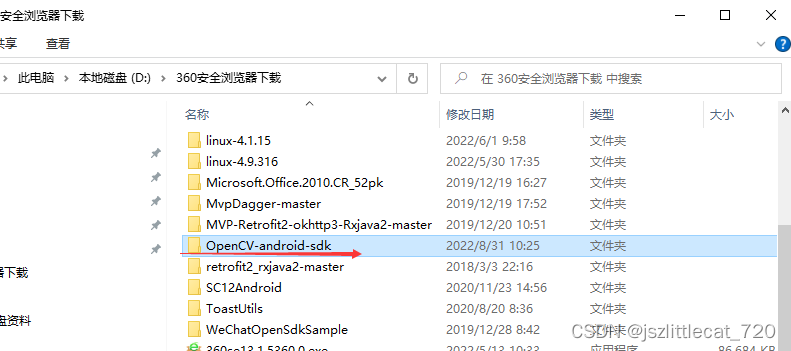
2.解压opencv-4.6.0-android-sdk.zip文件
解压之后的文件夹:OpenCV-android-sdk
讯享网
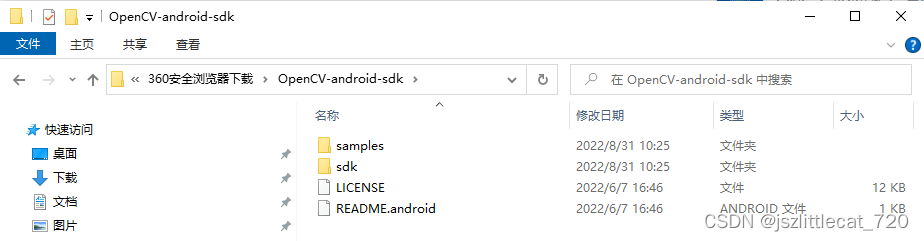
samples: 所有与android相关的一些示例代码,基本全部是java代码,封装了很多功能(图片转成灰度,高斯模糊,边缘检测)
sdk:所有的资源,so库,头文件,NDK自己动手写
源码下载链接:https://github.com/opencv/opencv/archive/4.6.0.zip
3.新建Android项目(native c++)
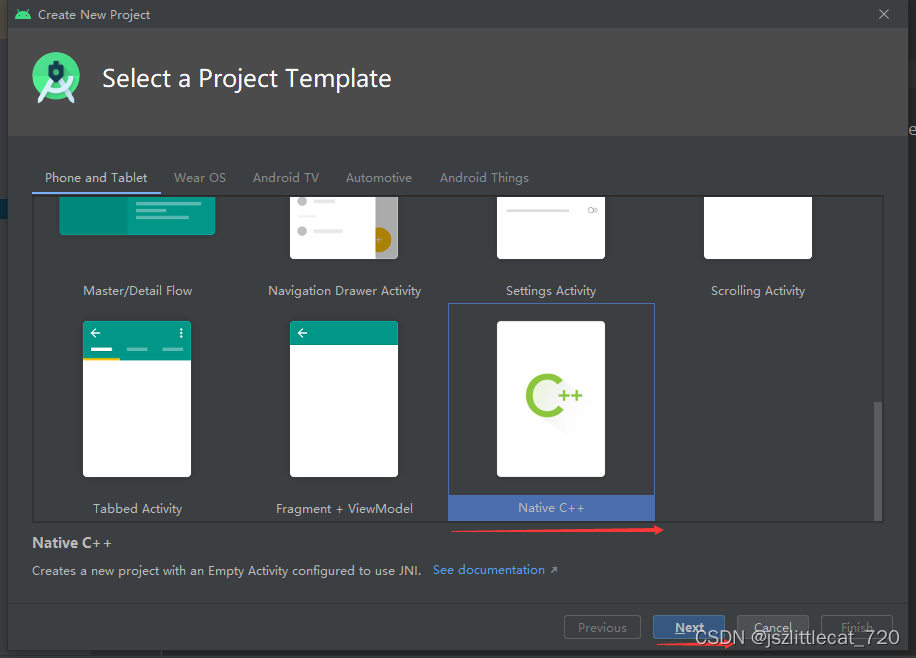
C++ Standard 选择C++11

在main目录下新建jni文件夹
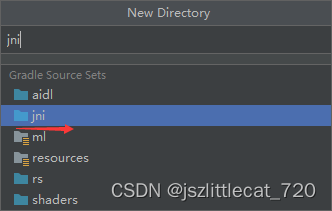
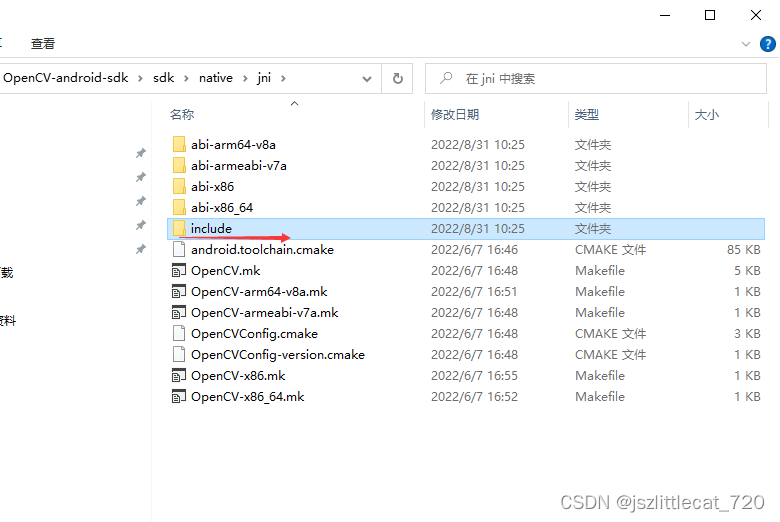
将OpenCV-android-sdk\sdk\native\jni下的include文件夹复制至项目中的jni文件夹下

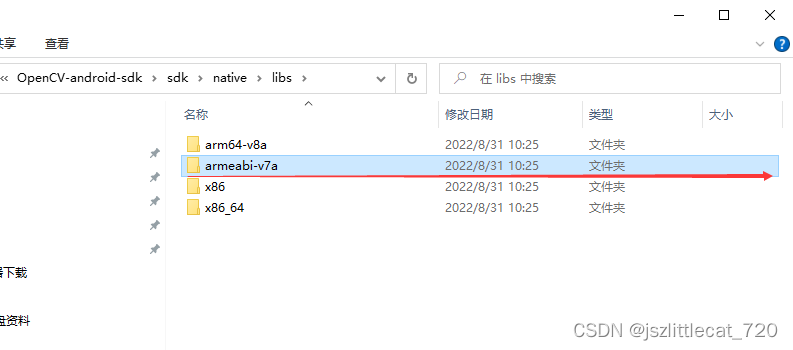
将OpenCV-android-sdk\sdk\native\libs下的armeabi-v7a文件夹复制至jni文件夹下

3.1配置CMakeLists.txt
引入头文件

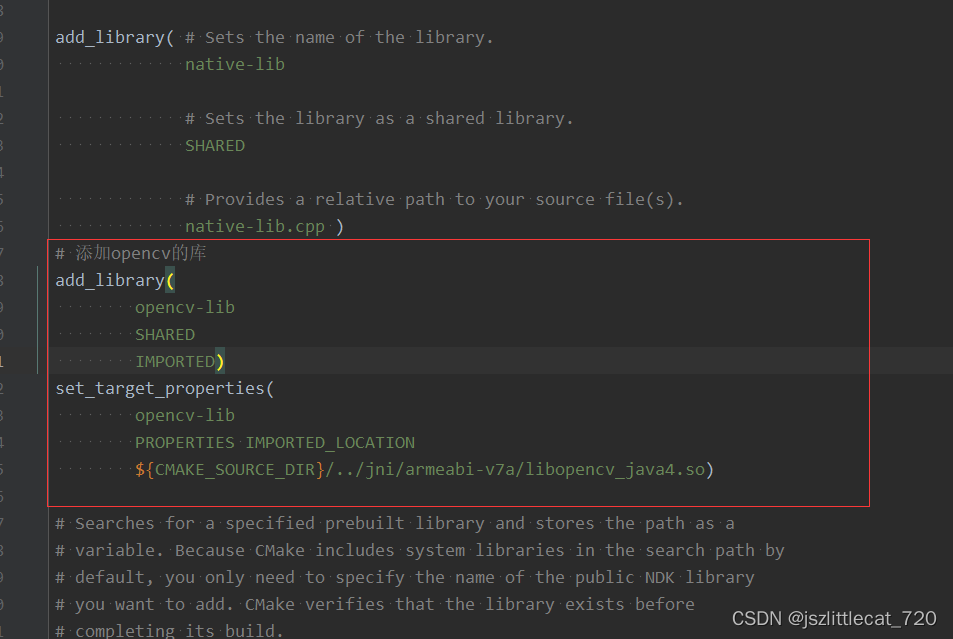
添加opencv库并设置目标属性(注意路径)
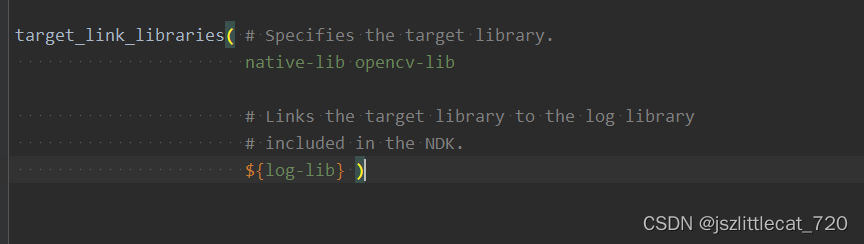
添加目标链接库opencv-lib

CMakeLists.txt内容:
# For more information about using CMake with Android Studio, read the
# documentation: https://d.android.com/studio/projects/add-native-code.html

# Sets the minimum version of CMake required to build the native library.

cmake_minimum_required(VERSION 3.10.2)

# Declares and names the project.

project("opencvtestapplication")
#需要引入我们头文件,以这个配置的目录为基准
include_directories(${CMAKE_SOURCE_DIR}/../jni/include)

# Creates and names a library, sets it as either STATIC
# or SHARED, and provides the relative paths to its source code.
# You can define multiple libraries, and CMake builds them for you.
# Gradle automatically packages shared libraries with your APK.

add_library( # Sets the name of the library.
             native-lib

             # Sets the library as a shared library.
             SHARED

             # Provides a relative path to your source file(s).
             native-lib.cpp )
# 添加opencv的库
add_library(
        opencv-lib
        SHARED
        IMPORTED)
set_target_properties(
        opencv-lib
        PROPERTIES IMPORTED_LOCATION
        ${CMAKE_SOURCE_DIR}/../jni/armeabi-v7a/libopencv_java4.so)

# Searches for a specified prebuilt library and stores the path as a
# variable. Because CMake includes system libraries in the search path by
# default, you only need to specify the name of the public NDK library
# you want to add. CMake verifies that the library exists before
# completing its build.

find_library( # Sets the name of the path variable.
              log-lib

              # Specifies the name of the NDK library that
              # you want CMake to locate.
              log )

# Specifies libraries CMake should link to your target library. You
# can link multiple libraries, such as libraries you define in this
# build script, prebuilt third-party libraries, or system libraries.

target_link_libraries( # Specifies the target library.
                       native-lib opencv-lib

                       # Links the target library to the log library
                       # included in the NDK.
                       ${log-lib} )
讯享网
3.2修改app下的build.gradle文件 只支持armv7
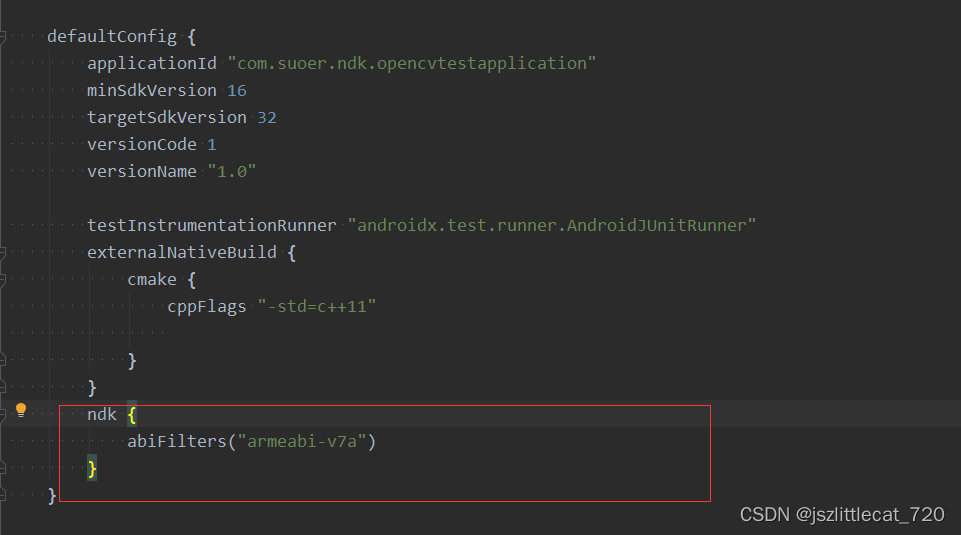
同步运行项目至手机设备
出现如下图所示错误:
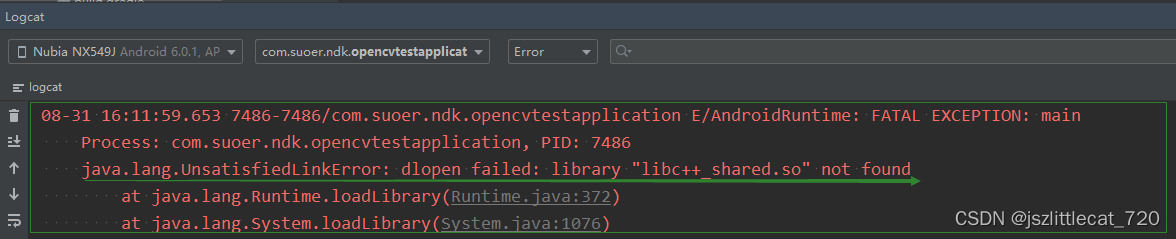
java.lang.UnsatisfiedLinkError: dlopen failed: library "libc++_shared.so" not found
解决方式如下:
修改app下的build.gradle文件
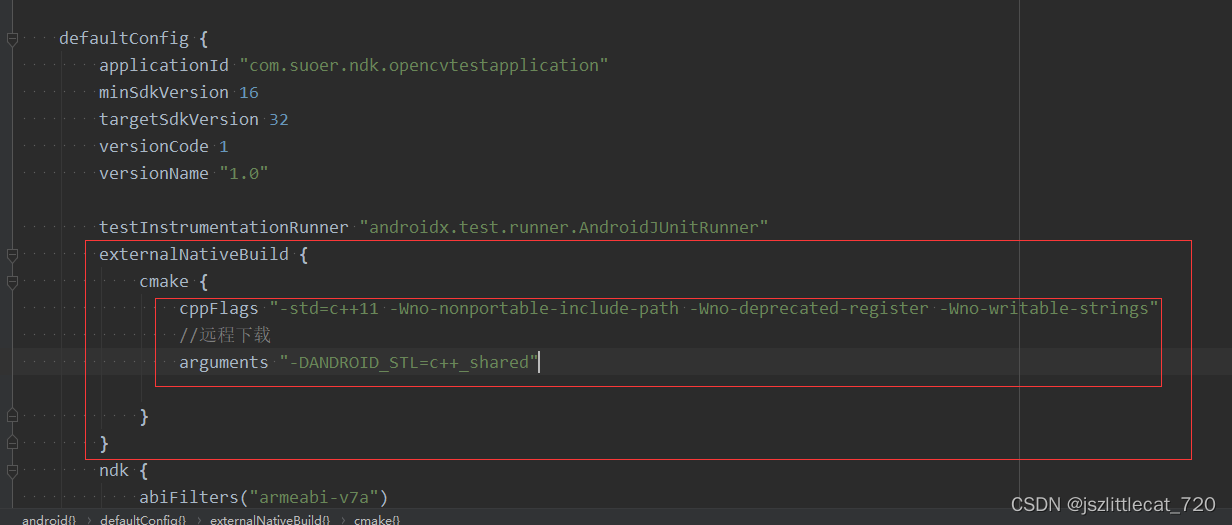
重新同步项目并运行项目至手机设备
3.3新建FaceDetection类
FaceDetection内容如下:
讯享网package com.suoer.ndk.opencvtestapplication; import android.graphics.Bitmap; public class FaceDetection { // Used to load the 'native-lib' library on application startup. static { System.loadLibrary("native-lib"); } / * 检测人脸并保存人脸信息 * @param faceBitmap */ public native int faceDetectionSaveInfo(Bitmap faceBitmap); / * 加载人脸识别的分类器文件 * @param filePath */ public native boolean loadCascade(String filePath); }
3.4修改MainActivity类
因为需要拍照以及保存图片,所以需要权限处理。这里使用rxpermissions
rxpermissions的具体使用请参照github链接:GitHub - tbruyelle/RxPermissions: Android runtime permissions powered by RxJava2
因为保存图片是耗时操作,需要开启子线程完成,所以需要处理线程问题。这里使用rxandroid
rxandroid的具体使用请参照github链接:GitHub - ReactiveX/RxAndroid: RxJava bindings for Android
修改app下的build.gradle文件

app下的build.gradle文件内容:
plugins { id 'com.android.application' } android { compileSdkVersion 32 buildToolsVersion "32.0.0" defaultConfig { applicationId "com.suoer.ndk.opencvtestapplication" minSdkVersion 16 targetSdkVersion 32 versionCode 1 versionName "1.0" testInstrumentationRunner "androidx.test.runner.AndroidJUnitRunner" externalNativeBuild { cmake { cppFlags "-std=c++11 -Wno-nonportable-include-path -Wno-deprecated-register -Wno-writable-strings" //远程下载 arguments "-DANDROID_STL=c++_shared" } } ndk { abiFilters("armeabi-v7a") } } buildTypes { release { minifyEnabled false proguardFiles getDefaultProguardFile('proguard-android-optimize.txt'), 'proguard-rules.pro' } } externalNativeBuild { cmake { path "src/main/cpp/CMakeLists.txt" version "3.10.2" } } compileOptions { sourceCompatibility JavaVersion.VERSION_1_8 targetCompatibility JavaVersion.VERSION_1_8 } } dependencies { implementation 'androidx.appcompat:appcompat:1.1.0' implementation 'com.google.android.material:material:1.1.0' implementation 'androidx.constraintlayout:constraintlayout:1.1.3' testImplementation 'junit:junit:4.+' androidTestImplementation 'androidx.test.ext:junit:1.1.1' androidTestImplementation 'androidx.test.espresso:espresso-core:3.2.0' implementation 'com.github.tbruyelle:rxpermissions:0.12' implementation 'io.reactivex.rxjava3:rxandroid:3.0.0' }修改项目下的build.gradle文件

项目下的build.gradle文件内容:
讯享网// Top-level build file where you can add configuration options common to all sub-projects/modules. buildscript { repositories { google() jcenter() } dependencies { classpath "com.android.tools.build:gradle:4.1.0" // NOTE: Do not place your application dependencies here; they belong // in the individual module build.gradle files } } allprojects { repositories { google() jcenter() maven { url 'https://jitpack.io' } maven { url "https://oss.jfrog.org/libs-snapshot" } } } task clean(type: Delete) { delete rootProject.buildDir }
修改AndroidManifest.xml添加权限
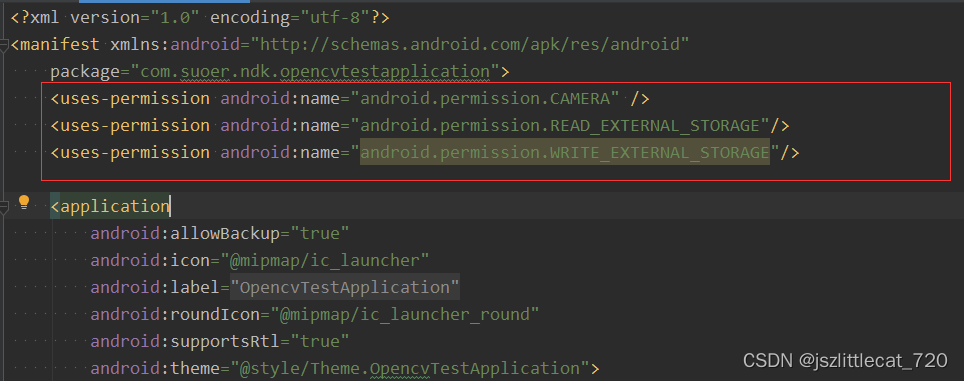
<uses-permission android:name="android.permission.CAMERA" /> <uses-permission android:name="android.permission.READ_EXTERNAL_STORAGE"/> <uses-permission android:name="android.permission.WRITE_EXTERNAL_STORAGE"/>MainActivity类内容如下:
讯享网package com.suoer.ndk.opencvtestapplication; import android.Manifest; import android.content.Context; import android.content.pm.PackageManager; import android.graphics.Bitmap; import android.os.Bundle; import android.util.Log; import android.view.SurfaceView; import android.view.View; import android.view.Window; import android.view.WindowManager; import android.widget.Button; import android.widget.ImageView; import android.widget.Toast; import com.suoer.ndk.opencvtestapplication.camerahandle.BitmapInterface; import com.suoer.ndk.opencvtestapplication.camerahandle.CameraSurfaceHolder; import com.suoer.ndk.opencvtestapplication.camerahandle.FrontCamera; import com.suoer.ndk.opencvtestapplication.camerahandle.SaveImageTask; import com.suoer.ndk.opencvtestapplication.camerahandle.SurfaceViewCallback; import com.tbruyelle.rxpermissions3.RxPermissions; import java.io.ByteArrayOutputStream; import java.io.File; import java.io.FileOutputStream; import java.io.IOException; import java.io.InputStream; import androidx.appcompat.app.AppCompatActivity; import io.reactivex.rxjava3.functions.Consumer; public class MainActivity extends AppCompatActivity { private static final String TAG = "MainActivity"; private SurfaceView mSurfaceView; private ImageView faceImg; private Button faceDetectionBtn; private FaceDetection mFaceDetection; private File mCascadeFile; private CameraSurfaceHolder mCameraSurfaceHolder=new CameraSurfaceHolder(); private SurfaceViewCallback mSurfaceViewCallback; private FrontCamera mFrontCamera; @Override protected void onCreate(Bundle savedInstanceState) { super.onCreate(savedInstanceState); requestWindowFeature(Window.FEATURE_NO_TITLE); getWindow().addFlags(WindowManager.LayoutParams.FLAG_FULLSCREEN); initView(); applyPermission(); initFaceDetection(); } private void initFaceDetection() { copyCascadeFile(); mFaceDetection = new FaceDetection(); if (mFaceDetection != null) { boolean load = mFaceDetection.loadCascade(mCascadeFile.getAbsolutePath()); if (load) { Toast.makeText(this, "加载分类器文件成功!", Toast.LENGTH_SHORT).show(); } else { Toast.makeText(this, "加载分类器文件失败!", Toast.LENGTH_SHORT).show(); } } } //申请权限 private void applyPermission() { if (!checkCameraHardware(this)) { return; } RxPermissions rxPermissions = new RxPermissions(this); rxPermissions.request(Manifest.permission.READ_EXTERNAL_STORAGE, Manifest.permission.WRITE_EXTERNAL_STORAGE, Manifest.permission.CAMERA).subscribe(new Consumer<Boolean>() { @Override public void accept(Boolean aBoolean) throws Throwable { if (aBoolean) { Log.e(TAG, "accept: " + aBoolean); faceDetectionBtn.setVisibility(View.VISIBLE); mSurfaceView.setVisibility(View.VISIBLE); //权限全部获取 initSurfaceViewPreView(); } } }); } private void initSurfaceViewPreView() { mCameraSurfaceHolder.setCameraSurfaceHolder(MainActivity.this, mSurfaceView); mSurfaceViewCallback = mCameraSurfaceHolder.mSurfaceViewCallback; if (mSurfaceViewCallback != null) { mFrontCamera = mSurfaceViewCallback.mFrontCamera; } } ; private void initView() { setContentView(R.layout.activity_main); mSurfaceView = findViewById(R.id.face_surfaceView); mSurfaceView.setVisibility(View.GONE); faceDetectionBtn = findViewById(R.id.faceDetectionBtn); faceImg = findViewById(R.id.faceImg); faceDetectionBtn.setOnClickListener(new View.OnClickListener() { @Override public void onClick(View v) { if (mFrontCamera != null) { //拍照的时候进行人脸识别 mFrontCamera.takePicture(new BitmapInterface() { @Override public void setBitMap(Bitmap bitMap) { if(bitMap==null){ Toast.makeText(MainActivity.this,"拍照失败!",Toast.LENGTH_SHORT).show(); return; } //人脸识别 int result = mFaceDetection.faceDetectionSaveInfo(bitMap); if (result != 0) { Toast.makeText(MainActivity.this, "检测人脸失败!", Toast.LENGTH_SHORT).show(); return; } faceImg.setVisibility(View.VISIBLE); faceImg.setImageBitmap(bitMap); byte[]data= bitmap2byte(bitMap); //rxandroid实现开启子线程保存文件 new SaveImageTask(MainActivity.this,faceImg).saveImage(data); //AsyncTask异步任务实现开启子线程保存文件 //new SaveImageAsyncTask(MainActivity.this,faceImg).execute(data); } }); } } }); } private byte[] bitmap2byte(Bitmap photoBitmap){ 创建对应的流对象 ByteArrayOutputStream byteArrayOutputStream = new ByteArrayOutputStream(); photoBitmap.compress(Bitmap.CompressFormat.JPEG,100,byteArrayOutputStream);//将流对象与Bitmap对象进行关联。 byte [] array=byteArrayOutputStream.toByteArray();//使用流对象,将Bitmap对象转换为byte[]数组 return array; } private void copyCascadeFile() { try { // load cascade file from application resources InputStream is = getResources().openRawResource(R.raw.lbpcascade_frontalface); File cascadeDir = getDir("cascade", Context.MODE_PRIVATE); mCascadeFile = new File(cascadeDir, "lbpcascade_frontalface.xml"); if (mCascadeFile.exists()) return; FileOutputStream os = new FileOutputStream(mCascadeFile); byte[] buffer = new byte[4096]; int bytesRead; while ((bytesRead = is.read(buffer)) != -1) { os.write(buffer, 0, bytesRead); } is.close(); os.close(); cascadeDir.delete(); } catch (IOException e) { e.printStackTrace(); Log.e(TAG, "Failed to load cascade. Exception thrown: " + e); } } / * 检测是否存在摄像头 * * @param context * @return */ private boolean checkCameraHardware(Context context) { if (context.getPackageManager().hasSystemFeature(PackageManager.FEATURE_CAMERA)) { return true; } else { Toast.makeText(this, "不具备摄像头硬件", Toast.LENGTH_SHORT).show(); return false; } } }
<?xml version="1.0" encoding="utf-8"?> <androidx.constraintlayout.widget.ConstraintLayout xmlns:android="http://schemas.android.com/apk/res/android" xmlns:app="http://schemas.android.com/apk/res-auto" xmlns:tools="http://schemas.android.com/tools" android:layout_width="match_parent" android:layout_height="match_parent" tools:context=".MainActivity"> <SurfaceView app:layout_constraintTop_toTopOf="@+id/faceDetectionBtn" android:id="@+id/face_surfaceView" android:layout_width="match_parent" android:layout_height="match_parent"/> <ImageView app:layout_constraintTop_toTopOf="@+id/faceDetectionBtn" android:visibility="gone" android:id="@+id/faceImg" android:src="@drawable/face" android:layout_width="match_parent" android:layout_height="match_parent"></ImageView> <Button android:visibility="gone" android:id="@+id/faceDetectionBtn" android:layout_width="match_parent" android:layout_height="wrap_content" android:text="人脸识别" app:layout_constraintBottom_toBottomOf="parent" app:layout_constraintLeft_toLeftOf="parent" app:layout_constraintRight_toRightOf="parent" /> </androidx.constraintlayout.widget.ConstraintLayout>3.5修改native-lib.cpp
讯享网#include <jni.h> #include <string> #include <opencv2/opencv.hpp> #include <android/bitmap.h> #include <android/log.h> #include <opencv2/imgcodecs/legacy/constants_c.h> #define TAG "JNI_LOG" #define LOGE(...)__android_log_print(ANDROID_LOG_ERROR,TAG,__VA_ARGS__) using namespace cv; CascadeClassifier cascadeClassifier; //使用命名空间 void bitmap2Mat(JNIEnv *env, Mat &mat, jobject bitmap); //mat转成bitmap void mat2Bitmap(JNIEnv *env, Mat mat, jobject bitmap); //bitmap转成mat void bitmap2Mat(JNIEnv *env, Mat &mat, jobject bitmap) { //Mat里面有个type:CV_8UC4 刚好对上bitmap中的ARGB_8888 CV_8UC2 刚好匹配bitmap中的RGB_565 //1.获取bitmap信息 AndroidBitmapInfo info; void *pixels; AndroidBitmap_getInfo(env,bitmap,&info); //锁定bitmap画布 AndroidBitmap_lockPixels(env,bitmap,&pixels); //指定mat的宽高和type BGRA mat.create(info.height,info.width,CV_8UC4); if(info.format==ANDROID_BITMAP_FORMAT_RGBA_8888){ //对应的mat应该是CV_8UC4 Mat temp(info.height,info.width,CV_8UC4,pixels); //把数据temp复制到mat里面 temp.copyTo(mat); }else if(info.format==ANDROID_BITMAP_FORMAT_RGB_565){ //对应的mat应该是CV_8UC2 Mat temp(info.height,info.width,CV_8UC2,pixels); //上面mat创建的是CV_8UC4 要改为CV_8UC2 CV_8UC2数据拷贝到CV_8UC4 cvtColor(temp,mat,COLOR_BGR5652BGRA); } //其他需要自己去转 //解锁画布 AndroidBitmap_unlockPixels(env,bitmap); } extern "C" JNIEXPORT jint JNICALL Java_com_suoer_ndk_opencvtestapplication_FaceDetection_faceDetectionSaveInfo(JNIEnv *env, jobject thiz, jobject face_bitmap) { // TODO: implement faceDetectionSaveInfo() //检测人脸 opencv有关键的类是Mat,opencv是c和c++写的,只会处理Mat,android里面是Bitmap //1.Bitmap转成opencv能操作的c++对象 Mat ,Mat是一个矩阵 Mat mat; bitmap2Mat(env,mat,face_bitmap); //处理灰度opencv 处理灰度图 提高效率,一般所有的操作都会对齐进行处理 Mat gray_mat; cvtColor(mat,gray_mat,COLOR_BGRA2GRAY); //再次处理直方均衡补偿 Mat equalize_mat; equalizeHist(gray_mat,equalize_mat); //识别人脸 当然我们可以直接用彩色图去做,识别人脸要加载人脸分类器文件 std::vector<Rect> faces; cascadeClassifier.detectMultiScale(equalize_mat,faces,1.1,5); LOGE("人脸个数:%d",faces.size()); if(faces.size()!=1){ return -1; } Rect faceRect=faces[0]; //在人脸部分画个图 rectangle(mat,faceRect,Scalar(255,155,155),8); //把mat 放到bitmap中 图片展示出来 //mat2Bitmap(env,mat,face_bitmap); //保存人脸信息 Mat,图片 Mat face_info_mat(equalize_mat,faceRect); //保存face_info_mat mat2Bitmap(env,face_info_mat,face_bitmap); //mat2Bitmap(env,equalize_mat,face_bitmap); //保存人脸信息 return 0; } void mat2Bitmap(JNIEnv *env, Mat mat, jobject bitmap) { //Mat里面有个type:CV_8UC4 刚好对上bitmap中的ARGB_8888 CV_8UC2 刚好匹配bitmap中的RGB_565 //1.获取bitmap信息 AndroidBitmapInfo info; void *pixels; AndroidBitmap_getInfo(env,bitmap,&info); //锁定bitmap画布 AndroidBitmap_lockPixels(env,bitmap,&pixels); if(info.format==ANDROID_BITMAP_FORMAT_RGBA_8888){ //对应的mat应该是CV_8UC4 Mat temp(info.height,info.width,CV_8UC4,pixels); if(mat.type()==CV_8UC4){ mat.copyTo(temp); }else if(mat.type()==CV_8UC2){ cvtColor(mat,temp,COLOR_BGR5652BGRA); } else if(mat.type()==CV_8UC1){//灰度mat cvtColor(mat,temp,COLOR_GRAY2BGRA); } }else if(info.format==ANDROID_BITMAP_FORMAT_RGB_565){ //对应的mat应该是CV_8UC2 Mat temp(info.height,info.width,CV_8UC2,pixels); if(mat.type()==CV_8UC4){ cvtColor(mat,temp,COLOR_BGRA2BGR565); }else if(mat.type()==CV_8UC2){ mat.copyTo(temp); } else if(mat.type()==CV_8UC1){//灰度mat cvtColor(mat,temp,COLOR_GRAY2BGR565); } } //其他需要自己去转 //解锁画布 AndroidBitmap_unlockPixels(env,bitmap); } extern "C" JNIEXPORT jboolean JNICALL Java_com_suoer_ndk_opencvtestapplication_FaceDetection_loadCascade(JNIEnv *env, jobject thiz, jstring file_path) { // TODO: implement loadCascade() const char *filePath=env->GetStringUTFChars(file_path,0); bool load=cascadeClassifier.load(filePath); env->ReleaseStringUTFChars(file_path,filePath); return load; }
运行app至手机设备出现如下图所示错误

error: undefined reference to 'AndroidBitmap_getInfo'
解决方式修改CMakeLists.txt

target_link_libraries( # Specifies the target library. native-lib opencv-lib #加入该依赖库 jnigraphics # Links the target library to the log library # included in the NDK. ${log-lib} )CMakeLists.txt内容如下:
讯享网# For more information about using CMake with Android Studio, read the
# documentation: https://d.android.com/studio/projects/add-native-code.html

# Sets the minimum version of CMake required to build the native library.

cmake_minimum_required(VERSION 3.10.2)

# Declares and names the project.

project("opencvtestapplication")
#需要引入我们头文件,以这个配置的目录为基准
include_directories(${CMAKE_SOURCE_DIR}/../jni/include)

# Creates and names a library, sets it as either STATIC
# or SHARED, and provides the relative paths to its source code.
# You can define multiple libraries, and CMake builds them for you.
# Gradle automatically packages shared libraries with your APK.

add_library( # Sets the name of the library.
             native-lib

             # Sets the library as a shared library.
             SHARED

             # Provides a relative path to your source file(s).
             native-lib.cpp )
# 添加opencv的库
add_library(
        opencv-lib
        SHARED
        IMPORTED)
set_target_properties(
        opencv-lib
        PROPERTIES IMPORTED_LOCATION
        ${CMAKE_SOURCE_DIR}/../jni/armeabi-v7a/libopencv_java4.so)

# Searches for a specified prebuilt library and stores the path as a
# variable. Because CMake includes system libraries in the search path by
# default, you only need to specify the name of the public NDK library
# you want to add. CMake verifies that the library exists before
# completing its build.

find_library( # Sets the name of the path variable.
              log-lib

              # Specifies the name of the NDK library that
              # you want CMake to locate.
              log )

# Specifies libraries CMake should link to your target library. You
# can link multiple libraries, such as libraries you define in this
# build script, prebuilt third-party libraries, or system libraries.

target_link_libraries( # Specifies the target library.
                       native-lib opencv-lib
                       #加入该依赖库
                       jnigraphics

                       # Links the target library to the log library
                       # included in the NDK.
                       ${log-lib} )
其他详细内容可见Demo。
版权声明:本文内容由互联网用户自发贡献,该文观点仅代表作者本人。本站仅提供信息存储空间服务,不拥有所有权,不承担相关法律责任。如发现本站有涉嫌侵权/违法违规的内容,请联系我们,一经查实,本站将立刻删除。
如需转载请保留出处:https://51itzy.com/kjqy/39991.html