
最近工作接触到了灵信LED控制卡,型号是C4M 屏长宽400X80
LED屏模组是强力Q4Y20
灵信官网也提供了C#版本调用代码和接口说明。
项目LED屏安装好后LED屏默认显示1循环滚动,可以在官网下载LEDPlayer进行文字修改,我用的是LED Player7.0
配置说明:(灵信售后是真的很厉害,服务态度好)
1.打开LED Player,设置-屏参设置-密码:888
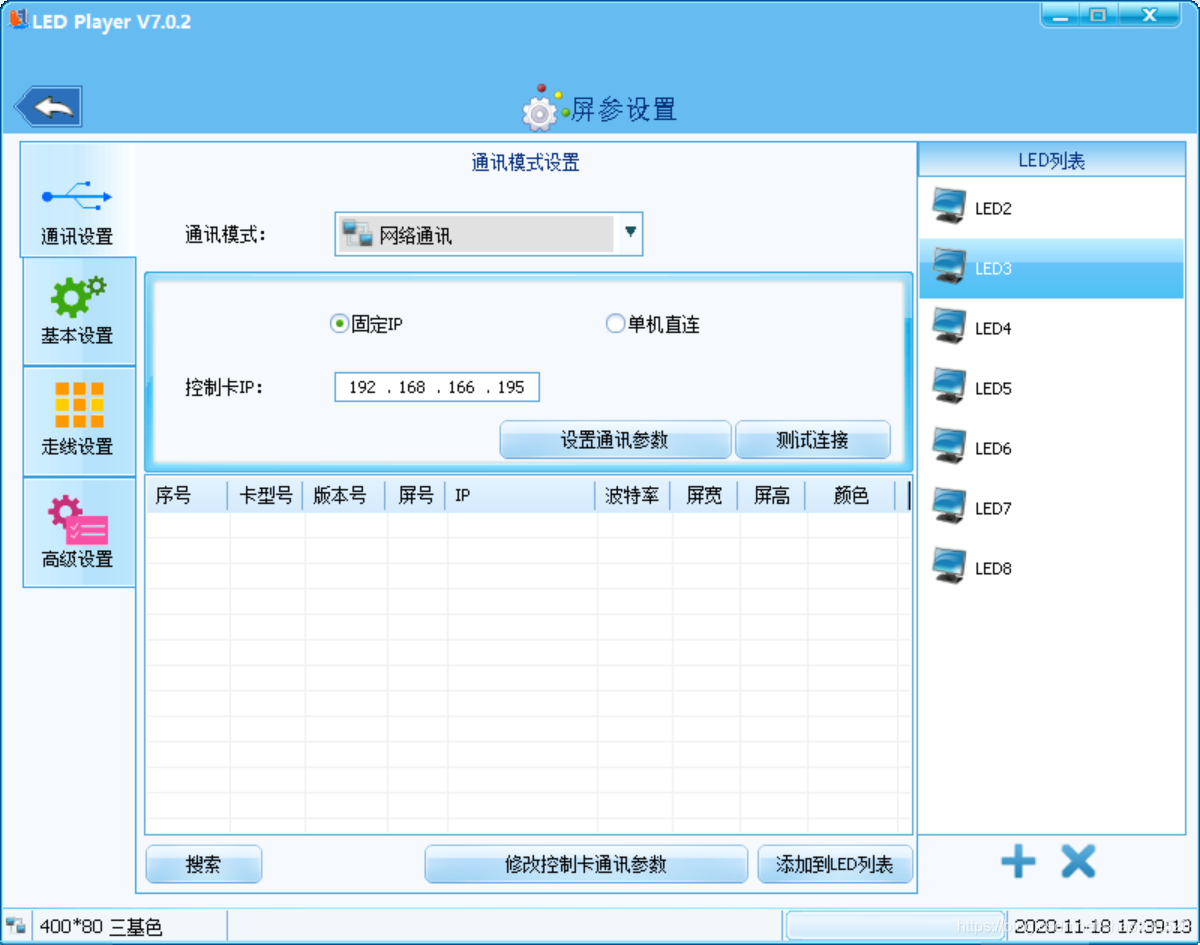
2.网络设置
选择网络通讯录--选择单机直连--点击测试连接
如下图代表已经连接上LED屏

点击设置通讯参数,填写IP地址和网关

3.基本设置:译码默认138,如果LED屏乱码,可以将译码改成SM5266
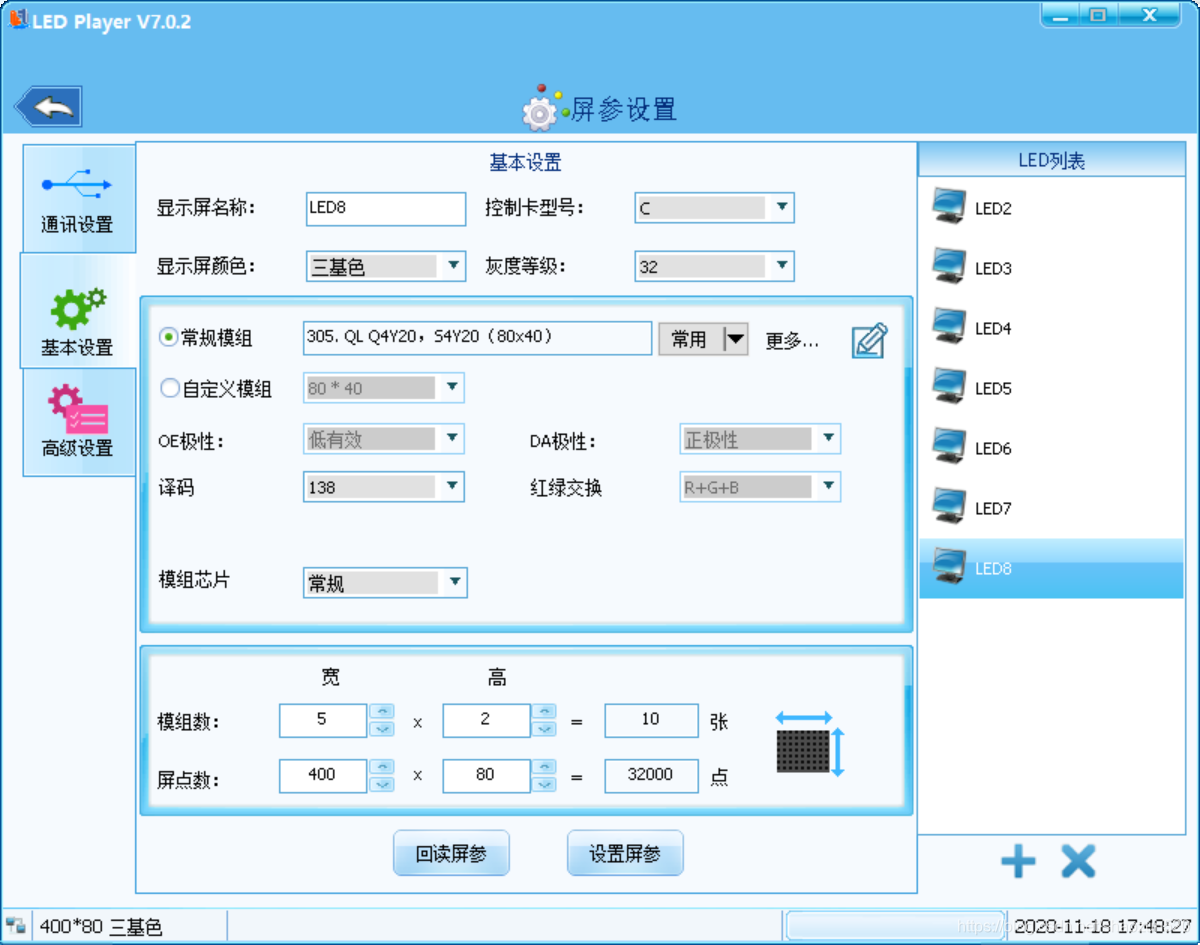

以上就是LED屏设置
代码开发:
定义返回参数:
public class Result { public bool status; public string Msg; }讯享网
根据官方提供的例子,先创建类LedDll
讯享网 public class LedDll { //颜色值 R 0x0000ff G 0x00ff00 B 0xff0000 public const int COLOR_RED = 0xff; //红色 public const int COLOR_GREEN = 0xff00; //绿色 public const int COLOR_YELLOW = 0xffff00; //黄色 public const int COLOR_WHITE = 0xffffff; //白色 public const int COLOR_BlUE = 0x0000ff; //蓝色 public const int ADDTYPE_STRING = 0; //添加类型为字符串 public const int ADDTYPE_FILE = 1; //添加类型为文件 public const int OK = 0;//函数返回成功 //节目定时启用日期时间星期的标志宏* public const int ENABLE_DATE = 0x01; public const int ENABLE_TIME = 0x02; public const int ENABLE_WEEK = 0x04; //* //节目定时星期里某天启用宏* public const int WEEK_MON = 0x01; public const int WEEK_TUES = 0x02; public const int WEEK_WEN = 0x04; public const int WEEK_THUR = 0x08; public const int WEEK_FRI = 0x10; public const int WEEK_SAT = 0x20; public const int WEEK_SUN = 0x40; //* //[StructLayout(LayoutKind.Sequential, Size = 8, CharSet = CharSet.Unicode, Pack = 1)] //通讯设置结构体* [StructLayout(LayoutKind.Sequential, CharSet = CharSet.Unicode)] public struct COMMUNICATIONINFO { public int LEDType; LED类型 0.6代T系A系XC系 1.6代E系 2.X1X2 3.7代C系 public int SendType; //通讯方式 0.为Tcp发送(又称固定IP通讯), 1.广播发送(又称单机直连) 2.串口通讯 3.磁盘保存 4.广域网通讯 [MarshalAs(UnmanagedType.ByValTStr, SizeConst = 16)] public string IpStr; //LED屏的IP地址,只有通讯方式为0时才需赋值,其它通讯方式无需赋值 public int Commport; //串口号,只有通讯方式为2时才需赋值,其它通讯方式无需赋值 public int Baud; //波特率,只有通讯方式为2时才需赋值,其它通讯方式无需赋值, 0.9600 1.57600 2. 直接赋值 9600,19200,38400,57600,亦可 public int LedNumber; //LED的屏号,只有通讯方式为2时,且用485通讯时才需赋值,其它通讯方式无需赋值 [MarshalAs(UnmanagedType.ByValTStr, SizeConst = 260)] public string OutputDir; //磁盘保存的目录,只有通讯方式为3时才需赋值,其它通讯方式无需赋值 [MarshalAs(UnmanagedType.ByValTStr, SizeConst = 19)] public string networkIdStr; //网络ID,只有通讯方式为4时才需赋值,其它通讯方式无需赋值 }; //* //区域坐标结构体* public struct AREARECT { public int left; //区域左上角横坐标 public int top; //区域左上角纵坐标 public int width; //区域的宽度 public int height; //区域的高度 }; // //*字体属性结构对 [StructLayout(LayoutKind.Sequential, CharSet = CharSet.Unicode)] public struct FONTPROP { [MarshalAs(UnmanagedType.ByValTStr, SizeConst = 32)] public string FontName; //字体名 public int FontSize; //字号(单位磅) public int FontColor; //字体颜色 public int FontBold; //是否加粗 public int FontItalic; //是否斜体 public int FontUnderLine; //时否下划线 }; // //页面显示的属性结构体 public struct PLAYPROP { public int InStyle; //入场特技值(取值范围 0-38) public int OutStyle; //退场特技值(现无效,预留,置0) public int Speed; //特技显示速度(取值范围1-255) public int DelayTime; //页面留停时间(1-65535) }; /* 特技值对应 0=立即显示 1=随机 2=左移 3=右移 4=上移 5=下移 6=连续左移 7=连续右移 8=连续上移 9=连续下移 10=闪烁 11=激光字(向上) 12=激光字(向下) 13=激光字(向左) 14=激光字(向右) 15=水平交叉拉幕 16=上下交叉拉幕 17=左右切入 18=上下切入 19=左覆盖 20=右覆盖 21=上覆盖 22=下覆盖 23=水平百叶(左右) 24=水平百叶(右左) 25=垂直百叶(上下) 26=垂直百叶(下上) 27=左右对开 28=上下对开 29=左右闭合 30=上下闭合 31=向左拉伸 32=向右拉伸 33=向上拉伸 34=向下拉伸 35=分散向左拉伸 36=分散向右拉伸 37=冒泡 38=下雪 */ //* //设置节目定时属性结构体 public struct PROGRAMTIME { public int EnableFlag; //启用定时的标记,ENABLE_DATE为启用日期,ENABLE_TIME为启用时间,ENABLE_WEEK为启用星期,可用或运算进行组合,如 ENABLE_DATE | ENABLE_TIME | ENABLE_WEEK public int WeekValue; //启用星期后,选择要定时的星期里的某些天,用宏 WEEK_MON,WEEK_TUES,WEEK_WEN,WEEK_THUR,WEEK_FRI,WEEK_SAT,WEEK_SUN 通过或运算进行组合 public int StartYear; //起始年 public int StartMonth; //起始月 public int StartDay; //起始日 public int StartHour; //起姐时 public int StartMinute; //起始分 public int StartSecond; //起始秒 public int EndYear; //结束年 public int EndMonth; //结束月 public int EndDay; //结束日 public int EndHour; //结束时 public int EndMinute; //结束分 public int EndSecond; //结束秒 }; // //数字时钟属性结构体* [StructLayout(LayoutKind.Sequential, CharSet = CharSet.Unicode)] public struct DIGITALCLOCKAREAINFO { [MarshalAs(UnmanagedType.ByValTStr, SizeConst = 128)] public string ShowStr; //自定义显示字符串 //[MarshalAs(UnmanagedType.Struct)] public FONTPROP ShowStrFont; //自定义显示字符串以及日期星期时间的字体属性,注意此字体属性里的FontColor只对自定义显示字体有效,其它项的颜色有单独的颜色属性,属性的赋值见FONTPROP结构体说明 public int TimeLagType; //时差类型 0为超前,1为滞后 public int HourNum; //时差小时数 public int MiniteNum; //时差分钟数 public int DateFormat; //日期格式 0.YYYY年MM月DD日 1.YY年MM月DD日 2.MM/DD/YYYY 3.YYYY/MM/DD 4.YYYY-MM-DD 5.YYYY.MM.DD 6.MM.DD.YYYY 7.DD.MM.YYYY public int DateColor; //日期字体颜色 public int WeekFormat; //星期格式 0.星期X 1.Monday 2.Mon. public int WeekColor; //星期字体颜色 public int TimeFormat; //时间格式 0.HH时mm分ss秒 1.HH時mm分ss秒 2.HH:mm:ss 3.上午 HH:mm:ss 4.AM HH:mm:ss 5.HH:mm:ss 上午 6.HH:mm:ss AM public int TimeColor; //时间字体颜色 public int IsShowYear; //是否显示年 TRUE为显示 FALSE不显示 下同 public int IsShowWeek; //是否显示星期 public int IsShowMonth; //是否显示月 public int IsShowDay; //是否显示日 public int IsShowHour; //是否显示时 public int IsShowMinute; //是否显示分 public int IsShowSecond; //是否显示秒 public int IsMutleLineShow; //是否多行显示 }; // //模拟时钟属性结构体* [StructLayout(LayoutKind.Sequential, CharSet = CharSet.Unicode)] public struct CLOCKAREAINFO { [MarshalAs(UnmanagedType.ByValTStr, SizeConst = 64)] public string ShowStr; //自定义显示字符串 public FONTPROP ShowStrFont; //自定义显示字符串字体属性 public int TimeLagType; //时差类型 0为超前,1为滞后 public int HourNum; //时差小时数 public int MiniteNum; //时差分钟数 public int ClockType; //表盘类型 0.圆形 1.正方形 public int HourMarkColor; //时标颜色 public int HourMarkType; //时标类型 0.圆形 1.正方形 public int HourMarkWidth; //时标宽度 1~16 public int MiniteMarkColor; //分标颜色 public int MiniteMarkType; //分标类型 0.圆形 1.正方形 public int MiniteMarkWidth; //分标宽度 1~16 public int HourPointerColor; //时针颜色 public int MinutePointerColor; //分针颜色 public int SecondPointerColor; //秒针颜色 public int HourPointerWidth; //时针的宽度 1~5 public int MinutePointerWidth; //分针的宽度 1~5 public int SecondPointerWidth; //秒针的宽度 1~5 public int IsShowDate; //是否显示日期 public int DateFormat; //日期格式 0.YYYY年MM月DD日 1.YY年MM月DD日 2.MM/DD/YYYY 3.YYYY/MM/DD 4.YYYY-MM-DD 5.YYYY.MM.DD 6.MM.DD.YYYY 7.DD.MM.YYYY public FONTPROP DateFont; //日期字体属性 public int IsShowWeek; //是否显示星期 public int WeekFormat; //星期格式 0.星期X 1.Monday 2.Mon. public FONTPROP WeekFont; //星期字体属性 }; // //计时属性结构体 [StructLayout(LayoutKind.Sequential, CharSet = CharSet.Unicode)] public struct TIMEAREAINFO { public int ShowFormat; //显示格式 0.xx天xx时xx分xx秒 1.xx天xx時xx分xx秒 2.xxDayxxHourxxMinxxSec 3.XXdXXhXXmXXs 4.xx:xx:xx:xx public int nYear; //结束年 public int nMonth; //结束月 public int nDay; //结束日 public int nHour; //结束时 public int nMinute; //结束分 public int nSecond; //结束秒 public int IsShowDay; //是否显示天 public int IsShowHour; //是否显示时 public int IsShowMinute; //是否显示分 public int IsShowSecond; //是否显示秒 public int IsMutleLineShow; //是否多行显示,指的是自定义文字与计时文字是否分行显示 [MarshalAs(UnmanagedType.ByValTStr, SizeConst = 128)] public string ShowStr; //自定义文字字符串 public int TimeStrColor; //计时文字的颜色 public FONTPROP ShowFont; //自定义文字及计时文字颜色,其中FontColor只对文定义文字有效,计时文字颜色为TimeStrColor }; // //LED通讯参数修改结构体* [StructLayout(LayoutKind.Sequential, CharSet = CharSet.Unicode)] public struct LEDCOMMUNICATIONPARAMETER { public int dwMask; //要修改项的标记 0.修改网络通讯参数 1.修改串口通讯参数 2.修改网口和串口通讯参数 [MarshalAs(UnmanagedType.ByValTStr, SizeConst = 16)] public string IpStr; //新的IP地址,只有dwMask为0或2时才需赋值,其它值无需赋值,格式例如 192.168.1.100 [MarshalAs(UnmanagedType.ByValTStr, SizeConst = 16)] public string NetMaskStr; //新的子网掩码,只有dwMask为0或2时才需赋值,其它值无需赋值,格式例如 255.255.255.0 [MarshalAs(UnmanagedType.ByValTStr, SizeConst = 16)] public string GatewayStr; //新的网关,只有dwMask为0或2时才需赋值,其它值无需赋值,格式例如 192.168.1.1 [MarshalAs(UnmanagedType.ByValTStr, SizeConst = 18)] public string MacStr; //新的MAC地址,只有dwMask为0或2时才需赋值,其它值无需赋值,格式例如 12-34-56-78-9a-bc,如无需修改请设为 ff-ff-ff-ff-ff-ff public int Baud; //波特率,只有dwMask为1或2时才需赋值,其它值无需赋值,0.9600 1.57600 2. public int LedNumber; //LED屏号 1~255,网络通讯和232通讯赋值 1 即可,485必需和控制卡显示的屏号相同才可通讯 }; //* //流水边框属性结构体 [StructLayout(LayoutKind.Sequential, CharSet = CharSet.Unicode)] public struct WATERBORDERINFO { public int Flag; //流水边框加载类型标志,0.为动态库预置的边框 1.为从文件加载的边框 public int BorderType; //边框的类型,Flag为0是有效,0.单色边框 1.双基色边框 2.全彩边框 public int BorderValue; //边框的值,Flag为0是有效,单色边框取值范围是0~39,双基色边框取值范围是0~34,全彩边框取值范围是0~21 public int BorderColor; //边框线颜色,Flag为0并且BorderType为0是才有效 public int BorderStyle; //边框显示的样式 0.固定 1.顺时针 2.逆时针 3.闪烁 public int BorderSpeed;//边框流动的速度 [MarshalAs(UnmanagedType.ByValTStr, SizeConst = 260)] public string WaterBorderBmpPath; //边框图片文件的路径,注意只能是bmp图片,图片大小必需是宽度为32点,取高度小于等于8 }; //* //定时开关屏设置属性 public struct ONOFFTIMEINFO { [MarshalAs(UnmanagedType.ByValArray, SizeConst = 3)] public int[] TimeFlag; //支持3个定时,1代表打开 0关闭 [MarshalAs(UnmanagedType.ByValArray, SizeConst = 3)] public int[] StartHour; //开始时钟 [MarshalAs(UnmanagedType.ByValArray, SizeConst = 3)] public int[] StartMinute; //开始分钟 [MarshalAs(UnmanagedType.ByValArray, SizeConst = 3)] public int[] EndHour; //结束时钟 [MarshalAs(UnmanagedType.ByValArray, SizeConst = 3)] public int[] EndMinute; //结束分钟 }; // //定时亮度设置属性 public struct BRIGHTNESSTIMEINFO { [MarshalAs(UnmanagedType.ByValArray, SizeConst = 3)] public int[] TimeFlag; //支持3个定时,1代表打开 0关闭 [MarshalAs(UnmanagedType.ByValArray, SizeConst = 3)] public int[] StartHour; //开始时钟 [MarshalAs(UnmanagedType.ByValArray, SizeConst = 3)] public int[] StartMinute; //开始分钟 [MarshalAs(UnmanagedType.ByValArray, SizeConst = 3)] public int[] EndHour; //结束时钟 [MarshalAs(UnmanagedType.ByValArray, SizeConst = 3)] public int[] EndMinute; //结束分钟 [MarshalAs(UnmanagedType.ByValArray, SizeConst = 3)] public int[] BrightnessValue; //亮度值0~15 }; //* [UnmanagedFunctionPointer(CallingConvention.Cdecl, CharSet = CharSet.Unicode)] public delegate int SERVERINFOCALLBACK(int Msg, int wParam, IntPtr ptr); public enum LV_MSG { LV_MSG_NONE, LV_MSG_CARD_ONLINE,//上线通知,通过CARD_INFO结构体指针获取详细上线信息 LV_MSG_CARD_OFFLINE,//下线通知,通过CARD_INFO结构体指针获取详细下线信息 }; [StructLayout(LayoutKind.Sequential, CharSet = CharSet.Unicode)] public struct CARD_INFO { public int port; //控制卡端口 [MarshalAs(UnmanagedType.ByValTStr, SizeConst = 16)] public string ipStr; //控制卡IP [MarshalAs(UnmanagedType.ByValTStr, SizeConst = 19)] public string networkIdStr; //控制卡唯一网络ID(每张卡都贴有唯一网络ID) }; / * LV_CreateProgram 创建节目对象,返回类型为 HPROGRAM * * 参数说明 * LedWidth 屏的宽度 * LedHeight 屏的高度 * ColorType 个位灰度等级 赋值 1-5对应的灰度等级分别为 无,4,8,16,32 十位屏的颜色 1.单色 2.双基色 3.七彩 4.全彩 百位RGB顺序 0-5 RGB GRB RBG BRG BGR GBR * 返回值 * 0 创建节目对象失败 * 非0 创建节目对象成功 / [DllImport("lv_led.dll", EntryPoint = "LV_CreateProgram", CharSet = CharSet.Unicode)] public static extern int LV_CreateProgram(int LedWidth, int LedHeight, int ColorType); / * LV_CreateProgramEx 创建节目对象,返回类型为 HPROGRAM * * 参数说明 * LedWidth 屏的宽度 * LedHeight 屏的高度 * ColorType 屏的颜色 1.单色 2.双基色 3.七彩 4.全彩 * GrayLevel 灰度等级 赋值 1-5对应的灰度等级分别为 无,4,8,16,32 * SaveType 节目保存位置,默认为0保存存为flash节目,3保存为ram节目 * 返回值 * 0 创建节目对象失败 * 非0 创建节目对象成功 / [DllImport("lv_led.dll", EntryPoint = "LV_CreateProgramEx", CharSet = CharSet.Unicode)] public static extern int LV_CreateProgramEx(int LedWidth, int LedHeight, int ColorType, int GrayLevel, int SaveType); /* * LV_AddProgram 添加一个节目 * * 参数说明 * hProgram 节目对象句柄 * ProgramNo 节目号 (取值范围0-255)(从0开始) * ProgramTime 节目播放时长 0.节目播放时长 非0.指定播放时长 * LoopCount 循环播放次数 为0则无意义 * 返回值 * 0 成功 * 非0 失败,调用LV_GetError来获取错误信息 / [DllImport("lv_led.dll", EntryPoint = "LV_AddProgram", CharSet = CharSet.Unicode)] public static extern int LV_AddProgram(int hProgram, int ProgramNo, int ProgramTime, int LoopCount); /* * LV_SetProgramTime 设置节目定时 * * 参数说明 * hProgram 节目对象句柄 * ProgramNo 节目号 (取值范围0-255)(从0开始) * pProgramTime 节目定时属性,设置方式见PROGRAMTIME结构体注示 * 返回值 * 0 成功 * 非0 失败,调用LV_GetError来获取错误信息 / [DllImport("lv_led.dll", EntryPoint = "LV_SetProgramTime", CharSet = CharSet.Unicode)] public static extern int LV_SetProgramTime(int hProgram, int ProgramNo, ref PROGRAMTIME pProgramTime); /* * LV_AddImageTextArea 添加一个图文区域 * * 参数说明 * hProgram 节目对象句柄 * ProgramNo 节目号 (取值范围0-255)(从0开始) * AreaNo 区域号 (取值范围1-255) * pAreaRect 区域坐标属性,设置方式见AREARECT结构体注示 * nLayout 区域层号,7代卡只能为0 * 返回值 * 0 成功 * 非0 失败,调用LV_GetError来获取错误信息 / [DllImport("lv_led.dll", EntryPoint = "LV_AddImageTextArea", CharSet = CharSet.Unicode)] public static extern int LV_AddImageTextArea(int hProgram, int ProgramNo, int AreaNo, ref AREARECT pAreaRect, int nLayout); /* * LV_AddFileToImageTextArea 添加一个文件到图文区 * * 参数说明 * hProgram 节目对象句柄 * ProgramNo 节目号 (取值范围0-255)(从0开始) * AreaNo 区域号 (取值范围1-255) * FilePath 文件路径,支持的文件类型有 txt rtf bmp gif png jpg jpeg tiff * pPlayProp 显示的属性,设置方式见PLAYPROP结构体注示 * 返回值 * 0 成功 * 非0 失败,调用LV_GetError来获取错误信息 / [DllImport("lv_led.dll", EntryPoint = "LV_AddFileToImageTextArea", CharSet = CharSet.Unicode)] public static extern int LV_AddFileToImageTextArea(int hProgram, int ProgramNo, int AreaNo, string FilePath, ref PLAYPROP pPlayProp); /* * LV_AddSingleLineTextToImageTextArea 添加一个单行文本到图文区 * * 参数说明 * hProgram 节目对象句柄 * ProgramNo 节目号 (取值范围0-255)(从0开始) * AreaNo 区域号 (取值范围1-255) * AddType 添加的类型 0.为字符串 1.文件(只支持txt和rtf文件) * AddStr AddType为0则为字符串数据,AddType为1则为文件路径 * pFontProp 如果AddType为字符串类型或AddType为文件类型且文件为txt则可传入以赋值的该结构体,其它可赋NULL * pPlayProp 显示的属性,设置方式见PLAYPROP结构体注示 * 返回值 * 0 成功 * 非0 失败,调用LV_GetError来获取错误信息 / [DllImport("lv_led.dll", EntryPoint = "LV_AddSingleLineTextToImageTextArea", CharSet = CharSet.Unicode)] public static extern int LV_AddSingleLineTextToImageTextArea(int hProgram, int ProgramNo, int AreaNo, int AddType, string AddStr, ref FONTPROP pFontProp, ref PLAYPROP pPlayProp); /* * LV_AddMultiLineTextToImageTextArea 添加一个多行文本到图文区 * * 参数说明 * hProgram 节目对象句柄 * ProgramNo 节目号 (取值范围0-255)(从0开始) * AreaNo 区域号 (取值范围1-255) * AddType 添加的类型 0.为字符串 1.文件(只支持txt和rtf文件) * AddStr AddType为0则为字符串数据,AddType为1则为文件路径 * pFontProp 如果AddType为字符串类型或AddType为文件类型且文件为txt则可传入以赋值的该结构体,其它可赋NULL * pPlayProp 显示的属性,设置方式见PLAYPROP结构体注示 * nAlignment 水平对齐样式,0.左对齐 1.右对齐 2.水平居中 (注意:只对字符串和txt文件有效) * IsVCenter 是否垂直居中 0.置顶(默认) 1.垂直居中 * 返回值 * 0 成功 * 非0 失败,调用LV_GetError来获取错误信息 / [DllImport("lv_led.dll", EntryPoint = "LV_AddMultiLineTextToImageTextArea", CharSet = CharSet.Unicode)] public static extern int LV_AddMultiLineTextToImageTextArea(int hProgram, int ProgramNo, int AreaNo, int AddType, string AddStr, ref FONTPROP pFontProp, ref PLAYPROP pPlayProp, int nAlignment, int IsVCenter); /* * LV_AddStaticTextToImageTextArea 添加一个静止文本到图文区 * * 参数说明 * hProgram 节目对象句柄 * ProgramNo 节目号 (取值范围0-255)(从0开始) * AreaNo 区域号 (取值范围1-255) * AddType 添加的类型 0.为字符串 1.文件(只支持txt和rtf文件) * AddStr AddType为0则为字符串数据,AddType为1则为文件路径 * pFontProp 如果AddType为字符串类型或AddType为文件类型且文件为txt则可传入以赋值的该结构体,其它可赋NULL * DelayTime 显示的时长 1~65535 * nAlignment 水平对齐样式,0.左对齐 1.右对齐 2.水平居中 (注意:只对字符串和txt文件有效) * IsVCenter 是否垂直居中 0.置顶(默认) 1.垂直居中 * 返回值 * 0 成功 * 非0 失败,调用LV_GetError来获取错误信息 / [DllImport("lv_led.dll", EntryPoint = "LV_AddStaticTextToImageTextArea", CharSet = CharSet.Unicode)] public static extern int LV_AddStaticTextToImageTextArea(int hProgram, int ProgramNo, int AreaNo, int AddType, string AddStr, ref FONTPROP pFontProp, int DelayTime, int nAlignment, int IsVCenter); /* * LV_QuickAddSingleLineTextArea 快速添加一个单行文本区域 * * 参数说明 * hProgram 节目对象句柄 * ProgramNo 节目号 (取值范围0-255)(从0开始) * AreaNo 区域号 (取值范围1-255) * pAreaRect 区域坐标属性,设置方式见AREARECT结构体注示 * AddType 添加的类型 0.为字符串 1.文件(只支持txt和rtf文件) * AddStr AddType为0则为字符串数据,AddType为1则为文件路径 * pFontProp 如果AddType为字符串类型或AddType为文件类型且文件为txt则可传入以赋值的该结构体,其它可赋NULL * nSpeed 滚动速度 1~255 * 返回值 * 0 成功 * 非0 失败,调用LV_GetError来获取错误信息 / [DllImport("lv_led.dll", EntryPoint = "LV_QuickAddSingleLineTextArea", CharSet = CharSet.Unicode)] public static extern int LV_QuickAddSingleLineTextArea(int hProgram, int ProgramNo, int AreaNo, ref AREARECT pAreaRect, int AddType, string AddStr, ref FONTPROP pFontProp, int nSpeed); /* * LV_AddDigitalClockArea 添加一个数字时钟区域 * * 参数说明 * hProgram 节目对象句柄 * ProgramNo 节目号 (取值范围0-255)(从0开始) * AreaNo 区域号 (取值范围1-255) * pAreaRect 区域坐标属性,设置方式见AREARECT结构体注示 * pDigitalClockAreaInfo 数字时钟属性,见DIGITALCLOCKAREAINFO结构体注示 * 返回值 * 0 成功 * 非0 失败,调用LV_GetError来获取错误信息 / [DllImport("lv_led.dll", EntryPoint = "LV_AddDigitalClockArea", CharSet = CharSet.Unicode)] public static extern int LV_AddDigitalClockArea(int hProgram, int ProgramNo, int AreaNo, ref AREARECT pAreaRect, ref DIGITALCLOCKAREAINFO pDigitalClockAreaInfo); /* * LV_AddTimeArea 添加一个计时区域 * * 参数说明 * hProgram 节目对象句柄 * ProgramNo 节目号 * AreaNo 区域号 (取值范围1-255) * pAreaRect 区域坐标属性,设置方式见AREARECT结构体注示 * pTimeAreaInfo 计时属性,见TIMEAREAINFO结构体注示 * 返回值 * 0 成功 * 非0 失败,调用LV_GetError来获取错误信息 / [DllImport("lv_led.dll", EntryPoint = "LV_AddTimeArea", CharSet = CharSet.Unicode)] public static extern int LV_AddTimeArea(int hProgram, int ProgramNo, int AreaNo, ref AREARECT pAreaRect, ref TIMEAREAINFO pTimeAreaInfo); /* * LV_AddClockArea 添加一个模拟时钟区域 * * 参数说明 * hProgram 节目对象句柄 * ProgramNo 节目号 (取值范围0-255)(从0开始) * AreaNo 区域号 (取值范围1-255) * pAreaRect 区域坐标属性,设置方式见AREARECT结构体注示 * pClockAreaInfo 模拟时钟属性,见CLOCKAREAINFO结构体注示 * 返回值 * 0 成功 * 非0 失败,调用LV_GetError来获取错误信息 / [DllImport("lv_led.dll", EntryPoint = "LV_AddClockArea", CharSet = CharSet.Unicode)] public static extern int LV_AddClockArea(int hProgram, int ProgramNo, int AreaNo, ref AREARECT pAreaRect, ref CLOCKAREAINFO pClockAreaInfo); /* * LV_AddWaterBorder 添加一个流水边框区域 * * 参数说明 * hProgram 节目对象句柄 * ProgramNo 节目号 (取值范围0-255)(从0开始) * AreaNo 区域号 (取值范围1-255) * pAreaRect 区域坐标属性,设置方式见AREARECT结构体注示 * pWaterBorderInfo 流水边框属性,见WATERBORDERINFO结构体注示 * 返回值 * 0 成功 * 非0 失败,调用LV_GetError来获取错误信息 / [DllImport("lv_led.dll", EntryPoint = "LV_AddWaterBorder", CharSet = CharSet.Unicode)] public static extern int LV_AddWaterBorder(int hProgram, int ProgramNo, int AreaNo, ref AREARECT pAreaRect, ref WATERBORDERINFO pWaterBorderInfo); /* * LV_DeleteProgram 销毁节目对象(注意:如果此节目对象不再使用,请调用此函数销毁,否则会造成内存泄露) * * 参数说明 * hProgram 节目对象句柄 / [DllImport("lv_led.dll", EntryPoint = "LV_DeleteProgram", CharSet = CharSet.Unicode)] public static extern void LV_DeleteProgram(int hProgram); /* * LV_Send 发送节目,此发送为一对一发送 * * 参数说明 * pCommunicationInfo 通讯参数,赋值方式见COMMUNICATIONINFO结构体注示 * hProgram 节目对象句柄 * 返回值 * 0 成功 * 非0 失败,调用LV_GetError来获取错误信息 / [DllImport("lv_led.dll", EntryPoint = "LV_Send", CharSet = CharSet.Unicode)] public static extern int LV_Send(ref COMMUNICATIONINFO pCommunicationInfo, int hProgram); /* * LV_TestOnline 测试LED屏是否可连接上 * * 参数说明 * pCommunicationInfo 通讯参数,赋值方式见COMMUNICATIONINFO结构体注示 * 返回值 * 0 成功 * 非0 失败,调用LV_GetError来获取错误信息 / [DllImport("lv_led.dll", EntryPoint = "LV_TestOnline", CharSet = CharSet.Unicode)] public static extern int LV_TestOnline(ref COMMUNICATIONINFO pCommunicationInfo); /* * LV_SetBasicInfo 设置基本屏参 * * 参数说明 * pCommunicationInfo 通讯参数,赋值方式见COMMUNICATIONINFO结构体注示 * ColorType 屏的颜色 1.单色 2.双基色 3.七彩 4.全彩 * LedWidth 屏的宽度点数 * LedHeight 屏的高度点数 * 返回值 * 0 成功 * 非0 失败,调用LV_GetError来获取错误信息 / [DllImport("lv_led.dll", EntryPoint = "LV_SetBasicInfo", CharSet = CharSet.Unicode)] public static extern int LV_SetBasicInfo(ref COMMUNICATIONINFO pCommunicationInfo, int ColorType, int LedWidth, int LedHeight); /* * LV_SetBasicInfoEx 设置基本屏参 * * 参数说明 * pCommunicationInfo 通讯参数,赋值方式见COMMUNICATIONINFO结构体注示 * ColorType 屏的颜色 1.单色 2.双基色 3.七彩 4.全彩 * GrayLevel 灰度等级 赋值 1-5对应的灰度等级分别为 无,4,8,16,32 * LedWidth 屏的宽度点数 * LedHeight 屏的高度点数 * 返回值 * 0 成功 * 非0 失败,调用LV_GetError来获取错误信息 / [DllImport("lv_led.dll", EntryPoint = "LV_SetBasicInfoEx", CharSet = CharSet.Unicode)] public static extern int LV_SetBasicInfoEx(ref COMMUNICATIONINFO pCommunicationInfo, int ColorType, int GrayLevel, int LedWidth, int LedHeight); /* * LV_SetOEDA 设置OE DA * * 参数说明 * pCommunicationInfo 通讯参数,赋值方式见COMMUNICATIONINFO结构体注示 * Oe OE 0.低有效 1.高有效 * Da DA 0.负极性 1.正极性 * 返回值 * 0 成功 * 非0 失败,调用LV_GetError来获取错误信息 / [DllImport("lv_led.dll", EntryPoint = "LV_SetOEDA", CharSet = CharSet.Unicode)] public static extern int LV_SetOEDA(ref COMMUNICATIONINFO pCommunicationInfo, int Oe, int Da); /* * LV_AdjustTime 校时 * * 参数说明 * pCommunicationInfo 通讯参数,赋值方式见COMMUNICATIONINFO结构体注示 * 返回值 * 0 成功 * 非0 失败,调用LV_GetError来获取错误信息 / [DllImport("lv_led.dll", EntryPoint = "LV_AdjustTime", CharSet = CharSet.Unicode)] public static extern int LV_AdjustTime(ref COMMUNICATIONINFO pCommunicationInfo); /* * LV_PowerOnOff 开关屏 * * 参数说明 * pCommunicationInfo 通讯参数,赋值方式见COMMUNICATIONINFO结构体注示 * OnOff 开关值 0.关屏 1.开屏 * 返回值 * 0 成功 * 非0 失败,调用LV_GetError来获取错误信息 / [DllImport("lv_led.dll", EntryPoint = "LV_PowerOnOff", CharSet = CharSet.Unicode)] public static extern int LV_PowerOnOff(ref COMMUNICATIONINFO pCommunicationInfo, int OnOff); /* * LV_TimePowerOnOff 定时开关屏 * * 参数说明 * pCommunicationInfo 通讯参数,赋值方式见COMMUNICATIONINFO结构体注示 * pTimeInfo 定时开关屏属性,详见ONOFFTIMEINFO结构体注示 * 返回值 * 0 成功 * 非0 失败,调用LV_GetError来获取错误信息 / [DllImport("lv_led.dll", EntryPoint = "LV_TimePowerOnOff", CharSet = CharSet.Unicode)] public static extern int LV_TimePowerOnOff(ref COMMUNICATIONINFO pCommunicationInfo, ref ONOFFTIMEINFO pTimeInfo); /* * LV_SetBrightness 设置亮度 * * 参数说明 * pCommunicationInfo 通讯参数,赋值方式见COMMUNICATIONINFO结构体注示 * BrightnessValue 亮度值 0~15 * 返回值 * 0 成功 * 非0 失败,调用LV_GetError来获取错误信息 / [DllImport("lv_led.dll", EntryPoint = "LV_SetBrightness", CharSet = CharSet.Unicode)] public static extern int LV_SetBrightness(ref COMMUNICATIONINFO pCommunicationInfo, int BrightnessValue); /* * LV_TimeBrightness 定时亮度 * * 参数说明 * pCommunicationInfo 通讯参数,赋值方式见COMMUNICATIONINFO结构体注示 * pBrightnessTimeInfo 定时亮度属性,详见BRIGHTNESSTIMEINFO结构体注示 * 返回值 * 0 成功 * 非0 失败,调用LV_GetError来获取错误信息 / [DllImport("lv_led.dll", EntryPoint = "LV_TimeBrightness", CharSet = CharSet.Unicode)] public static extern int LV_TimeBrightness(ref COMMUNICATIONINFO pCommunicationInfo, ref BRIGHTNESSTIMEINFO pBrightnessTimeInfo); /* * LV_SetLanguage 设置LED显示的语言 * * 参数说明 * pCommunicationInfo 通讯参数,赋值方式见COMMUNICATIONINFO结构体注示 * LanguageValue 语言值 0.中文(默认) 1.英文 * 返回值 * 0 成功 * 非0 失败,调用LV_GetError来获取错误信息 / [DllImport("lv_led.dll", EntryPoint = "LV_SetLanguage", CharSet = CharSet.Unicode)] public static extern int LV_SetLanguage(ref COMMUNICATIONINFO pCommunicationInfo, int LanguageValue); /* * LV_LedTest LED测试 * * 参数说明 * pCommunicationInfo 通讯参数,赋值方式见COMMUNICATIONINFO结构体注示 * TestValue 测试值 * 返回值 * 0 成功 * 非0 失败,调用LV_GetError来获取错误信息 / [DllImport("lv_led.dll", EntryPoint = "LV_LedTest", CharSet = CharSet.Unicode)] public static extern int LV_LedTest(ref COMMUNICATIONINFO pCommunicationInfo, int TestValue); /* * LV_TimeLocker LED定时锁屏 * * 参数说明 * pCommunicationInfo 通讯参数,赋值方式见COMMUNICATIONINFO结构体注示 * LockerYear 锁屏年 * LockerMonth 锁屏月 * LockerDay 锁屏日 * LockerHour 锁屏时 * LockerMinute 锁屏分 * 返回值 * 0 成功 * 非0 失败,调用LV_GetError来获取错误信息 / [DllImport("lv_led.dll", EntryPoint = "LV_TimeLocker", CharSet = CharSet.Unicode)] public static extern int LV_TimeLocker(ref COMMUNICATIONINFO pCommunicationInfo, int LockerYear, int LockerMonth, int LockerDay, int LockerHour, int LockerMinute); /* * LV_CancelLocker 取消定时锁屏 * * 参数说明 * pCommunicationInfo 通讯参数,赋值方式见COMMUNICATIONINFO结构体注示 * 返回值 * 0 成功 * 非0 失败,调用LV_GetError来获取错误信息 / [DllImport("lv_led.dll", EntryPoint = "LV_CancelLocker", CharSet = CharSet.Unicode)] public static extern int LV_CancelLocker(ref COMMUNICATIONINFO pCommunicationInfo); /* * LV_SetLedCommunicationParameter 设置LED通讯参数 * * 参数说明 * pCommunicationInfo 通讯参数,赋值方式见COMMUNICATIONINFO结构体注示 * pLedCommunicationParameter 详见LEDCOMMUNICATIONPARAMETER结构体注示 * 返回值 * 0 成功 * 非0 失败,调用LV_GetError来获取错误信息 / [DllImport("lv_led.dll", EntryPoint = "LV_SetLedCommunicationParameter", CharSet = CharSet.Unicode)] public static extern int LV_SetLedCommunicationParameter(ref COMMUNICATIONINFO pCommunicationInfo, ref LEDCOMMUNICATIONPARAMETER pLedCommunicationParameter); /* * LV_LedInitServer 启动控制卡心跳包服务 * * 参数说明 * port 监听的端口 * 返回值 * 0 成功 * 非0 失败,调用LV_GetError来获取错误信息 / [DllImport("lv_led.dll", EntryPoint = "LV_LedInitServer", CharSet = CharSet.Unicode)] public static extern int LV_LedInitServer(int port); /* * LV_LedShudownServer 断开控制卡心跳包服务 / [DllImport("lv_led.dll", EntryPoint = "LV_LedShudownServer", CharSet = CharSet.Unicode)] public static extern int LV_LedShudownServer(); /* * LV_RegisterLedServerCallback 注册回调函数 * * 参数说明 * serverCallback 回调函数 / [DllImport("lv_led.dll", EntryPoint = "LV_RegisterLedServerCallback", CharSet = CharSet.Unicode)] public static extern int LV_RegisterLedServerCallback(SERVERINFOCALLBACK serverCallback); /* * LV_GetError 获取错误信息(只支持中文) * * 参数说明 * nErrCode 函数执行返回的错误代码 * 返回值 * 错误信息字符串 / public static string LS_GetError(int nErrCode) { string ErrStr; switch (nErrCode) { case -1: ErrStr = "无效的节目句柄。"; break; case -2: ErrStr = "节目已经存在。"; break; case -3: ErrStr = "指定的节目不存在。"; break; case -4: ErrStr = "定的区域不存在。"; break; case -5: ErrStr = "创建socket失败。"; break; case -6: ErrStr = "错误的回复包。"; break; case -7: ErrStr = "不支持的文件类型。"; break; case -8: ErrStr = "IP网关掩码或MAC字符串格式错误。"; break; case -9: ErrStr = "错误的波特率。"; break; case -10: ErrStr = "文件路径不存在。"; break; case -11: ErrStr = "区域重叠。"; break; case -12: ErrStr = "打开文件失败。"; break; case -14: ErrStr = "区域已存在。"; break; case -15: ErrStr = "无效的发送类型。"; break; case -16: ErrStr = "绘图失败。"; break; case -17: ErrStr = "创建文件夹失败。"; break; case -30: ErrStr = "打开串口失败。"; break; case -31: ErrStr = "设置串口超时失败。"; break; case -32: ErrStr = "设置串口缓冲区失败。"; break; case -33: ErrStr = "串口发送数据失败。"; break; case -34: ErrStr = "串口接收数据失败。"; break; case -35: ErrStr = "串口设置失败。"; break; case -36: ErrStr = "串口接收数据超时。"; break; case -37: ErrStr = "USB不支持群发。"; break; case -38: ErrStr = "发送取消。"; break; case -100: ErrStr = "网络连接失败。"; break; case -101: ErrStr = "网络发送失败。"; break; case -102: ErrStr = "网络接收数据失败。"; break; case -103: ErrStr = "bind失败。"; break; case -104: ErrStr = "无可用网卡。"; break; case 0xc140: ErrStr = "Logo与参屏大小不适应。"; break; case 0xdaa3: ErrStr = "控制器繁忙。"; break; case 0xd5b0: ErrStr = "固件程序型号不匹配。"; break; case 0xd5b4: ErrStr = "不是有效的固件程序。"; break; case 0xdab8: ErrStr = "节目颜色或屏宽高与控制卡屏参设定值不一致。"; break; case 0xc1ba: ErrStr = "超出控制卡带载。"; break; case 0xdab5: ErrStr = "节目数据大小超过允许的最大值。"; break; default: ErrStr = "未定义错误。"; break; } return ErrStr; } }
由于是WPF项目,需要在App.config中配置,led类型、IP、屏宽度、屏高度、灰度等级
<!--LED 类型 0.6 代 T 系 A 系 XC 系 1.6 代 E 系 2.X1X2 3.C 系--> <add key="xxdr_led_LEDType" value="3" /> <!--屏的颜色 1.单色 2.双基色 3.七彩 4.全彩--> <add key="xxdr_led_ScreenParams_colorType" value="3" /> <!--屏的宽度--> <add key="xxdr_led_ScreenParams_ledWidth" value="400" /> <!--屏的高度--> <add key="xxdr_led_ScreenParams_ledHeight" value="80" /> <!--灰度等级 赋值 0-5 对应的灰度等级分别为 1,2,4,8,16,32--> <add key="xxdr_led_ScreenParams_grayLevel" value="5" />
创建需要展示的节目
讯享网public class ProgramLED { public static bool SetLed = false; Result res = new Result(); private int hProgram;//节目句柄 LedDll.COMMUNICATIONINFO CommunicationInfo = new LedDll.COMMUNICATIONINFO(); LedDll.AREARECT AreaRect = new LedDll.AREARECT(); //区域坐标属性结构体变量 public static bool IsZhiliang = false;// false 没有质量问题 true 存在质量问题 public static bool IsYujing = false;// false 没有预警 public static string Zhiliang = ""; public static string Yujing = ""; public static string Gangwei = ""; public static string Shengchan = ""; /// <summary> /// 多个区域 /// </summary> /// <returns></returns> public Result SetDefault() { int nResult; try { if (!SetLed) { CommunicationInfo.LEDType = Global.GetAppSetting("xxdr_led_LEDType").ToInt(); //TCP通讯 CommunicationInfo.SendType = 0;//设为固定IP通讯模式,即TCP通讯 CommunicationInfo.IpStr = Global.GetAppSetting("xxdr_led_ip");//给IpStr赋值LED控制卡的IP CommunicationInfo.LedNumber = 1;//LED屏号为1,注意socket通讯和232通讯不识别屏号,默认赋1就行了,485必需根据屏的实际屏号进行赋值 int ledwidth = Global.GetAppSetting("xxdr_led_ScreenParams_ledWidth").ToInt(); int ledheight = Global.GetAppSetting("xxdr_led_ScreenParams_ledHeight").ToInt(); int colortype = Global.GetAppSetting("xxdr_led_ScreenParams_colorType").ToInt(); int graylevel = Global.GetAppSetting("xxdr_led_ScreenParams_grayLevel").ToInt(); hProgram = LedDll.LV_CreateProgramEx(ledwidth, ledheight, colortype, graylevel, 0);//根据传的参数创建节目句柄,64是屏宽点数,32是屏高点数,2是屏的颜色,注意此处屏宽高及颜色参数必需与设置屏参的屏宽高及颜色一致,否则发送时会提示错误 } nResult = LedDll.LV_AddProgram(hProgram, 0, 0, 1);//添加一个节目,参数说明见函数声明注示 if (nResult != 0) { string ErrStr; ErrStr = LedDll.LS_GetError(nResult); res.status = false; res.Msg = ErrStr; return res; } LedDll.PLAYPROP PlayProp = new LedDll.PLAYPROP(); PlayProp.InStyle = 0; //入场特技值 PlayProp.DelayTime = 3; //页面留停时间 PlayProp.Speed = 4; //特技显示速度(取值范围 1-255) LedDll.FONTPROP FontPropleft = new LedDll.FONTPROP();//文字属性 FontPropleft.FontName = "宋体"; FontPropleft.FontSize = 12; FontPropleft.FontColor = LedDll.COLOR_WHITE; FontPropleft.FontBold = 0; LedDll.FONTPROP FontProp = new LedDll.FONTPROP();//文字属性 FontProp.FontName = "宋体"; FontProp.FontSize = 12; FontProp.FontColor = LedDll.COLOR_GREEN; FontProp.FontBold = 0; #region 区域信息 /* * LED芯片灵信C4M 长宽400X80 * 双面显示 正面长宽200X80 反面长宽200X80 * 反面left 需要从240开始 * 岗位、生产、质量、预警 需要设置两个区域 对应正反两面 */ #region 岗位 //区域1 岗位--反面 AreaRect.left = 240; AreaRect.top = 0; AreaRect.width = 60; AreaRect.height = 20; nResult = LedDll.LV_AddImageTextArea(hProgram, 0, 1, ref AreaRect, 0); nResult = LedDll.LV_AddMultiLineTextToImageTextArea(hProgram, 0, 1, LedDll.ADDTYPE_STRING, "岗位", ref FontPropleft, ref PlayProp, 0, 0); if (nResult != 0) { string ErrStr; ErrStr = LedDll.LS_GetError(nResult); res.status = false; res.Msg = ErrStr; return res; } //区域2 岗位内容 AreaRect.left = 300; AreaRect.top = 0; AreaRect.width = 100; AreaRect.height = 20; nResult = LedDll.LV_QuickAddSingleLineTextArea(hProgram, 0, 2, ref AreaRect, LedDll.ADDTYPE_STRING, $"{Gangwei} ", ref FontProp, 4);//快速通过字符添加一个单行文本区域,函数见函数声明注示 if (nResult != 0) { string ErrStr; ErrStr = LedDll.LS_GetError(nResult); res.status = false; res.Msg = ErrStr; return res; } //区域1 岗位--正面 AreaRect.left = 190; AreaRect.top = 0; AreaRect.width = 50; AreaRect.height = 20; nResult = LedDll.LV_AddImageTextArea(hProgram, 0, 9, ref AreaRect, 0); nResult = LedDll.LV_AddMultiLineTextToImageTextArea(hProgram, 0, 9, LedDll.ADDTYPE_STRING, "岗位", ref FontPropleft, ref PlayProp, 0, 0); if (nResult != 0) { string ErrStr; ErrStr = LedDll.LS_GetError(nResult); res.status = false; res.Msg = ErrStr; return res; } //区域2 岗位内容 AreaRect.left = 80; AreaRect.top = 0; AreaRect.width = 110; AreaRect.height = 20; nResult = LedDll.LV_QuickAddSingleLineTextArea(hProgram, 0, 10, ref AreaRect, LedDll.ADDTYPE_STRING, $"{Gangwei} ", ref FontProp, 4);//快速通过字符添加一个单行文本区域,函数见函数声明注示 if (nResult != 0) { string ErrStr; ErrStr = LedDll.LS_GetError(nResult); res.status = false; res.Msg = ErrStr; return res; } #endregion #region 生产 //区域3 生产-反面 AreaRect.left = 240; AreaRect.top = 20; AreaRect.width = 60; AreaRect.height = 20; nResult = LedDll.LV_AddImageTextArea(hProgram, 0, 3, ref AreaRect, 0); nResult = LedDll.LV_AddMultiLineTextToImageTextArea(hProgram, 0, 3, LedDll.ADDTYPE_STRING, "生产", ref FontPropleft, ref PlayProp, 0, 0); if (nResult != 0) { string ErrStr; ErrStr = LedDll.LS_GetError(nResult); res.status = false; res.Msg = ErrStr; return res; } //区域4 生产内容 AreaRect.left = 300; AreaRect.top = 20; AreaRect.width = 100; AreaRect.height = 20; nResult = LedDll.LV_QuickAddSingleLineTextArea(hProgram, 0, 4, ref AreaRect, LedDll.ADDTYPE_STRING, $"{Shengchan} ", ref FontProp, 4);//快速通过字符添加一个单行文本区域,函数见函数声明注示 if (nResult != 0) { string ErrStr; ErrStr = LedDll.LS_GetError(nResult); res.status = false; res.Msg = ErrStr; return res; } //区域3 生产-正面 AreaRect.left = 190; AreaRect.top = 20; AreaRect.width = 50; AreaRect.height = 20; nResult = LedDll.LV_AddImageTextArea(hProgram, 0, 11, ref AreaRect, 0); nResult = LedDll.LV_AddMultiLineTextToImageTextArea(hProgram, 0, 11, LedDll.ADDTYPE_STRING, "生产", ref FontPropleft, ref PlayProp, 0, 0); if (nResult != 0) { string ErrStr; ErrStr = LedDll.LS_GetError(nResult); res.status = false; res.Msg = ErrStr; return res; } //区域4 生产内容 AreaRect.left = 80; AreaRect.top = 20; AreaRect.width = 110; AreaRect.height = 20; nResult = LedDll.LV_QuickAddSingleLineTextArea(hProgram, 0, 12, ref AreaRect, LedDll.ADDTYPE_STRING, $"{Shengchan} ", ref FontProp, 4);//快速通过字符添加一个单行文本区域,函数见函数声明注示 if (nResult != 0) { string ErrStr; ErrStr = LedDll.LS_GetError(nResult); res.status = false; res.Msg = ErrStr; return res; } #endregion #region 质量 //区域5 质量-反面 AreaRect.left = 240; AreaRect.top = 40; AreaRect.width = 60; AreaRect.height = 20; nResult = LedDll.LV_AddImageTextArea(hProgram, 0, 5, ref AreaRect, 0); nResult = LedDll.LV_AddMultiLineTextToImageTextArea(hProgram, 0, 5, LedDll.ADDTYPE_STRING, "质量", ref FontPropleft, ref PlayProp, 0, 0); if (nResult != 0) { string ErrStr; ErrStr = LedDll.LS_GetError(nResult); res.status = false; res.Msg = ErrStr; return res; } //区域5 质量-正面 AreaRect.left = 190; AreaRect.top = 40; AreaRect.width = 50; AreaRect.height = 20; nResult = LedDll.LV_AddImageTextArea(hProgram, 0, 13, ref AreaRect, 0); nResult = LedDll.LV_AddMultiLineTextToImageTextArea(hProgram, 0, 13, LedDll.ADDTYPE_STRING, "质量", ref FontPropleft, ref PlayProp, 0, 0); if (nResult != 0) { string ErrStr; ErrStr = LedDll.LS_GetError(nResult); res.status = false; res.Msg = ErrStr; return res; } //区域6 质量内容 res = SetZhiLiang(); #endregion //区域7 预警 AreaRect.left = 240; AreaRect.top = 60; AreaRect.width = 60; AreaRect.height = 20; nResult = LedDll.LV_AddImageTextArea(hProgram, 0, 7, ref AreaRect, 0); nResult = LedDll.LV_AddMultiLineTextToImageTextArea(hProgram, 0, 7, LedDll.ADDTYPE_STRING, "预警", ref FontPropleft, ref PlayProp, 0, 0); if (nResult != 0) { string ErrStr; ErrStr = LedDll.LS_GetError(nResult); res.status = false; res.Msg = ErrStr; return res; } AreaRect.left = 190; AreaRect.top = 60; AreaRect.width = 50; AreaRect.height = 20; nResult = LedDll.LV_AddImageTextArea(hProgram, 0, 15, ref AreaRect, 0); nResult = LedDll.LV_AddMultiLineTextToImageTextArea(hProgram, 0, 15, LedDll.ADDTYPE_STRING, "预警", ref FontPropleft, ref PlayProp, 0, 0); if (nResult != 0) { string ErrStr; ErrStr = LedDll.LS_GetError(nResult); res.status = false; res.Msg = ErrStr; return res; } //区域8 预警内容 res = SetYujing(); #endregion nResult = LedDll.LV_Send(ref CommunicationInfo, hProgram);//发送,见函数声明注示 LedDll.LV_DeleteProgram(hProgram);//删除节目内存对象,详见函数声明注示 if (nResult != 0)//如果失败则可以调用LV_GetError获取中文错误信息 { string ErrStr; ErrStr = LedDll.LS_GetError(nResult); res.Msg = ErrStr; return res; } else { res.status = true; res.Msg = "发送成功"; } } catch (Exception ex) { res.status = false; res.Msg = "LED异常!请联系管理员!"+ex.Message; Logger.Error(res.Msg); } return res; } private Result SetZhiLiang() { int nResult; LedDll.FONTPROP FontProp = new LedDll.FONTPROP();//文字属性 FontProp.FontName = "宋体"; FontProp.FontSize = 12; FontProp.FontColor = LedDll.COLOR_RED; FontProp.FontBold = 0; res.status = true; //区域6 质量内容 AreaRect.left = 300; AreaRect.top = 40; AreaRect.width = 100; AreaRect.height = 20; if (!IsZhiliang) { FontProp.FontColor = LedDll.COLOR_YELLOW; //区域6 质量内容 nResult = LedDll.LV_QuickAddSingleLineTextArea(hProgram, 0, 6, ref AreaRect, LedDll.ADDTYPE_STRING, "无缺陷 ", ref FontProp, 4);//快速通过字符添加一个单行文本区域,函数见函数声明注示 if (nResult != 0) { string ErrStr; ErrStr = LedDll.LS_GetError(nResult); res.status = false; res.Msg = ErrStr; return res; } AreaRect.left = 80; AreaRect.top = 40; AreaRect.width = 110; AreaRect.height = 20; //区域6 质量内容 nResult = LedDll.LV_QuickAddSingleLineTextArea(hProgram, 0, 14, ref AreaRect, LedDll.ADDTYPE_STRING, "无缺陷 ", ref FontProp, 4);//快速通过字符添加一个单行文本区域,函数见函数声明注示 if (nResult != 0) { string ErrStr; ErrStr = LedDll.LS_GetError(nResult); res.status = false; res.Msg = ErrStr; return res; } } else { nResult = LedDll.LV_QuickAddSingleLineTextArea(hProgram, 0, 6, ref AreaRect, LedDll.ADDTYPE_STRING, $"{Zhiliang} ", ref FontProp, 4);//快速通过字符添加一个单行文本区域,函数见函数声明注示 if (nResult != 0) { string ErrStr; ErrStr = LedDll.LS_GetError(nResult); res.status = false; res.Msg = ErrStr; return res; } AreaRect.left = 80; AreaRect.top = 40; AreaRect.width = 110; AreaRect.height = 20; nResult = LedDll.LV_QuickAddSingleLineTextArea(hProgram, 0, 14, ref AreaRect, LedDll.ADDTYPE_STRING, $"{Zhiliang} ", ref FontProp, 4);//快速通过字符添加一个单行文本区域,函数见函数声明注示 if (nResult != 0) { string ErrStr; ErrStr = LedDll.LS_GetError(nResult); res.status = false; res.Msg = ErrStr; return res; } } return res; } private Result SetYujing() { int nResult; LedDll.FONTPROP FontProp = new LedDll.FONTPROP();//文字属性 FontProp.FontName = "宋体"; FontProp.FontSize = 12; FontProp.FontColor = LedDll.COLOR_YELLOW; FontProp.FontBold = 0; AreaRect.left = 300; AreaRect.top = 60; AreaRect.width = 100; AreaRect.height = 20; if (!IsYujing) { nResult = LedDll.LV_QuickAddSingleLineTextArea(hProgram, 0, 8, ref AreaRect, LedDll.ADDTYPE_STRING, "无预警 ", ref FontProp, 4);//快速通过字符添加一个单行文本区域,函数见函数声明注示 if (nResult != 0) { string ErrStr; ErrStr = LedDll.LS_GetError(nResult); res.status = false; res.Msg = ErrStr; return res; } AreaRect.left = 80; AreaRect.top = 60; AreaRect.width = 110; AreaRect.height = 20; nResult = LedDll.LV_QuickAddSingleLineTextArea(hProgram, 0, 16, ref AreaRect, LedDll.ADDTYPE_STRING, "无预警 ", ref FontProp, 4);//快速通过字符添加一个单行文本区域,函数见函数声明注示 if (nResult != 0) { string ErrStr; ErrStr = LedDll.LS_GetError(nResult); res.status = false; res.Msg = ErrStr; return res; } } else { FontProp.FontColor = LedDll.COLOR_RED; nResult = LedDll.LV_QuickAddSingleLineTextArea(hProgram, 0, 8, ref AreaRect, LedDll.ADDTYPE_STRING, $"{Yujing} ", ref FontProp, 4);//快速通过字符添加一个单行文本区域,函数见函数声明注示 if (nResult != 0) { string ErrStr; ErrStr = LedDll.LS_GetError(nResult); res.status = false; res.Msg = ErrStr; return res; } AreaRect.left = 80; AreaRect.top = 60; AreaRect.width = 110; AreaRect.height = 20; FontProp.FontColor = LedDll.COLOR_RED; nResult = LedDll.LV_QuickAddSingleLineTextArea(hProgram, 0, 16, ref AreaRect, LedDll.ADDTYPE_STRING, $"{Yujing} ", ref FontProp, 4);//快速通过字符添加一个单行文本区域,函数见函数声明注示 if (nResult != 0) { string ErrStr; ErrStr = LedDll.LS_GetError(nResult); res.status = false; res.Msg = ErrStr; return res; } } return res; } }
调用方法:
ProgramLED.Shengchan = dtline != null && dtline.Rows.Count > 0 ? dtline.Rows[0]["prodDesc"].ToString() : ""; ProgramLED.IsZhiliang = true; ProgramLED.Zhiliang = "有未处理的不良信息!"; Result res = pled.SetDefault(); if (!res.status) { Logger.Error("GetJobInfo jobInformation LED错误:" + res.Msg); }-------------------------------------------------------------------------------------------------------
以上就是代码的全部内容,仅作为记录,大神勿喷
最终展示结果:正面与背面显示信息一致

版权声明:本文内容由互联网用户自发贡献,该文观点仅代表作者本人。本站仅提供信息存储空间服务,不拥有所有权,不承担相关法律责任。如发现本站有涉嫌侵权/违法违规的内容,请联系我们,一经查实,本站将立刻删除。
如需转载请保留出处:https://51itzy.com/kjqy/35831.html