
tags代码浏览工具
tags工具介绍
一般来说,如果我们想要研究一个c/c++项目的源码,我们首先要做的是为该项目生成tags文件,tags文件种类有很多,比如 ctags、etags、cscope、gtags 等,有关他们的区别可以参考下面链接里的内容:
https://github.com/oracle/opengrok/wiki/Comparison-with-Similar-Tools
ctags使用
ctags官网
提供下载,安装、手册、FAQ等信息
http://ctags.sourceforge.net/
ctags功能
ctags的功能:扫描指定的源文件,找出其中所包含的语法元素,并将找到的相关内容记录下来。
ctags常用命令
ctags的功能:扫描指定的源文件,找出其中所包含的语法元素,并将找到的相关内容记录下来。
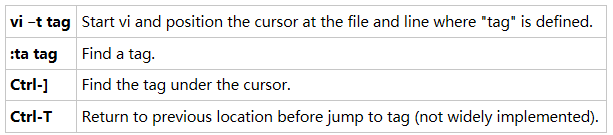
讯享网
cscope使用
cscope官网
提供下载,安装、手册、FAQ等信息
http://cscope.sourceforge.net/

cscope功能
cscope是用来浏览源码的工具,可生成符号数据库,以方便快速的搜索和索引。相对ctags提供了更多功能,查找符号调用位置,正则表达式搜索等。
cscope常用命令
cscope -Rbk:迭代遍历子目录生成数据库,但不打开GUI。
gtags使用
gtags官网
http://www.gnu.org/software/global/
gtags功能
它与ctags或etags相似,为源码生成符号索引,并且提供了更多强大的功能,如符号调用位置,正则表达式搜索,符号补全搜索等。
gtas使用
GTAGS definition database GRTAGS reference database GPATH path name database$ global //生成符号$ global symbal //搜索符号文件路径$ global -c prefix //补全符号 讯享网
生成kernel标签
Linux内核不仅包含了x86架构的函数还包含了如:arm、powerPC等等其他架构的函数,如果直接生成tags文件,将来查找时,多种架构的同名函数会混淆在一起,很不方便。贴心的Linux内核组给准备了tags.sh文件,可以自动生成相应的tags(ctags用),和cscope.out(cscope用)。linux的Makefile里已经帮我们写好了如何生成各种tags,
讯享网$ make help # 省略其他 tags/TAGS - Generate tags file for editors cscope - Generate cscope index gtags - Generate GNU GLOBAL index
由上可以看到,我们只要执行对应的make命令,就可以生成各种tags文件了,make调用Makefile,然后把参数传递给/script/tags.sh,tags.sh会接收更多的参数ARCH, SUBARCH, SRCARCH, srctree, src。
ARCH: which architecture to index. You can see all architectures list just by doingls -l arch/in your kernel source tree.SUBARCH: the meaning of this variable depends on your architecture:
- if
ARCH=arm,SUBARCHwill be used to determinearch/arm/mach-*andarch/arm/plat-*directories, and these directories will be indexed- if
ARCH=um, useSUBARCHto specify which architecture you actually want to use in your User-Mode Linux (likeSUBARCH=armorSUBARCH=x86)- for the rest of architectures, you can omit this variable
ALLSOURCE_ARCHS: use this to index more than one architecture. LikeALLSOURCE_ARCHS="x86 mips arm"orALLSOURCE_ARCHS="all". If you only want to index one architecture, omit this variable and useARCHinstead.COMPILED_SOURCE: set this variable to 1 if you want to index only actually compiled source files. If you want to index all source files, omit setting this variable.O=(this is actually Makefile parameter): use absolute paths (useful if you want to load created cscope/ctags index files outside of kernel directory, e.g. for development of out-of-tree kernel modules). If you want to use relative paths (i.e. you’re gonna do development only in kernel dir), just omit that parameter.
例如:
内核生成特定架构cscope数据库
make cscope ARCH=x86
make cscope ALLSOURCE_ARCHS=“x86 arm” 生成多种架构
版权声明:本文内容由互联网用户自发贡献,该文观点仅代表作者本人。本站仅提供信息存储空间服务,不拥有所有权,不承担相关法律责任。如发现本站有涉嫌侵权/违法违规的内容,请联系我们,一经查实,本站将立刻删除。
如需转载请保留出处:https://51itzy.com/kjqy/34096.html