
VSCode搜索时默认会搜索目录下所有文件
$ tree .
├── a.c
├── m.c
└── x
└── b.c
//a.c #include <stdio.h> #include <string.h> int main() { char s[] = "hello\n"; fprintf(stdout, s, strlen(s)); return 0; }讯享网
讯享网//m.c #include <stdio.h> #include <string.h> int main() { char s[] = "hello, 88\n"; fprintf(stdout, s, strlen(s)); return 0; }
//b.c #include <stdio.h> #include <string.h> int main() { char s[] = "hi\n"; fprintf(stdout, s, strlen(s)); return 0; }
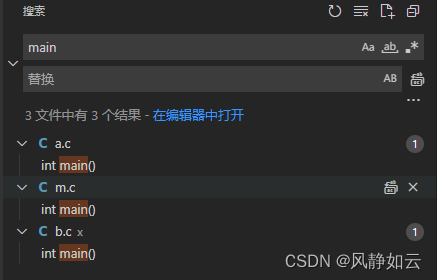
可以看到当搜索main时,a.c,b.c和m.c中的main都被搜索到了
有时文件太多,或者有些文件或目录可以不用关注,这时可以通过设置排除目录和文件来实现
方法如下:

1.在项目目录(也就是vscode打开的目录)下创建子目录.vscode
2.在.vscode子目录下创建文件settings.json,文件内容如下:
讯享网{ "search.exclude": { "/m.c": true, "x/": true, } }
其中"/m.c"表示任意目录下的m.c文件都会被排除搜索
"x/"表示目录x下的任意文件都会被排除搜索
此时通过vscode搜索
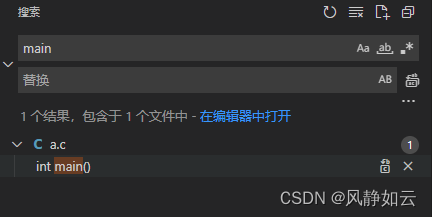
可以看到只搜索到了文件a.c,达到了目的
版权声明:本文内容由互联网用户自发贡献,该文观点仅代表作者本人。本站仅提供信息存储空间服务,不拥有所有权,不承担相关法律责任。如发现本站有涉嫌侵权/违法违规的内容,请联系我们,一经查实,本站将立刻删除。
如需转载请保留出处:https://51itzy.com/kjqy/32083.html