
目录
第一步:老规矩了,来一个基础框架
第二步:我们写一个超链接,并且把登录框的样式一并写好
这个是现在的效果图,接下来我们写关闭的效果,所以就要开始写js部分代码
第三步:之前忘记先把css样式放出来,现在放出来
第四步:添加点击事件,一个是点击注册,登录框出现,一个是点击关闭,登录框消失
第五步:这里我们添加上拖拽的样式,因为我们正常界面都是在页面顶部拖拽,所以我们给,title添加样式

第一步:老规矩了,来一个基础框架
<!DOCTYPE html>
<html>
  <head>
    <meta charset="utf-8" />
    <title></title>
  </head>
  <body>

  </body>
</html>
讯享网
第二步:我们写一个超链接,并且把登录框的样式一并写好
讯享网<!DOCTYPE html>
<html>
<head>
<meta charset="utf-8" />
<title></title>
</head>
<body>
<a href="javascript:;" id="loginA">注册/登录</a>
<!-- 登录弹框 -->
<div class="login">
<div class="title">
用户登录 <a href="javascript:;" id="close">关闭</a>
</div>
<div class="content">
<p> 用户名:<input type="text" value="" /></p>
<p> 密 码:<input type="password" value="" /></p>
<p> <input type="button" value="提交" id="submit" /></p>
</div>
</div>
<div class="bg"></div>
</body>
</html>
这里的话我们写了一个a和一个div盒子,盒子里包裹了一个提示框,下方是样图
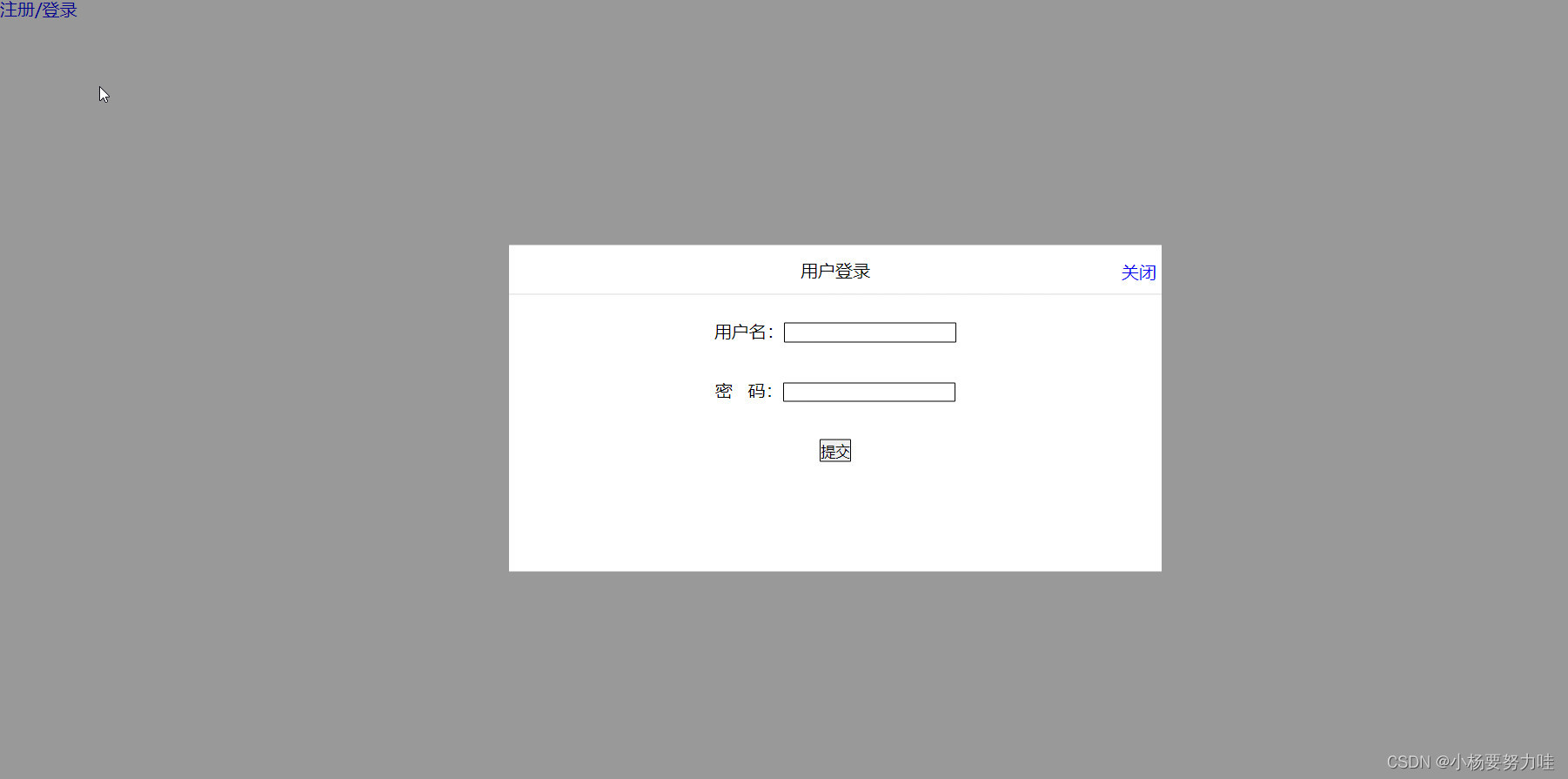
这个是现在的效果图,接下来我们写关闭的效果,所以就要开始写js部分代码
先把整个页面中该获取到的获取到
<script> var aonclick = document.querySelector('a') var login = document.querySelector('.login') var down = document.querySelector('.title #close') var bdcolor = document.querySelector('.bg') var sub = document.querySelector('#submit') var title = document.querySelector('.title') </script>第三步:之前忘记先把css样式放出来,现在放出来
讯享网 *{ padding: 0px; margin: 0px; } li{ list-style: none; } a{ text-decoration: none; } .bg{ width: 100%; height: 100%; position: fixed; top: 0px; left:0px; background: rgb(0,0,0,.4); z-index: 9998; display: none; } .login{ width: 600px; height: 300px; position: fixed; top:50%; left:50%; transform: translate(-50%,-50%); z-index: 9999; background: #fff; display: none; } .title{ height: 45px; line-height: 45px; text-align: center; border-bottom: 1px solid #DCDCDC; position: relative; cursor: move; } .content p{ text-align: center; line-height: 45px; padding-top: 10px; } .content>p>input{ border: 1px solid black; border-radius: 1px; } .title a{ display: block; position: fixed; top:2px; right: 5px; z-index: 9999; }
第四步:添加点击事件,一个是点击注册,登录框出现,一个是点击关闭,登录框消失
<script> var aonclick = document.querySelector('a') var login = document.querySelector('.login') var down = document.querySelector('.title #close') var bdcolor = document.querySelector('.bg') var sub = document.querySelector('#submit') var title = document.querySelector('.title') // console.log(down) // console.log(login) aonclick.onclick = function(){ login.style.display = 'block'; bdcolor.style.display = 'block'; } down.onclick = function(){ login.style.display = 'none'; bdcolor.style.display = 'none'; } </script> 第五步:这里我们添加上拖拽的样式,因为我们正常界面都是在页面顶部拖拽,所以我们给,title添加样式
讯享网 <script> var aonclick = document.querySelector('a') var login = document.querySelector('.login') var down = document.querySelector('.title #close') var bdcolor = document.querySelector('.bg') var sub = document.querySelector('#submit') var title = document.querySelector('.title') // console.log(down) // console.log(login) aonclick.onclick = function(){ login.style.display = 'block'; bdcolor.style.display = 'block'; } down.onclick = function(){ login.style.display = 'none'; bdcolor.style.display = 'none'; } // sub.onclick = function(){ // } title.addEventListener('mousedown',function(e){ var x1 = e.pageX - (login.offsetLeft); var y1 = e.pageY - (login.offsetTop); document.addEventListener('mousemove',sumer) function sumer(e){ var newx = e.pageX - x1; var newy = e.pageY - y1; login.style.left = newx + 'px'; login.style.top = newy + 'px'; } document.addEventListener('mouseup',function(){ document.removeEventListener('mousemove',sumer) }) }) </script>
到这里,整个样式就全部写完了,拖拽和关闭,出现的样式就写完了,接下来附上完整代码
<!DOCTYPE html>
<html>
<head>
<meta charset="utf-8">
<title></title>
<style>
*{
padding: 0px;
margin: 0px;
}
li{
list-style: none;
}
a{
text-decoration: none;
}
.bg{
width: 100%;
height: 100%;
position: fixed;
top: 0px;
left:0px;
background: rgb(0,0,0,.4);
z-index: 9998;
display: none;
}
.login{
width: 600px;
height: 300px;
position: fixed;
top:50%;
left:50%;
transform: translate(-50%,-50%);
z-index: 9999;
background: #fff;
display: none;
}
.title{
height: 45px;
line-height: 45px;
text-align: center;
border-bottom: 1px solid #DCDCDC;
position: relative;
cursor: move;
}
.content p{
text-align: center;
line-height: 45px;
padding-top: 10px;
}
.content>p>input{
border: 1px solid black;
border-radius: 1px;
}
.title a{
display: block;
position: fixed;
top:2px;
right: 5px;
z-index: 9999;
}
</style>
</head>
<body>
<!-- 制作登录框 -->
<a href="javascript:;" id="loginA">注册/登录</a>
<!-- 登录弹框 -->
<div class="login">
<div class="title">
用户登录 <a href="javascript:;" id="close">关闭</a>
</div>
<div class="content">
<p> 用户名:<input type="text" value="" /></p>
<p> 密 码:<input type="password" value="" /></p>
<p> <input type="button" value="提交" id="submit" /></p>
</div>
</div>
<div class="bg"></div>
<script>
var aonclick = document.querySelector('a')
var login = document.querySelector('.login')
var down = document.querySelector('.title #close')
var bdcolor = document.querySelector('.bg')
var sub = document.querySelector('#submit')
var title = document.querySelector('.title')
// console.log(down)
// console.log(login)
aonclick.onclick = function(){
login.style.display = 'block';
bdcolor.style.display = 'block';
}
down.onclick = function(){
login.style.display = 'none';
bdcolor.style.display = 'none';
}
// sub.onclick = function(){
// }
title.addEventListener('mousedown',function(e){
var x1 = e.pageX - (login.offsetLeft);
var y1 = e.pageY - (login.offsetTop);
document.addEventListener('mousemove',sumer)
function sumer(e){
var newx = e.pageX - x1;
var newy = e.pageY - y1;
login.style.left = newx + 'px';
login.style.top = newy + 'px';
}
document.addEventListener('mouseup',function(){
document.removeEventListener('mousemove',sumer)
})
})
</script>
</body>
</html>
版权声明:本文内容由互联网用户自发贡献,该文观点仅代表作者本人。本站仅提供信息存储空间服务,不拥有所有权,不承担相关法律责任。如发现本站有涉嫌侵权/违法违规的内容,请联系我们,一经查实,本站将立刻删除。
如需转载请保留出处:https://51itzy.com/kjqy/31031.html