
前言:
MySQL数据库和postgresql数据库之间的差异并不多,这里的差异指的是对SQL语言的支持两者并不大,但底层的东西差异是非常多的,例如,MySQL的innodb引擎概念,数据库用户管理,这些和postgresql相比是完全不同的(MySQL用户就是用户,没有角色,postgresql有用户,有角色,但差异不大),但,索引例如btree这些两者又是相同的或者说相通的。
那么,这些差异化的地方导致MySQL在向postgresql数据库迁移数据的时候会造成一些困扰,虽然两者数据库使用的SQL语言百分之九十是相同的,但就是这剩下的百分之十也是一个巨大的鸿沟。
普通的方案,MySQLdump或者navicat直接备份MySQL,然后将备份文件导入postgresql需要修改很多地方,最基本的是需要提取insert语句,光这些工作量就非常的大了,如果要迁移的数据很多的话,因此,该方案基本上是不能考虑的。
OK,那么,有没有MySQL数据库平滑的向postgresql数据库迁移的方案呢?
答案是有的,版本答案就是pgloader工具,但丑话先说前面,此工具只支持全量迁移并不支持增量迁移,这应该是一个比较遗憾的地方,其它的方面,比如迁移效率(迁移用时),迁移质量(也就是迁移到postgresql的数据是否完整,准确),迁移方式(例如,库对库迁移,读取csv文件迁移,编写配置文件迁移)这些方面是让人挑不出理的。
一,
pgloader的部署安装
下载
pgloader通常的部署方式是三种,第一种是编译部署,第二种是docker镜像部署,第三种是二进制部署,本文选择的是二进制部署,其它部署方式本文不予讨论。
pgloader的官方下载地址:
https://github.com/dimitri/pgloader/releases
离线安装的地址:
链接:https://pan.baidu.com/s/18aN0CvyoXy_o8iP-aqVwGg?pwd=kkey
提取码:kkey
建议选择最新版本3.6.9

二,
环境依赖安装
上述的离线安装包 ,解压后,进入文件夹,rpm -ivh * 即可。
如果是centos的,确认是否有安装libtool-ltdl,有输出表示已经安装,将那个libtool-ltdl-2.4.2-22.h1.eulerosv2r7.x86_64.rpm移除即可。
确认是否有安装libtool-ltdl,有输出表示已经安装,
[root@centos5 ~]# rpm -qa |grep libtool-ltdl libtool-ltdl-2.4.2-22.el7_3.x86_64 讯享网
这里说明一下,两个关键依赖,分别是freetds-devel和sbcl-1.4.0,其它rpm包是这两个关键依赖的依赖。
三,
部署
已经部署过了

讯享网[root@centos5 pgloader-bundle-3.6.9]# pwd /root/pgloader-bundle-3.6.9 [root@centos5 pgloader-bundle-3.6.9]# make pgloader make: `pgloader' is up to date.
第一次部署的,make pgloader的输出是这样的:
;; loading system "cffi" ;; loading system "cl+ssl" ;; loading system "mssql" ;; loading file #P"/root/pgloader_soft/pgloader-bundle-3.6.2/local-projects/pgloader-3.6.2/src/hooks.lisp" ;; loading system "pgloader" compressed 0 bytes into 8 at level -1 compressed 32768 bytes into 617 at level -1 compressed bytes into at level -1 compressed bytes into at level -1 compressed bytes into at level -1 # that's ugly, but necessary when building on Windows :( mv bin/pgloader.tmp bin/pgloader环境变量设置:
讯享网vi /etc/profile alias pgloader=/root/pgloader-bundle-3.6.9/bin/pgloader :wq source /etc/profile
验证:
[root@centos5 ~]# pgloader --version pgloader version "3.6.9" compiled with SBCL 1.4.0-1.el7 四,
pgloader的初步使用
既然是MySQL迁移数据到postgresql,那么,自然需要两个服务器,服务器1 IP是192.168.123.15,该服务器部署postgresql-12.5,服务器2 IP是192.168.123.16,该服务器部署mariadb
如何部署这两个数据库就不在这里废话了。
MySQL数据库有test数据库,该库里有erp表:
讯享网MariaDB [(none)]> use test; Reading table information for completion of table and column names You can turn off this feature to get a quicker startup with -A Database changed MariaDB [test]> show tables; +----------------+ | Tables_in_test | +----------------+ | DEPT | | EMP | +----------------+ 2 rows in set (0.00 sec) MariaDB [test]> select * from EMP; +-------+--------+-----------+------+------------+------+------+--------+ | EMPNO | ENAME | JOB | MGR | HIREDATE | SAL | COMM | DEPTNO | +-------+--------+-----------+------+------------+------+------+--------+ | 7369 | SMITH | CLERK | 7902 | 1980-12-17 | 800 | NULL | 20 | | 7499 | ALLEN | SALESMAN | 7698 | 1981-02-20 | 1600 | 300 | 30 | | 7521 | WARD | SALESMAN | 7698 | 1981-02-22 | 1250 | 500 | 30 | | 7566 | JONES | MANAGER | 7839 | 1981-04-02 | 2975 | NULL | 20 | | 7654 | MARTIN | SALESMAN | 7698 | 1981-09-28 | 1250 | 1400 | 30 | | 7698 | BLAKE | MANAGER | 7839 | 1981-05-01 | 2850 | NULL | 30 | | 7782 | CLARK | MANAGER | 7839 | 1981-06-09 | 2450 | NULL | 10 | | 7788 | SCOTT | ANALYST | 7566 | 1987-04-19 | 3000 | NULL | 20 | | 7839 | KING | PRESIDENT | NULL | 1981-11-17 | 5000 | NULL | 10 | | 7844 | TURNER | SALESMAN | 7698 | 1981-09-08 | 1500 | 0 | 30 | | 7876 | ADAMS | CLERK | 7788 | 1987-05-23 | 1100 | NULL | 20 | | 7900 | JAMES | CLERK | 7698 | 1981-12-03 | 950 | NULL | 30 | | 7902 | FORD | ANALYST | 7566 | 1981-12-03 | 3000 | NULL | 20 | | 7934 | MILLER | CLERK | 7782 | 1982-01-23 | 1300 | NULL | 10 | +-------+--------+-----------+------+------------+------+------+--------+ 14 rows in set (0.00 sec)
编辑迁移配置文件,在postgresql所在的服务器上,文件内容如下:
vi pg.load.test1 load database from mysql://root:密码@192.168.123.16:3306/test into pgsql://postgres:密码@192.168.123.15:5432/postgres;开始迁移:
迁移命令和日志文件的内容:
讯享网[postgres@centos5 ~]$ pgloader --verbose pg.load.test1>> pg.load.test2 2>&1 [postgres@centos5 ~]$ cat pg.load.test2 -bash: pgloader: command not found [postgres@centos5 ~]$ logout [root@centos5 ~]# mv /home/postgres/pg.load.test1 ./ [root@centos5 ~]# pgloader --verbose pg.load.test1>> pg.load.test2 2>&1 [root@centos5 ~]# cat pg.load.test pg.load.test1 pg.load.test2 [root@centos5 ~]# cat pg.load.test2 2023-08-04T08:03:56.023000+08:00 NOTICE Starting pgloader, log system is ready. 2023-08-04T08:03:56.049000+08:00 LOG pgloader version "3.6.9" 2023-08-04T08:03:56.+08:00 LOG Migrating from #<MYSQL-CONNECTION mysql://root@192.168.123.16:3306/test {1008D4C553}> 2023-08-04T08:03:56.+08:00 LOG Migrating into #<PGSQL-CONNECTION pgsql://postgres@192.168.123.15:5432/postgres {1008D4D933}> 2023-08-04T08:03:56.+08:00 ERROR mysql: Failed to connect to mysql at "192.168.123.16" (port 3306) as user "root": MySQL Error [1045]: "Access denied for user 'root'@'192.168.123.15' (using password: YES)" 2023-08-04T08:03:56.+08:00 LOG report summary reset table name errors read imported bytes total time read write ----------------- --------- --------- --------- --------- -------------- --------- --------- fetch meta data 0 0 0 0.000s ----------------- --------- --------- --------- --------- -------------- --------- --------- ----------------- --------- --------- --------- --------- -------------- --------- --------- [root@centos5 ~]# vim pg.load.test1 [root@centos5 ~]# pgloader --verbose pg.load.test1>> pg.load.test2 2>&1 [root@centos5 ~]# cat pg.load.test2 2023-08-04T08:03:56.023000+08:00 NOTICE Starting pgloader, log system is ready. 2023-08-04T08:03:56.049000+08:00 LOG pgloader version "3.6.9" 2023-08-04T08:03:56.+08:00 LOG Migrating from #<MYSQL-CONNECTION mysql://root@192.168.123.16:3306/test {1008D4C553}> 2023-08-04T08:03:56.+08:00 LOG Migrating into #<PGSQL-CONNECTION pgsql://postgres@192.168.123.15:5432/postgres {1008D4D933}> 2023-08-04T08:03:56.+08:00 ERROR mysql: Failed to connect to mysql at "192.168.123.16" (port 3306) as user "root": MySQL Error [1045]: "Access denied for user 'root'@'192.168.123.15' (using password: YES)" 2023-08-04T08:03:56.+08:00 LOG report summary reset table name errors read imported bytes total time read write ----------------- --------- --------- --------- --------- -------------- --------- --------- fetch meta data 0 0 0 0.000s ----------------- --------- --------- --------- --------- -------------- --------- --------- ----------------- --------- --------- --------- --------- -------------- --------- --------- 2023-08-04T08:05:15.005000+08:00 NOTICE Starting pgloader, log system is ready. 2023-08-04T08:05:15.015000+08:00 LOG pgloader version "3.6.9" 2023-08-04T08:05:15.048000+08:00 LOG Migrating from #<MYSQL-CONNECTION mysql://root@192.168.123.16:3306/test {1008DBCD63}> 2023-08-04T08:05:15.048000+08:00 LOG Migrating into #<PGSQL-CONNECTION pgsql://postgres@192.168.123.15:5432/postgres {1008DBE1E3}> 2023-08-04T08:05:15.+08:00 NOTICE Prepare PostgreSQL database. 2023-08-04T08:05:15.+08:00 NOTICE Processing tables in this order: test.emp: 14 rows, test.dept: 4 rows 2023-08-04T08:05:15.+08:00 NOTICE COPY test.emp with 14 rows estimated [2/4] 2023-08-04T08:05:15.+08:00 NOTICE COPY test.dept with 4 rows estimated [1/4] 2023-08-04T08:05:15.+08:00 NOTICE DONE copying test.dept in 0.000s 2023-08-04T08:05:15.+08:00 NOTICE DONE copying test.emp in 0.000s 2023-08-04T08:05:15.+08:00 NOTICE CREATE UNIQUE INDEX idx_16388_primary ON test.emp (empno); 2023-08-04T08:05:15.+08:00 NOTICE Completing PostgreSQL database. 2023-08-04T08:05:15.+08:00 NOTICE Reset sequences 2023-08-04T08:05:15.+08:00 NOTICE ALTER TABLE test.emp ADD PRIMARY KEY USING INDEX idx_16388_primary; 2023-08-04T08:05:15.+08:00 NOTICE ALTER DATABASE "postgres" SET search_path TO public, test; 2023-08-04T08:05:15.+08:00 LOG report summary reset table name errors read imported bytes total time read write ----------------------- --------- --------- --------- --------- -------------- --------- --------- fetch meta data 0 3 3 0.045s Create Schemas 0 0 0 0.001s Create SQL Types 0 0 0 0.002s Create tables 0 4 4 0.017s Set Table OIDs 0 2 2 0.006s ----------------------- --------- --------- --------- --------- -------------- --------- --------- test.emp 0 14 14 0.6 kB 0.033s 0.023s test.dept 0 4 4 0.1 kB 0.009s 0.005s ----------------------- --------- --------- --------- --------- -------------- --------- --------- COPY Threads Completion 0 4 4 0.022s Index Build Completion 0 1 1 0.006s Create Indexes 0 1 1 0.002s Reset Sequences 0 0 0 0.010s Primary Keys 0 1 1 0.001s Create Foreign Keys 0 0 0 0.000s Create Triggers 0 0 0 0.000s Set Search Path 0 1 1 0.000s Install Comments 0 0 0 0.000s ----------------------- --------- --------- --------- --------- -------------- --------- --------- Total import time ✓ 18 18 0.7 kB 0.041s
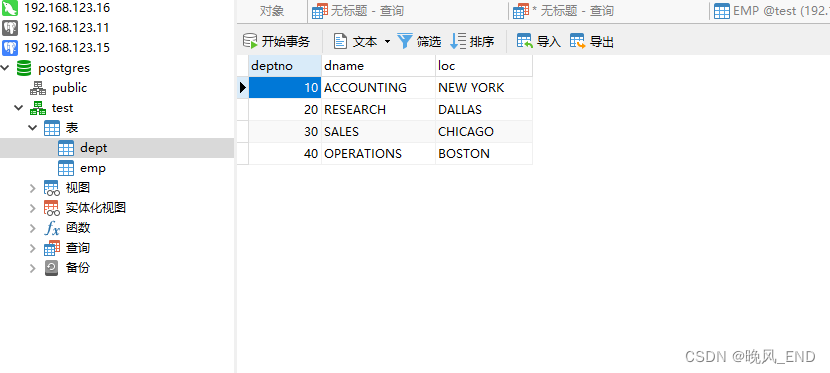
在postgresql数据库上查看是否迁移成功:
可以看到,完美迁移了
版权声明:本文内容由互联网用户自发贡献,该文观点仅代表作者本人。本站仅提供信息存储空间服务,不拥有所有权,不承担相关法律责任。如发现本站有涉嫌侵权/违法违规的内容,请联系我们,一经查实,本站将立刻删除。
如需转载请保留出处:https://51itzy.com/kjqy/28275.html