
华容道游戏
游戏说明
曹操败走华容道”是《三国演义》精彩的篇章。赤壁大战前,诸葛亮算定曹操必败走华容,且夜观天象,曹操不当身亡,考虑到曹操与关羽有恩,于是派关云长把守华容道以还人情。曹操赤壁大败后果然由乌林向华容道败退,并在途中三次大笑诸葛亮智谋不足,未在险要处暗设伏兵。然而,一笑笑出赵子龙,多亏徐晃、张郃二人双敌赵云,才使曹操得以逃脱;二笑笑出张翼德,又是张辽、徐晃二将抵挡张飞,使曹操再次脱险;三笑非同小可,笑出了关云长,且又在有一夫当关之险的华容狭路上,加之曹军几经打击,此时已无力再战,无奈,曹操只得亲自哀求关羽放行,关羽念旧日恩情,义释曹操,使曹操得以回到江陵。
传统的“华容道”游戏道具有一个可容纳二十个小方格的棋盘,代表华容道。棋盘下方有一个两方格边长的出口,是供曹操逃走的。棋盘上共摆有十个大小不等的棋子,它们分别代表曹操、张飞、赵云、马超、黄忠和关羽,还有四个卒。“华容道”有几十种布阵方法,最著名的为“横刀立马”,如下图所示。
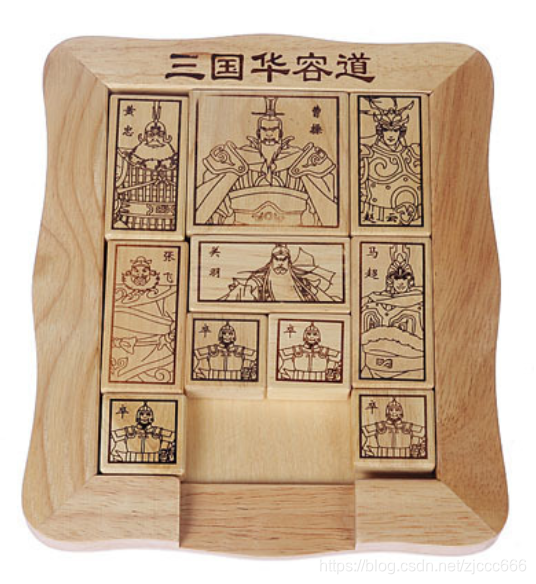
讯享网
棋盘上仅有两个小方格空着,玩家就是通过这两个空格移动各个棋子,用最少的步数把曹操从初始位置移到棋盘最下方中部,从出口逃走。
程序说明

了解如何在程序中使用字典(dict)
了解利用鼠标拖动来移动物体的编程技巧
了解如何检测物体之间是否发生了碰撞
了解Python面向对象编程的概念
增强逻辑思维能力
培养解决问题的能力
编码步骤
我们已经为该小项目提供了一个基本模板,我们建议 “华容道”游戏的开发策略为:
1、首先定义表示游戏棋子的Figure类,该类有6个私有属性:
self.image # 棋子图像
self.src_center # 源图像中心坐标
self.src_size # 源图像大小
self.des_center # 画布显示图像中心坐标
self.des_size # 画布显示图像大小
self.name = name # 棋子名称,如“曹操”
self.move_direction # 移动方向
self.move_direction的有效值为None、’ left ’ 、’ right '、 ’ up '以及 ’ down ',分别表示棋子静止、向左移动、向右移动、向上移动及向下移动。
该类的get_des_center (self)方法、get_des_size (self)、get_name (self) 及方法set_move_direction (self)均非常直观。
draw(self, canvas)将调用draw_image 并以前5个私有属性在画布绘制棋子。
update(self) 方法将根据self.move_direction的取值用全局变量speed 更新self.des_center。
而collide(self, other)则根据self.move_direction的取值计算是否和另一个静止的棋子发生碰撞,如果发生碰撞或到达棋盘边界则返回True,否则返回False。
2、编写绘制全部棋子的draw_figures(figures, canvas)函数,用for循环遍历figures并调用每个棋子的draw方法完成对所有棋子的绘制。
3、编写绘制游戏结束信息的draw_game_over_msg(canvas, msg)函数,调用draw_text函数绘制msg。
4、编写屏幕刷新事件处理函数(主后绘制函数)draw(canvas),如果全局变量game_over为True则调用draw_game_over_msg绘制游戏结束信息,否则先调用draw_figures完成对所有棋子的绘制,然后判断current_figure是否有效,如果有效,则调用check_collide()检查移动的棋子是否和其它棋子发生碰撞(后面你将实现该函数)和current_figure.update()。
5、编写start_game(),为游戏开始或重新开始初始化全局变量,该函数也是鼠标点击“重新开始游戏”按钮的事件处理函数。至此运行游戏应当在画布正确绘制最著名的“横刀立马”布阵。但玩家拖动鼠标时棋子没有任何反应。
6、在mouse_click(pos)函数中添加功能来确定鼠标点击了哪个棋子,关键是遍历所有棋子,将每个棋子的4各角的坐标和鼠标的坐标比较来确定点中的棋子。如果点中了某个棋子,将其赋值给全局变量,同时对全局变量current_figure、original_point赋予合适的值。如果鼠标点击的区域没有棋子,current_figure的值应当为None。可以将棋子的名称输出带控制台以便观察该函数是否正常工作。
7、编写mouse_drag(pos)函数,对鼠标拖动事件进行处理,先比较鼠标落下的位置original_point和拖动后的位置pos,判断四个方向上哪个移动距离最多,将current_figure的move_direction属性设置为该方向,同时将全局变量figure_moving的值设置为True。注意这些操作只有鼠标点中了某个棋子并拖动时才有效,如果鼠标点击和拖动的区域没有棋子则无效。到此为止,鼠标拖动棋子将发生作用,但棋子不会停下来。
8、编写check_collide()函数,检查移动i与其它静止棋子及边界的碰撞,用for循环遍历figures并调用每个棋子的collide方法检测与移动的棋子是否发生碰撞,但遍历要避免移动棋子自己之间检测碰撞。
9、设法在合适的函数中添加更新控制面板“移动次数”标签的代码。
10、当曹操被移动到最下方中部出口位置时,设法在合适的函数中代码让其一直下移直到从画布中消失为止。
完整代码
# “华容道”游戏项目模板 import simpleguitk as gui # 全局变量 canvas_height = 500 # 画布高度,单位为像素 canvas_width = 400 # 画布宽度,单位为像素 game_over = False # 游戏是否结束 figure_moving = False # 是否有运动的人物 figures = {
   } # 所有人物 steps = 0 # 移动步数 current_figure = None # 鼠标点中的人物 current_center = [] # 鼠标点中人物的中心坐标 original_point = [] # 鼠标点击的初始位置坐标,用来计算鼠标拖动的方向 speed = 5 # 人物移动的速度 machao_image = gui.load_image('http://202.201.225.74/video/PythonResoure/ProjectResource/images/project6/machao.png') zhangfei_image = gui.load_image('http://202.201.225.74/video/PythonResoure/ProjectResource/images/project6/zhangfei.png') zhaoyun_image = gui.load_image('http://202.201.225.74/video/PythonResoure/ProjectResource/images/project6/zhaoyun.png') huangzhong_image = gui.load_image('http://202.201.225.74/video/PythonResoure/ProjectResource/images/project6/huangzhong.png') guanyu_image = gui.load_image('http://202.201.225.74/video/PythonResoure/ProjectResource/images/project6/guanyu.png') caocao_image = gui.load_image('http://202.201.225.74/video/PythonResoure/ProjectResource/images/project6/caocao.png') soldier_image = gui.load_image('http://202.201.225.74/video/PythonResoure/ProjectResource/images/project6/shibing.png') # Figure类(棋子类) class Figure: def __init__(self, image, src_center, src_size, des_center, des_size, name, move_direction = None): self.image = image # 棋子图像 self.src_center = src_center # 源图像中心坐标 self.src_size = src_size # 源图像大小 self.des_center = des_center # 画布显示图像中心坐标 self.des_size = des_size # 画布显示图像大小 self.name = name # 棋子名称,如“曹操” self.move_direction = move_direction # 移动方向 def get_des_center(self): pass def get_des_size(self): pass def get_name(self): pass def set_move_direction(self, direction): pass def draw(self, canvas): pass def update(self): pass def collide(self, other): global figure_moving, steps pass # # 检查移动与其它静止棋子及边界的碰撞 def check_collide(): pass # 绘制全部棋子 def draw_figures(figures, canvas): pass # 绘制游戏结束信息 def draw_game_over_msg(canvas, msg): pass # 鼠标点击事件的处理函数 def mouse_click(pos): pass # 鼠标拖动事件的处理函数 def mouse_drag(pos): pass # 屏幕刷新事件处理函数 def draw(canvas): pass # 为游戏开始或重新开始初始化全局变量,也是鼠标点击按钮的事件处理函数 def start_game(): pass # 创建窗口初始化画布 frame = gui.create_frame("华容道之横刀立马", canvas_width, canvas_height) label = frame.add_label("移动次数 = 0 步") # 注册事件处理函数 frame.set_draw_handler(draw) # 显示处理,每秒调用draw函数60次 button = frame.add_button('重新开始游戏', start_game, 50) # 鼠标每次点击“重新开始游戏”按钮,调用start_game函数1次 frame.set_mouseclick_handler(mouse_click) # frame.set_mousedrag_handler(mouse_drag) # 启动游戏 start_game() # 为游戏开始或重新开始初始化全局变量 frame.start() # 显示窗口
讯享网
以下为完整代码
讯享网import simpleguitk as gui import math # 全局变量 canvas_height = 500 # 画布高度,单位为像素 canvas_width = 400 # 画布宽度,单位为像素 game_over = False # 游戏是否结束 figure_moving = False # 是否有运动的人物 figures = {
   } # 所有人物 steps = 0 # 移动步数 current_figure = None # 鼠标点中的人物 current_center = [] # 鼠标点中人物的中心坐标 original_point = [] # 鼠标点击的初始位置坐标,用来计算鼠标拖动的方向 speed = 5 # 人物移动的速度 machao_image = gui.load_image('http://202.201.225.74/video/PythonResoure/ProjectResource/images/project6/machao.png') zhangfei_image = gui.load_image('http://202.201.225.74/video/PythonResoure/ProjectResource/images/project6/zhangfei.png') zhaoyun_image = gui.load_image('http://202.201.225.74/video/PythonResoure/ProjectResource/images/project6/zhaoyun.png') huangzhong_image = gui.load_image('http://202.201.225.74/video/PythonResoure/ProjectResource/images/project6/huangzhong.png') guanyu_image = gui.load_image('http://202.201.225.74/video/PythonResoure/ProjectResource/images/project6/guanyu.png') caocao_image = gui.load_image('http://202.201.225.74/video/PythonResoure/ProjectResource/images/project6/caocao.png') soldier_image = gui.load_image('http://202.201.225.74/video/PythonResoure/ProjectResource/images/project6/shibing.png') picture_list = [machao_image,zhangfei_image,zhaoyun_image,huangzhong_image,guanyu_image,caocao_image,soldier_image,soldier_image,soldier_image,soldier_image] figure_src_size = [[100,200],[100,200],[100,200],[100,200],[200,100],[200,200],[100,100],[100,100],[100,100],[100,100]] figure_src_center =[[50,100], [50,100], [50,100], [50,100], [100,50],[100,100], [50,50], [50,50], [50,50], [50,50]] figure_name =["马超","张飞","赵云","黄忠","关羽","曹操","士兵1","士兵2","士兵3","士兵4"] figure_des_center = [[350,300],[50,300],[350,100],[50,100],[200,250],[200,100],[150,350],[250,350],[50,450],[350,450]] figure_des_size =[[100,200],[100,200],[100,200],[100,200],[200,100],[200,200],[100,100],[100,100],[100,100],[100,100]] # Figure类(棋子类) class Figure: def __init__(self, image, src_center, src_size, des_center, des_size, name, move_direction = None): self.image = image # 棋子图像 self.src_center = src_center # 源图像中心坐标 self.src_size = src_size # 源图像大小 self.des_center = des_center # 画布显示图像中心坐标 self.des_size = des_size # 画布显示图像大小 self.name = name # 棋子名称,如“曹操” self.move_direction = move_direction # 移动方向 def get_des_center(self): return self.des_center def get_des_size(self): return self.des_size def get_name(self): return self.name def set_move_direction(self, direction): self.move_direction = direction def draw(self, canvas): canvas.draw_image(self.image,self.src_center, self.src_size, self.des_center, self.des_size) def update(self): if self.move_direction =='left': self.des_center[0] -= speed elif self.move_direction =='right': self.des_center[0] += speed elif self.move_direction =='up': self.des_center[1] -= speed elif self.move_direction =='down': self.des_center[1] += speed else: self.des_center[0] = self.des_center[0] self.des_center[1] = self.des_center[1] def collide(self, other): global figure_moving, steps h_distance = self.des_center[0]-other.get_des_center()[0] h_length = self.des_size[0]/2+other.get_des_size()[0]/2 v_distance = self.des_center[1]-other.get_des_center()[1] v_length = self.des_size[1]/2+other.get_des_size()[1]/2 if self.move_direction =='left' and h_distance>0 and h_distance <=h_length and math.fabs(v_distance) < v_length : #print(self.des_size[0]/2+other.get_des_size()[0]/2) figure_moving = True self.move_direction = None print(h_distance<0) print(h_distance <=h_length) print(math.fabs(v_distance < v_length)) elif self.move_direction =='right'and h_distance<0 and -h_distance <=h_length and math.fabs(v_distance) < v_length: figure_moving = False self.move_direction = None elif self.move_direction =='down'and v_distance<0 and -v_distance <=v_length and math.fabs(h_distance) < h_length : figure_moving = False self.move_direction = None print(v_distance<0) print(-v_distance <=v_length) print(math.fabs(h_distance < h_length)) elif self.move_direction =='up'and v_distance>0 and v_distance <=v_length and math.fabs(h_distance) < h_length: figure_moving = False self.move_direction = None else: figure_moving = figure_moving self.move_direction =self.move_direction if self.move_direction =='left' and self.des_center[0]<=self.des_size[0]/2: figure_moving = False self.move_direction = None elif self.move_direction =='right' and self.des_center[0]>=canvas_width-self.des_size[0]/2-1: figure_moving = False self.move_direction = None elif self.move_direction =='up' and self.des_center[1]<=self.des_size[1]/2: figure_moving = False self.move_direction = None elif self.move_direction =='down' and self.des_center[1]>=canvas_height-self.des_size[1]/2-1: figure_moving = False self.move_direction = None else: figure_moving = figure_moving self.move_direction =self.move_direction label_text = "移动次数 = " + str(steps) + " 步" label.set_text(label_text) # # 检查移动与其它静止棋子及边界的碰撞 def check_collide(): global game_over if figure_list[current_figure].get_name()=="曹操" and figure_list[current_figure].get_des_center() == [200,400]: game_over = True figure_list[current_figure].set_move_direction("down") for p in figure_list: if figure_list.index(p) != current_figure : figure_list[current_figure].collide(p) # 绘制全部棋子 def draw_figures(figures, canvas): for p in figures: p.draw(canvas) # 绘制游戏结束信息 def draw_game_over_msg(canvas, msg): canvas.draw_text(msg, (150, 200), 48, 'Red') # 鼠标点击事件的处理函数 def mouse_click(pos): global current_center,current_figure,original_point,steps flag_pos = list(pos) for p in figure_list: list1 = p.get_des_center() list2 =p.get_des_size() if flag_pos[0]<=list1[0]+list2[0]/2 and flag_pos[0]>=list1[0]-list2[0]/2: if flag_pos[1]<=list1[1]+list2[1]/2 and flag_pos[1]>=list1[1]-list2[1]/2: m=figure_list.index(p) current_figure = m current_center = figure_list[m].get_des_center original_point = list(pos) steps = steps+1 # 鼠标拖动事件的处理函数 def mouse_drag(pos): global figure_moving,steps fina_pos = list(pos) if current_figure != None: figure_moving = True if math.fabs(original_point[0]-fina_pos[0])> math.fabs(original_point[1]-fina_pos[1]) and original_point[0]-fina_pos[0]>0: figure_list[current_figure].set_move_direction('left') elif math.fabs(original_point[0]-fina_pos[0])> math.fabs(original_point[1]-fina_pos[1]) and original_point[0]-fina_pos[0]<0: figure_list[current_figure].set_move_direction('right') elif math.fabs(original_point[0]-fina_pos[0])<= math.fabs(original_point[1]-fina_pos[1]) and original_point[1]-fina_pos[1]>0: figure_list[current_figure].set_move_direction('up') else: figure_list[current_figure].set_move_direction('down') # 屏幕刷新事件处理函数 def draw(canvas): if game_over == True: draw_game_over_msg(canvas, "通关成功") else: draw_figures(figure_list,canvas) if current_figure != None: check_collide() figure_list[current_figure].update() # 为游戏开始或重新开始初始化全局变量,也是鼠标点击按钮的事件处理函数 # 创建对象 figure_list = [] def start_game(): global figure_list,picture_list,figure_src_size,figure_src_center,figure_name,figure_des_center,figure_des_size,game_over,figure_moving,steps,current_figure,current_center,original_point picture_list = [machao_image,zhangfei_image,zhaoyun_image,huangzhong_image,guanyu_image,caocao_image,soldier_image,soldier_image,soldier_image,soldier_image] figure_src_size = [[100,200],[100,200],[100,200],[100,200],[200,100],[200,200],[100,100],[100,100],[100,100],[100,100]] figure_src_center =[[50,100], [50,100], [50,100], [50,100], [100,50],[100,100], [50,50], [50,50], [50,50], [50,50]] figure_name =["马超","张飞","赵云","黄忠","关羽","曹操","士兵1","士兵2","士兵3","士兵4"] figure_des_center = [[350,300],[50,300],[350,100],[50,100],[200,250],[200,100],[150,350],[250,350],[50,450],[350,450]] figure_des_size =[[100,200],[100,200],[100,200],[100,200],[200,100],[200,200],[100,100],[100,100],[100,100],[100,100]] figure_list = [] for i in range(10): p =Figure(picture_list[i],figure_src_center[i],figure_src_size[i],figure_des_center[i],figure_des_size[i],figure_name[i],move_direction=None) figure_list.append(p) game_over = False # 游戏是否结束 figure_moving = False # 是否有运动的人物 steps = 0 # 移动步数 current_figure = None # 鼠标点中的人物 current_center = [] # 鼠标点中人物的中心坐标 original_point = [] label.set_text("回合次数 = 0") # 创建窗口初始化画布 frame = gui.create_frame("华容道之横刀立马", canvas_width, canvas_height) label = frame.add_label("移动次数 = 0 步") # 注册事件处理函数 frame.set_draw_handler(draw) # 显示处理,每秒调用draw函数60次 button = frame.add_button('重新开始游戏', start_game, 50) # 鼠标每次点击“重新开始游戏”按钮,调用start_game函数1次 frame.set_mouseclick_handler(mouse_click) # frame.set_mousedrag_handler(mouse_drag) # 启动游戏 start_game() # 为游戏开始或重新开始初始化全局变量 frame.start() # 显示窗口
版权声明:本文内容由互联网用户自发贡献,该文观点仅代表作者本人。本站仅提供信息存储空间服务,不拥有所有权,不承担相关法律责任。如发现本站有涉嫌侵权/违法违规的内容,请联系我们,一经查实,本站将立刻删除。
如需转载请保留出处:https://51itzy.com/kjqy/27432.html