
一、前言
注:因为个人公司项目需要处理table表格重复数据多个单元格显示。现已合并。效果如下:
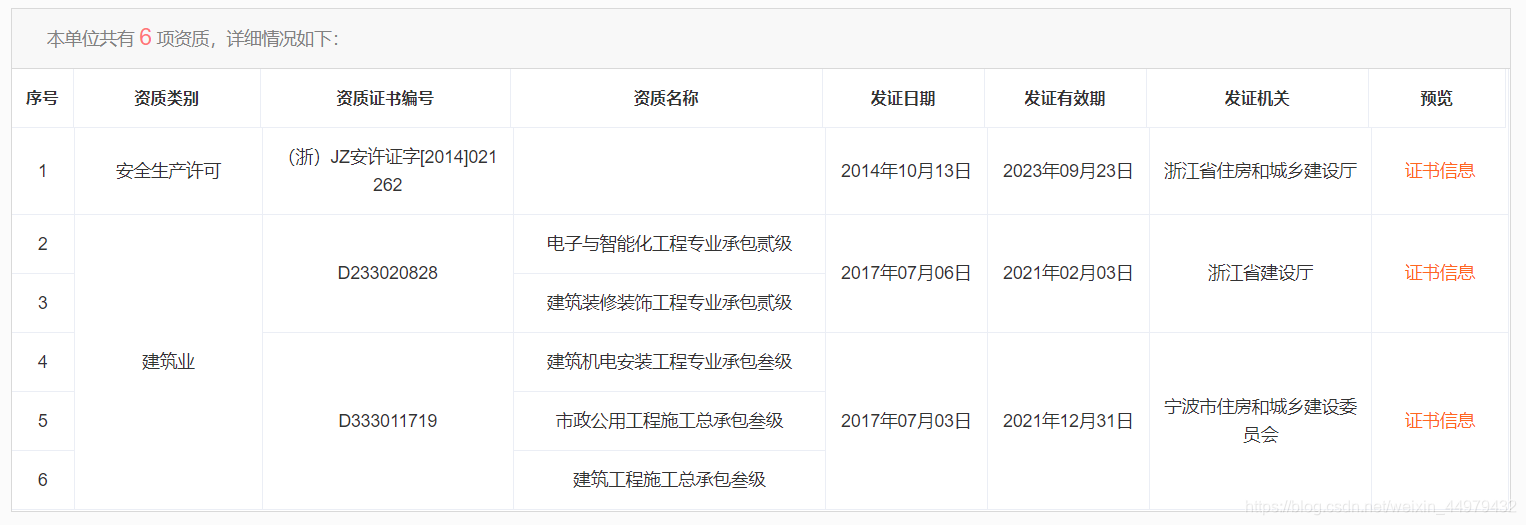
讯享网

二、代码
<template> <el-table :data="tableData" border :span-method="objectSpanMethod" style="width: 100%;text-align:center;border:1px solid #d9d9d9" :cell-style="{background:'#ffffff'}" :header-cell-style="{
    background: '#ffffff', color: '#333', fontSize: '13px', 'text-align': 'center' }" > <el-table-column label="序号" width="50"> <template slot-scope="scope">{
   {
   scope.$index+(pageIndex - 1) * pageSize + 1}}</template> </el-table-column> <el-table-column prop="APTITUDEKINDNAME" label="资质类别" width="150"></el-table-column> <el-table-column prop="CertID" label="资质证书编号" width="200"></el-table-column> <el-table-column prop="Zzmark" label="资质名称" width="250"></el-table-column> <el-table-column prop="OrganDate" label="发证日期" width="130"></el-table-column> <el-table-column prop="EndDate" label=" 发证有效期" width="130"></el-table-column> <el-table-column prop="OrganName" label=" 发证机关" width="178"></el-table-column> <el-table-column label="预览" prop="MOVE" width="110"> <template slot-scope="scope"> <span @click="certInfo(scope.row.CertID,_self.type)" style="color:#ff6600;cursor: pointer;" >证书信息</span> </template> </el-table-column> </el-table> </template> <script> export default {
    name: 'demo', data () {
    return{
    tableData: [ {
   "APTITUDEKINDNAME":"安全生产许可","CertID":"(浙)JZ安许证字[2014]021262","OrganName":"浙江省住房和城乡建设厅","UnitMan":"王浩明","OrganDate":"2014年10月13日","EndDate":"2023年09月23日","Zzmark":"","TechManDuty":"","TechMan":"王晓勤"}, {
   "APTITUDEKINDNAME":"建筑业","CertID":"D","OrganName":"浙江省建设厅","UnitMan":"王浩明","OrganDate":"2017年07月06日","EndDate":"2021年02月03日","Zzmark":"电子与智能化工程专业承包贰级","TechManDuty":"","TechMan":null}, {
   "APTITUDEKINDNAME":"建筑业","CertID":"D","OrganName":"浙江省建设厅","UnitMan":"王浩明","OrganDate":"2017年07月06日","EndDate":"2021年02月03日","Zzmark":"建筑装修装饰工程专业承包贰级","TechManDuty":"","TechMan":null}, {
   "APTITUDEKINDNAME":"建筑业","CertID":"D","OrganName":"宁波市住房和城乡建设委员会","UnitMan":"王浩明","OrganDate":"2017年07月03日","EndDate":"2021年12月31日","Zzmark":"建筑机电安装工程专业承包叁级","TechManDuty":"","TechMan":null}, {
   "APTITUDEKINDNAME":"建筑业","CertID":"D","OrganName":"宁波市住房和城乡建设委员会","UnitMan":"王浩明","OrganDate":"2017年07月03日","EndDate":"2021年12月31日","Zzmark":"市政公用工程施工总承包叁级","TechManDuty":"","TechMan":null}, {
   "APTITUDEKINDNAME":"建筑业","CertID":"D","OrganName":"宁波市住房和城乡建设委员会","UnitMan":"王浩明","OrganDate":"2017年07月03日","EndDate":"2021年12月31日","Zzmark":"建筑工程施工总承包叁级","TechManDuty":"","TechMan":null} ], } }, mounted () {
    this.tableDatas();//目前数据默认是写死,所以直接执行该方法。项目中通过后台数据调用成功后,在表格渲染后执行该方法 }, methods: {
    objectSpanMethod({
    row, column, rowIndex, columnIndex }) {
    if (columnIndex === 1) {
    //合并资质类别 const _row = this.spanArr[rowIndex]; const _col = _row > 0 ? 1 : 0; return {
    rowspan: _row, colspan: _col }; } if (columnIndex === 2) {
    //合并资质证书号 const _row = this.contentSpanArr[rowIndex]; const _col = _row > 0 ? 1 : 0; return {
    rowspan: _row, colspan: _col }; } if (columnIndex === 3) {
    //合并资质名称 const _row = this.contentSpanArr_3[rowIndex]; const _col = _row > 0 ? 1 : 0; return {
    rowspan: _row, colspan: _col }; } if (columnIndex === 4) {
    //发证日期 const _row = this.contentSpanArr_4[rowIndex]; const _col = _row > 0 ? 1 : 0; return {
    rowspan: _row, colspan: _col }; } if (columnIndex === 5) {
    //发证有效期 const _row = this.contentSpanArr_5[rowIndex]; const _col = _row > 0 ? 1 : 0; return {
    rowspan: _row, colspan: _col }; } if (columnIndex === 6) {
    //发证机关 const _row = this.contentSpanArr_6[rowIndex]; const _col = _row > 0 ? 1 : 0; return {
    rowspan: _row, colspan: _col }; } if (columnIndex === 7) {
    //预览 const _row = this.contentSpanArr_7[rowIndex]; const _col = _row > 0 ? 1 : 0; return {
    rowspan: _row, colspan: _col }; } }, // 表格合并方法 tableDatas() {
    let contactDot = 0; let contactDot_1 = 0; let contactDot_2 = 0; let contactDot_3 = 0; let contactDot_4 = 0; let contactDot_5 = 0; let contactDot_6 = 0; this.spanArr = []; this.contentSpanArr = []; this.contentSpanArr_3 = []; this.contentSpanArr_4 = []; this.contentSpanArr_5 = []; this.contentSpanArr_6 = []; this.contentSpanArr_7 = []; this.APTITUDENAME = []; this.tableData.forEach((item, index) => {
    item.index = index; if (index === 0) {
    this.spanArr.push(1); this.contentSpanArr.push(1); this.contentSpanArr_3.push(1); this.contentSpanArr_4.push(1); this.contentSpanArr_5.push(1); this.contentSpanArr_6.push(1); this.contentSpanArr_7.push(1); } else {
    // 判断第二列 if ( item.APTITUDEKINDNAME === this.tableData[index - 1].APTITUDEKINDNAME ) {
    this.spanArr[contactDot] += 1; this.spanArr.push(0); } else {
    this.spanArr.push(1); contactDot = index; } //判断第三列 if (item.CertID === this.tableData[index - 1].CertID) {
    this.contentSpanArr[contactDot_1] += 1; this.contentSpanArr.push(0); this.contentSpanArr_7[contactDot_6] += 1; this.contentSpanArr_7.push(0); } else {
    this.contentSpanArr.push(1); contactDot_1 = index; this.contentSpanArr_7.push(1); contactDot_6 = index; } //资质证书编号 if (item.Zzmark === this.tableData[index - 1].Zzmark) {
    this.contentSpanArr_3[contactDot_2] += 1; this.contentSpanArr_3.push(0); } else {
    this.contentSpanArr_3.push(1); contactDot_2 = index; } //发证日期 if (item.OrganDate === this.tableData[index - 1].OrganDate) {
    this.contentSpanArr_4[contactDot_3] += 1; this.contentSpanArr_4.push(0); } else {
    this.contentSpanArr_4.push(1); contactDot_3 = index; } //发证有效期 if (item.EndDate === this.tableData[index - 1].EndDate) {
    this.contentSpanArr_5[contactDot_4] += 1; this.contentSpanArr_5.push(0); } else {
    this.contentSpanArr_5.push(1); contactDot_4 = index; } //发证机关 if (item.OrganName === this.tableData[index - 1].OrganName) {
    this.contentSpanArr_6[contactDot_5] += 1; this.contentSpanArr_6.push(0); } else {
    this.contentSpanArr_6.push(1); contactDot_5 = index; } } }); }, } } </script> <style scoped> </style>
讯享网
- 详细说明:
讯享网tableDatas()这个函数就是用来返回 spanArr 数组的,定义每一行的 rowspan if( index === 0),第一行,直接先给数组 push 进一个1,表示自己先占一行,position 是数组元素的位置 (此时是从数组元素的第一个开始,所以position 为 0), position为 0 意思表示的就是数组的第一个元素。 当到了 index 为 2 的时候,if(item.CertID === this.tableData[index - 1].CertID), 让第二行与第一行作比较: (1)如果第二行与第一行相等的话,position 就 +1,当有 n 行第一行相同,position 就为 n,表示向下合并 n 行; 第二行自己就 spanArr.push(0),表示第二行“消失”,因为第一行和第二行合并了; (2)如果第二行与第一行不相等的话,那么 spanArr.push(1);就让第二行自己独占一行; position = index :把指针拿到 index 这行来,表示设置数组 spanArr[position] 的元素值,然后定义从此行开始向下合并几行 (可以根据示例研究下,当 index 为 2 时,position 为 2,当 index 为 3 时,第四行与第三行需要合并, 那么在数组的 position 元素就要 +1 了,也就是 spanArr[position] += 1)
:span-method="objectSpanMethod" 这个是官方给定的绑定属性和对应的方法,objectSpanMethod 传入了 {
    row, column, rowIndex, columnIndex } row: 当前行 column: 当前列 rowIndex:当前行号 columnIndex :当前列号 该函数可以返回一个包含两个元素的数组,第一个元素代表rowspan,第二个元素代表 colspan。 也可以返回一个键名为 rowspan 和 colspan 的对象。 const _col = _row > 0 ? 1 : 0; 定义的这个单元格列的合并,我们项目只合并行,不合并列; _row:代表合并行的行数,_row 的值要么是 1,或者更大的自然正整数,要么是 0。 1代表:独占一行 更大的自然数:代表合并了若干行 0:代表“消失”的哪那一个单元格,后面的单元格向前推一格
版权声明:本文内容由互联网用户自发贡献,该文观点仅代表作者本人。本站仅提供信息存储空间服务,不拥有所有权,不承担相关法律责任。如发现本站有涉嫌侵权/违法违规的内容,请联系我们,一经查实,本站将立刻删除。
如需转载请保留出处:https://51itzy.com/kjqy/27144.html