
先看下效果图:

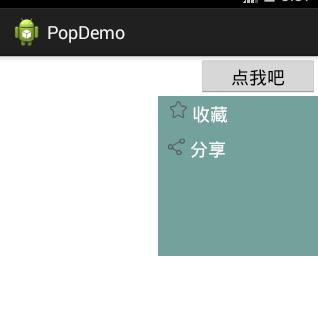
首先需要继承PopuWindow来自定义我们自己想要的结果,PopwinShare就是我们自定义的,代码如下
public class PopWinShare extends PopupWindow { private View mainView; private LinearLayout layoutCollect, layoutShare; public PopWinShare(Activity paramActivity, View.OnClickListener paramOnClickListener, int paramInt1, int paramInt2) { super(paramActivity); //窗口布局 mainView = LayoutInflater.from(paramActivity).inflate( R.layout.popwin_layout, null); //收藏布局 layoutCollect = ((LinearLayout) mainView.findViewById(R.id.ll_collect)); //分享布局 layoutShare = (LinearLayout) mainView.findViewById(R.id.ll_share); //设置每个子布局的事件监听器 if (paramOnClickListener != null) { layoutCollect.setOnClickListener(paramOnClickListener); layoutShare.setOnClickListener(paramOnClickListener); } setContentView(mainView); //设置宽度 setWidth(paramInt1); //设置高度 setHeight(paramInt2); //设置显示隐藏动画 setAnimationStyle(R.style.AnimTools); //设置背景透明 setBackgroundDrawable(new ColorDrawable(0)); } }讯享网
里面提供了一个构造方法,包含四个参数,第一个参数是上下文的activity,第二个是菜单的点击事件,从外边传递进来的,要绑定给每一行的菜单,具体的事件实现当然要写在activity中,后面两个分别是弹出窗口的宽度和高度。里面还包含了一个动画样式,窗口打开和关闭时出现动画的样式。
讯享网<?xml version="1.0" encoding="utf-8"?> <LinearLayout xmlns:android="http://schemas.android.com/apk/res/android" android:layout_width="wrap_content" android:layout_height="wrap_content" android:background="#" android:orientation="vertical" > <LinearLayout android:id="@+id/ll_collect" android:layout_width="wrap_content" android:layout_height="wrap_content" android:orientation="horizontal" android:padding="5dp" > <ImageView android:layout_width="wrap_content" android:layout_height="wrap_content" android:layout_marginLeft="7dp" android:scaleType="fitCenter" android:src="@drawable/icon_collect" /> <TextView android:layout_width="wrap_content" android:layout_height="wrap_content" android:layout_marginLeft="5dp" android:text="收藏" android:textColor="#ffffff" android:textSize="18sp" /> </LinearLayout> <LinearLayout android:id="@+id/ll_share" android:layout_width="wrap_content" android:layout_height="wrap_content" android:orientation="horizontal" android:padding="5dp" > <ImageView android:layout_width="wrap_content" android:layout_height="wrap_content" android:layout_marginLeft="5dp" android:scaleType="fitCenter" android:src="@drawable/icon_share" /> <TextView android:layout_width="wrap_content" android:layout_height="wrap_content" android:layout_marginLeft="5dp" android:text="分享" android:textColor="#ffffff" android:textSize="18sp" /> </LinearLayout> </LinearLayout>
采用线性布局,因为里面是一行一行竖排的菜单,线性布局更容易控制。大布局里面放了两个垂直排列的线性布局,每个线性布局中分别有横向排列的imageview和textview,很简单的布局。大布局的背景用了一个图片,当然也可以自定义一些其他颜色。
对了,贴一下我们要用的缩放动画,用于PopuWindow显示和消失的时候:

首先是 push_in,xml:
<?xml version="1.0" encoding="utf-8"?> <scale xmlns:android="http://schemas.android.com/apk/res/android" android:interpolator="@android:anim/accelerate_decelerate_interpolator" android:fromXScale="1.0" android:toXScale="1.0" android:fromYScale="0" android:toYScale="1.0" android:pivotX="0" android:pivotY="10%" android:duration="200" /> 其次是push_out.xml
讯享网<?xml version="1.0" encoding="utf-8"?> <scale xmlns:android="http://schemas.android.com/apk/res/android" android:interpolator="@android:anim/accelerate_decelerate_interpolator" android:fromXScale="1.0" android:toXScale="1.0" android:fromYScale="1.0" android:toYScale="0" android:pivotX="0" android:pivotY="10%" android:duration="200" />
然后再styles.xml中进行声明调用即可:
<style name="AnimTools" parent="@android:style/Animation"> <item name="android:windowEnterAnimation">@anim/push_in</item> <item name="android:windowExitAnimation">@anim/push_out</item> </style> 最后看看我们的MainActivity中的代码:
讯享网public class MainActivity extends Activity implements OnClickListener { private Button bt; private PopWinShare popWinShare; @Override protected void onCreate(Bundle savedInstanceState) { super.onCreate(savedInstanceState); setContentView(R.layout.activity_main); bt = (Button) findViewById(R.id.bt); bt.setOnClickListener(this); } @Override public void onClick(View v) { switch (v.getId()) { case R.id.bt: if (popWinShare == null) { // 自定义的单击事件 OnClickLintener paramOnClickListener = new OnClickLintener(); popWinShare = new PopWinShare(MainActivity.this, paramOnClickListener, UIUtils.dip2px(160), UIUtils.dip2px(160)); // 监听窗口的焦点事件,点击窗口外面则取消显示 popWinShare.getContentView().setOnFocusChangeListener( new View.OnFocusChangeListener() { @Override public void onFocusChange(View v, boolean hasFocus) { if (!hasFocus) { popWinShare.dismiss(); } } }); } //设置默认获取焦点 popWinShare.setFocusable(true); //以某个控件的x和y的偏移量位置开始显示窗口 popWinShare.showAsDropDown(bt, 0, 0); //如果窗口存在,则更新 popWinShare.update(); break; default: break; } } class OnClickLintener implements OnClickListener { @Override public void onClick(View v) { switch (v.getId()) { case R.id.ll_collect: break; case R.id.ll_share: break; default: break; } } } }
每个子菜单的单击事件用了自定义内部类,在里面就可以写每个子菜单的单击事件了,另外就是用到了dip向px转换的工具类,这个容易,网上有代码,就不贴出来了,下面给出了。。。。。
项目的链接,需要的同学可以自行下载:http://download.csdn.net/detail/u0/
版权声明:本文内容由互联网用户自发贡献,该文观点仅代表作者本人。本站仅提供信息存储空间服务,不拥有所有权,不承担相关法律责任。如发现本站有涉嫌侵权/违法违规的内容,请联系我们,一经查实,本站将立刻删除。
如需转载请保留出处:https://51itzy.com/kjqy/26965.html