
以小米zigbee版智能插座(型号:lumi.plug.v1)为例
插座已接入多功能网关(网关型号lumi.gateway.v3)
使用homeassistant官方的Xiaomi Gateway (Aqara)组件集成
(使用Xiaomi Miio集成的话,zigbee有开关和功率两个实体,之前的版本如果使用了Xiaomi Gateway (Aqara)集成,再用Xiaomi Miio会报错,这就是我为什么不直接使用Miio集成的原因。目前的版本已经OK了,使用两个集成不冲突)

集成后发现插座设备下只有一个开关实体,此实体属性中有显示功率值:

在实体属性列表中看到,功率的名称为:load_power

方式一:使用lovelace自带实体卡片
自带的实体卡片,可以显示包含实体某个属性值在内的丰富的实体信息
添加一个实体卡片:

选择一个已接入的智能插座实体,属性栏可以选择功率等属性,还可以自定义属性值的单位:

配合网格卡片-实体卡片套娃模式效果更加:
type: grid columns: 3 cards: - type: entity entity: switch.plug_158d000 name: 电脑 unit: 瓦 attribute: load_power state_color: true - type: entity entity: switch.plug_158d000 name: 吸尘器 unit: 瓦 attribute: load_power state_color: true - type: entity entity: switch.plug_158d000 name: 主卧路由器 unit: 瓦 attribute: load_power state_color: true - type: entity entity: switch.plug_158d000 name: 沙发插座 unit: 瓦 attribute: load_power state_color: true - type: entity entity: switch.plug_158d000 name: 床头柜插座 unit: 瓦 attribute: load_power state_color: true - type: entity entity: switch.plug_158d000 name: 电视 unit: 瓦 attribute: load_power state_color: true square: false讯享网
效果:

方式二:使用HACS卡片Multiline Entity Card
此卡片可以调用属性值,卡片名称:Multiline Entity Card
相比lovelace自带实体卡片,此卡片相当于实体卡片简配版
项目地址:https://github.com/jampez77/Multiline-Entity-Card https://github.com/jampez77/Multiline-Entity-Card
使用HACS可以直接搜索出Multiline Entity Card安装,但发现我的环境无法自动安装

于是手动在github打包下载拷贝到新建的config\www\community\Multiline-Entity-Card文件夹中
重载hass后
按项目中实例在lovelace中添加自定义卡片
讯享网type: 'custom:multiline-entity-card' name: "电脑功率" entity: switch.plug_158d000 attribute: load_power show_icon: true show_name: true
单Multiline Entity Card效果:

家里有6个zigbee插座,想显示在一起
于是配合网格卡片使用,效果更加:
type: grid columns: 3 cards: - type: custom:multiline-entity-card entity: switch.plug_158d000 name: 电脑 attribute: load_power show_icon: true show_name: true - type: custom:multiline-entity-card entity: switch.plug_158d0001 name: 吸尘器 attribute: load_power show_icon: true show_name: true - type: custom:multiline-entity-card entity: switch.plug_158d000 name: 主卧路由器 attribute: load_power show_icon: true show_name: true - type: custom:multiline-entity-card entity: switch.plug_158d000 name: 沙发 attribute: load_power show_icon: true show_name: true - type: custom:multiline-entity-card entity: switch.plug_158d000 name: 床头柜 attribute: load_power show_icon: true show_name: true - type: custom:multiline-entity-card entity: switch.plug_158d0003 name: 电视 attribute: load_power show_icon: true show_name: true square: false 效果:

插座开关关闭状态的话,会显示未知,如果是打开状态就会显示实时功率。
方式三:multiple-entity-row卡片:
项目地址:
GitHub - benct/lovelace-multiple-entity-row: Show multiple entity states and attributes on entity rows in Home Assistant's Lovelace UIShow multiple entity states and attributes on entity rows in Home Assistant's Lovelace UI - GitHub - benct/lovelace-multiple-entity-row: Show multiple entity states and attributes on entity rows in Home Assistant's Lovelace UI https://github.com/benct/lovelace-multiple-entity-row这个卡片显然高级一点
该项目中给的例子:
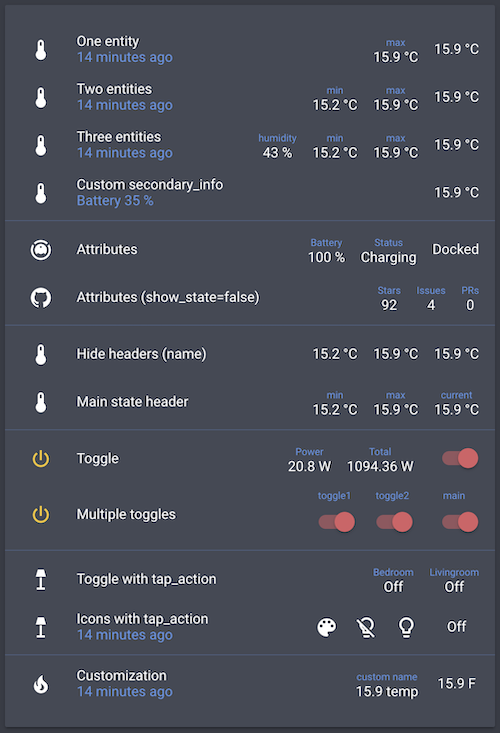
我的需求就是开关和功率两个,换成自己的实体,
这样,原本开关和功率两个实体列表就可以变成一个列表了,省了一些地方。

版权声明:本文内容由互联网用户自发贡献,该文观点仅代表作者本人。本站仅提供信息存储空间服务,不拥有所有权,不承担相关法律责任。如发现本站有涉嫌侵权/违法违规的内容,请联系我们,一经查实,本站将立刻删除。
如需转载请保留出处:https://51itzy.com/kjqy/24057.html