
测试视屏帧率的代码
//C++代码
 // 记录帧率 static map<int, int> fps_record; static map<int, std::chrono::steady_clock::time_point> fps_time; fps_record[channel_id]++; auto last_rec_time = fps_time[channel_id]; auto passed = std::chrono::duration_cast<std::chrono::milliseconds>(std::chrono::steady_clock::now() - last_rec_time); if(passed.count() > 3000) {
    if(passed.count() < 0xffff) {
    float fps = fps_record[channel_id] * 1000 / passed.count(); std::cout << "CHANNEL: " << channel_id << " STREAM FPS: " << fps << std::endl; } fps_record[channel_id] = 0; fps_time[channel_id] = std::chrono::steady_clock::now(); }
讯享网
or
获取从程序运行时到现在的时间(和下面系统时间区别开),在xavier nvidia agx板子上不适用。
讯享网 clock_t start = clock(); std::vector<torch::Tensor> r = yolo.prediction(frame); clock_t ends = clock(); std::cout << start << std::endl; std::cout << ends << std::endl; std::cout <<"Running Time : "<<(double)(ends - start) / CLOCKS_PER_SEC << std::endl; #算出时间单位为秒
获取系统时间
3.与日期和时间相关的数据结构 在标准C/C++中,我们可通过tm结构来获得日期和时间,tm结构在time.h中的定义如下: #ifndef _TM_DEFINED struct tm { int tm_sec; /* 秒 – 取值区间为[0,59] */ int tm_min; /* 分 - 取值区间为[0,59] */ int tm_hour; /* 时 - 取值区间为[0,23] */ int tm_mday; /* 一个月中的日期 - 取值区间为[1,31] */ int tm_mon; /* 月份(从一月开始,0代表一月) - 取值区间为[0,11] */ int tm_year; /* 年份,其值等于实际年份减去1900 */ int tm_wday; /* 星期 – 取值区间为[0,6],其中0代表星期天,1代表星期一,以此推 */ int tm_yday; /* 从每年的1月1日开始的天数 – 取值区间为[0,365],其中0代表1月1日,1代表1月2日,以此类推 */ int tm_isdst; /* 夏令时标识符,实行夏令时的时候,tm_isdst为正。不实行夏令时的进候,tm_isdst为0;不了解情况时,tm_isdst()为负。*/ }; #define _TM_DEFINED #endif ANSI C标准称使用tm结构的这种时间表示为分解时间(broken-down time)。 讯享网 struct tm *t; // tm结构指针 time_t now; //声明time_t类型变量 time( &now ); //获取系统日期和时间 t = localtime( &now ); //获取当地日期和时间 char cNowTime[ 64 ]; memset( cNowTime, 0, 64 ); strftime( cNowTime, sizeof( cNowTime ), "%Y-%m-%d-%H-%M-%S", t ); std::cout << t << std::endl; std::cout << t->tm_hour << std::endl; std::cout << t->tm_min << std::endl; std::cout << t->tm_sec << std::endl;
附录:
《c/c++ 获取时间戳》——精确到毫秒
timeb.h和time.h
这两个是C++的标准头文件,在Microsoft Visual Studio/VC98/Include中,表示了C++对时间的支持能力。

两个头文件的都定义了typedef long time_t;
time_t和tm可以相互转换,然而C++并没有提供从time_t到tm的转换,可以调用ACE的转换函数ACE_OS::localtime_r (const time_t *t, struct tm *res)来实现。
timeb.time实际上就是time_t;timeb.millitm表示毫秒。
timeb.h获取毫秒的代码
#include <iostream> #include <sys/timeb.h> using namespace std; int main() { timeb t; ftime(&t);//获取毫秒 cout << t.time << " " << t.millitm << endl;//秒级时间戳 cout << t.time * 1000 + t.millitm << endl;//某个时间戳下走过的毫秒数,可用来求时间复杂度 cout << t.time * 1000 + t.millitm << endl;//13位毫秒的时间戳 } timeb是一个结构体,下面是源码
讯享网 struct timeb { time_t time; unsigned short millitm; short timezone; short dstflag; };
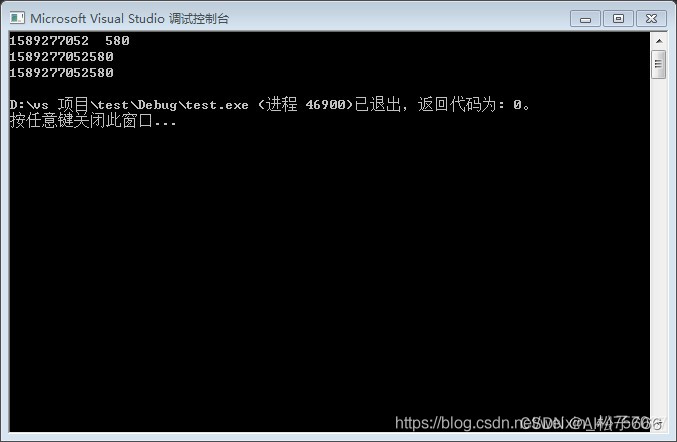
例如:
timeb tt; ftime(&tt);//获取毫秒 std::cout << tt.time << " " << tt.millitm << std::endl;//秒级时间戳 std::cout << tt.time * 1000 + tt.millitm << std::endl;//某个时间戳下走过的毫秒数,可用来求时间复杂度 std::cout << tt.time * 1000 + tt.millitm << std::endl;//13位毫秒的时间戳 struct tm *t; // tm结构指针 t = localtime( &tt.time ); //获取当地日期和时间 std::cout << t << std::endl; std::cout << t->tm_hour << std::endl; std::cout << t->tm_min << std::endl; std::cout << t->tm_sec << std::endl; char cNowTime[ 64 ]; memset( cNowTime, 0, 64 ); //strftime( cNowTime, sizeof( cNowTime ), "%Y%m%d%H%M%S", t ); strftime( cNowTime, sizeof( cNowTime ), "%H%M%S", t ); std::cout << cNowTime << std::endl; std::cout << atoi(cNowTime)* 1000 + tt.millitm << std::endl; std::string path = "/path/"; path +=cNowTime; path +=".jpg"; /* #include <cstdio> #include <iostream> #include <stdlib.h> using namespace std; int main(int argc , char *argv[]){ int n = 0; char str[110] = "1234"; //char[]转int n = atoi(str); printf("%d\n", n); //int转char[] n = 567; itoa(n, str, 10); //10代表进制,可填2,8,10,16 printf("%s",str); return 0; } 结果: 1234 567 */
版权声明:本文内容由互联网用户自发贡献,该文观点仅代表作者本人。本站仅提供信息存储空间服务,不拥有所有权,不承担相关法律责任。如发现本站有涉嫌侵权/违法违规的内容,请联系我们,一经查实,本站将立刻删除。
如需转载请保留出处:https://51itzy.com/kjqy/22041.html