

col
col 用于定义表格中的列。
col为表格内单标签元素,只能在table元素或者colgroup元素中使用。
其属性值主要包括如下几种,均能通过CSS属性实现。
span:指定col元素横跨的列数,此属性值为正整数,默认值为1align:指定col元素关联的列的内容的水平对齐方式,包括left(左对齐)、center(居中对齐)、right(右对齐)、char等,注意此属性HTML5已废弃,仅IE7及以下等浏览器可用,绝大多数浏览器已不再支持bgcolor:指定col元素关联的列的背景色,其属性值可指定rgba、rgb、hex和颜色名称,注意此属性为非标准属性,不同浏览器对此属性支持度不一致valign:指定col元素关联的列的内容的垂直对齐方式,包括top(顶端对齐)、middle(居中对齐)、bottom(底部对齐)、baseline(基线对齐),注意此属性HTML5也已废弃,不同浏览器支持程度不一致width:指定col元素关联的列的宽度,值为px宽度或者百分比,注意HTML5已废弃,绝大多数浏览器支持char:align属性设置为char时生效,用于指定某列以某个字符对齐,注意HTML5不再支持此属性,且大部分浏览器不支持charoff:align属性设置为char时生效,规定内容相对于char属性指定的字符的偏移量
span
span指定横跨的列数,不指定或指定为空默认为1,通过指定col的样式作用于列上。绝大多数浏览器都兼容col的span属性。
<style> td {
    width: 240px; height: 30px; } .col-1 {
    background: lightblue; } .col-23 {
    background: pink; } </style> <table border="1"> <col class="col-1"> <col span="2" class="col-23"> <tr> <th>Index</th> <th>Language</th> <th>Proportion</th> </tr> <tr> <td>1</td> <td>HTML</td> <td>20.36%</td> </tr> <tr> <td>2</td> <td>CSS</td> <td>19.64%</td> </tr> <tr> <td>3</td> <td>JavaScript</td> <td>160.00%</td> </tr> </table>
讯享网
样式呈现如下,col-1指定第一列,col-23指定第二列和第三列。

也可通过CSS实现col的span属性。
讯享网td:nth-child(1), th:nth-child(1) {
    background: lightblue; } td:nth-child(2), th:nth-child(2), td:nth-child(3), th:nth-child(3) {
    background: pink; }
IE8及以下浏览器不支持nth-child,可利用相邻选择器+兼容。IE5不支持相邻选择器则可指定class类名实现。
td, th {
    background: lightblue; } td + td, td + td + td, th + th, th + th + th {
    background: pink; }
align
指定col关联的列的对齐方式,默认为左对齐,仅IE7及以下等浏览器支持。
讯享网<style> td {
    width: 240px; height: 30px; } </style> <table border="1"> <col align="center"> <col align="right"> ... </table>
IE7呈现效果如下。

也可通过CSS属性实现,其中兼容性方面参考span属性。
td:nth-child(1), th:nth-child(1) {
    text-align: center; } td:nth-child(2), th:nth-child(2) {
    text-align: right; } <table border="1"> ... </table>
bgcolor
非标准属性,浏览器支持度不一,指定col关联的列的背景色。
讯享网<table border="1"> <col bgcolor="lightblue"> <col bgcolor="#ccc"> <col bgcolor="rgb(0,0,255,0.9)"> ... </table>
如下为Chrome浏览器呈现样式,也可通过CSS属性实现。

valign
指定col关联的列的垂直对齐方式,不同浏览器支持不一。
<style> td {
width: 240px; height: 50px; } </style> <table border="1"> <col valign="top"> <col valign="bottom"> ... </table> 如下为IE11浏览器呈现样式。
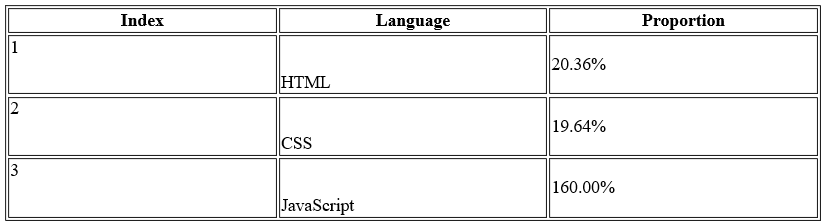
也可通过 CSS属性实现。
讯享网td:nth-child(1), th:nth-child(1) {
    vertical-align: top; } td:nth-child(2), th:nth-child(2) {
    vertical-align: bottom; } <table border="1"> ... </table>
width
指定col关联的列的宽度。

<style> td {
    height: 30px; } </style> <table border="1"> <col width="120px"> <col width="360px"> <col width="240px"> ... </table>
浏览器呈现效果如下。

也可指定col的样式作用于列上。
讯享网.col-1 {
    width: 120px; } .col-2 {
    width: 360px; } .col-3 {
    width: 240px; } <table border="1"> <col class="col-1"> <col class="col-2"> <col class="col-3"> ... </table>
或者也可指定CSS样式,其中兼容性方面也可参考span属性。
td:nth-child(1), th:nth-child(1) {
    width: 120px; } td:nth-child(2), th:nth-child(2) {
    width: 360px; } td:nth-child(3), th:nth-child(3) {
    width: 240px; }
char
指定列以某个字符对齐,需指定align为char属性值,注意大部分浏览器都不支持。
讯享网<style> td {
    width: 240px; height: 30px; } </style> <table border="1"> <col> <col> <col align="char" char="."> ... </table>
模拟呈现效果如下。

charoff
规定内容相对于char属性指定的字符的偏移量,其中正数为右偏移,负数为左偏移。
<style> td {
width: 240px; height: 30px; } </style> <table border="1"> <col> <col> <col align="char" char="." charoff="2"> ... </table> 如下为模拟呈现效果,即以字符.对齐后再往右偏移2个字符。

colgroup
colgroup 用于定义表格中的一组列。
colgroup为单标签元素,且只能在table内。
不包含col子元素的colgroup,标签colgroup等价于col,且colgroup与col的属性的表现形式完全一致,包括span、align、bgcolor、valign、width、char、charoff。
含有col子元素的colgroup,只要colgroup内部包含col,colgroup的span属性就会被忽略。并且内部col的样式或属性默认继承至colgroup,若col自身指定了样式或属性,则会覆盖继承的样式或属性。
讯享网<style> td {
    height: 30px; } colgroup {
    background: lightblue; } .col-2 {
    background: pink; } </style> <table border="1"> <colgroup span="2" width="180px"> <col> <col class="col-2" width="360px"> <col> </colgroup> <tr> <th>Index</th> <th>Language</th> <th>Proportion</th> </tr> <tr> <td>1</td> <td>HTML</td> <td>20.36%</td> </tr> <tr> <td>2</td> <td>CSS</td> <td>19.64%</td> </tr> <tr> <td>3</td> <td>JavaScript</td> <td>160.00%</td> </tr> </table>
如下colgroup的span="2"属性被忽略,第一列和第三列的样式(background: lightblue)和属性(width="120px")继承至colgroup,而第二列则覆盖了继承的样式和属性。

🎉 写在最后
🍻伙伴们,如果你已经看到了这里,觉得这篇文章有帮助到你的话不妨点赞👍或 Star ✨支持一下哦!
手动码字,如有错误,欢迎在评论区指正💬~
你的支持就是我更新的最大动力💪~
GitHub / Gitee、GitHub Pages、掘金、CSDN 同步更新,欢迎关注😉~
版权声明:本文内容由互联网用户自发贡献,该文观点仅代表作者本人。本站仅提供信息存储空间服务,不拥有所有权,不承担相关法律责任。如发现本站有涉嫌侵权/违法违规的内容,请联系我们,一经查实,本站将立刻删除。
如需转载请保留出处:https://51itzy.com/kjqy/21462.html