

RHEL 6 和 ubuntu 採用了 FreeDesktop.org 的規格,官方網站 http://standards.freedesktop.org/basedir-spec/basedir-spec-latest.html 定義了基本的 Linux 下的 X Window System (X11) 以及其他 Unix-like 作業系統的桌面環境.主要是為了增加 free software desktop environments 的互通性,而這環境簡稱為 XDG(X Desktop Group).
如果要用 x-window 開啟後自動啟動應用程式,請自行修改或是新增 .desktop 檔案.
System-wide autostart directories:
/etc/xdg/autostart
/usr/share/autostart
User specific autostart directories:
~/.config/autostart
~/.kde/share/autostart (KDE specific)
~/.kde/Autostart (KDE specific)
我們來看看基本的 .desktop 檔案內容有哪些
[root@benjr ~]# cat ~/.config/autostart/gnome-terminal.desktop
[Desktop Entry]
Type=Application
Exec=gnome-terminal
Hidden=false
X-GNOME-Autostart-enabled=true

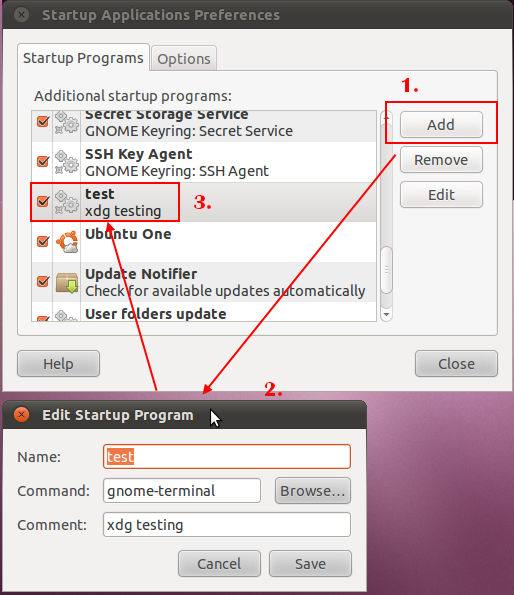
Name[en_US]=test
Name=test
Comment[en_US]=xdg testing
Comment=xdg testing
Type=Application
Exec=gnome-terminal
最重要的就是指定要執行哪一個程式.
Hidden=false
X-GNOME-Autostart-enabled=true
Name[en_US]=test
Name=test
Comment[en_US]=xdg testing
Comment=xdg testing
既然說是桌面系統,一定有相對應的 x-window 程式可以使用在 System > Preferences > Startup Applications 可以找到.
參考文件 https://help.ubuntu.com/community/AddingProgramToSessionStartup
沒有解決問題,試試搜尋本站其他內容
版权声明:本文内容由互联网用户自发贡献,该文观点仅代表作者本人。本站仅提供信息存储空间服务,不拥有所有权,不承担相关法律责任。如发现本站有涉嫌侵权/违法违规的内容,请联系我们,一经查实,本站将立刻删除。
如需转载请保留出处:https://51itzy.com/kjqy/18290.html