
前言

看到这个图标,大部分在机房上过课的朋友都很熟悉,(想把它关掉。自己有一段时间经常这么做,为了更好的普及和害怕自己忘掉,所以写下了这篇博客。
方法
方法一
运用DOS命令:神奇的taskkill,它可以结束进程,加上\f就可以强制执行,方法taskkill /f /im studentmain.exe
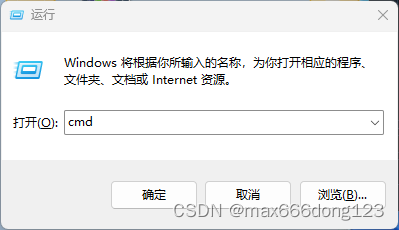
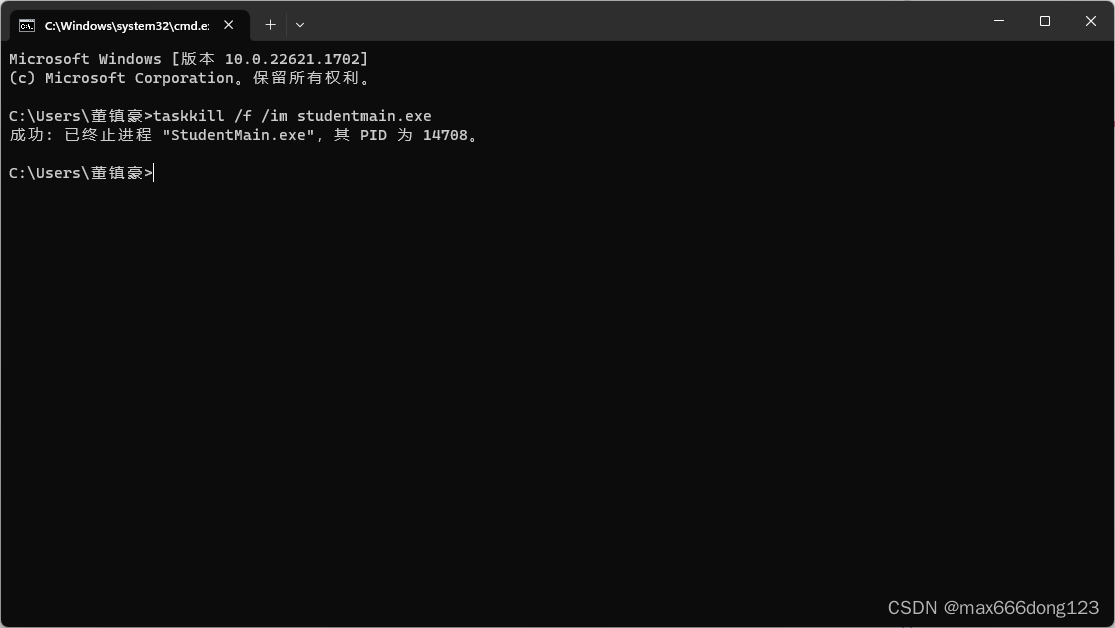
方法二
既然可以使用DOS命令了,也可以用任务管理器,在任务栏右键,选择任务管理器:在任务管理器的进程里找到studentmain,右键选择结束进程(由于作者用的win11所以可能不一样)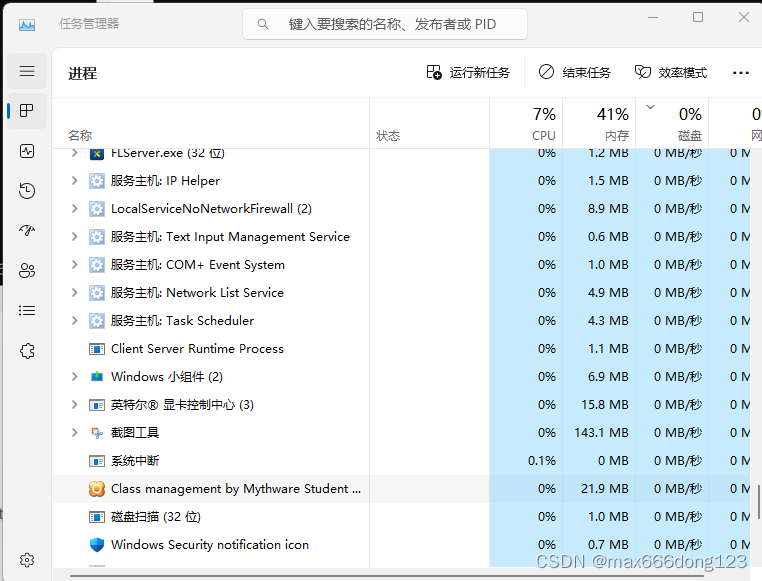
方法三 c++
直接上代码

#include<bits/stdc++.h> #include<windows.h> #define int long long #define IOS ios::sync_with_stdio(0);cin.tie(0);cout.tie(0) using namespace std; signed main(){
    IOS; system("taskkill /f /im studentmain.exe"); return 0; }
讯享网
完整版:
讯享网#include <windows.h> #include <bits/stdc++.h> using namespace std; /* This is where all the input to the window goes to */ int num = 0; HWND h1, h2, h3, h4, h5, h6, h7, h8, h9, h0, hok, hx, hb, h; HINSTANCE hInst; LRESULT CALLBACK WndProc(HWND hwnd, UINT Message, WPARAM wParam, LPARAM lParam) {
    switch (Message) {
    case WM_CREATE: {
    h1 = CreateWindow("button", "强杀极域", WS_CHILD | WS_VISIBLE, 0, 0, 100, 100, hwnd, (HMENU)1, hInst, NULL); h2 = CreateWindow("button", "恢复极域", WS_CHILD | WS_VISIBLE, 100, 0, 100, 100, hwnd, (HMENU)2, hInst, NULL); h3 = CreateWindow("button", "脱控00", WS_CHILD | WS_VISIBLE, 200, 0, 100, 100, hwnd, (HMENU)3, hInst, NULL); break; } case WM_COMMAND: {
    switch (wParam) {
    case 1: {
    system("taskkill /f /im studentmain.exe"); break; } case 2: {
    //system("\"C:\\Program Files\\Internet Explorer\\iexplore.exe\" "); system("\"C:\\Program Files (x86)\\Mythware\\极域电子教室软件 v4.0 2015 豪华版\\StudentMain.exe\" "); break; } case 3: {
    //system("C:\\Users\\.\\Desktop\\.\\.\2.exe"); break; } default: {
    num = 0; DefWindowProc(hwnd, Message, wParam, lParam); break; } } break; } default: {
    DefWindowProc(hwnd, Message, wParam, lParam); break; } } } /* The 'main' function of Win32 GUI programs: this is where execution starts */ int WINAPI WinMain(HINSTANCE hInstance, HINSTANCE hPrevInstance, LPSTR lpCmdLine, int nCmdShow) {
    hInst = hInstance; WNDCLASSEX wc; /* A properties struct of our window */ HWND hwnd; /* A 'HANDLE', hence the H, or a pointer to our window */ MSG msg; /* A temporary location for all messages */ /* zero out the struct and set the stuff we want to modify */ memset(&wc, 0, sizeof(wc)); wc.cbSize = sizeof(WNDCLASSEX); wc.lpfnWndProc = WndProc; /* This is where we will send messages to */ wc.hInstance = hInstance; wc.hCursor = LoadCursor(NULL, IDC_ARROW); /* White, COLOR_WINDOW is just a #define for a system color, try Ctrl+Clicking it */ wc.hbrBackground = (HBRUSH)(COLOR_WINDOW + 1); wc.lpszClassName = "WindowClass"; wc.hIcon = LoadIcon(NULL, IDI_APPLICATION); /* Load a standard icon */ wc.hIconSm = LoadIcon(NULL, IDI_APPLICATION); /* use the name "A" to use the project icon */ if (!RegisterClassEx(&wc)) {
    MessageBox(NULL, "Window Registration Failed!", "Error!", MB_ICONEXCLAMATION | MB_OK); return 0; } hwnd = CreateWindowEx(WS_EX_CLIENTEDGE, "WindowClass", "Caption", WS_VISIBLE | WS_OVERLAPPEDWINDOW, CW_USEDEFAULT, /* x */ CW_USEDEFAULT, /* y */ 640, /* width */ 480, /* height */ NULL, NULL, hInstance, NULL); if (hwnd == NULL) {
    MessageBox(NULL, "Window Creation Failed!", "Error!", MB_ICONEXCLAMATION | MB_OK); return 0; } /* This is the heart of our program where all input is processed and sent to WndProc. Note that GetMessage blocks code flow until it receives something, so this loop will not produce unreasonably high CPU usage */ while (GetMessage(&msg, NULL, 0, 0) > 0) {
    /* If no error is received... */ TranslateMessage(&msg); /* Translate key codes to chars if present */ DispatchMessage(&msg); /* Send it to WndProc */ } return msg.wParam; }
方法四
要是老师已经控制了怎么办呢?按下win+l锁定,切换用户,enter就好了,这时有 0 ∼ 10 0\sim10 0∼10
秒的时间,赶紧杀极域。
方法五:软件
第一款:JiYutrainer
作者:快乐的梦鱼
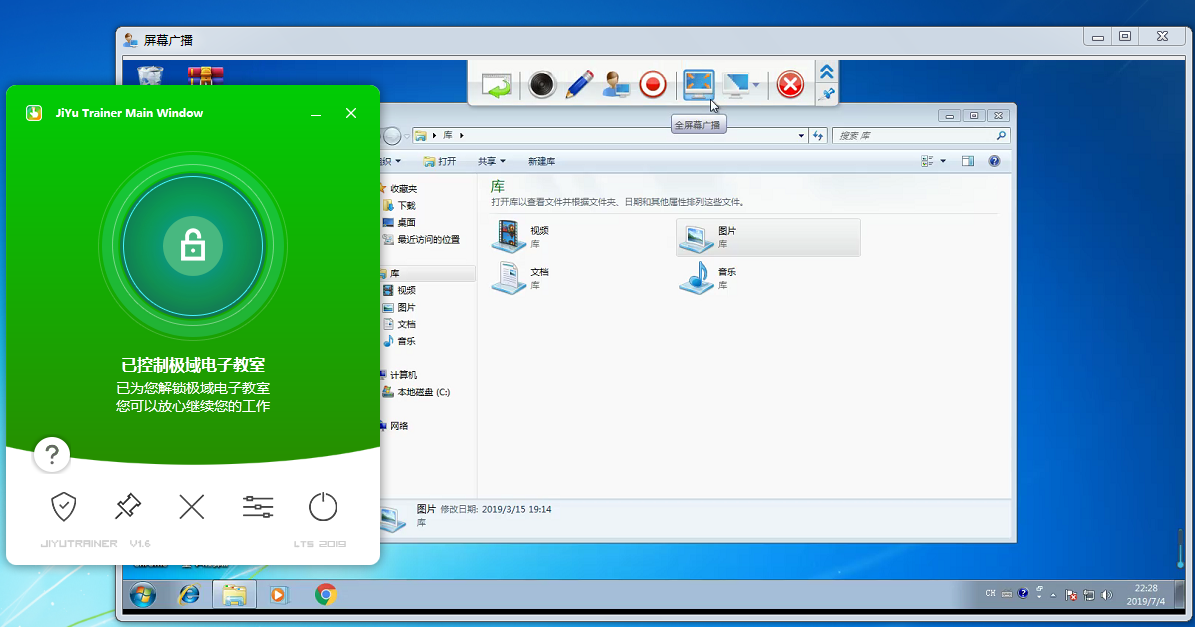 重放攻击版(极域是亮的时候可以远程操作)
提取码:mfkork。
第二款 再见极域
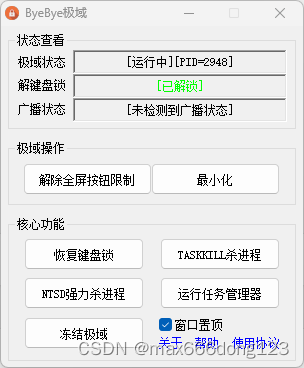
下载地址
提取码:9ec7pw。
第三款 解除控制
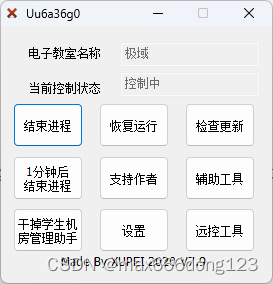
下载地址
提取码:t2qjuw
版权声明:本文内容由互联网用户自发贡献,该文观点仅代表作者本人。本站仅提供信息存储空间服务,不拥有所有权,不承担相关法律责任。如发现本站有涉嫌侵权/违法违规的内容,请联系我们,一经查实,本站将立刻删除。
如需转载请保留出处:https://51itzy.com/kjqy/17789.html