
再次观看Vue教程,重新总结
1. Vue的入门实例
工具:vscode 使用node安装插件 包括vue
// 创建项目 // 初始化node npm init -y // 安装vue npm i vue 讯享网
讯享网<!DOCTYPE html>
<html lang="en">
<head>
    <meta charset="UTF-8">
    <meta name="viewport" content="width=device-width, initial-scale=1.0">
    <meta http-equiv="X-UA-Compatible" content="ie=edge">
    <title>Document</title>
</head>
<body>
    <div id="app">
        {


  { message }}
    </div>

    <script src="./node_modules/vue/dist/vue.js"></script>
    <script>
        const app = new Vue({
            el: '#app',
            data: {
                message: 'Hello Vue'
            }
        })
    </script>

</body>
</html>
2. 双向数据绑定 v-model
<div id="app"> {


  { message }} <br> <input type="text" v-model="message"> </div> <script src="./node_modules/vue/dist/vue.js"></script> <script> const app = new Vue({ el: '#app', data: { message: 'Hello Vue' } }) </script>
3. 字符串拼接js与vue操作对比
document
讯享网<div id="demo"> <input type="text" id="firstName" name="firstName" value="孙"><br> <input type="text" id="lastName" name="lastName" value="悟空"><br> 结果:<p id="fullName">孙悟空</p> </div> <script> var firstName = document.getElementById("firstName") var lastName = document.getElementById("lastName") var fullName = document.getElementById("fullName") // 监听事件 firstName.addEventListener('input',handleTextInput) lastName.addEventListener("input",handleTextInput) function handleTextInput(){ fullName.innerHTML = firstName.value + lastName.value } </script>
vue
<div id="app"> <input type="text" name="firstName" v-model="firstName"><br> <input type="text" name="lastName" v-model="lastName"><br> 结果:{


  { firstName+lastName }} </div> <script src="./node_modules/vue/dist/vue.js"></script> <script> const app = new Vue({ el: '#app', data: { firstName: '孙', lastName: '悟空' } }) </script>
4. v-on注册事件 methods
讯享网<div id="app"> <input type="text" v-model="number"> <button v-on:click="increment">增加</button> </div> <script src="./node_modules/vue/dist/vue.js"></script> <script> const app = new Vue({ el: '#app', data: { number: 0 }, methods:{ increment: function(){ this.number++ } } }) </script>
5. 商品价格小案例
<div id="app"> 价格:<input type="text" v-model="price"><br> <button v-on:click="count=count-1<0?0:count-1">-</button> {


  { count }} <button v-on:click="increment">+</button><br> 总价:{


  { price * count }} </div> <script src="./node_modules/vue/dist/vue.js"></script> <script> const app = new Vue({ el: '#app', data: { price: 0, count: 0 }, methods:{ increment: function(){ this.count++ } } }) </script>
6. v-for、v-model、@keydown.enter、v-bind、@click指令的综合应用
讯享网<!DOCTYPE html>
<html lang="en">
<head>
<meta charset="UTF-8">
<meta name="viewport" content="width=device-width, initial-scale=1.0">
<meta http-equiv="X-UA-Compatible" content="ie=edge">
<title>Document</title>
<style>
.done {
text-decoration: line-through;
color: red;
}
</style>
</head>
<body>
<div id="app">
<h1>Todo小案例</h1>
<p>{
{ todos.filter(item => !item.done).length }} of {
{ todos.length }} remaining [archive]</p> <p v-for="(item,index) in todos"> <input type="checkbox" v-model="item.done" > <span v-bind:class="{ done: item.done}">{
{ item.title }}</span>
<input type="button" @click="removeTodo(index)" value="×">
</p>
<input type="text" @keydown.enter="inrementTodo" v-model="todoText">
<input type="button" @click="inrementTodo" value="添加">
</div>
<script src="./node_modules/vue/dist/vue.js"></script>
<script>
const todos = [
{
id: 1,
title: 'build an Angular JS app',
done: true
},
{
id: 2,
title: '吃饭',
done: true
},
{
id: 3,
title: '睡觉',
done: true
},
{
id: 4,
title: '打豆豆',
done: true
}
]
const app = new Vue({
el: '#app',
data: {
todos: todos,
todoText: ''
},
methods:{
inrementTodo(){
const todoText = this.todoText.trim()
if(!todoText.length){
return
}
this.todos.push({
id: this.todos[todos.length-1].id+1,
title: todoText
})
// 添加完后清空
this.todoText = ''
},
removeTodo(index){
const todos = this.todos
todos.splice(index,1)
}
}
})
</script>
</body>
</html>
7. vue实例创建
new Vue({ // el: document.getElementById('app') el: '#app' }) == // .$mount更像是动作意图 new Vue({ }).$mount('#app')8. v-once 一次性 以后不会改变它
讯享网<h1 v-once>{


  { message }}</h1>
9. v-html 脚本
<div> {


  { rawHtml }}
</div>

<!-- 渲染 -->
<div v-html="rawHtml">

</div>


const app = new Vue({
    el: '#app',
    data: {
        rawHtml: '<h1>Hello</h1>'
    }
})
10. v-bind 绑定参数
讯享网<div id="app"> <p v-for="item in todos"> <!-- item.id和{


  { item.title }}取值方式一样的 v-bind:href="item.id": 标签属性标定 {


  { item.title }}:标签文本绑定 --> <!-- <a v-bind:href="item.id">{


  { item.title }}</a> --> <a v-bind:href="'/todos?id='+item.id">{


  { item.title }}</a> </p> </div> <script src="./node_modules/vue/dist/vue.js"></script> <script> const todos = [ { id: 1, title: '唐僧' }, { id: 2, title: '孙悟空' }, { id: 3, title: '八戒' }, { id: 4, title: '沙僧' } ] const app = new Vue({ el: '#app', data: { todos: todos }, methods: { } }) </script>
11. v-if
<input type="checkbox" v-model="seen"> <div class="box" v-if="seen"> </div>12. 总结指令
- v-if 条件渲染
- v-for 列表渲染
- v-on 注册事件
- v-bind 属性绑定
- v-once 只绑定一次
- v-html 绑定输出html
- v-on:click.prevent 阻止默认事件的发生
- .filter过滤器
- .some()
- .every()
13. 官方综合案例TodoMVC
1) 插件
- node
- vue
- browser-sync npm install --save-dev browser-sync 将包装在项目中 (--save-dev)
2) 资源安装指令

3) 别名

4) 所要实现的功能
- No todos
- New todo
- Mark all as complete
- Item
- Editing
- Counter
- Clear completed button
- Persistence
- Routing
5) 基本入口

6) 渲染列表以及隐藏footer
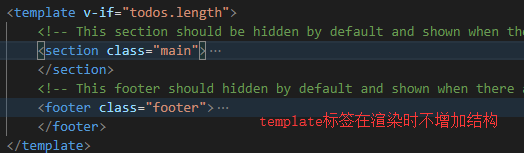
讯享网<li v-for="item in todos"> <div class="view"> <input class="toggle" type="checkbox"> <label>{


  { item.name }}</label> <button class="destroy"></button> </div> <input class="edit" value="Rule the web"> </li>
7) 添加、清除、自动聚焦
<!doctype html>
<html lang="en">
	<head>
		<meta charset="utf-8">
		<meta name="viewport" content="width=device-width, initial-scale=1">
		<title>Template • TodoMVC</title>
		<link rel="stylesheet" href="./node_modules/todomvc-common/base.css">
		<link rel="stylesheet" href="./node_modules/todomvc-app-css/index.css">
		<!-- CSS overrides - remove if you don't need it -->
		<link rel="stylesheet" href="./css/app.css">
	</head>
	<body>
		<section class="todoapp" id="app">
			<header class="header">
				<h1>{


  { message }}</h1> <input class="new-todo" @keydown.enter="handleTodoAdd" placeholder="What needs to be done?" autofocus> </header> <template v-if="todos.length"> <!-- This section should be hidden by default and shown when there are todos --> <section class="main"> <input @change="handleToggleAll" id="toggle-all" class="toggle-all" type="checkbox"> <label for="toggle-all">Mark all as complete</label> <ul class="todo-list"> <li v-for="(item,index) in todos" v-bind:class="{completed: item.completed,editing: currentEditing === item}"> <div class="view"> <input class="toggle" type="checkbox" v-model="item.completed"> <label @dblclick="handleGetEditingDblclick(item)">{


  { item.name }}</label> <button class="destroy" @click="remove(index)"></button> </div> <input class="edit" @keydown.enter="handleSaveTodo(item,index,$event)" @blur="handleSaveTodo(item,index,$event)" @keydown.esc="handleESC" :value="item.name"> </li> </ul> </section> <!-- This footer should hidden by default and shown when there are todos --> <footer class="footer"> <!-- This should be `0 items left` by default --> <span class="todo-count"><strong>{


  { todos.filter(item => !item.completed).length }}</strong> item left</span>
					<!-- Remove this if you don't implement routing -->
					<ul class="filters">
						<li>
							<a class="selected" href="#/">All</a>
						</li>
						<li>
							<a href="#/active">Active</a>
						</li>
						<li>
							<a href="#/completed">Completed</a>
						</li>
					</ul>
					<!-- Hidden if no completed items are left ↓ -->
					<button
						class="clear-completed"
						v-if="todos.some(item => item.completed)"
						@click="handleClearAllDone">
						Clear completed</button>
				</footer>
			</template>
		</section>
		<footer class="info">
			<p>Double-click to edit a todo</p>
			<!-- Remove the below line ↓ -->
			<p>Template by <a href="http://sindresorhus.com">Sindre Sorhus</a></p>
			<!-- Change this out with your name and url ↓ -->
			<p>Created by <a href="http://todomvc.com">you</a></p>
			<p>Part of <a href="http://todomvc.com">TodoMVC</a></p>
		</footer>
		<!-- Scripts here. Don't remove ↓ -->
		<script src="./node_modules/todomvc-common/base.js"></script>
		<!-- 引入vue -->
		<script src="./node_modules/vue/dist/vue.js"></script>
		<script src="./js/app.js"></script>
	</body>
</html>
讯享网;(function(){ const todos = [ { id: 1, name: '唐僧', completed: false }, { id: 2, name: '悟空', completed: false }, { id: 3, name: '八戒', completed: false }, { id: 4, name: '沙僧', completed: false } ] const app = new Vue({ data: { message: 'yan', todos: todos, currentEditing: null }, methods: { // 这是添加todo方法 handleTodoAdd(e) { const target = e.target // .trim() 去除空格的方法 const value = target.value.trim() // 首先判断是否值是否为空 if(!value.length){ return } // 判断collection中是否还有数据 如果使用const 此为常量的意思,下面就无法改变,因此在这使用let let id = 0 if(!this.todos.length){ id = 0 }else{ id = this.todos[this.todos.length-1].id+1 } // push到集合中 this.todos.push({ id: id, name: value, completed: false }) // 然后清空 target.value = '' }, // 当还想要event事件时,参数里可以添加 $event remove(index){ if(!this.todos.length){ return } // 删除 this.todos.splice(index,1) }, // 全选方法 handleToggleAll(e){ const checked = e.target.checked this.todos.forEach(item => { item.completed = checked }); }, // 双击方法 handleGetEditingDblclick(item){ this.currentEditing = item }, // 双击后改变方法 handleSaveTodo(item,index,e){ const target = e.target const value = target.value.trim() if(!value.length){ this.todos.splice(index,1) }else{ item.name = value this.currentEditing = null } }, // esc取消方法 handleESC(){ this.currentEditing = null }, // 清除所有已完成方法 handleClearAllDone(){ // 不要使用foreach去删除,会导致索引混乱,因此使用for循环 for(let i=0;i<this.todos.length;i++){ if(todos[i].completed){ this.todos.splice(i,1) i-- } } } } }).$mount('#app') })()
13. v-text和v-cloak
<h1 v-text="message"></h1>正常情况下使用{ { message }},浏览器在渲染的时候首先出现{ { message }},在引入vue后,才渲染出数据
但是这样的话,显示比较麻烦,因此又有v-cloak指令 先不显示{ { message }},渲染之后才显示
讯享网<style> [v-cloak]{ display: none; } </style> <div id="app" v-cloak> <h1>{


  { message }}</h1> </div>
14. v-if和v-show
- v-if:根据条件渲染不渲染
- v-show:根据条件显示不显示
15. v-pre
<span v-pre>{


  { this will not be compiled }}</span> // 显示的是{


  { this will not be compiled }} <span v-pre>{


  {msg}}</span>      // 即使data里面定义了msg这里仍然是显示的{


  {msg}}
16. 计算属性 避免重复调用
计算属性不是方法,只能当作属性使用
讯享网computed: { remianingCounts() { return this.todos.filter(item => !item.completed).length } // 该完整的写法 会自动调用其中的get方法 remianingCounts() { get(){ return this.todos.filter(item => !item.completed).length }, set(){ console.log('123') } } }
17. 本地数据持久化localstorage
todos: JSON.parse(window.localStorage.getItem(todos) || '[]'),讯享网windows.localStorage.setItem('todos',JSON.stringify(todos))
18. watch
watch: { // 监视todos的改变,当todos发生改变的时候做业务定制处理 // 引用类型只能监视一层,无法监视内部成员的子成员的改变 todos: { // 党建是todos发生改变的时候,深度监视 handler() { window.localStorage.setItem('todos',JSON.stringify(this.todos)) }, deep: true } },19. 路由切换
讯享网// 计算属性 filterTodos(){ // all return todas // active todos.filter(item => !item.completed) // completed todos.filter(item => item.completed) switch (this.filterText) { case 'active': return this.todos.filter(item => !item.completed) break; case 'completed': return this.todos.filter(item => item.completed) break; default: return this.todos break; } }
20. 高亮
<ul class="filters"> <li> <a :class="{selected: filterText === ''}" href="#/">All</a> </li> <li> <a :class="{selected: filterText === 'active'}" href="#/active">Active</a> </li> <li> <a :class="{selected: filterText === 'completed'}" href="#/completed">Completed</a> </li> </ul>21. 自定义语法
讯享网<script> // 注册一个全局自定义指令 v-focus Vue.directive('focus',{ // 当绑定的元素插入到Dom中时 // el参数就是作用该指令的DOM元素 inserted: function(el){ // 聚焦元素 el.focus() } }) </script>
当需要操作底层的dom元素时需要使用自定义指令
- 全局
- 局部
起名规则:
- 指令的名字前面避免上 v-
- 如果是驼峰起名,在使用时需要转换为小写并用 - 连接 例:autoFocus => v-auto-focus
指令的钩子函数
// 只调用一次,指令第一次绑定到元素时调用。在这里可以进行一次性的初始化设置 // bind钩子函数中拿不到父节点 bind(){ }, // 被绑定元素插入父节点时调用 (仅保证父节点存在,但不一定已**入文档中)。 inserted(){ }, // 所在组件的 VNode 更新时调用 update(){ }, // 指令所在组件的 VNode 及其子 VNode 全部更新后调用 componentUpdated(){ }, // 只调用一次,指令与元素解绑时调用 unbind() { }
例子: my-show
讯享网<!DOCTYPE html>
<html lang="en">
<head>
    <meta charset="UTF-8">
    <meta name="viewport" content="width=device-width, initial-scale=1.0">
    <title>自定义指令</title>
    <style>
        .box {
            width: 100px;
            height: 100px;
            background-color: yellow;
        }
    </style>
</head>
<body>
    <div id="app">
        <div id="box" class="box" v-my-show="seen">

        </div>
    </div>

    <script src="/node_modules/vue/dist/vue.js"></script>
    <script>
        Vue.directive('my-show',{
            bind(el,binding){
                if(binding.value){
                    el.style.display = 'block'
                }else{
                    el.style.display = 'none'
                }
            },
            inserted(){

            },
            update(){
                if(binding.value){
                    el.style.display = 'block'
                }else{
                    el.style.display = 'none'
                }
            },
            componentUpdated(){
                if(binding.value){
                    el.style.display = 'block'
                }else{
                    el.style.display = 'none'
                }
            },
            unbind(){

            }
        })

        const app = new Vue({
            el: '#app',
            date: {
                seen: true
            }
        })
    </script>
</body>
</html>
当需要同时使用bind和update钩子函数时,可简写
Vue.directive('color-swatch', function (el, binding) { el.style.backgroundColor = binding.value })22. 组件
组件化思想 封装视图
Element-ui npm i element-ui
例子:
讯享网<!DOCTYPE html>
<html lang="en">
<head>
    <meta charset="UTF-8">
    <meta name="viewport" content="width=device-width, initial-scale=1.0">
    <link rel="stylesheet" href="./node_modules/element-ui/lib/theme-chalk/index.css">
    <title>Document</title>
</head>
<body>
    <div id="app">
        <el-rate v-model="value3" show-text></el-rate>
    </div>

    <script src="node_modules/vue/dist/vue.js"></script>
    <script src="node_modules/element-ui/lib/index.js"></script>
    <script>
        const app = new Vue({
            el: '#app',
            data: {
                message: 'Hello Element',
                value3: null
            },

        })
    </script>
</body>
</html>
1) component基本使用
<div id="app"> <my-component></my-component> </div> <script src="node_modules/vue/dist/vue.js"></script> <script src="node_modules/element-ui/lib/index.js"></script> <script> // 1. 先定义(注册)组件 // 2. 使用 Vue.component('my-component',{ template: '<div>My Component</div>' }) const app = new Vue({ el: '#app', data: { }, }) </script>2) template
讯享网<!DOCTYPE html>
<html lang="en">
<head>
    <meta charset="UTF-8">
    <meta name="viewport" content="width=device-width, initial-scale=1.0">
    <link rel="stylesheet" href="./node_modules/element-ui/lib/theme-chalk/index.css">
    <title>Document</title>
</head>
<body>
<div id="app">
    <my-component></my-component>
</div>

<script src="node_modules/vue/dist/vue.js"></script>
<script src="node_modules/element-ui/lib/index.js"></script>
<script>
    // 1. 先定义(注册)组件
    // 2. 使用
    // 3. template
    // 4. 组件是独立的作用域,就像node中的javascript
    // 5. 组件其实是一个特殊的Vue实例,可以有自己的data、methods、computed、watch
    // 6. 组件的实例必须是方法
    Vue.component('my-component',{
        template: `
            <div>
                <div>My Component</div>
                <h2>{


  { message }}</h2>
            </div>
        `,
        data() {
            return {
                message: '我是内部组件'
            }
        }
    })

    const app = new Vue({
        el: '#app',
        data: {

        },

    })
</script>
</body>
</html>
3) 全局组件与局部组件
全局组件
Vue.component('global-1',{ template: ` <div> <h2>全局组件1</h2> <global-2></global-2> </div> `, data() { return { message: '我是内部组件' } } }) Vue.component('global-2',{ template: ` <h3>全局组件2</h3> `, })局部组件
讯享网Vue.component('global-1',{ template: ` <div> <h2>全局组件1</h2> <global-2></global-2> <hello></hello> </div> `, data() { return { message: '我是内部组件' } }, components: { // 组件名 hello: { template: ` <div>hello 局部组件</div> ` } } })
4) 组件的管理


5) 父子组件之间的通信
父传子 props prop是单向传递,子组件不能更改父组件传来的数据
Vue.component('global-1',{ template: ` <div> <h2>全局组件1</h2> <hello :abc="message"></hello> </div> `, data() { return { message: { id: 1, title: 'Hello' } } }, components: { // 组件名 hello: { template: ` <div>{


  { abc.title }}</div> `, props: ['abc'] } } })
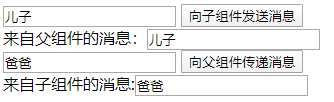
子传父 $emit() 子组件将修改的数据传入到父组件,让父组件来进行修改,这样可以很好的管理,不会出现数据乱改出错而无法定位
讯享网Vue.component('global-1',{ template: ` <div> <h2>全局组件1</h2> <hello :abc="message"></hello> </div> `, data() { return { message: { id: 1, title: 'Hello' } } }, components: { // 组件名 hello: { template: ` <div>{


  { abc.title }}</div> `, props: ['abc'], methods: { onChange(e){ const target = e.target const value = target.value.trim() this.$emit('abc',value) } } } } })


案例:
<!DOCTYPE html>
<html lang="en">
<head>
    <meta charset="UTF-8">
    <meta name="viewport" content="width=device-width, initial-scale=1.0">
    <title>Document</title>
</head>
<body>
    <div id="app">
        <input type="text" v-model="msgfromparents">
        <input type="button" @click="sendToChildren" value="向子组件发送消息">
        <children v-bind:message="tmpmsg" @func="getMsgFromSon"></children>
        来自子组件的消息:<input type="text" :value="msgFromSon">
    </div>

    <script src="./node_modules/vue/dist/vue.js"></script>
    <script src="./node_modules/vue-router/dist/vue-router.js"></script>

    <script>
        const children = {
            template: `
                <div>
                    来自父组件的消息:<input type="text" :value="message"><br>
                    <input type="text" v-model="msgfromchildren">
                    <input type="button" value="向父组件传递消息" @click="sendMsg">
                </div>
            `,
            data(){
                return{
                    msgfromchildren: ''
                }
            },
            props: ['message'],
            methods:{
                sendMsg(){
                    this.$emit('func',this.msgfromchildren)
                }
            }

        }

        const app = new Vue({
            el: '#app',
            data:{
                msgFromSon: '',
                msgfromparents: '',
                tmpmsg: ''
            },
            methods:{
                sendToChildren(){
                    console.log(this.msgfromparents)
                    this.tmpmsg = this.msgfromparents
                },
                getMsgFromSon(data){
                    this.msgFromSon = data
                    // console.log(this.msgFromSon);

                }

            },
            routes:[

            ],
            components:{
                children: children
            },
        })
    </script>
</body>
</html>
23. router
前端路由是通过hash来进行跳转的
1) vue-router npm i vue-router
入门例子:
讯享网<!DOCTYPE html>
<html lang="en">
<head>
    <meta charset="UTF-8">
    <meta name="viewport" content="width=device-width, initial-scale=1.0">
    <title>路由的基本使用</title>
</head>
<body>
    <div id="app">
        <a href="#/login">登录</a>
        <a href="#/register">注册</a>
        <router-view></router-view>
    </div>

    <script src="./node_modules/vue/dist/vue.js"></script>
    <script src="./node_modules/vue-router/dist/vue-router.js"></script>
    <script>
        // 路由中的组件是否必须是对象
        const login = {
            template: '<h1>登录组件</h1>'
        }
        // 而不能这样使用
        // Vue.component('login',{
        //     template: '<h1>登录组件</h1>'
        // })

        const register = {
            template: '<h1>注册组件</h1>'
        }

        const routerObj = new VueRouter({
            routes: [
                {
                    path: '/login',
                    component: login
                },
                {
                    path: '/register',
                    component: register
                }
            ]
        })


        const app = new Vue({
            el: '#app',
            data: {

            },
            router: routerObj
        })
    </script>

</body>
</html>

2) router-link使用
使用此标签是为了去掉hash中的#
<router-link to="/login">登录</router-link>3) redirect重定向解决路由不明确问题
讯享网const routerObj = new VueRouter({ routes: [ { path: '/', // 页面重定向 redirect: '/login' }, { path: '/login', component: login }, { path: '/register', component: register } ] })
4) 动画简单须知
<style> .v-enter, .v-leave-to{ opacity: 0; transform: translateX(140px); } .v-enter-active, .v-leave-active{ transition: all 0.5s ease; } </style> <transition model="out-in"> <router-view></router-view> </transition>5) 路由中的参数
方式一:字符串传参
讯享网<router-link to="/login?id=1&name=yan">登录</router-link> // 路由中的组件是否必须是对象 const login = { template: '<h1>登录组件 -- {


  { $route.query.id }} -- {


  { $route.query.name }}</h1>', data(){ return{ } }, // 生命周期钩子函数 created(){ console.log(this.$route) } }
方式二:restful规则
<router-link to="/login/12/yan">登录</router-link> const login = { template: '<h1>登录组件 -- {


  { $route.params.id }} -- {


  { $route.params.name }}</h1>', data(){ return{ } }, // 生命周期钩子函数 created(){ console.log(this.$route) } } const register = { template: '<h1>注册组件</h1>' } const routerObj = new VueRouter({ routes: [ { path: '/', // 页面重定向 redirect: '/login' }, { path: '/login/:id/:name', component: login }, { path: '/register', component: register } ] })
6) 路由的嵌套 children属性的使用
讯享网<!DOCTYPE html>
<html lang="en">
<head>
    <meta charset="UTF-8">
    <meta name="viewport" content="width=device-width, initial-scale=1.0">
    <title>路由的基本使用</title>
<style>
    .v-enter,
    .v-leave-to{
        opacity: 0;
        transform: translateX(140px);
    }

    .v-enter-active,
    .v-leave-active{
        transition: all 0.5s ease;
    }
</style>
</head>
<body>
    <div id="app">
        <router-link to="/account">Account</router-link>
        <router-view></router-view>
    </div>

    <!-- 主路由 -->
    <template id="account">
        <div>
            <h1>Account</h1>
            <router-link to="/account/login/12/yan">登录</router-link>
            <router-link to="/account/register">注册</router-link>
            <transition model="out-in">
                <router-view></router-view>
            </transition>
        </div>
    </template>

    <script src="./node_modules/vue/dist/vue.js"></script>
    <script src="./node_modules/vue-router/dist/vue-router.js"></script>

    <script>
        const account = {
            template: '#account',
        }

        // 路由中的组件是否必须是对象
        const login = {
            template: '<h1>登录组件 -- {


  { $route.params.id }} -- {


  { $route.params.name }}</h1>',
            data(){
                return{

                }
            },
            // 生命周期钩子函数
            created(){
                console.log(this.$route)
            }
        }

        const register = {
            template: '<h1>注册组件</h1>'
        }

        const routerObj = new VueRouter({
            routes: [
                {
                    path: '/',
                    // 页面重定向
                    redirect: '/account'
                },
                {
                    path: '/account',
                    component: account,
                    children: [
                        {
                            path: 'login/:id/:name',
                            component: login
                        },
                        {
                            path: 'register',
                            component: register
                        }
                    ]
                }
            ]
        })


        const app = new Vue({
            el: '#app',
            data: {

            },
            router: routerObj
        })
    </script>

</body>
</html>
24. 视图布局

<!DOCTYPE html>
<html lang="en">
<head>
    <meta charset="UTF-8">
    <meta name="viewport" content="width=device-width, initial-scale=1.0">
    <title>路由的基本使用</title>
    <style>
        .header{
            background-color: yellow;
            height: 80px;
        }

        h1{
            margin: 0;
            padding: 0;
            font-size: 16px
        }

        .container{
            display: flex;
            height: 800px
        }

        .left{
            background-color: red;
            flex: 2;
        }

        .main{
            background-color: green;
            flex: 8
        }
    </style>
</head>
<body>
    <div id="app">
        <router-view></router-view>
        <div class="container">
            <router-view name="left"></router-view>
            <router-view name="main"></router-view>
        </div>

    </div>

    <script src="./node_modules/vue/dist/vue.js"></script>
    <script src="./node_modules/vue-router/dist/vue-router.js"></script>

    <script>
        // head组件   -- 头部
        const header = {
            template: '<h1 class="header">视图头部</h1>'
        }

        // left组件   -- 左边
        const leftBox = {
            template: '<h1 class="left">视图左部</h1>'
        }

        // main组件   -- 主题部分
        const mainBox = {
            template: '<h1 class="main">视图主体部分</h1>'
        }

        const routerObj = new VueRouter({
            routes: [
                {
                    path: '/',
                    components: {
                        'default': header,
                        'left': leftBox,
                        'main': mainBox
                    }
                }
            ]
        })

        const app = new Vue({
            el: '#app',
            data: {

            },
            router: routerObj
        })
    </script>

</body>
</html>
25. nrm
解决npm下载慢的问题
npm i nrm -g 全局安装
nrm ls 查看
nrm use npm 或者 nrm use taobao
26. webpack
1) 网页常见静态资源
- JS:.js .jsx .coffee .ts(TypeScript)
- CSS:.css .less .scss
- Images: .jpg .png .gif .bmp .svg
- Fonts:.svg .ttf .eot .woff .woff2
- 模板文件:.ejs .jade
2) webpack npm i webpack webpack-cli
前端的一个项目构建工具,基于node.js开发
作用:
- 处理js文件的互相依赖关系
- 处理js的兼容问题,把高级的浏览器不识别的语法转换为低级的
1) 入门案例

结合es6语法管理资源头文件

webpack.config.js 使用npx webpack 或者 webpack构建项目

讯享网let path = require('path') module.exports = { // 模式 development和production mode: 'development', // 入口 entry: './src/main.js', output: { // 打包后的文件名 filename: 'bundle.js', // 将路径变为绝对路径 path: path.resolve(__dirname,'dist'), } }
2) webpack-dev-server工具使用自动打包
使用方式:
- node nodemon
- webpack webpack-dev-server
全局安装:可直接使用webpack
因此需要在package.json配置简化 npm run dev
"scripts": { "test": "echo \"Error: no test specified\" && exit 1", "dev": "webpack-dev-server" },托管给服务器更改js出现页面无法更新的情况注意
讯享网<script src="/bundle.js"></script>
webpack-dev-server常用命令参数:
方式一:推荐
"dev": "webpack-dev-server --open --port 3000 --contenBase src --hot"方式二:配置
讯享网const path = require('path') const webpack = require('webpack') // 热更新-2 module.exports = { // 模式 development和production // mode: 'development', // 入口 entry: './src/main.js', output: { // 打包后的文件名 filename: 'bundle.js', // 将路径变为绝对路径 path: path.resolve(__dirname,'./dist'), }, devServer:{ open: true, // 自动打开浏览器 port: 3000, // 设置启动端口 contentBase: 'src', // 指定托管项目的根目录 hot: true // 热更新-1 }, plugins:[ new webpack.HotModuleReplacementPlugin() // 热更新-3 ] }
3) html-webpack-plugin
可以帮省去bundle.js的路径的引用
const path = require('path')
const webpack = require('webpack') // 热更新-2
const htmlWebPack = require('html-webpack-plugin')

module.exports = {
    // 模式  development和production
    // mode: 'development',
    // 入口
    entry: './src/main.js',
    output: {
        // 打包后的文件名
        filename: 'bundle.js',
        // 将路径变为绝对路径
        path: path.resolve(__dirname,'./dist'),
    },
    devServer:{
        open: true,   // 自动打开浏览器
        port: 3000,   // 设置启动端口
        contentBase: 'src',  // 指定托管项目的根目录
        hot: true   // 热更新-1
    },
    plugins:[
        new webpack.HotModuleReplacementPlugin(), // 热更新-3
        new htmlWebPack({  // 创建生成一个在内存中生成的html
            // 指定模板页面, 以后会根据指定的页面路径去生成内存中的页面
            template: path.join(__dirname,'./src/index.html'),
            // 指定生成的页面的名称
            filename: 'index123.html'
        })
    ]

}
4) loader管理第三方css
npm i style-loader css-loader :处理非js文件的引入问题
且在webpack.config.js中配置module节点加载第三方配置
讯享网module:{ rules: [ { test: /\.css$/,use:['style-loader','css-loader'] }, ] }
npm i less-loader less
npm i sass-loader sass
npm i url-loader file-loader
module:{ rules: [ { test: /\.css$/,use:['style-loader','css-loader'] }, { test: /\.less$/,use:['style-loader','css-loader','less-loader'] }, { test: /\.scss$/,use:['style-loader','css-loader','less-loader','sass-loader'] }, // limit给定的值是图片的大小,若引用的图片大于或等于limit值,则不会转为base64格式 // name后面的参数是保持图片的名字不变 8为hash防止重命名 { test: /\.(jpg|png|gif|bmp|jpeg)$/,use: 'url-loader?limit=7631&name=[hash:8]-[name].[ext]' }, // 字体文件 { test: /\.(ttf|eot|svg|woff|woff2)$/,use: 'url-loader' } ] }JSON中不能注释
5) babel配置
将高级语法转换为低级语法

注意:babel版本的对应
- babel-loader 8.x对应babel-core 7.x
- babel-loader 7.x对应babel-core 6.x

27. Vue中render
讯享网<!DOCTYPE html>
<html lang="en">
<head>
    <meta charset="UTF-8">
    <meta name="viewport" content="width=device-width, initial-scale=1.0">
    <title>Document</title>
    <!-- 网页中不推荐此处引入静态资源 -->
    <!-- <script src="../node_modules/jquery/dist/jquery.js"></script> -->
    <!-- <script src="/bundle.js"></script> -->
</head>
<body>
    <div id="app">
        <login></login>
    </div>

    <template id="login">
        <h1>这是登录组件</h1>
    </template>

    <script src="../node_modules/vue/dist/vue.js"></script>
    <script>
        var login = {
            template: '#login'
        }

        const app = new Vue({
            el: '#app',
            data:{},
            components:{

            },
            // createElements是一个方法,调用它能够把指定的组件模板渲染为html
            render:function(createElements){
                // 返回的结果会替换el指定的容器
                return createElements(login)
            }
        })
    </script>

</body>
</html>
28. vue与webpack
1) 包的查找规则:
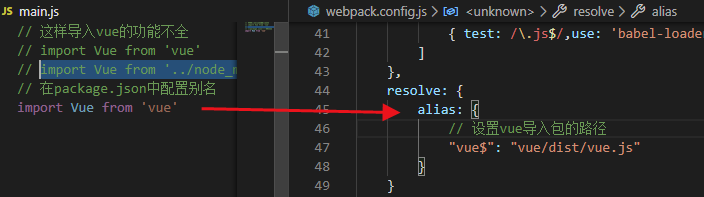
import Vue from 'vue'
这样的功能不全(runtime-only)
因此import时候需要导入module里面的
讯享网import Vue from '../node_modules/vue/dist/vue.js'
2) .vue第三方包且依赖插件
npm i vue-loader vue-template-compiler // 依赖的插件 在webpack.config.js中存在 const vueLoaderPlugin = require('vue-loader/lib/plugin')匹配规则:
讯享网{ test: /\.vue$/,use: 'vue-loader' }

29. export default与export
暴露对象给外界
需要安装插件 npm i babel-register
30. webpack与vue-router

抽离路由模板:router.js
import VueRouter from 'vue-router' var router = new VueRouter({ routes: [ ] }) export default router31. style样式中的scope和lang
讯享网// 本组件中有效 <style scope> </style> // 指定样式格式 <style lang="scss"> </style>
32. Mint-UI与Element-UI
- mint-ui:移动端
- element-ui: PC端
mint-ui
npm i mint-ui // 引入全部组件 import Mint from 'mint-ui' import Vue from 'vue' vue.use(Mint) // 按需导入组件 import {Cell,Checklist} from 'minu-ui' Vue.use(Cell.name,Cell) Vue.use(Checklist.name,Checklist) 按需导入需要注意安装插件
讯享网npm i babel-plugin-component // 在babelrc配置 "plugins": ["transform-runtime", "component", [ { "libraryName": "mint-ui", "style": true }] ]
1) 入门实例

2) mui与bootstrap一样,不依赖于vue等前端框架,不存在技术捆绑
主要需要引入:

33. 大型商场项目
1) 项目资源展示
2) 页面布局

3) git管理项目
.gitignore、README.md和开源协议 // 在PC端配置全局属性 git config --global user.email "邮箱" git config --global user.name "用户名" // git在本地 git init git status 展示所有文件状态 git add . 添加 git commit -m "init my project" // 将本地代码上传到git中 // 在你的git仓库中创建空项目 git remote add origin https://github.com/yanshiwu/Vue_Mall.git git push -u origin mastervscode插件快速提交代码: 自带

4) 页面图标的修改icon,使用mui中的icon和icon-extra 导入样式 字体样式的导入
router-link-active
5) 路由高亮
webpack使用路由,加载vue-router且使用Vue(VueRouter)
6) tabbar切换
7) 轮播图
第一步:轮播图
第二步:加载数据
vue-resource
8) 九宫格
本地图片显示[object-module]问题
解决办法:转载 https://blog.csdn.net/simper_boy/article/details/ 作者:Smirky-boy
10) tabbar切换时的动画
11) ES6中的Promise


使用场景:
- 前面有失败了就终止执行 使用catch捕获异常
- 前面失败不影响后面的执行
使用.then(),前面失败了不影响后面的结果
11) NewsList路由及其页面
- 页面
- 数据获取
- 页面中时间的处理,需要定义全局过滤器 且使用moment插件
讯享网// 需要使用moment 时间格式插件 import moment from 'moment' // 定义全局过滤器 Vue.filter('dateFormat',function(dataStr,pattern="yyyy-MM-dd HH:mm:ss"){ return moment(dataStr).format(pattern) }) <span>发表时间:{


  { item.add_time | dateFormat('YYYY-MM-DD') }}</span>
- 新闻列表中的跳转
- 评论展示
- 加载更多
- 添加评论
12) 图片路由 来自复制文档
绘制 图片列表 组件页面结构并美化样
- 需要借助于 MUI 中的 tab-top-webview-main.html
- 需要把 slider 区域的 mui-fullscreen 类去掉
- 滑动条无法正常触发滑动,通过检查官方文档,发现这是JS组件,需要被初始化一下:
- 导入 mui.js
- 调用官方提供的 方式 去初始化:
mui('.mui-scroll-wrapper').scroll({ deceleration: 0.0005 //flick 减速系数,系数越大,滚动速度越慢,滚动距离越小,默认值0.0006 });- 我们在初始化 滑动条 的时候,导入的 mui.js ,但是,控制台报错:
Uncaught TypeError: 'caller', 'callee', and 'arguments' properties may not be accessed on strict mode
- 经过我们合理的推测,觉得,可能是 mui.js 中用到了 'caller', 'callee', and 'arguments' 东西,但是, webpack 打包好的 bundle.js 中,默认是启用严格模式的,所以,这两者冲突了;
- 解决方案: 1. 把 mui.js 中的 非严格 模式的代码改掉;但是不现实; 2. 把 webpack 打包时候的严格模式禁用掉;
- 最终,我们选择了 plan B 移除严格模式: 使用这个插件 babel-plugin-transform-remove-strict-mode
- 刚进入 图片分享页面的时候, 滑动条无法正常工作, 经过我们认真的分析,发现, 如果要初始化 滑动条,必须要等 DOM 元素加载完毕,所以,我们把 初始化 滑动条 的代码,搬到了 mounted 生命周期函数中;
- 当 滑动条 调试OK后,发现, tabbar 无法正常工作了,这时候,我们需要把 每个 tabbar 按钮的 样式中
mui-tab-item重新改一下名字; - 获取所有分类,并渲染 分类列表;
制作图片列表区域
- 图片列表需要使用懒加载技术,我们可以使用 Mint-UI 提供的现成的 组件
lazy-load - 根据
lazy-load的使用文档,尝试使用 - 渲染图片列表数据
实现了 图片列表的 懒加载改造和 样式美化
实现了 点击图片 跳转到 图片详情页面
- 在改造 li 成 router-link 的时候,需要使用 tag 属性指定要渲染为 哪种元素
实现 详情页面的布局和美化,同时获取数据渲染页面
实现 图片详情中 缩略图的功能
- 使用 插件 vue-preview 这个缩略图插件
- 获取到所有的图片列表,然后使用 v-for 指令渲染数据
- 注意: img标签上的class不能去掉
- 注意: 每个 图片数据对象中,必须有 w 和 h 属性
13) 商品列表
手机上调试
14) Vuex


剩下的差不多。。。
版权声明:本文内容由互联网用户自发贡献,该文观点仅代表作者本人。本站仅提供信息存储空间服务,不拥有所有权,不承担相关法律责任。如发现本站有涉嫌侵权/违法违规的内容,请联系我们,一经查实,本站将立刻删除。
如需转载请保留出处:https://51itzy.com/kjqy/17656.html