
<p>在 CSS 中,盒模型的浮动是一种用于控制元素布局的属性。<br /> <br /> 一、浮动的作用<br /> 实现多栏布局:可以让元素向左或向右浮动,从而使多个元素在同一行显示,实现类似报纸排版的多栏布局效果。</p> 讯享网
环绕效果:浮动元素会脱离正常的文档流,使得周围的非浮动元素围绕它进行布局。
打破常规布局顺序:通常情况下,HTML 元素在文档流中是按照先后顺序依次排列的。但通过设置浮动,可以让元素脱离原来的排列顺序,出现在它原本不应该出现的位置上,从而实现一些特殊的布局需求。
二、语法
使用 float 属性来设置元素的浮动方向,可选值有 left (向左浮动)、 right (向右浮动)和 none (不浮动,默认值)。
例子:
<!DOCTYPE html>
<html lang=“en”>
<head>
<meta charset=“UTF-8”>
<meta name=“viewport” content=“width=device-width, initial-scale=1.0”>
<title>Document</title>
<style>
.box {
width: 100px;
height: 100px;
background-color: blue;
}
.float-left {
float: left;
}
.float-right {
float: right;
}
</style>
</head>
<body>
<div class=“box float-left”>左浮动</div>
<div class=“box float-right”>右浮动</div>
</body>
</html>
运行结果:

在 CSS 中,当使用浮动属性时,可能会导致父元素高度塌陷等问题,这时就需要进行清除浮动。以下是几种常见的清除浮动的方法:
一、使用额外元素并设置 clear 属性
在浮动元素之后添加一个空的 <div> 元素,并设置其 clear 属性为 both ,以清除浮动的影响。
<head>
<style>
.box {
width: 100px;
height: 100px;
background-color: blue;
float: left;
}
</style>
</head><body>
<div class=“box”></div>
<div style=“ clear: both;”></div>
</body></html>
.parent {
overflow: auto; /* 或者 hidden、scroll /
}
.parent {
/ 其他样式 */
}.parent::after {
content: “”;
display: block;
clear: both;
}
例子:
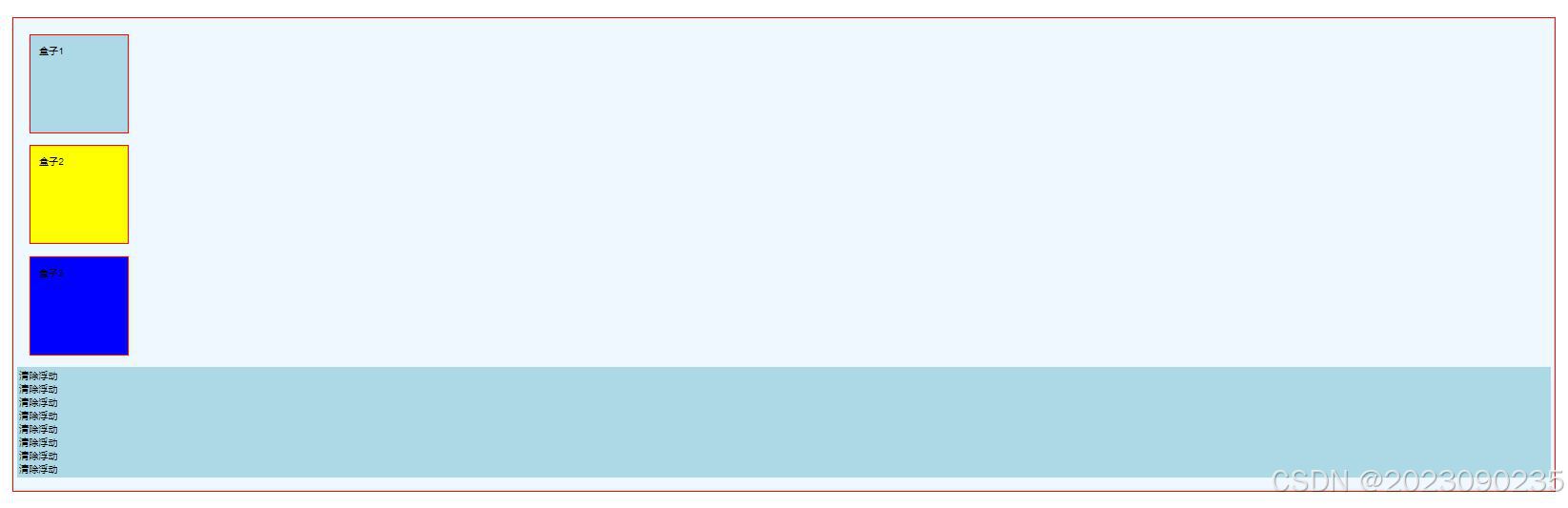
这是最原本的代码,未做任何设置
<!DOCTYPE html>
<html>
<head>
<style>
body{
margin: 15px;
font-family: Arial;
font-size: 12px;
}
.father{
background-color: aliceblue;
border: 2px red solid;
padding: 5px;
}
.father div{
padding: 10px;
margin: 15px;
border: 2px red solid;
background-color: aqua;
}
.father p {
border: 2px lightblue solid;
background-color: lightblue;
}
#float1 {
width: 100px;
height: 100px;
background-color: lightblue;
}
#float2{
width: 100px;
height: 100px;
background-color: yellow;
}
#float3 {
width: 100px;
height: 100px;
background-color: blue;
}
</style>
</head>
<body>
<div class=“father”>
<div id=“float1”>盒子1</div>
<div id=“float2”>盒子2</div>
<div id=“float3”>盒子3</div>
<p>清除浮动<br>
清除浮动<br>
清除浮动<br>
清除浮动<br>
清除浮动<br>
清除浮动<br>
清除浮动<br>
清除浮动<br>
</p>
</div>
</body>
</html>

运行结果:
下面将把盒子1、2设置为向左浮动,盒子3设置为向右浮动
代码如下:
<!DOCTYPE html>
<html>
<head>
<style>
body{
margin: 15px;
font-family: Arial;
font-size: 12px;
}
.father{
background-color: aliceblue;
border: 2px red solid;
padding: 5px;
}
.father div{
padding: 10px;
margin: 15px;
border: 2px red solid;
background-color: aqua;
}
.father p {
border: 2px lightblue solid;
background-color: lightblue;
}
#float1 {
float: left;
width: 100px;
height: 100px;
background-color: lightblue;
}
#float2{
float: left;
width: 100px;
height: 100px;
background-color: yellow;
}
#float3 {
float: right;
width: 100px;
height: 100px;
background-color: blue;
}
</style>
</head>
<body>
<div class=“father”>
<div id=“float1”>盒子1</div>
<div id=“float2”>盒子2</div>
<div id=“float3”>盒子3</div>
<p>清除浮动<br>
清除浮动<br>
清除浮动<br>
清除浮动<br>
清除浮动<br>
清除浮动<br>
清除浮动<br>
清除浮动<br>
</p>
</body>
</html>
运行结果:

下面将清除浮动
代码如下:
<!DOCTYPE html>
<html>
<head>
<style>
body{
margin: 15px;
font-family: Arial;
font-size: 12px;
}
.father{
background-color: aliceblue;
border: 2px red solid;
padding: 5px;
}
.father div{
padding: 10px;
margin: 15px;
border: 2px red solid;
background-color: aqua;
}
.father p {
border: 2px lightblue solid;
background-color: lightblue;
clear: both;
}
#float1 {
float: left;
width: 100px;
height: 100px;
background-color: lightblue;
}
#float2{
float: left;
width: 100px;
height: 100px;
background-color: yellow;
}
#float3 {
float: right;
width: 100px;
height: 100px;
background-color: blue;
}
</style>
</head>
<body>
<div class=“father”>
<div id=“float1”>盒子1</div>
<div id=“float2”>盒子2</div>
<div id=“float3”>盒子3</div>
<p>清除浮动<br>
清除浮动<br>
清除浮动<br>
清除浮动<br>
清除浮动<br>
清除浮动<br>
清除浮动<br>
清除浮动<br>
</p>
<!– <div style=“clear:both;”></div> –>
</body>
</html>
运行结果:

版权声明:本文内容由互联网用户自发贡献,该文观点仅代表作者本人。本站仅提供信息存储空间服务,不拥有所有权,不承担相关法律责任。如发现本站有涉嫌侵权/违法违规的内容,请联系我们,一经查实,本站将立刻删除。
如需转载请保留出处:https://51itzy.com/kjqy/175369.html