
gpaw 是一款效率比较高的第一性原理计算软件,在接近vasp的计算精度情况下,只消耗20%的时间。官网为:
安装介绍:Installation - GPAW
这个可以安装在自己的电脑,用来作为测试使用。
yum install epel-release #有些程序包在这里面 yum install libxc-devel openblas-devel openmpi-devel fftw-devel yum install blacs-openmpi-devel scalapack-openmpi-devel
讯享网
.bashrc 加入:
OPENMPI=/usr/lib64/openmpi
export PATH= \(OPENMPI/bin/:\)PATH
export LD_LIBRARY_PATH= \(OPENMPI/lib:\)LD_LIBRARY_PATH
export GPAW_SETUP PATH=/home/yourusername/gpaw_setups/gpaw-setups-0.9.20000.tar.gz
其中setups文件从官网下载:https://setups/setups.html#installation-of-paw-datasets。
2. 安装gpaw:
讯享网pip install gpaw
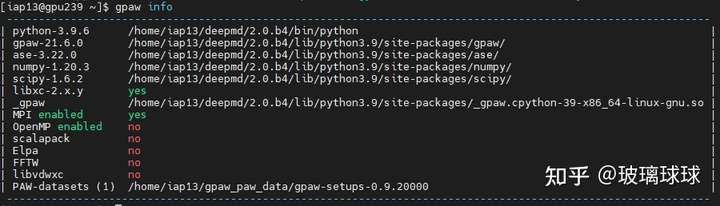
结果如上图所示,这种安装方式功能有限,并且因为为了方便,配置内容都放在了.bashrc,比较混乱。
yum install epel-release #有些程序包在这里面 yum install libxc-devel openblas-devel openmpi-devel fftw-devel yum install blacs-openmpi-devel scalapack-openmpi-devel
从gitlab下载gpaw.tar.gz,,解压并修改配置文件siteconfig.py。(若没有可创建,或者更改已存在的siteconfig_exapmle.py 为siteconfig.py):
讯享网tar -xf gpaw.tar.gz cd pgaw vim siteconfig.py
写入:
# FFTW3:
fftw = True
if fftw:
libraries = [‘fftw3’]
# openblas
openblas = True
if openblas :
libraries +=[‘openblas’]
# mpiblacs
mpiblacs = True
if mpiblacs :
libraries +=[‘mpiblacs’]
# ScaLAPACK (version 2.0.1+ required):
scalapack = True
if scalapack:
libraries += [‘scalapack’]
# xc:
xc = True
if xc:
libraries += [‘xc’]
# openmp
openmp = False
if openmp:
extra_compile_args += [‘-fopenmp’]
extra_link_args += [‘-fopenmp’]
保存文件,其中 openmp 在并行安装时使用。
2. 安装gpaw:
python setup.py install
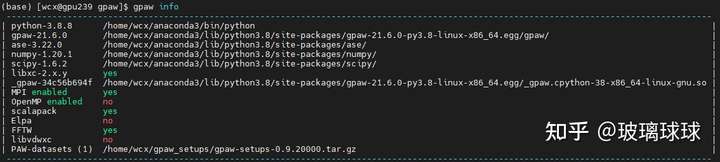
结果如下图所示,推荐,其他辅助功能可按照类似方式配置。

ubuntu
注:ubuntu同centos,第一步依赖程序换成:
讯享网sudo apt install libopenblas-dev libxc-dev libscalapack-mpi-dev libfftw3-dev
对于能够联网intel服务器来说这里,可以参考第二种方式。关闭其中的openmp,同时需要在.bashrc文件中加入:
export PATH=/opt/intel2020/compilers_and_libraries_2020.0.166/linux/mpi/:\(PATH<br/>export PATH=/opt/intel2020/compilers_and_libraries_2020.0.166/linux/mpi/intel64/bin/:\)PATH
export PATH=/opt/intel2020/compilers_and_libraries_2020.0.166/linux/:\(PATH</blockquote><p class="ztext-empty-paragraph" style="margin-top: -0.8em; margin-bottom: -0.8em; color: rgb(18, 18, 18); font-family: -apple-system, BlinkMacSystemFont, "Helvetica Neue", "PingFang SC", "Microsoft YaHei", "Source Han Sans SC", "Noto Sans CJK SC", "WenQuanYi Micro Hei", sans-serif; font-size: medium; white-space: normal; background-color: rgb(255, 255, 255);"><br/></p><p style="margin-top: 1.4em; margin-bottom: 1.4em; color: rgb(18, 18, 18); font-family: -apple-system, BlinkMacSystemFont, "Helvetica Neue", "PingFang SC", "Microsoft YaHei", "Source Han Sans SC", "Noto Sans CJK SC", "WenQuanYi Micro Hei", sans-serif; font-size: medium; white-space: normal; background-color: rgb(255, 255, 255);">intel mpi下载请自行百度,一般使用过一段时间的服务器都已经安装好了,对应位置请自行设置。</p><p style="margin-top: 1.4em; margin-bottom: 1.4em; color: rgb(18, 18, 18); font-family: -apple-system, BlinkMacSystemFont, "Helvetica Neue", "PingFang SC", "Microsoft YaHei", "Source Han Sans SC", "Noto Sans CJK SC", "WenQuanYi Micro Hei", sans-serif; font-size: medium; white-space: normal; background-color: rgb(255, 255, 255);">对于不能联网服务器,比如某些使用intel cpu的超算,安装最为麻烦,其他种类的cpu请参考他们的文档。</p><p style="margin-top: 1.4em; margin-bottom: 1.4em; color: rgb(18, 18, 18); font-family: -apple-system, BlinkMacSystemFont, "Helvetica Neue", "PingFang SC", "Microsoft YaHei", "Source Han Sans SC", "Noto Sans CJK SC", "WenQuanYi Micro Hei", sans-serif; font-size: medium; white-space: normal; background-color: rgb(255, 255, 255);"><span style="font-weight: 600; font-synthesis: style;">Inter MPI:(不使用openmp)</span></p><p style="margin-top: 1.4em; margin-bottom: 1.4em; color: rgb(18, 18, 18); font-family: -apple-system, BlinkMacSystemFont, "Helvetica Neue", "PingFang SC", "Microsoft YaHei", "Source Han Sans SC", "Noto Sans CJK SC", "WenQuanYi Micro Hei", sans-serif; font-size: medium; white-space: normal; background-color: rgb(255, 255, 255);">intel mpi下载请自行百度,一般使用过一段时间的服务器都已经安装好了,对应位置请自行设置。在.bashrc文件中加入:</p><blockquote style="margin: 1.4em 0px; padding-left: 1em; color: rgb(100, 100, 100); border-left: 3px solid rgb(211, 211, 211); font-family: -apple-system, BlinkMacSystemFont, "Helvetica Neue", "PingFang SC", "Microsoft YaHei", "Source Han Sans SC", "Noto Sans CJK SC", "WenQuanYi Micro Hei", sans-serif; font-size: medium; white-space: normal; background-color: rgb(255, 255, 255);">export PATH=/opt/intel2020/compilers_and_libraries_2020.0.166/linux/mpi/:\)PATH
export PATH=/opt/intel2020/compilers_and_libraries_2020.0.166/linux/mpi/intel64/bin/:\(PATH<br/>export PATH=/opt/intel2020/compilers_and_libraries_2020.0.166/linux/:\)PATH
libxc:
wget http://www.pus/down.php?file=libxc/4.2.3/libxc-4.2.3.tar.gz -O libxc-4.2.3.tar.gz
tar -xf libxc-4.2.3.tar.gz
cd libxc-4.2.3
https://blog.sciencenet.cn/configure –enable-shared –disable-fortran –prefix=\(HOME/libxc-4.2.3<br/>make -j 10<br/>make install</blockquote><p style="margin-top: 1.4em; margin-bottom: 1.4em; color: rgb(18, 18, 18); font-family: -apple-system, BlinkMacSystemFont, "Helvetica Neue", "PingFang SC", "Microsoft YaHei", "Source Han Sans SC", "Noto Sans CJK SC", "WenQuanYi Micro Hei", sans-serif; font-size: medium; white-space: normal; background-color: rgb(255, 255, 255);">添加文件<em>.bashrc:</em></p><blockquote style="margin: 1.4em 0px; padding-left: 1em; color: rgb(100, 100, 100); border-left: 3px solid rgb(211, 211, 211); font-family: -apple-system, BlinkMacSystemFont, "Helvetica Neue", "PingFang SC", "Microsoft YaHei", "Source Han Sans SC", "Noto Sans CJK SC", "WenQuanYi Micro Hei", sans-serif; font-size: medium; white-space: normal; background-color: rgb(255, 255, 255);">XC=~/libxc-4.2.3<br/>export C_INCLUDE_PATH=\)XC/include
export LIBRARY_PATH=\(XC/lib<br/>export LD_LIBRARY_PATH=\)XC/lib
(这个过程中,可能会需要设置添加-std=c99, 或者直接更改xc-theshold.c文件第800+行,把i定义放在for循环外。不知道是不是bug? )
openblas (非必须):
tar -xf openblas.tar.gz
cd openblas
https://blog.sciencenet.cn/configure –prefix=\(HOME/openblas<br/>make -j 10<br/>make install<br/>libraries = ['openblas']<br/>library_dirs = ['path_to_myblas']</blockquote><p style="margin-top: 1.4em; margin-bottom: 1.4em; color: rgb(18, 18, 18); font-family: -apple-system, BlinkMacSystemFont, "Helvetica Neue", "PingFang SC", "Microsoft YaHei", "Source Han Sans SC", "Noto Sans CJK SC", "WenQuanYi Micro Hei", sans-serif; font-size: medium; white-space: normal; background-color: rgb(255, 255, 255);">添加文件<em>.bashrc:</em></p><blockquote style="margin: 1.4em 0px; padding-left: 1em; color: rgb(100, 100, 100); border-left: 3px solid rgb(211, 211, 211); font-family: -apple-system, BlinkMacSystemFont, "Helvetica Neue", "PingFang SC", "Microsoft YaHei", "Source Han Sans SC", "Noto Sans CJK SC", "WenQuanYi Micro Hei", sans-serif; font-size: medium; white-space: normal; background-color: rgb(255, 255, 255);">export C_INCLUDE_PATH=\)HOME/openblas/include/:\(C_INCLUDE_PATH<br/>export LD_LIBRARY_PATH=\)HOME/openblas/lib/:\(LD_LIBRARY_PATH<br/>export LIBRARY_PATH=/\)HOME/openblas/lib/:\(LIBRARY_PATH<br/>export PATH=\)HOME/openblas/bin/:\(PATH</blockquote><p style="margin-top: 1.4em; margin-bottom: 1.4em; color: rgb(18, 18, 18); font-family: -apple-system, BlinkMacSystemFont, "Helvetica Neue", "PingFang SC", "Microsoft YaHei", "Source Han Sans SC", "Noto Sans CJK SC", "WenQuanYi Micro Hei", sans-serif; font-size: medium; white-space: normal; background-color: rgb(255, 255, 255);"><span style="font-weight: 600; font-synthesis: style;">fftw:</span></p><p></p><p style="margin-top: 1.4em; margin-bottom: 1.4em; color: rgb(18, 18, 18); font-family: -apple-system, BlinkMacSystemFont, "Helvetica Neue", "PingFang SC", "Microsoft YaHei", "Source Han Sans SC", "Noto Sans CJK SC", "WenQuanYi Micro Hei", sans-serif; font-size: medium; white-space: normal; background-color: rgb(255, 255, 255);">没啥说的,和上面一样,编译安装,其中配置参数注意:</p><p style="margin-top: 1.4em; margin-bottom: 1.4em; color: rgb(18, 18, 18); font-family: -apple-system, BlinkMacSystemFont, "Helvetica Neue", "PingFang SC", "Microsoft YaHei", "Source Han Sans SC", "Noto Sans CJK SC", "WenQuanYi Micro Hei", sans-serif; font-size: medium; white-space: normal; background-color: rgb(255, 255, 255);">(并行版本)</p><blockquote style="margin: 1.4em 0px; padding-left: 1em; color: rgb(100, 100, 100); border-left: 3px solid rgb(211, 211, 211); font-family: -apple-system, BlinkMacSystemFont, "Helvetica Neue", "PingFang SC", "Microsoft YaHei", "Source Han Sans SC", "Noto Sans CJK SC", "WenQuanYi Micro Hei", sans-serif; font-size: medium; white-space: normal; background-color: rgb(255, 255, 255);">https://blog.sciencenet.cn/configure MPICC=mpicc --prefix=\)HOME/fftw –disable-fortran –enable-mpi –enable-shared
(非并行版本)
https://blog.sciencenet.cn/configure –prefix=\(HOME/fftw --disable-fortran</blockquote><p style="margin-top: 1.4em; margin-bottom: 1.4em; color: rgb(18, 18, 18); font-family: -apple-system, BlinkMacSystemFont, "Helvetica Neue", "PingFang SC", "Microsoft YaHei", "Source Han Sans SC", "Noto Sans CJK SC", "WenQuanYi Micro Hei", sans-serif; font-size: medium; white-space: normal; background-color: rgb(255, 255, 255);">添加文件<em>.bashrc:</em></p><blockquote style="margin: 1.4em 0px; padding-left: 1em; color: rgb(100, 100, 100); border-left: 3px solid rgb(211, 211, 211); font-family: -apple-system, BlinkMacSystemFont, "Helvetica Neue", "PingFang SC", "Microsoft YaHei", "Source Han Sans SC", "Noto Sans CJK SC", "WenQuanYi Micro Hei", sans-serif; font-size: medium; white-space: normal; background-color: rgb(255, 255, 255);">export LD_LIBRARY_PATH=/\)HOME/fftw/lib/:\(LD_LIBRARY_PATH<br/>export C_INCLUDE_PATH=\)HOME/fftw/include/:\(C_INCLUDE_PATH<br/>export LIBRARY_PATH=\)HOME/fftw/lib/:$LIBRARY_PATH
其他的库请按照该方式自行安装。
2. gpaw:
tar -xf gpaw.tar.gz cd gpaw vim siteconfig.py
siteconfig.py 写入:
libraries += [‘openblas’]
library_dirs += [‘/data/home/wa/openblas/lib/’]
include_dirs +=["/data/home/wa/anaconda3/include/python3.8"]
include_dirs +=["/data/home/wa/anaconda3/lib/python3.8/site-packages/numpy/core/include"]
# FFTW3:
fftw=True
libraries += [‘fftw3’]
ff = ‘/data/home/wa/gpaw/fftw/’
include_dirs += [ff + ‘include’]
library_dirs += [ff + ‘lib’]
extra_link_args += [‘-Wl,-rpath={ff}lib’.format(ff=ff)]
# LibXC:
xc = ‘/data/home/wa/gpaw/libxc/’
include_dirs += [xc + ‘include’]
library_dirs += [xc + ‘lib’]
# You can use rpath to avoid changing LD_LIBRARY_PATH:
extra_link_args += [‘-Wl,-rpath={xc}lib’.format(xc=xc)]
if ‘xc’ not in libraries:
libraries.append(‘xc’)
setup.py 文件写入:
extra_compile_args = [‘-Wall’, ‘-Wno-unknown-pragmas’, ‘-std=c99’,"-Xlinker",]
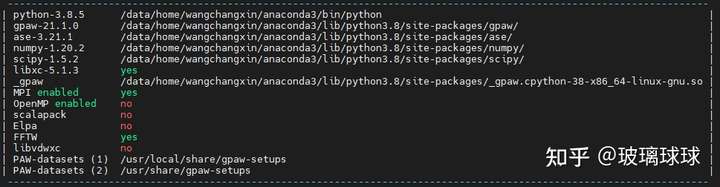
运行:
讯享网python setup.py build_ext install
这样装完,基本都是动态链接。所以谨慎删除文件。
编辑于 2021-09-18 18:02
<label style="font-size:13px; color:#850f0f">转载本文请联系原作者获取授权,同时请注明本文来自吕铁羽科学网博客。<br />链接地址:</label>https://blog.sciencenet.cn/blog-3471958-1328574.html
上一篇:已知拉曼张量,计算拉曼振动模强度随旋转角度变化关系(偏振拉曼)
下一篇:openmpi+gfortran编译ShengBTE
版权声明:本文内容由互联网用户自发贡献,该文观点仅代表作者本人。本站仅提供信息存储空间服务,不拥有所有权,不承担相关法律责任。如发现本站有涉嫌侵权/违法违规的内容,请联系我们,一经查实,本站将立刻删除。
如需转载请保留出处:https://51itzy.com/kjqy/174993.html