
04.PDFViewer学习笔记
第1步:下载第三方框架 PDFViewer,下载地址:https://github.com/vfr/Reader
第2步:导入PDFViewer依赖的iOS框架
MessageUI.framework:发邮件用的,可以把PDF通过邮件的方式发给自己的好友
ImageIO.framework:图像底层的输入输出的接口,
QuartzCore.framework:绘图的时候用
第3步:往项目中导入Classes和Sources,
如果需要打印功能,需要往工程的Supporting Files下导入Graphics文件夹,导入后就自动支持PDF打印功能。
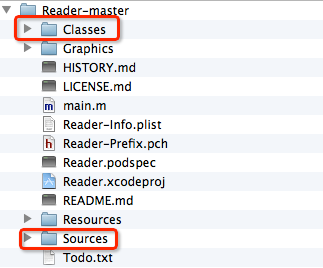
第4步:往控制器中引入PDFViewer的头文件
第5步:开始使用
#import “MJViewController.h”
#import “ReaderViewController.h”
@interface MJViewController () <ReaderViewControllerDelegate>
@end
@implementation MJViewController
- (IBAction)click:(id)sender
{
// 1. 实例化控制器
NSString *path = [[NSBundle mainBundle] pathForResource:@“MobileHIG_iOS7_中文.pdf” ofType:nil];
ReaderDocument *doc = [[ReaderDocument alloc] initWithFilePath:path password:nil];
ReaderViewController *rvc = [[ReaderViewController alloc] initWithReaderDocument:doc];
rvc.delegate = self;
// 2. 显示ViewController
[self presentViewController:rvc animated:YES completion:nil];
}
- (void)dismissReaderViewController:(ReaderViewController *)viewController
{
[self dismissViewControllerAnimated:YES completion:nil];
}
版权声明:本文内容由互联网用户自发贡献,该文观点仅代表作者本人。本站仅提供信息存储空间服务,不拥有所有权,不承担相关法律责任。如发现本站有涉嫌侵权/违法违规的内容,请联系我们,一经查实,本站将立刻删除。
如需转载请保留出处:https://51itzy.com/kjqy/174629.html