
<div id="navCategory"></div> 讯享网
1. 创建容器时设置:
2. 更新已有容器设置:
–restart具体参数,详见官方文档
Policy Result no Do not automatically restart the container when it exits. This is the default. 默认设置,容器退出时不重启容器。 on-failure[:max-retries] Restart only if the container exits with a non-zero exit status. Optionally, limit the number of restart retries the Docker daemon attempts. 在容器非正常退出时重启容器,最多重启max-retries次。 always Always restart the container regardless of the exit status. When you specify always, the Docker daemon will try to restart the container indefinitely. The container will also always start on daemon startup, regardless of the current state of the container. 总是重启容器。 unless-stopped Always restart the container regardless of the exit status, including on daemon startup, except if the container was put into a stopped state before the Docker daemon was stopped. 总是重启容器,除非在Docker守护程序停止之前容器就处于停止状态。
服务器的机房,有时候需要关机重启,进行机房改造!
查看已经启动的服务
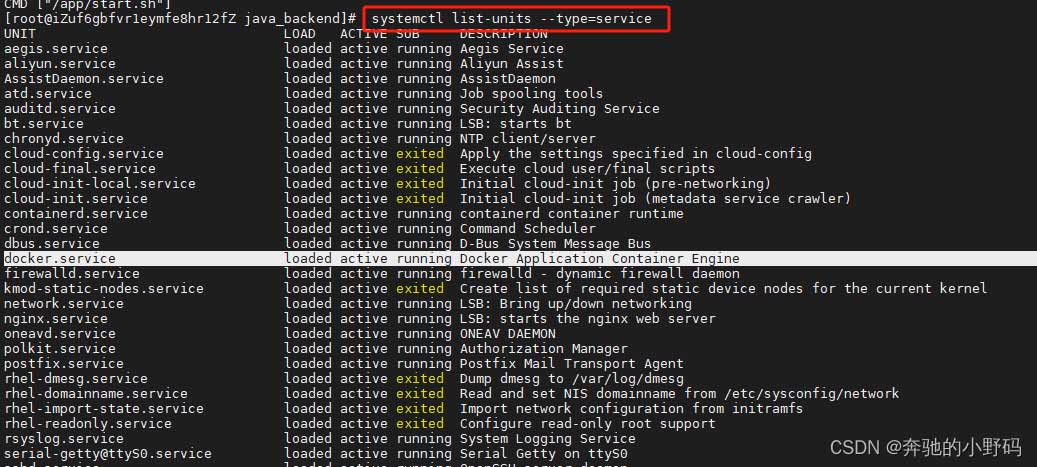
如上图,docker已经启动,
如果没有启动,就先执行一下启动命令
查看docker是否设置了开机自启

如上图,设置成功,如果没有设置开机自启,就是disabled

设置开机启动命令
设置容器自启动有两种方式,一个是在创建并启动容器时,一种是在容器启动之后
创建并启动容器时,添加--restart=always
容器启动之后,执行如下命令
修改容器时间有三种方式:创建并启动容器时共享宿主机时间、启动之后的容器复制宿主机的时间、在Dockerfile中设置
1.创建并启动容器时共享宿主机时间,在启动命令中增加-v /etc/localtime:/etc/localtime:ro -v /etc/timezone:/etc/timezone:ro
2.启动之后的容器复制宿主机的时间
containerId 为要修改的容器id,注意需要重启容器
3.在Dockerfile中设置
Dockerfile中添加如上命令即可
首先进入容器查看当前字符编码
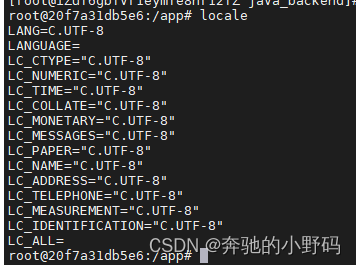
查看本地拥有的字符编码
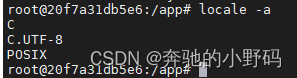
C.UTF-8可以支持中文,只需要把容器编码设置为C.UTF-8即可(有的是zh_CN.UTF-8,不过我在本地没发现这种编码)
临时修改字符编码
设置字符编码为C.UTF-8
重新加载环境变量
永久修改
Dockerfile中添加命令
以上为个人经验,希望能给大家一个参考,也希望大家多多支持脚本之家。
版权声明:本文内容由互联网用户自发贡献,该文观点仅代表作者本人。本站仅提供信息存储空间服务,不拥有所有权,不承担相关法律责任。如发现本站有涉嫌侵权/违法违规的内容,请联系我们,一经查实,本站将立刻删除。
如需转载请保留出处:https://51itzy.com/kjqy/172900.html