
<p> </p> 讯享网
目录
方法一
方法2
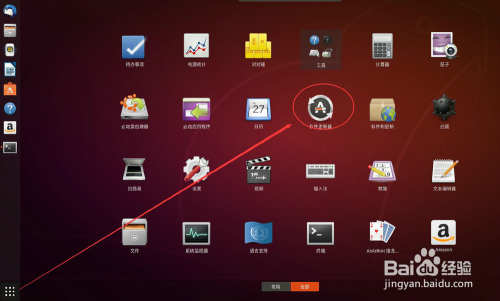
- 选择打开Ubuntu的“软件更新器”
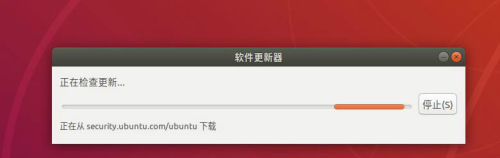
- 出现“正在检查更新……”的画面。

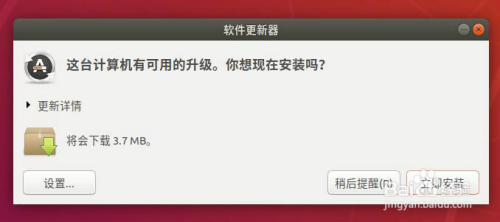
- 更新画面停止后出现下面的界面。
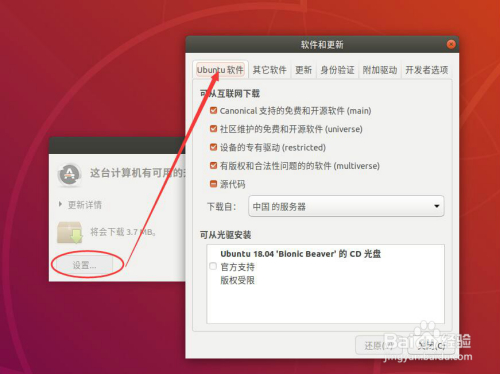
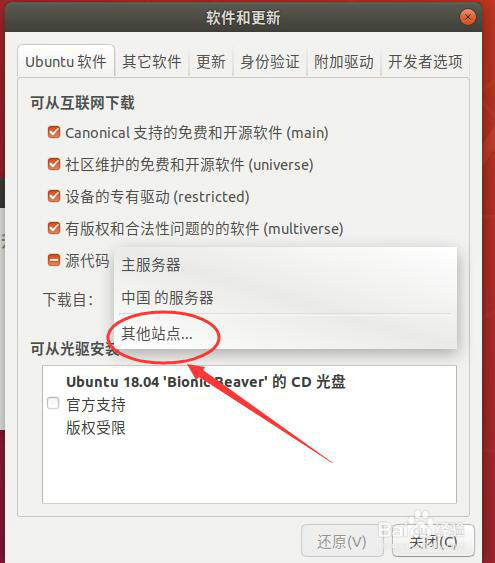
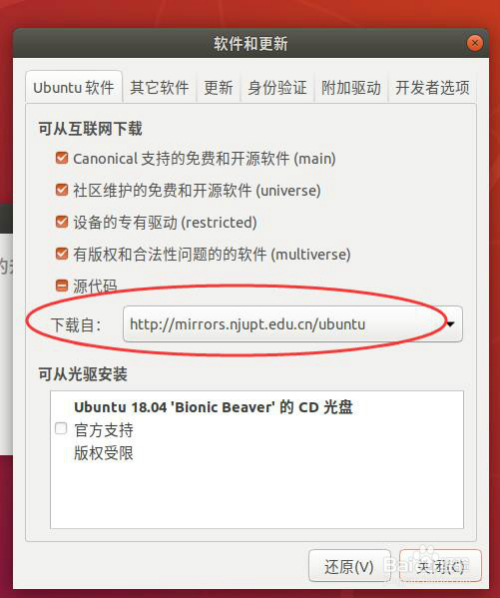
- 选择“设置”,出现的画面中,点击选择“Ubuntu软件”
- 点击下载自中的“其他站点……”
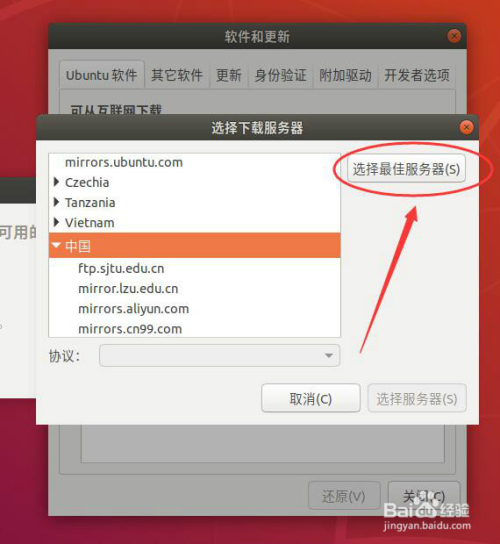
- 在弹出的界面中,点击“选择**服务器”
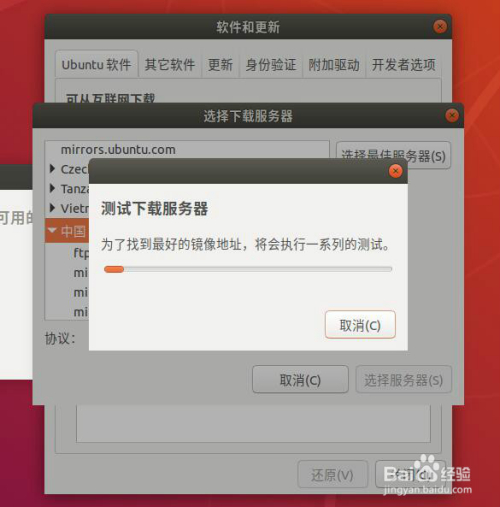
- 这时系统会测试那个服务器站点比较快
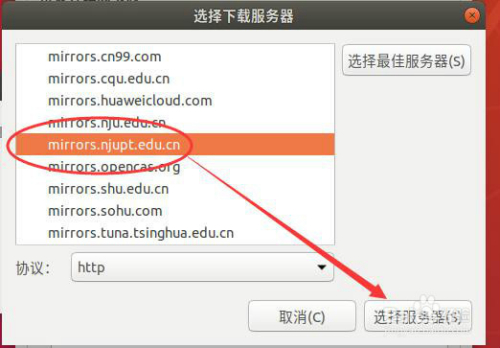
- 完成后会找出**的一个服务器站点,点击右下方的“选择服务器”
- 输入验证密码,完成相应的更改,可以看到下载自已更改为选择了的**服务器的站点。点击“关闭”,完成更改。


1、备份sources.list文件
讯享网
更新,输入命令
讯享网
相关源的信息如下:
1)官方源
deb http://archive.ubuntu.com/ubuntu/ trusty main restricted universe multiverse
deb http://archive.ubuntu.com/ubuntu/ trusty-security main restricted universe multiverse
deb http://archive.ubuntu.com/ubuntu/ trusty-updates main restricted universe multiverse
deb http://archive.ubuntu.com/ubuntu/ trusty-proposed main restricted universe multiverse
deb http://archive.ubuntu.com/ubuntu/ trusty-backports main restricted universe multiverse
deb-src http://archive.ubuntu.com/ubuntu/ trusty main restricted universe multiverse
deb-src http://archive.ubuntu.com/ubuntu/ trusty-security main restricted universe multiverse
deb-src http://archive.ubuntu.com/ubuntu/ trusty-updates main restricted universe multiverse
deb-src http://archive.ubuntu.com/ubuntu/ trusty-proposed main restricted universe multiverse
deb-src http://archive.ubuntu.com/ubuntu/ trusty-backports main restricted universe multiverse
2)163源
deb http://mirrors.163.com/ubuntu/ trusty main restricted universe multiverse
deb http://mirrors.163.com/ubuntu/ trusty-security main restricted universe multiverse
deb http://mirrors.163.com/ubuntu/ trusty-updates main restricted universe multiverse
deb http://mirrors.163.com/ubuntu/ trusty-proposed main restricted universe multiverse
deb http://mirrors.163.com/ubuntu/ trusty-backports main restricted universe multiverse
deb-src http://mirrors.163.com/ubuntu/ trusty main restricted universe multiverse
deb-src http://mirrors.163.com/ubuntu/ trusty-security main restricted universe multiverse
deb-src http://mirrors.163.com/ubuntu/ trusty-updates main restricted universe multiverse
deb-src http://mirrors.163.com/ubuntu/ trusty-proposed main restricted universe multiverse
deb-src http://mirrors.163.com/ubuntu/ trusty-backports main restricted universe multiverse
3)阿里源:地址: https://opsx.alibaba.com/mirror
deb http://mirrors.aliyun.com/ubuntu/ trusty main restricted universe multiverse
deb http://mirrors.aliyun.com/ubuntu/ trusty-security main restricted universe multiverse
deb http://mirrors.aliyun.com/ubuntu/ trusty-updates main restricted universe multiverse
deb http://mirrors.aliyun.com/ubuntu/ trusty-proposed main restricted universe multiverse
deb http://mirrors.aliyun.com/ubuntu/ trusty-backports main restricted universe multiverse
deb-src http://mirrors.aliyun.com/ubuntu/ trusty main restricted universe multiverse
deb-src http://mirrors.aliyun.com/ubuntu/ trusty-security main restricted universe multiverse
deb-src http://mirrors.aliyun.com/ubuntu/ trusty-updates main restricted universe multiverse
deb-src http://mirrors.aliyun.com/ubuntu/ trusty-proposed main restricted universe multiverse
deb-src http://mirrors.aliyun.com/ubuntu/ trusty-backports main restricted universe multiverse
4)搜狐源
deb http://mirrors.sohu.com/ubuntu/ trusty main restricted universe multiverse
deb http://mirrors.sohu.com/ubuntu/ trusty-security main restricted universe multiverse
deb http://mirrors.sohu.com/ubuntu/ trusty-updates main restricted universe multiverse
deb http://mirrors.sohu.com/ubuntu/ trusty-proposed main restricted universe multiverse
deb http://mirrors.sohu.com/ubuntu/ trusty-backports main restricted universe multiverse
deb-src http://mirrors.sohu.com/ubuntu/ trusty main restricted universe multiverse
deb-src http://mirrors.sohu.com/ubuntu/ trusty-security main restricted universe multiverse
deb-src http://mirrors.sohu.com/ubuntu/ trusty-updates main restricted universe multiverse
deb-src http://mirrors.sohu.com/ubuntu/ trusty-proposed main restricted universe multiverse
deb-src http://mirrors.sohu.com/ubuntu/ trusty-backports main restricted universe multiverse
5)centos源
deb http://centos.bitcomm.cn/ubuntu trusty main restricted universe multiverse
deb http://centos.bitcomm.cn/ubuntu trusty-security main restricted universe multiverse
deb http://centos.bitcomm.cn/ubuntu trusty-updates main restricted universe multiverse
deb http://centos.bitcomm.cn/ubuntu trusty-backports main restricted universe multiverse
deb http://centos.bitcomm.cn/ubuntu trusty-proposed main restricted universe multiverse
deb-src http://centos.bitcomm.cn/ubuntu trusty main restricted universe multiverse
deb-src http://centos.bitcomm.cn/ubuntu trusty-security main restricted universe multiverse
deb-src http://centos.bitcomm.cn/ubuntu trusty-updates main restricted universe multiverse
deb-src http://centos.bitcomm.cn/ubuntu trusty-backports main restricted universe multiverse
deb-src http://centos.bitcomm.cn/ubuntu trusty-proposed main restricted universe multiverse
6)清华源:地址:https://mirrors.tuna.tsinghua.edu.cn/help/ubuntu/
deb https://mirrors.tuna.tsinghua.edu.cn/ubuntu/ bionic main restricted universe multiverse
# deb-src https://mirrors.tuna.tsinghua.edu.cn/ubuntu/ bionic main restricted universe multiverse
deb https://mirrors.tuna.tsinghua.edu.cn/ubuntu/ bionic-updates main restricted universe multiverse
# deb-src https://mirrors.tuna.tsinghua.edu.cn/ubuntu/ bionic-updates main restricted universe multiverse
deb https://mirrors.tuna.tsinghua.edu.cn/ubuntu/ bionic-backports main restricted universe multiverse
# deb-src https://mirrors.tuna.tsinghua.edu.cn/ubuntu/ bionic-backports main restricted universe multiverse
deb https://mirrors.tuna.tsinghua.edu.cn/ubuntu/ bionic-security main restricted universe multiverse
# deb-src https://mirrors.tuna.tsinghua.edu.cn/ubuntu/ bionic-security main restricted universe multiverse
3、更新源
1)sudo apt-get update(更新源信息)
2)sudo apt-get upgrade(更新源对应的软件库信息)
版权声明:本文内容由互联网用户自发贡献,该文观点仅代表作者本人。本站仅提供信息存储空间服务,不拥有所有权,不承担相关法律责任。如发现本站有涉嫌侵权/违法违规的内容,请联系我们,一经查实,本站将立刻删除。
如需转载请保留出处:https://51itzy.com/kjqy/167660.html