
<p> 项目采用MAX30102血氧及心率监视模块、<u>Arduino</u> UNO板、<u>OLED</u>显示器和蜂鸣器,搭建了一个简单的心率(BPM)测量仪。</p> 讯享网
讯享网 </p>
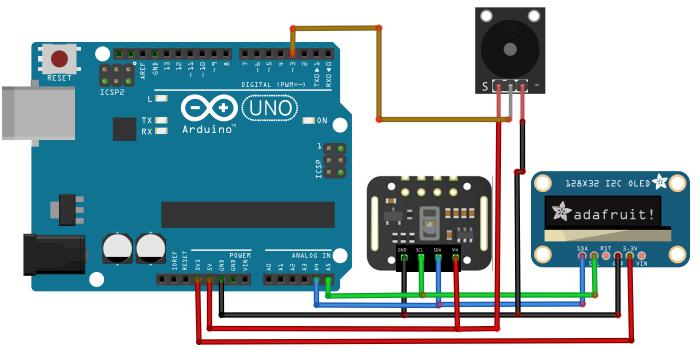
<br /> 这里,BPM为每分钟的心跳数,正常人的数字为65-75之间,体育运动员的数字要低些;血氧饱和度(SaO2)对于正常然来说大概为95%。</p> 讯享网项目物料</p>
本项目所需材料包括:<br /> Max30102(×1):这是项目的功能器件,是一款用于可穿戴设备的高灵敏脉冲式血样及心率<u>传感器</u>,具有不同版本,但是只要型号正确即可。 <br /> Arduino UNO(×1)<br /> OLED 128x32(×1):低功耗显示器。 <br /> Buzzer (×1):蜂鸣器<br /> 面包板(×1):方便组件安装和连接的线路板。<br /> 连接线</p> 讯享网 </p>
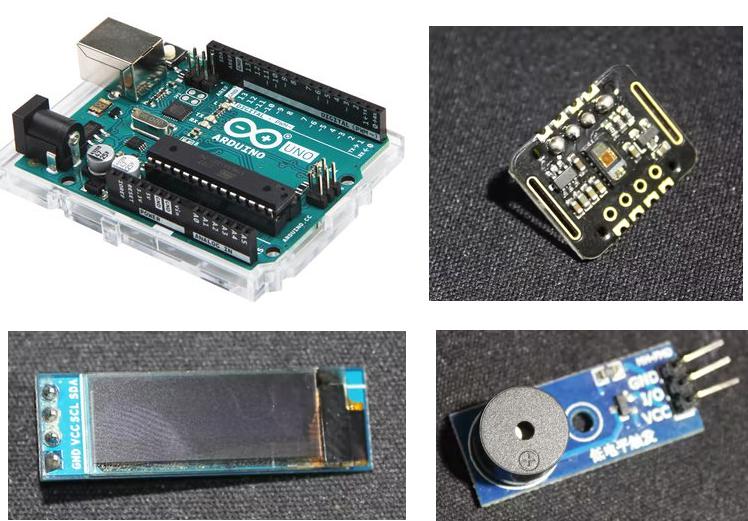
<br /> 本项目所用代码来自Sparkfun_MAX3010x示例库,OLED和Buzzer代码根据 "HeartRate" 示例改进而来,这需要用户将手指放在传感器上。</p> 讯享网注意,如果将手指放在传感器上,就要保持安静,直到蜂鸣器的“哔哔”声与你的心率节拍同步,或者与OLED动画同步,这时可读出正确的BPM心率读数。</p>
</p> 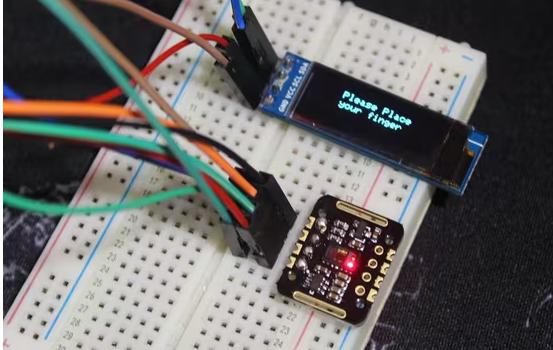
讯享网<br /> 本项目采用4次BPM读数的平均值,因此比较准确。</p>
<br /> 让OLED显示bmp图像</p> 讯享网<br /> OLED显示的是小的“心形”栅格图(bmp),一旦传感器<u>检测</u>到一次心跳,就立即切换为大点的“心形”栅格图并保持一会儿,这样屏幕就像心跳一样,一闪一闪的,并伴有蜂鸣器的“哔哔”声。</p>
</p> 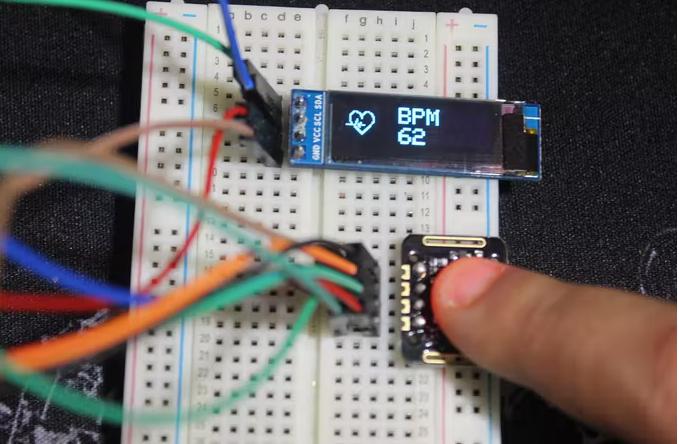

讯享网<br /> 选择希望看到的图走向的格式,如 .png .bmp .dib等。切记,本项目屏幕尺寸为128x32px,图像尺寸要小一些,为32x32px和24x21px。</p>
</p> 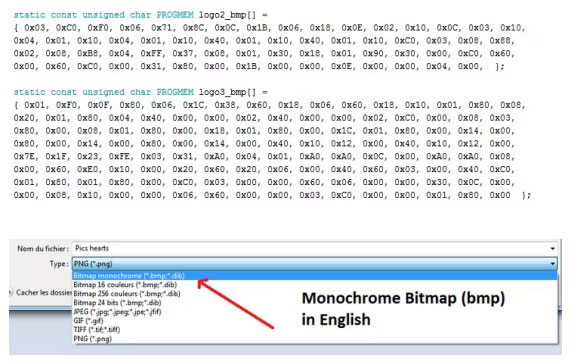
讯享网<br /> <u>下载</u>LCD助手并打开。</p>
</p> 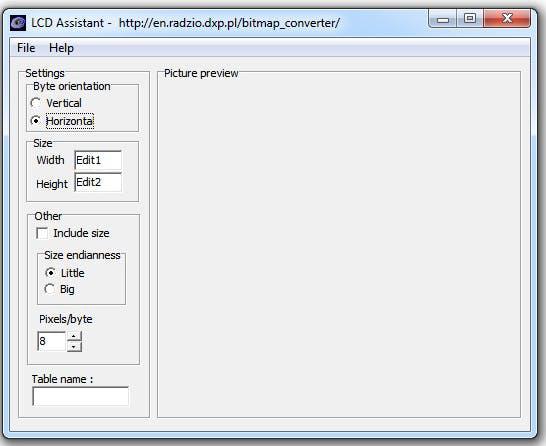
讯享网<br /> 可看到如下"数字"</p>
</p> 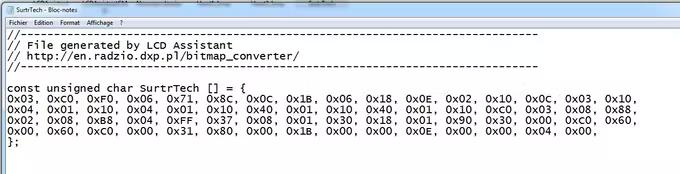
讯享网<br /> 这就是所谓的代码:</p>
display.drawBitmap(5, 5, logo2_bmp, 24, 21, WHI<u>TE</u>);</p> 讯享网其含义为:</p>
display.drawBitmap(Star<u>ti</u>ng x pos, Starting y pos, Bitmap name, Width, Height, Color);</p> 讯享网这段代码描述了两件事——“当检测到手指时做什么”,以及“捡到心跳时做什么”。</p>
以下是更新后的代码:</p> 讯享网MAX_BPM_OLED_Buzzer.inoArduino<br /> Modified from the SparkFun MAX3010x library</p>

/* This code w<u>or</u>ks with MAX30102 + 128x32 OLED <u>i2c</u> + Buzzer and Arduino UNO<br /> * It's displays the Average BPM on the screen, with an animation and a buzzer sound<br /> * everytime a heart pulse is detected<br /> * It's a modified version of the HeartRate library example<br /> * Refer to www.surtrtech.com for more det<u>ai</u>ls or SurtrTech YouTube channel<br /> */</p> 讯享网#include //OLED libraries<br /> #include <br /> #include <br /> #include "MAX30105.h" //MAX3010x library<br /> #include "heartRate.h" //Heart rate calculating algorithm</p>
MAX30105 part<u>icl</u>eSensor;</p> 讯享网const byte RATE_SIZE = 4; //Increase this for more averaging. 4 is good.<br /> byte rates[RATE_SIZE]; //Array of heart rates<br /> byte rateSpot = 0;<br /> long lastBeat = 0; //Time at which the last beat occurred<br /> float beatsPerMinute;<br /> int beatAvg;</p>
#define SCREEN_WIDTH 128 // OLED display width, in <u>pi</u>xels<br /> #define SCREEN_HEIGHT 32 // OLED display height, in pixels<br /> #define OLED_RESET -1 // Reset pin # (or -1 if sharing Arduino reset pin)</p> 讯享网<u>Ad</u>afruit_S<u>SD</u>1306 display(SCREEN_WIDTH, SCREEN_HEIGHT, &Wire, OLED_RESET); //Declaring the display name (display)</p>
stat<u>ic</u> const unsigned char PROGMEM logo2_bmp[] =<br /> { 0x03, 0xC0, 0xF0, 0x06, 0x71, 0x8C, 0x0C, 0x1B, 0x06, 0x18, 0x0E, 0x02, 0x10, 0x0C, 0x03, 0x10, //Logo2 and Logo3 are two bmp pictures that display on the OLED if cal<u>led</u><br /> 0x04, 0x01, 0x10, 0x04, 0x01, 0x10, 0x40, 0x01, 0x10, 0x40, 0x01, 0x10, 0xC0, 0x03, 0x08, 0x88,<br /> 0x02, 0x08, 0xB8, 0x04, 0xFF, 0x37, 0x08, 0x01, 0x30, 0x18, 0x01, 0x90, 0x30, 0x00, 0xC0, 0x60,<br /> 0x00, 0x60, 0xC0, 0x00, 0x31, 0x80, 0x00, 0x1B, 0x00, 0x00, 0x0E, 0x00, 0x00, 0x04, 0x00, };</p> 讯享网static const unsigned char PROGMEM logo3_bmp[] =<br /> { 0x01, 0xF0, 0x0F, 0x80, 0x06, 0x1C, 0x38, 0x60, 0x18, 0x06, 0x60, 0x18, 0x10, 0x01, 0x80, 0x08,<br /> 0x20, 0x01, 0x80, 0x04, 0x40, 0x00, 0x00, 0x02, 0x40, 0x00, 0x00, 0x02, 0xC0, 0x00, 0x08, 0x03,<br /> 0x80, 0x00, 0x08, 0x01, 0x80, 0x00, 0x18, 0x01, 0x80, 0x00, 0x1C, 0x01, 0x80, 0x00, 0x14, 0x00,<br /> 0x80, 0x00, 0x14, 0x00, 0x80, 0x00, 0x14, 0x00, 0x40, 0x10, 0x12, 0x00, 0x40, 0x10, 0x12, 0x00,<br /> 0x7E, 0x1F, 0x23, 0xFE, 0x03, 0x31, 0xA0, 0x04, 0x01, 0xA0, 0xA0, 0x0C, 0x00, 0xA0, 0xA0, 0x08,<br /> 0x00, 0x60, 0xE0, 0x10, 0x00, 0x20, 0x60, 0x20, 0x06, 0x00, 0x40, 0x60, 0x03, 0x00, 0x40, 0xC0,<br /> 0x01, 0x80, 0x01, 0x80, 0x00, 0xC0, 0x03, 0x00, 0x00, 0x60, 0x06, 0x00, 0x00, 0x30, 0x0C, 0x00,<br /> 0x00, 0x08, 0x10, 0x00, 0x00, 0x06, 0x60, 0x00, 0x00, 0x03, 0xC0, 0x00, 0x00, 0x01, 0x80, 0x00 };</p>
<br /> void setup() { <br /> display.begin(SSD1306_SWITCHCAPVCC, 0x3C); //Start the OLED display<br /> display.display();<br /> delay(3000);<br /> // Initialize sensor<br /> particleSensor.begin(Wire, I2C_SPEED_FAST); //Use default I2C port, 400kHz speed<br /> particleSensor.setup(); //Configure sensor with default settings<br /> particleSensor.setPulseAmplitudeRed(0x0A); //Turn Red LED to low to indicate sensor is running</p> 讯享网}</p>
void loop() {<br /> long irValue = particleSensor.getIR(); //Re<u>adi</u>ng the IR value it will permit us to know if there's a finger on the sensor or not<br /> //Also detecting a heartbeat<br /> if(irValue > 7000){ //If a finger is detected<br /> display.clearDisplay(); //Clear the display<br /> display.drawBitmap(5, 5, logo2_bmp, 24, 21, WHITE); //Draw the fi<u>rs</u>t bmp picture (little heart)<br /> display.setTextSize(2); //Near it display the average BPM you <u>can</u> display the BPM if you want<br /> display.setTextColor(WHITE); <br /> display.setCursor(50,0); <br /> display.println("BPM"); <br /> display.setCursor(50,18); <br /> display.println(beatAvg); <br /> display.display();<br /> <br /> if (checkForBeat(irValue) == true) //If a heart beat is detected<br /> {<br /> display.clearDisplay(); //Clear the display<br /> display.drawBitmap(0, 0, logo3_bmp, 32, 32, WHITE); //Draw the second picture (bigger heart)<br /> display.setTextSize(2); //And still displays the average BPM<br /> display.setTextColor(WHITE); <br /> display.setCursor(50,0); <br /> display.println("BPM"); <br /> display.setCursor(50,18); <br /> display.println(beatAvg); <br /> display.display();<br /> tone(3,1000); //And tone the buzzer for a 100ms you can reduce it it will be better<br /> delay(100);<br /> noTone(3); //De<u>ac</u>tivate the buzzer to have the effect of a "bip"<br /> //We sensed a beat!<br /> long delta = millis() - lastBeat; //Measure duration between two beats<br /> lastBeat = millis();</p> 讯享网 beatsPerMinute = 60 / (delta / 1000.0); //Calculating the BPM</p>
if (beatsPerMinute < 255 && beatsPerMinute > 20) //To calculate the average we strore some values (4) then do some math to calculate the average<br /> {<br /> rates[rateSpot++] = (byte)beatsPerMinute; //Store this reading in the array<br /> rateSpot %= RATE_SIZE; //Wrap variable</p> 讯享网 //Take average of readings<br /> beatAvg = 0;<br /> for (byte x = 0 ; x < RATE_SIZE ; x++)<br /> beatAvg += rates[x];<br /> beatAvg /= RATE_SIZE;<br /> }<br /> }</p>
}<br /> if (irValue < 7000){ //If no finger is detected it inform the user and put the average BPM to 0 or it will be stored for the next measure<br /> beatAvg=0;<br /> display.clearDisplay();<br /> display.setTextSize(1); <br /> display.setTextColor(WHITE); <br /> display.setCursor(30,5); <br /> display.println("Please Place "); <br /> display.setCursor(30,15);<br /> display.println("your finger "); <br /> display.display();<br /> noTone(3);<br /> }</p> 讯享网}<br /><br /> 审核编辑:汤梓红</p>
版权声明:本文内容由互联网用户自发贡献,该文观点仅代表作者本人。本站仅提供信息存储空间服务,不拥有所有权,不承担相关法律责任。如发现本站有涉嫌侵权/违法违规的内容,请联系我们,一经查实,本站将立刻删除。
如需转载请保留出处:https://51itzy.com/kjqy/149297.html