
vx:
1数据情况说明
1.1数据来源
主网站:url=‘http://www.dataoke.com/qlist/’ 变量为cid和page,cid控制类目,page控制页码, 因此获得的组合网址格式之一为:‘http://www.dataoke.com/qlist/?uid=1&page=2’ 讯享网
1.1.1网站介绍
讯享网该网站是一个淘宝平台的下级推广网站,为阿里巴巴旗下阿里妈妈平台推广,网站商品皆为淘宝商品,由于淘宝网站反爬严重,故用此网站采集数据!
1.1.2获取时间
2019-11-7
1.1.3数据量级
5553
1.2数据描述
“店铺名”: 淘宝店铺名字
“商品地址”:淘宝店铺商品url
“标题”:淘宝商品在大淘客网的标题
“商品类型”:商品的类型
“价格”:商品的目前价格
“原价”:商品原价
“券额度”:商品的优惠额度
“月销量”:商品的月销量
“评论”:商品的评论量
“来源”:商品是哪个平台(天猫,淘宝,天猫超市)
“运费险”:商品是否赠送运费险
“推荐文案”:商品的推广文案
“团队”:商品所属的推广团队
“到期时间”:商品本次推广的到期时间
“主图地址”:主图的url

1.2.1数据基本情况
1.2.2数据列意义描述
大淘客网站作为淘宝客推广中举足轻重的平台,平台分类有14类之多,由这些数据的分类,价格,券额度,佣金,有无运费险,我们可以获取各种促销商品的种类,优惠力度,给推广平台的佣金力度,以及每种品类的评价情况,销售情况,也可以得出每个商品应该的推广价格,可以为买家提供购买价格参考,卖家作定价参考,给淘宝作为参考数据,可用于店家优化数据,也可以给比价平台做历史价格参考。 1.3数据爬取技术分析
1、引用模块有:
讯享网Import urllib.request Import json Import csv Imprt time From lxml import etree
2、分析:
1、通过两个嵌套循环将控制页面分类的 uid和page自增来改变主url,访问网页,然后爬取出每个网页中指定的xpath路径,获取二级页面url 2、获取二级url后,通过xpath路径来爬取相关数据 3、将获取的数据整理在字典中,再永久保存为本地文件 csv数据
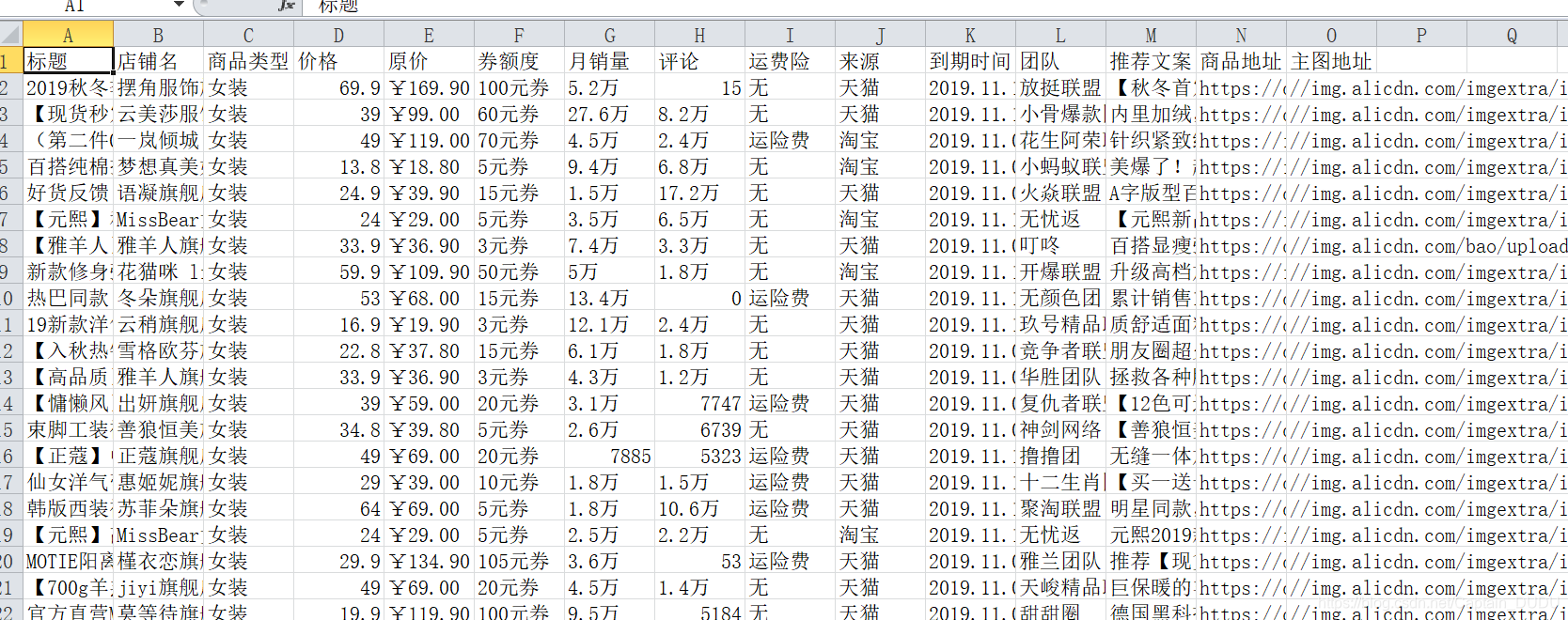
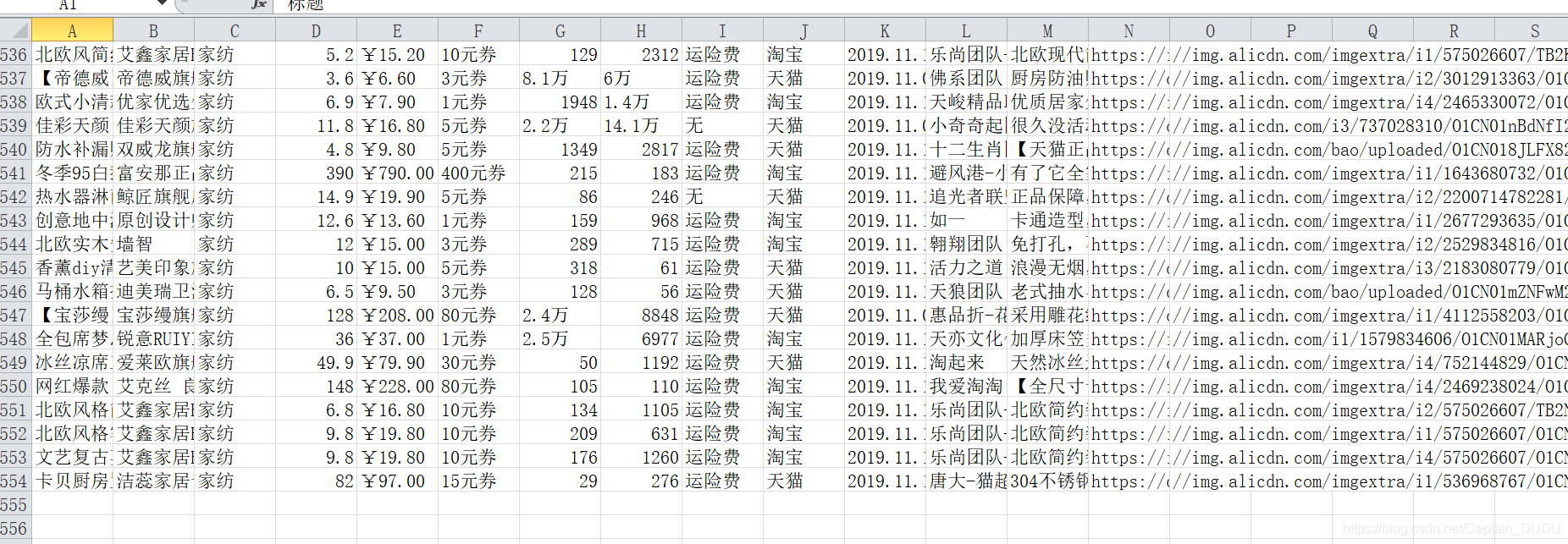
json数据
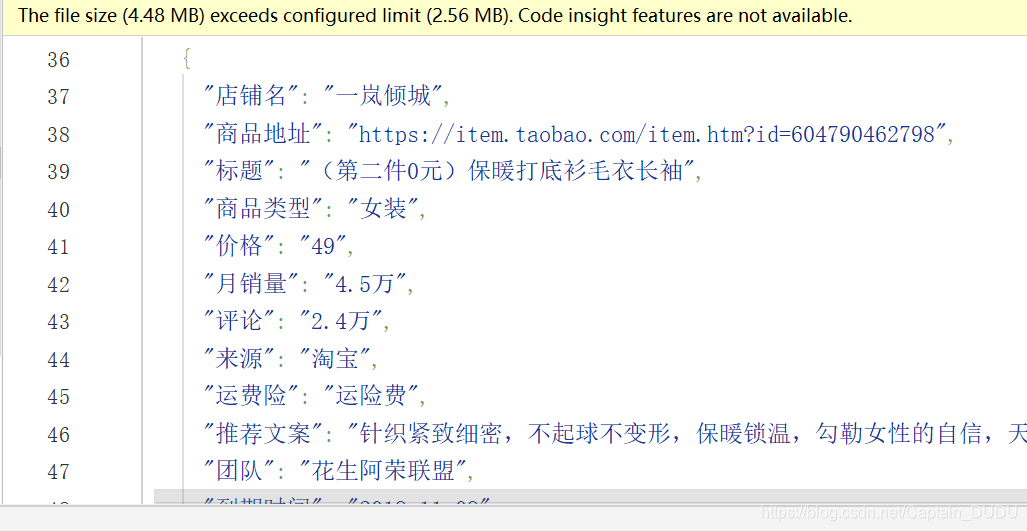
text(文件)
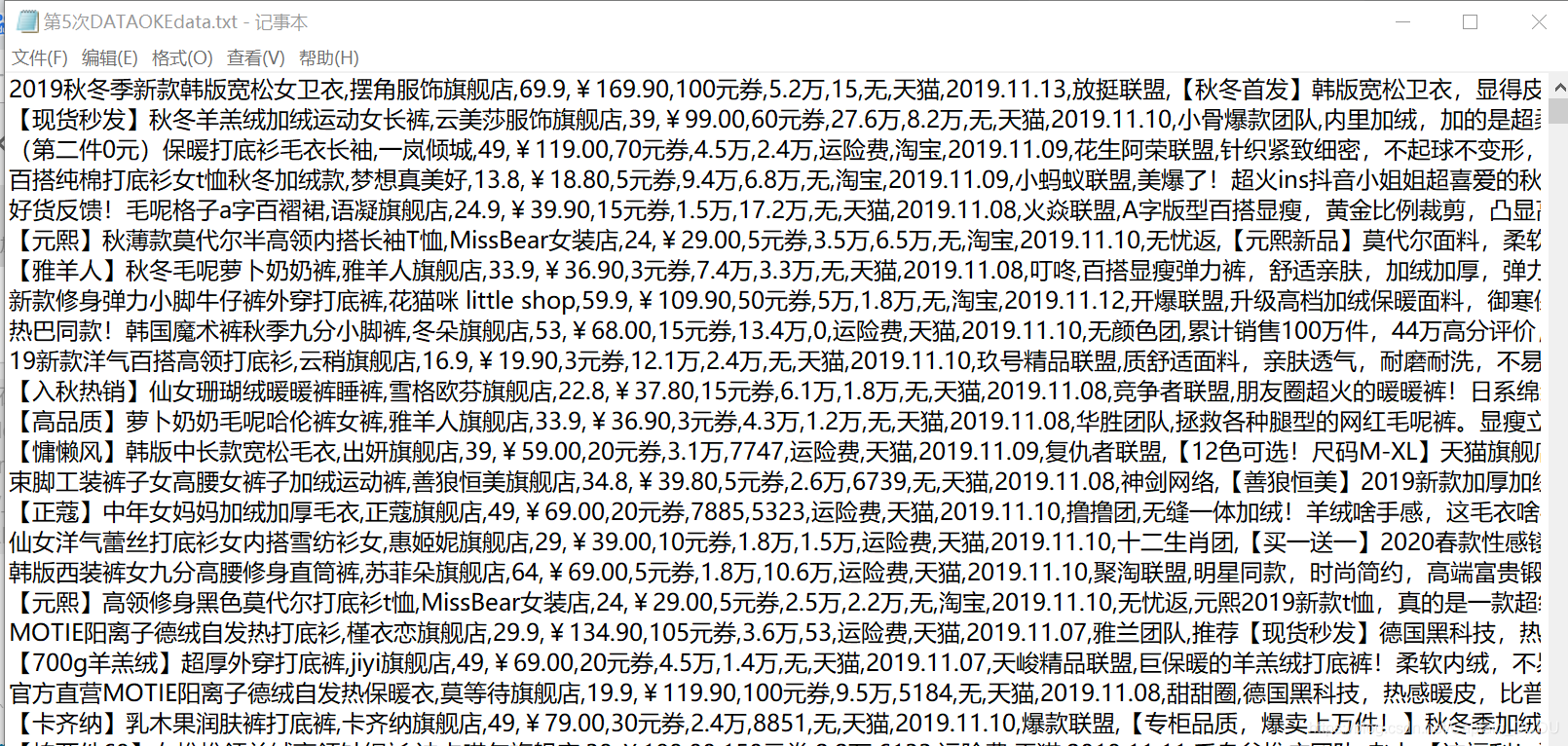
代码
讯享网import requests import csv from lxml import html
import requests import time import json listJson=[] JsonName='第5次DATAOKEdata.json' kv = {
   'User-Agent': 'Mozilla/5.0'} cid = 1 contYM = 0 # http://www.dataoke.com/qlist/?cid=4 riyong #http://www.dataoke.com/qlist/?cid=4&page=2 #分类函数 大淘客总共14分类 def kinds(cid): if cid==1: kind='女装' if cid==2: kind='母婴' if cid==3: kind='美妆' if cid==4: kind='日用' if cid==5: kind='鞋品' if cid==6: kind='美食' if cid==7: kind='文体' if cid==8: kind='数码' if cid==9: kind='男装' if cid==10: kind='内衣' if cid==11: kind='箱包' if cid==12: kind='配饰' if cid==13: kind='户外' if cid==14: kind='家纺' return kind #计算页数函数 也是主函数入口 粗略计算 def pages(times): page=times//14//100+1 Geturl(page) # 获取url #循环换分类换页主函数 传出主页url def Geturl (pages): global cid global page doCsvhead() url = "http://www.dataoke.com/qlist/" for cid in range(1, 15): for page in range(1,pages+1): time.sleep(3) print("--------------------") print("------进度提示------") print("----第%d页抓取完成----"%(page)) print("--------------------") params = {
    'cid': cid, 'page': page } getHTML(url, params) ‘’‘爬取网页主函数1,获取传入的link后,利用xpath 抓取大淘客子页面的所有数据传给getLINK函数,在该模块加入了异常抛出模块,当出错或出现被封ip会自动等待10 s ,抛出出错位置,备份json数据,并尝试重新连接’‘’ getHTMLcount=0 def getHTML(url, params): global JsonName global getHTMLcount global cid global page global listJson headers = {
   'User-Agent': 'Mozilla/5.0'}#获取HTML数据 try: r = requests.get(url, headers=headers, params=params) r.encoding = "gbk" texts = r.text getLINK(texts) except: getHTMLcount += 1 JsonName="第"+str(getHTMLcount)+'次'+"getHTML.json" downJson(listJson) print('出错位置inLink,cid:%d:page:%d' % (cid, page)) time.sleep(10) print('inLink模块尝试第%d次链接'%(getHTMLcount)) getHTML(url, params) #根据传入的htm信息用Xpath定向抓取子页面url def getLINK(texts): global cid global page global listJson content=texts content=content.replace('<!--','').replace('-->','') LISTtree=html.etree.HTML(content) link_text_lists=LISTtree.xpath('//div[@class="goods-info"]/span[@class="goods-tit"]/a/@href') for link_text in link_text_lists: link='http://www.dataoke.com'+link_text inLink(link) print("子页获取成功!") ‘’‘爬取网页主函数2,获取传入的url后,用xpath 将各种html转成代码树传给下一个函数,在该模块也加入了异常抛出模块,当出错或出现被封ip会自动等待10 s ,抛出出错位置,备份json数据,并尝试重新连接’‘’ inLinkcount=0 def inLink(link): global cid global page global listJson global JsonName global inLinkcount headers = {
   'User-Agent': 'Mozilla/5.0'} try: r = requests.get(link, headers=headers) r.encoding = "utf8" texts = r.text tree=html.etree.HTML(texts) lists(tree) except: inLinkcount += 1 JsonName = "第" + str(inLinkcount) + '次' + "inLink.json" downJson(listJson) print('出错位置inLink cid:%d:page:%d' % (cid, page)) time.sleep(10) print('inLink模块尝试第%d次链接'%(inLinkcount)) inLink(link) #xpath解析树,把各种文本字符存入字典,再传给打印模块永久保存 def lists(tree): global cid global contYM global listJson # kinds(cid) shopName=tree.xpath('//h3[@class="shop-name"]/a/text()')[0] if len(tree.xpath('//h3[@class="shop-name"]/a/text()'))>0 else '' goodLink=tree.xpath('//div[@class="top-cent"]/a/@href')[0] if len(tree.xpath('//div[@class="top-cent"]/a/@href'))>0 else '' titList=tree.xpath('//div[@class="msg-block"]/div[@class="top-tit"]/a[@class="tit"]/text()')[0] if len(tree.xpath('//div[@class="msg-block"]/div[@class="top-tit"]/a[@class="tit"]/text()'))>0 else '' print("获取标题中!") timeLine =tree.xpath('//span[@class="time"]/b/text()')[0] if len(tree.xpath('//span[@class="time"]/b/text()'))>0 else '' priceList=tree.xpath('//span[@class="price"]/b/text()')[0] if len( tree.xpath('//span[@class="price"]/b/text()') )>0 else ''#价格 saleNumList = tree.xpath('//span[@class="sale-num"]/b/text()')[0] if len( tree.xpath('//span[@class="sale-num"]/b/text()') )>0 else ''#月销量 commentNumList = tree.xpath('//span[@class="comment-num"]/b/text()')[0] if len( tree.xpath('//span[@class="comment-num"]/b/text()') )>0 else ''#评论 lyNumList = tree.xpath('//div[@class="goods-type tag fr"]/i/@title')[0] if len( tree.xpath('//span[@class="comment-num"]/b/text()') )>0 else ''#来源 yfxNumList = tree.xpath('//i[@class="tag-trans"]/@title')[0] if len( tree.xpath('//i[@class="tag-trans"]/@title')) > 0 else '无' # 来源 textList=tree.xpath('//p[@class="top-des"]/text()')[0] if len( tree.xpath('//p[@class="top-des"]/text()') )>0 else '无推荐语'#推荐 teamList=tree.xpath('//p[@class="name"]/a/text()')[0] if len( tree.xpath('//p[@class="name"]/a/text()') )>0 else ''#团队 imgList = tree.xpath('//img[@class="large-img"]/@src')[0] if len( tree.xpath('//img[@class="large-img"]/@src')) > 0 else '' # 团队 oldpriceList = tree.xpath('//span[@class="old-price"]/text()')[0] if len( tree.xpath('//span[@class="old-price"]/text()')) > 0 else '' # 团队 quanList = tree.xpath('//span[@class="quan-num"]/b/text()')[0] if len( tree.xpath('//span[@class="quan-num"]/b/text()')) > 0 else '' # 团队 dict1={
    "店铺名": shopName.strip(), "商品地址": goodLink.strip(), "标题": titList.strip(), "商品类型": kinds(cid), "价格": priceList.strip(), "月销量": saleNumList.strip(), "评论": commentNumList.strip(), "来源": lyNumList.strip(), "运费险": yfxNumList.strip(), "推荐文案": textList.strip(), "团队": teamList.strip(), "到期时间": timeLine.strip(), "主图地址": imgList.strip(), "原价": oldpriceList.strip(), "券额度": quanList.strip() } if dict1 not in listJson:#去重 list1 = [] list1.append(dict1) listJson.append(dict1) contYM+= 1 DownWrite(dict1) DownCsv(list1) downJson(listJson) else: pass #csv头部打印模块 def doCsvhead(): key = ["标题", "店铺名", "商品类型", "价格", "原价", "券额度","月销量","评论","运费险", "来源", "到期时间","团队","推荐文案","商品地址","主图地址"] with open('DATAs/第5次DATAOKEdata.csv', 'a', newline="", encoding="utf_8_sig") as f: # 构建一个数据字典写入的对象 f_csv = csv.DictWriter(f, key) f_csv.writeheader() #csv行部打印模块 def DownCsv(list): global contYM key = ["标题", "店铺名", "商品类型", "价格", "原价", "券额度","月销量","评论","运费险", "来源", "到期时间","团队","推荐文案","商品地址","主图地址"] with open('DATAs/第5次DATAOKEdata.csv', 'a', newline="", encoding="utf_8_sig") as f: # 构建一个数据字典写入的对象 f_csv = csv.DictWriter(f, key) f_csv.writerows(list) # 写入多行列表 print(list[0]["标题"],'写入成功!') print('第%d条csv数据写入成功!'%(contYM)) #json打印模块 def downJson(lists): global contYM global JsonName JsonName=JsonName with open('DATAs/'+JsonName,'w',encoding='utf8')as f: json.dump(lists,f,ensure_ascii=False,indent=2) print('第%d条Json数据写入成功!' % (contYM)) #text打印模块 def DownWrite(dict): global contYM print(dict["标题"]) # FileName='DATAs/dataokedata'+str(contYM )+".txt" writeLine = dict["标题"]+','+dict["店铺名"]+','+ dict["价格"]+','+ dict["原价"]+','+dict["券额度"]+',' + dict["月销量"]+',' + dict["评论"]+','+dict["运费险"]+','+ dict["来源"]+','+ dict["到期时间"]+',' +dict["团队"]+',' +dict["推荐文案"]+',' +dict["商品地址"]+',' +dict["主图地址"]+'\n' with open('DATAs/第5次DATAOKEdata.txt','a',encoding='utf8') as f: f.write(writeLine) print("第%d条txt数据写入成功!"%(contYM)) if __name__ == '__main__': times=int(input("请输入抓取的条数:")) start=time.time() pages(times) print("爬取完成!") end=time.time() print('耗时:',end-start)
版权声明:本文内容由互联网用户自发贡献,该文观点仅代表作者本人。本站仅提供信息存储空间服务,不拥有所有权,不承担相关法律责任。如发现本站有涉嫌侵权/违法违规的内容,请联系我们,一经查实,本站将立刻删除。
如需转载请保留出处:https://51itzy.com/kjqy/14301.html